Week 8: Object-Oriented Programming
| Week 8: Practice Code | GitHub |
|---|
What is OOP?
OOP stands for Object-Oriented Programming.
Python is an object-oriented language, allowing you to structure your code using classes and objects for better organization and re-usability.
Advantages of OOP
- Provides a clear structure to programs
- Makes code easier to maintain, reuse, and debug
- Helps keep your code DRY (Don’t Repeat Yourself)
- Allows you to build reusable applications with less code
The DRY principle means you should avoid writing the same code more than once, Move repeated code into functions or classes and reuse it.
What are Classes and Objects?
Classes and objects are the two core concepts in OOP.
A class defines what an object should look like, and an object si created based on that class. For example:
| Class | Objects |
|---|---|
| Fruit | Apple, Banana, Mango |
| Car | Volvo, Audi, Toyota |
When you create an object from a class, it inherits all the variables and functions defined inside that class.
Python Classes and Objects
Python is an object-oriented programming language.
Almost everything in Python is an object, with its properties and methods.
A Class is like an object constructor, or a “blueprint” for creating objects.
Create a Class
To create a class, use the keyword class.
Create a class named MyClass, with a property named x:
Create Object
Now we can use the class named MyClass to create objects.
Create an object named p1, and print the value of x:
Delete Objects
You can delete objects by using the del keyword.
Delete the p1 object:
Multiple Objects
You can create multiple objects from the same class:
Create three objects from the MyClass class:
Each object is independent and has its own copy of the class properties.
The pass Statement
class definitions cannot be empty, but if you for some reason have a class definition with no content, put in the pass statement to avoid getting an error.
Python __init__() Method
The functions inside classes are called Methods.
The __init_() Method
All classes have a built-in method called __init__(), which is always executed when the class is being initiated.
The __init__() method is used to assign values to object properties, or to perform operations that are necessary when the object is being created.
Example
Create a class named Person, use the __init__() method to assign values for name and age:
The __init__() method is called automatically every time the class is being used to create a new object.
Why Use __init__()?
Without the __init__() method, you would need to set properties manually for each object:
Using __init__() makes it easier to create object with initial values.
Default Values in __init__()
You can also set default values for parameters in the init() method.
Multiple Parameters
The __init__() method can have as many parameters as you need:
Python Self Parameter
The self parameter is a reference ot the current instance of the class.
It is used to access properties and methods that belong to the class.
Use self to access class properties:
The self parameter must be the first parameter of any method in the class.
Why Use self?
Without self, Python would not know which object’s properties you want to access.
The self parameter links the method to the specific object:
self Does Not Have to Be Named “self”
It doesn’t have to be named self, you can call it whatever you like, but it has to be the first parameter of any method in the class.
While you can use a different name, it is strongly recommended to use self as it is the convention in Python and makes your code more readable to others.
Calling Methods with self
You can also call other methods within the class using self.
Call one method from another method using self:
Python Magic Methods
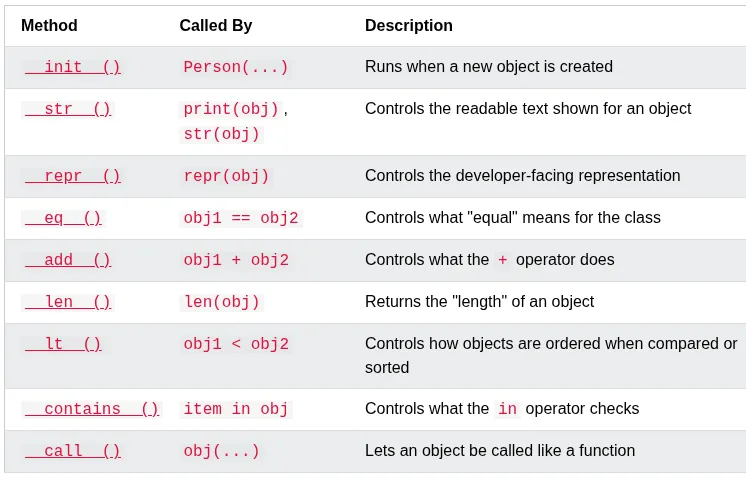
Magic methods are special methods whose names start and end with double underscores, like __init__() and __str__(). Because of the double underscores, they are also called Dunder methods (short for “double underscore”).
You don’t call magic methods directly. Python calls them for you, automatically, in certain situations - like when an object is created, printed, or compared to another object.
__init__() runs automatically when an object is created, and __str__() runs automatically when the object is printed.
List of Magic methods
The __str__() Method
The __str__() method is a special method that controls what is returned when the object is printed.
Without the __str__() method, printing an object shows its memory address:

With the __str__() method, you can control what is shown when an object is printed:

__str__() must return a string. If it returns anything else, Python raises a TypeError.
- REF: Python OOP via W3School