Disaster Recovery
Disaster Recovery
Disaster Recovery Plan (DRP)
Detailed plan for resuming operations after a disaster
- Application, data center, building, campus, region, etc.
Extensive planning prior to the disaster
- Backups
- Off-site data replication
- Cloud alternatives
- Remote site
Many third-party options
- Physical locations
- Recovery services
RTO (Recovery Time Objective)
Measured as an amount of time
- Time to resume operations
- We would like this to be near-zero
Recovery time objective (RTO)
- Get up and running quickly
- Get back to a particular service level in a certain timeframe
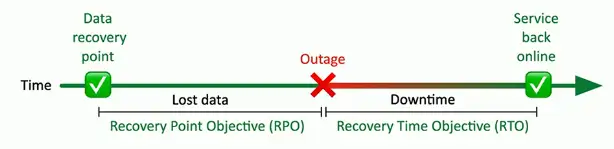
RPO (Recovery Point Objective)
Also measured as an amount of time
- The goal is had a near-zero RPO
Recovery point objective (RPO)
- How much data loss is acceptable
- Bring the system back online; how far back in time does data go?
Define the right RPO
- Banking transactions, patient information
- Very short — Less than an hour
- Website updates, internal documents
- 1–4 hours
MTTR and MTBF
Meantime to repair (MTTR)
- Average time required to fix the issue
- The time from the point of the failure to full functionality
Mean time between failures (MTBF)
- Predict the time between outages
- Often takes many variables into account
Site Resiliency
Recovery site is prepped
- Data is synchronized
A disaster is called
- Business processes failover to the alternate processing site
Problem is addressed
- This can take hours, weeks, or longer
Revert back to the primary location
- The process must be documented for both directions
Cold Site
No hardware
- Empty building
No data
- Bring it with you
No people
- Bus in your team
Hot Site
An exact replica
- Duplicate everything
Stocked with hardware
- Constantly updated
- You buy two of everything
Applications and software are constantly updated
- Automated replication
Flip a switch and everything moves
- This may be quite a few switches
Warm Site
Somewhere between cold and hot
- Just enough to get going
Bing room with rack space
- You bring the hardware
Hardware is ready and waiting
- You bring the software and data
Tabletop Exercises
Performing a full-scale disaster drill can be costly
- And time-consuming
Many of the logistics can be determined through analysis
- You don’t physically have to go through a disaster or drill
Get key players together for a tabletop exercise
- Talk through a simulated disaster
Validation Tests
Test yourselves before an actual event
- Scheduled update sessions (annual, semi-annual, etc.)
Use well-defined rules of engagement
- Do not touch the production systems
Very specific scenario
- Limited time to run the event
Evaluate response
- Document and discuss
Network Redundancy
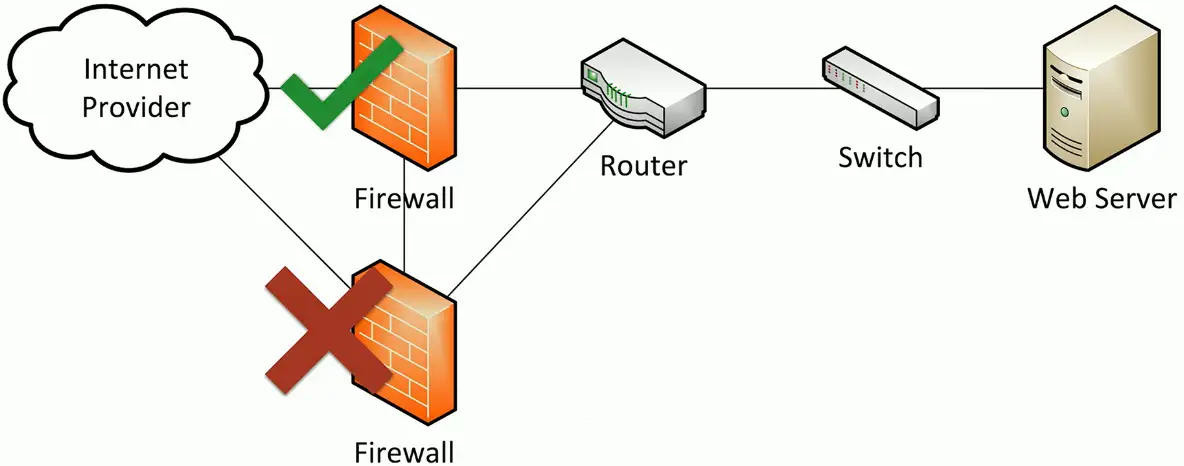
Active-passive
Two devices are installed and configured
- Only one operates at a time
If one device fails, the other takes over
- Constant communication between the pair
Configuration and real-time session information is constantly synchronized
- The failover might occur at any time
Active-active
You bought two devices
- Use both at the same time
More complex to design and operate
- Data can flow in many directions
- A challenge to manage the flows
- Monitoring and controlling data requires a very good understanding of the underlying infrastructure