Network Appliances and Applications
Networking Devices
Many ways to forward traffic
- A data center full of equipment
Every device has a purpose
- The implementation may change over time
- Once installed, it can often be difficult to remove
There are new technologies all the time
- Always something to learn
Analog Modems
Public Switched Telephone Network (PSTN)
- The worldwide telephone system
- The speeds were in bauds and bits per second (bps).
- Computer sends 0s and 1s via digital signals to modem
- Modem then converts those signals to the analog tones, which can be sent over the PSTN.
- The modem at the receiver ends, receives those analog tones, perform modulation/demodulation, and send the signals to the Server.
Modem (Modulator/Demodulator): Modulates binary data into analog signals, and demodulates analog signals into binary data.
Baud: Number of tone changes per second
Bits per Second (bps): Number of 1s and 0s that can be transmitted over the line.
300bps: 300 baud using one channel
2400 bps: 2400 baud using one channel
9600 bps: 2400 baud using four channels
28.8 kbps: 2400 baud using twelve channels

CSMA-CD vs. CSMA-CA
Carrier-Sense Multiple Access with Collision Detection (CSMA/CD)
- Can only have one packet on the network at a time
- Multiple packets can collide and in-turn corrupt the data.
- CSMA-CD detects if there are other packets on the line.
- If two computers sent the packet at the same time, collision will happen and detected by the CSMA-CD system, then they will set random back off timer, to send their respective packets at hopefully different times without collision.
- The collision is detected by the slight spike of the voltage signal.
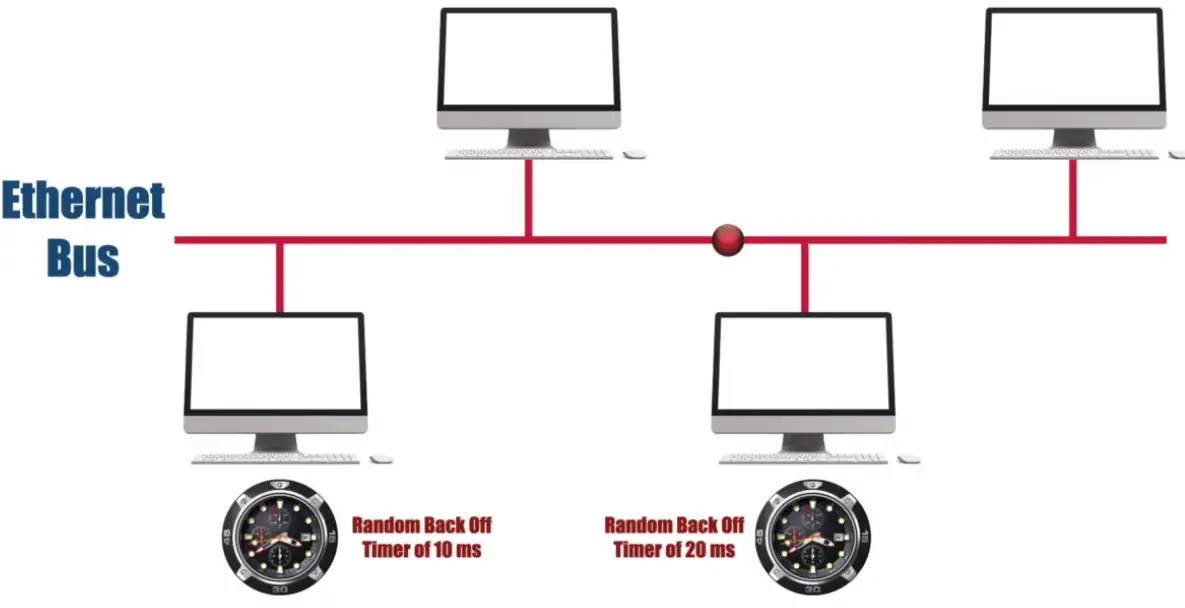
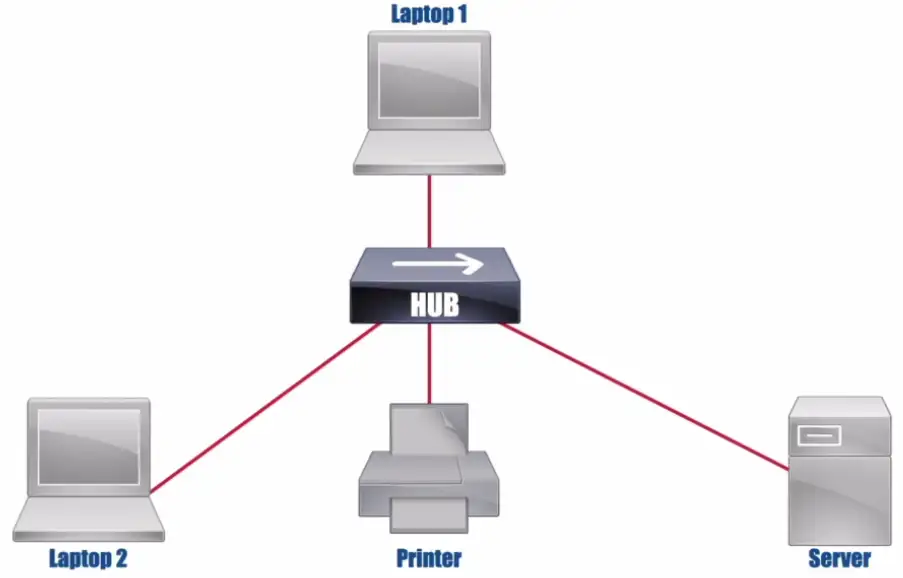
Then Ethernet Hub became popular and CSMA-CD was still effective.
- If there was a collision, the hub will send jam signal to everyone on the network.
Carrier-Sense Multiple Access with Collision Avoidance (CSMA/CA)
- The more modern approach
- Mainly used in Wireless Networks
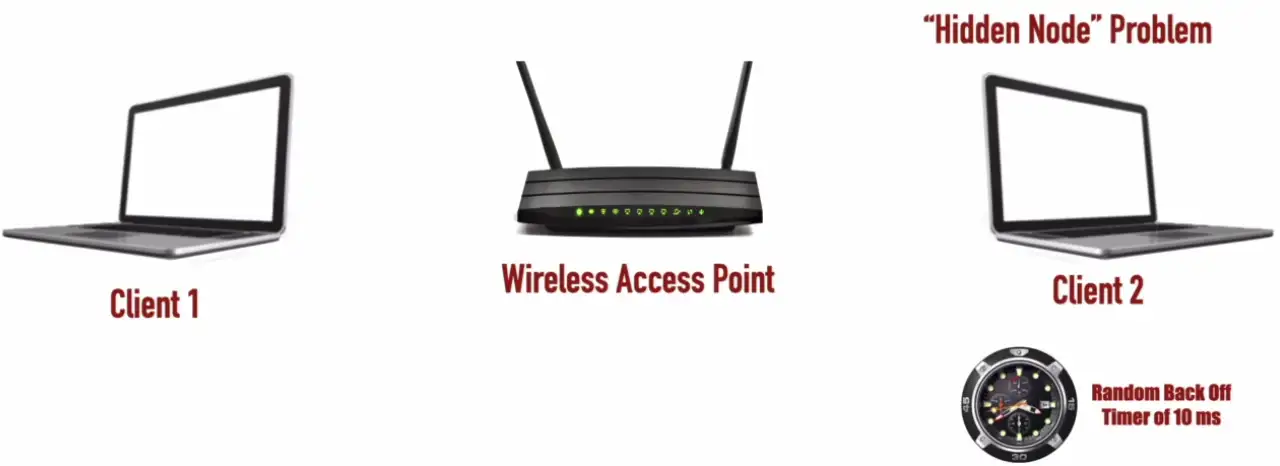
- When Client 1 sends the radio signals, Client 2 also hears this transmission, and wait for the transmission to be over, to begin its transfer.
- There is Hidden Node Problem, when the Client 2 is far away from the Wireless Access Point. It cannot clearly hear the Client 1 transmission cycle going on, and falsely assumes that there is no transmission happening. The Client 2 then tries to send its signals, and collision happens.
- There is no voltage spike for collision detection, for wireless AP.
- We need some upper level protocol, that detects the collisions, and re-transmits the collided packets again.
Ethernet Hub
- Legacy device
- More modern form of Ethernet Bus
- Not intelligent, doesn’t know which packets are destined for which device, and send those packets to everyone
- It needs to run with CSMA-CD protocol
Switch
Bridging done in hardware
- Application-specific integrated circuit (ASIC)
An OSI layer 2 device
- Forwards traffic based on data link address
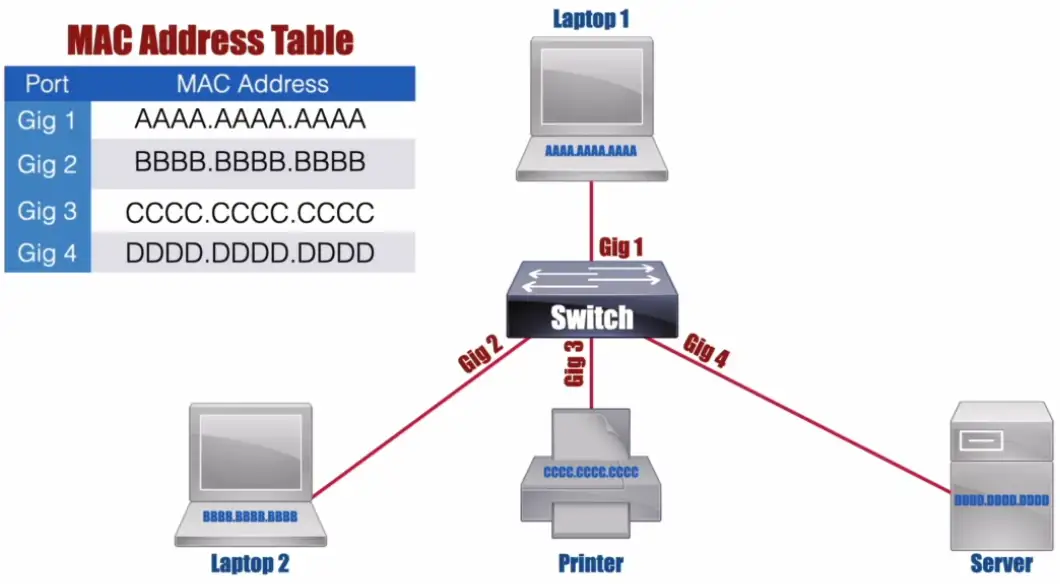
- Maintains a MAC addresses table for packet forwarding
- If the device isn’t in the table, it sends flood signal
Many ports and features
- The core of an enterprise network
- May provide Power over Ethernet (PoE)
Multilayer switch
- Includes Layer 3 (routing) functionality
Router
Routes traffic between IP subnets
- OSI layer 3 device
- Routers inside of switches sometimes called “layer 3 switches”
- Layer 2 = Switch, layer 3 = Router
- Maintains an IP Routing Table
- It doesn’t need to know millions of IP routes on the Internet, it just needs to know the Default Route.
- Routing Table gets populated:
- Maybe router is directly connected to the devices
- Statically configured
- Dynamic Routing Protocol IS-IS, BGP, RIP, EIGRP
Default Route: A route that is used when a router doesn’t have a more specific routing table entry for the destination network.
Often connects diverse network types
- LAN, WAN, copper, fiber
Collision and Broadcast Domains
Collision Domain: A network segment on which only one packet is allowed at any one time.
Ethernet Hub
- In the 1990s, Ethernet Bus networks were replaced by Ethernet Hubs.
- All ports on a hub belong to one collision domain.
- No intelligent forwarding decisions, every packet is sent to each connected to the Hub.
- It works in the half-duplex mode, one can send or receive at one time.
Half-Duplex: Allows a device on a network segment to either transmit or receive packets at any one time, but no transmit and receive packets simultaneously.
Ethernet Switch
- Each port on a switch belongs to its own collision domain.
- Run devices in the full Duplex mode.
Full-Duplex: Allows simultaneous transmission and reception of packets on a network segment.
Broadcast Domain: An area of a network throughout which a broadcast can travel (e.g., a subnet or a VLAN)
- All ports on a hub belong to one broadcast domain
- If a device comes online, it sends a broadcast signal to the network to know where is the DHCP server, to get an IP address to reach the Internet or other local devices.
- All ports on a switch (by default) belong to one broadcast domain.
- If laptop 1 wants to find a DHCP server, switch will flood all the port with the broadcast signal.
- Broadcast MAC Address
FFFF.FFFF.FFFF - Not very efficient or scalable due to all or nothig approach
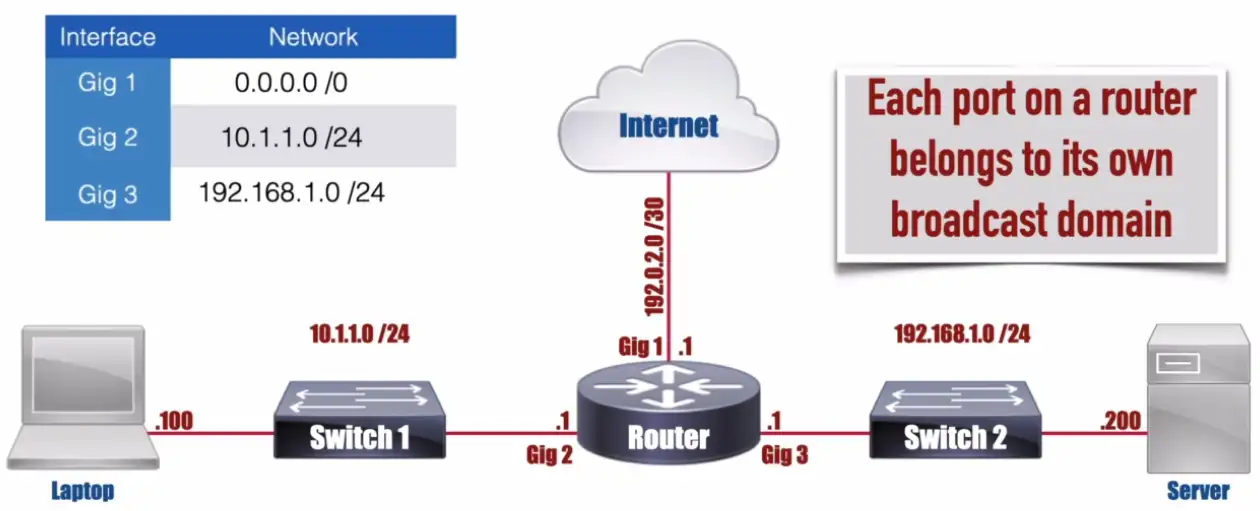
- Each port on a router belongs to its own broadcast domain.
- A router will interconnect the broadcast domains aka subnets or VLANs.
- On a router, each port is connected to a different subnet.
- If a device tries to reach a DHCP server, and sends DHCP discover broadcast, router will discard broadcast by default.
- In figure, the router has 3 gigabit ports which means it has 3 broadcast domains on the router.
Firewalls
Filter traffic by port number or application
- Traditional vs. NGFW
Encrypt traffic
- VPN between sites
Most firewalls can be layered 3 devices (routers)
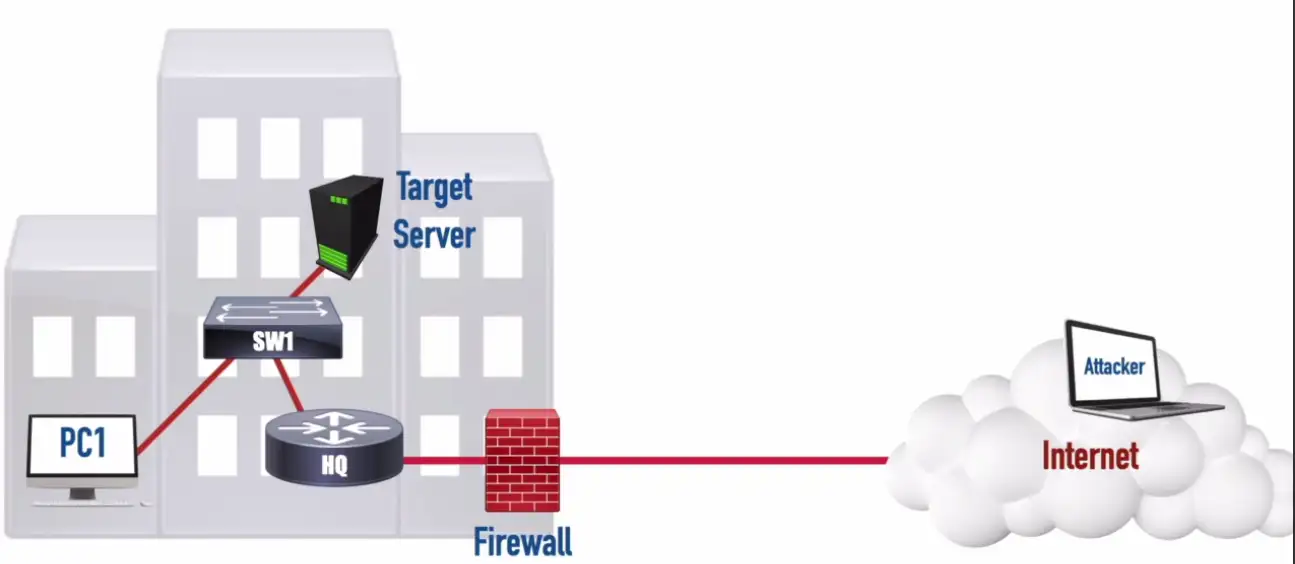
- Often sits on the ingress/egress of the network
- Network Address Translation (NAT)
- Dynamic routing
Types of Firewalls
- Packet Filter: Only Internal traffic is allowed, and all outside traffic is dropped, even websites won’t load.
- Stateful Firewall: Inspects the packets going out or coming in. When outgoing packets have the IPs listed, it wanted to connect, when those Internet IPs respond, firewall allows that traffic to pass, as the request was originated from inside the local network.
- Next Generation Firewall (NGFW/Layer 7 Firewall): Performs deep packet inspection (DPI), better able to block threats based on Online Threat databases by matching their signature with known threats signals.
Demilitarized Zone (DMZ)
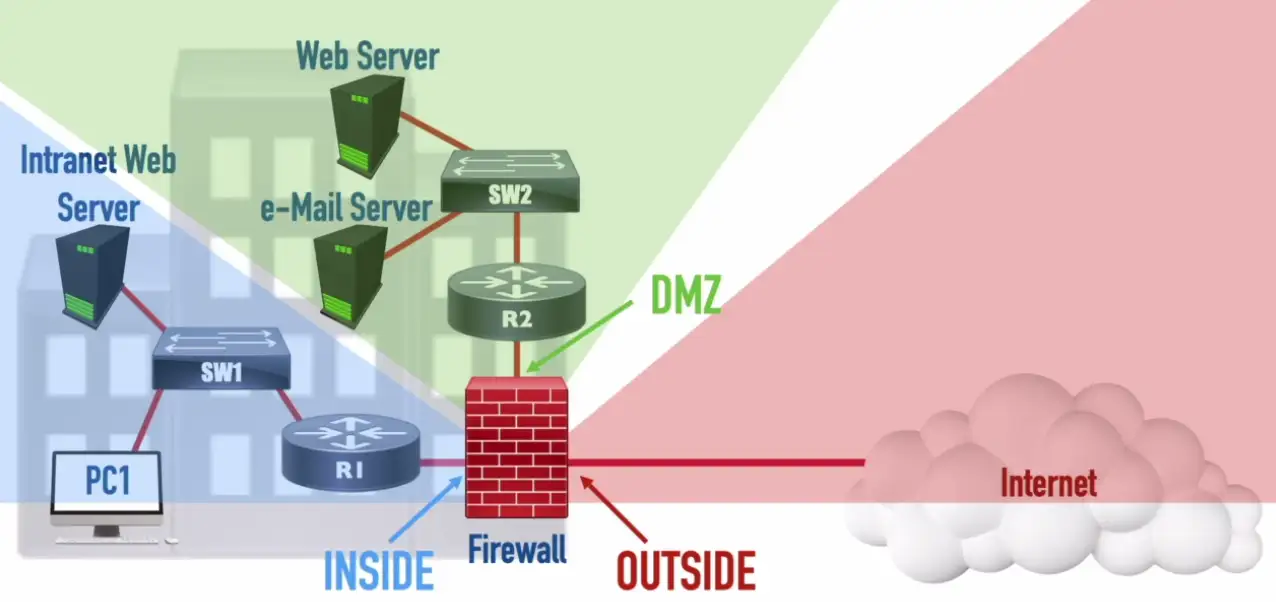
For corporate environment, we want our email server etc., to be accessible from the Internet. We put that email server in the Demilitarized Zone, separate from our internal network. In case, our email server gets compromised, our internal network remains safe and isolated.
IDS and IPS
Intrusion Detection System/Intrusion Prevention System
- Watch network traffic
Intrusions
- Exploits against operating systems, applications, etc.
- Buffer overflows, cross-site scripting, other vulnerabilities
Detection vs. Prevention
- Detection — Alarm or alert
- Prevention — Stop before it gets into the network
IDS Sensor: Inspects and can react to a copy of received traffic.
IPS Sensor: Inspects and can react to traffic received in-line.
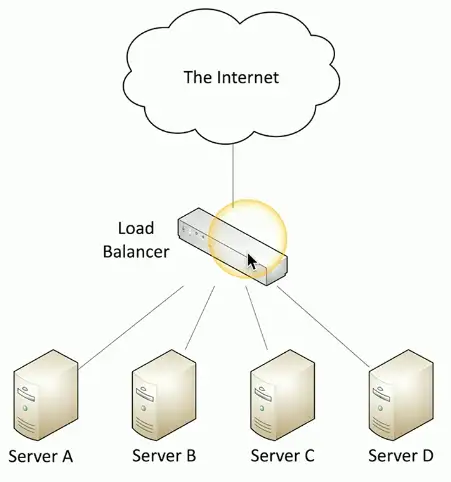
Balancing the load
Distribute the load
- Multiple servers with identical content
- Invisible to the end-user
- Eases the processor/hard drive demand on a single server
- Allows individual servers to be removed from the load balancer’s pool of server (e.g., for maintenance)
- Allows “elastic” server capacity when used with virtual servers
- Could be a dedicated appliance or a router that supports load balancing
Large-scale implementations
- Web server farms, database farms
Fault tolerance
- Server outages have no effect
- Very fast convergence
Load Balancer
Configurable load
- Manage across servers
TCP offload
- Protocol overhead
SSL offload
- Encryption/Decryption
Caching
- Fast response
Prioritization
- QoS
Content switching
- Application-centric balancing
Advanced Filtering Appliances
Next Generation Firewall (NGFW/Layer 7 Firewall): An Application Layer firewall with additional features, such as: Deep-Packet Inspection (DPI), Intrusion Prevention System (IPS), and encrypted traffic inspection.
Content Filter: Could be software (e.g., used by parents) or an appliance (e.g., used by enterprises) used to filter traffic thought to be objectionable.
Unified Threat Management (UTM) Appliance: A dedicated appliance that combines multiple filtering functions, such as: Firewall, IPS, Anti-Malware, VPN, and Content Filter.
Ransomware Attack: Occurs when a system contains malware (software written to be intentionally malicious), and the user is asked to pay a ransom to prevent their data from being publically posted or permanently encrypted.
Proxies
- Sits between the user and the external network
- Receives the user requests and sends the request on their behalf (the proxy)
- Useful for caching, access control, URL filtering, content scanning
- Applications may need to know how to use the proxy (explicit)
- Some proxies are invisible (transparent)
- Clients don’t need to know the proxy server is sitting in the middle, and work in the silence.
NAS vs. SAN
Network Attached Storage (NAS)
- Connect to a shared storage device across the network
- File-level access
Storage Area Network (SAN)
- Looks and feels like a local storage device
- Block-level access (modified part of the files can be accessed only)
- Very efficient reading and writing
Requires a lot of bandwidth
- May use an isolated network and high-speed network technologies
Access Point (AP)
Not a wireless router
- A wireless router is a router and an access point in a single device
An access point is a bridge
- Extends the wired network onto the wireless network
- OSI layer 2 devices
Wireless networks everywhere
Wireless Access Point: Contains one or more antennas for communicating with wireless devices.
Wireless networking is pervasive
- And you probably don’t just have a single access point
Your access points may not even be in the same building
- One (or more) at every remote site
Configurations may change at any moment
- Access policy, security policies, AP configs
The network should be invisible to your users
- Seamless network access, regardless of role
Wireless LAN controllers
Centralized management of access points
- A single “pane of glass”
Deploy new access points
Performance and security monitoring
Configure and deploy changes to all sites
Report on access point use
Usually a proprietary system
- The wireless controller is paired with the access points
Networking Functions
There’s a lot happening behind the scenes
- Many networking functions are part of the infrastructure
Access to important data
- From anywhere in the world
Remote access
- Secure network communication
Traffic management
- Prioritize the important applications
Protocol support
- Maintain uptime and availability
Content Delivery Network (CDN)
It takes time to get data from one place to another
- Speed up the process
Geographically distributed caching servers
- Duplicate the data
- Users get the data from a local server
You’re using a CDN right now
- Used on many websites
- Invisible to the end user
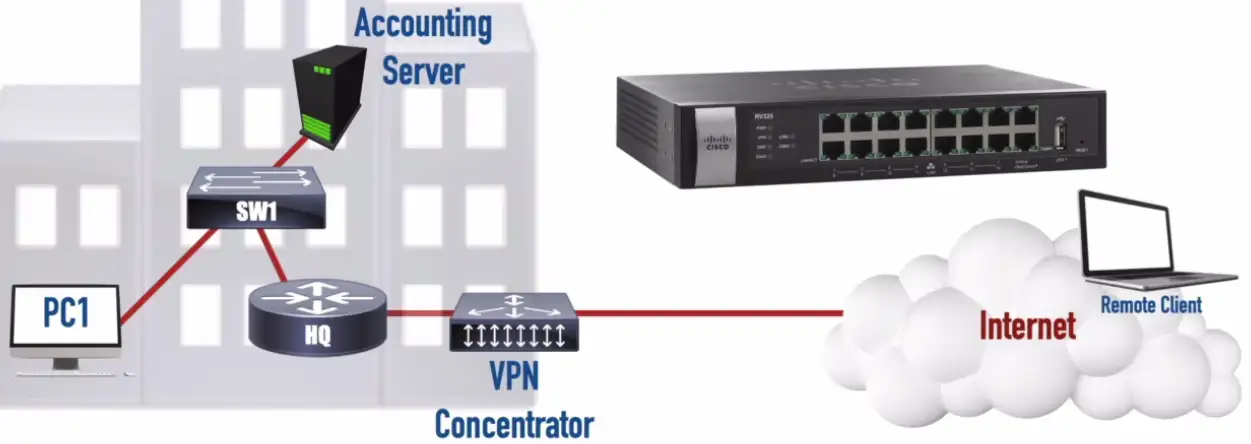
Virtual Private Network (VPN)
Secure private data traversing a public network
- Encrypted communication on an insecure medium
Concentrator/head-end
- Encryption/decryption access device
- Often integrated into a firewall
Many deployment options
- Specialized cryptographic hardware
- Software-based options available
Often used with client software
- Sometimes built into the OS
Virtual Private Network (VPN) Concentrator: A dedicated hardware appliance, that can handle encryption and decryption of VPN traffic as well as it can originate/terminate multiple VPN connections. It reduces the burden on the router.
Quality of Service (QoS)
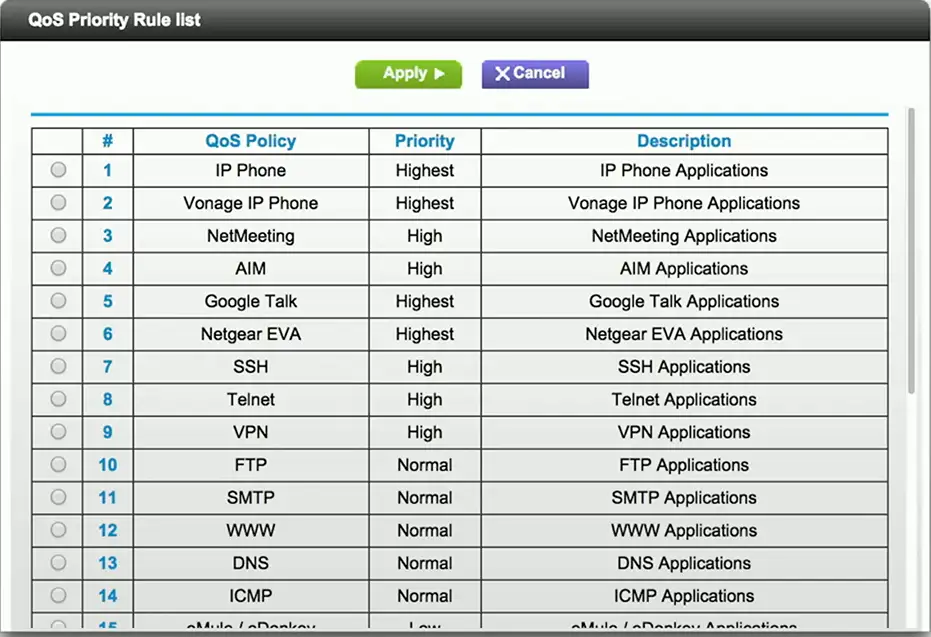
Traffic shaping, packet shaping
Control by bandwidth usage or data rates
Set important applications to have higher priorities than other apps
Manage the QoS
- Routers, switches, firewalls, QoS devices
Time to live (TTL)
How long should data be available?
- Not all systems or protocols are self-regulating
- We sometimes need to tell a system when to stop
Create a timer
- Wait until traversing a number of hops, or wait until a certain amount of time elapses
- Then stop (or drop)
Many uses
- Drop a packet caught in a loop
- Clear a cache
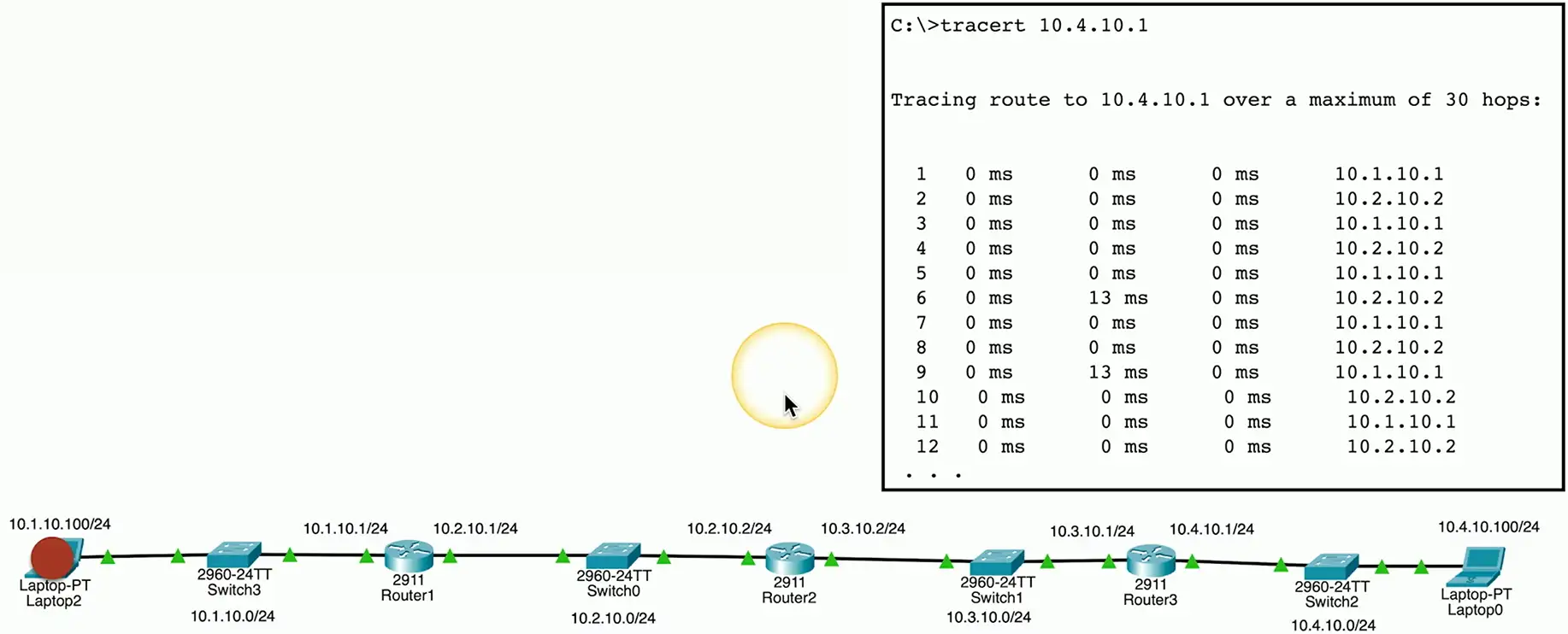
Routing loops
Router A thinks the next hop is to Router B
- Router B thinks the next hop is to router A
- And repeat
Easy to misconfigure
- Especially with static routing
This can’t go on forever
- TTL is used to stop the loop
IP (Internet Protocol)
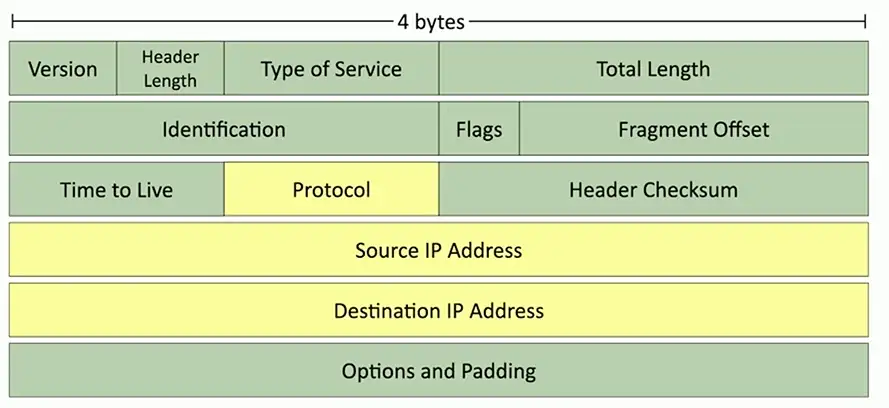
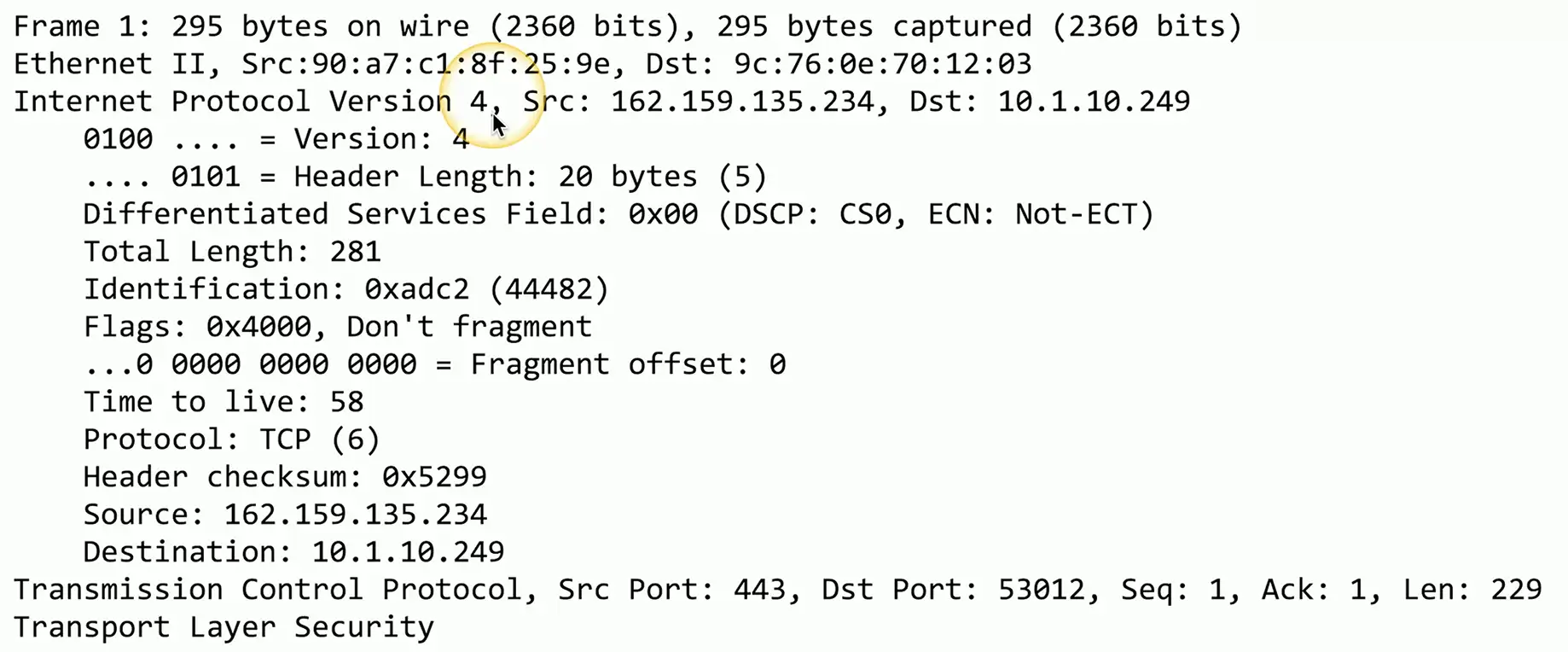
Loops could cause a packet to live forever
- Drop the packet after a certain number of hops
Each pass through a router is a hop
- Default TTL for macOS/Linux is 64 hops
- Default TTL for Windows is 128 hops
The router decreases TTL by 1
- A TTL of zero is dropped by the router
DNS (Domain Name System)
DNS lookups
- Resolve an IP address from a fully-qualified domain name
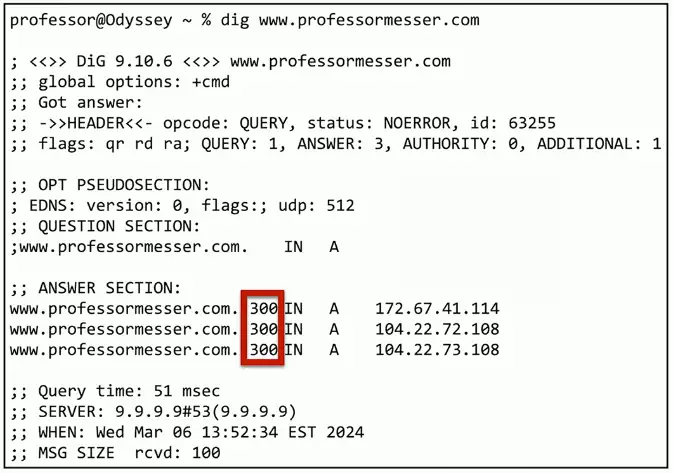
- www.professormesser.com = 172.67.41.114
A device caches the lookup for a certain amount of time
- How long? TTL seconds long.