Processes and Procedures
Network Documentation
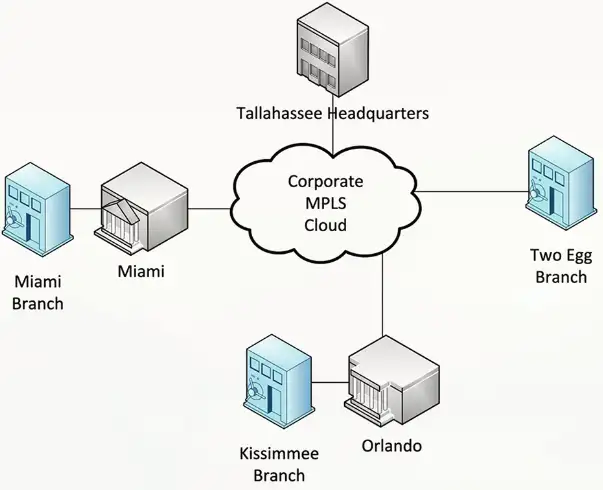
Physical Network Maps
Follows the physical wire and device
- Can include physical rack locations
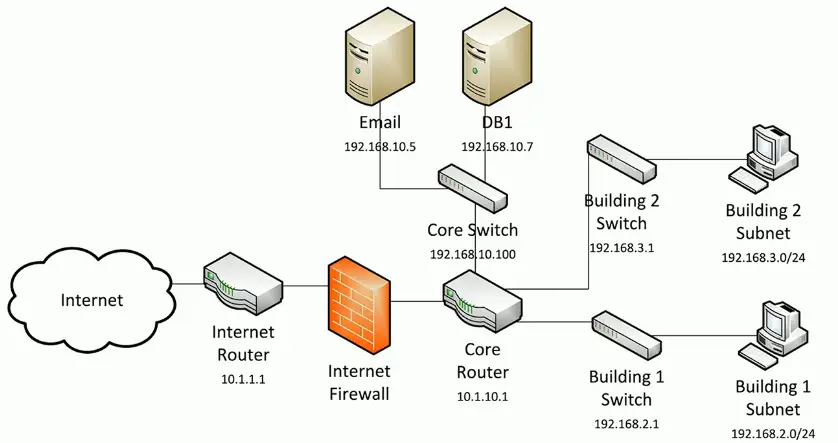
Logical Network Maps
Specialized software
- Visio, OmniGraffle, Gliffy.com
High level views
- WAN layout, application flows
Useful for planning and collaboration
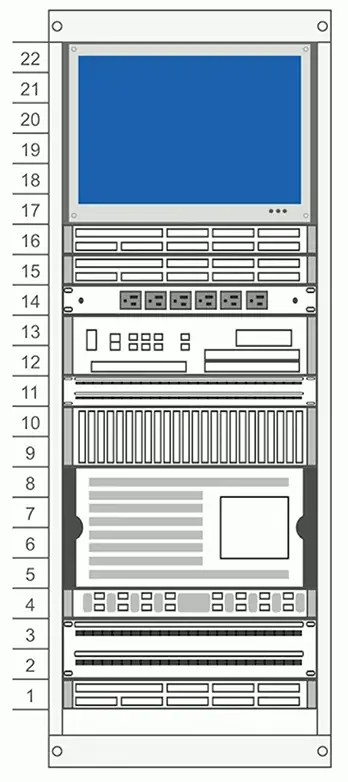
Rack Diagrams
A network admin might never walk into the data center
- Physical access is often limited
Provide documentation for installation or change
- A picture is worth a thousand words
Detailed digram of rack components
- Often listed by physical location of the rack (row 3, rack W)
- Each rack unit (U) is documented
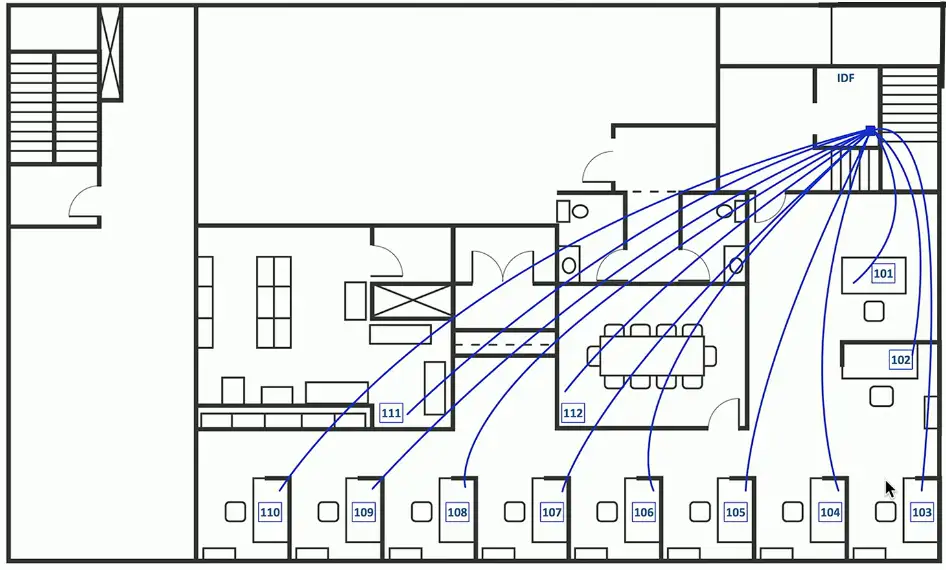
Cable maps and diagrams
The foundation of the network
- Physical cable and fiber
Valuable documentation
- Planning the installation
- Numbering each network drop
- Troubleshooting after installation
Network Diagrams
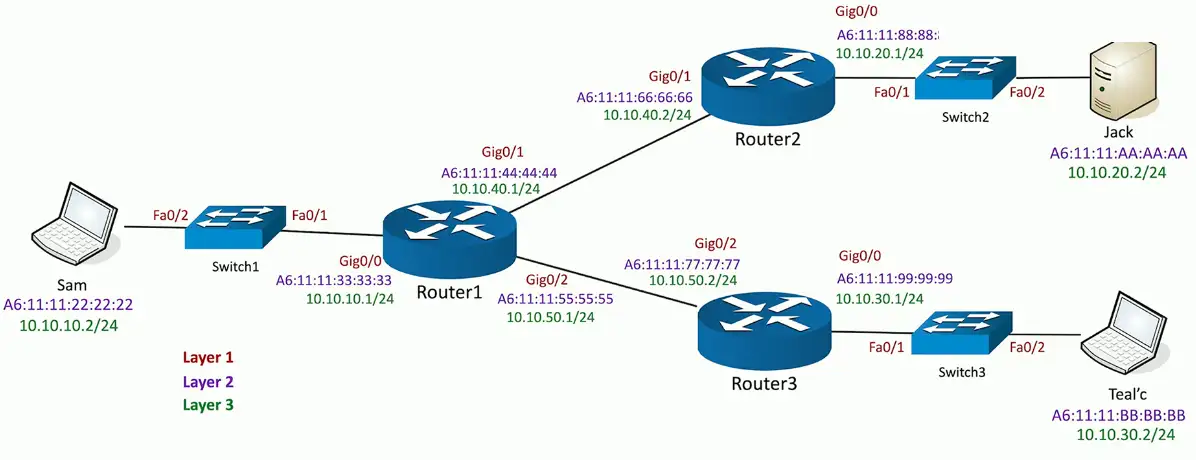
Asset management
A record of every asset
- Laptops, desktops, servers, routers, switches, cables, fiber modules, tablets, etc.
Associate support tickets with a device make and model
- A record of hardware and software
Financial records, audits, depreciation
- Make/model, configuration, purchase date, location, etc.
Add an asset tag
- Barcode, RFID, visible tracking number, organization name
Asset Database
A central asset tracking system
- Used by different parts of the organization
Assigned users
- Associate a person with an asset
- Useful for tracking a system
Warranty
- A different process if out of warranty
Licensing
- Software costs
- Ongoing renewed deadlines
IP Address Management (IPAM)
Manage IP addressing
- Plan, track, configure DHCP
Report on IP address usage
- Time of day, user-to-IP mapping
Control DHCP reservations
- Identify problems and shortages
Manage IPv4 and IPv6
- One console
Service Level Agreement (SLA)
Service Level Agreement (SLA)
- Minimum terms for services provided
- Uptime, response time agreement, etc.
- Commonly used between customers and service providers
Contract with an Internet Provider
- SLA is no more than four hours of unscheduled downtime
- Technician will be dispatched
- May require customer to keep spare equipment on-site
Site surveys
Determine existing wireless landscape
- Sample the existing wireless spectrum
Identify existing access points
- You may not control all of them
Work around existing frequencies
- Layout for ongoing site surveys
Plan for ongoing site surveys
- Things will certainly change
Heat maps
- Identify wireless signal strengths
Life Cycle Management
End-of-life
End of life (EOL)
- Manufacturer stops supporting the hardware
- May continue to provide security patches and updates
- May provide warranty repair
End of support (EOS)
- Manufacturer stops updating a product
- Current version is the final version
- No ongoing security patches or updates
Technology EOS is a significant concern
- Security patches are part of normal operation
Patches and bug fixes
Incredibly important
- System stability
- Security fixes
Service packs
- All at once
Monthly updates
- Incremental (and important)
Emergency out-of-band updates
- Zero-day and important security discoveries
Operating System Updates
Many and varied
- Windows, Linux, iOS, Android, etc.
Updates
- OS updates/service packs, security patches
User accounts
- Minimum password lengths and complexity
- Account limitations
Network access and security
- Limit network access
Monitor and secure
- Anti-virus, anti-malware
Firmware management
The software inside the hardware
- The operating system of the hardware device
The potential exists for security vulnerabilities
- Upgrade the firmware to non-vulnerable version
Plan for the unexpected
- Always have a rollback plan
- Save those firmware binaries
Trane Comfortlink II thermostats
- Control the temperature from your phone
- Trane notified of three vulnerabilities in April 2014
- Two patched in April 2015, one in January 2016
Decommissioning
Managing asset disposal
- Desktops, laptops, tablets, mobile devices
- Sanitize media or destroy
Maybe a legal issue
- Some information must not be destroyed
- Consider offsite storage
You don’t want critical information in the trash
- People really do dumpster dive
- Recycling can be a security concern
Change management
How to make a change
- Upgrade software, change firewall configuration, modify switch ports
One of the most common risks in the enterprise
- Occurs very frequently
- Often overlooked or ignored
Have clear policies
- Frequency, duration, installation process, fallback procedures
Sometimes extremely difficult to implement
- It’s hard to change corporate culture
Request Process Tracking
The best way to manage service requests
- Document, assign, resolve, report
Usually a responsibility of the help desk
- Take the calls
- Triage
- Determine the best next-step
- Assign the ticket and monitor
There are many ticketing systems
- They are all very similar in function
Configuration Management
The only constant is change
- OSes, patches, application updates, network modifications, new application instances, etc.
Identify and document hardware and software settings
- Manage the security when changes occur
Rebuild those systems if a disaster occurs
- Documentation and processes will be critical
Production Configuration
The most current running configuration
- Everyone uses this config
Covers all aspects of the configuration
- Hardware devices and firmware versions
- Device driver versions
- Application software updates
Usually tested before installation
- This must work properly
- Not everything can be tested
- Plan for the unforeseen issues
Backup Configuration
There always needs to be a backup
- Not everything works as expected
Create a backup before making a change
- Revert to the backup if problems occur
- Copy files, create a snapshot of a VM, etc.
Problems during the change
- Easily go back to the previous production configuration
Problems after the change
- Future issues can be rolled back
Baseline/Golden Configuration
An application environment should be well-defined
- All application instances must follow this baseline
- Firewall settings, patch levels, OS file versions
- May require constant updates
Integrity measurements check for the secure baseline
- These should be performed often
- Check against well-documented baselines
- Failure requires am immediate correction