Troubleshooting Network Services
Switching Issues
Switching Loops
A fear of every network administrator
- Spanning Tree Protocol is often configured
Switches communicate by MAC address
- Every device has it’s own address
- Every packet is directed
Broadcasts and multicast are sent to all
- Broadcast repeated to all switch ports
Nothing at the MAC address level to identify loops
- IP has TTL (time to live)
No loop:

The loop:

Spanning Tree Protocol (STP)
Bridges are always talking to each other
- Uses MAC-layer multicasts (01:80:C2:00:00:00)
- Sends configuration and any topology changes
Default “hello” interval is 2 seconds
- Miss three of those, and the link is considered down
Root Bridge Selection
When starting, the bridges elect a root bridge
- All other bridges choose the best connection to the root
All bridges/switches are assigned a bridge ID between 0 and 61440
- Lowest ID is the root
- If there’s a tie, the lowest MAC address number wins
Each bridge assigns a port role to each interface
- Root, designated, or blocked
Spanning tree protocol
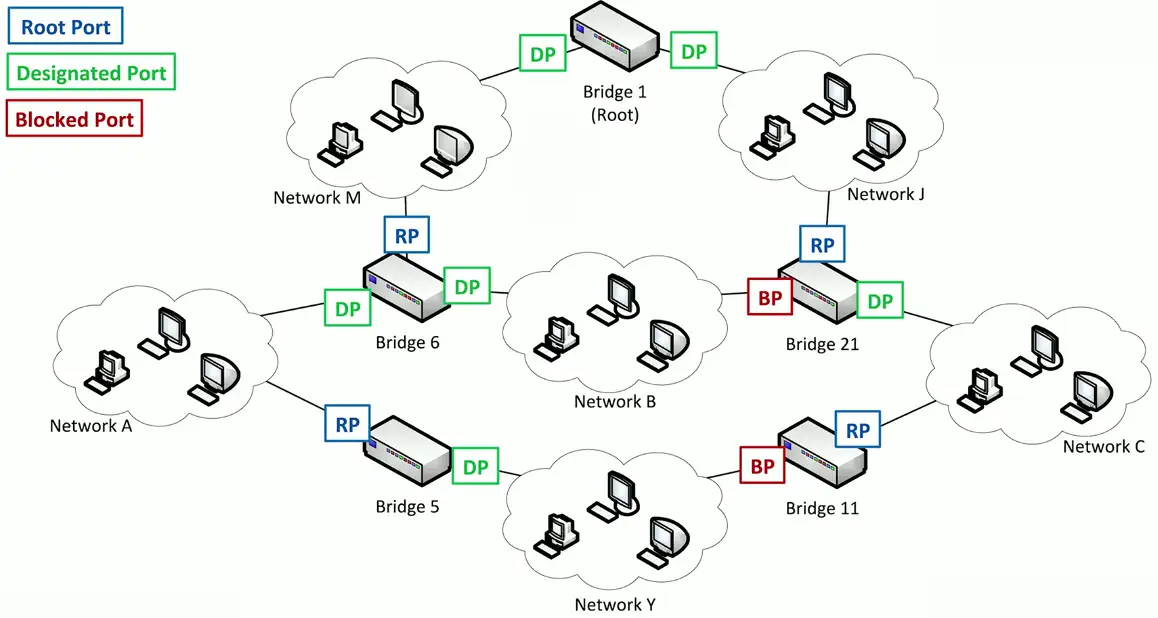
STP port states
Blocking/Discarding
- Not forwarding to prevent a loop
Listening
- Not forwarding and cleaning the MAC table
Learning
- Not forwarding and adding to the MAC table
Forwarding
- Data passes through and is fully operational
Disabled
- Administrator has turned off the port
VLAN assignment
Network link is active, and IP address is assigned
- No access to resources or limited functionality
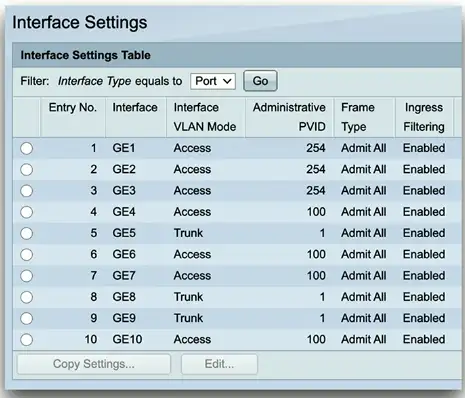
Every switch interface is configured as an access port or a trunk port
- Each access port is assigned to a VLAN
Confirm the specific switch interface
- Check the VLAN assignment
This is also a common issue
- A quick fix
ACLs break perfectly good networks
Clients are working
- DHCP is assigning correct IP addresses
- Routing tables look correct
Packets are still dropping
Everything could be configured perfectly
- ACLs would still break the traffic flow
Always include an ACL check when troubleshooting
- Save lots of time
ACL best practices
More granular rules should be first
- Very similar to a firewall
- The ACL stops evaluating after a match
- Broader rules at the top would prevent more specific rules from firing
Best practices: Before editing an ACL, disable on an interface
- Adding an access list without any rules will filter all traffic
- ACLs deny all by default
Routing and IP issues
Routing Tables
The digital version of asking for directions
- Know how to get from point A to point B
This can answer a lot of questions
- Default gateway
- Manually configured static routes
Know which way data will flow
- A network map might help
Refer to every router
- Routing loops and missing routes are common
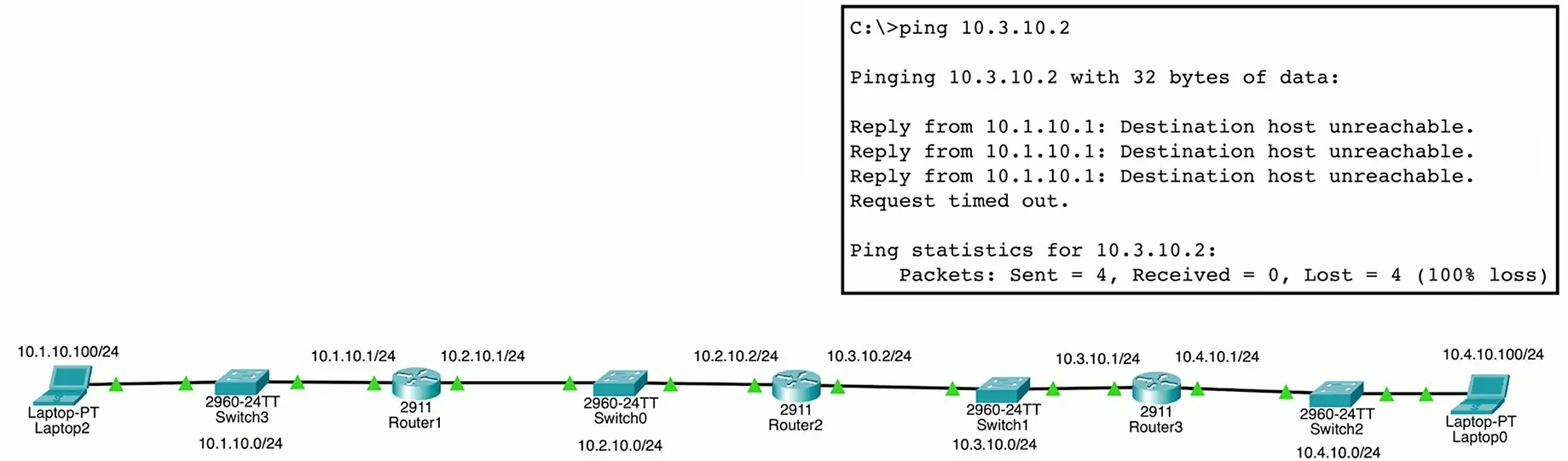
Missing route
A route to the destination network doesn’t exist
- The packet will be dropped
ICMP host unreachable message will be sent to the source address
- Source device will be informed of the error
Check your routes
- In both directions
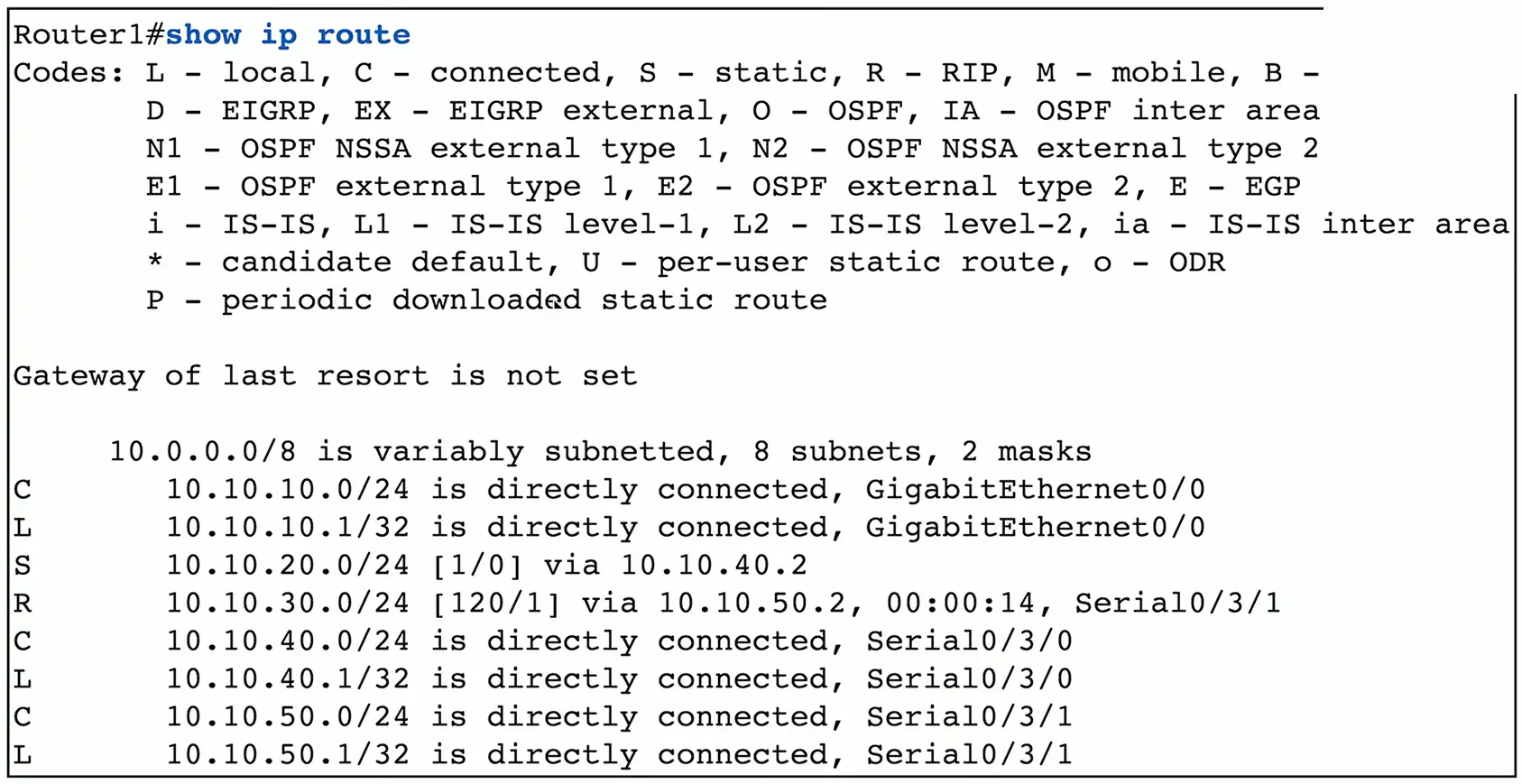
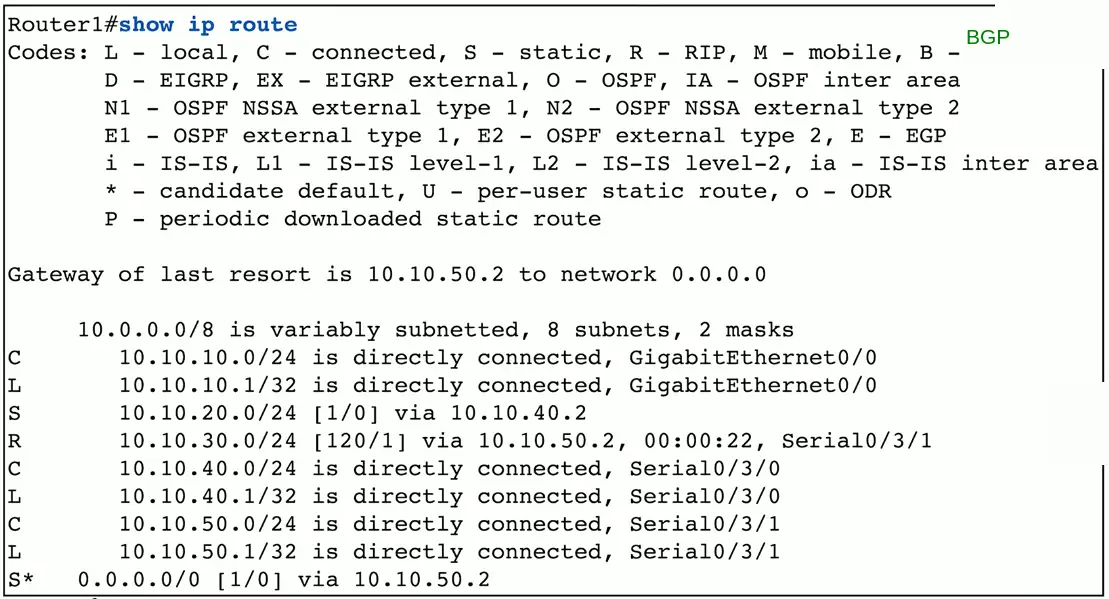
Gateway of last resort
Designation IP has to match a routing table entry
- If not, it’s dropped
Adding a static default route can simplify your routing table
- If it doesn’t match an entry, use this route
Add in global router configuration
- Create a route to 0.0.0.0/0
Address Pool Exhaustion
Client received an APIPA address
- Local subnet communication only
Check the DHCP server
- Add more IP addresses if possible
IP address management (IPAM) may help
- Monitor and report on IP address shortages
Lower the lease time
- Especially if there are a lot transient users
Troubleshooting IP configuration
Check your documentation
- IP address, subnet mask, default gateway
- Confirm these settings!
Monitor the traffic
- Difficult to determine subnet mask
Check devices around you
- Confirm your subnet mask and gateway
Traceroute and ping
- The issue might be your infrastructure
- Ping local IP, default gateway, and outside address
Duplicating IP addresses
Static address assignments
- Must be very organized
DHCP is not a panacea (Something that solves all the problems)
- Static IP addressing
- Multiple DHCP servers overlap
- Rogue DHCP servers
Intermittent connectivity
- Two addresses “fight” with each other
Blocked by the OS
- Checks when it starts
Troubleshooting duplicate IP address
Check your IP addressing
- Did you misconfigure?
Ping an IP address before static addressing
- Does it respond?
Determine the IP addresses
- Ping the IP address, check your ARP table
- Find the MAC address in your switch MAC table
Capture the DHCP process
- What DHCP servers are responding?