Physical Installations
Installing Networks
Distribution Frames
Passive cable termination
- Punch down blocks
- Patch panels
Usually mounted on the wall or flat surface
- Uses a bit of real-estate
All transport media
- Copper, fiber, voice, and data
Often used as a room or location name
- It’s a significant part of the network

Main Distribution Frame (MDF)
Central point of the network
- Usually in a data center
Termination point for WAN links
- Connects the inside to the outside
Good test point
- Test in both directions
This is often the data center
- The central point for data

Intermediate Distribution Frame (IDF)
Extension of the MDF
- A strategic distribution point
Connects the users to the network
- Uplinks from the MDF
- Workgroup switches
- Other local resources
Common in medium to large organizations
- Users are geographically diverse

Equipment racks
Rack sizes
- 19" rack/device width
Height measured in rack units
- 1U is 1.75"
- A common rack height is 42U
Depth can vary
- Often determined by the equipment
Plan and locate
- Devices follow standard sizing
Cooling a data center
Heating, Ventilating, and Air conditioning
- Thermodynamics, fluid mechanics, and heat transfer
A complex science
- Not something you can properly design yourself
- Must be integrated into the fire system
Data centers optimize cooling
- Separate aisles for heating and cooling
Heat intake and exhaust is important
- Front, back, or side

Cale infrastructure

Copper patch panel/patch bay
Punch-down block on one side
- RJ45 connector on the other
Move a connection around
- Different switch interfaces
The run to the desk doesn’t move

Fiber Distribution Panel
Permanent fiber installation
- Patch panel at both ends
Fiber bend radius
- Breaks when bent too tightly
Often includes a service loop
- Extra fiber for future changes
- Inexpensive insurance

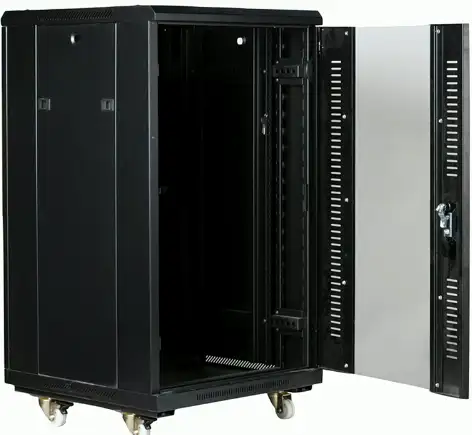
Locking Cabinets
Data center hardware is usually managed by different groups
- Responsibility lies with the owner
Racks can be installed together
- Side-to-side
Enclosed cabinets with locks
- Ventilation on front, back, top, and bottom
Power
WARNING
Always disconnect from the power source when working on a device
- Always. Seriously.
Some devices store a charge in capacitors
- Know how to discharge before touching
Never connect your body to any part of an electrical system
- Do not connect yourself to the ground wire of an electrical system
Respect electricity
- It doesn’t respect you
Amp and Volt
Ampere (amp, A) — The rate of electron flow past a point in one second
- The diameter of the hose
Voltage (volt, V) Electrical “pressure” pushing the electrons
- How open the faucet is
- 120 volts, 240 volts
Watt
Watt (W)
- How much energy is being consumed?
- Electrical load is measured in watts
Easy to calculate
- Volts × amps = watts
- 120 V × 0.5 A = 60 W
Current
Alternating current (AC)
- Direction of current constantly reverses
- Distributes electricity efficiently over long distances
Frequency of this cycle is important
- US/Canada – 110 to 120 volts of AC (VAC), 60 hertz (Hz)
- Europe — 220-240 VAC, 50 Hz
Direct current (DC)
- Current moves in the one direction with a constant voltage
Device power supplies
Devices commonly use DC voltage
- Most power sources provide AC voltage
Convert 120 V AC or 240 V AC
- To DC voltages
You’ll know when this isn’t working
- An important component
UPS
Uninterruptible Power Supply
- Short-term backup power
- Blackouts, brownouts, surges
Common UPS types
- Offline/Standby UPS
- Line-interactive UPS
- On-line/Double-conversion UPS
Features
- Auto shutdown, battery capacity, outlets, phone line suppression
Power distribution units (PDUs)
Provide multiple power outlets
- Usually in a rack
Often include monitoring and control
- Manage power capacity
- Enable or disable individual outlets
Environmental Factors
Humidity
We use a lot of power for data centers
- One estimate is nearly 2% of all U.S. power consumption
Humidity level
- High humidity promotes condensation
- Low humidity promotes static discharge
Industry guidelines for data centers
- Somewhere around 40% to 60% humidity
- Specific settings vary on location and equipment type
Temperature
Electrical equipment has an optimal operating temperature
- Usually part of the device specifications
- Industry best practices are around 64 °F (ca. 18 °C) to 81 °F (ca. 27 °C)
Many external influences
- Outdoor temperature
- Temperature increases as system load increases
HVAC is used to manage temperature and humidity
- Sensors are placed in strategic locations
Fire suppression
Data center fire safety
- Large area, lots of electronics
- Water isn’t the best fire suppression option
Common to use inert gases and chemical agents
- Stored in tanks and dispersed during a fire
- Many warning signs
Integrated into HVAC system
- Monitor for carbon monoxide
- Enable/disable air handlers