Ports and Protocols
Introduction to IP
A Series of moving Vans
Efficiently move large amounts of data
- Use a shipping truck
The network topology is the road
- Ethernet, DSL, cable system
The truck is the Internet Protocol (IP)
- We have designed the roads for this truck
The boxes hold your data
- Boxes of TCP and UDP
Inside the boxes are more things
- Application information
IP — Internet Protocol

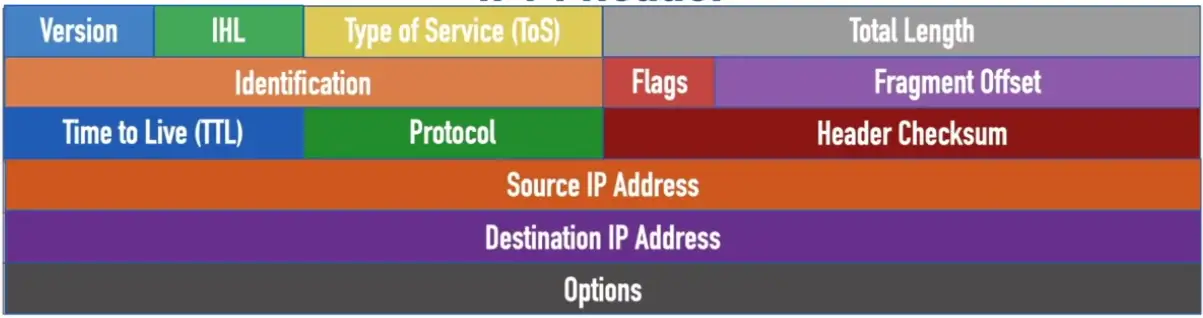
IPv4 Header
- Version: A 4-bit field that indicates that IP version being used and is always set to a value of 4 for IPv4 headers
- Internet Header Length (IHL): A 4-bit field that indicates the number of 32-bit words in the header, and can have a value in the range 5–15
- Type of Service (ToS): An 8-bit field used to indicate the priority of the packet, and is typically divided into a 6-bit Differentiated Services Code Point (DSCP) field and a 2-bit Explicit Congestion Notification (ECN) field
- Total Length: A 16-bit field that specifies the total size of the packet (in bytes)
- Identification: 16-bit field used to logically group together multiple fragments making up a datagram
- Flags: A 3-bit field used to control packet fragmentation
- Fragment Offset: A 13-bit field used to identify where a fragment was originally located in an unfragmented datagram
- Time to Live (TTL): An 8-bit field used to prevent routing loops by being decremented by 1 at each router hop until the packet is discarded when the TTL = 0
- Protocol: An 8-bit field used to identify the type of data being carried by the packet
- Header Checksum: A 16-bit field used to check the header for errors
- Source IP Address: A 32-bit address specifying the IPv4 address of the sender
- Destination IP Address: A 32-bit address specifying the IPv4 address of the receiver
- Options: A rarely-used field that can specify additional IPv4 header options (NOTE: The Options field is populated if the Internet Header Length > 5)
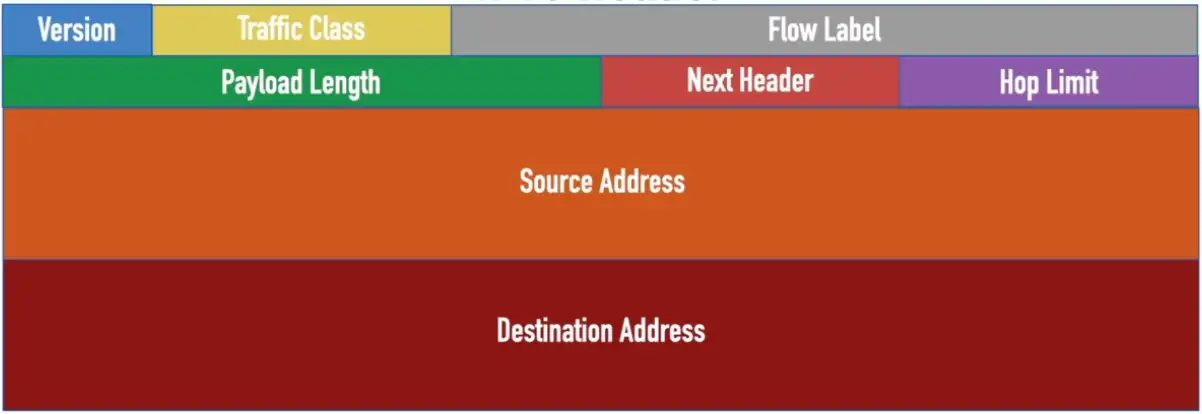
IPv6 Header
- Version: A 4-bit field that indicates that IP version being used, and is always set a value of 6 for IPv6 headers
- Traffic Class: An 8-bit field used to indicate the priority of the packet, and is typically divided into a 6-bit Differentiated Services Code Point (DSCP) field and a 2-bit Explicit Congestion Notification (ECN) field (performs the same function as an IPv4 ToS byte)
- Flow Label: A 20-bit field used to identify a group of packets as belonging to a single stream
- Payload Length: 16-bit field used to indicate how many bytes are contained in the payload
- Next Header: An 8-bit field used to indicate the next type of header encapsulated in the IPv6 packet (typically a Layer 4 protocol such as TCP or UDP)
- Hop Limit: An 8-bit field used to prevent routing loops by being decremented by 1 at each router hop until the packet is discarded when the Hop Limit = 0 (replaces the IPv4 TTL field)
- Source Address: A 128-bit field that indicates the IPv6 address of the sender
- Destination Address: A 128-bit field that indicates the IPv6 address of the receiver
TCP and UDP
Transported inside of IP
- Encapsulated by the IP protocol
Two ways to move data from place to place
- Different features for different applications
OSI layer 4
- The transport layer
Multiplexing
- Use many applications at the same time
- TCP and UDP
TCP — Transmission Control Protocol
Connection-oriented
- A formal connection setup and close
“Reliable” delivery
- Recovery from errors
- Can manage out-of-order messages or retransmissions
Flow control
- The receiver can manage how much data is sent

The 3-Way Handshake
A 3-step process that sets up a connection between two devices speaking TCP.
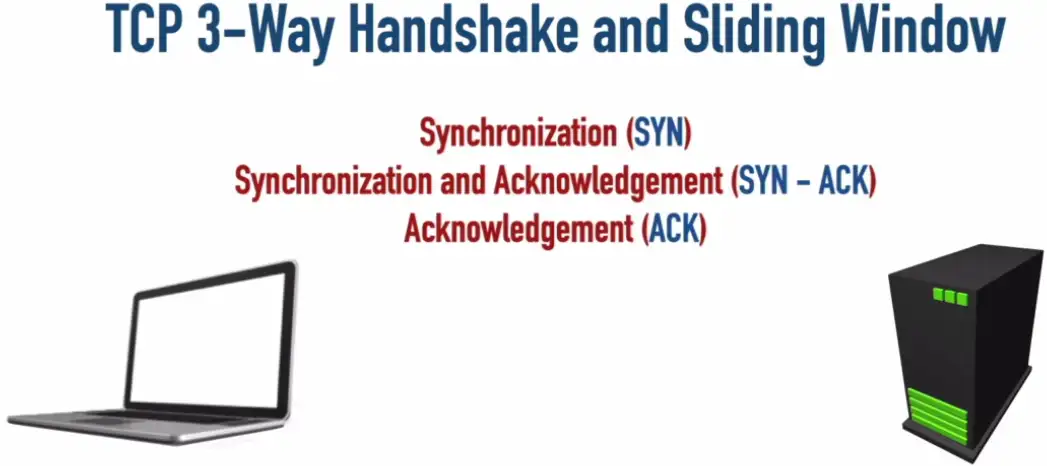
- Segment 1 is sent, ACK2 is sent back from server, acknowledging server is ready for segment 2.
- The next device will send Segment 2 and Segment 3 at a time, after receiving acknowledgement via ready ACK4, the next time device will send double the segments.
- Number of segments sent each time, are called Window Size. It will keep doubling until some segment is dropped, and the server asks for it again, then the device will think it needs to slow down to transfer segments without error, so the window size will be reduced.
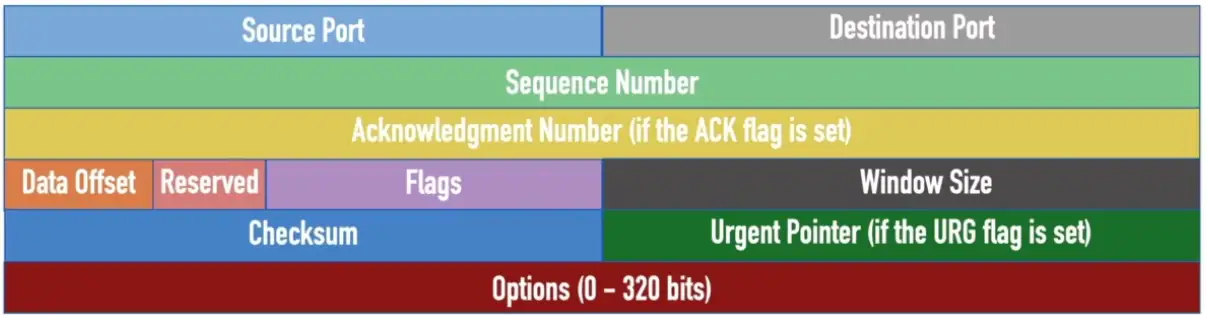
TCP Header
- Source Port: A 16-bit field that identifies the sending port
- Destination Port: A 16-bit field that identifies the receiving port
- Sequence Number: A 32-bit field that specifies the first sequence number if the SYN flag = 1, or the accumulated sequence number if the SYN flag = 0
- Acknowledgement Number: A 32-bit field that specifies the next sequence number the sender of an ACK expects (if the ACK flag = 1)
- Data Offset: A 4-bit field that specifies the size of the TCP header, with a unit measure of 32-bit words (the minimum value is 5, and the maximum value is 15)
- Reserved: A 3-bit field reserved for future use, where each bit is set to a value of 0
- Flags: A series of nine 1-bit fields indicating the number of bytes the sender of this segment is willing to receive
- Checksum: A 16-bit field used for error-checking both header and payload of the segment
- Urgent Pointer: A 16-bit field indicating the last urgent data byte (if the URG flag = 1)
- Options: A field whose size is in the range of 0–320 bits and can be used to indicate a variety of additional TCP options
UDP — User Datagram Protocol
Connectionless
- No formal open or close to the connection
“Unreliable” delivery
- No error recovery
- No reordering of data or retransmissions
- There is data checksum, to make sure data doesn’t get corrupted in the transmission.
- Due to lack of Sequence Number and Acknowledge Number, we don’t know if it’s ever delivered to the destination, that’s why it’s unreliable.
No flow control
- Sender determines the amount of data transmitted

UDP Header
- Source Port: A 16-bit field that identifies the sending port
- Destination Port: A 16-bit field that identifies the receiving port
- Length: A 16-bit field that specifies the combined length of the UDP header and data
- Checksum: A 16-bit field that can be used to perform error checking of the header and data (optional IPv4 and required for IPv6)

Speedy delivery
The IP delivery truck delivers from one (IP) address to another (IP) address
- Every house has an address, every computer has an IP address
Boxes arrive at the house/IP address
- Where do the boxes go?
- Each box has a room name
Port is written on the outside box
- Drop the box into the right room
Lots of Ports
IPv4 sockets
- Server IP address, protocol, server application port number
- Client IP address, protocol, client port number
Non-ephemeral ports — permanent port numbers
- Ports
0through1023 - Usually on a server or service
Ephemeral ports — temporary port numbers
- Ports
1024through65,535
Well-Known Ports: 0–1023 Offer well-known network services
Registered Ports: 1024-49151 Registered with the Internet Assigned Number Authority (IANA)
Ephemeral Ports: 49152–65535 (a.k.a. Dynamic Ports or Private Ports)
Port Numbers
TCP and UDP ports can be any number between 0 and 65,535
Most servers (services) use non-ephemeral (not temporary) port numbers
- This isn’t always the case
- It’s just a number
Port numbers are for communication, not security
Service port numbers need to be “well-known”
TCP port numbers aren’t the same as UPD port numbers
Ports on the Network:


Common Ports
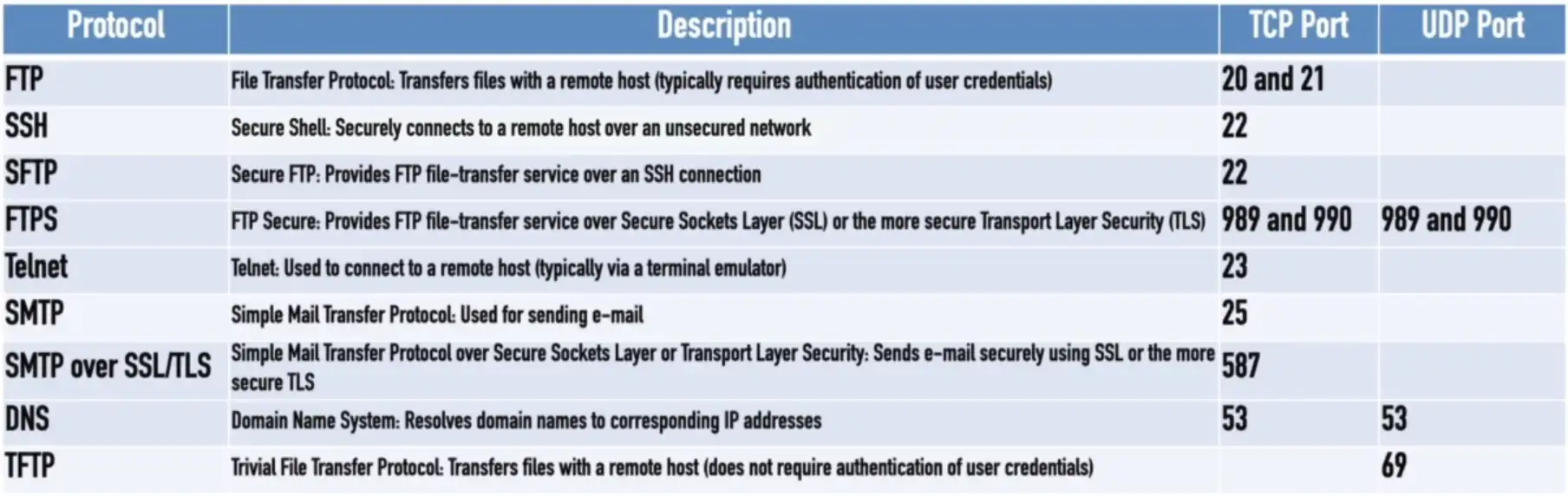
FTP — File Transfer Protocol
Transfers files between systems
- Generic file transfer method
- Not specific to an OS
tcp/20 (active mode data), tcp/21 (control)
- Authenticates with a username and password
Full-featured functionality
- List, add, delete, etc.
SSH — Secure Shell
Text-based console communication
Encrypted communication link - tcp/22
SFTP — Secure FTP
Generic file transfer with security
- Encrypted network communication
Uses the SSH File Transfer Protocol
tcp/22
Provide files system functionality
- Resuming interrupted transfers, directory listings, remote file removal
Uses SSH (port 22)
- SSH isn’t just for console communication
Telnet
Telnet — Telecommunication Network
- tcp/23
Console access
- Similar functionality to SSH
In-the-clear communication
- Not the best choice for production systems
SMTP — Simple Mail Transfer Protocol
SMTP
- Server to server email transfer
tcp/25(SMTP using plaintext)tcp/587(SMTP using TLS encryption)
Also used to send mail from a device to a mail server
- Commonly configured on mobile devices and email clients
Other protocols are used for clients to receive email
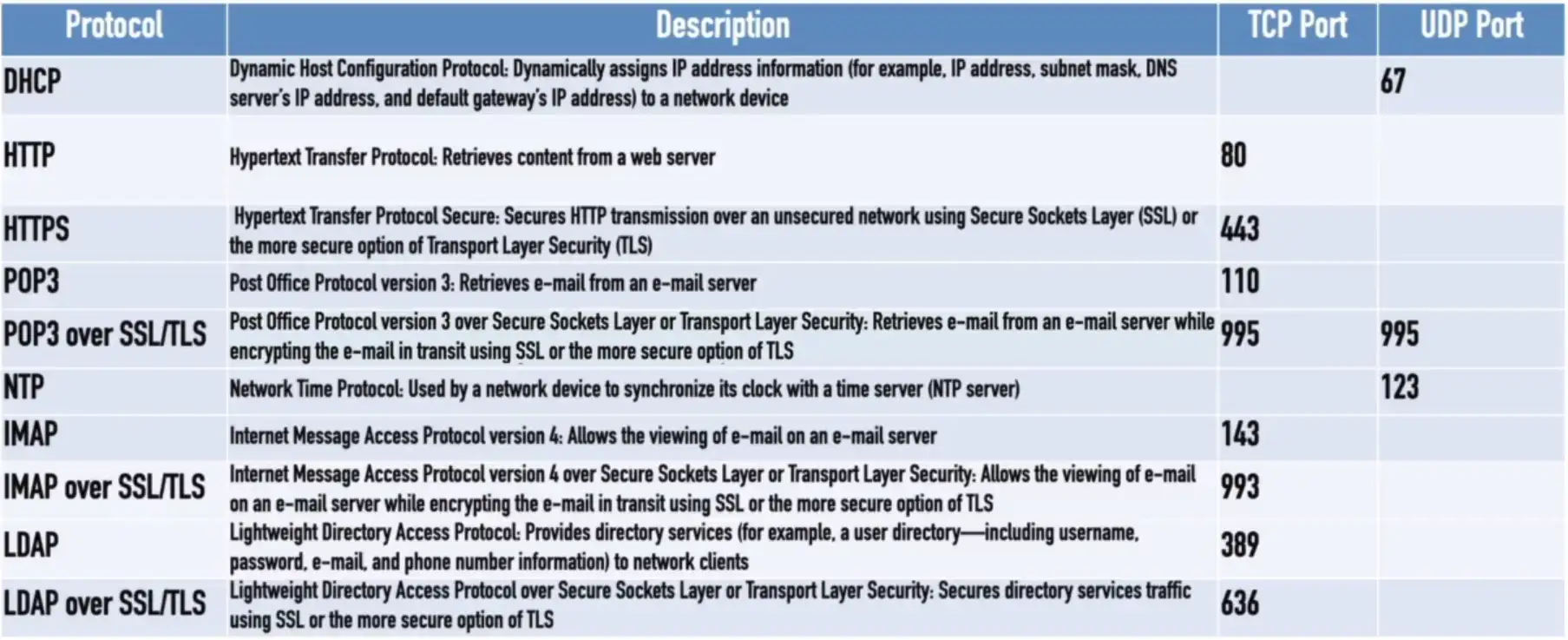
- IMAP, POP3
DNS — Domain Name System
Converts names to IP address - udp/53
- www.professormesser.com = 162.159.246.164
- Large transfers may use
tcp/53
These are very critical resources
- Usually multiple DNS servers are in production
DHCP — Dynamic Host Configuration Protocol
Automated configuration of IP address, subnet mask and other options
udp/67Andudp/68- Requires a DHCP server
- Server, appliance, integrated into a SOHO router, etc.
Dynamic/pooled
- IP addresses are assigned in real-time from a pool
- Each system is given a lease, must renew at set intervals
DHCP reservation
- Addresses are assigned by MAC address in DHCP server
- Quickly manage addresses from one location
TFTP — Trivial File Transfer Protocol
TFTP
udp/69
Very simple file transfer application
- Read files and write files
No authentication
- Not used on highly secure systems
Useful when starting a system
- Transfer configuration files
- Quick and easy
HTTP and HTTPS
Hypertext Transfer Protocol
- Communication in the browser
- And by other applications
In the clear or encrypted
- SSL (Secure Sockets Layer) or TLS (Transport Layer Security)
| Protocol | Port | Name | Description |
|---|---|---|---|
| HTTP | tcp/80 | Hypertext Transfer Protocol | Web server communication |
| HTTPS | tcp/443 | HTTP over TLS or SSL | Web server communication with encryption |
NTP — Network Time Protocol
Switches, routers, firewalls, servers, workstations
- Every device has its own clock
udp/123
Synchronizing the clocks becomes critical
- Log files, authentication information, outage details
Automatic updates
- No flashing 12:00 lights
Flexible — You control how clocks are updated
Very accurate
- Accuracy is better than 1 millisecond on a local network
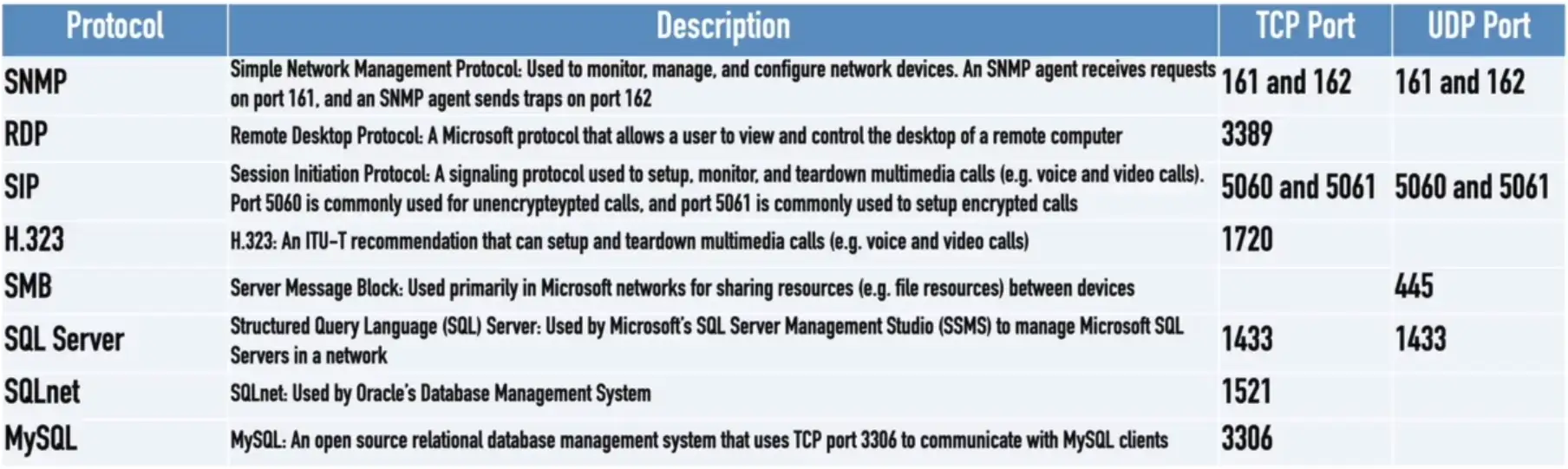
SNMP — Simple Network Management Protocol
Gather statistics from network devices
udp/161
v1 — The original
- Structured tables
- In-the-clear
v2 — A good step ahead
- Data type enhancements
- Bulk transfers
- Still in-the-clear
v3 — A secure standard
- Message integrity
- Authentication
- Encryption
SNMP traps
- Alerts and notifications from the network devices
udp/162

LDAP/LDAPS
LDAP (Lightweight Directory Access Protocol)
tcp/389- Store and retrieve information in a network directory
LDAPS (LDAP Secure)
- A non-standard implementation of LDAP over SSL
tcp/636

SMB — Server Message Block
Protocol used by Microsoft Windows
- File sharing, printer sharing
- Also called CIFS (Common Internet File System)
Integrated into the OS
- Access rights integration across systems
- File share publishing
- File locking
Direct over tcp/445 (NetBIOS-less)
- Direct SMB communication over TCP
Syslog
Standard for message logging
- Diverse systems, consolidated log
- udp/514
Usually a central log collector
- Integrated into the SIEM
- Security information and Event Manager
You’re going to need a lot of disk space
- No, more. More than that.
- Data storage from many devices over an extended timeframe
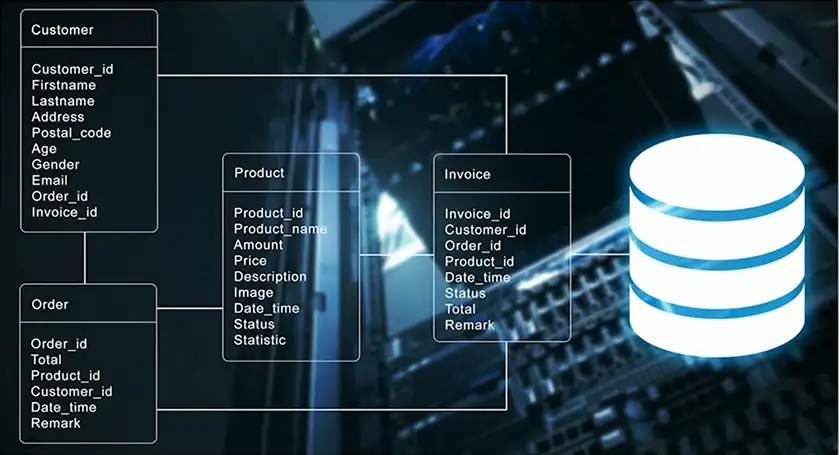
Databases
Collection of information
- Many types of data
- One common method to store and query
Structured Query Language (SQL)
- A standard language across database servers
Microsoft SQL Server
- MS-SQL (Microsoft Structured Query Language)
tcp/1433
RDP — Remote Desktop Protocol
Share a desktop from a remote location over tcp/3389
- Connect to an entire desktop or just an application
Remote Desktop Services on many Windows versions
- Clients for Windows, macOS, Linux, Unix, iPhone, and others
SIP — Session Initiation Protocol
Voice over IP (VoIP) signaling
tcp/5060Andtcp/5061
Setup and manage VoIP sessions
- Call, ring, play busy signal, hang up
Extend voice communication
- Video conferencing
- Instant messaging
- File transfer etc.
Other Useful Protocols
ICMP
Internet Control Message Protocol
- “Text messaging” for your network devices
Another protocol carried by IP
- Not used for data transfer
Devices can request and reply to administrative requests
- Hey, are you there?/Yes, I’m right here.
Devices can send messages when things don’t go well
- That network you’re trying to reach is not reachable from here
- Your time-to-live expired, just letting you know
GRE
Generic Routing Encapsulation
- The “tunnel” between two endpoints
Encapsulate traffic inside of IP
- Two endpoints appear to be directly connected to each other
- No built-in encryption

VPN
Virtual Private Networks
- Encrypted (private) data transversing a public network
Concentrator
- Encryption/decryption access device
- Often integrated into a firewall
Many deployment options
- Specialized cryptographic hardware
- Software-based options available
Site-to-site VPN
Always-on
- Or almost always
Firewalls often act as VPN concentrators
- Probably already have firewalls in place

IPSec (Internet Protocol Security)
Security for OSI Layer 3
- Authentication and encryption for every packet
Confidentiality and integrity/anti-replay
- Encryption and packet signing
Very standardized
- Common to use multivendor implementations
Two core IPSec protocols
- Authentication Header (AH)
- Encapsulation Security Payload (ESP)
Internet Key Exchange (IKE)
Agree on encryption/decryption keys
- Without sending the key across the network
- Builds a Security Association (SA)
Phase I
- Use Diffie-Hellman to create a shared secret key
udp/500- ISAKMP (Internet Security Association and Key Management Protocol)
Phase II
- Coordinate ciphers and key sizes
- Negotiate an inbound and outbound SA for IPSec

Transport mode and Tunnel mode

Authentication Header (AH)
Hash of the packet and a shared key
- MD5, SHA-1, or SHA-2 are common
- Adds the AH to the packet

Some integrity information is sent, but rest of the (original) data is sent in the clear.
Encapsulation Security Payload (ESP)
Encrypts the packet
- MD5, SHA-1, or SHA-2 for hash and 3DES or AES for encryption
- Adds a header, a trailer, and an integrity Check Value

Network Communication
Unicast
One station sending information to another station
- One-to-one
Send information between two systems
Web surfing, file transfers
Does not scale optimally for real-time streaming media
IPv4 and IPv6

Multicast
Delivery of information to interested systems
- One-to-many-of-many
Multimedia delivery, stock exchanges, dynamic routing updates
Very specialized
- Difficult to scale across large networks
Used in both IPv4 and IPv6
- Extensive use in IPv6

Anycast
Single destination IP address has multiple paths to two or more endpoints
- One-to-one-of-many
- Used in IPv4 and IPv6
Configure the same anycast address on different devices
- Looks like any other unicast address
Packets sent to an anycast address are delivered to the closest interface
- Announce the same route out of multiple data centers, clients use the data center closest to them
- Anycast DNS

Broadcast
Send information to everyone at once
- One-to-all
One packet, received by everyone
Limited scope
- The broadcast domain
Routing updates, ARP requests
Used in IPv4
Not used in IPv6
- Uses multicast instead