Attack Types
Denial of Service
Force a service to fail
- Overload the service
Take advantage of a design failure or vulnerability
- Keep your systems patched!
Cause a system to be unavailable
- Competitive advantage
Create a smokescreen for some other exploit
- Precursor to a DNS spoofing attack
Doesn’t have to be complicated
- Turn off the power
A “friendly” DoS
Unintentional DoSing
- It’s not always a ne’er-do-well
Network DoS
- Layer 2 loop without STP
Bandwidth DoS
- Downloading multi-gigabyte Linux distribution over a DSL line
The water line breaks
- Get a good shop vacuum
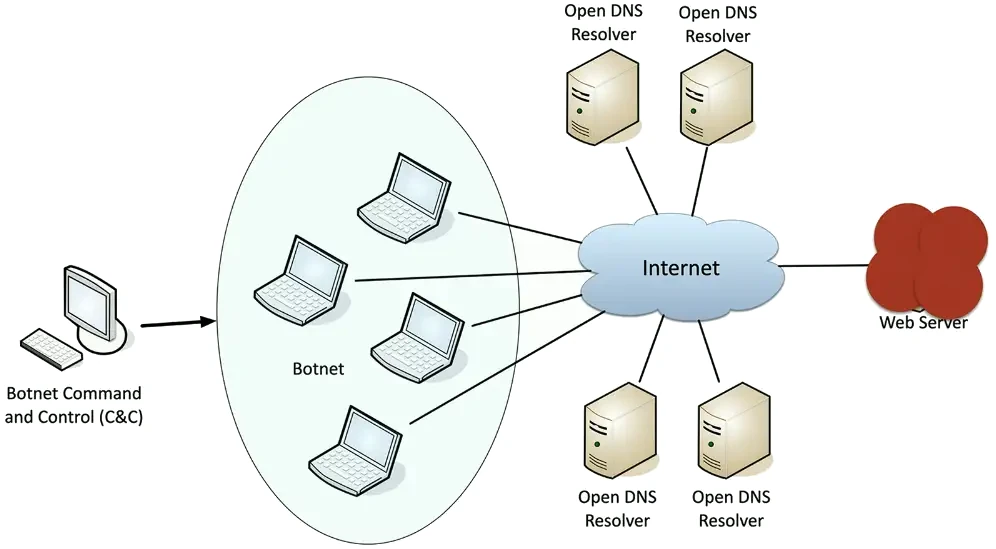
Distributed Denial of Service (DDoS)
Launch an army of computers to bring down a service
- Use all the bandwidth or resources — traffic spike
This is why the attackers have botnets
- Thousands or millions of computers at your command
- At its peak, Zeus botnet infected over 3.6 million PCs
- Coordinated attack
Asymmetric threat
- The attacker may have fewer resources than the victim
DDoS reflection and amplification
Turn your small attack into a big attack
- Often reflected off another device or service
An increasingly common network DDoS technique
- Turn Internet services against the victim
Uses protocols with little (if any) authentication or checks
- NTP, DNS, ICMP
- Simple DNS query returns much more data than simple domain response
- A common example of protocol abuse
VLAN Hopping
Define different VLANs
- Organizational, network engineering, security
You only have access to your VLAN
- Good security best practice
“Hop” to another VLAN
- This shouldn’t happen
Two primary methods
- Switch spoofing
- Double tagging
Switch Spoofing
Some switches support automatic configuration
- Is the switch port for a device, or is it a trunk?
There is no authentication required
- Pretend to be a switch
- Send trunk negotiation
Now you have got a trunk link to a switch
- Send and receive from any configured VLAN
Switch administrators should disable trunk negotiation
- Administratively configure trunk interfaces and device/access interfaces
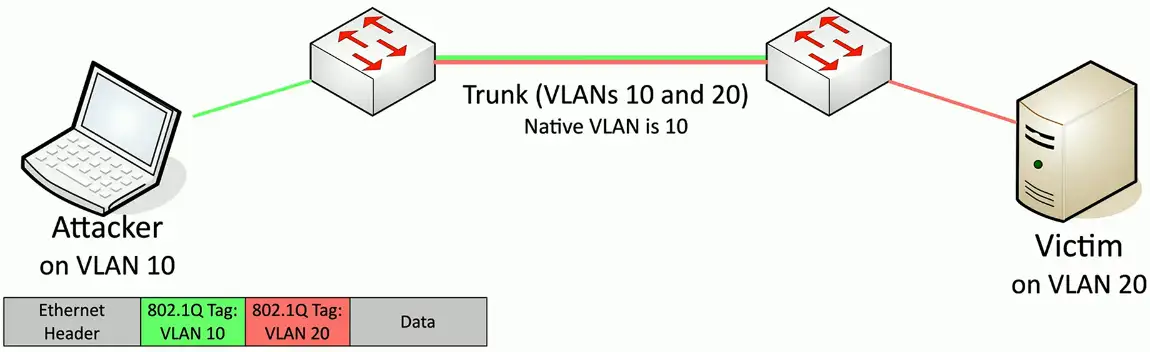
Double Tagging
Craft a packet that includes two VLAN tags
- Takes advantage of the “native” VLAN configuration
The first native VLAN tag is removed by the first switch
- The second “fake” tag is now visible to the second switch
- Packet is forwarded to the target
This is one-way trip
- Responses don’t have a way back to the source host
- Good for DoS
Don’t put any devices on the native VLAN
- Change the native VLAN ID
- Force tagging of the native VLAN
MAC Flooding
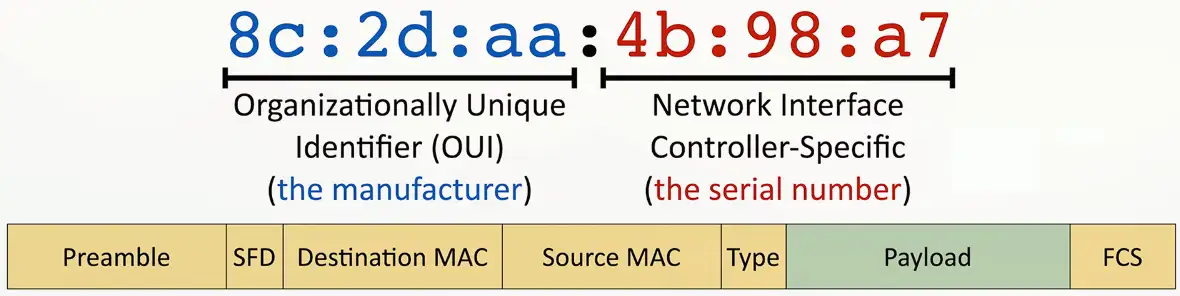
The MAC address
Ethernet Media Access Control Address
- The “physical” address of a network adapter
- Unique to a device
48 bits/6 bytes long
LAN Switching
Forward or drop frames
- Based on the destination MAC address
Gather a constantly updating list of MAC addresses
- Builds the list based on the source MAC address of incoming traffic
- These age out periodically, often in 5 minutes
Maintain a loop-free environment
- Using Spanning Tree Protocol (STP)
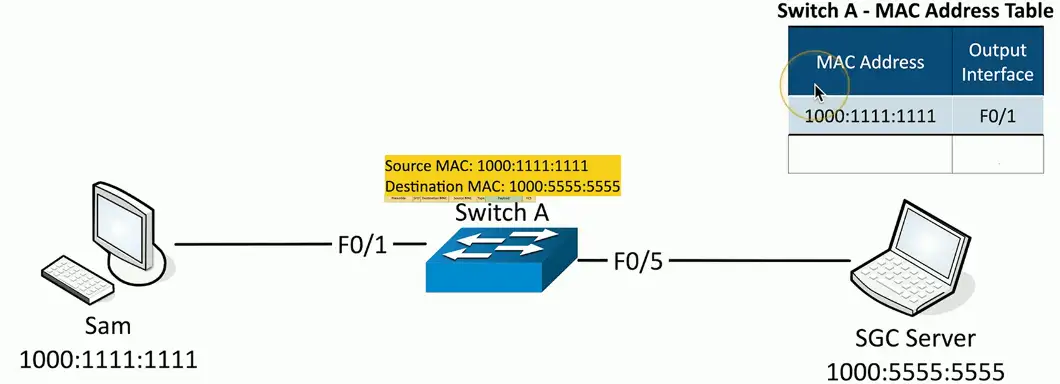
Learning the MACs
Switches examine incoming traffic
- Makes a note of the source MAC address
Adds unknown MAC addresses to the MAC address table
- Sets the output interface to the received interface
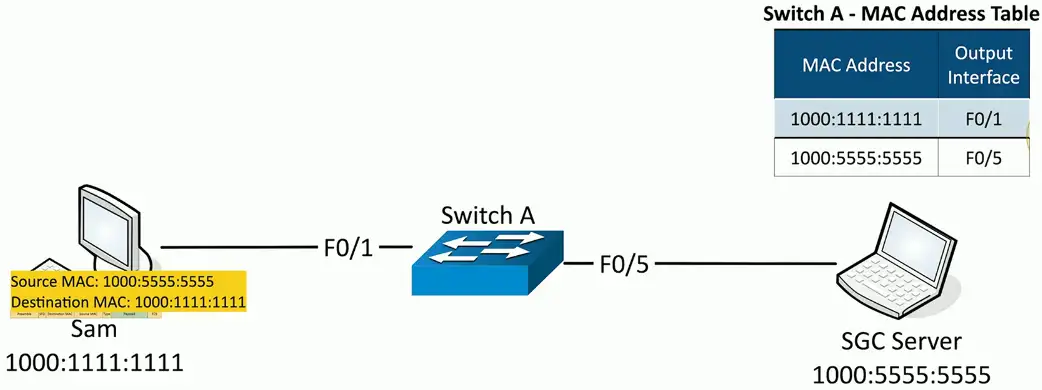
Frame Switching
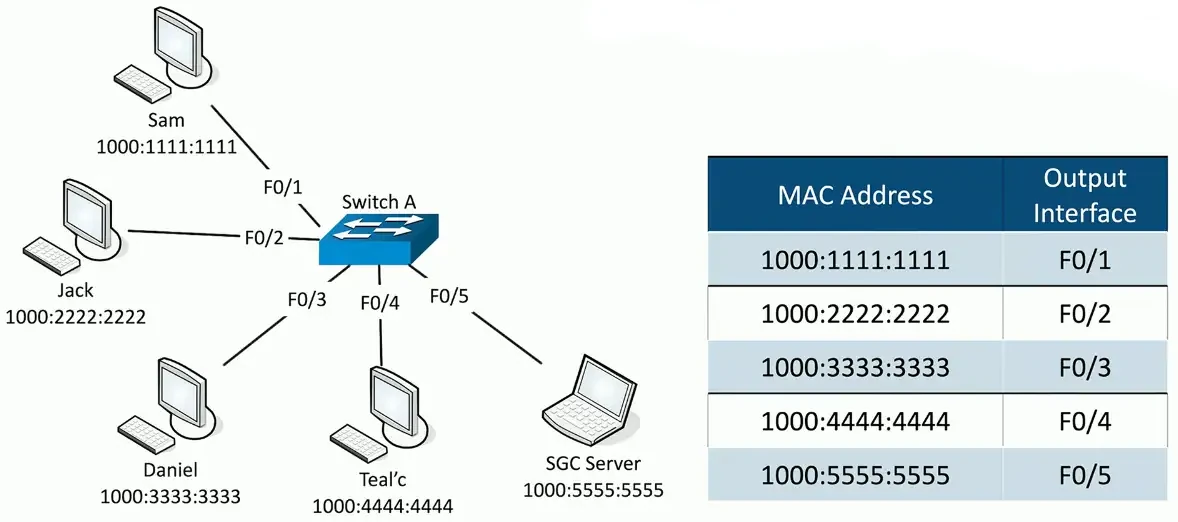
MAC Flooding
The MAC table is only so big
Attackers starts sending traffic with different source MAC addresses
- Force out the legitimate MAC addresses
The table fills up
- Switch begins flooding traffic to all interfaces
This effectively turns the switch into a hub
- All traffic is transmitted to all interfaces
- No interruption in traffic flows
Attacker can easily capture all network traffic!
Flooding can be restricted in the switch’s port security settings
ARP and DNS Poisoning
Spoofing and Poisoning
Pretend to be something you aren’t
- Fake web server, fake DNS server, etc.
Email address spoofing
- The sending address of an email isn’t really the sender
Caller ID spoofing
- The incoming call information is completely fake
On-path attacks
- The person in the middle of the conversation pretends to be both endpoints
ARP Poisoning (IP Spoofing)
Simple ARP Request and response:
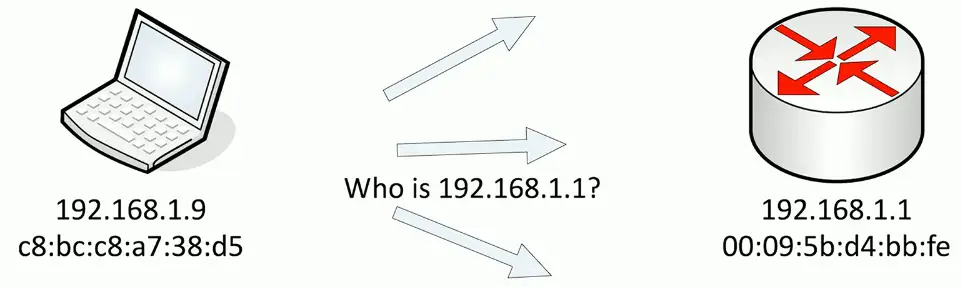
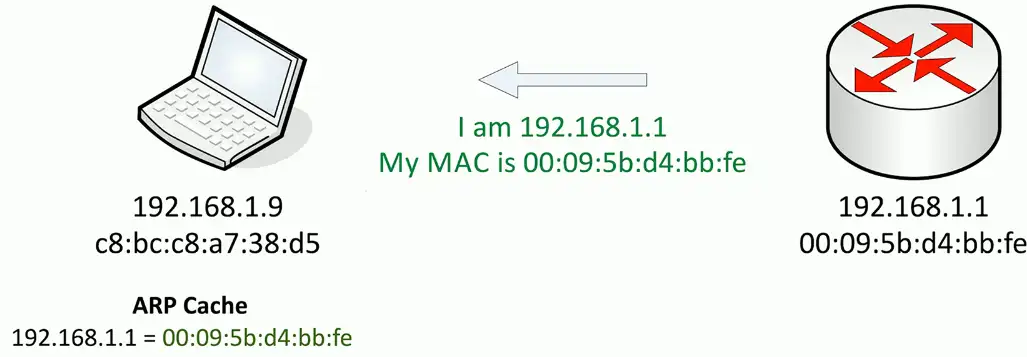
No security or authentication. That’s what the attacker takes advantage of!
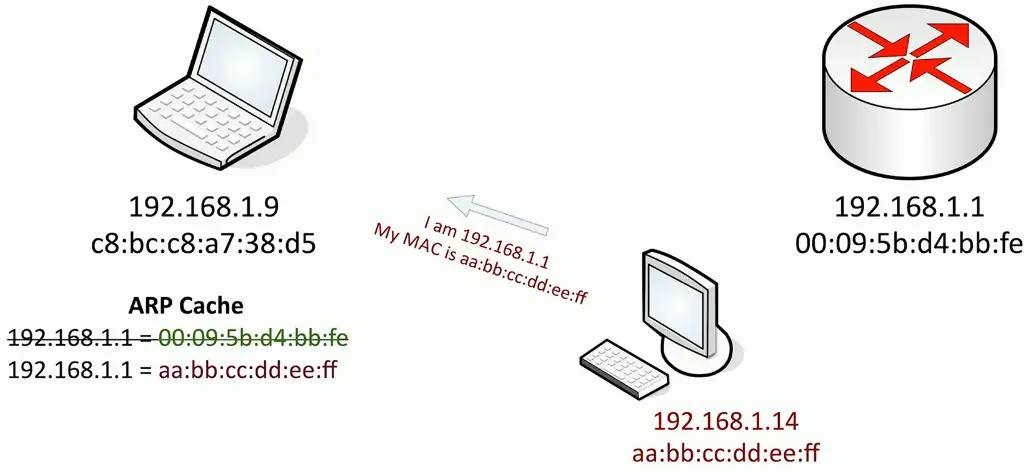
The attacker will capture the traffic, and then send to the legitimate target/router. Neither the router nor the client has any idea about the attacker in the middle who is monitoring their traffic.
DNS Poisoning
Modify the DNS server
- Requires some crafty hacking Modify the client host file
- The host file takes precedent over DNS queries
Send a fake response to a valid DNS request
- Requires a redirection of the original request or the resulting response
- Real-time redirection
- This is on-path attack
DNS spoofing/poisoning:
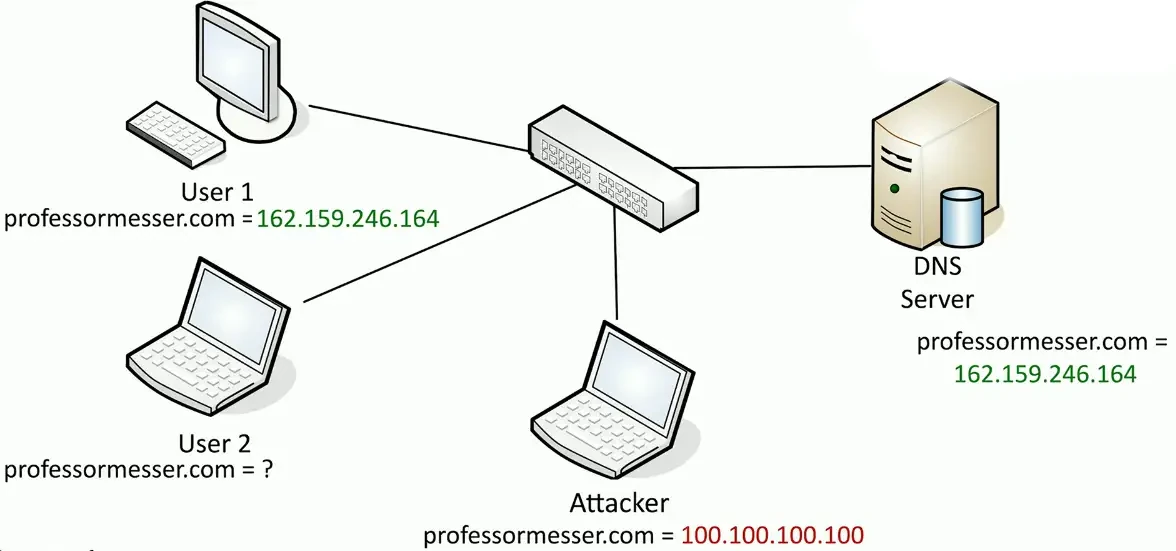
Attacker can poison the DNS server:
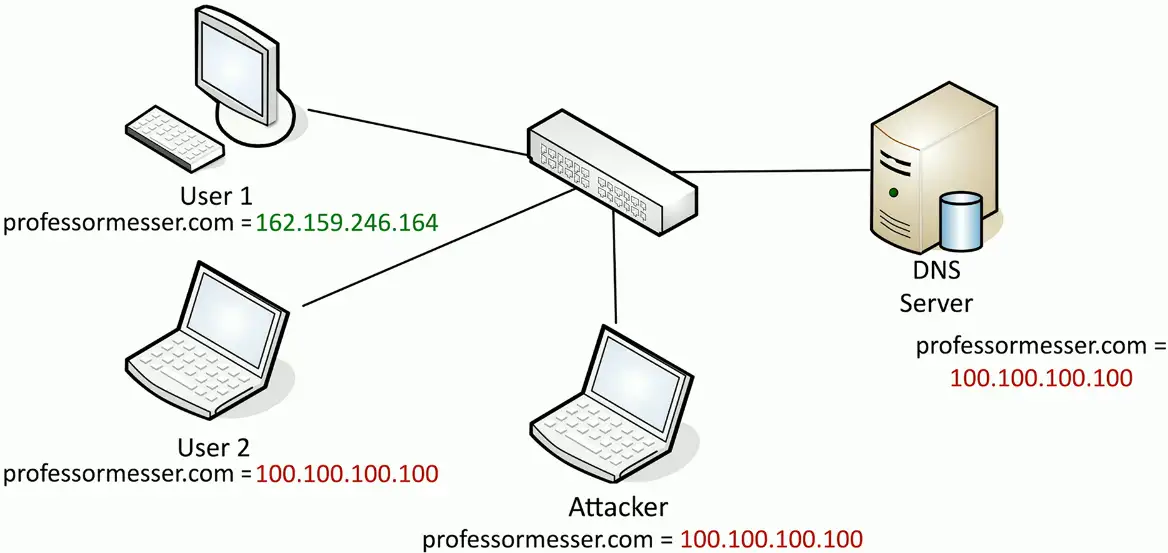
Rogue Services
Rogue DHCP server
IP addresses assigned by a non-authorized server
- There is no inherent security in DHCP
Client is assigned an invalid or duplicate address
- Intermittent connectivity, no connectivity
Disable rogue DHCP communication
- Enable DHCP snooping on your switch
- Authorized DHCP servers in Active Directory
Disable the rogue
- Renew the IP lease
Rogue Access Points
An unauthorized wireless access point
- May be added by an employee or an attacker
- Not necessarily malicious
- A significant potential backdoor
Very easy to plug in a wireless AP
- Or enable wireless sharing in your OS
Schedule a periodic survey
- Walk around your building/campus
- Use third-party tools/Wi-Fi Pineapple
Consider using 802.1X (Network Access Control)
- You must authenticate, regardless of the connection type
Wireless Evil Twins
Looks legitimate, but actually malicious
- The wireless version of phishing
Configure an access point to look like an existing network
- Same (or similar) SSID and security settings/captive portal
Overpower the existing access point
- May not require the same physical location
Wi-Fi hotspots (and users) are easy to fool
- And they are wide open
You encrypt your communication, right?
- Use HTTPS and a VPN
On-Path Network Attack
How can an attacker watch without you knowing?
- Formerly known as man-in-the-middle
Redirects your traffic
- Then passes it on to the destination
- You never know your traffic was redirected
ARP poisoning
- On-path attack on the local IP subnet
- ARP has no security
Other on-path attacks
Get in the middle of the conversation and view or change information
- Session hijacking
- HTTPS spoofing
- Wi-Fi eavesdropping
Encryption fixes most of these situations
- You can’t change what you cannot see
Social Engineering
Phishing
Social engineering with a touch of spoofing
- Often delivered by email, text, etc.
- Very remarkable when well done
Don’t be fooled
- Check the URL
Usually there’s something not quite right
- Spelling, fonts, graphic
Shoulder Surfing
You have access to important information
- Many people want to see
- Curiosity, industrial espionage, competitive advantage
This is surprisingly easy
- Airports/Flights
- Hallway-facing monitors
- Coffee shops
Surf from afar
- Binoculars/Telescope
- Easy in the big city
- Webcam monitoring
Prevent Shoulder Surfing
Control your input
- Be aware of your surroundings
Use privacy filters
- It’s amazing how well they work
Keep your monitor out of sight
- Away from windows and hallways
Don’t sit in front of me on your flight
- I can’t help myself
Tailgating and Piggybacking
Tailgating uses an authorized person to gain unauthorized access to a building
- The attacker does not have consent
- Sneaks through when nobody is looking
Piggybacking follows the same process, but the authorized person is giving consent
- Hold the door, my hands are full of donut boxes
- Sometimes you shouldn’t be polite
Once inside, there’s little to stop you
- Most security stops at the border
Watching for Tailgating
Policy for visitors
- You should be able to identify anyone
Once scan, one person
- A matter of policy or mechanically required
Access control Vestibule/Airlock
- You don’t have a choice
Don’t be afraid to ask
- Who are you, and why are you here?
Dumpster Diving
Mobile garbage bin
- United States brand name “Dumpster”
- Similar to a rubbish skip
Important information thrown out with the trash
- Thanks for bagging your garbage for me!
Gather details that can be used for a different attack
- Impersonate names, use phone numbers
Timing is important
- Just after end of month, end of quarter
Is it legal to dive in a dumpster?
I am not a lawyer.
In the US, it’s legal
- Unless there is a local restriction
If it’s in the trash, it’s open season
- Nobody owns it
Dumpsters on private property or “No Trespassing” signs may be restricted
- You cannot break the law to get to the rubbish
Questions? Talk to a legal professional.
Protect your rubbish
Secure your garbage
- Fence and a lock
Shred your documents
- This will only go so far
- Governments burn the good stuff
Go look at your trash
- What’s in there?
Malware
Malicious software
- These can be very bad
Gather information
- Keystrokes
Participate in a group
- Controlled over the network
Show you advertising
- Big money
Viruses and worms
- Encrypt your data
- Ruin your day
Malware Types and Methods
- Viruses
- Worms (Self replicating)
- Ransomware
- Trojan Horse
- Rootkit
- Keylogger
- Adware/Spyware
- Bloatware
- Logic Bomb (Wait for particular time to trigger)
How you get malware
These all work together
- A worm takes advantage of a vulnerability
- Install malware that includes a remote access backdoor
- Bot may be installed later
Your computer must run a program
- Email link — Don’t click links
- Web page pop-up
- Drive-by download
- Worm
Your computer is vulnerable
- OS — Keep your OS updated!
- Applications — Check with the publisher
Your data is valuable
Personal data
- Family pictures and videos
- Important documents
Organization data
- Planning documents
- Employee personally identifiable information (PII)
- Financial information
- Company private data
How much is it worth?
- There is a number