IP Services
DHCP
IPv4 address configuration used to be manual
- IP address, subnet mask, gateway, DNS servers, NTP servers, etc.
October 1993 — The bootstrap protocol
- BOOTP
BOOTP didn’t automatically define everything
- Some manual configurations were still required
- BOOTP also didn’t know when an IP address might be available again
Dynamic Host Configuration Protocol
- Initially released in 1997, updated through the years
- Provides automatic address/IP configuration for almost all devices
DHCP Process
DORA
- A four-step process
Discover
- Find a DHCP server
Offer
- Get an offer
Request
- Lock in the offer
Acknowledge
- DHCP server confirmation
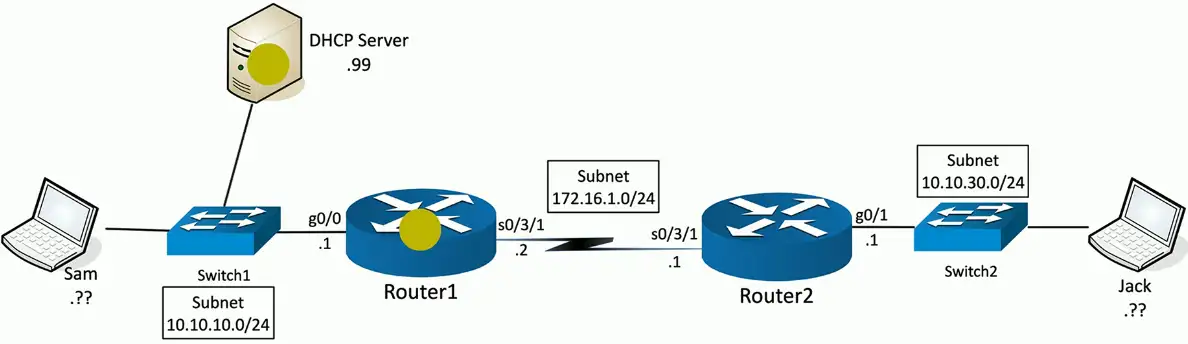
Step 1: Discover
DHCP Discover sent from Sam (0.0.0.0:udp/68) to 255.255.255.255:udp/67
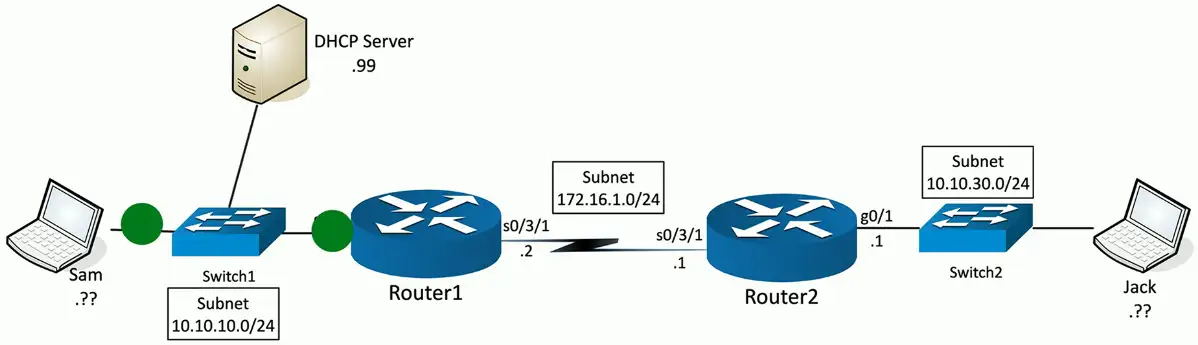
Step 2: Offer
DHCP Offer sent from DHCP Server (10.10.10.99:udp/67) to 255.255.255.255:udp/68
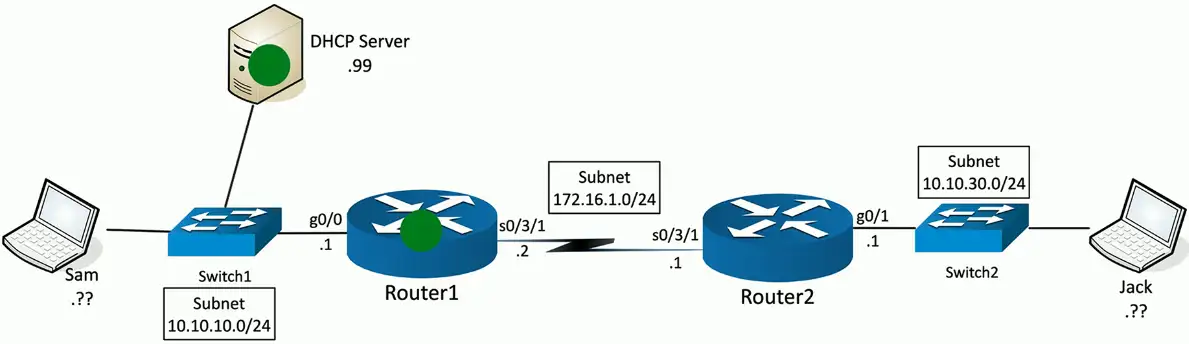
Step 3: Request
DHCP Request sent from Sam (0.0.0.0/udp:68) to 255.255.255.255:udp/67
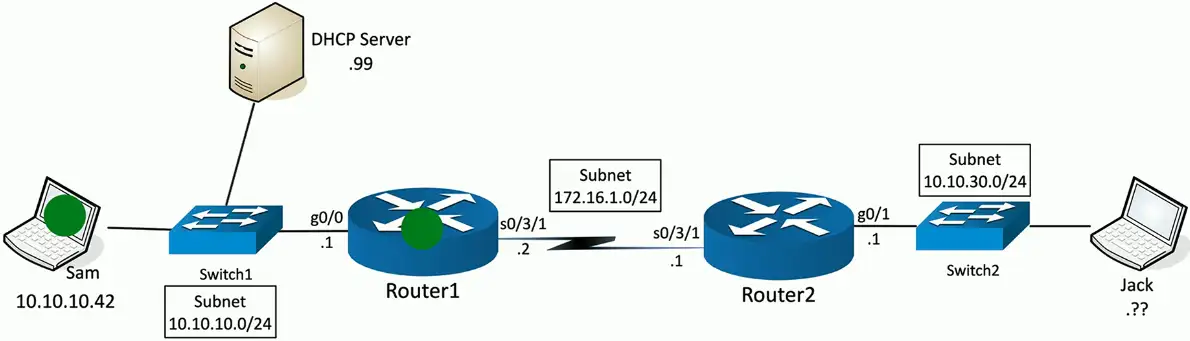
Step 4: Acknowledgement
DHCP Acknowledgement sent from DHCP Server (10.10.10.99:udp/67) to 255.255.255.255:udp/68
Managing DHCP in the Enterprise
Limited Communication range
- Uses the IPv4 broadcast domain
- Stops at a router
Multiple servers needed for redundancy
- Across different locations
Scalability is always an issue
- May not want (or need) to manage DHCP servers at every remote location
You’re going to need a little help(er)
- Send DHCP request across broadcast domains
DHCP relay
Discover: DHCP relay changes the source IP address to 10.10.30.1:udp/68 and the destination address to 10.10.10.99:udp/67
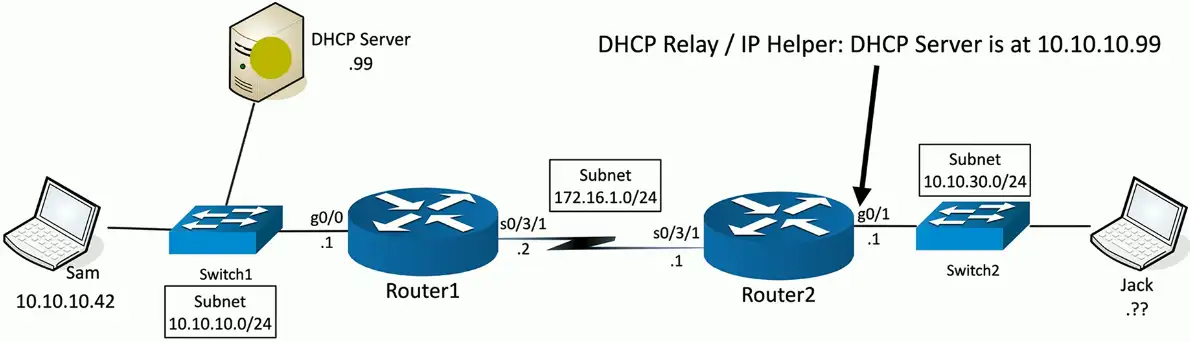
Offer with DHCP relay
DHCP offer sent from DHCP Server (10.10.10.99:udp/67) to 10.10.30.1:udp/68
Router with IP helper-address changes the destination IP address to 255.255.255.255, and sent as a broadcast message to local subnet.
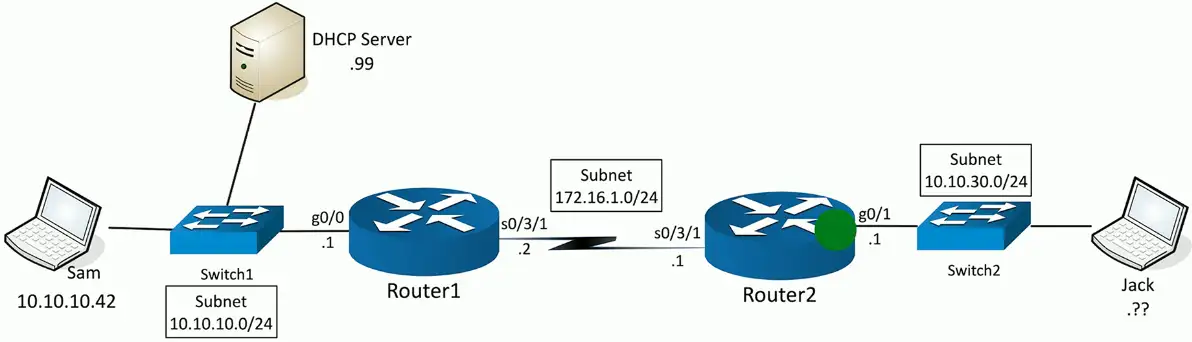
The process repeats itself for the remaining two processes, REQUEST/ACKNOWLEDGEMENT through the DHCP relay until, and finally the device gets the IP from the DHCP server.
Configuring DHCP
Scope Properties
IP address range
- And excluded addresses
Subnet mask
Lease durations
Other scope options
- DNS server
- Default gateway
- VoIP servers
DHCP Pools
Grouping of IP addresses
- Each subnet has its own scope
- 192.168.1.0/24
- 192.168.2.0/24
- 192.168.3.0/24
- …
A scope is generally a single contiguous pool of IP addresses
- DHCP exclusions can be made inside the scope
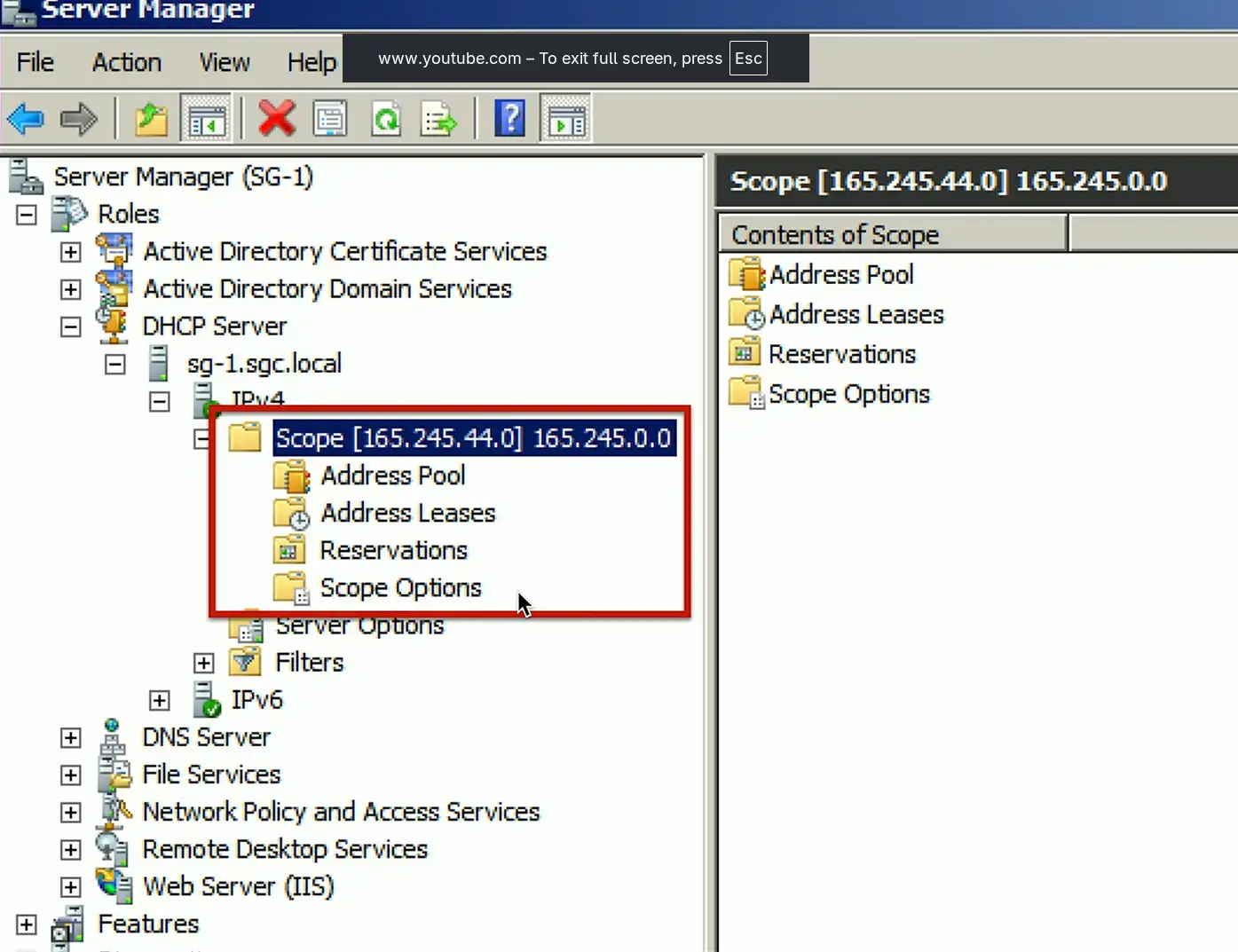
DHCP address assignment
Dynamic assignment
- DHCP server has a big pool of addresses to give out
- Addresses are reclaimed after a lease period
Automatic assignment
- Similar to dynamic allocation
- DHCP server keeps a list of past assignments
- You will always get the same IP address
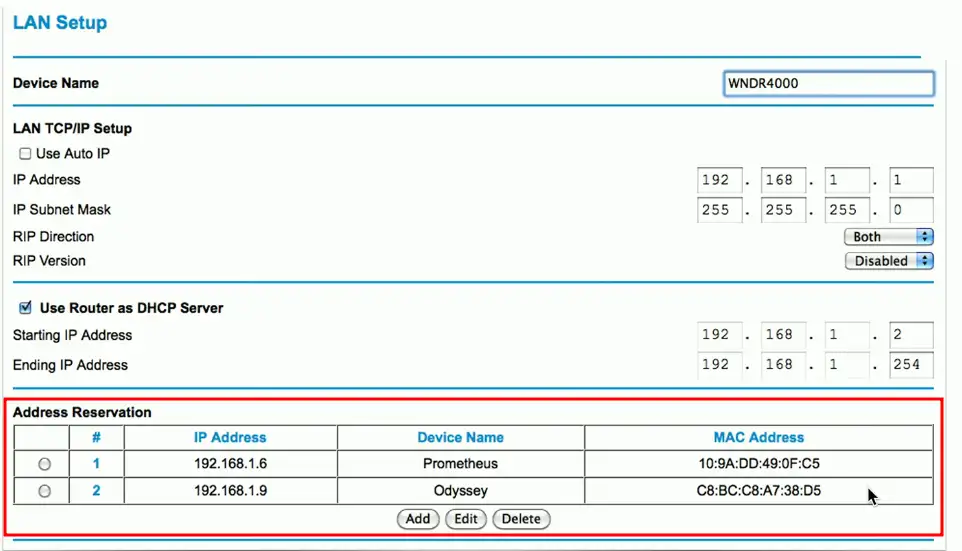
Address reservation
Address reservation
- Administratively configured
Table of MAC addresses
- Each MAC address has a matching IP address
Other names
- Static DHCP Assignment
- Static DHCP
- IP Reservation
DHCP leases
Leasing your address
- It’s only temporary
- But it can seem permanent
Allocation
- Assigned a lease time by the DHCP server
- Administratively configured
Reallocation
- Reboot your computer
- Confirms the lease
Workstation can also manually release the IP address
- Moving to another subnet
DHCP renewal
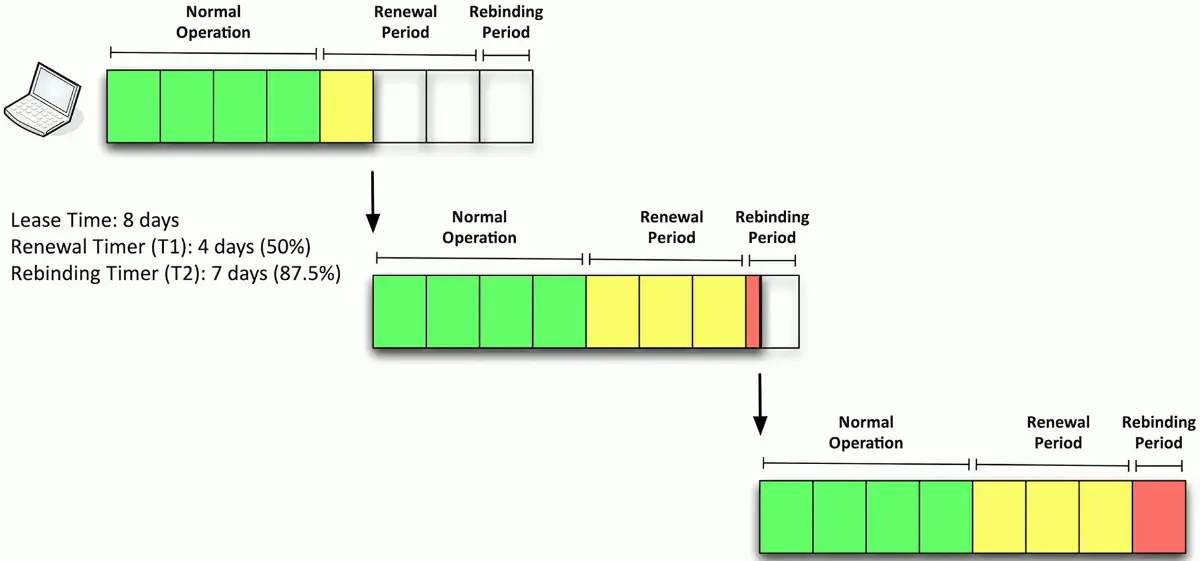
T1 timer
- Check in with the lending DHCP server to renew the IP address
- 50% of the lease time (by default)
T2 timer
- If the original DHCP server is down, try rebinding with any DHCP server
- 87.5% of the lease time (7/8ths)
The DHCP lease process
- After half-time, T1 timer will be passed, and the device asks for another lease
- Another half-period later, T1 timer will be expired, and there is no DHCP server to respond for lease renewal
- The device waits until the rebinding period (7/8ths) begins
- The device will send another lease request, and enterprise environments have fallback DHCP server configured. The backup DHCP server will get this request and renew the lease period.
DHCP options
A special field in the DHCP message
- Many, many options
Options are part of the DHCP RFC
- BOOTP called them “vendor extensions”
256 (254 usable) options
- O through 255
- 0 is
pad, 255 isend
Many common options
- Subnet mask, domain name server, domain name, etc.
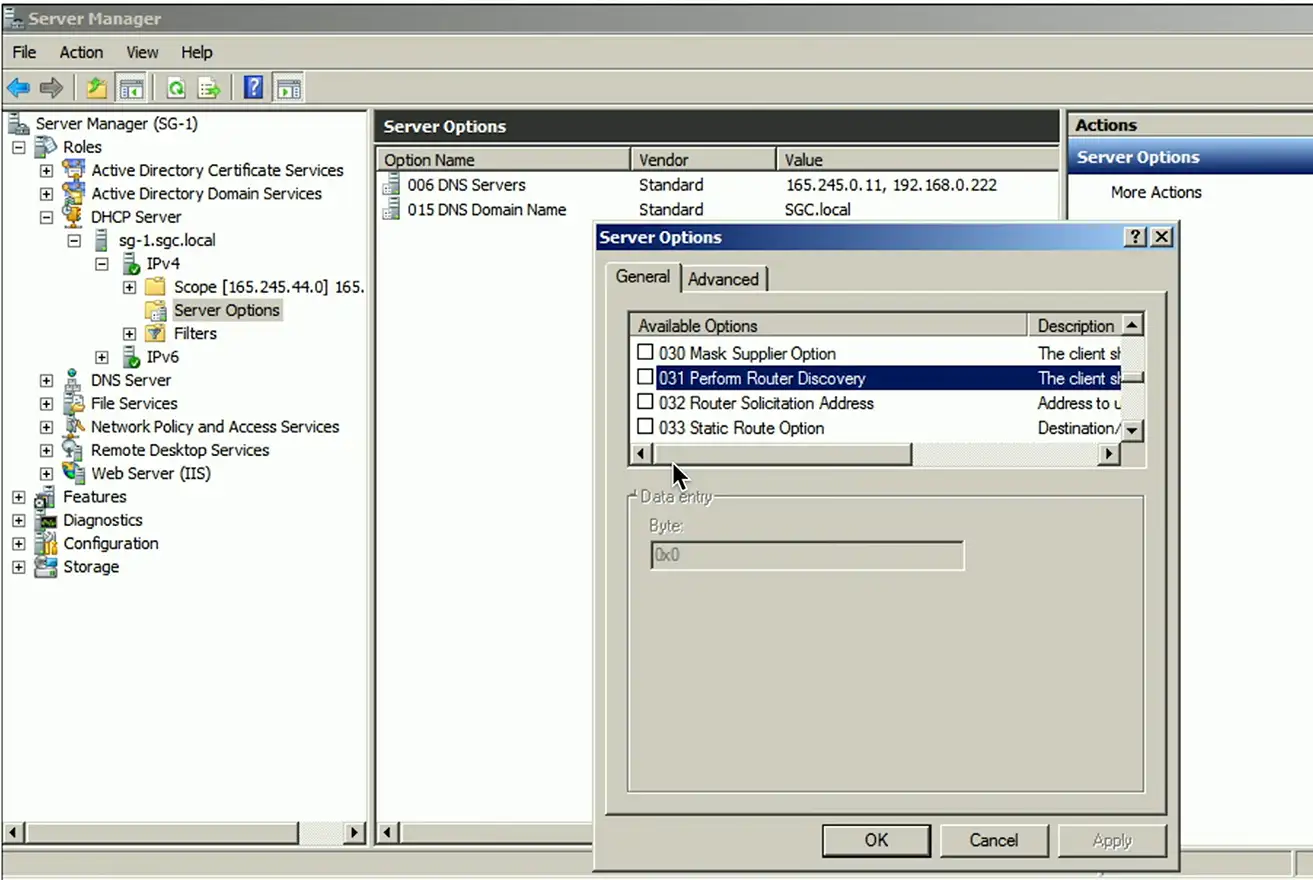
Options are configured on the DHCP server
- Not all DHCP servers support option configuration
Options have been added through the years
- Option 129: Call Server IP address
- Option 135: HTTP Proxy for phone-specific applications
IPv6 and SLAAC
Automatic IP addressing in IPv6
DHCP servers
- Similar process as IPv4
- Requires redundant DHCP servers
- Ongoing administration
Stateless addressing
- No separate server keeping the state
- No tracking IP or MAC addresses
- Lease time don’t exist
NDP (Neighbor Discovery Protocol)
No broadcasts!
- Operates using multicast over ICMPv6
Neighbor MAC discovery
- Replaces the IPv4 ARP
SLAAC (Stateless Address Autoconfiguration)
- Automatically configure an IP address without a DHCP server
DAD (Duplicate Address Detection)
- No duplicate IPs!
Discover routers
- Router Solicitation (RS) and Router Advertisement (RA)
Finding Router
ICMPv6 adds the Neighbor Discovery Protocol

Router also sends unsolicited RA messages
- From the multicast destination of
ff02::1
Transfers IPv6 address information, prefix value, prefix length, DNS server, etc.
SLAAC (Stateless Address Autoconfiguration)
Determine the IP prefix using NDP (Neighbor Discovery Protocol)
- Router Solicitation (RS) and Router Advertisement (RA)
Use the IP prefix with a modified EUI-64 address (or randomize)
- Put them together to make a complete IPv6 address
| 64-bit IPv6 Subnet Prefix | Interface ID |
|---|---|
| 2001:0dn8:0000:0001: | 8e2d:aaff:fe4b:98a7 |
Before using, use NDP’s DAD (Duplicate Address Detection)
- Just to be sure you are the only one with that IPv6 address
An Overview of DNS
Domain Name System
Translates human-readable names into computer-readable IP addresses
- You only need to remember www.ProfessorMesser.com
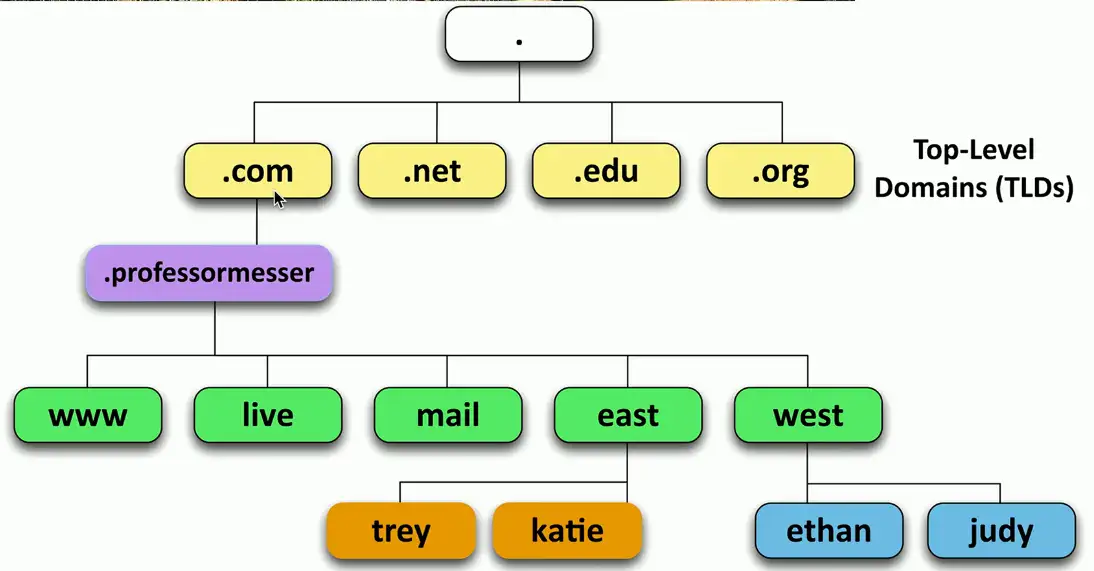
Hierarchical
- Follow the path
Distributed database
- Many DNS servers
- 13 root server cluster (Over 1,000 actual servers)
- Hundreds of generic top-level (gTLDs) — .com, .org, .net, etc.
- Over 275 country code top-level domain (ccTLDs) — .us, .ca, .uk, etc.
The DNS hierarchy
FQDN (Fully Qualified Domain Name)
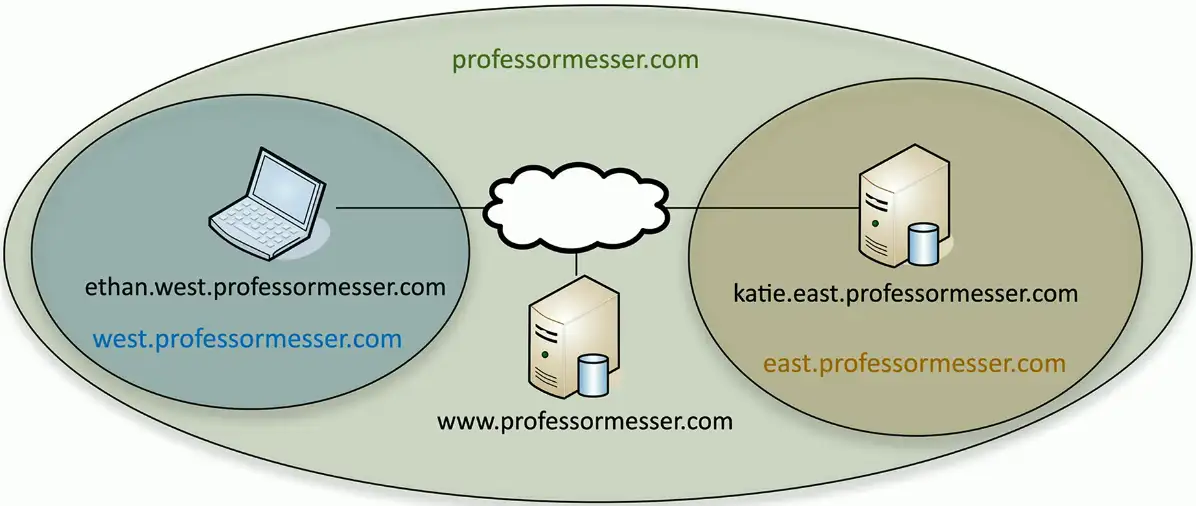
Primary and secondary DNS servers
DNS is an important service
- Internet, Active Directory, application access
- Redundant servers are commonly used
Primary DNS server
- Contains all the zone information for a domain
- Changes and updates are made to the primary server
Secondary DNS server
- Zone information is read-only
- Zone transfers are pushed from the primary DNS server
The primary/secondary updates are invisible to the end user
Local name resolution
You might need to override the DNS server
- Access a test server
- DNS server might be configured incorrectly
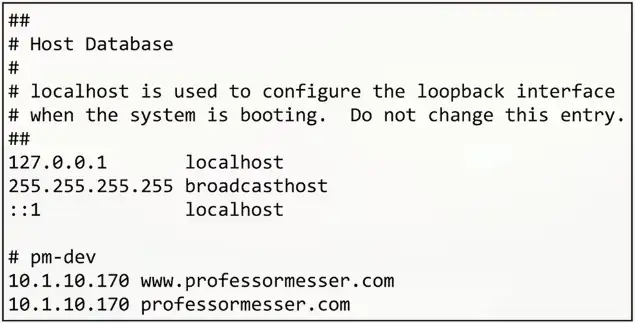
Hosts file
- Contains a list of IP addresses and host names
- These are the preferred resolutions
Some apps may not use the hosts file
- Check the browser or app docs
Location
- Windows:
C:\Windows\System32\Drivers\etc\hosts - Linux:
/etc/hosts
Lookups
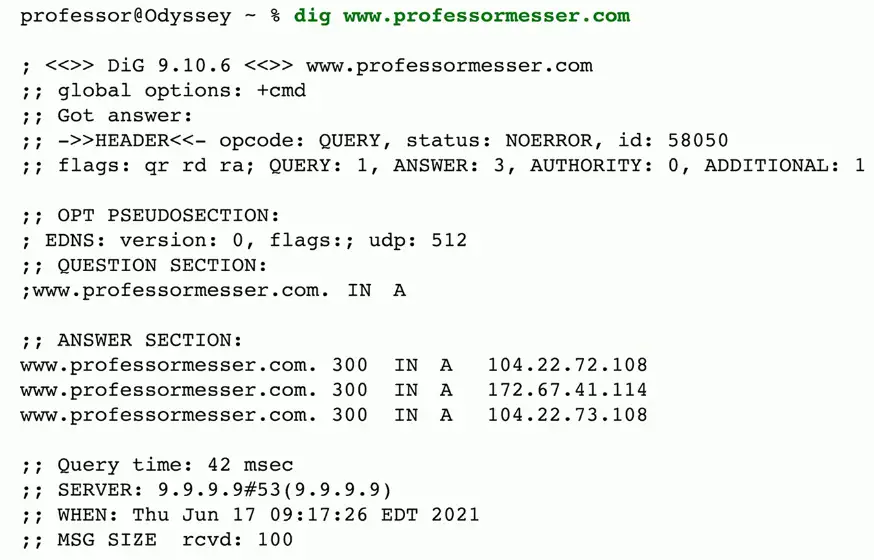
Forward lookup
- Provides the DNS server with an FQDN
- DNS server responds with an IP address
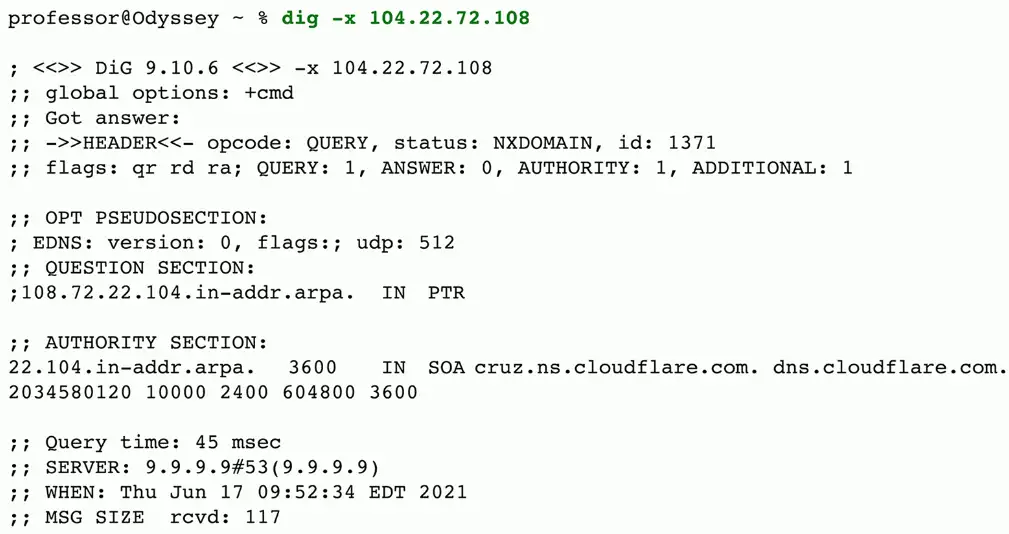
Reverse DNS
- Provides the DNS server with an IP address
- The DNS server responds with an FQDN
Forward Lookup:
Reverse Lookup:
The Authority
Authoritative
- The DNS server is the authority for the zone
Non-authoritative
- Doesn’t contain the zone source files
- Probably cached information
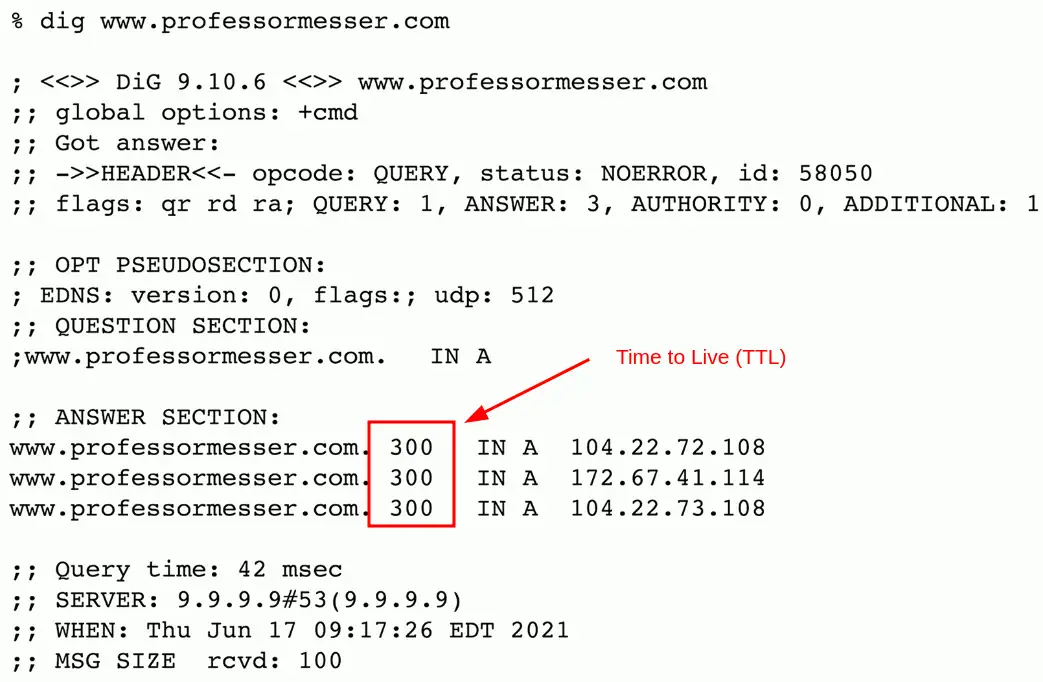
TTL (time to live)
- Configured on the authoritative server
- Specifies how long a cache is valid
- A very long TTL can cause problems if changes are made
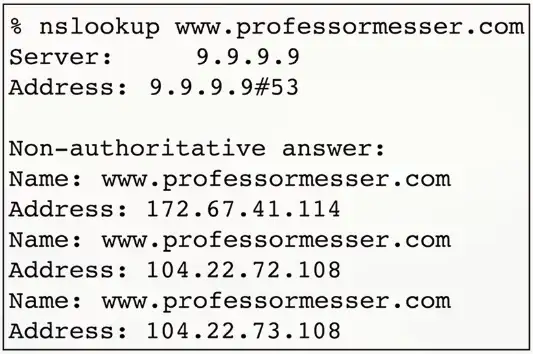
The DNS response usually contains the TTL information until the authoritative servers are rechecked for updated DNS information.
Recursive DNS queries
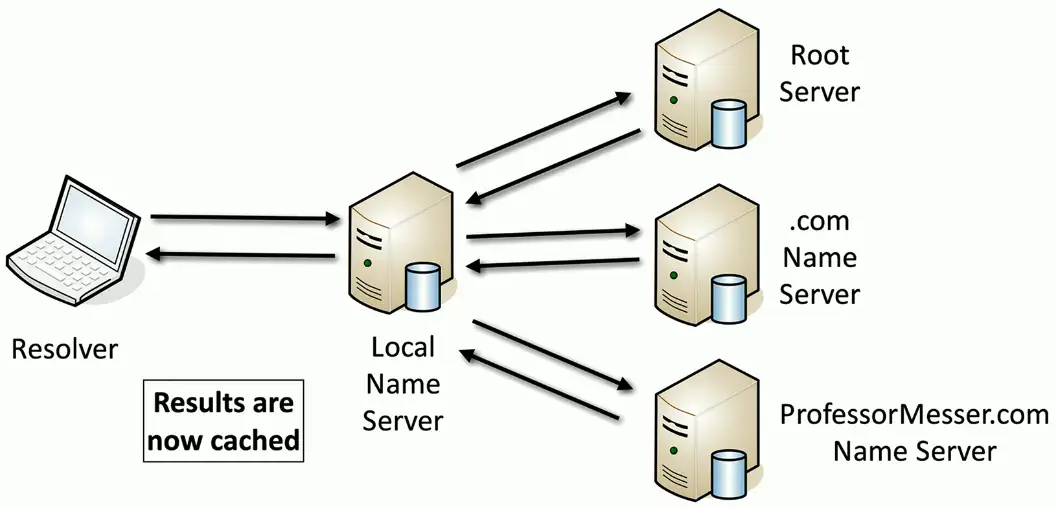
Recursive query
- Delegate the lookup to a DNS server
The DNS server does the work and reports back
- Large DNS cache provides a speed advantage
Future queries use the local cache
- Cache entries eventually timeout and are removed
Securing DNS
DNS is often transmitted in the clear
- No built-in encryption
- Relatively easy to spoof
- Redirect email to a different mail server
Domain Name Security Extensions (DNSSEC)
- DNS responses from the server are digitally signed
- A forgery would be easily identified
- Requires additional configurations on the DNS server
Encrypting DNS
DNS requests and responses are sent in the clear
- Anyone can view the traffic
- Security and privacy concerns
DNS over TLS (DOT)
- Send DNS traffic over tcp/853, but encrypt it with TLS/SSL
DNS over HTTPS (DoH)
- Send DNS traffic in an HTTPS packet
- Looks like a web server communication over tcp/443
- Some browsers use DoH by default
DNS Records
Resource Records (RR)
- The database records of domain name services
Over 30 record types
- IP addresses, certificates, host alias names, etc.
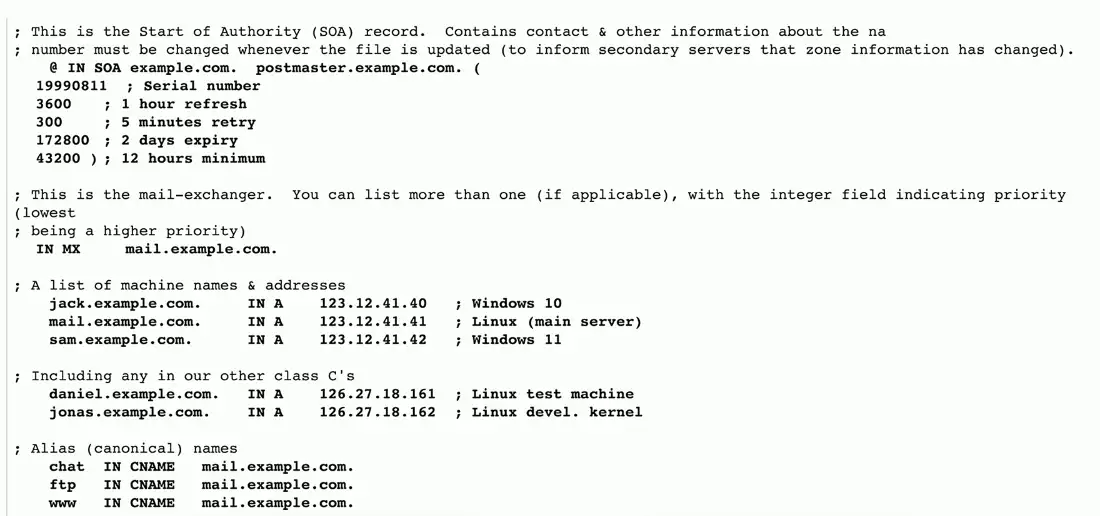
Sample Forward Lookup File
Start of Authority (SOA)
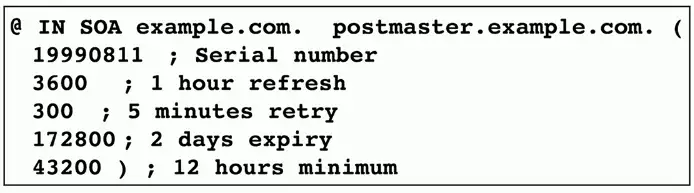
Describes the DNS zone details
Structure
- In SOA (Internet zone, Start of Authority) with name of zone
- Serial number
- Refresh, retry, and expiry timeframes
- Caching duration/TTL (Time To Live)
Address Records (A) (AAAA)
Defines the IP address of a host
- This is the most popular query
A records are for IPv4 addresses
- Modify the A record to change the host name to IP address resolution
AAAA records are for IPv6 addresses
- The same DNS server, different records

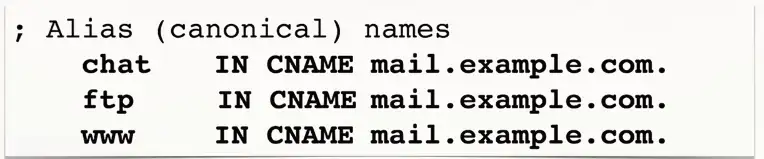
Canonical Name Records (CNAME)
A name is an alias of another, canonical name
- One physical server, multiple services
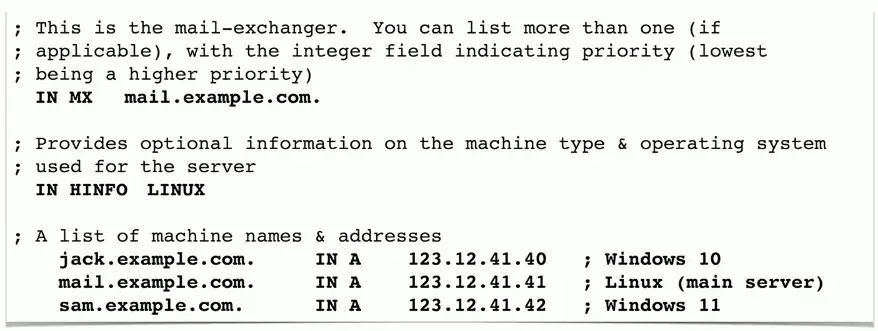
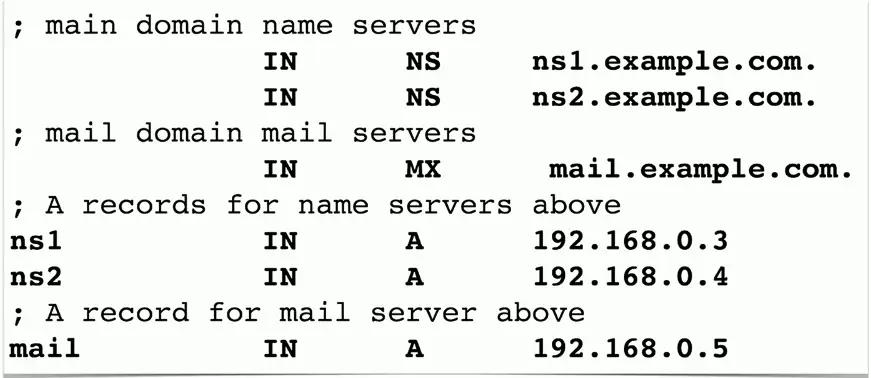
Mail Exchanger Record (MX)
Determines the host name for the mail server
- This isn’t an IP address; it’s a name
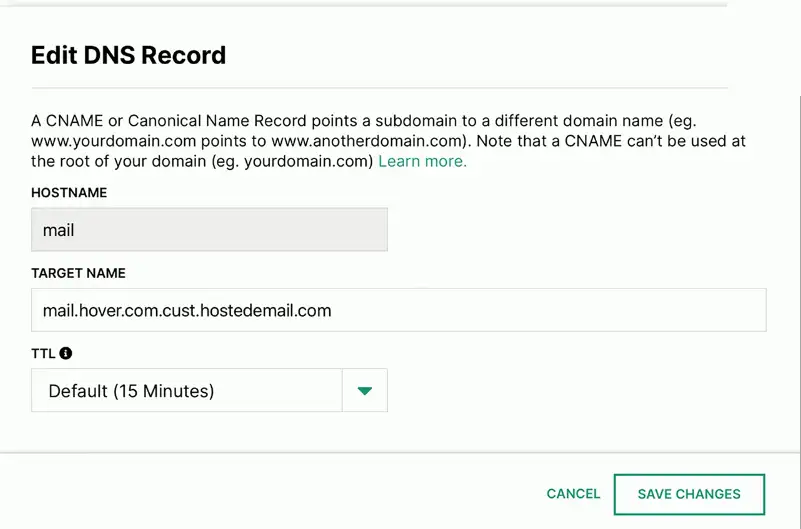
Some DNS servers only provide web-based front-end instead of text based MX records:
Text Records (TXT)
Human-readable text information
- Useful public information
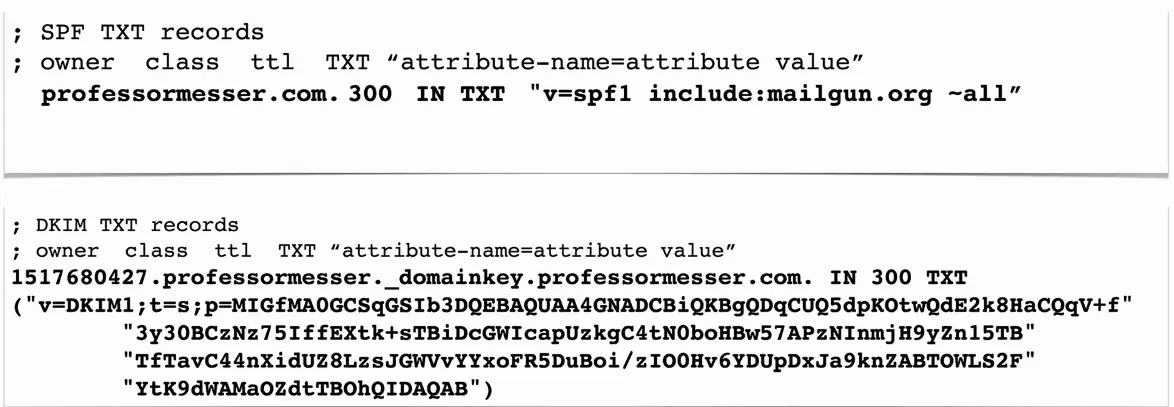
SPF protocol (Sender Policy Framework)
- Prevent mail spoofing
- Mail servers check that incoming mail really did come from an authorized host
DKIM (Domain Keys Identified Mail)
- Digitally sign your outgoing mail
- Validated by the mail server, not usually seen by the end user
- Put your public key in the DKIM TXT record
Name Sever Records (NS)
List the name servers for a domain
- NS records point to the name of the server
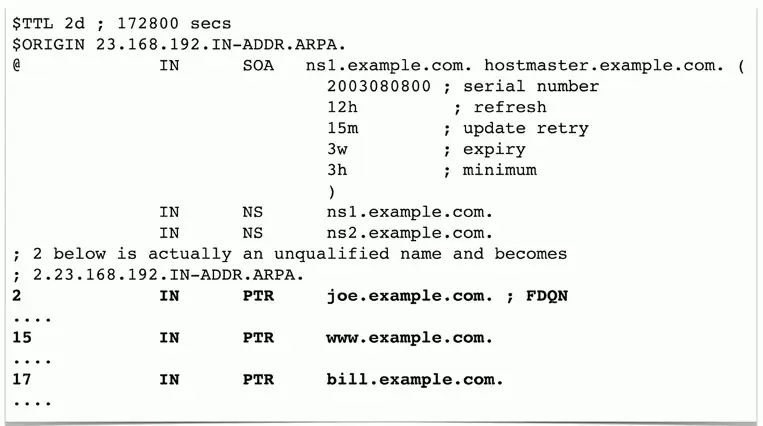
Pointer Record (PTR)
The reverse of an A or AAAA record
- Added to a reverse map zone file
Time Protocols
NTP (Network Time Protocol)
Switches, routers, firewalls, servers, workstations
- Every device has its own clock
Synchronizing the clocks becomes critical
- Log files, authentication information, outage details
Automatic updates
- No flashing 12:00 lights
Flexible
- You can control how clocks are updated
Very accurate
- Accuracy commonly measured in the tens of milliseconds
NTP Clients and Servers
NTP server
- Listens on udp/123, responds to time requests from NTP clients
- Doesn’t modify their own time
NTP client
- Requests time updates from NTP server
NTP client/server
- Requests time updates from an NTP server
- Responds to time requests from other NTP clients
Important to plan your NTP strategy
- Which devices are clients, servers, and client/servers?
Network Time Security (NTS)
NTP sends traffic in the clear
- The time of day isn’t really a secret
The wrong time can be a significant problem
- How do you know your NTP server response can be trusted
NTP is updated to provide authentication
- NTP information can be trusted
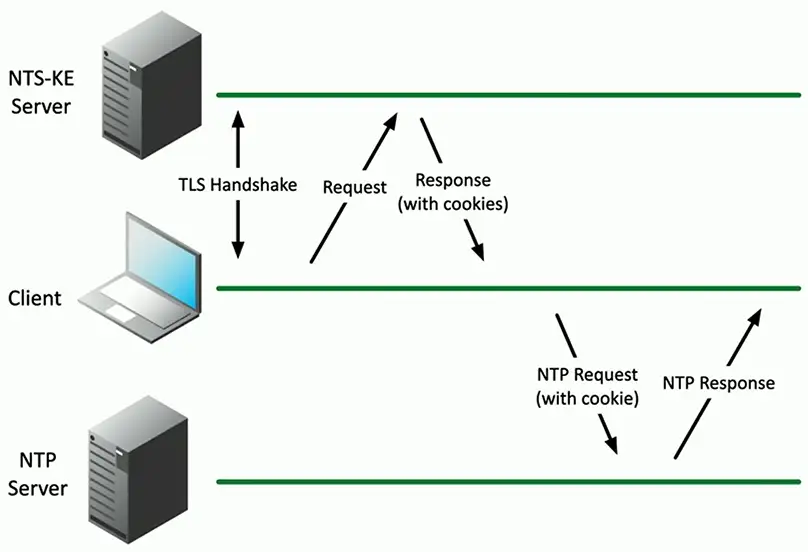
TLS handshake is used for key exchange
- Get authorization cookie from an NTS key exchange server
Connect to an NTP server using this authentication
- Both requests and responses are validated
Precision Time Protocol (PTP)
A more precise time protocol
- A hardware-based time synchronization
Nanosecond granularity
- Important for industrial applications, financial trading, etc.
Often implemented as specialized hardware
- Avoids delays from the OS and applications