Subsections of CompTIA SY0-701 Security+
How to Pass Your SY0-701 Security+ Exam
The CompTIA Security+ Advantages
CompTIA stands for Computing Technology Industry Association .
The most popular
builds a solid foundation
Many organizations require some type of certifications
Knowledge and satisfaction
Recognition in over 100 countries
Available in different languages
About this Training Course
SY0-701
Released in Nov. 7, 2023
Smaller video duration
Quick and easy
Follows the CompTIA exam objectives
90 minutes, max of 90 questions
Passing score: 750 on a scale of 100-900
Exam Questions
Multiple Choice
Very straightforward
Single, multiple answers
Performance based
Complete a task
Matching, sorting, drag-and-drop etc.
Security Controls
Security risks are out there
Many categories and types to consider
Assets are also varied
Data, physically property, computer systems
Prevent security events, minimize the impact, and limit the damage
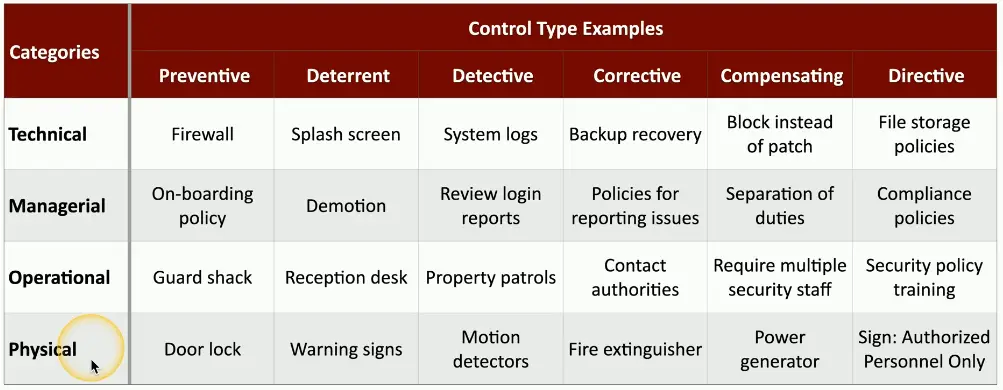
Control Categories
Technical Controls
Controls implemented using systems
OSes controls
Firewalls, anti-viruses
Managerial Controls
Admin controls associated with security design and implementation
Security policies, SOPs
Operational Controls
Controls implemented by people instead of systems
Security guards, awareness programs
Physical Controls
Limit physical access
Guard shack
Fences, locks
Badge readers
Preventive Control Types
Preventive
Block access to a resource
You shall not pass
Prevent access
Firewall rules
Follow security policy
Guard shack checks all identification
Enable door locks
Deterrent Control Types
Deterrent
Discourage an intrusion attempt
Doesn’t directly prevent access
Make an attacker think twice
Application splash screens
Threat of demotion
Front reception desk
Posted warning signs
Detective Control Types
Detective
Identify and log an intrusion attempt
May not prevent access
Find the issue
Collect and review system logs
Review login reports
Regularly patrol the property
Enable motion detectors
Corrective Control Types
Corrective
Apply a control after an event has been detected
Reverse the impact of an event
Continue operating with minimal downtime
Correct the problem
Restoring from backups can mitigate a ransomware infection
Create policies for reporting security issues
Contact law enforcement to manage criminal activity
Use a fire extinguisher
Compensating Control Types
Compensating
Control using other means
Existing controls aren’t sufficient
May be temporary
Prevent the exploitation of a weakness
Firewall blocks a specific application instead of patching the app
Implement a separation of duties
Require simultaneous guard duties
Generator used after power outage
Directive Control Types
Managing Security Controls
These are not inclusive lists
There are many categories of control
Some organizations will combine types
There are multiple security controls for each category and type
Some security controls may exist in multiple types or categories
New security controls are created as systems and processes evolve
Your organization may use very different controls
Security Concepts
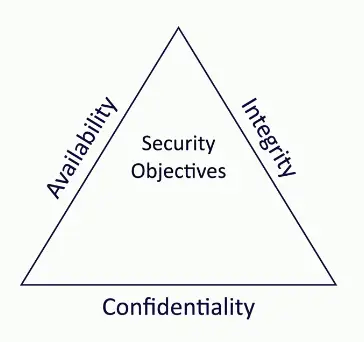
The CIA Triad
Combination of principles
The fundamentals of security
Sometimes referenced as the AIC Triad
Confidentiality
Prevent disclosure of information to unauthorized individuals or systems
Integrity
Messages can’t be modified without detection
Availability
Systems and networks must be up and running
1. Confidentiality
Certain information should only be known to certain people
Prevent unauthorized information disclosure
Encryption
Encode messages so only certain people can read it
Access Controls
Selectively restrict access to a resource
Two-factor Authentication
Additional confirmation before information is disclosed
2. Integrity
Data is stored and transferred as intended
Any modification to the data would be identified.
Hashing
Map data of an arbitrary length to data of a fixed length
Digital Signatures
Mathematical scheme to verify the integrity of data
Certificates
Combine with a digital signature to verify an individual
Non-repudiation
Provides proof of integrity, can be asserted to be genuine!
3. Availability
Information is accessible to authorized users
Always at your fingertips
Redundancy
Build services that will always be available
Fault Tolerance
System will continue to run, even when a failure occurs
Patching
Stability
Close security holes
Non-repudiation
You can’t deny what you have said
There is no taking it back
Signs a contract
Your signature adds non-repudiation
You really did sign the contract
Others can see your signature
Adds a different perspective for cryptography
Proof of integrity
Proof of origin, with high assurance of authenticity
Proof of integrity
Verify data doesn’t change
The data remains accurate and consistent
In cryptography, we use a hash
Represents data as a short string of text
A message digest, a fingerprint
If the data changes, the hash changes
If the person changes, you get a different fingerprint
Does not necessarily associate data with an individual
Only tells you if the data has changed
Proof of Origin
Prove the message was not changed
Prove the source of the message
Make sure the signature isn’t fake
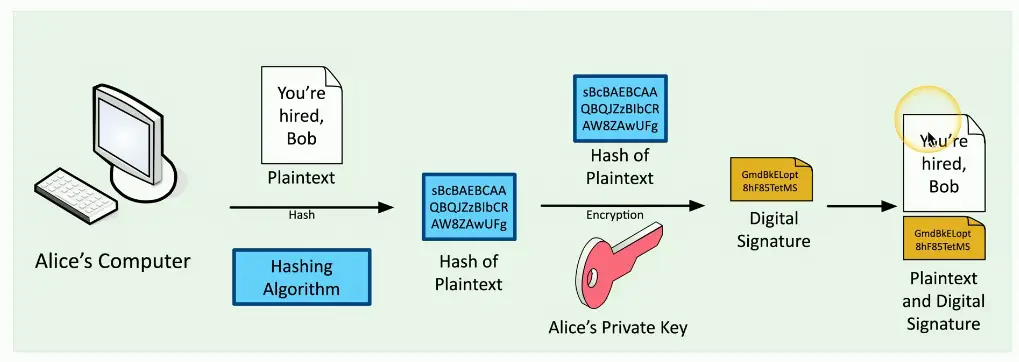
Sign with the private key
The message doesn’t need to be encrypted
Nobody else can sign this (obviously)
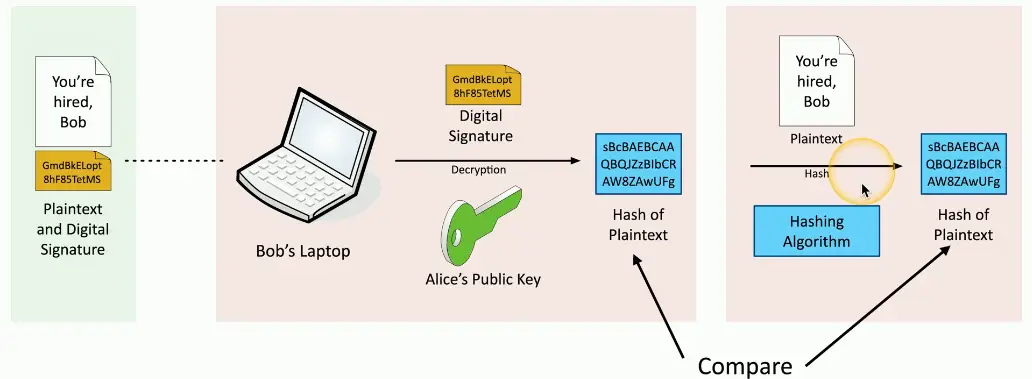
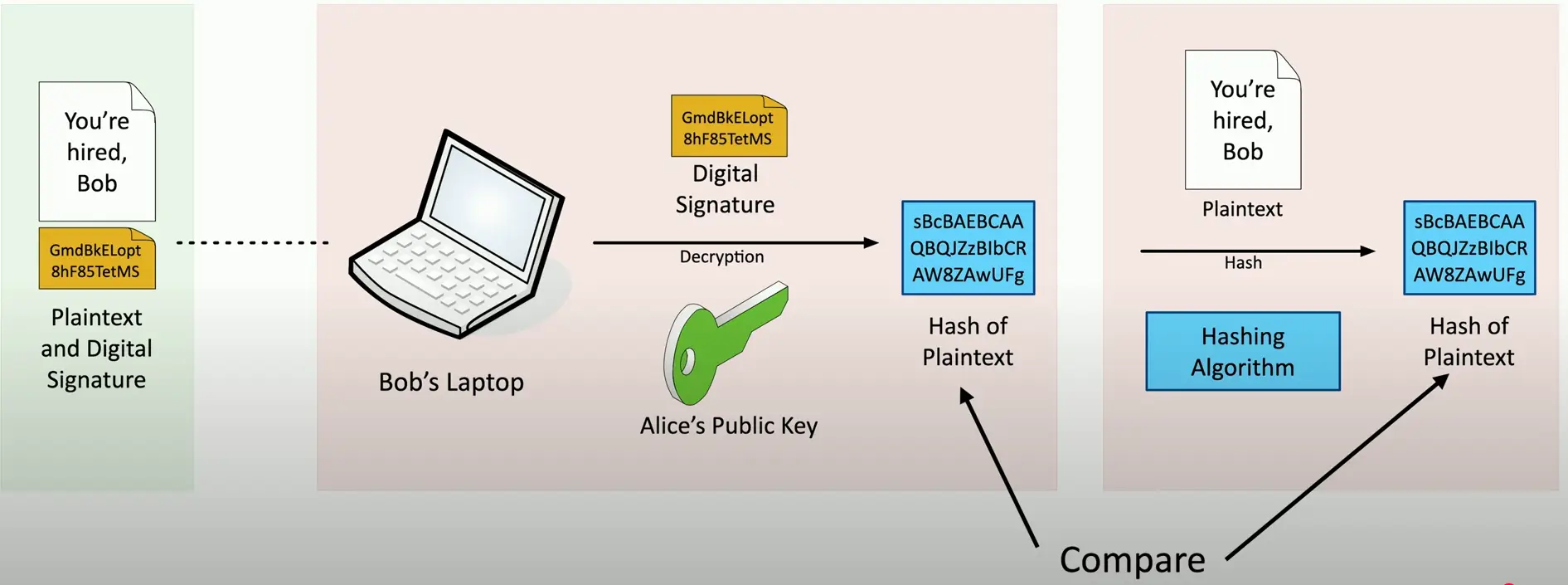
Verify with the public key
Any change to the message will invalidate the signature
Verifying a Digital Signature
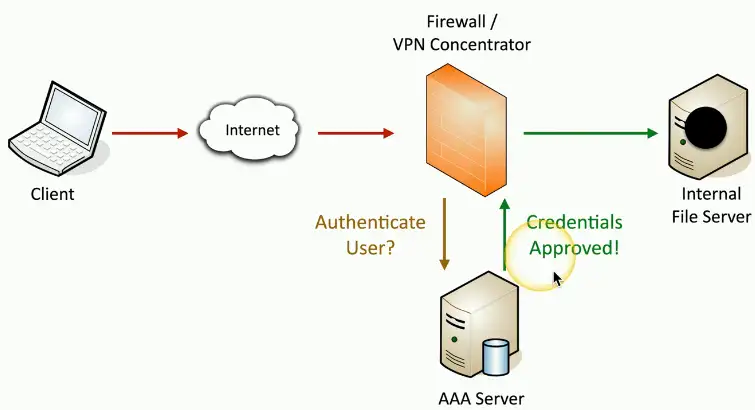
Authentication, Authorization, and Accounting (AAA) Framework
Identification
This is who you claim to be
Usually your username
Authentication
Prove you are who you say you are
Password and other authentication factors
Authorization
Based on your identification and authentication, what access do you have?
Accounting
Resources used: Login time, data sent and received, logout time
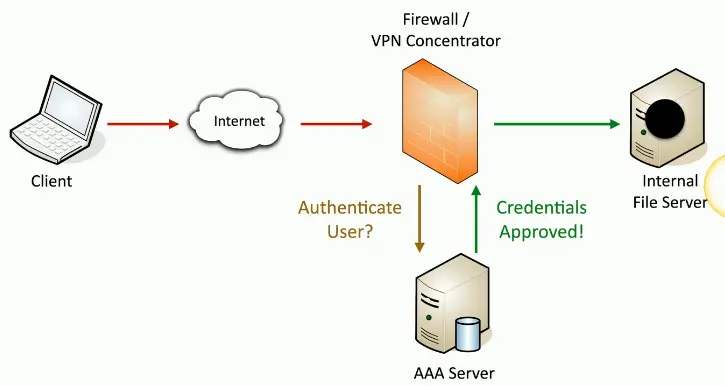
Authenticating People
Authenticating Systems
You have to manage many devices
Often devices that you will never physically see
A system can’t type a password
And you may not want to store one
How can you truly authenticate a device
Put a digitally signed certificate on the device
Other business processes rely on the certificate
Acess to the VPN from authorized devices
Management software can validate the end device
Certificate Authentication
An organization has a trusted Certificate Authority (CA)
Most organizations maintain their own CAs
The organization creates a certificate for a device
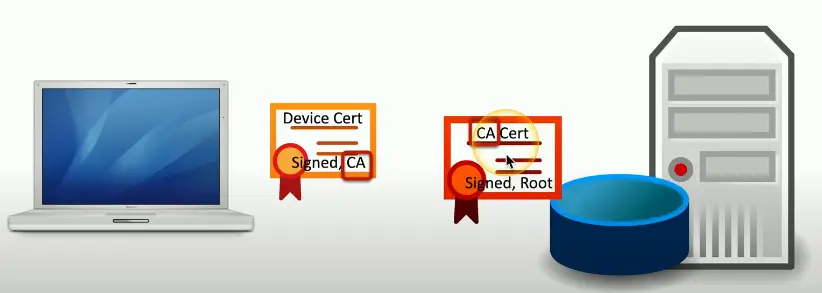
And digitally signs the certificate with the organization’s CA
The certificate can now be included on a device as an authentication factor
The CA’s digital signature is used to validate the certificate
Certificate-based Authentication
Authorization Models
The user or device has now authenticated
To what do they now have access?
Time to apply an authorization model
Users and services ⇾ data and applications
Associating individual users to access rights doesn’t scale
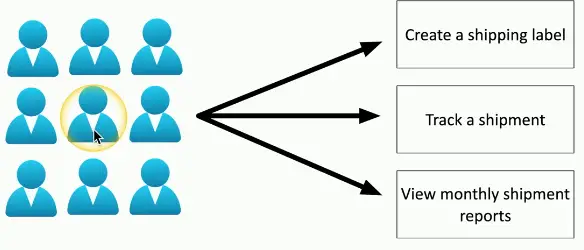
Put an authorization model in the middle
Define by Roles, Organizations, Attributes, etc.
No Authorization Model
A simple relationship
Some issues with this method
Difficult to understand why an authorization may exist
Doesn’t scale
Using an Authorization Model
Add an abstraction
Reduce complexity
Create a clear relationship between the user and the resource
Administration is streamlined
Easy to understand the authorizations
Support any number of users or resources
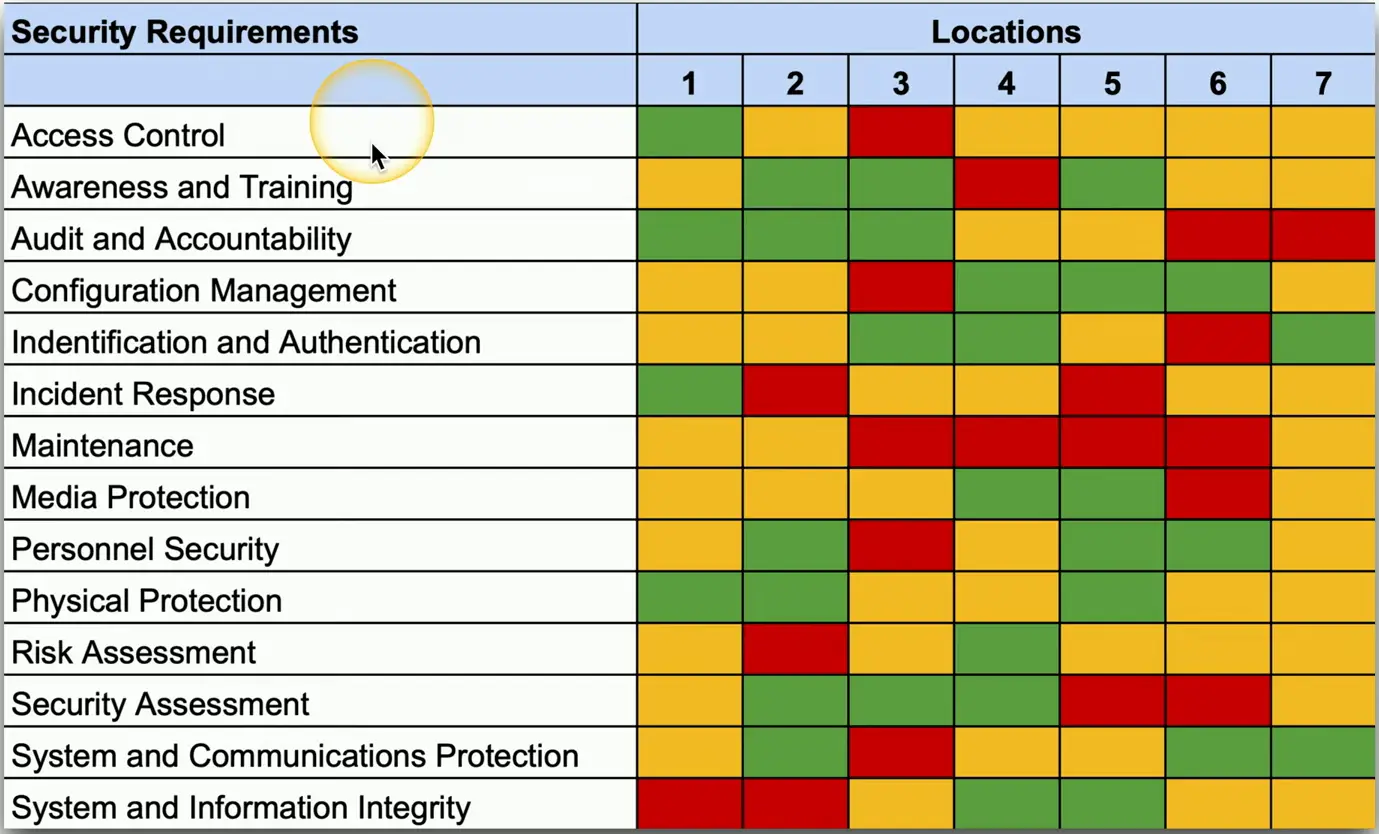
Gap Analysis
Where you are compared with where you want to be
The “gap” between the two
This may require extensive research
There is a lot to consider
This can take weeks or months
An extensive study with numerous participants
Get ready for emails, data gathering, and technical research
Choosing the Framework
Get the baseline of employees
Formal experience
Current training
Knowledge of security policies and procedures
Examine the current processes
Research existing IT systems
Evaluate existing security policies
Compare and Contrast
The comparison
Evaluate existing systems
Identify weakness
Along with the most effective processes
A detailed analysis
Examine broad security categories
Break those into smaller segments
The Analysis and Report
The final comparison
Detailed baseline objectives
A clear view of the current state
Need a path to get from the current security to the goal
This will almost certainly include time, money, and lots of change control
Time to create the gap analysis report
A formal description of the current state
Recommendations for meeting the baseline
Gap Analysis Overview
Zero Trust
Many networks are relatively open on the inside
Once you’re through the firewall, there are few security controls
Zero trust is a holistic approach to network security
Covers every device, every process, every person
Everything must be verified
Nothing is inherently trusted
Multi-factor authentication, encryption, system permissions, additional firewalls, monitoring, and analytics etc.
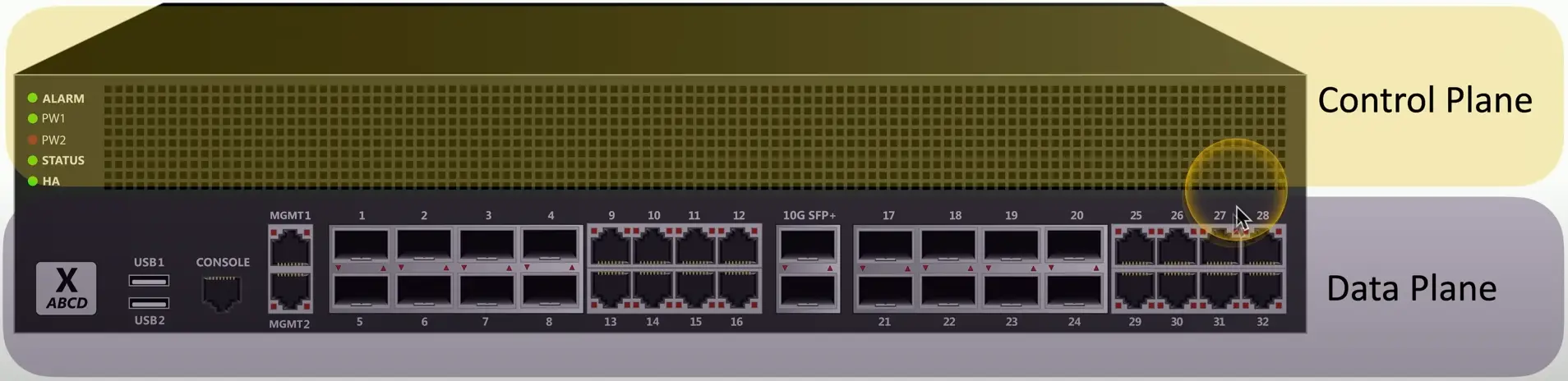
Planes of Operation
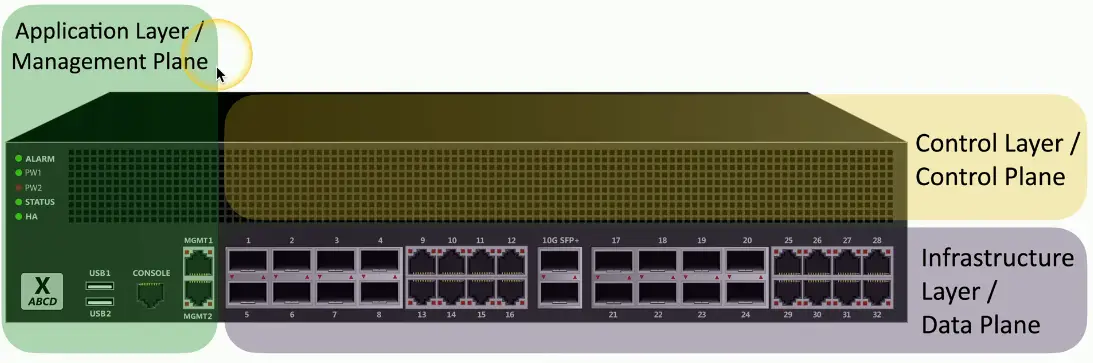
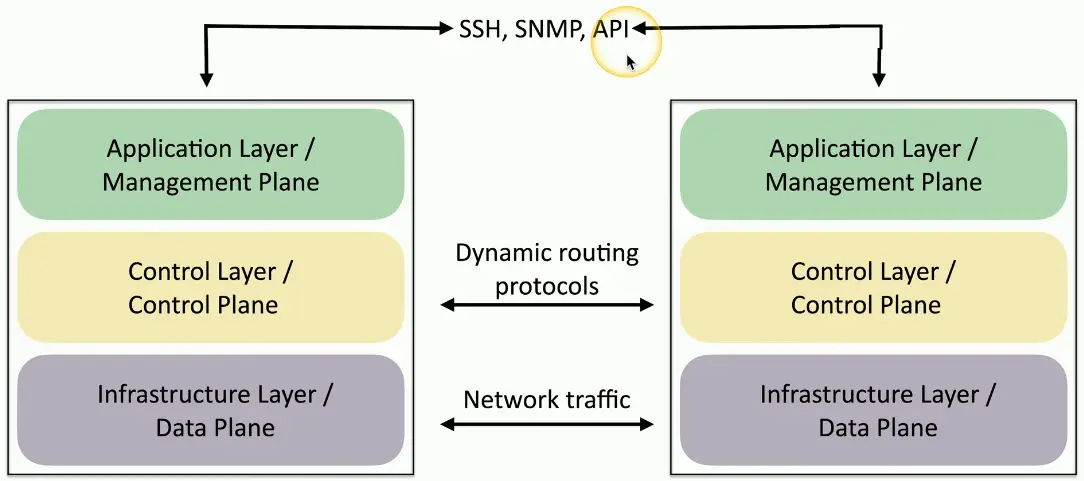
Split the network into functional planes
Applies to physical, virtual, and cloud components
Data Plane
Process the frames, packets, and network data
Processing, forwarding, trunking, encrypting, NAT
Control Plane
Manages the actions of the data plane
Define policies and rules
Determine how packets should be forwarded
Routing tables, session tables, NAT tables
Extend the Physical Architecture
Separate into functional tasks
Incorporate into hardware or software
Controlling Trust
Adaptive Identity
Consider the source and the requested resources
Multiple risk indicators — relationship to the organization, physical location, type of connection, IP address, etc.
Make the authentication stricter, if needed
Threat Scope Reduction
Decrease the number of possible entry points
Policy-driven access control
Combine the adaptive identity with a predefined set of rules
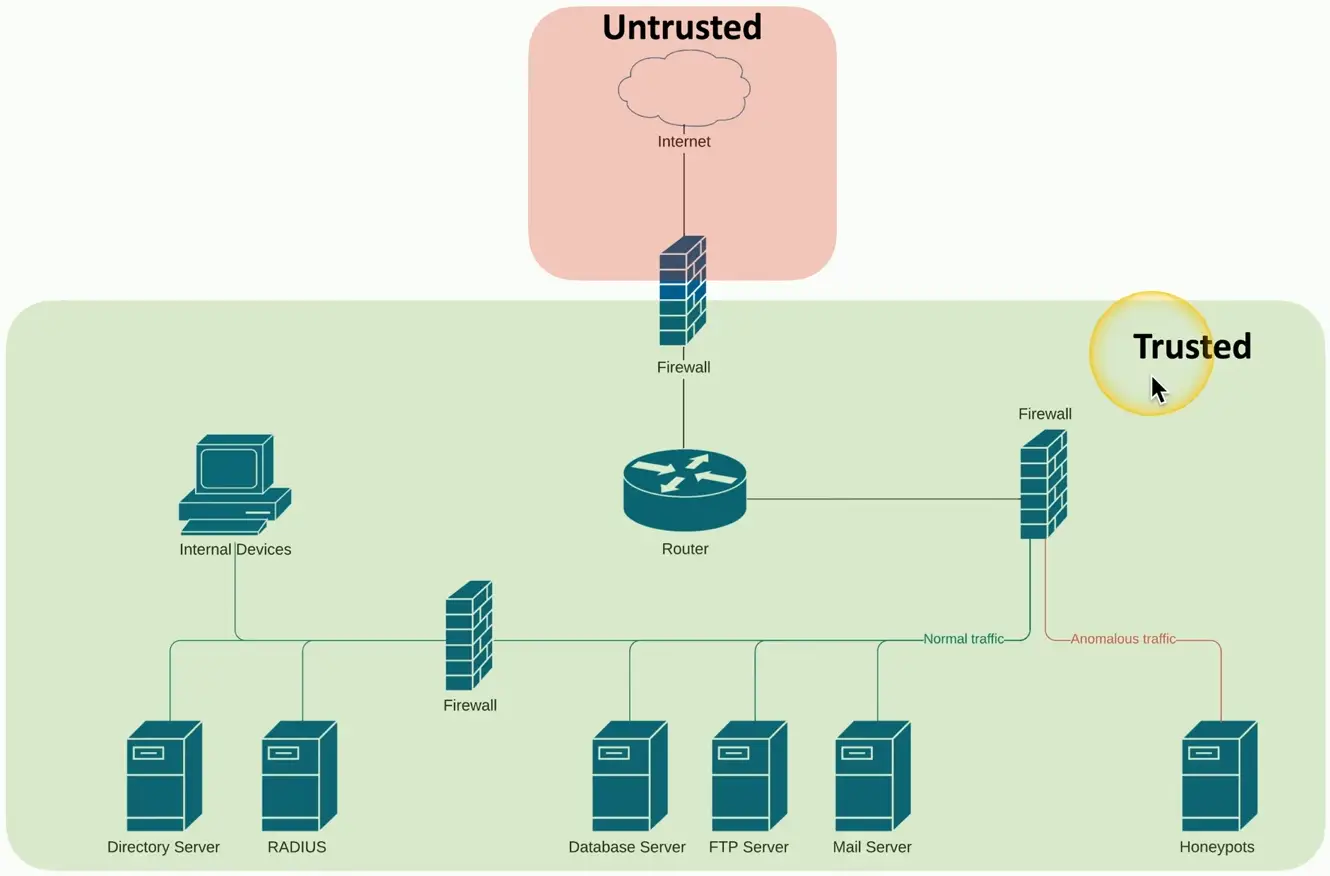
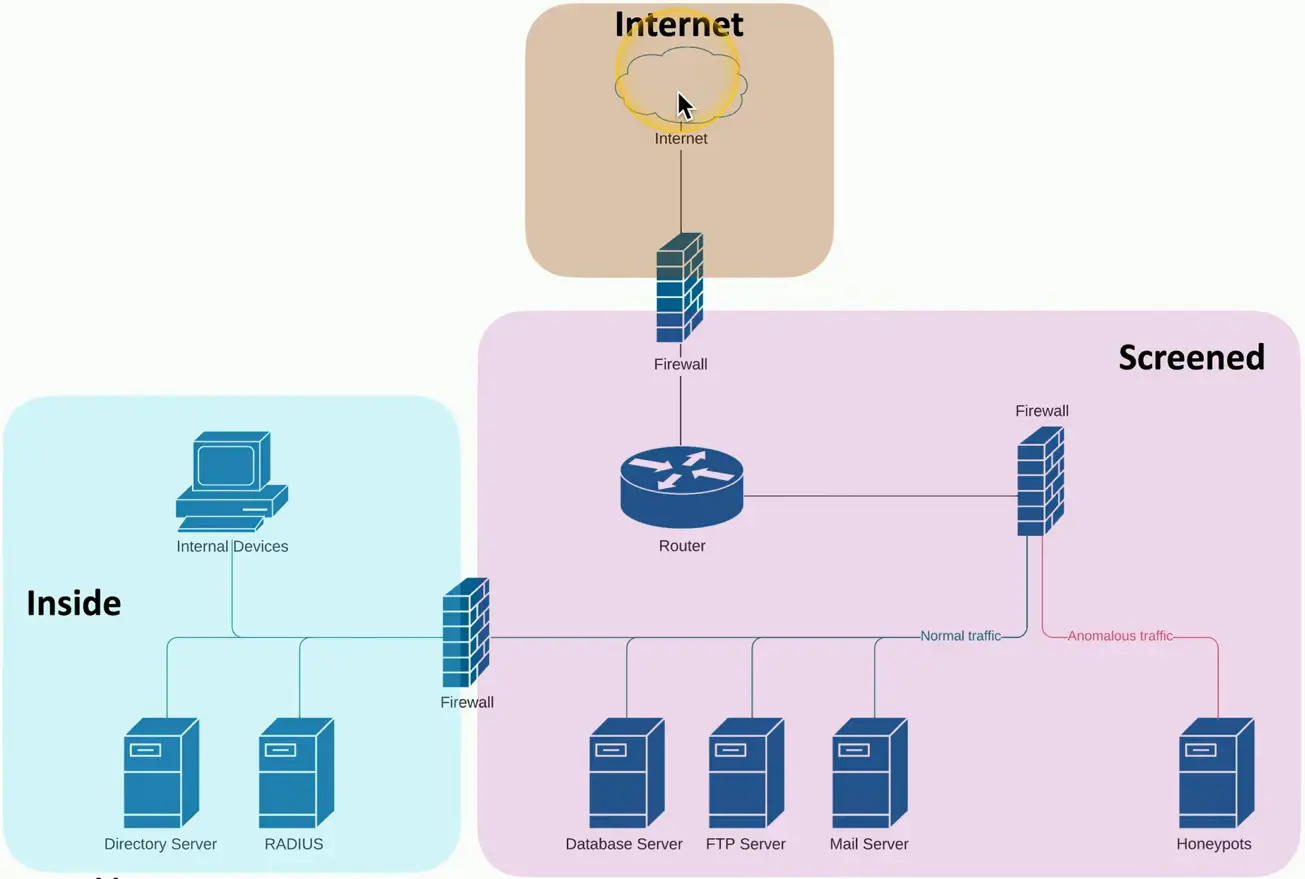
Security Zone
Security is more than a one-to-one relationship
Broad categorization provide a security-based foundation
Where are you coming from and where are you going
Trusted, untrusted
Internal network, external network
VPN 1, VPN 5, VPN 11
Marketing, IT, Accounting, HR
Using the zones may be enough by itself to deny access
For example, Untrusted to Trusted zone traffic
Some zones are implicitly trusted
For example, Trusted to Internal zone traffic
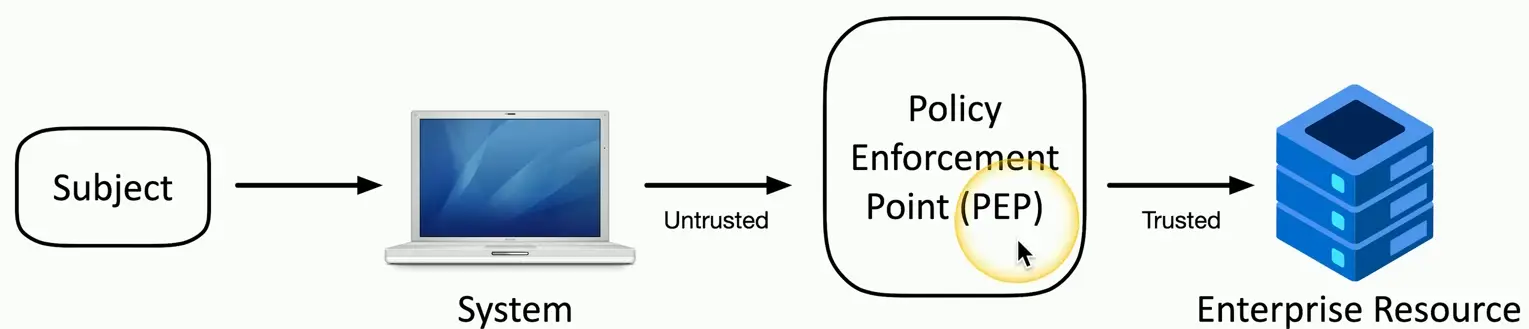
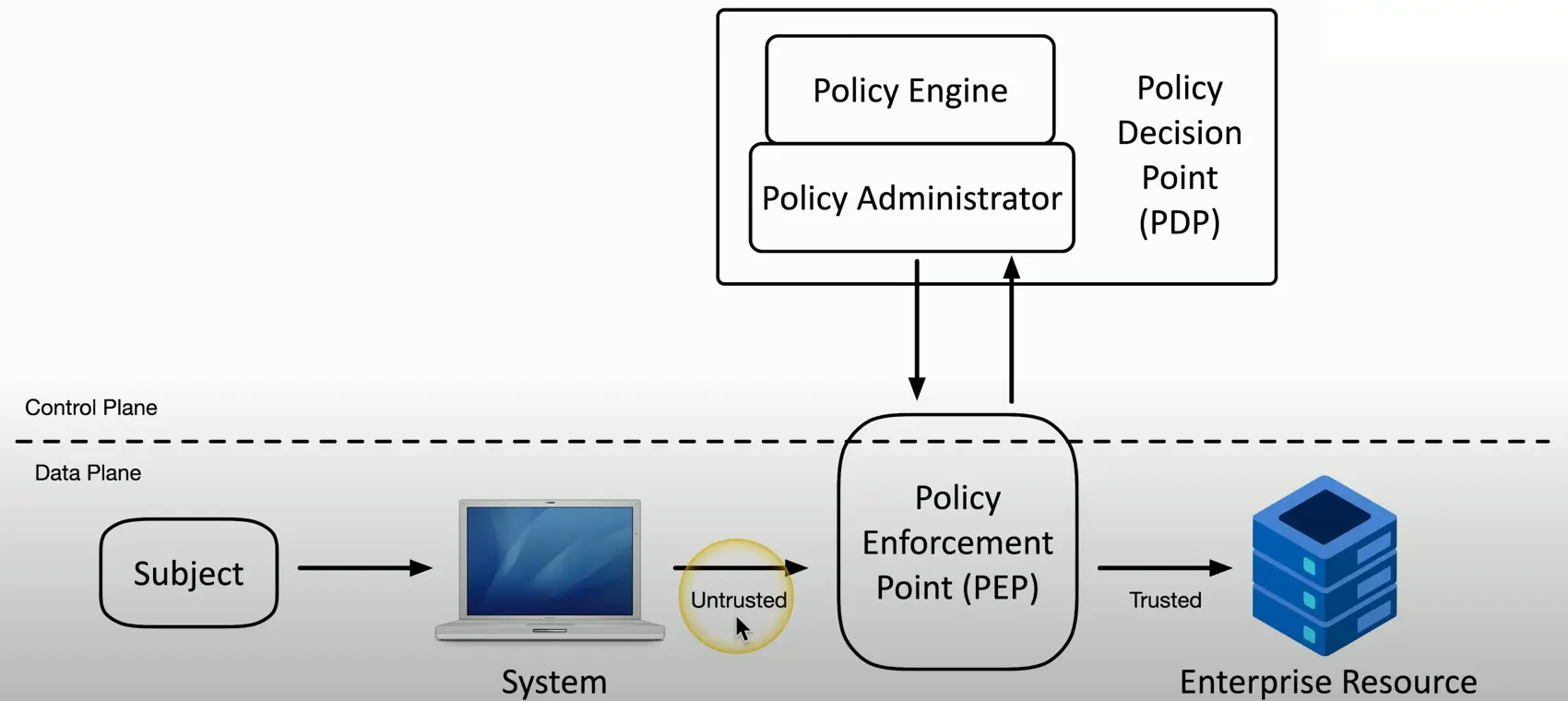
Policy Enforcement Point
Subjects and systems
End users, applications, non-human entities
Policy enforcement point (PEP)
Allow, monitor, and terminate connections
Can consist of multiple components working together
Applying Trust in the Planes
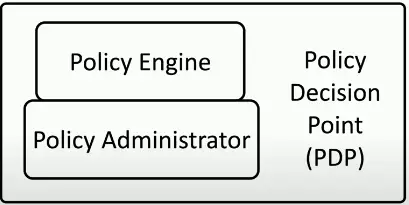
Policy Decision Point
There’s a process for making an authentication decision
Policy Engine
Evaluates each access decision based on policy and other information sources
Grant, deny, or revoke
Policy Administration
Communicates with the Policy Enforcement Point
Generates access tokens or credentials
Tells PEP to allow or disallow access
Zero Trust Across Planes
Physical Security
Barricades/ Bollards
Prevent access
There are limits to the prevention
Channel people through a specific access point
And keep out other things
Allow people, prevent cars and trucks
Identify safety concerns
Can be used to an extreme
Concrete barriers/bollards
Moats (Water ditch around the facility)
Access Control Vestibules
All doors normally unlocked
Opening one door causes others to lock
All doors normally locked
Unlocking one door prevents others from being unlocked
One door open/others locked
When one is open, the other cannot be unlocked
One at a time, controlled groups
Managed control through an area
Fencing
Build a perimeter
Usually very obvious
May not be what you’re looking for
Transparent or opaque
See through fence (or not)
Robust
Difficult to cut the fence
Prevent Climbing
Video Surveillance
CCTV (Closed circuit television)
Can replace physical guards
Camera features are important
Motion recognition can alarm and alert when something moves
Object detection can identify a license plate or person’s face
Often many cameras
Networked together and recorded over time
Guards and Access Badges
Security Guard
Physical protection at the reception area of a facility
Validate identification of existing employees
Two-person integrity/control
Minimize exposure to an attack
No single person has access to a physical asset
Access badge
Picture, name, other details
Must be worn at all times
Electronically logged
Lighting
More light means more security
Attackers avoid the light
Easier to see when lit
Non IR cameras can see better
Specialized design
Consider overall light levels
Lighting angles may be important
Avoid shadows and glare
Sensors
Infrared
Detects infrared radiation in both light and dark
Common in motion detectors
Pressure
Detects a change in force
Floor and window sensors
Microwave
Detects movement across large areas
Ultrasonic
Send ultrasonic signals, receive reflected sound waves
Detect motion, collision detection etc.
Deception and Disruption
Honeypots
Attract the bad guys
The “attacker” is probably a machine
Makes for interesting recon
Honeypots
Create a virtual world to explore
Many options
Most are open source and available to download
Constant battle to discern the real from the fake
Honeynets
A real network includes more than a single device
Servers, workstations, routers, switches, firewalls
Honeynets
Build a larger deception network with one or more honeypots
More than one source of information
Honeyfiles
Attract the attackers with more honey
Create files with fake information
Something bright and shiny
Honeyfiles
Bait for the honeynet (passwords.txt)
Add many honeyfiles to files shares
An alert is sent if the file is accessed
Honeytokens
Track the malicious actors
Add some traceable data to the honeynet
If the data is stolen, you will know where it came from
API Credentials
Doesn’t actually provide access
Notifications are sent when used
Fake email addresses
Add it to a contact list
Monitor the internet to see who posts it
Many other honeytoken examples
Database records, browser cookies, web page pixels
Change Management
Change Management
How to make a change
Upgrade software, patch an application, change firewall configuration, modify switch ports
One of the most common risks in the enterprise
Often overlooked or ignored
Have clear policies
Frequency, duration, installation process, rollback procedures
Sometimes extremely difficult to implement
It’s hard to change corporate culture
Change Approval Process
A formal process for managing change
Avoid downtime, confusion, and mistakes
A typical approval process
Complete the request forms
Determine the purpose of the change
Identify the scope of the change
Schedule a date and time of the change
Determine affected systems and the impact
Analyze the risk associated with the change
Get approval from the change control board
Get end-user acceptance after the change is complete
Ownership
An individual or entity needs to make a change
They own the process
They don’t (usually) perform the actual change
The owner manages the process
Process updates are provided to the owner
Ensures the process is followed, and acceptable
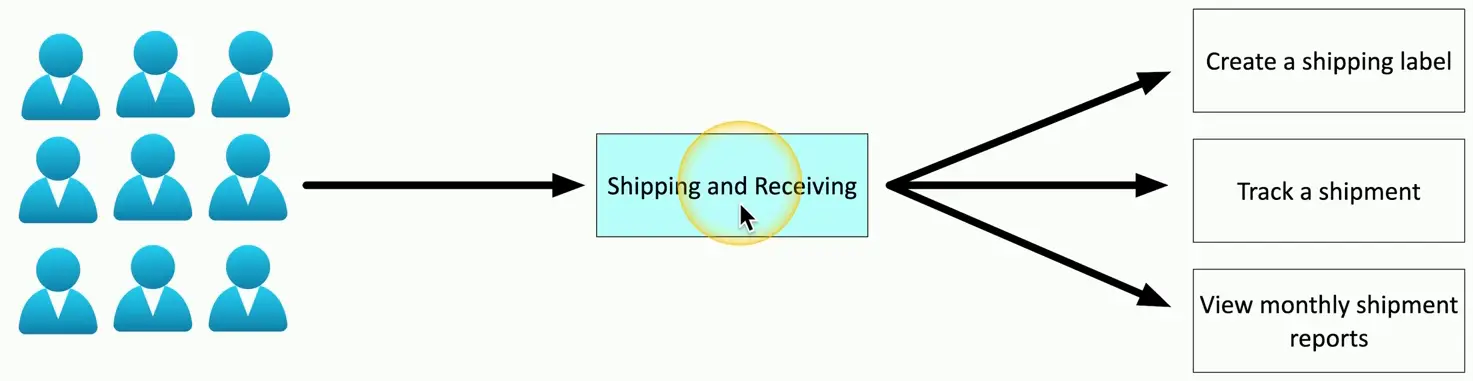
Address label printers needs to be upgraded
Shipping and Receiving department owns the process
IT handles the actual change
Stakeholders
Who is impacted by this change?
They’ll want to have input on the change management process
This may not be as obvious as you might think
A single change can include one individual or the entire company
Upgrade software used for shipping labels
Shipping/receiving
Accounting reports
Product delivery timeframes
Revenue recognition — CEO visibility
Impact Analysis
Determine a risk value
The risks can be minor or far-reaching
The “fix” doesn’t actually fix anything
The fix breaks something else
OS failures
Data corruption
What’s the risk with NOT making the change?
Security vulnerability
Application unavailability
Unexpected downtime to other services
Test Results
Sandbox testing environment
No connection to the real world or production system
A technological safe place
Use before making a change to production
Try the upgrade, apply the patch
Test and confirm before deployment
Confirm the back out plan
Move everything back to the original
A sandbox cannot consider every possibility
Backout Plan
The change will work perfectly and nothing will ever go bad
You should always have a way to revert your changes
Prepare for the worst, hope for the best
This isn’t as easy as it sounds
Some changes are difficult to revert
Always have backups
Maintenance Windows
When is the change happening
This might be the most difficult part of the process
During the workday may not be the best option
Potential downtime would affect a large part of production
Overnights are often a better choice
Challenging for 24-hour production schedules
The time of year may be a consideration
Retail networks are frozen during the holiday season
Standard Operating Procedures
Change management is critical
Affects everyone in the organization
The process must be well documented
Should be available on the Internet
Along with all standard processes and procedures
Changes to the process are reflected in the standards
Technical Change Management
Put the change management process into action
There is no such thing as a simple upgrade
Can have many moving parts
Separate events may be required
Change management is often concerned with “what” need to change
The technical team is concerned with “how” to change it
Allow List/Deny List
Any application can be dangerous
Vulnerabilities, Trojan horses, malware
Security policy can control app execution
Allow list, deny/block list
Allow list
Nothing runs unless it’s approved
Very restrictive
Deny list
Nothing on the “bad list” can be executed
Anti-virus, anti-malware
Restricted Activities
The scope of a change is important
Defines exactly which components are covered
A change approval isn’t permission to make any change
The change control approval is very specific
The scope may need to be expanded during the change window
It’s impossible to prepare for all possible outcomes
The change management process determines the next steps
There are processes in place to make the change successful
Downtime
Services will eventually be unavailable
The change process can be disruptive
Usually scheduled during non-production hours
If possible, prevent any downtime
Switch to secondary system, upgrade the primary, then switch back
Minimize any downtime events
The process should be as automated as possible
Switch back to secondary if issues appear
Should be part of the backout plan
Send emails and calendar updates
Restarts
It’s common to require a restart
Implement the new configuration
Reboot the OS, power cycle the switch, bounce the service
Can the system recover from a power outage?
Services
Stop and restart the service or daemon
May take seconds or minutes
Applications
Close the application completely
Launch a new application instance
Legacy Applications
Some applications were here before you arrived
They will here when you leave
Often no longer supported by the developer
You’re now the support team
Fear of Unknown
Face your fears and document the system
It may not be as bad as you think
May be quirky
Create specific processes and procedures
Become the expert
Dependencies
To complete A, you must complete B
A service will not start without other active services
An application requires a specific library version
Modifying one component may require changing or restarting other components
This can be challenging to manage
Dependencies may occur across systems
Upgrade the firewall code first
Then upgrade the firewall management software
Documentation
It can be challenging to keep up with changes
Documentation can become outdated very quickly
Require with the change management process
Updating diagrams
Modifications to network configurations
Address updates
Updating policies/procedures
Adding new systems may require new procedures
Version Control
Track changes to a file or configuration data over time
Easily revert to a previous setting
Many opportunities to manage versions
Router configurations
Windows OS patches
Application registry entries
Not always straightforward
Some devices and OSes provide version control features
May require additional management software
Cryptographic Solutions
Public Key Infrastructure (PKI)
Policies, procedures, hardware, software, people
Digital certificates: create, distribute, manage, store, revoke
This is a big, big, endeavor
Also refers to the binding of public keys to people or devices
The certificate authority (CA)
It’s all about trust
Symmetric Encryption
A single, shared key
Encrypt with the key
Decrypt with the same key
If it gets out, you’ll need another key
Secret key algorithm
Doesn’t scale very well
Can be challenging to distribute
Very fast to use
Less overhead than asymmetric encryption
Often combined with asymmetric encryption
Asymmetric Encryption
Public key cryptography
Two (or more) mathematically related keys
Private Key
Public Key
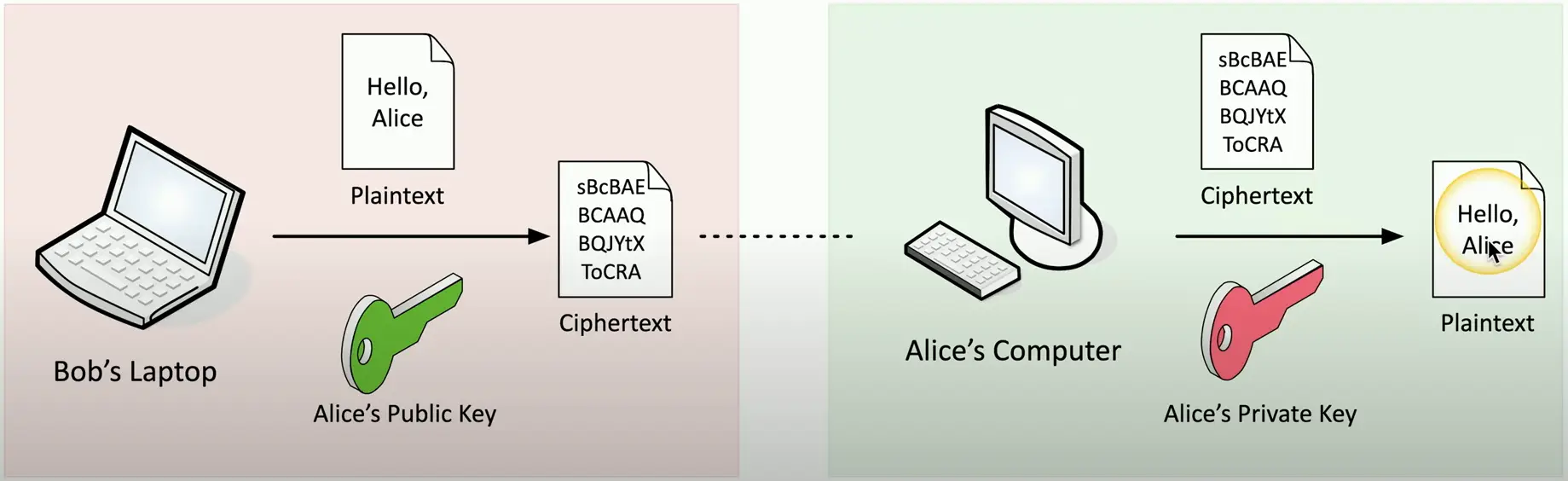
Anyone can see this key
Give it away
The private key is the only key that can decrypt data encrypted with public key
You cannot derive the private key from the public key
The Key Pair
Asymmetric encryption
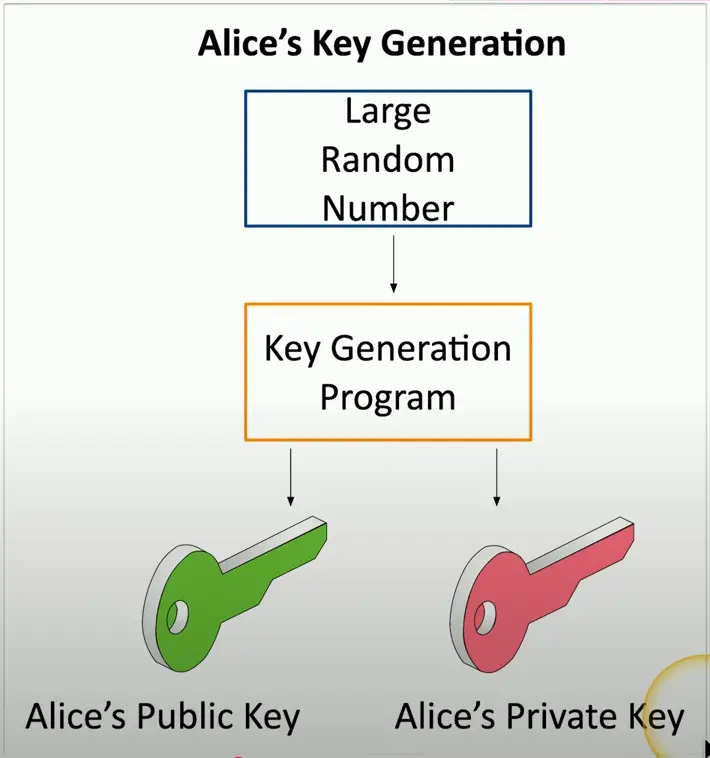
Key generation
Build both the public and private key at the same time
Lots of randomization
Large prime numbers
Lots and lots of math
Everyone can have the public key
Only Alice has the private key
Asymmetric Encryption
Key Escrow
Someone else holds your decryption keys
Your private keys are in the hands of a 3rd Party
This may be within your own organization
This can be a legitimate business arrangement
A business might need access to employee information
Government agencies may need to decrypt partner data
Controversial?
Of course
But may still be required
Encrypting Data
Encrypting Stored Data
Protect data on storage devices
SSD, hard drive, USB drive, cloud storage, etc.
This is data at rest
Full-disk and partition/volume encryption
BitLocker, FileVault, etc.
File encryption
EFS (Encrypting File System), third-party utilities
Database Encryption
Protecting stored data
And the transmission of that data
Transparent encryption
Encrypt all database information with a symmetric key
Record-level encryption
Encrypt individual columns
Use separate symmetric keys for each column
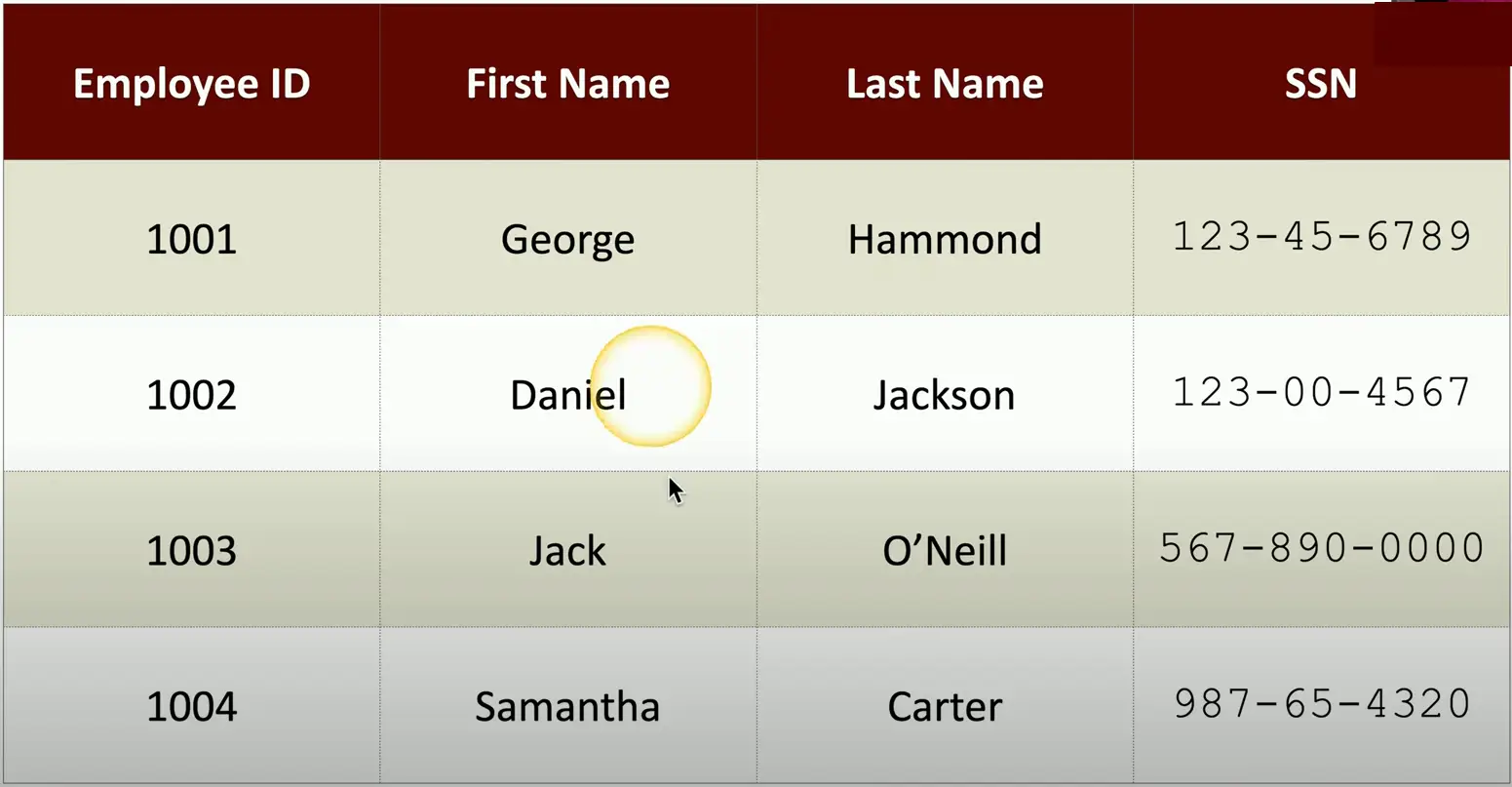
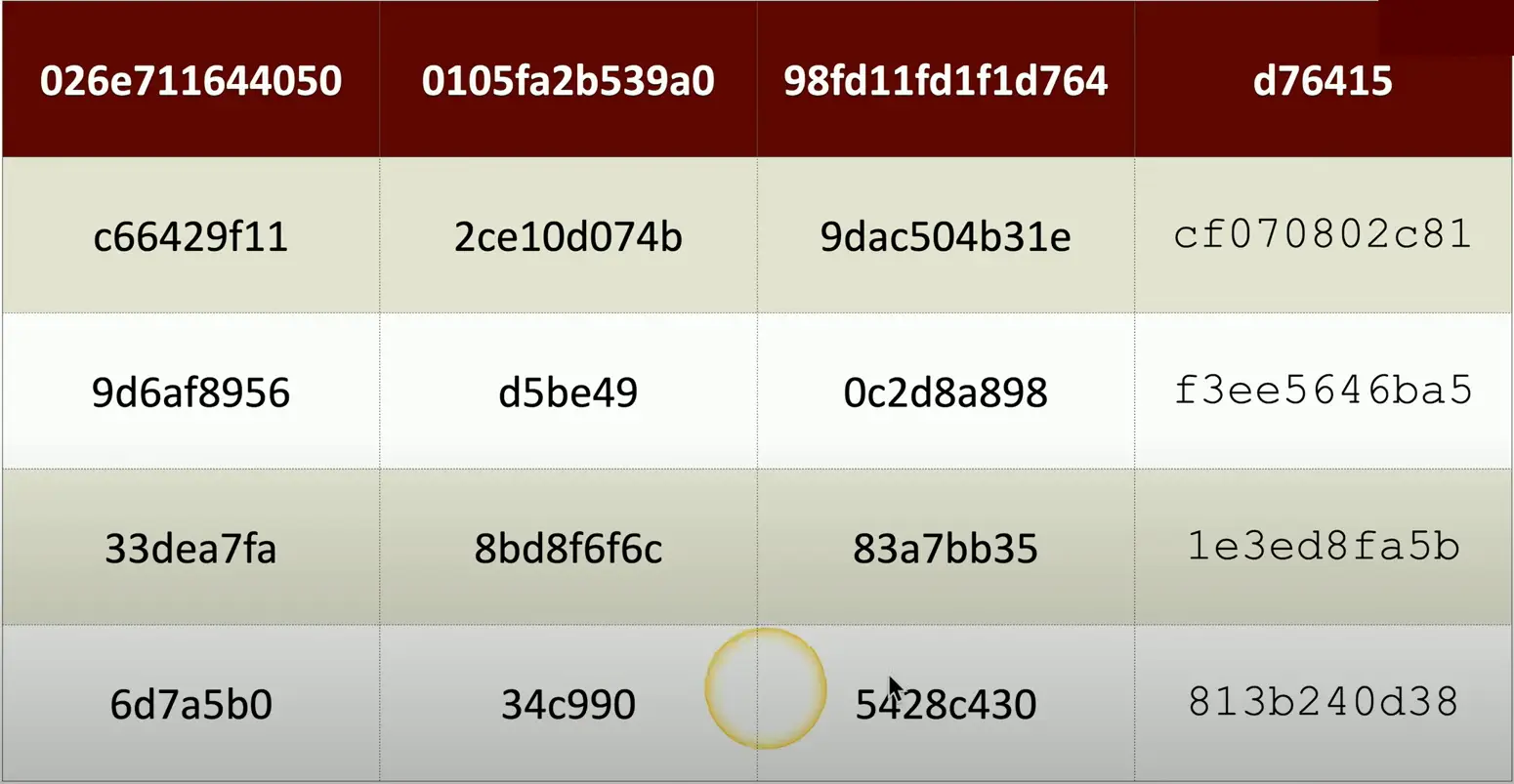
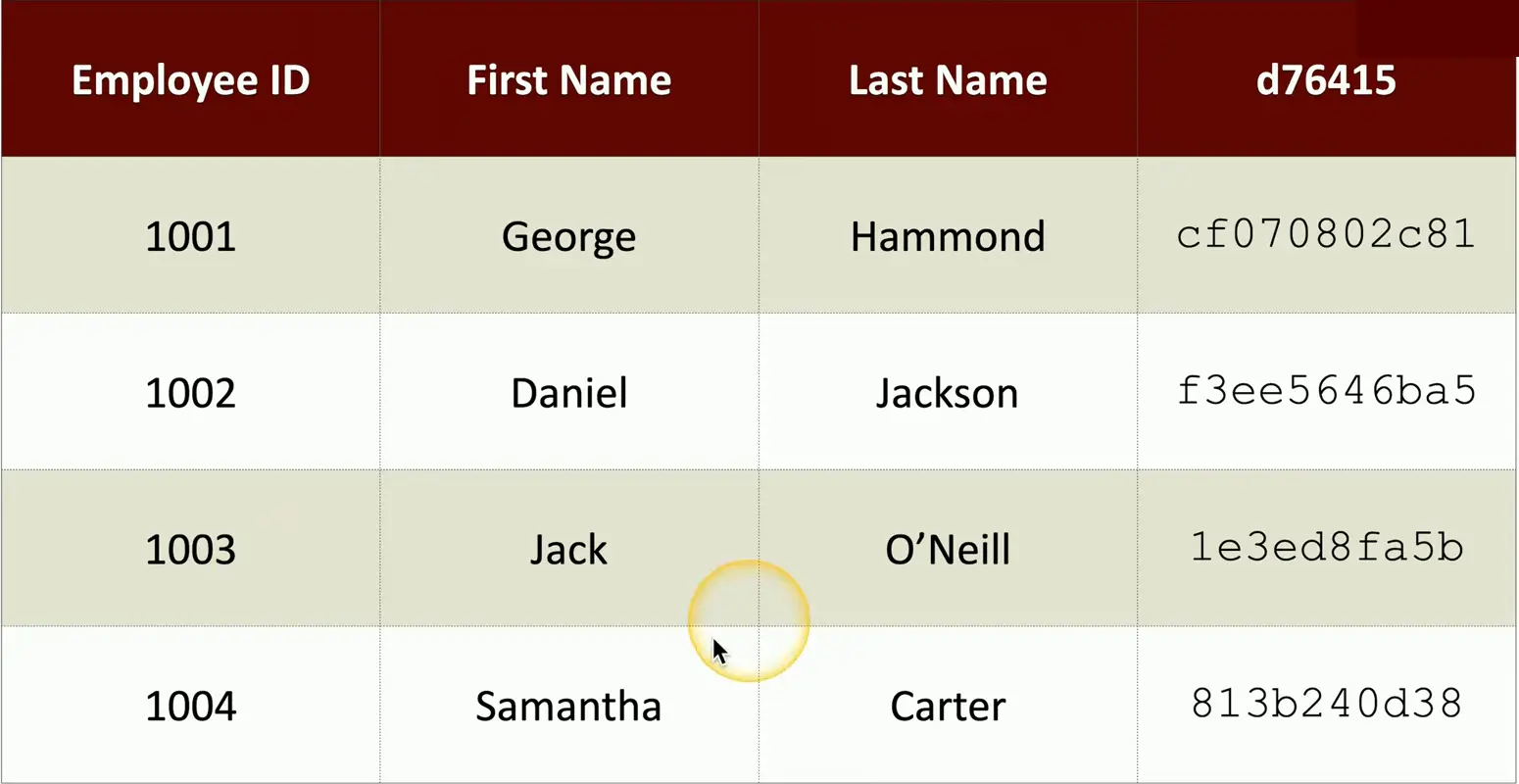
Example Database:
You can encrypt the entire database
But this adds the extra overhead for database search and lookup. We have to decrypt the data every time we need to pull something from it.
One way to avoid, the overhead is to encrypt only the sensitive portion of the data, leaving rest as unencrypted.
Transport Encryption
Protect data traversing the network
You are probably doing this now
Encrypting in the application
Browsers can communicate using HTTPS
VPN (virtual private network)
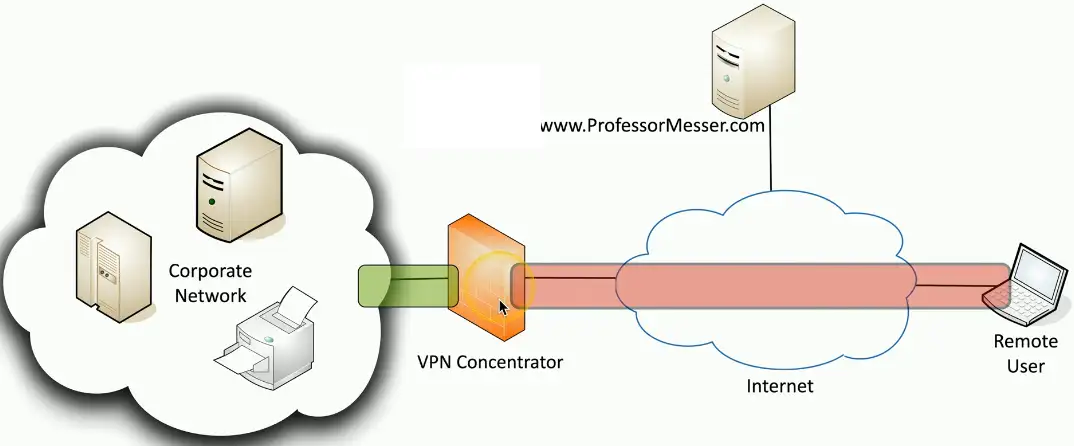
Encrypts all data transmitted over the network, regardless of the application
Client-based VPN using SSL/TLS
Site-to-site VPN using IPsec
Encryption Algorithms
There are many, many ways to encrypt data
The proper “formula” must be used during encryption and decryption
Both sides decide on the algorithm before encrypting the data
The details are often hidden from the end user
There are advantages and disadvantages between algorithms
Security level, speed, complexity of implementation, etc.
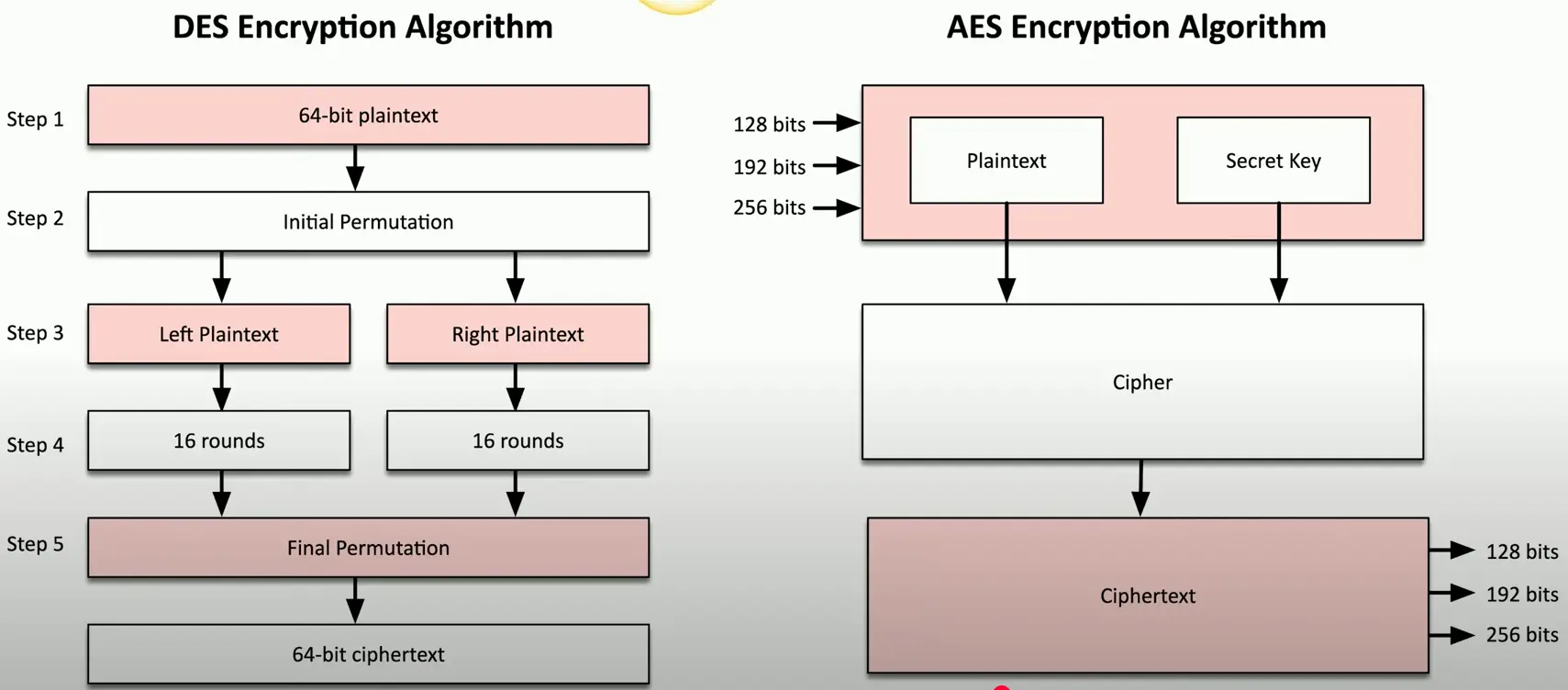
Encryption Algorithm Comparison
Cryptographic Keys
There’s very little that is not known about the cryptographic process
The algorithm is usually a known entity
The only thing you don’t know is the key
The key determines the output
Encrypted data
Hash value
Digital signature
Keep your key private
It’s the only thing protecting your data
Key Lengths
Larger keys tend to be more secure
Prevent brute-force attacks
Attackers can try every possible key combination
Symmetric encryption
128-bit or larger symmetric keys are common
These numbers get larger and larger as time goes on
Asymmetric encryption
Complex calculations of prime numbers
Larger keys than symmetric encryption
Common to see key lengths of 3072 bits or larger
Key Stretching
A weak key is a weak key
By itself, it’s not very secure
Make a weak key stronger by performing multiple processes
Hash a password. Hash the hash of the password. And continue…
Key stretching, key strengthening
Brute force attacks would require reversing each of those hashes
The attacker has to spend much more time, even though the key is small
Key Exchange
A logistical challenge
How do you share an encryption key across an insecure medium without physically transferring the key?
Out-of-band key exchange
Don’t send the symmetric key over the network
Telephone, courier, in-person, etc.
In-band key exchange
It’s on the network
Protect the key with additional encryption
Use asymmetric encryption to deliver a symmetric key
Real-time Encryption/Decryption
There is a need for fast security
Without compromising the security part
Share a symmetric session key using asymmetric encryption
Client encrypts a random (symmetric) key with a server’s public key
The server decrypts this shared key and uses it to encrypt data
This is the session key
Implement session keys carefully
Need to be changed often (ephemeral keys)
Need to be unpredictable
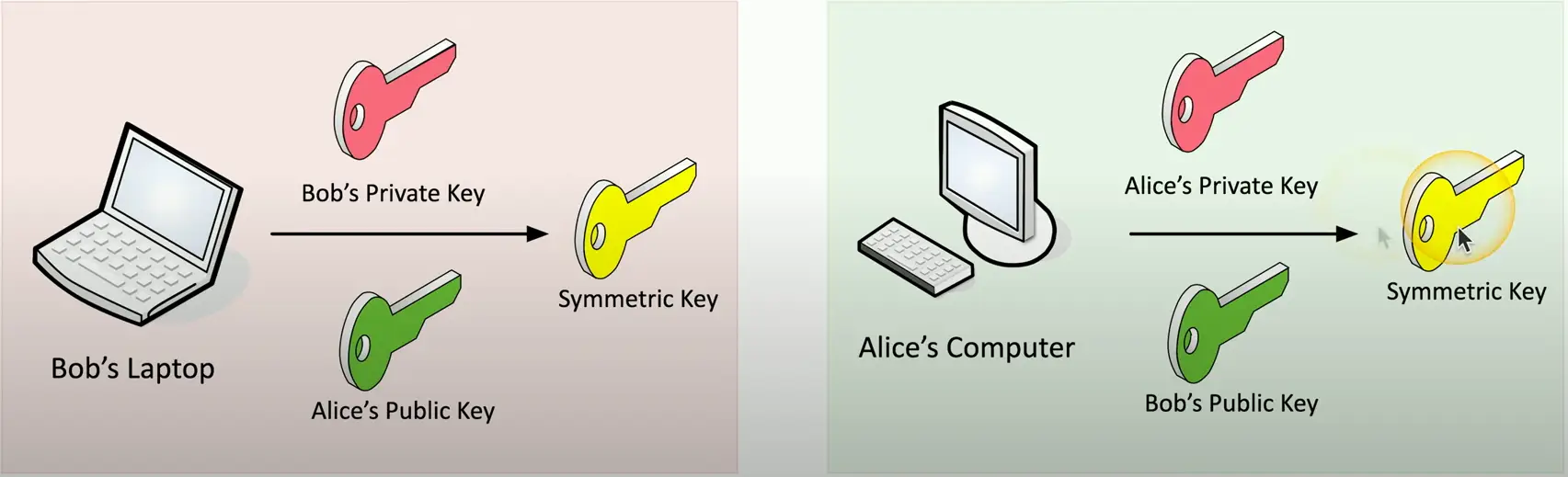
Symmetric Key from Asymmetric Keys
Use public and private key cryptography to create a symmetric key
Encryption Technologies
A specification for cryptographic functions
Cryptography hardware on a device
Cryptographic processor
Random number generator, key generators
Persistent Memory
Unique keys burned in during manufacturing
Versatile memory
Storage keys, hardware configuration information
Securely store BitLocker keys
Password protected
Hardware Security Module (HSM)
Used in large environments
Clusters, redundant power
Securely store thousands of cryptographic keys
High-end cryptographic hardware
Plug-in card or separate hardware device
Key backup
Secure storage in hardware
Cryptographic accelerators
Offload that CPU overhead from other devices
Key Management System
Services are everywhere
On-premises, cloud-based
Many keys for many services
Manage all keys from a centralized manager
Often provided as third-party software
Separate the encryption keys from the data
All key management from one console
Create keys for a specific service or cloud provider (SSL/TLS, SSH, etc.)
Associate keys with specific users
Rotate keys on regular intervals
Log key use and important events
Keeping Data Private
Our data is located in many places
Mobile phones, cloud, laptops, etc.
The most private data is often physically closest to us
Attackers are always finding new techniques
It’s a race to stay one step ahead
Our data is changing constantly
How do we keep this data protected?
Secure Enclave
A protected area of our secrets
Often implemented as a hardware processor
Isolated from the main processor
Many technologies and names
Provides extensive security features
Has its own boot ROM
Monitors the system boot process
True random number generator
Real-time memory encryption
Performs AES encryption in hardware
And more…
Obfuscation
The process of making something unclear
It’s now much more difficult to understand
But it’s not impossible to understand
If you know how to read it
Hid information in plain sight
Store payment information without storing a credit card number
Hide information inside an image
Steganography
Greek for “concealed writing”
Security through obscurity
Message is invisible
The covertext
The container document or file
Common Steganography Techniques
Network based
Embed messages in TCP packets
Use an image
Embed the message in the image itself
Invisible watermarks
Other Steganography Types
Audio steganography
Modify the digital audio file
Interlace a secret message within the audio
Similar techniques to image steganography
Video steganography
A sequence of images
Use image steganography on a larger scale
Manage the signal-to-noise ratio
Potentially transfer much more information
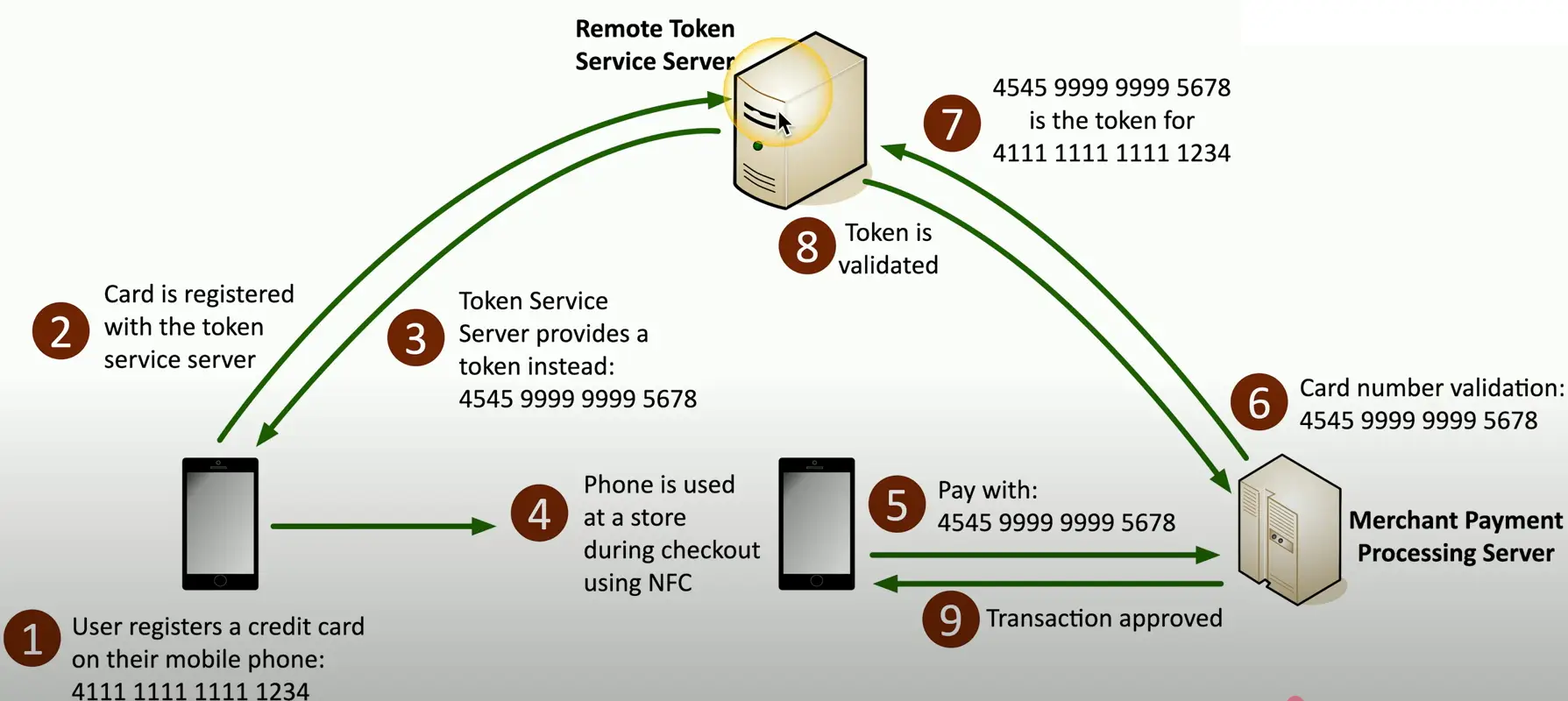
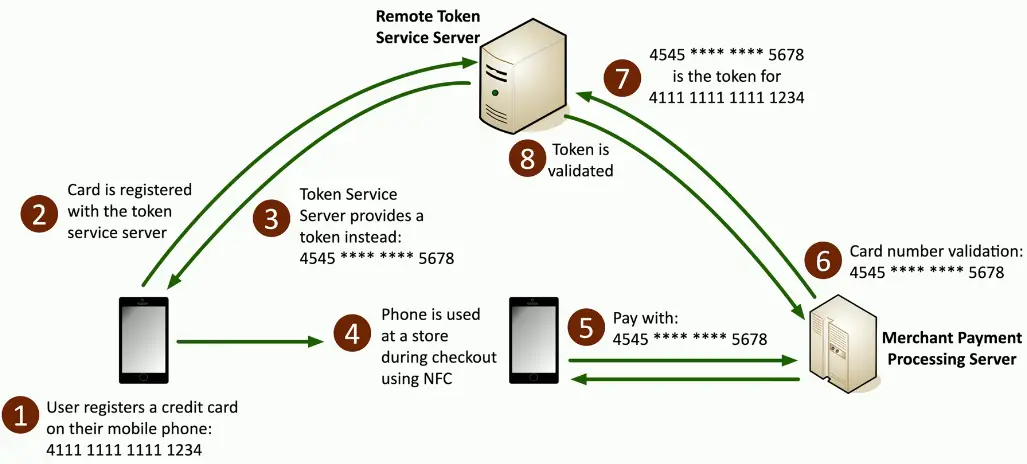
Tokenization
Replace sensitive data with a non-sensitive placeholder
SSN 266-12-1112 is no 691-618539
Common with credit card processing
Use a temporary token during payment
An attacker capturing the card numbers can’t use them later
This isn’t encryption or hashing
The original data and token aren’t mathematically related
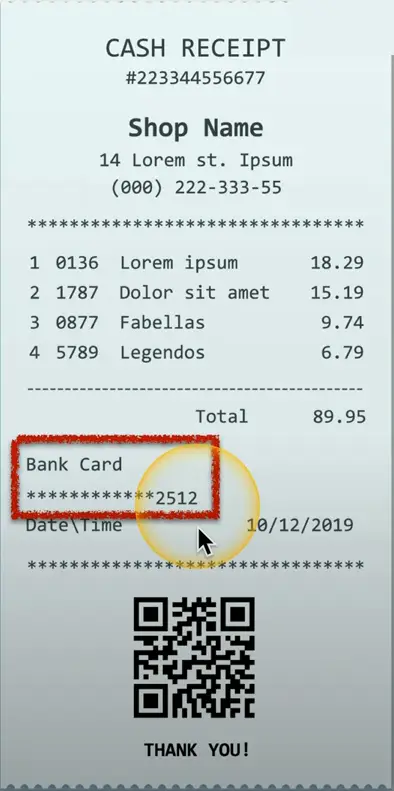
Data Masking
Data Obfuscation
Protects PII
May only be hidden from view
The data may still be intact in storage
Control the view based on permissions
Many techniques
Substituting, shuffling, encrypting, masking out, etc.
Hashing and Digital Signatures
Hashes
Represent data as a short string of text
A message digest, a fingerprint
One-way trip
Impossible to recover the original message from the digest
Use to store passwords/confidentiality
Verify a downloaded document is the same as the original
Can be a digital signature
Authentication, non-repudiation, and integrity
Collision
Hash functions
Take an input of any size
Create a fixed size string
Message digest, checksum
The hash should be unique
Different inputs should never create the same hash
If they do, it’s a collision
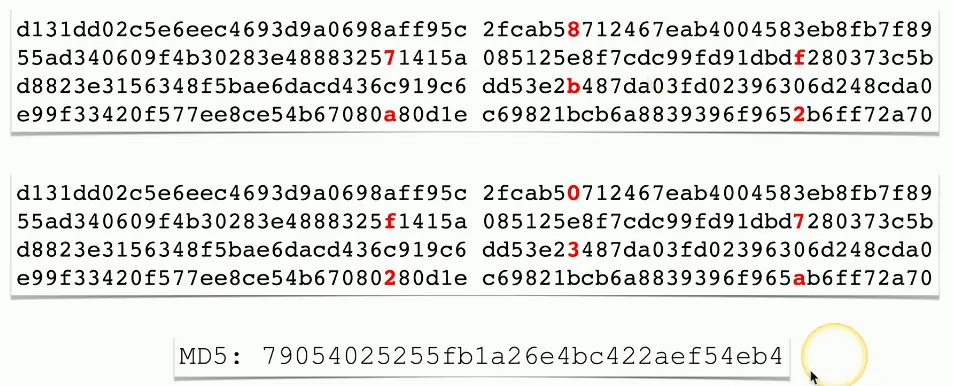
MD5 has a collision problem
Found in 1996
Don’t use MD5 for anything important
Practical Hashing
Verify a downloaded file
Hashes may be provided on the download site
Compare the downloaded files hash with the posted hash value
Password Storage
Instead of storing the password, store a salted hash
Compare hashes during the authentication process
Nobody ever knows your actual password
Adding Some Salt
Salt
Random data added to a password when hashing
Every user gets their own random salt
The salt is commonly stored with the password
Rainbow tables won’t work with salted hashes
Additional random value added to the original password
This slows down the brute force process
It doesn’t completely stop the reverse engineering
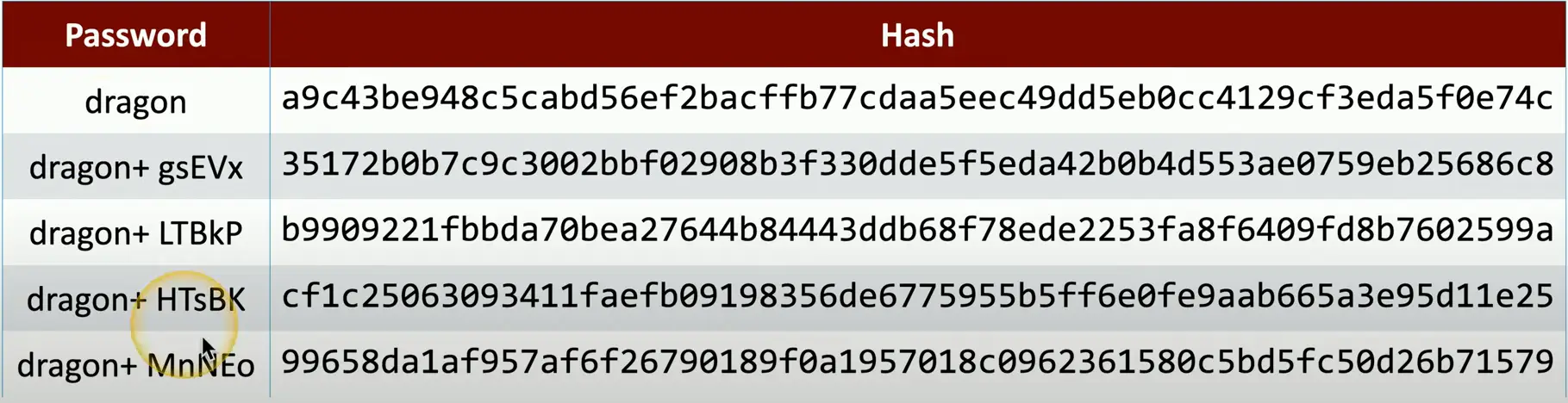
Salting the Hash
Each user gets a different random hash
The same password creates a different hash
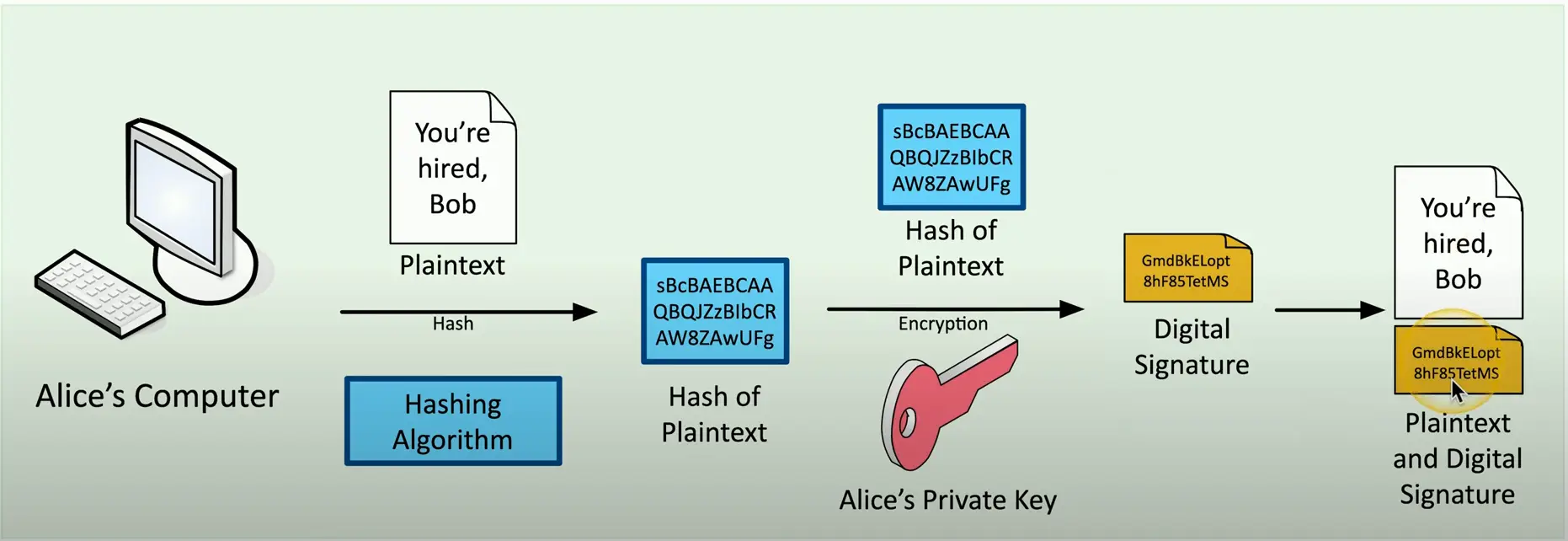
Digital Signature
Prove the message was not changed
Prove the source of the message
Make sure the signature isn’t fake
Sign with the private key
The message doesn’t need to be encrypted
Nobody else can sign this (obviously)
Verify with the public key
Any change in the message will invalidate the signature
Creating a Digital Signature
Blockchain Technology
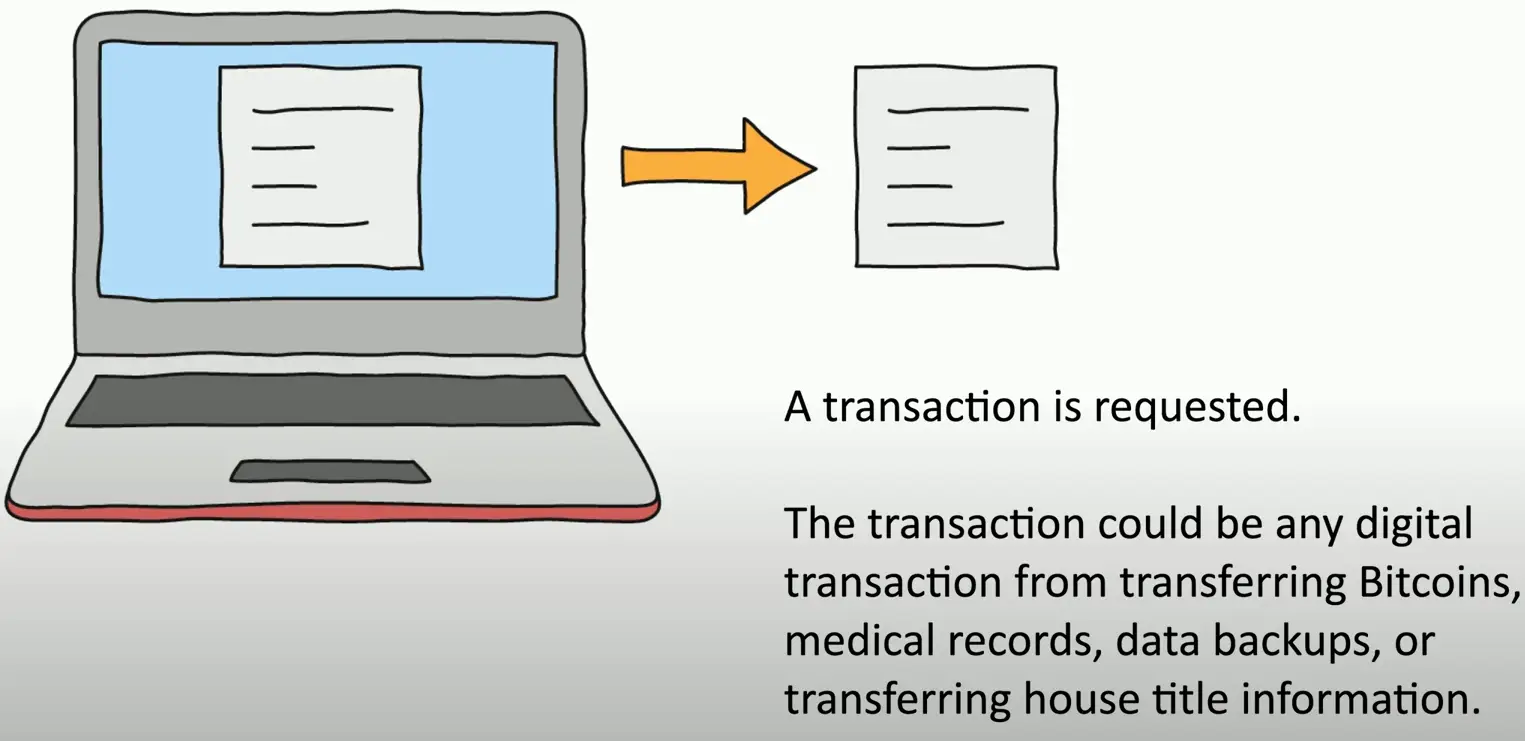
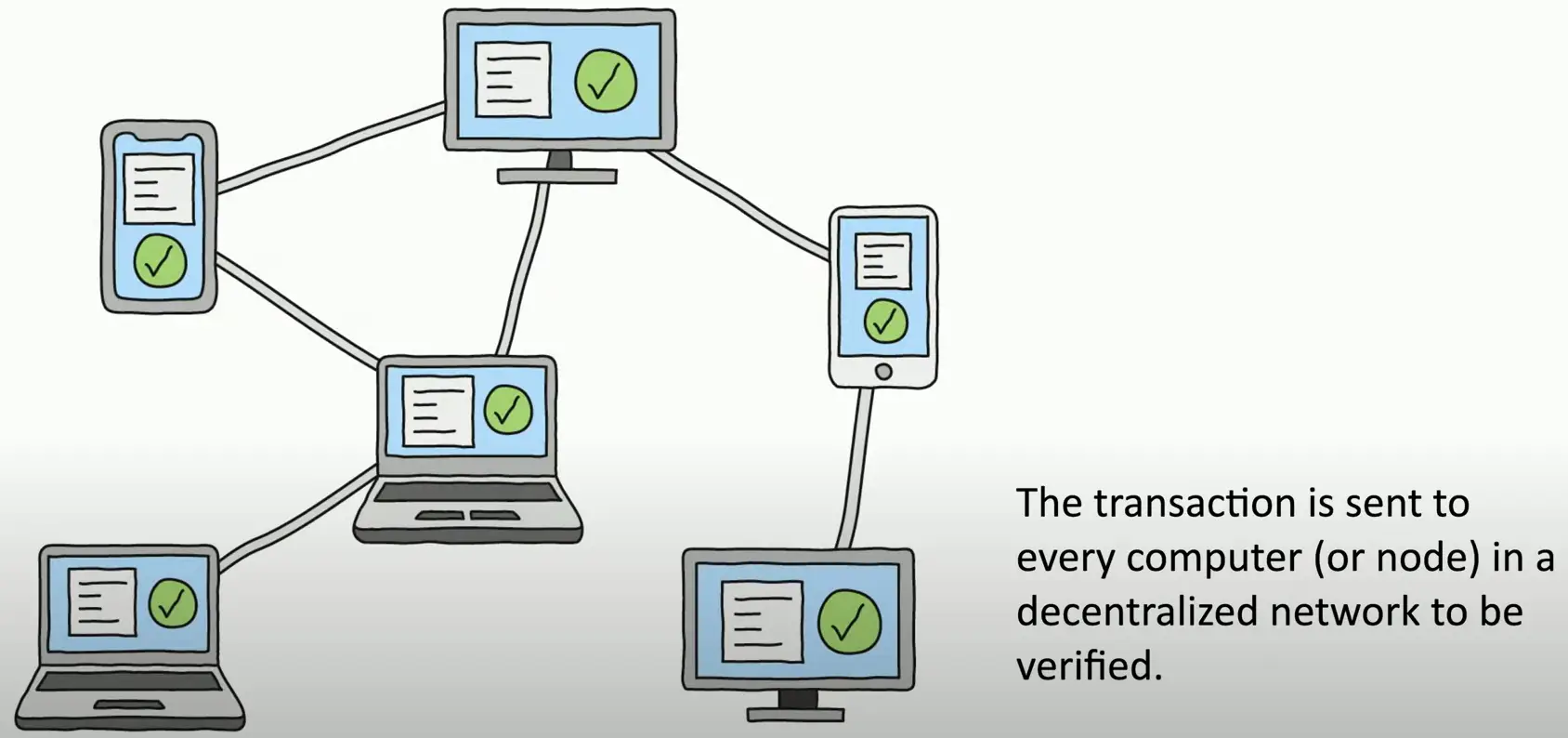
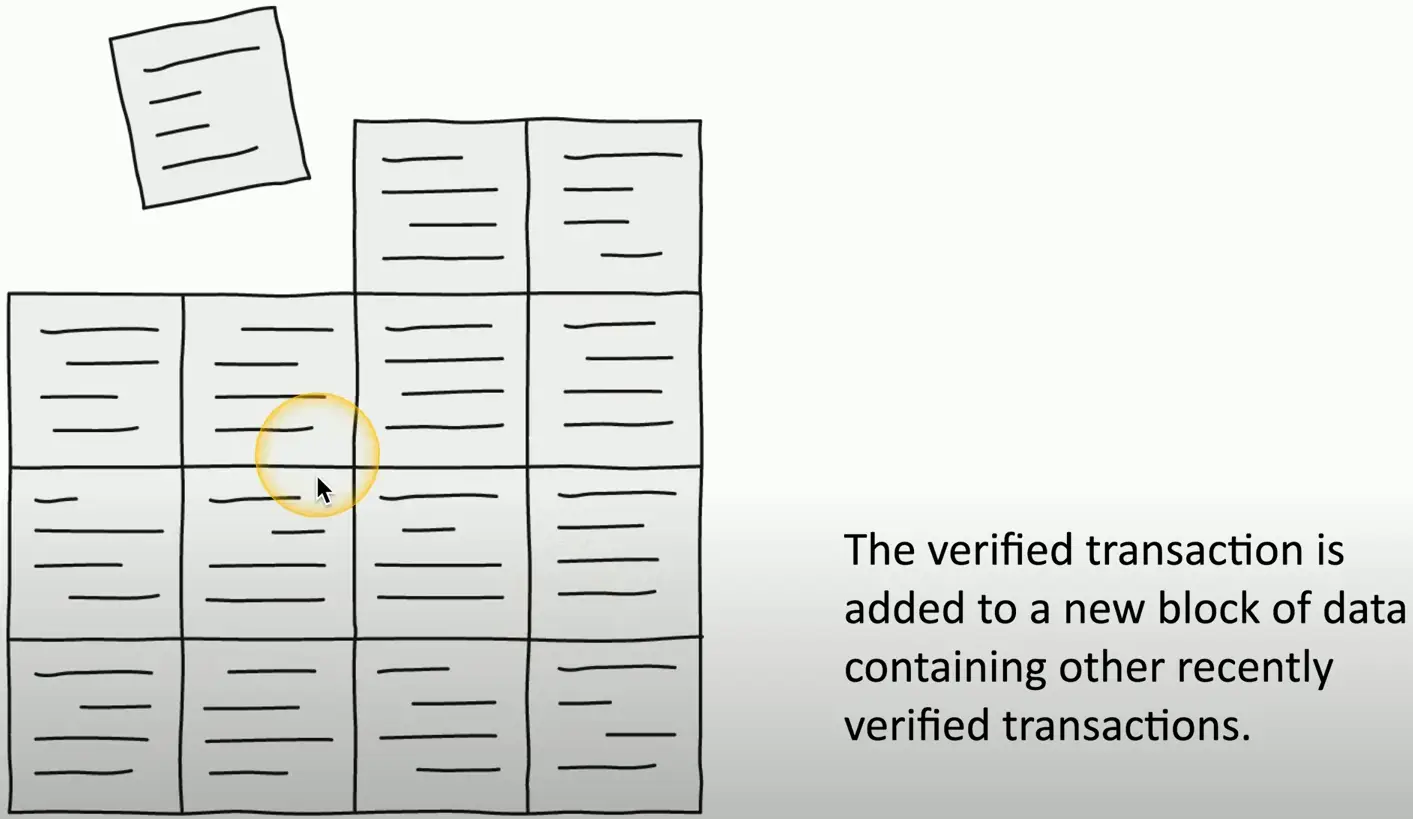
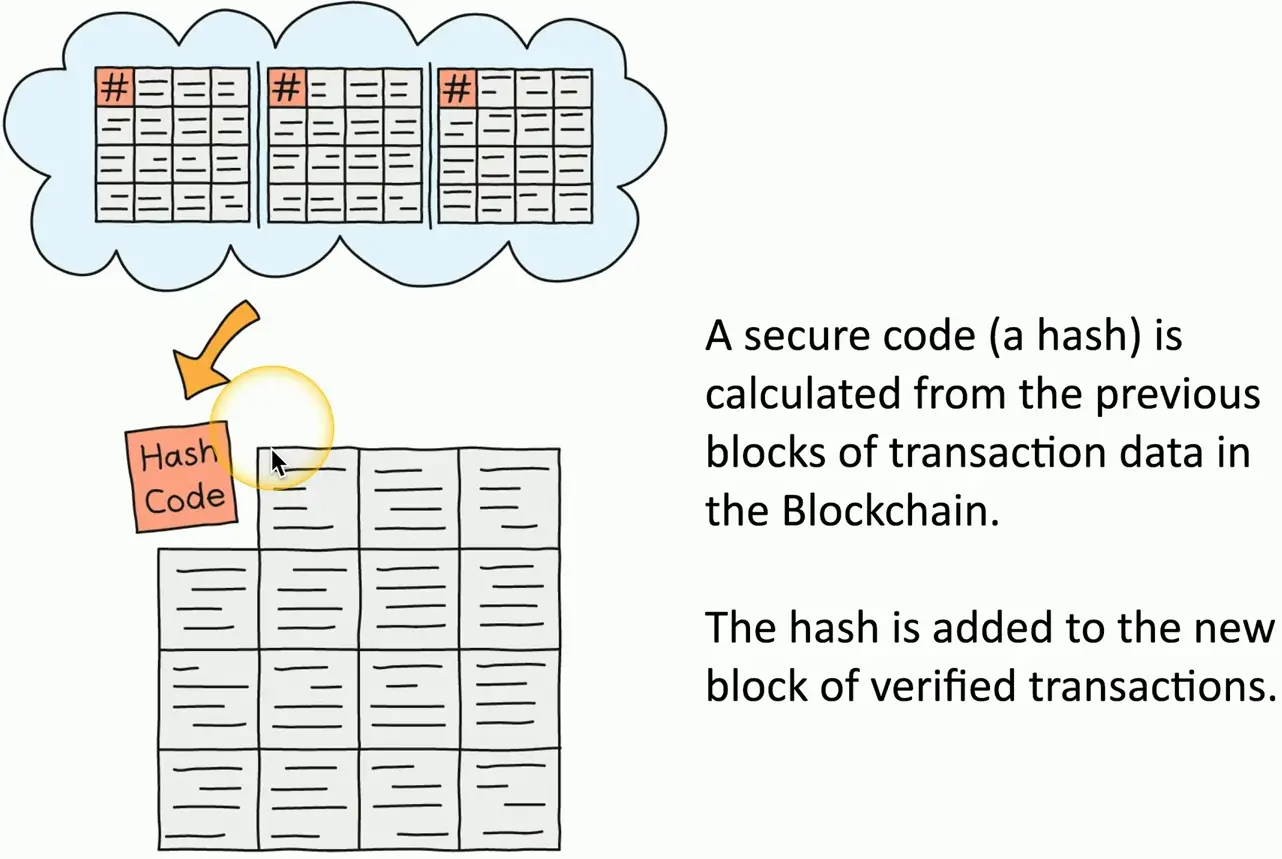
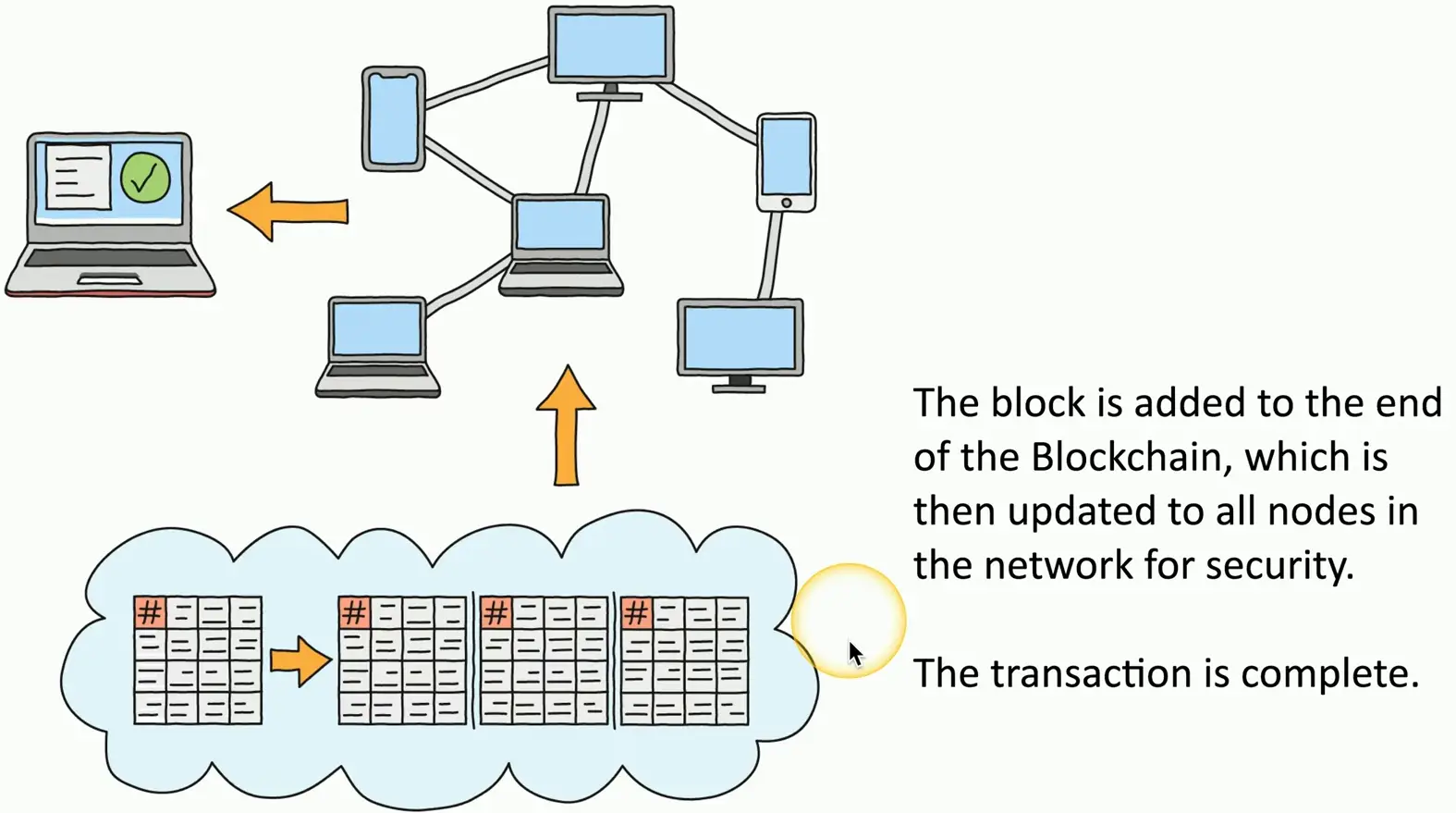
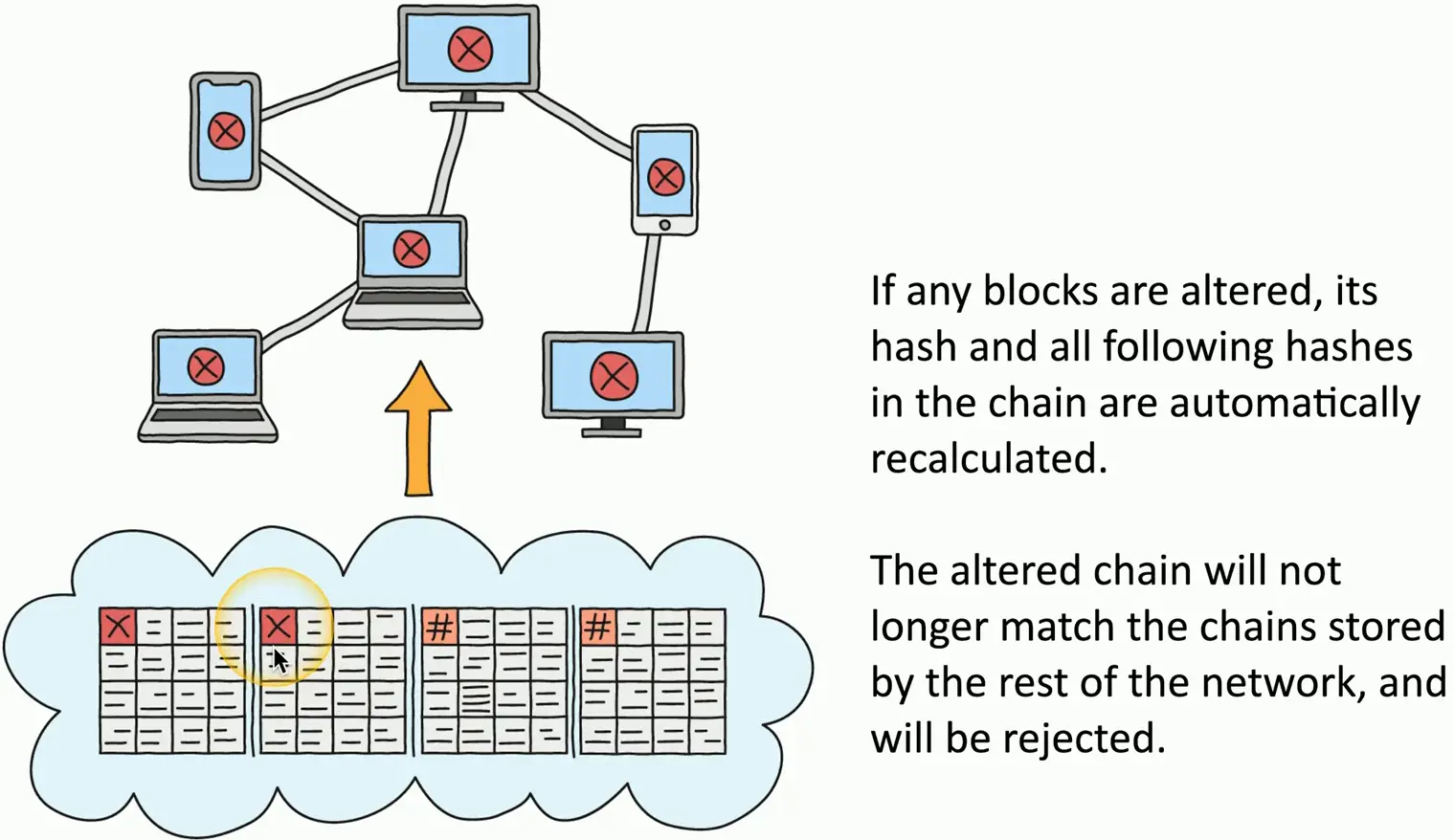
A distributed ledger
Keep track of transaction
Everyone on the blockchain network maintains the ledger
Records and replicates to anyone and everyone
Many practical applications
Payment processing
Digital identification
Supply chain monitoring
Digital Voting
The Blockchain Process
Certificates
Digital Certificates
A public key certificate
Binds a public key with a digital signature
And other details about the keyholder
A digital signature adds trust
PKI uses Certificate Authorities for additional trust
Web of Trust adds other users for additional trust
Certificate creation can be built into the OS
Part of Windows Domain services
Many 3rd-party options
What’s in a digital Certificate?
X.509
Certificate Details
Serial number
Version
Signature algorithm
Issuer
Name of the cert holder
Public key
And more…
Root of Trust
Everything associated with IT security requires trust
A foundational characteristic
How to build trust from something unknown?
Someone/something trustworthy provides their approval
Refer to the root of trust
An inherently trusted component
Hardware, software, firmware, or other component
Hardware security module (HSM), Secure Enclave, Certificate Authority, etc.
Certificate Authorities
You connect to a random website
Need a good way to trust an unknown entity
Use a trusted third-party
An authority
Certificate Authorization (CA) has digitally signed the website certificate
You trust the CA, therefore you trust the website
Real-time verification
Third-party Certificate Authorities
Built-in to your browser
Purchase your website certificate
It will be trusted by everyone’s browser
CA is responsible for vetting the request
They will confirm the certificate owner
Additional verification information may be required by the CA
Certificate Signing Requests
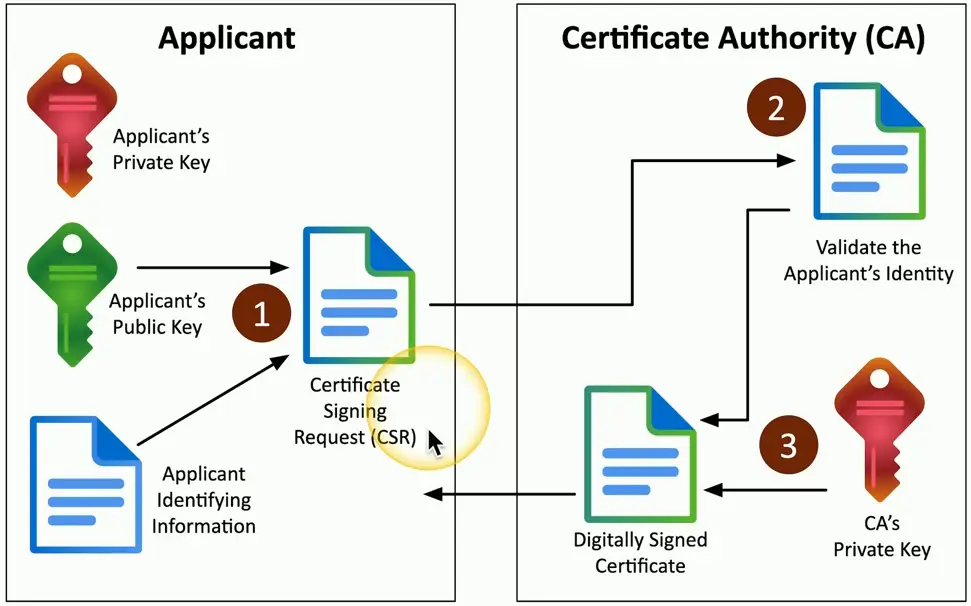
Create a key pair, then send the public key to the CA to be signed
A certificate signing request (CSR)
The CA validates the request
Confirms DNS emails and website ownership
CA digitally signs the cert
Private Certificate Authorities
You are your own CA
Build it in-house
Your devices must trust the internal CA
Needed for medium-to-large organization
Many web servers and privacy requirements
Implement as part of your overall computing strategy
Windows Certificate Services, OpenCA
Self-signed Certificates
Internal certificates don’t need to be signed by a public CA
Your company is the only one going to use it
No need to purchase trust for devices that already trust you
Build your own CA
Issue your own certificates signed by your own CA
Install the CA certificate/trusted chain on all devices
They will now trust any certificate signed by your internal CA
Works exactly like a certificate you purchased
Wildcard Certificates
Subject Alternative Name (SAN)
Extension to an X.509 certificate
Lists additional identification information
Allows a certificate to support many domains
Wildcard domain
Certificates are based on the name of the server
A wildcard domain will apply to all server names in the domain
Key Revocation
Certificate Revocation List (CRL)
Maintained by the CA
Can contain many revocations in a large file
Many reasons
April 2014 — CVE-2014-0160
Heartbleed
OpenSSL flaw put the private key of affected web servers at risk
OpenSSL was patched, every web server certificate was replaced
Older certificates were moved to the CRL
OCSP Stapling
Online Certificate Status Protocol
Provides scalability for OCSP checks
The CA is responsible for responding to all client OCSP requests
Instead, have the certificate holder verify their own status
Status information is stored on the certificate holder’s server
OCSP status is “stapled” into the SSL/TLS handshake
Digitally signed by the CA
Getting Revocation Details to the Browser
OCSP (Online Certificate Status Protocol)
The browser can check certificate revocation
Message usually sent to an OCSP responder via HTTP
Easy to support over Internet links
More efficient than downloading a CRL
Not all browsers/apps support OCSP
Early Internet Explorer versions didn’t support OCSP
Some support OCSP, but don’t bother checking
Threat Actors
The entity responsible for an event that has an impact on the safety of another entity
Also called a malicious actor
Threat actor attributes
Describes characteristics of the attacker
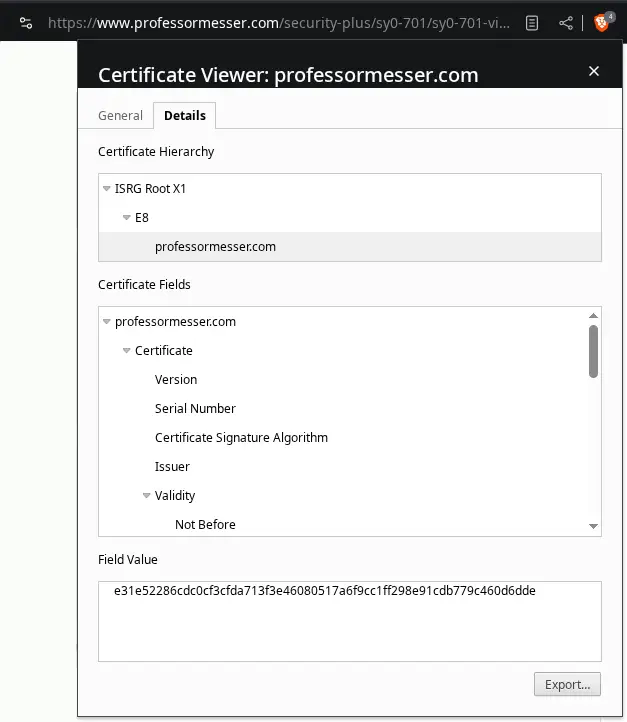
Useful to categorize the motivation
Why is this attack happening?
Is this directed or random?
Attributes of Threat Actors
Internal/external
The attacker is insider the house
They are outside and trying to get in
Resources/funding
No money
Extensive funding
Level of sophistication/capability
Blindly runs scripts or automated vulnerability scans
Can write their own attack malware and scripts
Motivations of Threat Actors
What makes them tick?
There is a purpose to this attack
Motivation include
Data exfiltration
Espionage
Service disruption
Blackmail
Financial gain
Philosophical/political beliefs
Ethical
Revenge
Disruption/chaos
War
Nation States
External entity
Government and national security
Many possible motivations
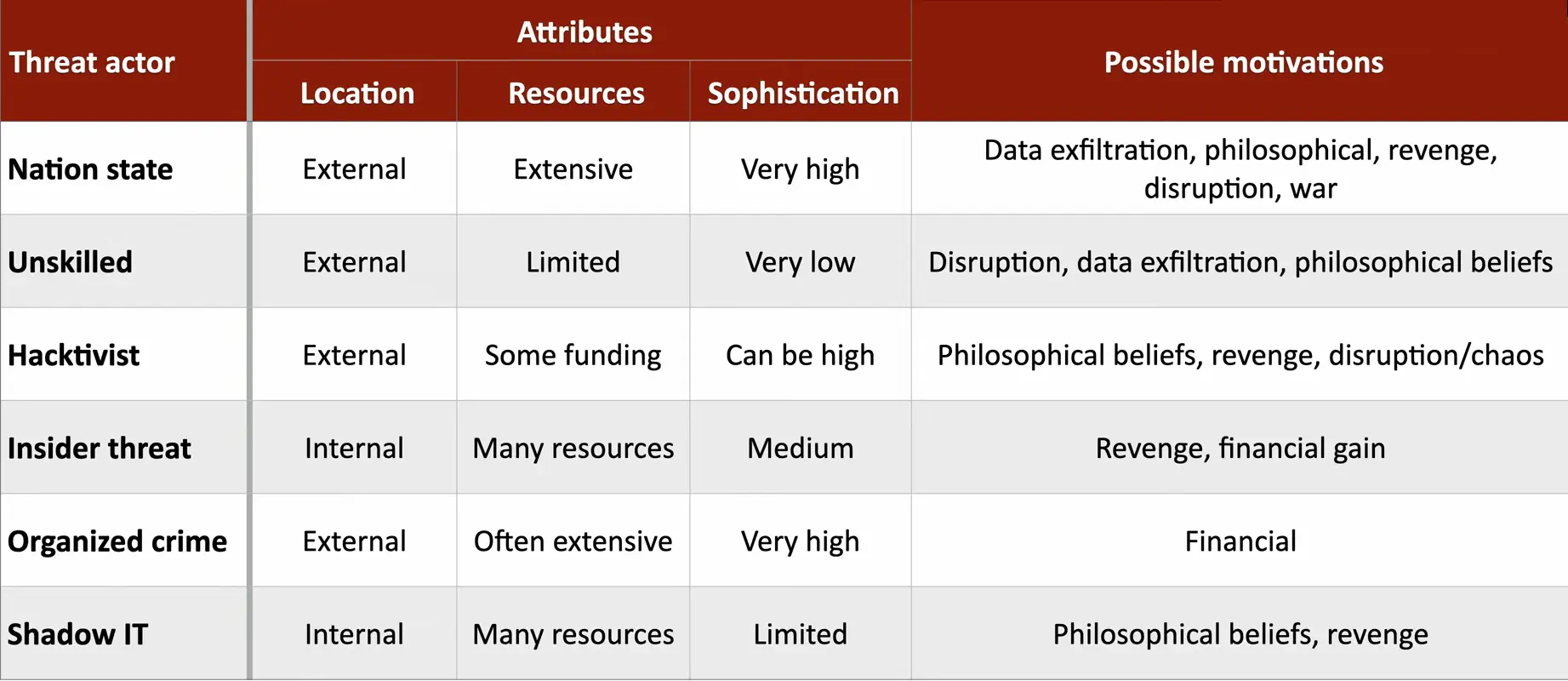
Data exfiltration, philosophical, revenge, disruption, war
Constant attacks, massive resources
Commonly an Advanced Persistent Threat (APT)
Highest sophistication
Military control, utilities, financial control
United States and Israel destroyed 1000 nuclear centrifuges with the Stuxnet worm
Unskilled Attackers
Run pre-made scripts without any knowledge of what’s really happening
Motivated by the hunt
Disruption, data exfiltration, sometimes philosophical
Can be internal or external
Not very sophisticated
Limited resources, if any
No formal funding
Looking for low-hanging fruit
Hacktivist
A hacker with a purpose
Motivated by philosophy, revenge, disruption, etc.
Often an external entity
Could potentially infiltrate to also be an insider threat
Can be remarkably sophisticated
Very specific hacks
DoS, website defacing, private documents release
Funding may be limited
Some organizations have fundraising options
Insider Threat
More than just passwords on sticky notes
Motivated by revenge, financial gain
Extensive resources
Using the organization’s resources against themselves
An internal entity
Eating away from the inside
Medium level of sophistication
The insider has institutional knowledge
Attacks can be directed at vulnerable systems
The insider knows what to hit
Organized Crime
Professional criminals
Motivated by money
Almost always an external entity
Very sophisticated
Best hacking money can buy
Crime that’s organized
One person hacks, one person manages the exploits, another person sells the data, another handles’ customer support
Lots of capital to fund hacking efforts
Shadow IT
Going rogue
Working around the internal IT organization
Builds their own infrastructure
Information Technology can put up roadblocks
Shadow IT is unencumbered
Use the cloud
Might also be able to innovate
Limited resources
Medium sophistication
May not have IT training or knowledge
Common Threat Vectors
A method used by the attacker
Gain access or infect to the target
Also called “Attack Vectors”
A lot of work goes into finding vulnerabilities in these vectors
Some are more vulnerable than others
IT security professional spend their career watching these vectors
Protect existing vectors
Find new vectors
Message-based Vectors
One the biggest (and most successful) threat vectors
Everyone has at least one of these messaging systems
Email
Malicious links in an email
Link to malicious site
SMS (Short Message Service
Attacks in a text message
Phishing Attacks
People want to click links
Links in an email, links send via text or IM
Deliver the malware to the user
Attach it to the email
Scan all attachments, never launch untrusted links
Social engineering attacks
Invoice scams
Cryptocurrency scams
Image-based Vectors
Easy to identify a text-based threat
It’s more difficult to identify the threat in an image
Some image formats can be a threat
The SVG (Scalable Vector Graphic) format
Image is described in XML (Extensible Markup Language)
Significant security concerns
HTML injection
JavaScript attack code
Browsers must provide input validation
Avoid running malicious code
File-based Vectors
More than just executables
Malicious code can hide in many places
Adobe PDF
A file format containing other objects
ZIP/RAR files (or any compression type)
Microsoft Office
Documents with macros
Add-in files
Voice Call Vectors
Vishing
Spam over IP
War dialing
Call tampering
Removable Device Vectors
Get around the firewalls
Malicious software on USB flash drives
Infect air gapped networks
Industrial systems, high-security services
USB devices can act as keyboards
Data exfiltration
Terabytes of data walk out the door
Zero bandwidth used
Vulnerable Software Vectors
Client-based
Infected executable
Known (or unknown) vulnerabilities
May require constant updates
Agentless
No installed executable
Compromised software on the server would affect all users
Client runs a new instance each time
Unsupported Systems Vectors
Patching is an important prevention tool
Unsupported systems aren’t patched
There may not even be an option
Outdated OSes
Eventually, even the manufacturer won’t help
A single system could be an entry
Keep your inventory and records current
Unsecure Network Vectors
The network connect everything
Ease of access for the attackers
View all (non-encrypted) data
Wireless
Outdated security protocols (WEP, WPA, WPA2)
Open or rogue wireless networks
Wired
Unsecure interfaces — No 802.1X
Bluetooth
Reconnaissance
Implementation vulnerabilities
Open Service Ports
Most network-based services connect over a TCP or UDP port
Every open port is an opportunity for the attacker
Application vulnerability or misconfiguration
Every application has their own open port
More services expand the attack surface
Firewall rules
Must allow traffic to an open port
Default Credentials
Most devices have default usernames and passwords
The right credentials provide full control
Very easy to find the defaults for your access point or router
Supply Chain Vectors
Tamper with the underlying infrastructure
Managed service providers (MSPs)
Access many customer networks from one location
Gain access to a network using a vendor
2013 Target credit card breach
Suppliers
Counterfeit networking equipment
Install backdoors, substandard performance and availability
2020 — Fake Cisco Catalyst Switches
Phishing
Social engineering with a touch of spoofing
Often delivered by email, text, etc.
Very remarkable when well done
Don’t be fooled
Usually there’s something not quite right
Business Email Compromise
We trust email sources
The attackers take advantage of this trust
Spoofed email addresses
Financial fraud
Send emails with updated bank information
Modify wire transfer details
The recipient clicks the links
The attachments have malware
Tricks and Misdirection
How are they so successful?
Digital slight of hands
It fools the best of us
Typo squatting
Pretexting
Lying to get information
Attacker is a character in a situation they create
Hi, we are calling from Visa regarding an automated payment to your utility service
Phishing with different bait
Vishing (voice phishing) is done over the phone or voicemail
Call ID spoofing is common
Fake security checks or bank updates
Smishing (SMS phishing) is done by text message
Spoofing is a problem here as well
Forwards links or asks for personal information
Variations on a theme
The fake check scam, phone verification code scam, Boss/CEO scam, advance-fee scam
Some great summaries on https://reddit.com/r/Scams
Impersonation
Before the attack, the trap is set
There is an actor and a story
“Hello sir, my name is Wendy, and I’m from Microsoft Windows. This is an urgent check-up call for your computer as we have found several problems with it.”
Voice mail: “This is an enforcement action executed by the US Treasury, intending your serious attention.”
“Congratulations on your excellent payment history! You now qualify for 0% interest rates on all of your credit card accounts.”
Attackers pretend to be someone they are not
Halloween for the fraudsters
User some of those details from reconnaissance
You can trust me, I’m with your help desk
Attack the victim as someone higher in rank
Office of the Vice President for Scamming
Throw tons of technical details around
Catastrophic feedback due to the depolarization of the differential magnetometer
Be a buddy
Extracting information from the victim
The victim doesn’t even realize this is happening
Hacking the human
Often seen with vishing
Can be easier to get this information over the phone
These are well-documented psychological techniques
They cannot just ask, “So, what’s your password?”
Identify Fraud
Your identity can be used by others
Keep your personal information safe!
Credit card fraud
Open an account in your name, or use your credit card information
Bank Fraud
Attacker gains access to your account or opens a new account
Loan fraud
Your information is used for a loan or lease
Government benefits fraud
Attacker obtains benefits on your behalf
Protect against impersonation
Never volunteer information
Don’t disclose personal details
Always verify before revealing info
Call back, verify through 3rd parties
Verification should be encouraged
Especially if your organization owns valuable information
Watering Hole Attack
Watering hole is a computer attack strategy in which an attacker guesses or observes which websites an organization’s users frequent, and then uses one or more of the websites to distribute malware.
What if your network was really secure?
You didn’t even plug in that USB key from the parking lot
The attackers can’t get in
Not responding to phishing emails
Not opening any email attachments
Have the mountain come to you
Go where the mountain hangs out
the watering hole
This requires a bit of research
Executing the Watering Hole Attack
Determine which websites the victim group uses
Educated guess — Local coffee or sandwich shop
Industry-related sites
Infect one of these third-party sites
Site vulnerability
Email attachments
Infect all visitors
But you are just looking for specific victims
Now you’re in!
Because that’s where the money is
January 2017
Polish Financial Supervision Authority, National Banking and Stock Commission of Mexico, State-owned bank in Uruguay
The watering hole was sufficiently poisoned
Visiting the site would download malicious JavaScript files
But only to IP addresses matching banks and other financial institutions
Did the attack work?
Watching the Watering Hole
Defense-in-depth
Layered defense
It’s never one thing
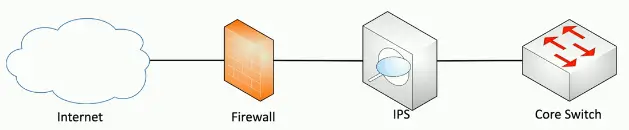
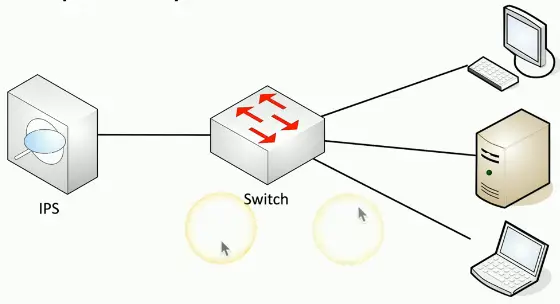
Firewall and IPS
Stop the network traffic before things get bad
Antivirus/Anti-malware signature updates
The Polish Financial Supervision Authority attack code was recognized and stopped by generic signatures in Symantec’s antivirus software
Other Social Engineering Attacks
Disseminate factually incorrect information
Create confusion and division
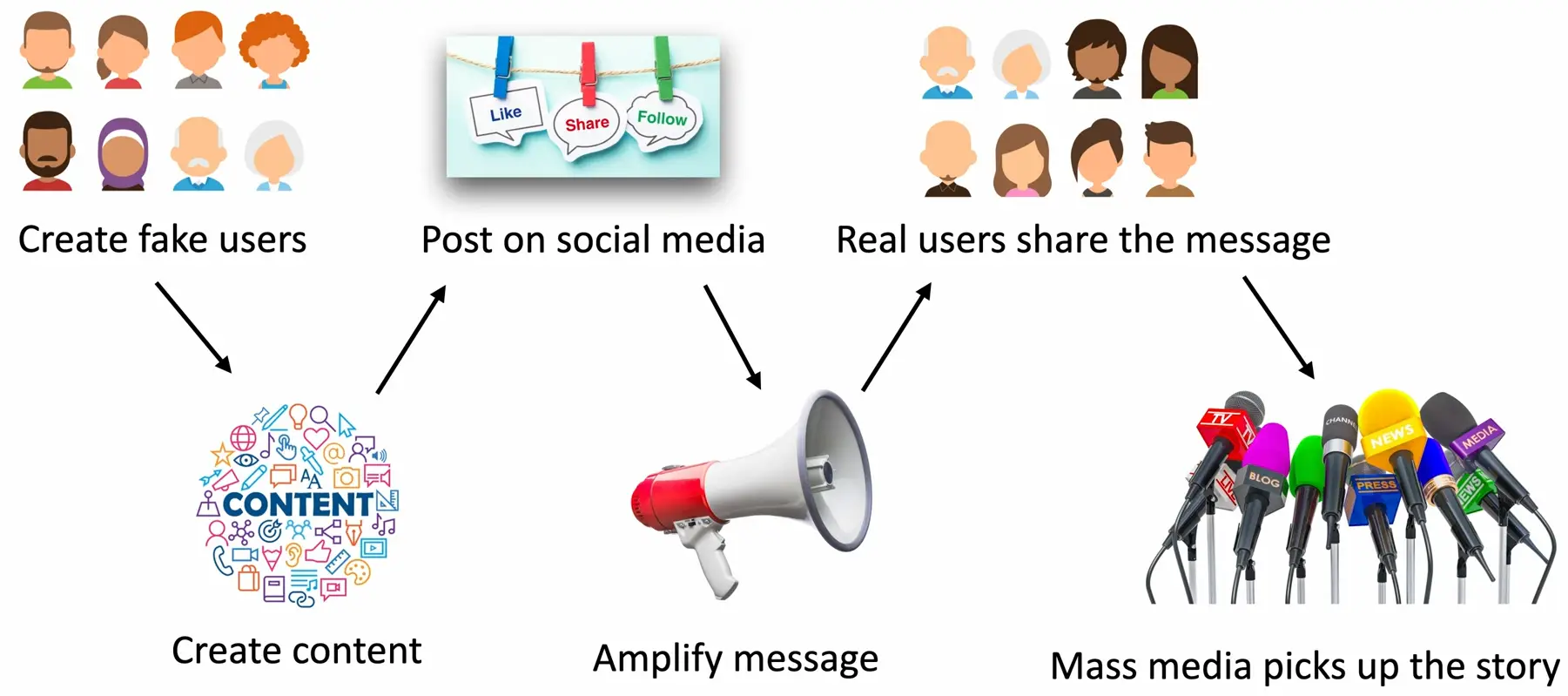
Influence campaigns
Sway public opinion on political and social issues
Nation-state actors
Divide, distract, and persuade
Advertising is an option
Buy a voice for your opinion
Enabled through Social media
Creating, sharing, liking, amplifying
Brand Impersonation
Pretend to be a well-known brand
Coca-cola, McDonald’s, Apple, etc.
Create tens of thousands of impersonated sites
Get into the Google index, click an ad, get a WhatsApp message
Visitors are presented with a pop-up
You won! Special offer! Download the video!
Malware infection is almost guaranteed
Display ads, site tracking, data exfiltration
Types of Vulnerabilities
Finding Malware
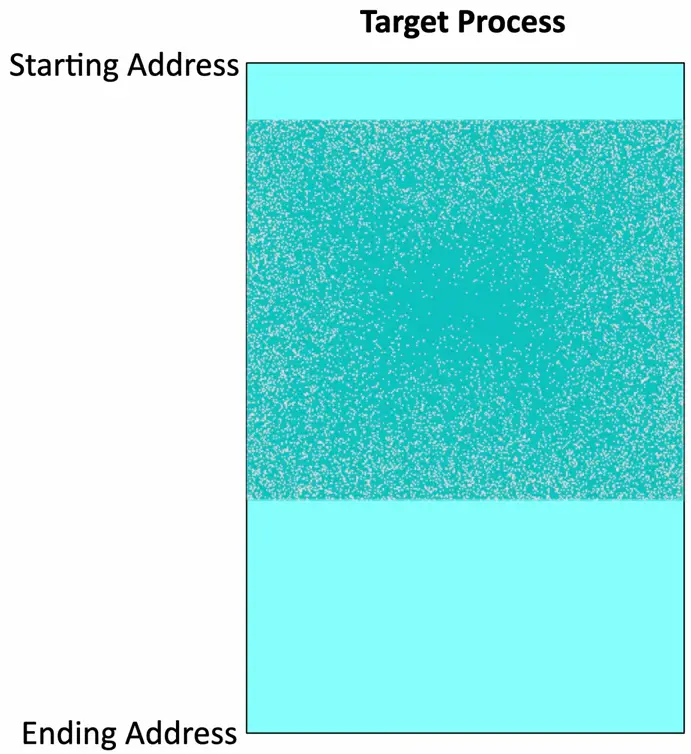
Malware runs in memory
Memory forensics can find the malicious code
Memory contains running processes
DLLs (Dynamic Link Libraries)
Threads
Buffers
Memory management functions
And much more
Malware is hidden somewhere
Malware runs in its own process
Malware injects itself into a legitimate process
Memory Injection
Add code into the memory of an existing process
Hide malware inside the process
Get access to the data in that process
And the same rights and permissions
Perform a privilege escalation
DLL Injection
Dynamic-Link Library
A Windows library containing code and data
Many applications can use this library
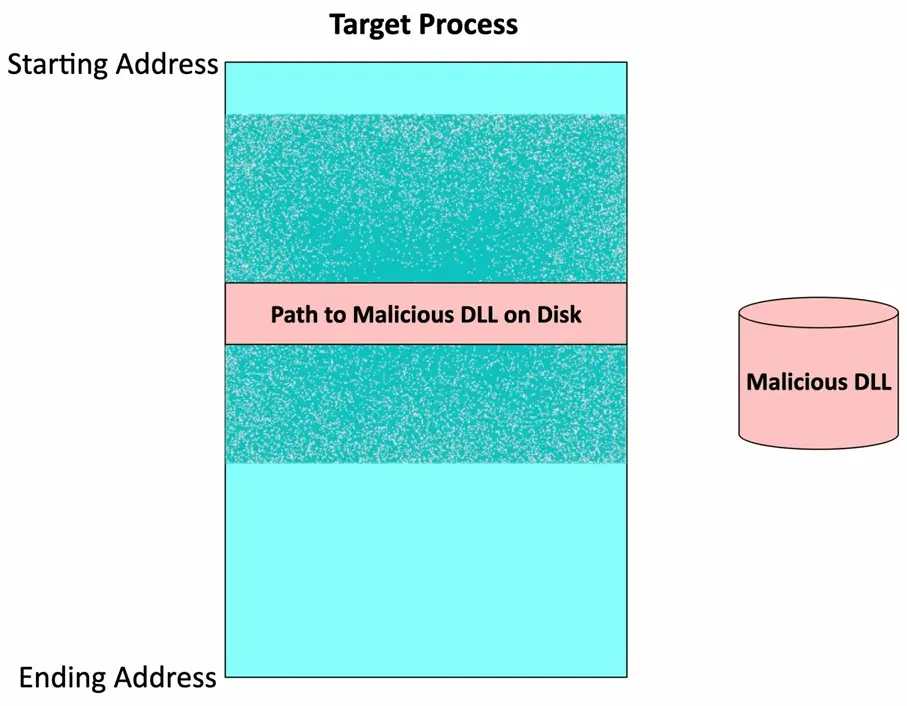
Attackers inject a path to a malicious DLL
Runs as part of the target process
One of the most popular memory injection methods
Relatively easy to implement
Buffer Overflows
Overwriting a buffer of memory
Spills over into other memory areas
Developers need to perform bounds checking
The attackers spend a lot of time looking for openings
Not a simple exploit
Takes time to avoid crashing things
Takes time to make it do what you want
A really useful buffer overflow is repeatable
Which means that a system can be compromised
Race Conditions
Race Condition
A programming conundrum
Sometimes, things happen at the same time
This can be bad if you’ve not planned for it
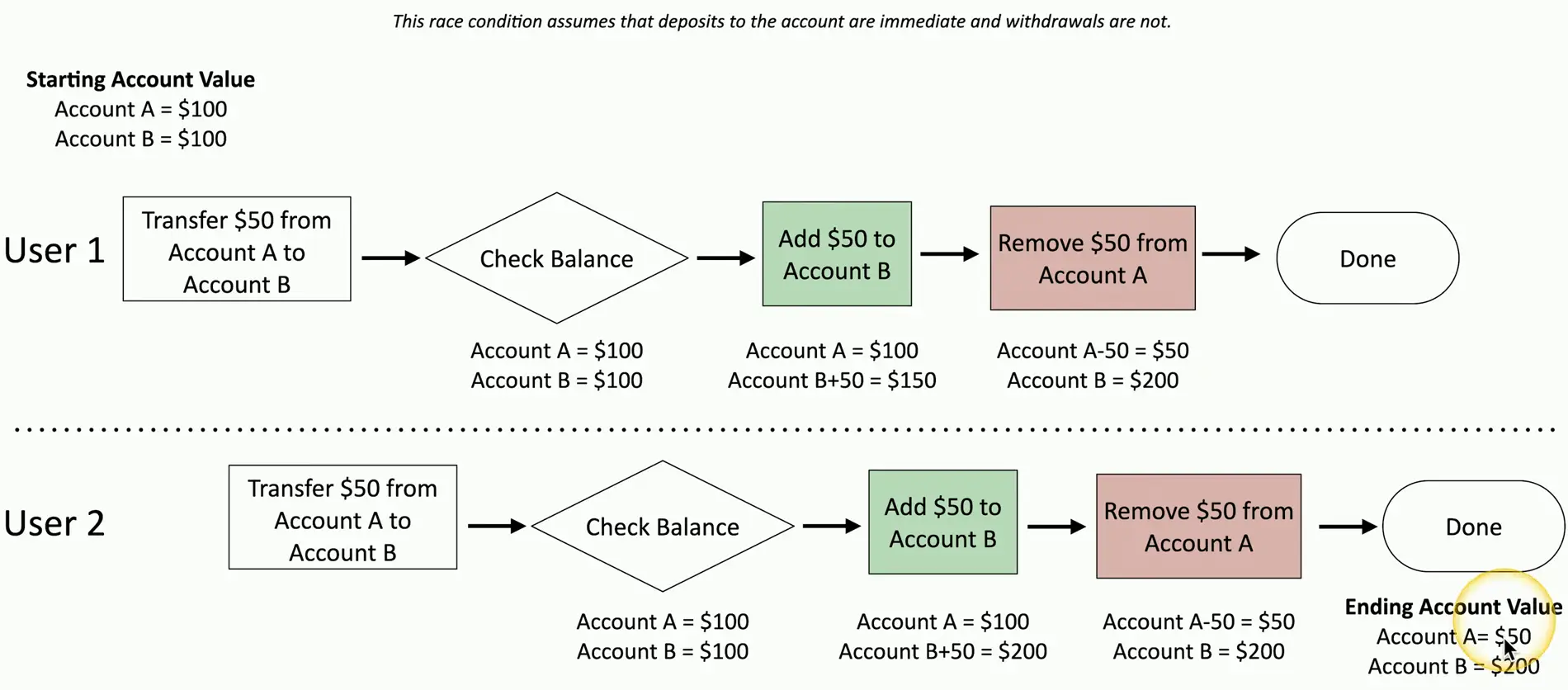
Time-of-check to time-of-use attack (TOCTOU)
Check the system
When do you use the results of your last check?
Something might happen between the check and the use
Race Condition Example
Race Conditions can cause big problems
January 2004 — Mars rover “Spirit”
Reboot when a problem is identified
Problem is with the file system, so reboot because of the file system problem
Reboot loop was the result
Pwn2Own Vancouver 2023 — Tesla Model 3
TOCTOU attack against the Tesla infotainment using Bluetooth
Elevated privileges to root
Earned $100,000 US prize, and they keep the Tesla
Malicious Updates
Software Updates
Always keep your operating system and applications updated
Updates often include bug fixes and security patches
This process has its own security concerns
Note every update is equally secure
Follow best practices
Always have a known-good backup
Install from trusted sources
Did I mention the backup?
Downloading and updating
Install updates from a downloaded file
Always consider your actions
Every installation could potentially be malicious
Confirm the source
A random pop-up during web browsing may not be legitimate
Visit the developer’s site directly
Don’t trust a random update button or random downloaded file
Many OSes will only allow signed apps
Don’t disable your security controls
Automatic Updates
The app updates itself
Often includes security checks/digital signatures
Relatively trustworthy
Comes directly from the developer
SolarWinds Orion supply chain attack
Reported in December 2025
Attackers gained access to the SolarWinds development system
Added their own malicious code to the updates
Gained access to hundreds of government agencies and companies
Operating System Vulnerabilities
Operating Systems
A foundational computing platform
Everyone has an OS
This makes the OS a very big target
Remarkably complex
Millions of lines of code
More code means more opportunities for a security issues
The vulnerabilities are already in there
We’ve just not found them yet
A month OS updates
A normal month of Windows updates
Patch Tuesday — 2nd Tuesday of each month
Other companies have similar schedules
May 9, 2023 — Nearly 50 security patches
8 Elevation of Privilege Vulnerabilities
4 Security Feature Bypass Vulnerabilities
12 Remote Code Execution Vulnerabilities
8 Information Disclosure Vulnerabilities
5 Denial of Service Vulnerabilities
1 Spoofing Vulnerability
Checkout Microsoft Security Center for latest patches and updates: https://msrc.microsoft.com/
Best Practices for OS Vulnerabilities
Always update
Monthly or on-demand updates
It’s a race between you and the attackers
May require testing before deployment
A patch might break something else
May require a reboot
Have a fallback plan
SQL Injection
Code Injection
Code Injection
Adding your own information into a data stream
Enabled because of bad programming
The application should properly handle input and output
So many data types
SQL Injection
SQL — Structured Query Language
The most common relational database management system language
SQL injection (SQLi)
Put your own SQL requests into an existing application
Your application shouldn’t allow this
Can often be executed in a web browser
Inject in a form or field
Building a SQL Injection
An example of website code:
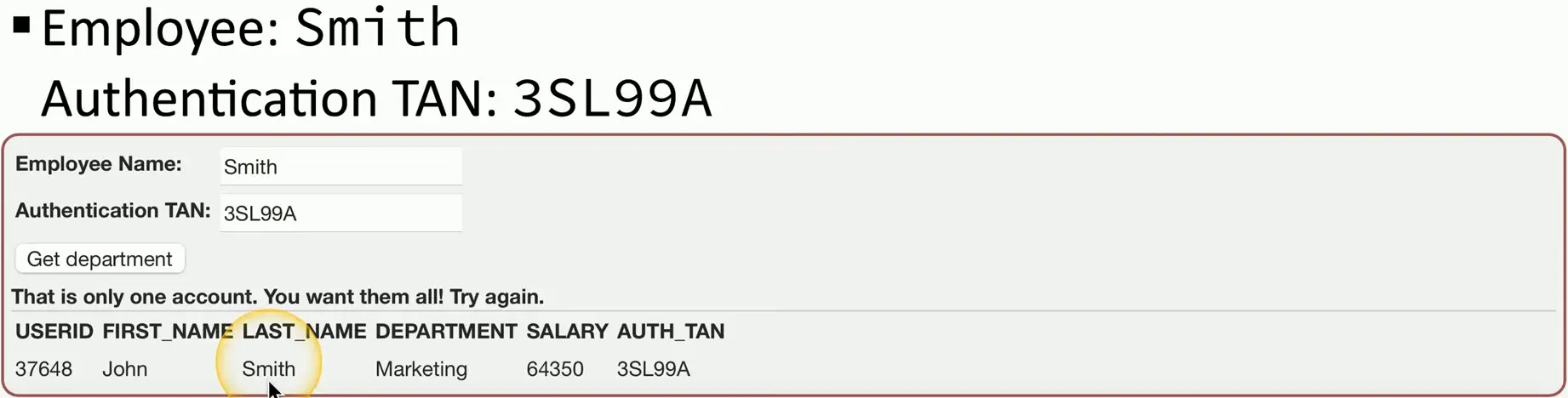
"SELECT * FROM users WHERE name = '" + userName + "'" ; How this looks to the SQL database
"SELECT * FROM users WHERE name = 'Professor'" ; Add more information to the query (SQLi):
"SELECT * FROM users WHERE name = 'Professor' OR '1' = '1'" ; This could be very bad
View all database information, delete database information, add users, denial of service, etc.
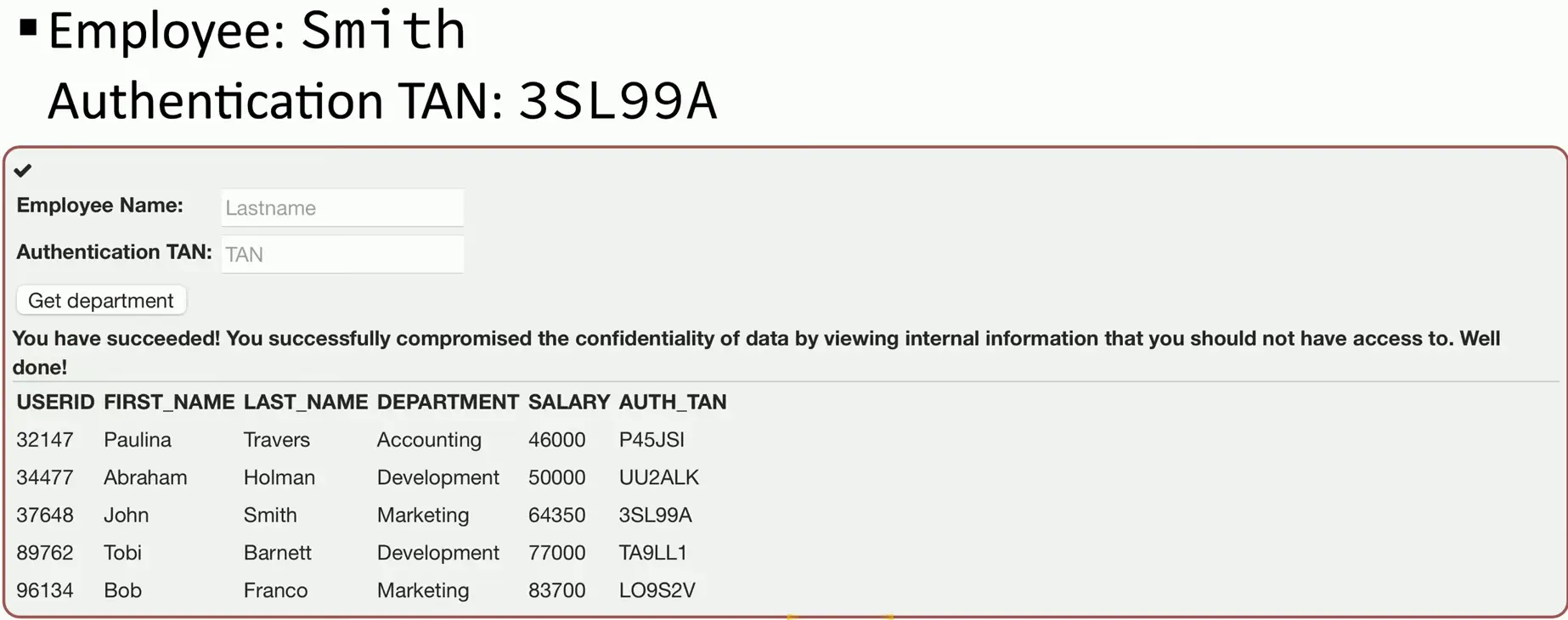
SQL Injection Demonstration
Source: https://owasp.org/www-project-webgoat/
Cross-site Scripting
XSS
XSS
Cascading Style Sheets (CSS) are something else entirely
Originally called cross-site because of browser security flaws
Information from one site could be shared with another
One of the most common web app vulnerabilities
Takes advantage of the trust a user has for a site
Complex and varied
XSS commonly uses JavaScript
Do you allow scripts? Me too.
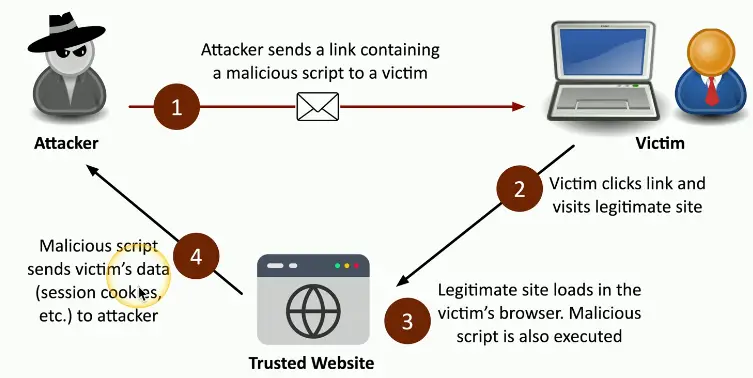
Non-persistent (reflected) XSS Attack
Website allows scripts to run in user input
Search box is a common source
Attacker emails a link that takes advantage of this vulnerability
Runs a script that sends credentials/session IDs/Cookies to the attacker
Script embedded in the URL executes in the victim’s browser
As if it came from the server
Attacker uses credentials/session IDs/cookies to steal victim’s information without their knowledge
Persistent (stored) XSS Attack
Attacker posts a message to a social media
Includes the malicious payload
It’s now “persistent”
Everyone gets the payload
No specific target
For social networking, this can spread quickly
Everyone who views the message can have it posted to their page
Where someone else can view it and propagate it further
Hacking a Subaru
June 2017, Aaron Guzman
When authenticating with Subaru, users get a token
This token never expires (bad!)
A valid token allowed any service request
Even adding your email address to someone else’s account
Now you have full access to someone else’s car
Web front-end included an XSS vulnerability
A user clicks a malicious link, and you have their token
Protecting Against XSS
Be careful when clicking untrusted links
Never blindly click in your email inbox, Never.
Consider disabling JavaScript
Or control with an extension
This offers limited protection
Keep your browser and applications updated
Avoid the nasty browser vulnerabilities
Validate input
Don’t allow users to add their own scripts to an input field
Hardware Vulnerabilities
We are surrounded by hardware devices
Many don’t have an accessible OS
These devices are potential security issues
A perfect entry point for an attack
Everything is connecting to the network
Light bulbs, garage doors, refrigerators, door locks
IoT is everywhere
The security landscape has grown
Time to change your approach
Firmware
The software inside the hardware
The OS of the hardware device
Vendors are the only ones who can fix their hardware
Assuming they know about the problem
And care about fixing it
Trane Comfortlink II thermostats
Control the temperature from your phone
Trane notified of three vulnerabilities in April 2014
Two patched in April 2015, one in January 2016
End-of-life
End of life (EOL)
Manufacturer stops selling a product
May continue supporting the product
Important for security patches and updates
End of service life (EOSL)
Manufacturer stops selling a product
Support is no longer available for the product
No ongoing security patches or updates
May have a premium-cost support option
Technology EOSL is a significant concern
Security patches are part of normal operation
Some devices remain installed for a long time
Legacy devices
Older OSes, applications, middleware
May be running end-of-life software
The risk need to be compared to the return
May require additional security protections
Additional firewall rules
IPS signatures for older OSes
Virtualization Vulnerabilities
Virtualization Security
Quite different from non-virtual machines
Quantity of resources vary between VMs
Many similarities to physical machines
Complexity adds opportunity for the attackers
Virtualization vulnerabilities
Local privilege escalations
Command injection
Information disclosure
VM escape protection
The virtual machine self-contained
There’s no way out
Or is there?
Virtual machine escape
Break out of the VM and interact with the host OS or hardware
Once you escape the VM, you have great control
Control the host and control other guests VMs
This would be a huge exploit
Full control of the virtual world
Escaping the VM
March 2017 — Pwn2Own competition
Hacking contest
You pwn it, you own it — along with some cash
JavaScript engine bug in Microsoft Edge
Code execution in the Edge sandbox
Windows 10 kernel bug
Hardware simulation bug in VMware
Patches were released soon afterward
Resource Reuse
The hypervisor manages the relationship between physical and virtual resources
Available RAM, storage space, CPU availability, etc.
These resources can be reused between VMs
Hypervisor host with 4 GB of RAM
Supports three VMs with 2 GB of RAM each
RAM is allocated and shared between VMs
Data can inadvertently be shared between VMs
Time to update the memory management features
Security patches can mitigate the risk
Cloud Specific Vulnerabilities
Security in the Cloud
Cloud adoption has been nearly universal
It’s difficult to find a company NOT using the cloud
We have put sensitive data in the cloud
The attackers would like this data
We are not putting in the right protections
76% of organizations aren’t using MFA for management of console users
Simple best-practices aren’t being used
63% of code in production is unpatched
Vulnerabilities rated high or critical (Common Vulnerability Scoring System - CVSS >= 7.0)
Attack the service
Denial of Service (DoS)
A fundamental attack type
Authentication bypass
Take advantage of weak or faulty authentication
Directory transversal
Faulty contiguration put data at risk
Remote code execution
Take advantage of unpatched systems
Attack the application
Web application attacks have increased
Log4j and Spring Cloud Function
Easy to exploit, rewards are extensive
Cross-site scripting
Take advantage of poor input validation
Out of bound write
Write to unauthorized memory areas
Data corruption, crashing, or code execution
SQL injection
Get direct access to a database
Supply Chain Vulnerabilities
Supply Chain Risk
The chain contains many moving parts
Raw materials, suppliers, manufacturers, distributors, customers, consumers
Attackers can infect any step along the way
Infect different parts of the chain without suspicion
People trust their suppliers
One exploit can infect the entire chain
Service Providers
You can control your own security posture
You can’t always control a service provider
Service providers often have access to internal services
An opportunity for the attacker
Many types of providers
Network, utility, office cleaning, payroll/accounting, cloud services, system administration, etc.
Consider ongoing security audits of all providers
Should be included with the contract
Target Service Provider Attack
Target Corp. breach — November 2013
40 million credit cards stolen
Heating and AC firm in Pennsylvania war infected
Malware delivered in an email
VPN credentials for HVAC techs were stolen
HVAC vendor was the supplier
Attackers used a wide-open Target network to infect every cash register at 1800 stores
Hardware Providers
Can you trust your new server/router/switch/firewall/software?
Supply chain cybersecurity
Use a small supplier base
Tighter control of vendors
Strict controls over policies and procedures
Ensure proper security is in place
Security should be part of the overall design
Cisco or not Cisco?
All network traffic flows
A perfect visibility and pivot point
July 2022 — DHS arrests reseller CEO
Sold more than $1 billion of counterfeit Cisco products
Created over 30 different companies
Had been selling these since 2013
Knock-offs made in China
Sold as authentic Cisco products
Until they started breaking and catching on fire
Software providers
Trust is a foundation of security
Every software installation questions our trust
Initial installation
Digital signature should be confirmed during installation
Updates and patches
Some software updates are automatic
How secure are the updates?
Open source is not immune
Compromising the source code itself
SolarWinds Supply Chain Attack
SolarWinds Orion
Used by 18000 customers
Including Fortune 500 and US Federal Government
Software updates compromised in March and June 2020
Upgrades to existing installations
Not detected until December 2020
Additional breaches took advantage of the exploit
Microsoft, Cisco, Intel, Deloitte
Pentagon, Homeland Security, State Department, Department of Energy, National Nuclear Security Administration, Treasury
Misconfiguration Vulnerabilities
Open Permissions
Very easy to leave a door open
The hackers will always find it
Increasingly common with cloud storage
Statistical chance of finding an open permission
June 2017–14 million Verizon records exposed
Third-party left an Amazon S3 data repository open
Researcher found the data before anyone else
Many, Many other examples
Unsecured Admin Accounts
The Linux root account
The Windows Administrator or superuser account
Can be misconfiguration
Intentionally configuring an easy-to-hack password
123456, ninja, football
Disable direct login to the root account
Use the su or sudo option
Protect accounts with root or administrator access
There should not be a lot of these
Insecure Protocols
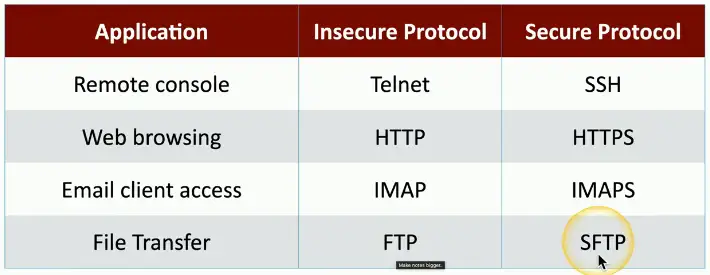
Some protocols aren’t encrypted
All traffic sent in the clear
Telnet, FTP, SMTP, IMAP
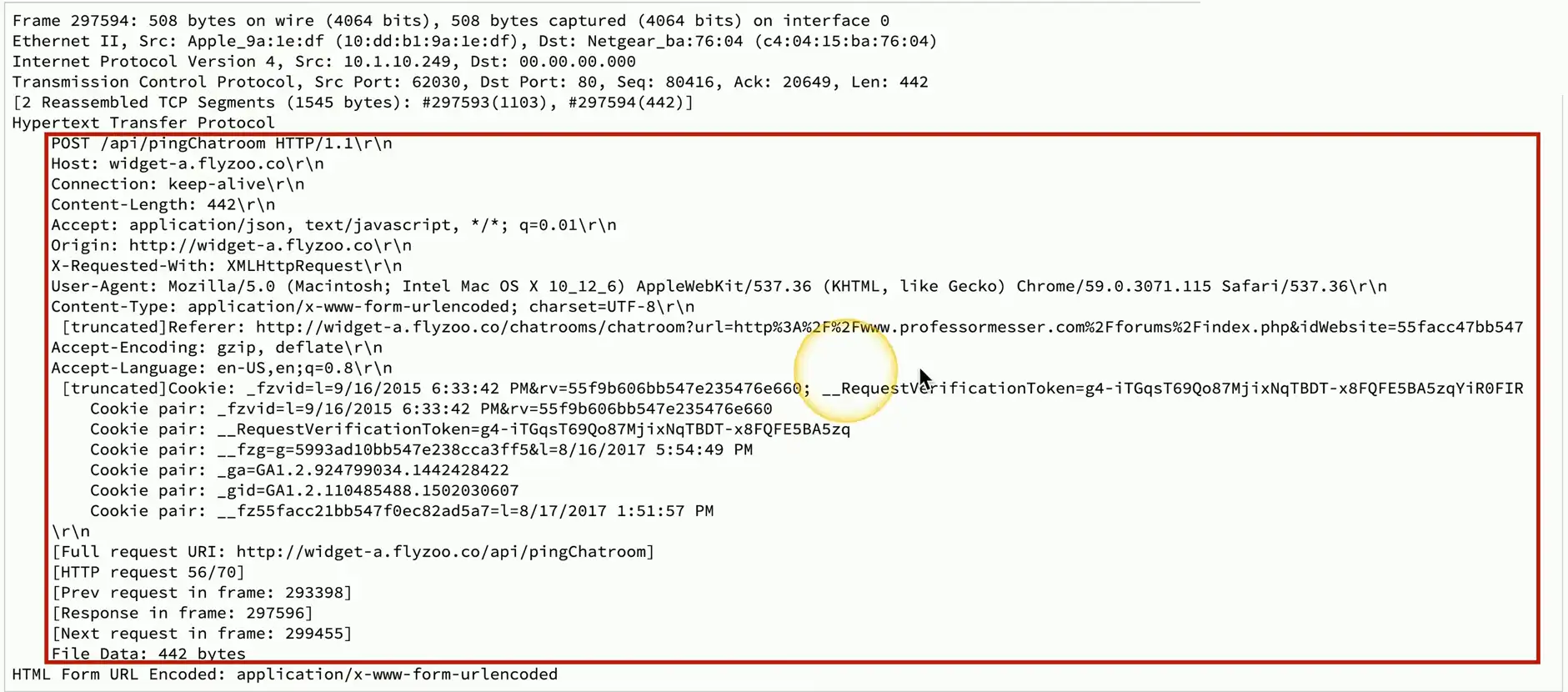
Verify with a packet capture
View everything sent over the network
Use the encrypted versions
Default Settings
Every application and network device has a default login
Not all of these are ever changed
Mirai Botnet
Take advantage of default configurations
Takes over Internet of Things (IoT) devices
60+ default configurations
Camera, routers, doorbells, garage door openers, etc.
Mirai released as open-source software
There’s a lot more where that came from
Open Ports and Services
Services will open ports
It’s important to manage access
Often managed with a firewall
Manage traffic flows
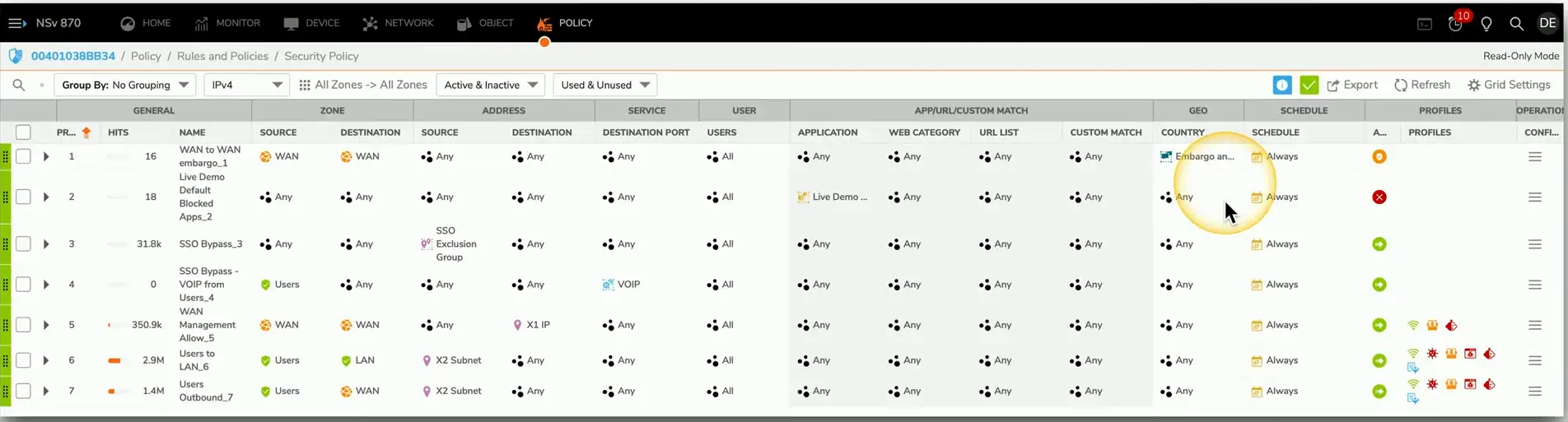
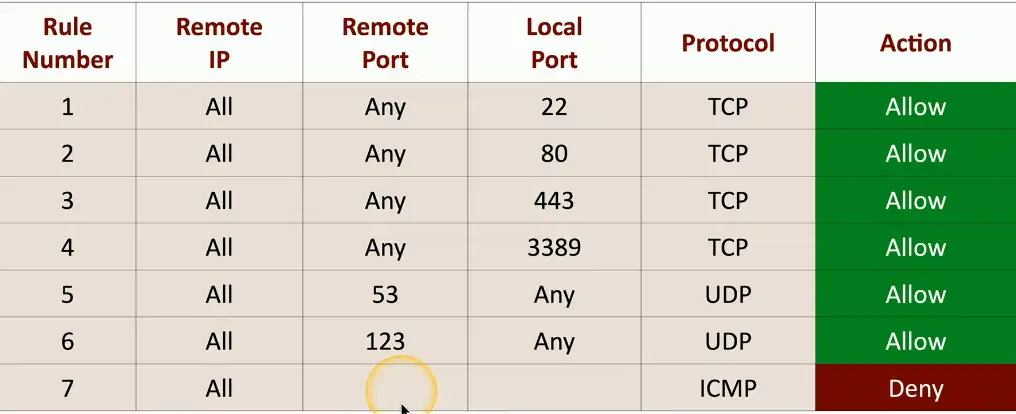
Allow or deny based on port number or application
Firewall rulesets can be complex
It’s easy to make mistake
Always test and audit
Mobile Device Vulnerabilities
Mobile Device Security
Challenging to secure
Often need additional security policies and systems
Relatively small
Almost always in motion
You never know where it might be
Packed with sensitive data
Personal and organizational
Constantly connected to the Internet
Nothing bad happens on the Internet
Jailbreaking/Rooting
Mobile devices are purpose built systems
You don’t have access to the OS
Gaining access
Android — Rooting
Apple iOS — Jailbreaking
Install custom firmware
Uncontrolled access
Circumvent security features
The MDM (Mobile Device Management) becomes relatively useless
Sideloading
Malicious apps can be a significant security concern
One Trojan horse can create a data breach
Manage installation sources
The global or local app store
Sideloading circumvents security
Apps can be installed manually without using an app store
Again, your MDM becomes relatively useless
Zero-day Vulnerabilities
Vulnerabilities
Many applications have vulnerabilities
We have just not found them yet
Someone is working hard to find the next big vulnerability
The good guys share these with developers
Attackers keep these yet-to-be-discovered holes to themselves
They want to use these vulnerabilities for personal gain
Zero-day Attacks
Attackers search for unknown vulnerabilities
They create exploits against these vulnerabilities
The vendor has no idea the vulnerability exists
They don’t have a fix for an unknown problem
Zero-day attacks
An attack without a patch or method of mitigation
A race to exploit the vulnerability or create a patch
Difficult to defend against the unknown
Common Vulnerabilities and Exposure (CVE)
Zero-day Attacks in the wild
April 2023 — Chrome zero-day
Memory corruption, sandbox escape
May 2023 — Microsoft zero-day patch
Secure boot zero-day vulnerability
Attackers can run UEFI-level self-signed code
May 2023 — Apple iOS and iPadOS zero-days
Three zero-day attacks
Sandbox escape, disclosure of sensitive information, arbitrary code execution
Active exploitation
An Overview of Malware
Malware
Malicious Software
Gather information
Show you advertising
Viruses and worms
Encrypt your data
Ruin your day
Malware Types and Methods
Viruses
Worms
Ransomware
Trojan Horse
Rootkit
Keylogger
Spyware
Bloatware
Logic bomb
How You Get Malware
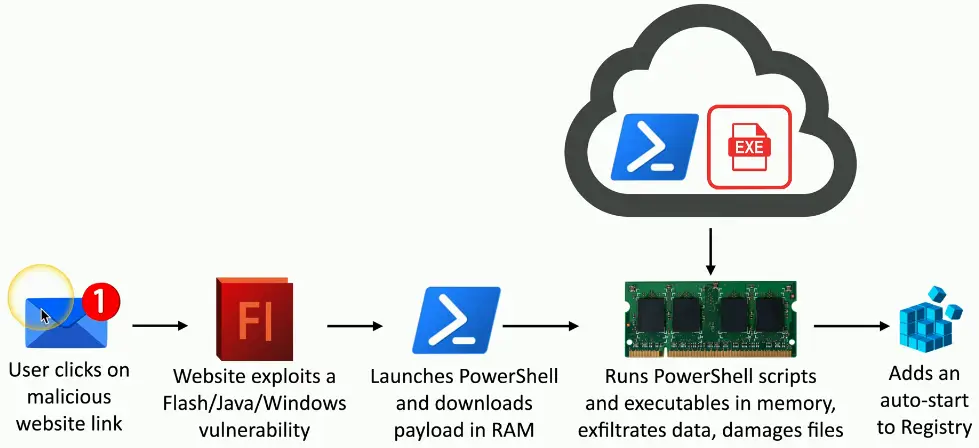
These all work together
A worm takes advantage of a vulnerability
Installs malware that includes a remote access backdoor
Additional malware may be installed later
Your computer must run a program
Email link — Don’t click links
Web page pop-up
Drive-by download
Worm
Your computer is vulnerable
OS — Keep your OS updated
Applications — Check with the publisher
Your Data is Valuable
Personal Database
Family pictures and videos
Important documents
Organization data
Planning documents
Employee personally identifiable information (PII)
Financial records
Company private data
How much is it worth?
Ransomware
A particularly nasty malware
Your data is unavailable until you provide cash
Malware encrypts your data files
Pictures, documents, music, movies, etc.
Your OS remains available
You must pay the attackers to obtain the decryption key
Untraceable payment system
An unfortunate use of public-key cryptography
Protecting against Ransomware
Always have a backup
An offline backup, ideally
Keep your OS up to date
Patch those vulnerabilities
Keep your applications up-to-date
Keep your anti-virus/anti-malware signatures up-to-date
Keep everything up-to-date
Viruses and Worms
Virus
Malware that can reproduce itself
It needs you to execute a program
Reproduces through file systems or the network
Just running a program can spread a virus
May or may not cause problems
Some viruses are invisible, some are annoying
Anti-virus is very common
Thousands of new viruses every week
Is your signature file updated?
Virus Types
Program viruses
It’s part of the application
Boot sector viruses
Script viruses
Macro viruses
Common in Microsoft Office
Fileless Virus
A stealth attack
Does a good job of avoiding anti-virus detection
Operates in memory
But never installed in a file or application
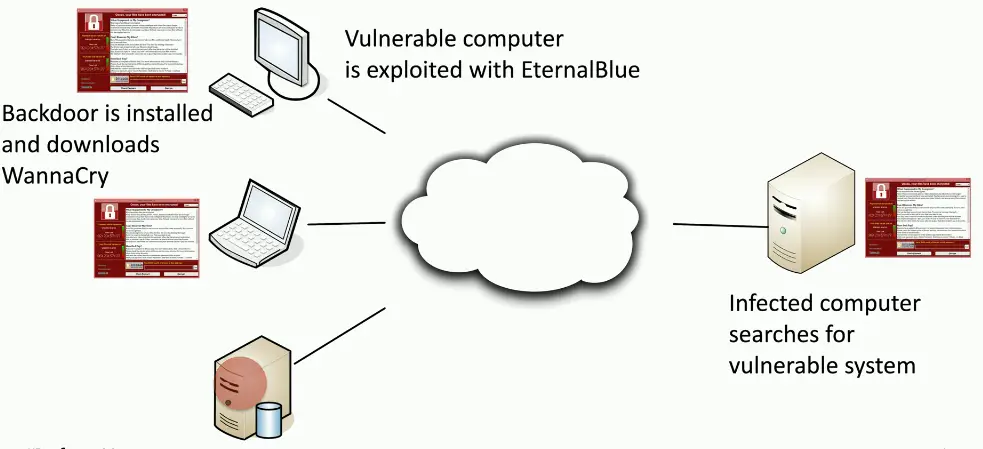
Worms
Malware that self-replicates
Doesn’t need you to do anything
Uses the network as a transmission medium
Self-propagates and spreads quickly
Worms are pretty bad things
Can take over many systems very quickly
Firewalls and IDS/IPS can mitigate many worms infestations
Doesn’t help much once the worm gets inside
Wannacry Worm
Spyware and Bloatware
Spyware
Malware that spies on you
Advertising, identity theft, affiliate fraud
Can trick you into installing
Peer to peer, fake security software
Browser monitoring
Keyloggers
Capture every keystroke
Send your keystrokes back to the attacker
Protecting Against Spyware
Maintain your anti-virus/anti-malware
Always have the latest signatures
Always know what you’re installing
And watch your options during the installation
Where’s your backup?
You might need it someday
Cleaning adware isn’t easy
Run some scans
Bloatware
A new computer or phone
Includes the OS and important apps
Also includes applications you didn’t expect
Apps are installed by the manufacturer
Uses valuable storage space
May also add to overall resource usage
The system may be slower than expected
Could open your system to exploits
Removing Bloatware
Identify and remove
This may be easier said than done
Use the built-in uninstaller
Works for most applications
Some apps have their own uninstaller
Third-party uninstallers and cleaners
Probably not the first option
Always have a backup
Other Malware Types
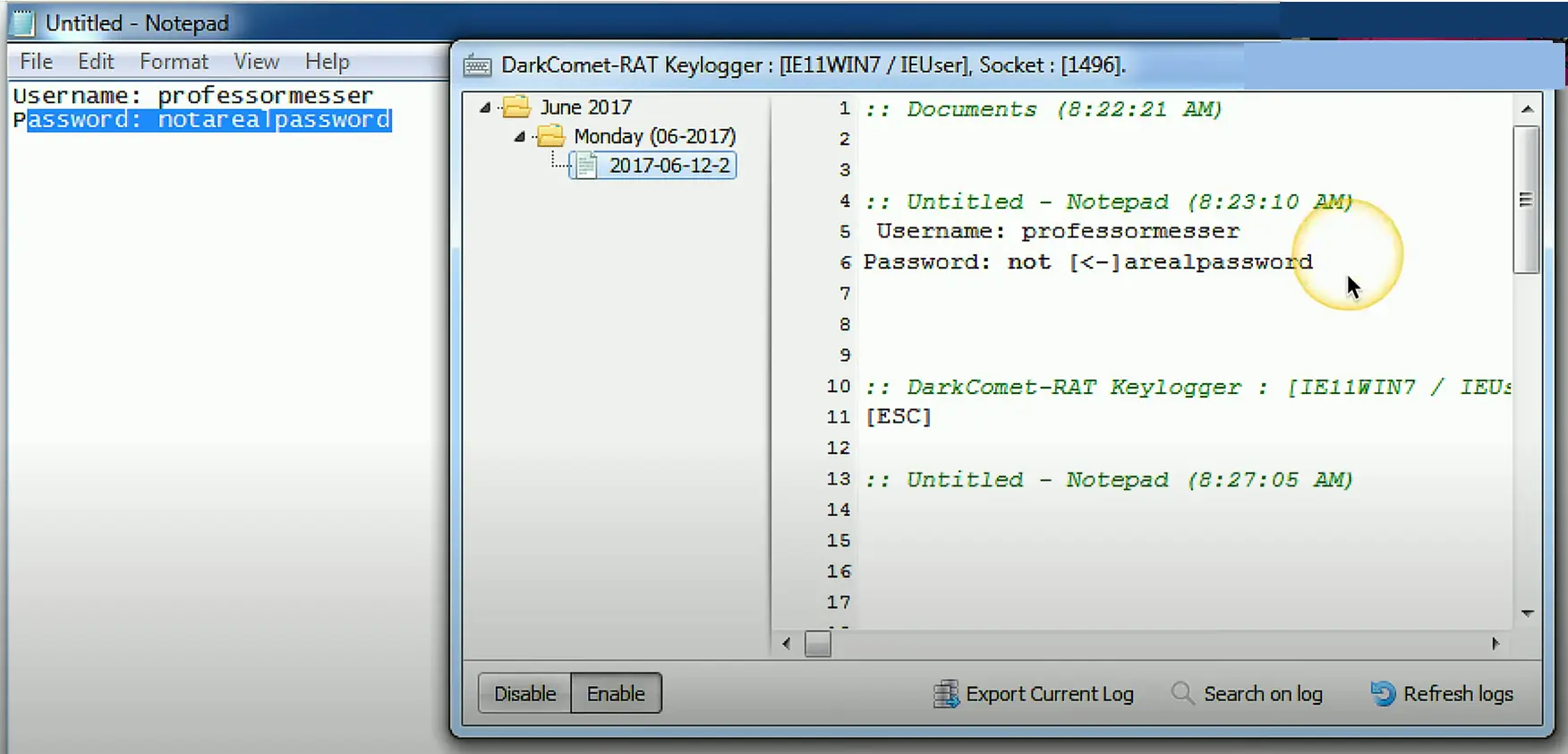
Keyloggers
Your keystrokes contain valuable information
Website login URLs, passwords, email messages
Save all of your input
Circumvent encryption protections
Your keystrokes are in the clear
Other data logging
Clipboard logging, screen logging, instant messaging, search engine queries
Keylogger in action
Logic Bomb
Waits for a predefined event
Often left by someone with grudge
Time bomb
User event
Difficult to identify
Difficult to recover if it goes off
Real-world Logic Bomb
March 19, 2013, South Korea
Email wit malicious attachment sent to South Korean organizations
Posed as a bank email
Trojan installs a malware
March 20, 2013, 2 PM local time
Malware time-based logic bomb activates
Storage and master boot record (MBR) deleted, system reboots
Boot device not found.
Please install an Operating System on your hard disk.
Preventing a Logic Bomb
Difficult to recognize
Each is unique
No predefined signatures
Process and procedures
Electronic monitoring
Alerts on changes
Host-based intrusion detection, Tripwire, etc.
Constant auditing
An administrator can circumvent existing systems
Rootkits
Originally a Unix technique
Modifies core system files
Can be invisible to the OS
Won’t see it in the Task Manager
Also, invisible to traditional anti-virus utilities
If you cannot see it, you cannot stop it
Finding and Removing Rootkits
Look for the unusual
Use a remover specific the rootkit
Usually built after the rootkit is discovered
Secure boot with UEFI
Physical Attacks
Physical Attacks
Old school security
No keyboard, no mouse, no command line
Many ways to circumvent digital security
A physical approach must be considered
If you have physical access to a server, you have full control
An OS can’t stop an in-person attack
Door locks keep out the honest people
Brute Force
The physical version
Push through the obstruction
Check your physical security
Check the windows
Try the doors
Attackers will try everything
You should be prepared for anything
RFID Cloning
RFID is everywhere
Duplicators are on Amazon
The duplication process takes seconds
Read one card
Copy to another
This is why we have MFA
Use another factor with the card
Environmental Attacks
Attack everything supporting the technology
The operating environment
Power monitoring
HVAC (Heating, Ventilation, and Air conditioning) and humidity controls
Large data centers must be properly cooled
Fire suppression
Denial of Service
Denial of Service
Force a service to fail
Take advantage of a design failure or vulnerability
Keep your system patched!
Cause a system to be unavailable
Create a smokescreen for some other exploit
Precursor to a DNS spoofing attack
Doesn’t have to be complicated
A “Friendly” DoS
Unintentional DoSing
It’s not always an né’er-do-well
Network DoS
Bandwidth DoS
Downloading multi-gigabyte Linux distribution over a DSL line
The water line breaks
Distributed Denial of Service (DDoS)
Launch an army of computers to bring down a service
Use all the bandwidth or resources — traffic spike
This is why the attackers have botnets
Thousands or millions of computers at your command
At its peak, Zeus botnet infected over 3.6 million PCs
Coordinated attack
Asymmetric threat
The attacker may have fewer resources than the victim
DDoS Reflection and Amplification
Turn your small attack into a big attack
Often reflected off another device or service
An increasingly common network DDoS technique
Turn Internet services against the victim
Uses protocols with little (if any) authentication or checks
NTP, DNS, ICMP
A common example of protocol abuse
DNS Attacks
DNS Poisoning
Modify the DNS server
Requires some crafty hacking
Modify the client host file
The host file takes precedent over DNS queries
Send a fake response to a valid DNS request
Requires a redirection of the original request or the resulting response
Real-time redirection
This is an on-path attack
DNS Spoofing/Poisoning in Action
Domain Hijacking
Get access to the domain registration, and you have control where the traffic flows
You don’t need to touch the actual servers
Determines the DNS names and DNS IP addresses
Many ways to get into the account
Brute-force
Social engineer the password
Gain access to the email address that manages the account
The usual things
Saturday, October 22, 2016, 1 PM
Domain name registrations of 36 domains were changes
Brazilian bank
Desktop domains, mobile domains, and more
Under hacker control for 6 hours
The attackers became the bank
5 million customers, $27 billion in assets
Results of the hack have not been publicly released
URL Hijacking
Make money from your mistakes
There’s a lot of advertising on the Internet
Sell the badly spelled domain to the actual owner
Redirect to a competitor
Not as common, legal issues
Phishing site
Looks like the real site, please log in
Infect with a drive-by download
Types of URL Hijacking
Typosquatting/brandjacking
Take advantage of poor spelling
Outright misspelling
professormesser.com vs. professormessor.com
A typing error
A different phrase
Different top-level domain
Wireless Attacks
It started as a normal day
Surfing along on your wireless network
And then it happens again
You may not be able to stop it
There’s (almost) nothing you can do
Time to get a long patch cable
Wireless deauthentication
A significant wireless denial of service (DoS) attack
802.11 management frames
802.11 wireless includes a number of management features
Frames that make everything work
You never see them
Important for the operation of 802.11 wireless
How to find access points, manage QoS, associate/disassociate with an access point, etc.
Original wireless standards didn’t add protection for management frames
Sent in the clear, no authentication or validation
Protecting against deauth attacks
IEEE has already addressed the problem
Updates included with 802.11ac
Some important management frames are encrypted
Disassociate, deauthenticate, channel switch announcement, etc.
Not everything is encrypted
Beacons, probes, authentication, association
Radio Frequency (RF) Jamming
Denial of service
Prevent wireless communication
Transmit interfering wireless signals
Decrease the signal-to-noise ratio at the receiving device
The receiving device can’t hear the good signal
Sometimes it’s not intentional
Interference, not jamming
Microwave oven, fluorescent lights
Jamming is intentional
Someone wants your network to not work
Wireless Jamming
Many types
Constant, random bits/Constant, legitimate frames
Data sent at random times — random data and legitimate frames
Reactive jamming — only when someone else tries to communicate
Needs to be somewhere close
Difficult to be effective from a distance
Time to go fox hunting
You’ll need the right equipment to hunt down the jam
Directional antenna, attenuator
On-path Attacks
On-path Network Attack
How can an attacker watch without you knowing?
Formerly known as man-in-the-middle
Redirects your traffic
Then passes it on to the destination
You never know your traffic was redirected
ARP poisoning
On-path attack on the local IP subnet
ARP has no security
ARP Poisoning (Spoofing)
On-path Browser Attack
What if the middleman was on the same computer as the victim?
Malware/Trojan does all the proxy work
Formerly known as man-in-the-browser
Huge advantages for the attackers
Relatively easy to proxy encrypted traffic
Everything looks normal to the victim
The malware in your browser waits for you to log in to your bank
Replay Attacks
Replay Attacks
Useful information is transmitted over the network
A crafty hacker will take advantage of this
Need access to the raw network data
Network tap, ARP poisoning
Malware on the victim computer
The gathered information may help the attacker
Replay the data to appear as someone else
This is not an on-path attack
The actual replay doesn’t require the original workstation
Pass the Hash
Avoid this type of replay attack with a salt or encryption
Use a session ID with the password hash to create a unique authentication hash each time
Browser Cookie and Session IDs
Cookies
Information stored on your computer by the browser
Used for tracking, personalization, session management
Not executable, not generally a security risk
Unless someone gets access to them
Could be considered be a privacy risk
Lots of personal data in there
Session IDs are often stored in the cookie
Maintains sessions across multiple browser sessions
Session Hijacking (Sidejacking)
Information gathering
Exploits
Modify header
Modify cookie
Cookies Manager+ (Firefox add-on)
Prevent Session Hijacking
Encrypt end-to-end
They can’t capture your session ID if they can’t see it
Additional load on the web server (HTTPS)
Firefox extension: HTTPS Everywhere, Force TLS
Many sites are now HTTPS-only
Encrypt end-to-somewhere
At least avoid capture over a local wireless network
Still in-the-clear for part of the journey
Personal VPN
Firefox and Chromium based browser now by-default support strict HTTPS configuration policy, you don’t need a 3rd-party extension
Malicious Code
Exploiting a Vulnerability
An attacker can use many techniques
Social engineering
Default credentials
Misconfiguration
These don’t require technical skills
The door is already unlocked
There are still ways to get into a well-secured system
Exploit with malicious code
Knock the pins out of a door hinge
Malicious Code
The attackers use any opportunity
The types of malicious code are varied
Many forms
Executables, scripts, macro viruses, worms, Trojan horses, etc.
Protection comes from different sources
Anti-malware
Firewall
Continuous updates and patches
Secure computing habits
Malicious Code Examples
WannaCry ransomware
Executable exploited a vulnerability in Windows SMBv1
Arbitrary code execution
British Airways cross-site scripting
22 lines of malicious JavaScript code placed on checkout pages
Information stolen from 380,000 victims
Estonian Central Health Database
SQL injection
Breached all healthcare information for an entire country
Application Attacks
Application Attacks
Injection Attacks
Code injection
Adding your own information into a data stream
Enabled because of bad programming
The application should properly handle input and output
So many injectable data types
HTML, SQL, XML, LDAP, etc.
Buffer Overflows
Overwriting a buffer of memory
Spills over into other memory area
Developers need to perform bounds checking
The attackers spend a lot of time looking for openings
Not a simple exploit
Takes time to avoid crashing things
Take time to make it do what you want
A really useful buffer overflow is repeatable
Which means that a system can be compromised
Replay attack
Useful information is transmitted over the network
A crafty hacker will take advantage of this
Need to access to the raw network data
Network tap, ARP poisoning.
Malware on the victim
The gathered information may help the attacker
Replay the data to appear as someone else
This is not an on-path attack
The actual replay doesn’t require the original workstation
Privilege Escalation
Gain higher-level access to a system
Exploit a vulnerability
Might be a bug or design flaw
Higher-level access means more capabilities
This commonly is the highest level access
This is obviously a concern
These are high-priority vulnerability patches
You want to get these holes closed very quickly
Horizontal privilege escalation
User A can access user B resources
Mitigating Privilege Escalation
Patch quickly
Updates anti-virus/anti-malware software
Block known vulnerabilities
Data Execution Prevention
Only data in executable areas can run
Address space layout randomization
Prevent a buffer overrun at a known memory address
Elevation of Privilege Vulnerability
CVE-2023-293366
Win32k Elevation of privilege vulnerability
Win32k Kernel Driver
Server 2008, 2008 R2, 2012, 2012 R2, 2016
Windows 10
Attacker would gain SYSTEM privileges
Cross-site Request
Cross-site requests are common and legitimate
You visit professormesser.com
Your browser loads text from the professormesser.com server
It loads a video from YouTube
And pictures from Instagram
HTML on professormesser.com directs requests from your browser
This is normal and expected
Most of these are unauthenticated requests
The Client and the Server
Website pages consist of client-side code and server-side code
Client-side
Renders the page on the screen
HTML, JavaScript
Server-side
Performs requests from the client
HTML, PHP
Transfer money from one account to another
Post a video on YouTube
Cross-site Request Forgery
One-click attack, session riding
Takes advantage of the trust that a web application has for the user
The website trusts your browser
Requests are made without your consent or your knowledge
Attacker posts a Facebook status on your account
Significant web application development oversight
The application should have anti-forgery techniques added
Usually a cryptographic token to prevent a forgery
Directory Transversal
Directory transversal/path transversal
Read files from a web server that are outside the website’s file directory
Users shouldn’t be able to browse the Windows Folder
Web server software vulnerability
Won’t stop users from browsing past the web server root
Web application code vulnerability
Take advantage of badly written code
Cryptographic Attacks
Cryptographic Attacks
You’ve encrypted data and sent it to another person
Is it really secure?
How do you know?
The attacker doesn’t have the combination (the key)
So they break the safe (the cryptography)
Finding ways to undo the security
There are many potential cryptographic shortcomings
The problem is often the implementation
Birthday Attack
In a classroom of 23 students, what is the chance of two students sharing a birthday?
About 50%
For a class of 30, the chance is about 70%
In the digital word, this is a hash collision
A hash collision is the same hash value for two different plaintexts
Find a collision through brute force
The attacker will generate multiple versions of plaintext to match the hashes
Protect yourself with a large hash output size
Collisions
Hash digests are supposed to be unique
Different input data should not create the same hash
MD5 hash
Message Digest Algorithm 5
First published in April 1996
December 2008: Researchers created CA certificate that appeared legitimate when MD5 is checked
Built other certificates that appeared to be legit and issued by RapidSSL
Downgrade Attack
Instead of using perfectly good encryption, use something that’s not so great
Force the systems to downgrade their security
SSL stripping
Combines an on-path attack with a downgrade attack
Difficult to implement, but big returns for the attacker
Attacker must sit in the middle of the conversation
Victims browser page isn’t encrypted
Strips the S away from HTTPS
Plaintext/Unencrypted Passwords
Some applications store passwords “in the clear”
No encryption. You can read the stored password
This is rare, thankfully.
Do not store passwords as plaintexts
Anyone with access to the password file or database has every credential
What to do if your application saves passwords as plaintext
Hashing a password
Hashes represent data as a fixed-length string of text
A message digest, or “fingerprint”
Will not have a collision (hopefully)
Different inputs will not have the same hash
One-way trip
Impossible to recover the original message from the digest
A common way to store passwords
A Hash Example
SHA-256 hash
Used in many applications
The Password File
Different across OSes and applications
Different hash algorithms
Spraying Attack
Try to log in with an incorrect password
Eventually you’ll be locked out
There are some common passwords
Attack an account with the top three (or more) passwords
If they don’t work, move to the next account
No lockouts, no alarms, no alerts
Brute-force
Try every possible password combination until the hash is matched
This might take some time
A strong hashing algorithm slows things down
Brute-force attacks — Online
Keep trying the login process
Very slow
Most accounts will lock out after a number of failed attempts
Brute-force the hash — Offline
Obtain the list of users and hashes
Calculate a password hash, compare it to a stored hash
Large computational resource requirement
Indicators of Compromise
Indicators of Compromise (IOC)
An event that indicates an intrusion
Confidence is high
He’s calling from inside the house
Indicators
Unusual amount of network activity
Change to file hash values
Irregular international traffic
Changes to DNS data
Uncommon login patterns
Spikes of read requests to certain files
Account Lockout
Credentials are not working
Exceeded login attempts
Account is automatically locked
Account was administratively disabled
This would be a larger concern
This may be part of a larger plan
Attacker locks account
Calls support line to reset the password
Concurrent Session Usage
It’s challenging to be two places at one time
Multiple account logins from multiple locations
Interactive access from a single user
You don’t have a clone
This can be difficult to track down
Multiple devices and desktops
Automated processes
Blocked Content
An attacker wants to stay as long as possible
Your system has been unlocked
Keep the doors and windows open
There’s probably a security patch available
Blocked content
Auto-update connections
Links to security patches
Third-party anti-malware sites
Removal tools
Impossible Travel
Authentication logs can be telling
Login from Omaha, Nebraska, United States
Three minutes later, a login from Melbourne, Victoria, Australia
Alarm bells should be ringing
This should be easy to identify
Log analysis and automation
Resource Consumption
Every attacker’s action has an equal and opposite reaction
Watch carefully for significant changes
File transfers use bandwidth
Firewall logs show the outgoing transfer
Often the first real notification of an issue
The attacker may have been here for months
Resource Inaccessibility
The server is down
Network disruption
A cover for the actual exploit
Server outage
Result of an exploit gone wrong
Encrypted data
A potential ransomware attack begins
Brute force attack
Out-of-Cycle Logging
Out-of-Cycle
Occurs at an unexpected time
OS patch logs
Occurring outside the normal patch day
Keep that exploited system safe from other attackers!
Firewall log activity
Timestamps of every traffic flow
Protocols and applications used
Missing logs
Log information is evidence
Attackers will try to cover their tracks by removing logs
Information is everywhere
Authentication logs
File access logs
Firewall logs
Proxy logs
Server logs
The logs may be incriminating
Missing logs are certainly suspicious
Logs should be secured and monitored
Published/Documented
The entire attack and data exfiltration may go unnoticed
Company data may be published online
The attackers post a portion or all data
This may be in conjunction with ransomware
Raw data may be released without context
Researchers will try to find the source
Segmentation and Acess Control
Segmenting the Network
Physical, logical, or virtual segmentation
Devices, VLANs, virtual networks
Performance
High-bandwidth applications
Security
Users should not talk directly to database servers
The only applications in the core are SQL and SSH
Compliance
Mandated segmentation (PCI compliance)
Makes change control much easier
Access Control Lists (ACLs)
Allow or disallow traffic
Groupings of categories
Source IP, Destination IP, port number, time of day, application, etc.
Restrict access to network devices
Limit by IP address, or other identifier
Prevent regular user/non-admin access
Be careful when configuring these
You can accidentally lock yourself out
List the permissions
Bob can read files
Fred can access the network
James can access network 192.168.1.0/24 using TCP ports 80, 443, 8088
Many OSes use ACLs to provide access to files
A trustee and the access rights allowed
Application Allow List/Deny List
Any application can be dangerous
Vulnerabilities, Trojan Horses, malware
Security policy can control app execution
Allow list, deny/block list
Allow list
Nothing runs unless it’s approved
Very restrictive
Deny list
Nothing on the “bad list” can be executed
Anti-virus, anti-malware
Examples of Allow and Deny Lists
Decisions are made in the OS
Often built-in to the OS management
Application hash
Only allows applications with this unique identifier
Certificate
Allow digitally signed apps from certain publishers
Path
Only run applications in these folders
Network Zone
The apps can only run from this network zone
Mitigation Techniques
Mitigation Techniques
Patching
Incredibly important
System stability, security fixes
Monthly updates
Incremental (and important)
Third-party updates
Application developers, device drivers
Auto-update
Not always the best option
Emergency out-of-band updates
Encryption
Prevent access to application data files
File level encryption
Full disk encryption (FDE)
Encrypt everything on the drive
BitLocker, FileVault, etc.
Application data encryption
Managed by the app
Stored data is protected
Monitoring
Aggregate information from devices
Built-in sensors, separate devices
Integrated into servers, switches, routers, firewalls, etc.
Sensors
Intrusion prevention systems, firewall logs, authentication logs, web server access logs, database transaction logs, email logs
Collectors
Proprietary consoles (IPS, Firewall), SIEM consoles, syslog servers
Many SIEMs include a correlation engine to compare diverse sensor data
Least Privilege
Rights and permissions should be set to the base minimum
You only get exactly what’s needed to complete your objective
All user accounts must be limited
Applications should run with minimal privileges
Don’t allow users to run with administrative privileges
Limit the scope of malicious behavior
Configuring Enforcement
Perform a posture assessment
Each time a device connects
Extensive check
OS patch version
EDR (Endpoint Detection and Response) version
Status of firewall and EDR
Certificate status
Systems out of compliance are quarantined
Private VLAN with limited access
Recheck after making corrections
Decommissioning
Should be a formal policy
Don’t throw your data into the trash
Someone will find this later
Mostly associated with storage devices
Hard drive
SSD
USB drives
Many options for physical devices
Recycle the device for use in another system
Destroy the device
Hardening Techniques
System Hardening
Many and varied
Windows, Linux, iOS, Android, etc.
Updates
OS updates/service packs, security patches
User accounts
Minimum password lengths and complexity
Account Limitations
Network access and security
Monitor and secure
Encryption
Prevent access to application data files
File system encryption
Windows Encrypting Files System (EFS)
Full disk encryption (FDE)
Encrypt everything on the drive
Windows BitLocker, macOS FileVault, etc.
Encrypt all network communication
Virtual Private Network (VPN)
Application encryption
The Endpoint
The user’s access
Stop the attackers
Inbound attacks
Outbound attacks
Many platforms
Protection is multi-faceted
Endpoint Detection and Response (EDR)
A different method of threat detection
Scale to meet the increasing number of threats
Detect a threat
Signatures aren’t the only detection tool
Behavior analysis, machine learning, process monitoring
Lightweight agent on the endpoint
Investigate the threat
Respond to the threat
Isolate the system, quarantine the threat, rollback to a previous config
API driven, no user or technician intervention required
Host-based Firewall
Software based firewall
Personal firewall, runs on every endpoint
Allow or disallow incoming or outgoing application traffic
Control by application process
View all data
Identify and block unknown processes
Stop malware before it can start
Finding Intrusions
Host based Intrusion Prevention System (IPS)
Recognize and block known attacks
Secure OS and application configs, validate incoming service requests
Often built into endpoint protection software
HIPS identification
Signature, heuristics, behavioral
Buffer overflows, registry updates, writing files to the Windows folder
Access to non-encrypted data
Open Ports and Services
Every open port is a possible entry point
Close everything except required ports
Control access with a firewall
Unused or unknown services
Installed with the OS or from other applications
Applications with broad port ranges
Open port 0 through 65,535
Use nmap or similar port scanner to verify
Ongoing monitoring is important
Default Password Changes
Every network device has a management interface
Critical systems, other device
Many applications also have management or maintenance interfaces
These can contain sensitive data
Change default settings
Add additional security
Require additional logon
Add 3rd-party authentication
Removal of Unnecessary Software
All software contains bugs
Some of those bugs are security vulnerabilities
Every application seems to have a completely different patching process
Can be challenging to manage ongoing updates
Remove all unused software
Reduce your risk
An easy fix
Architecture Models
The soaring Cloud Computing costs, unexpected high bills, and multitude of hidden charges, make Cloud a lot less viable option than on-prem options. Depending on the organization’s needs and size, On-premise Cloud Computing will be a cheaper alternative.
The Cloud Tipping Point | Lawrence Systems
Leaving the Cloud | The Rework Podcast
Why you’re addicted to cloud computing | Fireship
Cloud Responsibility Matrix
IaaS, PaaS, SaaS, etc.
Who is responsible for security?
Security should be well documented
Most cloud providers provide a matrix of responsibilities
Everyone knows up front
These responsibilities can vary
Different cloud providers
Contractual agreements
Hybrid Considerations
Hybrid cloud
More than one public or private cloud
This adds additional complexity
Network protection mismatches
Authentication across platforms
Firewall configurations
Server settings
Different security monitoring
Logs are diverse and cloud-specific
Data leakage
Data is shared across public Internet
Third-Party Vendors in the Cloud
You, the cloud provider, and the third parties
Infrastructure technologies
Cloud-based appliances
Ongoing vendor risk assessments
Part of an overall vendor risk management policy
Include third-party impact for incident response
Everyone is part of the process
Constant monitoring
Watch for changes and unusual activity
Infrastructure as Code
Describe an infrastructure
Define servers, network, and applications as code
Modify the infrastructure and create versions
The same way you version application code
Use the description (code) to build other application instances
Build it the same way every time based on the code
An important concept for cloud computing
Build a perfect version every time
Serverless Architecture
Function as a Service (FaaS)
Applications are separated into individual, autonomous functions
Remove the OS from the equation
Developer still creates the server-side logic
Runs in a stateless compute container
May be event triggered and ephemeral
May only run for one event
Managed by a third-party
All OS security concerns are at the third party
Microservices and APIs
Monolithic applications
One big application that does everything
Application contains all decision-making process
User interface
Business logic
Data input and output
Code challenges
Large codebase
Change control challenges
APIs
Application Programming Interface
API is the “glue” for the microservices
Work together to act as the application
Scalable
Scale just the microservices you need
Resilient
Security and compliance
Network Infrastructure Concepts
Physical Isolation
Devices are physically separate
Air gap between Switch A and Switch B
Must be connected to provide communication
Direct connect, or another switch or router
Web servers in one rack
Database servers on another
Customer A on one switch, customer B on another
No opportunity for mixing data
Physical Segmentation
Separate devices
Multiple units, separate infrastructure
Logical Segmentation with VLANs
Virtual Local Area Networks (VLANs)
Separated logically instead of physically
Cannot communicate between VLANs without a Layer 3 device/router
SDN (Software Defined Networking)
Networking devices have different functional planes of operation
Data, control, and management planes
Split the functions into separate logical units
Extend the functionality and management of a single device
Perfectly built for the cloud
Infrastructure layer/Data plane
Process the network frames and packets
Forwarding, trunking, encrypting, NAT
Control layer/Control plane
Manages the actions of the data plane
Routing tables, session tables, NAT tables
Dynamic routing protocol updates
Application layer/Management plane
Configure and manage the device
SSH, browser, API
Extend the Physical Architecture
SDN Data Flows
SDN Security
Other Infrastructure Concepts
Attacks can happen anywhere
Two categories for IT security
The on-premises data is more secure!
The cloud-based data is more secure!
Cloud-based security is centralized and costs less
No dedicated hardware, no data center to secure
A third party handles everything
On-premises puts the security burden on the client
Data center security and infrastructure costs
Attackers want your data
They don’t care where it is
On-premises Security
Customize your security posture
Full control when everything is in-house
On-site IT team can manage security better
The local team can ensure everything is secure
A local team can be expensive and difficult to staff
Local team maintains uptime and availability
System checks can occur at any time
No phone call for support
Security changes can take time
New equipment, configurations, additional costs
Centralized vs. Decentralized
Most organizations are physically decentralized
Many locations, cloud providers, OSes, etc.
Difficult to manage and protect so many diverse systems
Centralize the security management
A centralized approach
Correlated alerts
Consolidated log file analysis
Comprehensive system status and maintenance/patching
It’s not perfect
Single point of failure, potential performance issues
Virtualization
Virtualization
Run different OSes on the same hardware
Each application instance has its own OS
Adds overhead and complexity
Virtualization is relatively expensive
Application Containerization
Container
Contains everything you need to run an application
Code and dependencies
A standardized unit of software
An isolated process in a sandbox
Self-contained
Apps can’t interact with each other
Container image
A standard for portability
Lightweight, uses the host kernel
Secure separation between applications
Virtualized vs. Containerized
IoT (Internet of Things)
Sensors
Heating and cooling, lighting
Smart devices
Home automation, video doorbells
Wearable technology
Facility automation
Temperature, air quality, lighting
Weak defaults
IOT manufacturers are not security professionals
SCADA/ICS
Supervisory Control and Data Acquisition System
Large-scale, multi-site Industrial Control Systems (ICS)
PC manages equipment
Power generation, refining, manufacturing equipment
Facilities, industrial, energy, logistics
Distributed control systems
Real-time information
System control
Requires extensive segmentation
No access from the outside
RTOS (Real-Time Operating System)
An OS with a deterministic processing schedule
No time to wait for other processes
Industrial equipment, automobiles
Military environments
Extremely sensitive to security issues
Non-trivial systems
Need to always be available
Difficult to know what type of security is in place
Embedded Systems
Hardware and software designed for a specific function
Or to create as part of a larger system
Is built with only this task in mind
Can be optimized for size and/or cost
Common examples
Traffic light controllers
Digital watches
Medical imaging systems
High Availability
Redundancy doesn’t mean always available
May need to be powered on manually
HA (High availability)
Always on, always available
Many include many components working together
Active/active can provide scalability advantages
Higher availability almost always means higher costs
There’s always another contingency you could add
Upgraded power, high-quality server components, etc.
Infrastructure Consideration
Availability
System uptime
Access data, complete transactions
A foundation of IT security
A balancing act with security
Available, but only to the right people
WE spend a lot of time and money on availability
Monitoring, redundant systems
An important metric
We are often evaluated on total available time
Resilience
Eventually, something will happen
Can you maintain availability?
Can you recover? How quickly?
Based on many variables
The root cause
Replacement hardware installations
Software patch availability
Redundant systems
Commonly referenced as MTTR
Cost
How much money is required?
Everything ultimately comes down to cost
Initial installation
Very different across platforms
Ongoing maintenance
Replacement or repair costs
You might need more than one
Tax implications
Operating or capital expense
Responsiveness
Request information
Get a response
How quickly did that happen?
Especially important for interactive applications
Humans are sensitive to delays
Speed is an important metric
All parts of the application contribute
There’s always the weakest link
Scalability
How quickly and easily can we increase or decrease capacity?
This might happen many times a day
Elasticity
There’s always a resource challenge
What’s preventing scalability?
Needs to include security monitoring
Increases and decreases as the system scales
Ease of Deployment
An application has many moving parts
Web server, database, caching server, firewall, etc.
This might be an involved process
Hardware resources, cloud budgets, change control
This might be very simple
Important to consider during the product engineering phase
One missed detail can cause deployment issues
Risk Transference
Many methods to minimize risk
Transfer the risk to a third party
Cybersecurity insurance
Attacks and downtime can be covered
Popular with the rise in ransomware
Recover internal losses
Outages and business downtime
Protect against legal issues from customers
Limit the costs associated with legal proceedings
Ease of Recover
Something will eventually go wrong
Time is money
How easily can you recover?
Malware infection
Reload OS from original media — 1 hour
Reload from corporate image — 10 minutes
Another important design criteria
This may be critical to the final product
Patch Availability
Software isn’t usually static
Bug fixes, security updates, etc.
This is often the first task after installation
Make sure you’re running the latest version
Most companies have regular updates
Microsoft’s monthly patch schedule
Some companies rarely patch
This might be a significant concern
Inability to Patch
What if patching wasn’t an option?
This often happens than you might think
Embedded systems
HVAC controls
Time clocks
Not designed for end-user updates
This is a bit short-sighted
Especially these days
May need additional security controls
A firewall for your time clock
Power
A foundational element
This can require extensive engineering
Overall power requirements
Data center vs. office building
Primary power
Backup services
UPS (Uninterruptible Power Supply)
Generators
Compute
An application’s heavy lifting
More than just a single Compute
The compute engine
More options available in the cloud
May be limited to a single processor
Use multiple CPUs across multiple clouds
Addtional complexity
Enhanced scalability
Applying Security Principles
Secure Infrastructures
Device Placement
Every network is different
There are often similarities
Firewalls
Separate trusted from untrusted
Provide additional security checks
Other services may require their own security technologies
Honeypots, jump server, load balancers, sensors
Security Zone
Zone-based security technologies
More flexible (and secure) than IP address ranges
Each area of the network is associated with a zone
Trusted, untrusted
Internal, external
Inside, Internet, Servers, Databases, Screened
This simplifies security policies
Trusted to Untrusted
Untrusted to Screened
Untrusted to Trusted
Attack Surface
How many ways into your home?
Doors, windows, basements
Everything can be a vulnerability
Application code
Open ports
Automated process
Human error
Minimize the surface
Audit the code
Block ports on the firewall
Monitor network traffic in real-time
Connectivity
Everything contributes to security
Including the network connection
Secure network cabling
Protect the physical drops
Application-level encryption
The hard work has already been done
Network-level encryption
IPsec tunnels, VPN connections
Intrusion Prevention
Intrusion Prevention System (IPS)
Intrusion Prevention System
Intrusions
Exploits against OSes, applications, etc.
Buffer overflows, cross-site scripting, other vulnerabilities
Detection vs. Prevention
Intrusion Detection System (IDS) — Alarm or alert
Prevention — Stop it before it gets into the network
Failure Modes
We hope for 100% uptime
This obviously isn’t realistic
Eventually, something will break
Fail-open
When a system fails, data continues to flow
Fail-closed
When a system fails, data does not flow
Device Connections
Active monitoring
System is connected inline
Data can be blocked in real-time as it passes by
Intrusion prevention is commonly active
Passive monitoring
A copy of the network traffic is examined using a tap or port monitor
Data cannot be blocked in real-time
Intrusion detection is commonly passive
Active Monitoring
Malicious traffic is immediately identified
Dropped at the IPS
Doesn’t proceed through the network
Passive Monitoring
Examine a copy of the traffic
Port mirror (SPAN), network tap
No way to block (prevent) traffic
Common with Intrusion Detection Systems
Network Appliances
Jump Server
Access secure network zones
Provides an access mechanism to a protected network
Highly-secured device
SSH/Tunnel/VPN to the jump server
RDP, SSH, or jump from there
A significant security concern
Compromise of the jump server is a significant breach
Proxies
Sits between the users and the external network
Receives the user requests and sends the request on their behalf (the proxy)
Useful for caching information, access control, URL filtering, content scanning
Applications may need to know how to use the proxy (explicit)
Some proxies are invisible (transparent)
Users don’t need to configure anything for the proxy to work on their end
Application Proxies
One of the simplest “proxies” is NAT
Most proxies in use are application proxies
The proxy understands the way the application works
A proxy may only know one application
Many proxies are multipurpose proxies
Forward Proxy
An “internal proxy”
Commonly used to protect and control user access to the Internet
Reverse Proxy
Inbound traffic from the Internet to your internal service
Open Proxy
A third party, uncontrolled proxy
Can be a significant security concern
Often used to circumvent existing security controls
Balancing the Load
Distribute the load
Multiple servers
Invisible to the end-user
Large-scale implementations
Web server farms, database farms
Fault tolerance
Server outages have no effect
Very fast convergence
Active/active Load Balancing
Configurable load
TCP offload
SSL offload
Caching
Prioritization
Content Switching
Application-centric balancing
Active/Passive Load Balancing
Some servers are active
If an active server fails, the passive server takes its place
Sensors and Collectors
Aggregate information from network devices
Built-in sensors, separate devices
Integrated into switches, routers, servers, firewalls, etc.
Sensors
Intrusion prevention systems, firewall logs, authentication logs, web server access logs, database transaction logs, email logs
Collectors
Proprietary consoles (IPS, firewall), SIEM consoles, syslog serves
Many SIEMs include a correlation engine to compare diverse sensor data
Port Security
We have created many authentication methods through the years
A network administrator has many choices
Use a username and password
Other factors can be included
Commonly used on wireless networks
Also works on wired networks
EAP
Extensible Authentication Protocol (EAP)
An authentication framework
Many ways to authenticate based on RFC standards
Manufacturers can build their own EAP methods
EAP integrates with 802.1X
Prevents access to the network until the authentication succeeds
IEEE 802.1X
IEEE 802.1X
Port-based Network Access Control (NAC)
You don’t get access to the network until you authenticate
EAP integrates with 802.1X
Extensible Authentication Protocol
802.1X prevents access to the network until the authentication succeeds
Used in conjunction with an authentication database
RADIUS, LDAP, TACACS+, Kerberos, etc.
IEEE 802.1X and EAP
Supplicant — The client
Authenticator — The device that provides access
Authentication server — Validates the client credentials
Firewall Types
The Universal Security Control
Standard issue
Home, office, and in your OS
Control the flow of network traffic
Everything passes through the firewall
Corporate control of outbound and inbound data
Control of inappropriate content
Not safe for work, parental controls
Protection against evil
Network-based Firewalls
Filter traffic by port number or application
OSI layer 4 vs. OSI layer 7
Traditional vs. NGFW firewalls
Encrypt traffic
Most firewalls can be a layer 3 devices (routers)
Often sits on the ingresses/egress of the network
Network Address Translation (NAT) functionality
Authenticate dynamic routing communication
UTM/ All-in-one Security Appliance
Unified Threat Management (UTM)/Web Security gateway
URL filter/Content inspection
Malware inspection
Spam filter
CSU (Channel Service Unit)/DSU (Data Service Unit)
Router, Switch
Firewall
IDS/IPS
Bandwidth shaper
VPN endpoint
[! Warning]
Using all features at once, will slow down the network. So enable those only you need.
Next-generation Firewall (NGFW)
The OSI Application Layer
Can be called different names
Application layer gateway
Stateful multilayer inspection
Deep packet inspection
Requires some advanced decodes
Every packet must be analyzed and categorized before a security decision is determined
Network-based Firewalls
Control traffic flows based on the application
Microsoft SQL server, Twitter/X, YouTube
Intrusion Prevention Systems
Identify the application
Apply application-specific vulnerability signatures to the traffic
Content filtering
URL filters
Control website traffic by category
Web Application Firewall (WAF)
Not like a “normal” firewall
Applies rules to HTTP/HTTPS conversations
Allow or deny based on expected input
Unexpected input is a common method of exploiting an application
SQL injection
Add your own commands to an application’s SQL query
A major focus of Payment Card Industry Data Security Standard (PCI DSS)
Secure Communication
VPN
Virtual Private Networks
Encrypted (private) data transversing a public network
Concentrator
Encryption/decryption access device
Often integrated into a firewall
Many deployment options
Specialized cryptographic hardware
Software-based options available
Used with client software
Sometimes built into the OS
Encrypted Tunnel
Keep data private across the public internet
Encrypt your data
Add new headers and trailers
Decrypt on the other side
Original data is delivered
SSL/TLS VPN (Secure Sockets Layer VPN)
Uses common SSL/TLS protocol (TCP/443)
(Almost) No firewall issues
No big VPN clients
Usually remote access communication
Authenticate users
No requirement for digital certificates or shared passwords (like IPSec)
Can be run from a browser or from a (usually light) VPN client
On-demand access from a remote device
Software connects to a VPN concentrator
Some software can be configured as always-on
Site-to-site IPsec VPN
Always-on
Firewalls often act as VPN concentrators
Probably already have firewalls in place
SD-WAN
Software Defined Networking in a Wide Area Network
A WAN built for the cloud
The data center used to be in one place
The cloud has changed everything
Cloud-based applications communicate directly to the cloud
No need to hop through a central point
Old Datacenters Design:
Cloud First Design:
SW-WAN:
Secure Access Service Edge (SASE)
Update secure access for cloud services
Securely connect from different locations
Secure Access Service Edge (SASE)
Security technologies are in the cloud
Located close to existing cloud services
SASE clients on all device
Streamlined and automatic
Selection of Effective Controls
Many security options
Selecting the right choice can be challenging
VPN
SSL/TLS VPN for user access
IPsec tunnels for site-to-site access
SD-WAN
Manage the network connectivity to the cloud
Does not adequately address security concerns
SASE
A complete network and security solution
Requires planning and implementation
Protecting Data
Data Types and Classification
Data Types
Regulated
Managed by a third-party
Government laws and statutes
Trade secret
An organization’s secret formulas
Often unique to an organization
Intellectual property
May be publicly visible
Copyright and trademark restrictions
Legal information
Court records and documents, judge and attorney information, etc.
PII and other sensitive details
Usually stored in many systems
Financial information
Internal company financial details
Customer finances
Payment records
Credit card data, bank records, etc.
Human-readable
Humans can understand the data
Very clear and obvious
Non-human readable
Not easily understood by humans
Encoded data
Barcodes
Images
Some formats are a hybrid
Classifying Sensitive Data
Not all data has the same level of categorization
License tag numbers vs. health records
Different levels require different security and handling
Additional permissions
A different process to view
Restricted network access
Data Classifications
Proprietary
Data that is the property of an organization
May also include trade secrets
Often data unique to an organization
PII — Personally Identifiable Information
Data that can be used to identify an individual
Name, data of birth, mother’s maiden name, biometric information
PHI — Protected Health Information
Health information associated with an individual
Health status, health care records, payments for health care, and much more
Sensitive
Intellectual property, PII, PHI
Confidential
Very sensitive, must be approved to view
Public/Unclassified
No restrictions on viewing the data
Private/Classified/Restricted
Restricted access, may require an NDA
Critical
Data should always be available
States of Data
Data at rest
The data is on a storage device
Hard drive, SSD, flash drive, etc.
Encrypt the data
Whole disk encryption
Database encryption
File or folder-level encryption
Apply permissions
Access control lists
Only authorized users can access the data
Data in transit
Data transmitted over the network
Also called data in-motion
Not much protection as it travels
Many switches, routers, devices
Network-based protection
Provide transport encryption
TLS (Transport Layer Security)
IPsec (Internet Protocol Security)
Data in use
Data is actively processing in memory
System RAM, CPU registers and cache
The Data is almost always decrypted
Otherwise, you couldn’t do anything with it
The attackers can pick the decrypted information out of RAM
Target Corp. breach — November 2013
110 million credit cards
Data in-transit encryption and data at-rest encryption
Attackers picked the credit card numbers out of the point-of-sale RAM
Data Sovereignty
Data sovereignty
Data that resides in a country is subject to the laws of that country
Legal monitoring, court orders, etc.
Laws may prohibit where data is stored
GDPR (General Data Protection Regulation)
Data collected on EU citizens must be stored in the EU
A complex mesh of technology and legalities
Where is your data stored?
Your compliance laws may prohibit moving data out of the country
Geolocation
Location details
Tracks within a localized area
Many ways to determine location
802.11, mobile providers, GPS
Can be used to manage data access
Prevent access from other countries
Limit administrative tasks unless secure area is used
Permit enhanced access when inside the building
Protecting Data
Geographic Restrictions
Network location
Identify based on IP subnet
Can be difficult with mobile devices
Geolocation — determine a user’s location
GPS — mobile devices, very accurate
802.11 wireless, less accurate
IP address, not very accurate
Geo-fencing
Automatically allow or restrict access when the user is in a particular location
Don’t allow this app to run unless you’re near the office
A primary job task
An organization is out of business without data
Data is everywhere
ON a storage drive, on the network, in a CPU
Protecting the data
Encryption, security policies
Data permissions
Not everyone has the same access
Encryption
Encode information into unreadable data
Original information is plaintext, encrypted form is ciphertext
This is a two-way street
Convert between one and the other
IF you have the proper key
Confusion
The encrypted data is drastically different from the plaintext
Hashing
Represent data as a short string of text
A message digest, a fingerprint
One-way trip
Impossible to recover the original message from the digest
Used to store passwords/confidentiality
Verify a downloaded document is the same as the original
Can be a digital signature
Authentication, non-repudiation, and integrity
Will not have a collision (hopefully)
Different messages will not have the same hash
Obfuscation
Obfuscate
Make something normally understandable very difficult to understand
Take perfectly readable code and turn it into nonsense
The developer keeps the readable code and gives you the chicken scratch
Both sets of code perform exactly the same way
Helps prevent the search for security holes
Makes it more difficult to figure out what’s happening
But not impossible
Masking
A type of obfuscation
Protects PII
May only be hidden from view
The data may still be intact in storage
Control the view based on permissions
Many techniques
Substituting, shuffling, encrypting, masking out, etc.
Tokenization
Replace sensitive data with a non-sensitive placeholder
SSN 266-12-1112 is now 691-618539
Common with credit card processing
Use a temporary token during payment
An attacker capturing the card numbers can’t use them later
This isn’t encryption or hashing
The original data and token aren’t mathematically related
No encryption overhead
Segmentation
Many organizations use a single data source
One breach puts all the data at risk
You’re making it easy for the attacker
Separate the data
Store it in different locations
Sensitive data should have stronger security
The most sensitive data should be the most secure
Permission Restrictions
Control access to an account
It’s more than jut username and password
Determine what policies are best for an organization
The authentication process
Password policies
Authentication factor policies
Other considerations
Permissions after login
Another line of defense
Prevent unauthorized access
Resiliency and Recovery
Resiliency
High Availability
Redundancy doesn’t mean always available
May need to be powered on manually
HA (high availability)
always on, always available
May include many components working together
Active can provide scalability advantages
Higher availability almost always means higher costs
There’s always another contingency you could add
Upgraded power, high-quality server components, etc.
Server Clustering
Combine two or more servers
Appears and operates as a single large server
Users only see one device
Easily increase capacity and availability
Add more servers to the cluster
Usually configured in the OS
All devices in the cluster commonly use the same OS
Load Balancing
Load is distributed across multiple servers
The servers are often unaware of each other
Distribute the load across multiple devices
The load balancer adds or removes devices
Add a server to increase capacity
Remove any servers not responding
Site resiliency
Recovery site is prepped
A disaster is called
Business processes failover to the alternate processing site
Problem is addressed
This can take hours, weeks, or longer
Revert back to the primary location
The process must be documented for both directions
Hot Site
An exact replica
Stocked with hardware
Constantly updated
You buy two of everything
Applications and software are constantly updated
Flip a switch and everything moves
This may be quite a few switches
Cold Site
No hardware
No data
No people
Warm Site
Somewhere between cold and hot
Big room with rack space
Geographic Dispersion
These sites should be physically different from the organization’s primary location
Many disruptions can affect a large area
Hurricane, tornado, floods, etc.
Can be a logistical challenge
Transporting equipment
Getting employee’s on-site
Getting back to the main office
Every OS contains potential security issues
Many security vulnerabilities are specific to a single OS
Windows vulnerabilities don’t commonly affect Linux or macOS
And vice versa
Use many platforms
Different applications, clients, and OSes
Spread the risk around
Multi-Cloud Systems
There are many cloud providers
Amazon Web Services, Microsoft Azure, Google Cloud, etc.
Plan for cloud outages
These can sometimes happen
Data is both geographically dispersed and cloud service dispersed
A breach with one provider would not affect the others
Plan for every contingency
Continuity of Operations Planning (COOP)
Not everything goes according to plan
Disaster can cause a disruption to the norm
We rely on our computer systems
There need to be an alternative
Manual transactions
Paper receipts
Phone calls for transactions approvals
These must be documented and tested before a problem occurs
Capacity Planning
Match supply to the demand
This isn’t always an obvious equation
Too much demand
Application slowdowns and outages
Too much supply
Requires a balanced approach
Add the right amount of people
Apply appropriate technology
Build the best infrastructure
People
Some services require human intervention
Call center support lines
Technology services
Too few employees
Recruit new staff
It may be time-consuming to add more staff
Too many employees
Redeploy to other parts of the organization
Downsize
Technology
Pick a technology that can scale
Not all services can easily grow and shrink
Web services
Distribute the load across multiple web services
Database services
Cluster multiple SQL servers
Split the database to increase capacity
Cloud services
Services on demand
Seemingly unlimited resources (if you pay the money)
Infrastructures
The underlying framework
Application servers, network services, etc.
CPU, network, storage
Physical devices
Purchase, configure, and install
Cloud-based devices
Easier to deploy
Useful for unexpected capacity changes
Recovery Testing
Test yourselves before an actual event
Scheduled updates sessions (annual, semi-annual, etc.)
Use well-defined rules of engagement
Don’t touch the production systems
Very specific scenario
Limited time to run the event
Evaluate response
Tabletop Exercises
Performing a full-scale disaster drill can be costly
Many of the logistics can be determined through analysis
You don’t physically have to go through a disaster or drill
Get key players together for a tabletop exercise
Talk through a simulated disaster
Fail Over
A failure is often inevitable
We may be able to keep running
Create a redundant infrastructure
Multiple routers, firewalls, switches, etc.
If one stops working, fail over to the operational unit
Many infrastructure devices and services can do this automatically
Simulation
Test with a simulated event
Phishing attack, password requests, data breaches
Going phishing
Create a phishing email attack
Send to your actual user community
See who bites
Test internal security
Did the phishing get past the filter
Test the users
Who clicked?
Additional training may be required
Parallel Processing
Split a process through multiple (parallel) CPUs
A single computer with multiple CPU cores or multiple physical CPUs
Multiple computers
Improved performance
Split complex transactions across multiple processors
Improved recover
Quickly identify a faulty system
Take the faulty device out of the list of available processors
Continue operating with the remaining processors
Backups
Incredibly important
Recover important and valuable data
Plan for disaster
Many implementations
Total amount of data
Type of backup
Backup media
Storage location
Backup and recovery software
Day of the week
Onsite vs. Offsite Backups
Onsite backups
No Internet link required
Data is immediately available
Generally less expensive than offsite
Offsite backups
Transfer data over Internet or WAN link
Data is available after a disaster
Restoration can be performed from anywhere
Organizations often use both
More copies of the data
More options when restoring
Frequency
How often to back up
This may be different between systems
Some systems may not change much each day
May have multiple backups sets
Daily, weekly, and monthly
This requires significant planning
Multiple backup sets across different days
Lots of media to manage
Encryption
A history of data is on backup media
Some of this media may be offsite
This makes it very easy for an attacker
All the data is in one place
Protect backup data using encryption
Everything on the backup media is unreadable
The recovery key is required to restore the data
Especially useful for cloud backups and storage
Prevent anyone from eavesdropping
Snapshots
Became popular on virtual machines
Very useful in cloud environments
Take a snapshot
An instant backup of an entire system
Save the current configuration and data
Take another snapshot after 24 hours
Contains only the changes between snapshots
Take a snapshot every day
Revert to any snapshot
Very fast recovery
Recovery Testing
It’s not enough to perform the backup
You have to be able to restore
Disaster recovery testing
Simulate a disaster situation
Restore from backup
Confirm the restoration
Test the restored application and data
Perform periodic audits
Always have a good backup
Weekly, monthly, quarterly checks
Replication
An ongoing, almost real-time backup
Keep data synchronized in multiple locations
Data is available
There’s always a copy somewhere
Data can be stored locally to all users
Replicate data to all remote sites
Data is recoverable
Disasters can happen at any time
Journaling
Power goes out while writing data to storage
The stored data is probably corrupted
Recovery could be complicated
Remove corrupted files, restore from backup
Before writing to storage, make a journal entry
After the journal is written, write the data to storage
After the data is written to storage, update the journal
Clear the entry and get ready for the next
Power Resiliency
Power is the foundation of our technology
It’s important to properly engineer and plan for outages
We usually don’t make our own power
Power is likely provided by third-parties
We can’t control power availability
There are ways to mitigate power issues
Short power outages
Long-term power issues
UPS
Uninterruptible Power Supply
Short-term backup power
Blackouts, brownouts, surges
UPS types
Offline/Standby UPS
Line-interactive UPS
On-line/Double-conversion UPS
Features
Auto shutdown, battery capacity, outlets, phone line suppression
Generators
Long-term power backup
Power an entire building
Some power outlets may be marked as generator-powered
It may take a few minutes to get the generator up to speed
Use a battery UPS while the generator is starting
Security Techniques
Secure Baselines
The security of an application environment should be well-defined
All application instances must follow this baseline
Firewall settings, patch levels, OS file versions
May require constant updates
Integrity measurements check for the secure baseline
These should be performed often
Check against well-documented baselines
Failure requires an immediate correction
Establish Baselines
Create a series of baselines
Foundational security policies
Security baselines are often available from the manufacturer
Application developer
OS manufacturer
Appliance manufacturer
Many OSes have extensive options
There are over 3000 group policy settings in Windows 10
Only some of those are associated with security
Microsoft Security Baselines Guide
Deploy Baselines
We now have established detailed security baselines
How do we put those baselines into action?
Deploy the baselines
Usually managed through a centrally administered console
May require multiple deployment mechanisms
Active Directory group policy, MDM, etc.
Automation is the key
Deploy to hundreds or thousands of devices
Maintain Baselines
Many of these are best practices
Other baselines may require ongoing updates
A new vulnerability is discovered
An updated application has been deployed
A new OS is installed
Test and measure to avoid conflicts
Some baselines may contradict others
Enterprise environments are complex
Hardening Targets
No system is secure with the default configurations
You need some guidelines to keep everything safe
Hardening guides are specific to the software or platform
Get feedback from the manufacturer or Internet interest group
They will have the best details
Other general-purpose guides are available online
Mobile Devices
Always-connected mobile technologies
Phones, tablets, etc.
Hardening checklists are available from manufacturers
Updates are critical
Bug fixes and security patches
Prevent any known vulnerabilities
Segmentation can protect data
Company and user data are separated
Control with an MDD
Workstations
User desktops and laptops
Windows, macOS, Linux, etc.
Constant monitoring and updates
OSes, applications, firmware, etc.
Automate the monthly patches
There’s likely an existing process
Connect to a policy management system
Active Directory group policy
Remove unnecessary software
Network Infrastructure Devices
Switches, routers, etc.
You never see them, but they’re always there
Purpose-built devices
Embedded OS, limited OS access
Configure authentication
Check with the manufacturer
Security updates
Not usually updated frequently
Updates are usually important
Cloud Infrastructure
Secure the cloud management workstation
Least privilege
All services, network settings, application rights and permissions
Configure Endpoint Detection and Response (EDR)
All devices accessing the cloud should be secure
Always have backups
Servers
Many and varied
Updates
OS updates/service packs, security patches
User accounts
Minimum password lengths and complexity
Account limitations
Network access and security
Monitor and secure
SCADA/ICS
Supervisory Control and Data Acquisition System
Large-scale, multi-site Industrial Control Systems (ICS)
PC manages equipment
Power generation, refining, manufacturing equipment
Facilities, industrial, energy, logistics
Distributed control systems
Real-time information
System control
Requires extensive segmentation
No access from the outside
Embedded Systems
Hardware and software designed for a specific function
Or to operate as part of a larger system
Can be difficult to upgrade
Watches and televisions are relatively easy
Other devices may not be easily modified
Correct vulnerabilities
Security patches remove potential threats
Segment and firewall
Prevent access from unauthorized users
RTOS (Real-Time Operating System)
An OS with a deterministic processing schedule
No time to wait for other processes
Industrial equipment, automobiles, military environments
Isolate the system
Prevent access from other areas
Run with the minimum services
Prevent the potential for exploit
Use secure communication
Protect with a host-based firewall
IoT Devices
Heating and cooling, lighting, home automation, wearable technology, etc.
Weak defaults
IoT manufacturers are not security professionals
Change those passwords
Deploy updates quickly
Can be a significant security concern
Segmentation
Put IoT devices on their own VLAN
Securing Wireless and Mobile
Site Surveys
Determine existing wireless landscape
Sample the existing wireless spectrum
Identify existing access points
You may not control all of them
Work around existing frequencies
Layout and plan for interference
Plan for ongoing site surveys
Things will certainly change
Heat maps
Identify wireless signal strengths
Signal coverage
Potential interference
Built-in tools
3rd-party tools
Spectrum analyzer
Mobile Device Management (MDM)
Manage company-owned and user-owned mobile devices
BYOD — Bring Your Own Device
Centralized management of the mobile devices
Specialized functionality
Set policies on apps, data, camera, etc.
Control the remote device
The entire device or a “portion”
Manage access control
Force screen locks and PINs on these single user devices
BYOD
Bring Your Own Device OR Bring Your Own Technology
Employee owns the device
Need to meet the company’s requirements
Difficult to secure
It’s both a home device and a work device
How is data protected?
What happens to the data when a device is sold or traded in?
COPE
Corporate owned, personally enabled
Company buys the device
Used as both a corporate device and a personal device
Organization keeps full control of the device
Similar to company-owned laptops and desktops
Information is protected using corporate policies
Information can be deleted at any time
CYOD — Choose Your Own Device
Similar to COPE, but with the user’s choice of device
Cellular Networks
Mobile devices
Separate land into “cells”
Antenna coverages a cell with certain frequencies
Security concerns
Traffic monitoring
Location tracking
Worldwide access to a mobile device
Wi-Fi
Local network access
Same security concerns as other Wi-Fi devices
Data capture
On-path attack
Modify and/or monitor data
Denial of service
Bluetooth
High speed communication over short distances
PAN (Personal Area Network)
Connects our mobile devices
Smartphones, tethering, headsets and headphones, smartwatches, etc.
Do not connect to unknown Bluetooth devices
There’s a formal pairing process to prevent unauthorized connections
Wireless Security Settings
Securing a Wireless Network
An organization’s wireless network can contain confidential information
Not everyone is allowed access
Authenticate the users before granting access
Who gets access to the wireless network?
Username, password, multifactor authentication
Ensure that all communication is confidential
Encrypt the wireless data
Verify the integrity of all communication
The received data should be identical to the original sent data
A message integrity check (MIC)
The WPA2 PSK Problem
WPA2 has a PSK brute-force problem
Listen to the four-way handshake
Some methods can derive the PSK hash without the handshake
Compute the hash
With the hash, attackers can brute force the pre-shared key (PSK)
This has become easier as technology improves
A weak PSK is easier to brute-force
GPU processing speeds
Cloud-based password cracking
Once you have the PSK, you have everyone’s wireless key
There’s no forward secrecy
WPA3 and GCMP
Wi-Fi Protected Access 3 (WPA3)
GCMP block cipher mode
Galois/Counter Mode Protocol
A stronger encryption than WPA2
GCMP security services
Data confidentiality with AES
Message Integrity Check (MIC) with Galois Message Authentication (GMAC)
SAE
WPA3 changes the PSK authentication process
Includes mutual authentication
Creates a shared session key without sending that key across the network
No more four-way handshakes, no hashes, no brute force attacks
Simultaneous Authentication of Equals (SAE)
A Diffie-Hellman derived key exchange with an authentication component
Everyone uses a different session key, even with the same PSK
An IEEE standard — the dragonfly handshake
Wireless Authentication Methods
Gain access to a wireless network
Mobile users
Temporary users
Credentials
Shared password/pre-shared key (PSK)
Centralized authentication (802.1X)
Configuration
Part of the wireless network connection
Prompted during the connection process
Wireless Security Modes
Configure the authentication on your wireless access point/wireless router
Open System
No authentication password is required
WPA3-Personal/WPA3-PSK
WPA2 or WPA3 with a pre-shared key
Everyone uses the same 256-bit key
WPA3-Enterprise/WPA3-802.1X
Authenticates users individually with an authentication server (i.e, RADIUS)
AAA Framework
Identification
This is who you claim to be
Usually your username
Authentication
Prove you are who you say you are
Password and other authentication factors
Authorization
Based on your identification and authentication, what access do you have?
Accounting
Resources use: Login time, data sent and received, logout time
RADIUS (Remote Authentication Dial-in User Service)
One of the more common AAA protocols
Supported on a wide variety of platforms and devices
Centralize authentication for users
Routers, switches, firewalls
Server authentication
Remote VPN access
802.1X network access
RADIUS services available on almost any server operating system
IEEE 802.1X
IEEE 802.1X
Port-based Network Access Control (NAC)
You don’t get access to the network until you authenticate
Used in conjunction with an access database
EAP
Extensible Authentication Protocol (EAP)
An authentication framework
Many ways to authenticate based on RFC standards
Manufacturers can build their own EAP methods
EAP integrates with 802.1X
Prevents access to the network until the authentication succeeds
IEEE 802.1X and EAP
Supplicant — the client
Authenticator — The device that provides access
Authentication server — Validates the client credentials
Application Security
Secure Coding Concepts
A balance between time and quality
Programming with security in mind is often secondary
Testing, testing, testing
The Quality Assurance (QA) process
Vulnerabilities will eventually be found
What is the expected input?
Validate actual vs. expected
Document all input methods
Check and correct all input (normalization)
A zip code should be only X characters long with a letter in the X column
Fix any data with improper input
The fuzzers will find what you missed
Don’t give them an opening
Cookies
Cookies
Information stored on your computer by the browser
Used for tracking, personalization, session management
Not executable, not generally a security risk
Unless someone gets access to them
Secure cookies have a Secure attribute set
Browser will only send it over HTTPS
Sensitive information should not be saved in a cookie
This isn’t designed to be secure storage
Static Code Analyzers
Static Application Security Testing (SAST)
Help to identify security flaws
Many security vulnerabilities found easily
Buffer overflows, database injections, etc.
Not everything can be identified through analysis
Authentication security, insecure cryptography, etc.
Don’t rely on automation for everything
Still have to verify each finding
False positives are an issue
Code Signing
An application is deployed
Users run application executables or scripts
So many security questions
Has the application been modified in any way?
Can you confirm that the application was written by a specific developer?
The application code can be digitally signed by the developer
Asymmetric encryption
A trusted CA signs the developer’s public key
Developer signs the code with their private key
For internal apps, use your own CA
Sandboxing
Applications cannot access unrelated resources
They play in their own sandbox
Commonly used during development
Can be useful production technique
Used in many deployments
Virtual machines
Mobile devices
Browser iframes (Inline Frames)
Windows User Account Control (UAC)
Application Security Monitoring
Real-time information
Application usage, access demographics
View blocked attacks
SQL injection attempts, patched vulnerabilities
Audit the logs
Find the information gathering and hidden attacks
Anomaly detection
Unusual file transfer
Increase in client access
Asset Management
Asset Management
Acquisition/Procurement Process
The purchasing process
Multi-step process for requesting and obtaining goods and services
Start with a request from the user
Usually includes budgeting information and formal approvals
Negotiate with suppliers
Assignment/Accounting
A central asset tracking system
Used by different parts of the system
Ownership
Associate a person with an asset
Useful for tracking a system
Classification
Type of asset
Hardware (capital expenditure)
Software (Operating expenditure)
Monitoring/Asset Tracking
Inventory every asset
Laptops, desktops, servers, routers, switches, cables, fiber modules, tablets, etc.
Associate a support ticket with a device make and model
Can be more detailed than a user’s description
Enumeration
List all parts of an asset
CPU, memory, storage drive, keyboard, mouse
Add an asset tag
Barcode, RFID, visible tracking number, organization name
System disposal or decommissioning
Completely remove data
No usable information remains
Different use cases
Clean a hard drive for future use
Permanently delete a single file
A one-way trip
Once it’s gone, it’s really gone
No recovery with forensics tools
Reuse the storage media
Ensure nothing is left behind
Physical Destruction
Shredder/pulverizer
Heavy machinery
Complete destruction
Drill/Hammer
Quick and easy
Platters, all the way through
Electromagnetic (degaussing)
Remove the magnetic field
Destroys hard drive data and renders the hard drive unusable
Incineration
Certificate of Destruction
Destroy is often done by a 3rd-party
How many drills and degaussers do you have?
Need confirmation that your data is destroyed
Service should include a certificate
A paper trail of broken data
You know exactly what happening
Data Retention
Backup your data
How much and where?
Copies, versions of copies, lifecycle of data, purging old data
Regulatory compliance
A certain amount of data backup may be required
Emails, corporate financial data
Operational needs
Accidental deletion
Disaster recovery
Differentiate by type and application
Recover the data you need when you need it
Vulnerability Management
Vulnerability Scanning
Usually minimally invasive
Unlike a penetration test
Port scan
Poke around and see what’s open
Identify system
Test from the outside and inside
Don’t dismiss insider threats
Gather as much information as possible
We’ll separate wheat from chaff later
Static Code Analyzer
Static Application Security Testing (SAST)
Help to identify security flaws
Many security vulnerabilities found easily
Buffer overflows, database injections, etc.
Not everything can be identified through analysis
Authentication security, insecure cryptography, etc.
Don’t rely on automation for everything
Still have to verify each finding
False positives are an issue
Dynamic Analysis (fuzzing)
Send random input to an application
Fault-injecting, robustness testing, syntax testing, negative testing
Looking for something out of the ordinary
Application crash, server error, exception
1988 class project at the University of Wisconsin
“Operating System Utility Program Reliability”
Professor Barton Miller
The Fuzz Generator
Fuzzing Engines and Frameworks
Many fuzzing options
Platform specific, language specific, etc.
Very time and processor resource heavy
Many, many iterations to try
Many fuzzing engines use high-probability tests
Carnegie Mellon Computer Emergency Response Team (CERT)
Package Monitoring
Some applications are distributed in a package
Especially open source
Supply chain integrity
Confirm the package is legitimate
Trusted source
No added malware
No embedded vulnerabilities
Confirm a safe package before deployment
Threat Intelligence
Research the threats
Data is everywhere
Hacker group profiles, tools used by the attackers, and much more
Make decisions based on this intelligence
Invest in the best prevention
Used by researchers, security operations teams, and others
Open-source Intelligence (OSINT)
Open-source
Publicly available sources
A good place to start
Internet
Discussion groups, social media
Government data
Mostly public hearings, reports, websites, etc.
Commercial data
Maps, financial reports, databases
Proprietary/Third-party Intelligence
Someone else has already compiled the threat information
Threat intelligence services
Threat analysis
Correlation across different data sources
Constant threat monitoring
Identify new threats
Create automated prevention workflows
Public threat intelligence
Often classified information
Private threat intelligence
Private companies have extensive resources
Need to share critical security details
Real-time, high-quality cyber threat information sharing
Cyber Threat Alliance (CTA)
Members upload specifically formatted threat intelligence
CTA scores each submission and validates across other submissions
Other members can extract the validated data
Dark Web Intelligence
Dark website
Overlay networks that use the Internet
Requires specific software and configurations to access
Hacking groups and services
Activities
Tools and techniques
Credit card sales
Accounts and passwords
Monitor forums for activity
Company names, executive names
Penetration Testing
Pentest
Similar to vulnerability scanning
Except we actually try to exploit the vulnerabilities
Often a compliance mandate
Regular penetration testing by a 3rd-party
National Institute of Standards and Technology
Technical Guide to Information Security Testing and Assessment
Rules of Engagement
An important document
Defines purpose and scope
Makes everyone aware of the test parameters
Type of testing and schedule
On-site physical breach, internal test, external test
Normal working hours, after 6 PM only, etc.
The rules
IP address ranges
Emergency contacts
How to handle sensitive information
In-scope and out-of-scope devices or appliances
Exploiting Vulnerabilities
Try to break into the system
Be careful; this can cause a denial of service or loss of data Buffer overflows can cause instability
Gain privilege escalation
You may need to try many vulnerability types
Password brute-force
Social engineering
Database injections
Buffer overflows
You will only be sure you’re vulnerable if you can bypass security
If you can get through, the attackers can get through
The Process
Initial exploitation
Lateral movement
Move from system to system
The inside of the network is relatively unprotected
Persistence
Once you are there, you need to make sure there is a way back in
Set up a backdoor, build user accounts, change or verify default passwords
The pivot
Gain access to systems that would normally not be accessible
Use a vulnerable system as a proxy or relay
Responsible Disclosure Program
It takes tie to fix a vulnerability
Software changes, testing, deployment, etc.
Bug bounty programs
A reward for discovering vulnerabilities
Earn money for hacking a system
Document the vulnerability to earn cash
A controlled information release
Researcher reports the vulnerability
Manufacturer creates a fix
The vulnerability is announced publicly
Analyzing Vulnerabilities
False positives
A vulnerability is identified that doesn’t really exist
This is different from a low-severity vulnerability
It’s real, but it may not be your highest priority
False negatives
A vulnerability exists, but you didn’t detect it
Update to the latest signatures
If you don’t know about it, you can’t see it
Work with the vulnerability detection manufacturer
They may need to update their signatures for your environment
Prioritizing Vulnerabilities
Not every vulnerability shares the same priority
Some may not be significant
Others may be critical
This may be difficult to determine
The research has probably already been done
Refer to public disclosures and vulnerability databases
The industry is well versed
Online discussion groups, public disclosure mailing lists
CVSS
National Vulnerability Database
Common Vulnerability Scoring System (CVSS)
Quantitative scoring of a vulnerability — 0 to 10
The scoring standards change over time
Different scoring for CVSS 2.0 vs. CVSS 3.x
Industry collaboration
Enhanced feed sharing and automation
CVE
The vulnerabilities can be cross-referenced online
Almost all scanners give you a place to go
National Vulnerability Database
Common Vulnerabilities and Exposure (CVE)
Microsoft Security Bulletins
Some vulnerabilities cannot be definitively identified
You will have to check manually to see if a system is vulnerable
The scanner gives you a heads-up
Vulnerability Classification
The scanner looks for everything
Well, not everything — The signatures are the key
Application scans
Web application scans
Network scans
Misconfigured firewalls, open ports, vulnerable devices
Exposure Factor
Loss of value or business activity if the vulnerability is exploited
Usually expressed as a percentage
A small DDoS may limit access to a service
50% exposure factor
A buffer overflow may completely disable a service
100% exposure factor
A consideration when prioritizing
Worst possible outcome probably gets priority
Environmental Variables
What type of environment is associated with this vulnerability?
Internal server, public cloud, test lab
Prioritization and patching frequency
A device in an isolated test lab
A database server in the public cloud
Which environment gets priority?
Every environment is different
Number and type of users (internal, external)
Revenue generating application
Potential for exploit
Industry/Organizational Impact
Some exploits have signal-to-noise consequences
The type of organization is an important consideration
Tallahassee Memorial Healthcare — February 2023
Ransomware — closed for two weeks
Diverted emergency cases, surgeries cancelled
Power utilities — Salt Lake City, Utah and LA County, California — March 2019
DDoS attacks from an unpatched known vulnerability
Risk Tolerance
The amount of risk acceptable to an organization
It’s important to remove all risk
The timing of security patches
Patching immediately doesn’t allow for proper testing
Testing takes time
While you’re testing, you’re also vulnerable
There’s a middle ground
May change based on the severity
Patching
The most common mitigation technique
We know the vulnerability exists
We have a patch file to install
Scheduled vulnerability/patch notices
Unscheduled patches
This is an ongoing process
The patches keep coming
An easy way to prevent most exploits
Insurance
Cybersecurity insurance coverage
Lost revenue
Data recovery costs
Money lost to phishing
Privacy lawsuit costs
Doesn’t cover everything
Intentional acts, funds transfers, etc.
Ransomware has increased popularity of cybersecurity liability insurance
Applies to every organization
Segmentation
Limit the scope of an exploit
Separate devices into their own networks/VLANs
A breach would have limited scope
It’s not as bad as it could be
Can’t patch?
Disconnect from the world
Air gaps may be required
Use internal NGFWS
Block unwanted/unnecessary traffic between VLANs
Identify malicious traffic on the inside
Physical Segmentation
Separate devices
Multiple units, separate infrastructure
Logical Segmentation with VLANs
Virtual Local Area Network (VLANs)
Separated logically instead of physically
Cannot communicate between VLANs without a layer 3 device/router
Compensating Controls
Optimal security methods may not be available
Can’t deploy a patch right now
No internal firewalls
Compensate in other ways
Disable the problematic service
Revoke access to the application
Limit external access
Modify internal security controls and software firewalls
Provide coverage until a patch is deployed
Or similar optimal security response
Exceptions and Exemptions
Removing the vulnerability is optimal
But not everything can be patched
A balancing act
Provide the service, but also protect the data and systems
Not all vulnerabilities share the same severity
May require local login, physical access, or other criteria
An exception may be an option
Usually a formal process to approve
The vulnerability is now patched
Does the patch really stop the exploit?
Did you patch all vulnerable systems?
Rescanning
Perform an extensive vulnerability scan
Audit
Check remediated systems to ensure the patch was successfully deployed
Verification
Manually confirm the security of the system
Reporting
Ongoing checks are required
New vulnerabilities are continuously discovered
Difficult (or impossible) to manage without automation
Manual checks would be time-consuming
Continuous reporting
Number of identified vulnerabilities
Systems patched vs. unpatched
New threat notifications
Errors, exception, and exemptions
Security Monitoring
Security Monitoring
The attackers never sleep
Monitor all entry points
Logins, publicly available services, data storage locations, remote access
React to security events
Account access, firewall rule base, additional scanning
Status dashboards
Get the status of all systems at a glance
Monitoring Computing Resources
Systems
Authentication — logins from strange places
Server monitoring — Service activity, backups, software versions
Applications
Availability — Uptime and response times
Data transfers — Increases or decreases in rates
Infrastructure
Remote access systems — Employees, vendors, guests
Firewall and IPS reports — Increase or type of attack
Log Aggregation
SIEM or SEM (Security Information and Event Manager)
Consolidate different logs to a central database
Servers, firewalls, VPN concentrators, SANs, cloud services
Centralized reporting
All information in one place
Correlation between diverse systems
View authentication and access
Track application access
Measure and report on data transfers
Scanning
A constantly changing threat landscape
New vulnerabilities discovered daily
Many business applications and services
Systems and people are always moving
Actively check systems and devices
OS types and versions
Device driver options
Installed applications
Potential anomalies
Gather the raw details
A valuable database of information
Reporting
Analyze the collected data
Create “actionable” reports
Status information
Number of devices up to date/in compliance
Devices running older OSes
Determine best next steps
A new vulnerability is announced
How many systems are vulnerable?
Ad hoc information summaries
Archiving
It takes an average of about 9 months for a company to identify and contain a breach
IBM security report, 2022
Access to data is critical
Archive over an extended period
May have a mandate
State for federal law
Or organizational requirements
Alerting
Real-time notification of security events
Increase in authentication errors
Large file transfers
Actionable data
Keep the right people informed
Enable quick response and status information
Notification methods
SMS/text
Email
Security console/SOC
Quarantine
A foundational security response
Prevent a potential security issue from spreading
Alert tuning
A balancing act
Prevent false positives and false negatives
An alert should be accurate
This is an ongoing process
The tuning gets better as time goes on
Security Content Automation Protocol (SCAP)
Many security tools on the market
NGFWs, IPS, vulnerability scanners, etc.
They all have their own way of evaluating a threat
Managed by National Institute of Standards and Technology (NIST)
Allows tools to identify and act on the same criteria
Validate the security configuration
Confirm patch installs
Scan for a security breach
Using SCAP
SCAP content can be shared between tools
Focused on configuration compliance
Easily detect applications with known vulnerabilities
Especially useful in large environments
Many OSes and applications
This specification standard enables automation
Even between different tools
Automation types
Ongoing monitoring
Notification and alerting
Remediation of noncompliant systems
Benchmarks
Apply security best-practices to everything
OSes, cloud providers, mobile devices, etc.
The bare minimum for security settings
Example: Mobile device
Disable screenshots, disable screen recordings, prevent voice calls when locked, force encryption backups, disable additional VPN profiles, configure a “lost phone” message, etc.
Popular benchmarks — Center for Internet Security (CIS)
Agents/Agentless
Check to see if the device is in compliance
Install a software agent onto the device
Run an on-demand agentless check
Agents can usually provide more details
Always monitoring for real-time notifications
Must be maintained and updated
Agentless runs without a formal install
Performs the check, then disappears
Does not require ongoing updates to an agent
Will not inform or alert if not running
SIEM
Security Information and Event Management
Logging of security events and information
Log collection of security alerts
Log aggregation and long-term storage
Usually includes advanced reporting features
Data correlation
Forensic analysis
Gather details after an event
Anti-virus and Anti-malware
Anti-virus is the popular term
Refers specifically to a type of malware
Trojans, worms, macro viruses
Malware refers to the broad malicious software category
Anti-malware stops spyware, ransomware, fileless malware
The terms are effectively the same these days
The names are more of a marketing tool
Anti-virus software is also anti-malware software now
Make sure your system is using a comprehensive solution
Data Loss Prevention (DLP)
Where’s your data?
Social Security Numbers, Credit Card Numbers, Medical Records
Stop the data before the attacker gets it
So many sources, so many destinations
Often requires multiple solutions
Endpoint clients
Cloud-based systems
Email, cloud storage, collaboration tools
SNMP
Simple Network Management Protocol
A database of data (MIB) — Management Information Base
The database contains OIDS — Object identifiers
Poll devices over udp/161
Request statistics from a device
Server, firewall, workstation, switch, router, etc.
Graphing with SNMP
SNMP traps
Most SNMP operations expect a poll
Devices then respond to the SNMP request
This requires constant polling
SNMP traps can be configured on the monitored device
Communicates over udp/162
Set a threshold for alerts
If the number of CRC errors increases by 5, send a trap
Monitoring station can be reacted immediately
NetFlow
Gather traffic statistics from all the traffic flows
Shared communication between devices
NetFlow
Standard collection method
Many products and options
Probe and collector
Probe watches network communication
Summary records are sent to the collector
Usually a separate reporting app
Closely tied to the collector
Vulnerability Scanner
Usually minimally invasive
Unlike a penetration test
Port scan
Poke around and see what’s open
Identify systems
Test from the outside and inside
Don’t dismiss insider threats
Gather as much information as possible
We’ll separate wheat from chaff later
Enterprise Security
Firewalls
Network-based Firewalls
Filter traffic by port number of application
Encrypt traffic
Most firewalls can be layered 3 devices (router)
Often sits on the ingress/egress of the network
Network Address Translation (NAT)
Dynamic routing
Next-generation Firewalls (NGFW)
The OSI Application Layer
Can be called different names
Application layer gateway
Stateful multilayer inspection
Deep packet inspection
Requires some advanced decodes
Every packet must be analyzed, categorized, and a security decision determined
Ports and Protocols
Make a forwarding decisions based on protocols (TCP or UDP) and port number
Traditional port-based firewalls
Add to an NGFW for additional security policy options
Based on destination protocol and port
Web server: tcp/80, tcp/443
SSH server: tcp/22
Microsoft RDP: tcp/3389
DNS query: udp/53
NTP:udp/123
Firewall Security Policies:
Firewall Rules
A logical path
Can be very general or very specific
Specific rules are usually at the top
Implicit deny
Most firewalls include deny at the bottom
Even if you didn’t put one
Access control lists (ACLS)
Allow or disallow traffic
Groupings of categories — Source IP, Destination IP, port number, time of day, application, etc.
Web Server Firewall Ruleset
Screened subnet
An additional layer of security between you and the Internet
Public access to public resources
Private data remains inaccessible
IPS Rules
Intrusion Prevention System
Usually integrated into an NGFW
Different ways to find malicious traffic
Look at traffic as it passes by
Signature-based
Anomaly-based
Build a baseline of what’s “normal”
Unusual traffic patterns are flagged
You determine what happens when unwanted traffic appears
Block, allow, send an alert, etc.
Thousands of rules
Rules can be customized by group
This can take time to find the right balance
Security/alert “noise”/false positives
Web Filtering
Content filtering
Control traffic based on data within the content
URL filtering, website category filtering
Corporate control of outbound and inbound data
Control of inappropriate content
Not safe for work
Parental controls
Protection against evil
URL Scanning
Allow or restrict on Uniform Resource Locator (URL)
Also called a Uniform Resource Identifier (URI)
Allow list/Block list
Managed by category
Auction, hacking, malware, travel, recreation, etc.
Can have limited control
URLs aren’t the only way to surf
Often integrated into an NGFW
Filters traffic based on category or specific URL
Agent Based
Install client software on the user’s device
Usually managed from a central console
Users can be located anywhere
The local agent makes the filtering decisions
Always-on, always filtering
Updates must be distributed to all agents
Cloud-based updates
Update status shown at the console
Proxies
Sits between the users and the external network
Receive the user requests and sends the request on their behalf (the proxy)
Useful for caching information, access control, URL filtering, content scanning
Applications may need to know how to use the proxy (explicit)
Some proxies are invisible (transparent)
Forward Proxy
A centralized “internal proxy”
Commonly used to protect and control user access to the Internet
Block Rules
Based on specific URL
*.professormesser.com:Allow
Category of site content
Usually divided into over 50 different topics
Adult, Educational, Gambling, Government, Home and Garden, Legal, Malware, News, etc.
Different dispositions
Educational: Allow
Home and Garden: Allow and Alert
Gambling: Block
Reputation
Filters URLs based on perceived risk
A good reputation is allowed
A bad reputation is blocked
Risk: Trustworthy, Low risk, Medium risk, Suspicious, High risk
Automated reputation
Sites are scanned and assigned a reputation
Manual reputation
Managers can administratively assign a rep
Add these dispositions to the URL filter
High risk: Block, Trustworthy: Allow
DNS filtering
Before connecting to a website, get the IP address
DNS is updated with real-time threat intelligence
Both commercial and public lists
Harmful sites are not connection
No IP address, no connection
This works for any DNS lookup
Operating System Security
Active Directory
A database of everything on the network
Computers, user accounts, file shares, printers, groups, and more
Primarily Windows-based
Manage authentication
Users login using their AD credentials
Centralized access control
Determine which users can access resources
Commonly used by the help desk
Reset passwords, add and remove accounts
Group Policy
Manage the computers or users with Group Policies
Local and Domain policies
Group Policy Management Editor
A central console
Login scripts
Network configurations (QoS)
Security parameters
Comprehensive control
Hundreds of configuration options
Security-Enhanced Linux (SELinux)
Security patches for Linux Kernel
Adds mandatory access control (MAC) to Linux
Linux traditionally uses discretionary Access Control (DAC)
Limits application access
The Least privilege
A potential breach will have limited scope
Open-source
Already included as an option with many Linux distributions
Secure Protocols
Unencrypted Network Data
Network traffic is important data
Everything must be protected
Some protocols aren’t encrypted
All traffic sent in the clear
Telnet, FTP, SMTP, IMAP
Verify with a packet capture
View everything sent over the network
Protocol Selection
Use a secure application protocol
A secure protocol may not be available
This may be a deal-breaker
Port Selection
Secure and insecure application connections may be available
It’s common to run secure and insecure on different ports
HTTP and HTTPS
In-the-clear and encryption web browsing
HTTP: Port 80
HTTPS: Port 443
The port number does not guarantee security
Confirm the security features are enabled
Packet captures may be necessary
Transport method
Don’t rely on the application
Encrypt everything over the current network transport
802.11 Wireless
Open access point: No transport-level encryption
WPA3: All user data is encrypted
Virtual Private Network (VPN)
Create an encrypted tunnel
All traffic is encrypted and protected
Often requires third-party services and software
VPN Tunnel:
Email Security
Email Security Challenges
The protocols used to transfer emails include relatively few security checks
It’s very easy to spoof an email
Spoofing happens all the time
The email looks as if it originated from james@professormesser.com
But did it? How can you tell?
A reputable sender will configure email validation
Publicly available on the sender’s DNS server
Mail Gateway
The gatekeeper
Evaluates the source of inbound email messages
Blocks it at the gateway before it reaches the user
On-site or cloud-based
Sender Policy Framework (SPF)
SPF protocol
Sender configures a list of all servers authorized to send emails for a domain
List of authorized mail servers are added to a DNS TXT record
Receiving mail servers perform a check to see if incoming mail really did come from an authorized host
Domain Keys Identified Mail (DKIM)
A mail server digitally signs all outgoing mail
The public key is in the DKIM TXT record
The signature is validated by the receiving mail servers
Not usually seen by the end user
DMARC
Domain-based Message Authentication, Reporting, and Conformance (DMARC)
An extension of SPF and DKIM
The domain owner decides what receiving email servers should do with emails not validating using SPF and DKIM
That policy is written into a DNS TXT record
Accept all, send to spam, or reject the email
Compliance reports are sent to the email administrator
The domain owner can see how emails are received
Monitoring Data
FIM (File Integrity Monitoring)
Some files change all the time
Some files should NEVER change
Monitor important OS and application files
Identify when changes occur
Windows — SFC (System File Checker)
Linux — Tripwire
Many host-based IPS options
Data Loss Prevention (DLP)
Where’s your data?
Social Security Numbers, credit card numbers, medical records
Stop the data before the attackers get it
So many sources, so many destinations
Often requires multiple solutions in different places
Data Loss Prevention (DLP) Systems
On your computer
On your network
On your server
USB Blocking
DLP on a workstation
Allow or deny certain tasks
November 2008 — U.S. Department of Defense
Worm virus “agent.btz” replicates using USB storage
Bans removable flash media and storage devices
All devices had to be updated
Local DLP agent handled USB blocking
Ban was lifted in February 2010
Replaced with strict guidelines
Cloud-based DLP
Located between users and the Internet
Watch every byte of network traffic
No hardware, no software
Block custom defined data strings
Unique data for your organization
Manage access to URLs
Prevent file transfers to cloud storage
Block viruses and malware
Anything traversing the network
DLP and Email
Email continue to be the most critical risk vector
Inbound threats, outbound data loss
Check every email inbound and outbound
Internal system or cloud-based
Inbound
Block keywords, identify impostors, quarantine email messages
Outbound
Fake wire transfers, W-2 transmissions, employee information
Emailing a spreadsheet template
November 2016
Boeing employee emails spouse a spreadsheet to use as a template
Contained the personal information of 36000 Boeing employees
In hidden columns
Social security numbers, data of birth, etc.
Boeing sells its own DLP software
But only uses it for classified work
Endpoint Security
The endpoint
The user’s access
Stop the attackers
Inbound attacks
Outbound attacks
Many platforms
Protection is multi-faceted
Edge vs. Access Control
Control at the edge
Your Internet link
Managed primarily through firewall rules
Firewall rules rarely change
Access control
Control from wherever you are
Access can be based on many rules
By user, group, location, application, etc.
Access can be easily revoked or changed
Change your security posture at any time
Posture Assessment
You can’t trust everyone’s computer
BYOD (Bring Your Own Device)
Malware infections/missing anti-malware
Unauthorized applications
Before connecting to the network, perform a health check
Is it a trusted device?
Is it running anti-virus? Which one? Is it updated?
Are corporate applications installed?
Is it a mobile device? Is the disk encrypted?
The type of device doesn’t matter — Windows, Mac, Linux, iOS, Android
Health Checks/Posture Assessment
Persistent agents
Permanently installed onto a system
Periodic updates may be required
Dissolvable agents
No installation is required
Runs during the posture assessment
Terminates when no longer required
Agentless NAC
Integrated with AD
Checks are made during login and logoff
Can’t be scheduled
Failing your Assessment
What happens when a posture assessment fails?
Too dangerous to allow access
Quarantine network, notify administrators
Just enough network access to fix the issues
Once resolved, try again
May require additional fixes
Endpoint Detection and Response (EDR)
A different method of threat protection
Scale to meet the increasing number of threats
Detect a threat
Signatures aren’t the only detection tool
Behavioral analysis, machine learning, process monitoring
Lightweight agent on the endpoint
Investigate the threat
Respond to the threat
Isolate the system, quarantine the threat, rollback to a previous config
API driven, no user or technician intervention required
Extended Detection and Response (XDR)
An evolution of EDR
Improve missed detections, false positives, and long investigation times
Attacks involve more than just the endpoint
Add network-based detection
Investigate and respond to network anomalies
Correlate endpoint, network, and cloud data
Improve detection rates
Simplify security event investigation
User Behavior Analytics
XDR commonly includes user behavior analytics
Extend the scope of anomaly detection
Watch users, hosts, network traffic, data repositories, etc.
Create a baseline or normal activity
Requires data analysis over an extended period
Watch for anything unusual
Use a set of rules, pattern matching, statistical analysis
Real-time detection of unusual activity
Identity and Access Management
Identity and Access Management (IAM)
Identity lifecycle management
Every entity (human and non-human) gets a digital identity
Access control
An entit only get access to what they need
Authentication and authorization
Entities must prove they are who they claim to be
Identity governance
Track an entity’s resource access
It may be a regulatory requirement
Provisioning/De-provisioning User Accounts
The user account creation process
And the account removal process
Provisioning and de-provisioning occurs for certain events
Hiring, transfers, promotions, job separation
Account details
Name, attributes, group permissions, other permissions
An important part of the IAM process
An initial checkpoint to limit access
Nobody gets Administrator access
Permission Assignments
Each entity gets limited permissions
Just enough to do their job
Group assignments are common
Storage and files can be private to that user
Even if another person is using the same computer
No privilege access to the OS
Specifically not allowed on a user account
Identity Proofing
I could be anyone
The IAM process should confirm who I am
Resolution
Who the system thinks you are
Validation
Gathering information from the user (password, security questions, etc.)
Verification/Attestation
Passport, in-person meeting, etc.
Automated verification is also an option
Gaining Access:
Single sign-on (SSO)
Provide credentials one time
Get access to all available or assigned resources
No additional authentication required
Usually limited by time
A single authentication can work for 24 hours
Authenticate again after the timer expires
The underlying authentication infrastructure must support SSO
LDAP (Lightweight Directory Access Protocol)
Protocol for reading and writing directories over an IP network
An organized set of records, like a phone directory
X.500 specification was written by the International Telecommunications Union (ITU)
DAP ran on the OSI protocol stack
LDAP is the protocol used to query and update an X.500 directory
Used in Windows Active Directory, Apple OpenDirectory, Novell eDirectory, etc.
X.500 Distinguished Names
attribute = value pairs
Most specific attribute is listed first
This may be similar to the way you already think
CN=WIDGETWEB, OU=Marketing, O=Widget, L=London, ST=London, C=GB, DC=com
Hierarchical structure
Container objects
Country, organization, organizational units
Leaf objects
Users, computers, printers, files
Security Assertion Markup Language (SAML)
Open Standard for authentication and authorization
You can authenticate through a third party to gain access
One standard does it all, sort of
Not originally designed for mobile apps
This has been SAML’s largest roadblock
The SAML Authentication Flow:
OAuth
Authorization framework
Determines what resources a user will be able to access
Created by Twitter, Google, and many others
Significant industry support
Not an authentication protocol
OpenID Connect handles the single sing-on authentication
OAuth provides authorization between applications
Federation
Provide network access to others
Not just employees — Partners, suppliers, customers, etc.
Provides SSO and more
Third-parties can establish a federated network
Authenticate and authorize between the two organizations
Login with your Facebook credentials
The third party must establish a trust relationship
And the degree of the trust
Interoperability
Many ways to communicate with an authentication server
More than a simple login process
Often determined by what is at hand
VPN concentrator can talk to an LDAP server
We have an LDAP server
A new app uses OAuth
Need to allow authentication API access
The interoperability is dependent on the environment
This is often part of a much larger IAM strategy
Access Controls
Authorization
The process of ensuring only authorized rights are exercised
Policy enforcement
The process of determining rights
Policy definition
User receive rights based on Access Control models
Different business needs or mission requirements
Least Privilege
Rights and permissions should be set to the bare minimum
You only get exactly what’s needed to complete your objective
All user accounts must be limited
Applications should run with minimal privileges
Don’t allow users to run with administrative privileges
Limits the scope of malicious behavior
Mandatory Access Control (MAC)
The OS limits the operation on an object
Based on security clearance levels
Every object gets a label
Confidential, secret, top secret, etc.
Labeling of objects uses predefined rules
The administrator decides who gets access to what security level
Users cannot change these settings
Discretionary Access Control (DAC)
Used in most OSes
A familiar access control model
You create a spreadsheet
As the owner, you control who has access
You can modify access at any time
Very flexible access control
Role-based Access Control (RBAC)
You have a role in your organization
Manager, director, team lead, project manager
Administrators provide access based on the role of the user
Rights are gained implicitly instead of explicitly
On Windows, use Groups to provide role-based access control
You are in shipping and receiving, so you can use the shipping software
You are the manager, so you can review shipping logs
Generic term for following rules
Conditions other than who you are
Access is determined through system-enforced rules
System administrators, not users
The rule is associated with the object
System checks the ACLs for that object
Rules examples
Lab network access is only available between 9 AM and 5 PM
Only Chrome browsers may complete this web form
Attribute-based Access Control (ABAC)
Users can have complex relationships to application and data
Access may be based on many criteria
ABAC can consider many parameters
A “next-generation” authorization model
Aware of context
Combine and evaluate multiple parameters
Resource information, IP address, time of day, desired action, relationship to the data, etc.
Time-of-day Restrictions
Almost all security devices include a time-of-day option
Restrict access during certain times or days of the week
Usually not the only access control
Can be difficult to implement
Especially in a 24-hour environment
Time-of-day restrictions
Training room network is inaccessible between midnight and 6 AM
Conference room access is limited after 8 PM
R&D databases are only after between 8 AM and 6 PM
Multifactor Authentication
Prove who you are
Use different methods
A memorized password
A mobile app
Your GPS location
Factors
Something you know
Something you have
Something you are
Somewhere you are
There are other factors as well
Something You Know
Password
Secret word/phrase, string of characters
Very common authentication factor
PIN
Personal Identification Number
Not typically contained anywhere on a smart card or ATM card
Pattern
Complete a series of patterns
Only you know the right format
Something You Have
Smart card
Integrates with devices
May require a PIN
USB security key
Certificate is on the USB devices
Hardware or software tokens
Generates pseudo-random authentication codes
Your phone
Something You are
Biometric authentication
Fingerprints, iris scan, voiceprint
Usually stores a mathematical representation of your biometric
Your actual fingerprint isn’t usually saved
Difficult to change
You can change your password
You can’t change your fingerprint
Used in very specific situations
Somewhere You are
Provide a factor based on your location
The transaction only completes if you are in a particular geography
IP address
Not perfect, but can help provide more info
Works with IPv4, not so much with IPv6
Mobile device location services
Geolocation to a very specific area
Must be in a location that can receive GPS information or near an identified mobile or 802.11 network
Still not a perfect identifier of location
Password Security
Password Complexity and Length
Make your password strong
Resist guessing or brute-force attack
Increase password entropy
No single words, no obvious passwords
Mix upper and lower case letters, numbers, and special characters
Stronger passwords are commonly at least 8 characters
These requirements change as processing speed gets faster
Consider a phrase or set of words
Password Age and Expiration
Password age
How long since a password was modified
Password expiration
Password works for a certain amount of time
30 days, 60 days, 90 days, etc.
After the expiration date, the password doesn’t work
System remembers password history, requires unique passwords
Critical systems might change more frequently
Every 15 days or every week
Password Managers
Important to use different passwords for each account
Remembering all of them would be impractical
Store all of your passwords in a single database
Encrypted, protected
Can include multifactor tokens
Built-in, many OSes
Enterprise password managers
Centralized management and recovery options
Passwordless Authentication
Many breaches are due to poor password control
Weak passwords, insecure implementation
Authenticate without a password
This solves many password management issues
You may already be passwordless
Facial recognition, security key, etc.
Passwordless may not be the primary authentication method
Used with a password or additional factors
Just-in-time permissions
In many organizations, the IT team is assigned administrator/root elevated account rights
This would be a great account to attack
Grant admin access for a limited time
No permanent administrator rights
The principles of least privilege
A breached user account never has elevated rights
Narrow the scope of a breach
Request access from a central clearinghouse
Grants to denies based on predefined security policies
Password vaulting
Primary credentials are stored in password vault
The vault controls who get access to credentials
Accounts are temporary
Just-in-time process creates a time-limited account
Administrator receives ephemeral credentials
Primary passwords are never released
Credentials are used for one session then deleted
Automation and Orchestration
Scripting and Automation
Automate and orchestrate
You don’t have to be there
Solve problems in your sleep
Monitor and resolve problems before they happen
The need for speed
The script is as fast as the computer
No typing or delays
No human error
Automate mundane tasks
You can do something more creative
Automation Benefits
Save time
No typing required
Run multiple times, over and over
Enforce baselines
Missing an important security patch
Automatically install when identified
Standard infrastructure configurations
Use a script to build a default router config
Add firewall rules to a new security appliance
IP configurations, security rules, standard configuration options
Secure scaling
Orchestrate cloud resources
Quickly scale up and down
Automation ensures proper security also scales
Employee retention
Automate the boring stuff
Ease the workload
Minimize the mundane tasks
Employees work is rewarding instead of repetitive
Reaction time
The computer is much faster than you
An event can be addressed immediately
A script doesn’t need a wake-up call
Workforce multiplier
Scripting works 24/7
Allows the smart people to do smarter work somewhere else
Cases for automation
User and resource provisioning
On-boarding and off-boarding
Assign access to specific resources
Guard rails
A set of automated validations
Limit behaviors and responses
Constantly check to ensure proper implementation
Reduce errors
Security groups
Assign (or remove) group access
Constant audits without human intervention
Ticket creation
Automatically identify issues
Script email submissions into a ticket
Escalation
Correct issues before involving a human
If issue isn’t resolved, contact the on-call tech
Controlling services and access
Automatically enable and disable services
No set and forget
Continuous integration and testing
Constant development and code updates
Securely test and deploy
Integrations and application programming interfaces (APIs)
Interact with third-party devices and services
Cloud services, firewalls, OSes
Talk their language
Scripting considerations
Complexity
Many moving parts
All the parts have to reliably work together
Cost
It takes money to create the script
It takes money to implement the automation
Single point of failure
What happens if the script stops working?
This could be a significant deal-breaker
Technical debt
Patching problems may push the issue down the road
It’s going to be more expensive to fix later
Ongoing supportability
The script works great today
The script may not work great tomorrow
Plan for changes and updates
Incident Response
Incident Response
Security incidents
User clicks an email attachment and executes malware
Malware then communicates with external servers
DDoS
Confidential information is stolen
Thief wants money, or it goes public
User installs peer-to-peer software and allows external access to internal servers
NIST SP800-61
National Institute of Standards and Technology
NIST Special Publication 800-61 Revision 2
Computer Security Incident Handling Guide
The incident response lifecycle:
Preparation
Detection and Analysis
Containment, Eradication, and Recovery
Post-incident Activity
Preparing for an Incident
Communication methods
Phones and contact information
Incident handling hardware and software
Laptops, removable media, forensic software, digital cameras, etc.
Incident analysis resources
Documentation, network diagrams, baselines, critical file hash values
Incident mitigation software
Clean OS and application images
Policies needed for incident handling
Everyone knows what to do
The Challenge of Detection
Many detection sources
Different levels of detail, different levels of perception
A large amount of “volume”
Attacks are incoming all the time
How do you identify the legitimate threats?
Incidents are almost always complex
Extensive knowledge needed
Analysis
An incident might occur in the future
Web server log
Vulnerability scanner in use
Exploit announcement
Monthly Microsoft patch release, Adobe PDF software update
Direct threats
A hacking group doesn’t like you
An attack is underway
Or an exploit is successful
Buffer overflow attempt
Identified by an intrusion detection/prevention system
Anti-virus software identifies malware
Deletes from OS and notifies administrator
Host-based monitor detects a configuration change
Constantly monitors system files
Network traffic flows detect deviate from the norm
Requires constant monitoring
Isolation and Containment
Generally a bad idea to let things run their course
an incident can spread quickly
It’s your fault at that point
Sandboxes
An isolated OS
Run malware and analyze the results
Clean out the sandbox when done
Isolation can be sometimes be problematic
Malware or infections can monitor connectivity
When connectivity is lost, everything could be deleted/encrypted/damaged
Recovery after an Incident
Get things back to normal
Remove the bad, keep the good
Eradicate the bug
Remove malware
Disable breached user accounts
fix vulnerabilities
Recover the system
Restore from backups
Rebuild from scratch
Replace compromised files
Tighten down the perimeter
Lessons Learned
Learn and improve
Post-incident meeting
Invite everyone affected by the incident
Don’t wait too long
Memories fade over time
Some recommendations can be applied to the next event
Answer the Tough Questions
What happened, exactly?
How did your incident plans work?
Did the process operate successfully?
What would you do differently next time?
Retrospective views provide context
Which indicators would you watch next time?
Different precursors may give you better alerts
Training for an Incident
There is limited on-the-job training when a security event occurs
Be ready when an incident is identified
Train the team prior to an incident
Initial response
Investigation plans
Incident reporting
And more
This can be an expensive endeavor
Especially with larger response teams
Incident Planning
Exercising
Test yourselves before an actual event
Scheduled update sessions (annual, semi-annual, etc.)
Use well-defined rules of engagement
Do not touch the production systems
Very specific scenario
Limited time to run the event
Evaluate response
Tabletop Exercises
Performing a full-scale disaster drill can be costly
Many of the logistics can be determined through analysis
You don’t physically have to go through a disaster or drill
Get key players together for a tabletop exercise
Talk through a simulated disaster
Simulation
Test with a simulated event
Phishing attack, password requests, data breaches
Going phishing
Create a phishing email attack
Send to your actual user community
See who bites
Test internal security
Did the phishing get past the filter?
Test the users
Who clicked?
Additional training may be required
Root Cause Analysis
Determine the ultimate cause of an incident
Find the root cause by asking “why”
Create a set of conclusions regarding the incident
Don’t get tunnel vision
There can be more than a single root cause
Mistakes happen
The response to the mistake is the difference
Threat Hunting
The constant game of cat and mouse
Find the attacker before they find you
Strategies are constantly changing
Firewalls get stronger, so phishing gets better
Intelligence data is reactive
You can’t see the attack until it happens
Speed up the reaction time
Digital Forensics
Collect and protect information relating to an intrusion
Many data sources and protection mechanisms
RFC 3227 — Guidelines for Evidence Collection and Archiving
A good set of best practices
Standard digital forensic process
Acquisition, analysis, and reporting
Must be detail oriented
Legal Hold
A legal technique to preserve relevant information
Prepare for impending litigation
Initiated by legal counsel
Hold notification
Custodians are instructed to preserve data
Separate repository for electronically stored information (ESI)
Many data sources and types
Unique workflow and retention requirements
Ongoing preservation
Once notified, there’s an ongoing obligation to preserve data
Chain of Custody
Control evidence
Everyone who contacts the evidence
Use hashes and digital signatures
Avoid tampering
Label and catalog everything
Digitally tag all items for ongoing documentation
Seal and store
Acquisition
Obtain the data
Disk, RAM, firmware, OS files, etc.
Some data may not be on a single system
Servers, network data, firewall logs
For virtual systems, get a snapshot
Contains all files and information about a VM
Look for any left-behind digital items
Artifacts
Log information, recycle bins, browser bookmarks, saved logins, etc.
Reporting
Document the findings
For internal use, legal proceedings, etc.
Summary information
Overview of the security event
Detailed explanation of data acquisition
Step-by-step method of the process
The findings
Conclusion
Professional results, given the analysis
Preservation
Handling evidence
Isolate and protect the data
Analyze the data later without any alterations
Manage the collection process
Work from copies
Manage the data collection from mobile devices
Live collection has become an important skill
Data may be encrypted or difficult to collect after powering down
Follow best practices to ensure admissibility of data in court
What happens now affects the future
E-discovery
Electronic discovery
Collect, prepare, review, interpret, and produce electronic documents
E-discovery gathers data required by the legal process
Does not generally involve analysis
There’s no consideration of intent
Works together with digital forensics
The e-discovery process obtains a storage drive
Data on the drive is smaller than expected
Forensics experts determine that data was deleted and attempt to recover the data
Security Data Sources
Log Data
Security Log Files
Detailed security-related information
Blocked and allowed traffic flows
Exploit attempts
Blocked URL categories
DNS sinkhole traffic
Critical security information
Documentation of every traffic flow
Summary of attack info
Correlate with other logs
Firewall logs
Traffic flows through the firewall
Source/destination IP, port numbers, dispositions
Next Generation Firewalls (NGFW)
Logs the application used, URL filtering categories, anomalies and suspicious data
Application Logs
Specific to the application
Information varies widely
Windows
Event Viewer/Application Log
Linux/macOS
Parse the log details on the SIEM
Endpoint Logs
Attackers often gain access to endpoints
Phones, laptops, tablets, desktops, servers, etc.
There’s a lot of data on the endpoint
Logon events, policy changes, system events, processes, account management, directory services, etc.
Everything rolls up to the SIEM
Security Information and Event Manager
Use with correlation of security events
Combine IPS events with endpoint status
OS-specific Security Logs
OS security events
Monitoring apps
Brute-force, files changes
Authentication details
Find problems before they happen
Brute force attacks
Disabled services
May require filtering
IPS/IDS Logs
IPS/IDS
Usually integrated into an NGFW
Logs contain information about predefined vulnerabilities
Known OS vulnerabilities, generic security events
Common data points
Timestamps
Type or class of attack
Source and destination IP
Source and destination port
Network Logs
Switches, routers, access points, VPN concentrators
And other infrastructure devices
Network changes
Routing updates
Authentication issues
Network security issues
Metadata
Data that describes other data sources
Email
Header details, sending servers, destination address
Mobile
Type of phone, GPS location
Web
OS, browser type, IP address
Files
Name, address, phone number, title
Vulnerability Scan
Lack of security controls
No firewall
No anti-virus
No anti-malware
Misconfigurations
Real vulnerabilities
Especially newer ones
Occasionally the old ones
Automated Reports
Most SIEMs include a report generator
Automate common security reports
May be easy or complex to create
The SIEM may have its own report generator
Third-party report generators may be able to access the database
Requires human intervention
Someone has to read the reports
These can be involved to create
Huge data storage and extensive processing time
Dashboards
Real-time status information
Get summaries on a single screen
Add or remove information
Most SIEMs and reporting systems allow for customization
Shows the most important data
Not designed for long-term analysis
Packet Captures
Solve complex application issues
Gathers packets on the network
Or in the air
Sometimes built into the device
View detailed traffic information
Identify unknown traffic
Verify packet filtering and security controls
View a plain-language description of the application data
Security Governance
Security Policies
Security Policies Guidelines
What rules are you following to provide CIA?
Confidentiality, Integrity, and Availability
High level strategies
Data storage requirements, security events procedures
Detailed security goals
Appropriate Wi-Fi usage, requirements for remote access
Security policies answer the “what” and “why”
Technical security controls answer the “how”
The big list of all security-related policies
A centralized resource for processes
Compliance requirements
Can be critical to an organization
Detailed security procedures
A list of roles and responsibilities
This is just words and letters
An organization must enforce the policy
Acceptable Use Policies (AUP)
What is acceptable use of company assets?
Detailed documentation
May be documented in the Rules of Behavior
Covers many topics
Internet use, telephones, computers, mobile devices, etc.
Used by an organization to limit legal liability
If someone is dismissed, these are the well-documented reasons why
Business Continuity
Not everything goes according to plan
Disasters can cause a disruption to the norm
We rely on our computer systems
There needs to be an alternative
Manual transactions
Paper receipts
Phone calls for transaction approvals
These must be documented and tested before a problem occurs
Disaster Recovery Plan
If a disaster happens, IT should be ready
Part of business continuity planning
Keep the organization up and running
Disasters are many and varied
Natural disasters
Technology or system failures
Human-created disasters
A comprehensive plan
Recovery location
Data recovery method
Application restoration
IT team and employee availability
Security Incidents
User clicks an email attachment and executes malware
Malware then communicates with external servers
DDoS
Confidential information is stolen
Thief wants money, or it goes public
Incident Response Roles
Incident response team
Specialized group, trained and tested
IT security management
Compliance officers
Intricate knowledge of compliance rules
Technical staff
Your team in the trenches
User community
NIST SP800-61
National Institute of Standards and Technology
NIST Special Publication 800-61 Revision 2
Computer Security Incident Handling Guide
The incident response lifecycle
Preparation
Detection and Analysis
Containment, Eradication, and Recovery
Post-incident Activity
Software Development Lifecycle (SDLC)
Systems development life cycle
Or application development life cycle
Many ways to get from idea to app
And many moving parts
Customer requirements
Keep the process on schedule
Stay in budget
There is no “best way”
But it helps to have a framework
There are many options
Change Management
How to make a change
Upgrade software, change firewall configuration, modify switch ports
One of the most common risks in the enterprise
Often overlooked or ignored
Have clear policies
Frequency, duration, installation process, fallback procedures
Sometimes extremely difficult to implement
It’s hard to change organizational culture
Security Standards
A formal definition for using security technologies and processes
Complete documentation reproduces security risk
Everyone understands the expectations
These may be written in-house
Your requirements may be unique
Many standards are already available
ISO (International Organization for Standardization)
NIST (National Institute of Standards and Technology)
Password
What makes a good password?
Every organization has their own requirements
Create a formal password complexity policy
Define acceptable authentication methods
No local accounts, only LDAP to the AD database, etc.
Create policies for secure password resets
Avoid unauthorized resets and access
Other password policies
Password change frequency, secure password storage requirements, password manager options, etc.
Access Control
How does an organization control access to data?
Determine which information, at what time
And number which circumstances
Define which access control types can be used
No discretionary, mandatory only, etc.
Determine how a user gets access
Require privilege documentation
Document how access may be removed
Security issues, expiration, contract renewals, etc.
Physical Security
Rules and policies regarding physical security controls
Doors, building access, property security
Granting physical access
Different for employees vs. visitors
Define specific physical security systems
Electronic door locks, ongoing monitoring, motion detection, etc.
Additional security concerns
Mandatory escorts, off-boarding, etc.
Encryption
Define specific standards for encrypting and securing data
All things cryptographic
Can include implementation standards
Password storage
Data encryption minimums
Algorithms for data in use, data in transit, data at rest
Will probably be different for each data state
Security Procedures
Change Management
A formal process for managing change
Avoid downtime, confusion, and mistakes
Nothing changes without the process
Determine the scope of the change
Analyze the risk associated with the change
Create a plan
Get end-user approval
Present the proposal to the change control board
Have a backout plan if the change doesn’t work
Document the changes
On-boarding
Bring a new person into the organization
IT agreements need to be signed
May be part of the employee handbook or a separate AUP
Create accounts
Associate the user with proper groups and departments
Provide required IT hardware
Laptops, tablets, etc.
Preconfigured and ready to go
Off-boarding
All good things…
But you know this day would come
This process should be pre-planned
You don’t want to decide how to do things at this point
What happens to the hardware?
What happens to the data?
Account information is usually deactivated
Playbooks
Conditional steps to follow; a broad process
Investigate a data breach, recover from ransomware
Step-by-step set of processes and procedures
A manual checklist
Can be used to create automated activities
Often integrated with a SOAR platform
Security Orchestration, Automation, and Response
Integrate third-party tools and data sources
Make security teams more effective
Monitoring and Revision
IT security is constantly changing
Processes and procedures also must change
Update to security posture
Tighter change control, additional playbooks
Change to individual procedure
Update the playbooks, include additional checks
New security concerns
Protect against emerging threats
Governance Structures
Boards
A panel of specialists
Sets the tasks or requirements for the committees
Committees
Subject-matter experts
Considers the input from a board
Determines next steps for a topic at hand
Presents the results to the board
Government entities
A different kind of machine
Legal concerns, administrative requirements, political issues
Often open to public
Centralized/decentralized
The source of the processes and procedures
Centralized governance is located in one location with a group of decision makers
Decentralized governance spreads the decision-making process around to other individuals or locations
Security Considerations
Regulatory
Regulations are often mandated
Security processes are usually a foundational consideration
Logging, data storage, data protection, and retention
Sarbanes-Oxley Act (SOX)
The Public Company Accounting Reform and Investor Protection Act of 2002
The Health Insurance Portability and Accountability Act (HIPAA)
Extensive healthcare standards for storage, use, and transmission of health care information
Legal
The security team is often tasked with legal responsibilities
Reporting illegal activities
Holding data required for legal proceedings
Security breach notifications
A legal requirement in many jurisdictions
Cloud computing can make this challenging
Data moves between jurisdictions without human intervention
The security team must follow legal guidelines
Industry
The industry may require specific security considerations
Every market is a bit different
Electrical power and public utilities
Isolated and protected system controls
Medical
Highly secure data storage and access logs
Data encryption and protection
Geographical Security
Local/regional
City and state government records
Uptime and availability of end-user services
National
Federal governments and national defense
Multi-state organizations
State secrets remain secret
Global
Large multinational companies
Global financial markets
Legal concerns will vary widely
Data Roles and Responsibilities
Data Responsibilities
High-level data relationships
Organizational responsibilities, not always technical
Data owner
Accountable for specific data, often a senior officer
VP of Sales owns the customer relationship data
Treasurer owns the financial information
Date Roles
Data controller
Manages the purposes and means by which personal data is processed
Data processor
Processes data on behalf of the data controller
Often a third-party or different group
Payroll controller and processor
Payroll department (data controller) defines payroll amounts and timeframes
Payroll company (data processor) processes payroll and stores employee information
Data custodian/steward
Responsible for data accuracy, privacy, and security
Works directly with the data
Associates sensitivity labels to the data
Ensures compliance with any applicable laws and standards
Manages the access rights to the data
Implements security controls
Risk Management
Risk Management
Risk Identification
The only certainty is uncertainty
Risk management helps to understand potential risks
Identify weaknesses before they become an issue
An important part of any organization
Growth brings risk
It’s useful to get ahead of any potential problems
Risk management
Manage potential risk
Qualify internal and external threats
Risk analysis helps plan for contingencies
Not all risk requires constant evaluation
Or it might be required to always assess the amount of risk
One-time
The assessment may be part of a one-time project
Company acquisition, new equipment installation, unique new security threats, etc.
Continuous assessments
May be part of an existing process
Change control requires a risk assessment as part of the change
Ad HOC Assessment
An organization may not have a formal risk assessment process
Perform an assessment when the situation requires
CEO is back from a conference
Wants to know if the organization is protected from a new attack type
A committee is created, and the risk assessment proceeds
Once the assessment is complete, the committee is disbanded
There may not be a need to investigate this specific risk again
Recurring Assessment
Recurring assessments
The evaluation occurs on standard intervals
An internal assessment
Performed every three months at the beginning of the quarter
A mandated risk assessment
Required by certain organizations
Some legal requirements will mandate an assessment
PCI DSS requires annual risk assessments
Risk Analysis
Qualitative Risk Assessment
Identify significant risk factors
Ask opinions about the significance
Display visually with traffic light grid or similar method
ARO (Annualized Rate of Occurrence)
How likely is that a hurricane will hit? In Montana? In Florida?
Asset value (AV)
The value of asset to the organization
Includes the cost of the asset, the effect of company sales, potential regulatory fines, etc.
Exposure factor (EF)
The percentage of the value lost due to an incident
Losing a quarter of the value is .25
Losing the entire asset is 1.0
SLE (Single Loss Expectancy)
What is the monetary loss if a single event occurs?
Asset value (AV) x Exposure factor (EF)Laptop stolen = $1000 (AV) x 1.0 (EF) = $1000 (SLE)
ALE (Annualized Loss Expectancy)
Annualized Rate of Occurrence (ARO) x SLESeven laptops stolen a year (ARO) x $1000 (SLE) = $7000
The business impact can be more than monetary
Quantitative vs. qualitative
Impact
Life
The most important consideration
Property
The risk to buildings and assets
Safety
Some environments are too dangerous to work
Finance
The resulting financial cost
Likelihood and Probability
Risk likelihood
A qualitative measurement of risk
Rare, possible, almost certain, etc.
Risk probability
A quantitative measurement of risk
A statistical measurement
Can be used based on historical performance
Often considered similar in scope
Can be used interchangeably in casual conversation
Risk Appetite and Tolerance
Risk appetite
A broad description of risk-taking deemed acceptable
The amount of accepted risk before taking any action to reduce that risk
Risk appetite posture
Qualitative description for readiness to take risk
Conservative, neutral, and expansionary
Risk tolerance
An acceptable variance (usually larger) from the risk appetite
Risk appetite example:
A highway’s speed limit
Government authorities have set the speed limit
The limit is an acceptable balance between safety and convenience
Risk tolerance example:
Drivers will be ticketed when the speed limit is violated
Ticketing usually occurs well above the posted limit
This tolerance can change with road conditions, weather, traffic, etc.
Risk Register
Every project has a plan, but also has risk
Identify and document the risk associated with each step
Apply possible solutions to the identified risks
Monitor the results
Key risk indicators
Identify risks that could impact the organization
Risk owners
Each indicator is assigned someone to manage the risk
Risk threshold
The cost of mitigation is at least equal to the value gained by mitigation
Risk Management Strategies
Accept with exemption
A security policy or regulation cannot be followed
May be based on available security controls, size of the organization, total assets, etc.
Exemption may need approval
Accept with exception
Internal security policies are not applied
Monthly security updates must be applied within 3 calendar days
The monthly updates cause a critical software package to crash
An exception is made to the update timeframe
Avoid
Stop participating in a high-risk activity
This effectively removes the risk
Mitigate
Decrease the risk level
Invest in security systems
Risk Reporting
A formal document
Identifies risk
Detailed information for each risk
Usually created for senior management
Make decisions regarding resources, budgeting, additional security tasks
Commonly includes critical and emerging risks
The most important consideration
Business Impact Analysis
Recovery
Recovery time objective (RTO)
Get up and running quickly
Get back to a particular service level
You’re not up and running until the database and web server are operational
How long did that take?
Recovery point objective (RPO)
How much data loss is acceptable?
Bring the system back online; how far back does data go?
The database is up, but only provides the last twelve months of data
Meantime to repair (MTTR)
Average time required to fix an issue
This includes time spent diagnosing the problem
An important metric for determining the cost and time associated with unplanned outages
Mean time between failures (MTBF)
The time between outages
Can be used as a prediction or calculated based on historical performance
Total Uptime/Number of BreakdownsStatistically plan for possible outages
Third Party Risk
Third-party Risk Assessment
Every organization works with vendors
Payroll, customer relationship management, email marketing, travel, raw materials
Important company data is often shared
May be required for cloud-based services
Perform a risk assessment
Categorize risk by vendor and manage the risk
Use contracts for clear understanding
Make sure everyone understands the expectations
Use the contract to enforce a secure environment
Penetration Testing
Pentest
Similar to vulnerability scanning
Except we actually try to exploit the vulnerabilities
Often a compliance mandate
May include a legal requirement
Regular penetration testing by a 3rd-party
Very specialized
Third-party experts are well-versed
Rules of Engagement
An important document
Defines purpose and scope
Makes everyone aware of the test parameters
Type of testing and schedule
On-site physical breach, internal test, external test
Normal working hours, after 6 PM only, etc.
The rules
IP address ranges
Emergency contacts
How to handle sensitive information
In-scope and out-of-scope devices or applications
Right-to-audit Clauses
Common to work business partners
Third-party providers
Can hold all the data
Manage internet access
Are they secure?
Right-to-audit should be in the contract
A legal agreement to have the option to perform a security audit at any time
Everyone agrees to the terms and conditions
Ability to verify security before a breach occurs
Evidence of Internal Audit
Evaluate the effectiveness of security controls
Have a third party perform an audit
May be required for compliance
It’s a good idea, even without industry standards
Check for security controls and processes
Access management, off boarding, password security, VPN controls, etc.
There’s always an opportunity for improvement
Perform at a reasonable frequency
A single audit isn’t very helpful in the long-term
Supply Chain Analysis
The system involved when creating a product
Involves organizations, people, activities, and resources
Supply chain analysis
Get a product or service from supplier to customer
Evaluate coordination between groups
identify areas of improvement
Assess the IT systems supporting the operation
Document the business process changes
Software update installs malware: March-June 2020
Announced December 2020 by SolarWinds
Malware deployed with a valid SolarWinds digital signature
At least 18,000 of 300,000 customers potentially impacted
Independent Assessments
Bring in a smart person or team to evaluate security and provide recommendations
Specialists in their field
They do this all day, every day
They’ve seen it all
And can provide options you may not have considered
Vendor Selection Process
Due diligence
Check a company out before doing business
Investigate and verify information
Financial status, pending or past legal issues, etc.
Background checks, personnel interviews
Conflict of interest
A personal interest could compromise judgment
A potential partner also does business with your largest competitor
A third-party employs the brother of the CFO
A third-party offers gifts if a contract is signed
Vendor Monitoring
Ongoing management of the vendor relationship
This doesn’t end when the contract is signed
Reviews should occur on a regular basis
Financial health check, IT security reviews, news articles, social media posts
Different vendors may be checked for different indicators
Quantitative and qualitative analysis
Assign a person to be in charge of the vendor relationship
They will manage the monitoring process
Questionnaires
An important part of due diligence and ongoing vendor monitoring
Get answers directly from the vendor
Security-related questions
What is the vendor’s due diligence process?
What plans are in place for disaster recovery?
What secure storage method is used for company data?
And more
Results are used to update a vendor risk analysis
Updated during the life of the vendor relationship
Agreement Types
Common Agreements
Service Level Agreement (SLA)
Minimum terms for services provided
Uptime, response time agreement, etc.
Commonly used between customers and service providers
Contract with an Internet provider
SLA is no more than four hours of unscheduled downtime
Technician will be dispatched
May require customer to keep spare equipment on-site
Memorandum of Understanding (MOU)
Both sides agree in general to the contents of the memorandum
Usually states common goals, but not much more
May include statements of confidentiality
Informal letter of intent; not a signed contract
Memorandum of Agreement (MOA)
The next step above a MOU
Both sides conditionally agree to the objectives
Can also be a legal document, even without legal language
Unlike a contract, may not contain legally enforceable promises
Master Service Agreement (MSA)
Legal contract and agreement of terms
A broad framework to cover later transactions
Many detailed negotiations happen here
Future projects will be based on this agreement
Work order (WO)/Statement of Work (SOW)
Specific list of items to be completed
Used in conjunction with an MSA
Details the scope of the job, location, deliverables schedule, acceptance criteria, and more
Was the job done properly? Let’s refer to the SOW.
Business Partners Agreement (BPA)
Going into business together
Owner stake
Financial contract
Decision-making
Who makes the business decisions?
The BPA lists specific individuals and scope
Prepare for contingencies
Financial issues
Disaster recovery
Non-disclosure Agreement (NDA)
Confidentiality agreement between parties
Information in the agreement should not be disclosed
Protects confidential information
Trade secrets
Business activities
Anything else listed in the NDA
Unilateral or bilateral (or multilateral)
One-way NDA or mutual NDA
Formal contract
Signatures are usually required
Security Compliance
Compliance
Compliance
Meeting the standards of laws, policies, and regulations
A healthy catalog of rules
Across many aspects of business and life
Many are industry-specific or situational
Penalties
Fines, loss of employment, incarceration
Scope
Domestic and international requirements
Compliance Reporting
Internal
Monitor and report on organizational compliance efforts
Large organizations have a Central Compliance Officer (CCO)
Also used to provide details to customers or potential investors
External
Documentation required by external or industry regulators
May require annual or ongoing reporting
Missing or invalid reporting could result in fines and/or sanctions
Regulatory Compliance
Sarbanes-Oxley Act (SOX)
The Public Company Accounting Reform and Investor Protection Act of 20002
The Health Insurance Portability and Accountability Act (HIPAA)
Extensive healthcare standards for storage, use, and transmission of health care information
The Gramm-Leach-Bliley Act of 1999 (GLBA)
Disclosure of privacy information from financial institutions
HIPAA Non-Compliance Fines and Sanctions
↵ Fine of up to $50,000, or up to 1 year in prison, or both; (Class 6 Felony)
↵ Under false pretenses; a fine of up to $100,000, up to 5 years in prison, or both; (Class 5 Felony)
↵ Intent to sell, transfer, or use individually identifiable health information for commercial advantage, personal gain, or malicious harm, a fine up to $250,000, or up to 10 years in prison, or both; (Class 4 Felony)
↵ Civil fines; maximum is $100 for each violation, with the total amount not to exceed $25,000 for all violations of an identical requirement or prohibition during a calendar year; (Class 3 Felony)
Reputational Damage
Getting hacked isn’t a great look
Organizations are often required to disclose
Stock prices drop, at least for the short term
October 2016 — Uber Breach
25.6 million Names, email addresses, mobile phone numbers
Didn’t publicly announce it until November 2017
Allegedly paid the hackers $100,000 and had them sign an NDA
2018 — Uber paid $148 million in fines
Hackers pleaded guilty in October 2019
May 2023 — Uber’s former Chief Security Officer sentenced
Three years probation and a $50,000 fine
Other Consequences
Loss of license
Significant economic sanction
Organization cannot sell products
Other cannot purchase from a sanctioned company
May be expensive to re-license
Contractual impacts
Some business deals may require a minimum compliance level
Without compliance, the contract may be in breach
May be resolved with or without a court of law
Compliance Monitoring
Compliance monitoring
Ensure compliance in day-to-day operations
Due diligence/care
A duty to act honestly and in good faith
Investigate and verify
Due care tends to refer to internal activities
Due diligence is often associated with third-party activities
Attestation and acknowledgement
Someone must “sign off” on formal compliance documentation
Ultimately responsible if the documentation is incorrect
Internal and external
Monitor compliance with internal tools
Provide access or information to third-party participants
May require ongoing monitoring of third-party operations
Automation
A must-have for large organizations
Can be quite different across vertical markets
Many third-party monitoring systems
Collect data from people and systems
Compile the data and report
Privacy
Privacy legal implications
A constantly evolving set of guidelines
We are all concerned about privacy
Local/regional
State and local governments set privacy limits
Legal information, vehicle registration details, medical licensing
National
Privacy laws for everyone in a country
HIPAA, online privacy for children under 13, act.
Global
Many countries are working together for privacy
GDPR — General Data Protection Regulation
European Union Regulation
Data protection and privacy for individuals in the EU
Name, address, photo, email address, bank details, posts on social networking websites, medical information, a computer’s IP address, etc.
Controls export of personal data
Users can decide where their data goes
Can request removal of data from search engines
Gives “data subjects” control of their personal data
Data Subject
Any information relating to an identified or identifiable person
An individual with personal data
This includes everyone
Name, ID number, address information, genetic makeup, physical characteristics, location, etc.
You are the data subject
Laws and regulations
Privacy is ideally defined from the perspective of the data subject
Data Responsibilities
High-level data relationships
Organizational responsibilities, not always technical
Data owner
Accountable for specific data, often a senior officer
VP of Sales owns the customer relationship data
Treasurer owns the financial information
Data Roles
Data controller
Manages the purposes and means by which personal data is processed
Data processor
Processes data on behalf of the data controller
Often a third-party or different group
Payroll controller and processor
Payroll department (data controller) defines payroll amounts and timeframes
Payroll company (data processor) processes payroll and stores employee information
Data Inventory and Retention
What data does your organization store?
You should document your data inventory
Data inventory
A listing of all managed data
Owner, update frequency, format of the data
Internal use
Project collaboration, IT security, data quality checks
External use
Select data to share publicly
Follow existing laws and regulations
Audits and Assessments
Audits and Assessments
Not just for taxes
There are good reasons to audit your technology
Cybersecurity audit
Examines the IT infrastructure, software, devices, etc.
Checks for effectiveness of policies and procedures
Find vulnerabilities before the attackers
Can be performed internally or by a third party
Attestation
Provides an opinion of truth or accuracy of a company’s security positioning
An auditor will attest to a company’s cybersecurity posture
Internal Audits
Audits aren’t just for third-parties
You should also have internal audits
Compliance
Is your organization complying with regulatory or industry requirements?
Audit committee
Oversees risk management activities
All audits start and stop with the committee
Self-assessments
Have the organization perform their own checks
Consolidate the self-assessments into ongoing reports
External Audits
Regulatory requirements
An independent third-party may be required to perform the audit
Audit type and frequency are often based on the regulation
Examinations
Audits will often require hands-on research
View records, compile reports, gather additional details
Assessment
Audit will assess current activities
May also provide recommendation for future improvements
Penetration Tests
Physical Penetration Testing
OS security can be circumvented by physical means
Modify the boot process
Boot from other media
Modify or replace OS files
Physical security is key
Prevent access by unauthorized individuals
Assess and test physical security
Can you enter a building without a key?
What access is available inside?
Doors, windows, elevators, physical security processes
Pentesting Perspectives
Offensive
The red team
Attack the systems and look for vulnerabilities to exploit
Defensive
The blue team
Identify attacks in real-time
Prevent any unauthorized access
Integrated
Create an ongoing process
Identify and patch exploitable systems and services
Test again
Working Knowledge
How much do you know about the test?
Known environment
Partially known environment
A mix of known and unknown
Focus on certain systems or applications
Unknown environment
The pentester knows nothing about the systems under attack
“Blind” test
Reconnaissance
Need information before the attack
Can’t rush blindly into battle
Gathering a digital footprint
Understand the security posture
Firewalls, security configuration
Minimize the attack area
Create a network map
Identify routers, networks, remote sites
Passive Reconnaissance
↻ Learn as much as you can from open sources
There’s a lot of information out there
Remarkably difficult to protect or identify
↻ Social media
↻ Corporate website
↻ Online forums, Reddit
↻ Social Engineering
↻ Dumpster diving
↻ Business organizations
Active Reconnaissance
↻ Trying the doors
Maybe one is unlocked
Don’t open it yet
Relatively easy to be seen
↻ Visible on network traffic and logs
↻ Ping scans, port scans
↻ DNS scans, OS fingerprinting
↻ Service scans, version scans
Security Awareness
Security Awareness
Phishing Campaigns
How many employees would click a link in a phishing email
Many companies will perform their own phishing campaign
Send a phishing email to your employees
An automated process
Centralized reporting for incorrect clicks
Users can receive immediate feedback and security training
Some organizations will schedule in-person training
Recognize a phishing attempt
Spelling and grammatical errors
Domain name and email inconsistencies
Unusual attachments
Request for personal information
With the rise of Large language models, phishing campaigns has become more sophisticated and personalized.
Respond to reported suspicious messages
Email filtering can get the worst offenders
Never click a link in an email
Never run an attachment from an email
All organizations should have a process for reporting phishing
Anomalous Behavior Recognition
Risky behavior
Modifying hosts file
Replacing a core OS file
Uploading sensitive files
Unexpected behavior
Logon from another country
Increase in data transfers
Unintentional behavior
Typing the wrong domain name
Misplacing USB drives
Misconfiguring security settings
Reporting and Monitoring
Track and analyze security awareness metrics
Automated
Phishing click rates
Password manager adoption, MFA use, password sharing
Initial
First occurrence is an opportunity for user training
Work towards avoiding the issue in the future
Recurring
The value of long-term monitoring
Identify high-frequency security issues
Help users with multiple occurrences
Development
Create a Security Awareness team
Determine roles for training, monitoring, policy creation, etc.
Establish a minimum awareness level
Information delivery (emails, posters, notices, training)
Depth of training based on job function
Integrate compliance mandates
PCI DSS, HIPAA, GDPR, etc.
Define metrics
Assess the performance of security awareness programs
Make updates in lower-performance areas
Execution
Create the training materials
Provided to users in different forms
Document success measurements
How will we know the awareness is working?
Identify the stakeholders
Provide ongoing metrics and performance data
Deploy the training material
Classroom training, posters, weekly emails, etc.
Track user training efforts
Ongoing monitoring, usually with an automated reporting system
User Training
Security Awareness Training
Before providing access, train your users
Detailed security requirements
Specialized training
Each user role has unique security responsibilities
Also applies to third-parties
Contractors, partners, suppliers
Detailed documentation and records
Problems later can be severe for everyone
User Guidance and Training
Policy/handbooks
Document all security requirements
Provide access online in policy guidelines
Reference the policies in the employee handbook
Situational awareness
Users should always be looking for threats
Software attacks: Email links, attachments, unusual URLs, text messages, etc.
Physical Attacks: USB drives in a FedEx envelope, unlocked building doors, etc.
Be ready for anything
Insider threat
Difficult to guard against
Add multiple approvals for critical processes
Monitor files and systems as much as possible
Password management
Many standards to choose from
Guide users with standard requirements (length, complexity, etc.)
This is often controlled using technology (Group Policy)
Removable media and cables
Unknown USB drives can contain malware
Unknown cables can be malicious
Social engineering
Extensive and ongoing training
The attackers are very good
The users are your front line defense
Operational security
View security from the attacker’s perspective
Users need to identify sensitive data
Keep the sensitive data private
Hybrid/remote work environments
Working at home brings unusual security risks
No access to family and friends
Additional endpoint security
Security policies for VPN access