Performance Issues
Performance Issues
Congestion
The network is a finite resource
- 1000BASE-T is one gigabit per second
- It can’t go any faster
A busy network may attempt to send 2 gigabits per seconds
- Contention brings packet queueing, buffering, etc.
There are only so many resources
- Buffers will fill
- Some data may be dropped
Increase the size of the road
- Or decrease the number of cars
Bottlenecks
There’s never just one performance metric
- A series of technologies working together
I/O bus, CPU speed, storage access speed, WAN bandwidth, local network speeds, etc.
- One of these can slow all the others down
You must monitor all of them to find the slowest one
- This may be more difficult than you might expect
Resolving the network bottleneck:
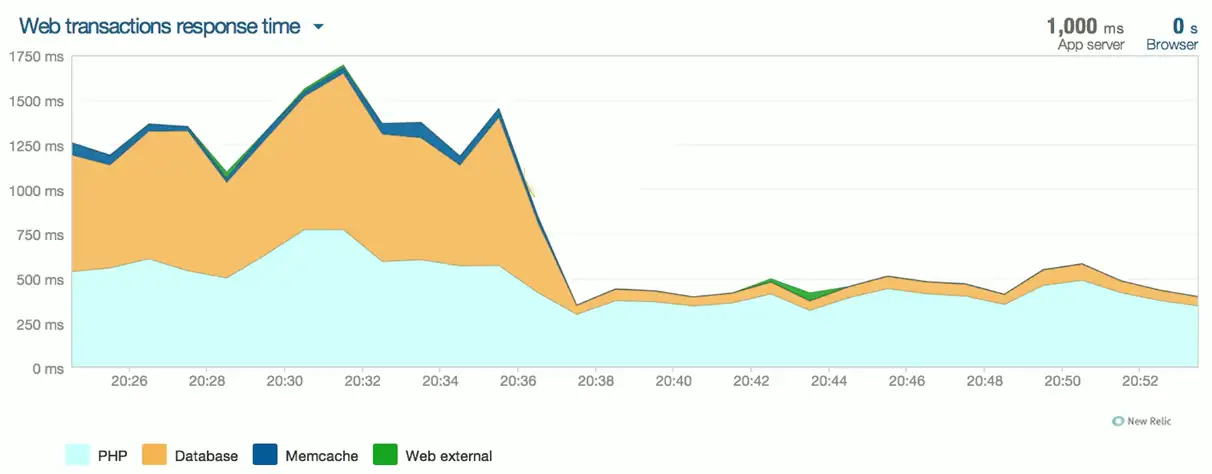
Bandwidth usage
The fundamental network statistic
- Amount of network use over time
Throughput
- The amount of data successfully transferred through the network
Many ways to monitor
- SNMP, NetFlow, sFlow, IPFIX protocol analysis, software agent
Throughput capacity
- Total throughput has a maximum value
- Based on the slowest link
Latency
A delay between the request and the response
- Waiting time
Some latency is expected and normal
- Laws of physics always apply
Examine the response times at every step along the way
- This may require multiple measurement tools
Packet captures can provide detailed analysis
- Microsecond granularity
- Get captures from both sides
Packet loss
Discards, packet drops
- No errors in the packet, but system could not transmit or receive the data
Packets are lost
- Corrupted during transmission
- Dropped after validation
Data must be retransmitted
- Overall communication is delayed
- Uses additional resources
Jitter
Most real-time media is sensitive to delay
- Data should arrive at regular intervals
- Voice communication, live video
If you miss a packet, there’s no retransmission
- There is no time to “rewind” your phone call
Jitter is the time between frames
- Excessive jitter can cause you to miss information, “choppy” voice calls

- Shows the inconsistency of packet delays
- Lower jitter means better stability of the connection
- High jitter means stutter in live video or voice/video calls
Wireless Issues
Wireless Interference
There is a limited amount of frequency
- Everyone can’t talk at once
- Similar to a wired network
An increasing number of wireless devices
- They all want to talk
- Nearby access points using the same frequencies would cause problems
Most APs can monitor frequency usage
- Can move automatically to unused space
- Manual configuration is an option
Band selection and bandwidth
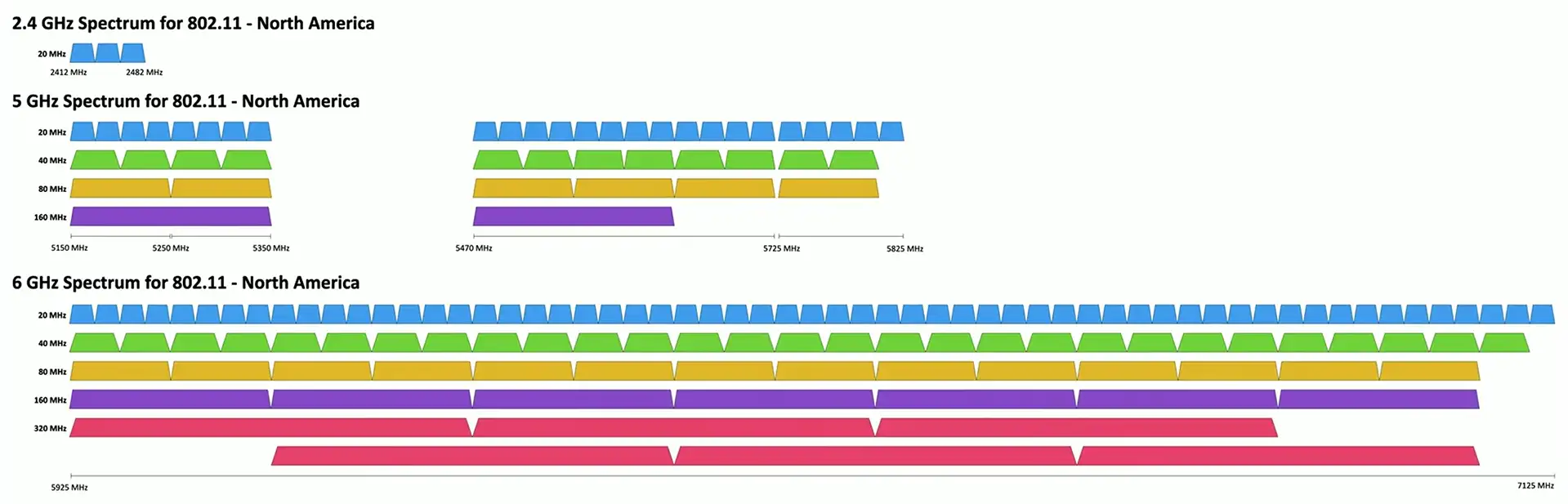
Managing channel usage
Disable legacy, low speed support
- Use the fastest possible speeds and configurations
Check your channels
- Avoid overlap between access points
Adjust the output power
- Avoid conflicts with other access points
- Interference can steal valuable network time
Split the network
- You might need additional frequencies and access points
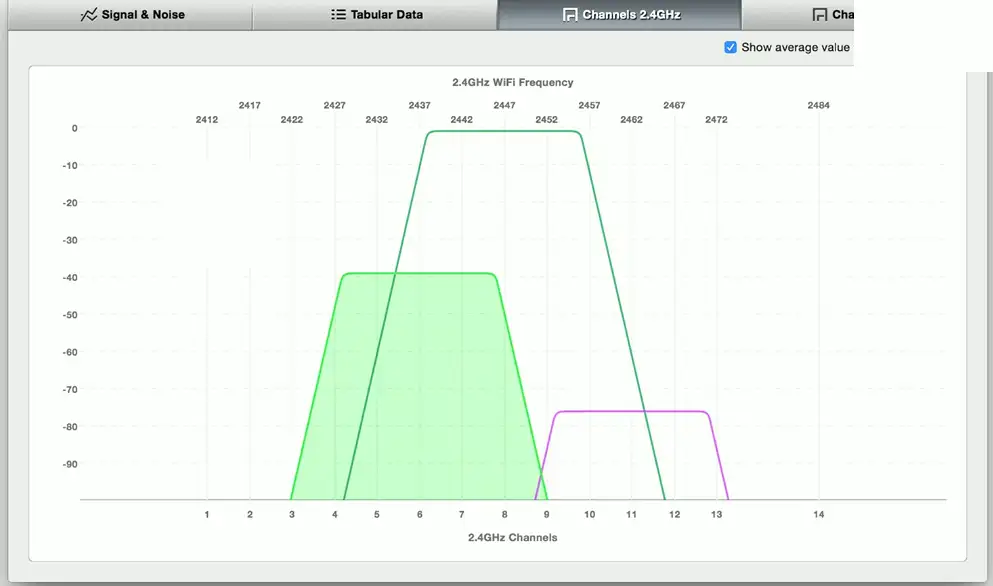
Overlapping channels

One misconfiguration, and you have overlapping channels:
Attenuation
Wireless signals get weaker as you move farther from the antenna
- The attenuation can be measured with a Wi-Fi analyzer
Control the power output on the access point
- Not always an option
Use a reception antenna with a higher gain
- Capture more of the signal
Some power is lost in the antenna cable coax
- Most applicable at higher frequencies
- Also check for damaged cables, especially outside
Insufficient Wireless Coverage
Determine existing wireless landscape
- Sample the existing wireless spectrum
Identify existing access points
- You may not control all of them
Work around existing frequencies
- Layout and plan for interference
Plan for ongoing site surveys
- Things will certainly change
Heat maps
- Identify wireless signal strengths
Client Disassociation issues
A denial-of-service attack
- Takes advantage of older 802.11 management frame transmission
Device keeps dropping from the wireless network
- Or never connects
Disassociation frames can be clearly seen in a packet capture
- Grab the 802.11 frame information with Wireshark
Remove the device performing the disassociation
- Or upgrade to a new 802.11 standard
Roaming misconfiguration
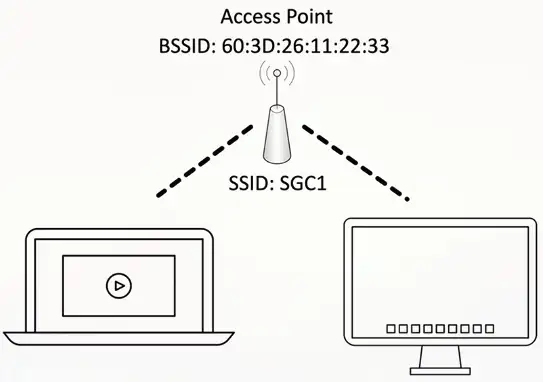
A wireless network often has a single name
- SSID (Service Set Identifier)
- Appears as one big wireless network
There might be multiple access points supporting an SSID
- Extend the network
Users will move to the best access point
- These must have identical configurations
- Users will be dropped if configurations differ