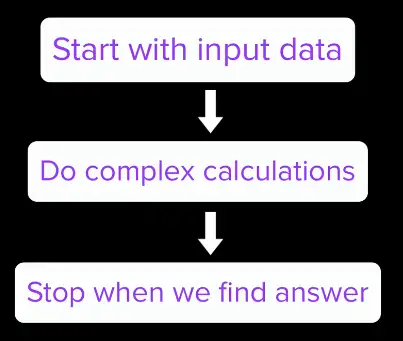
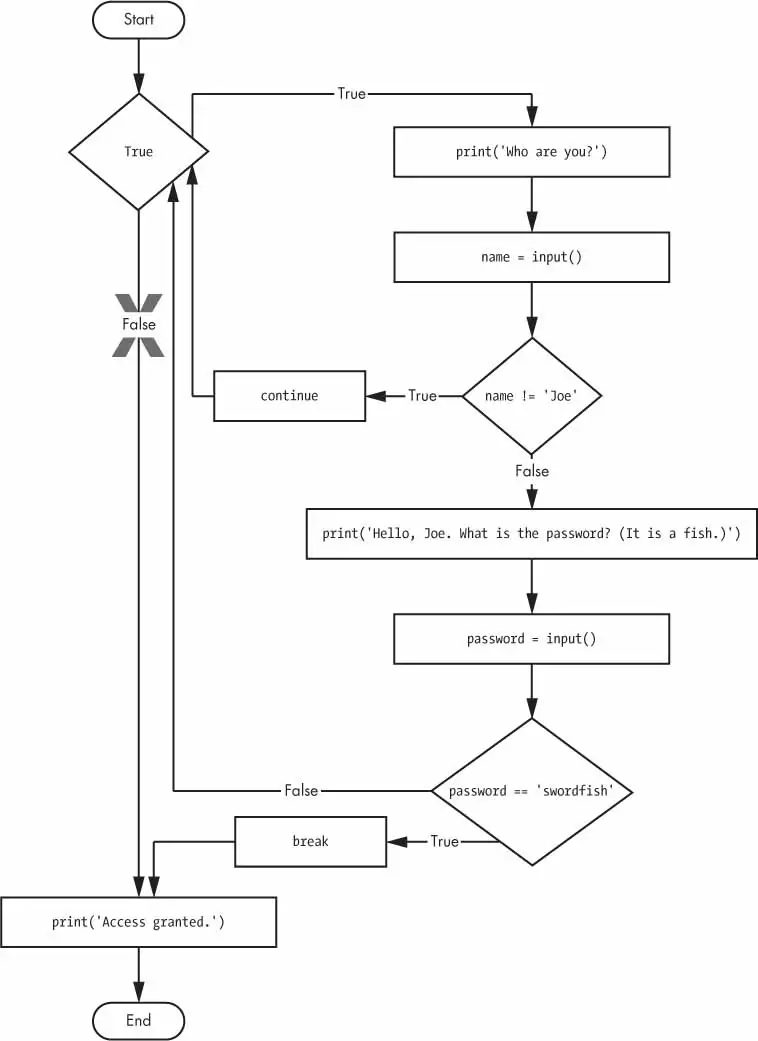
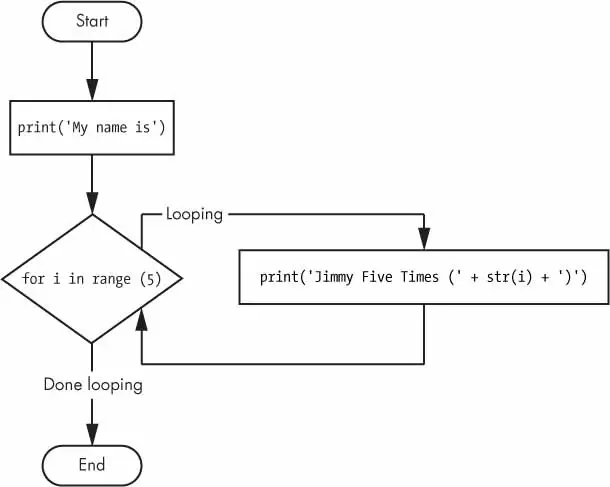
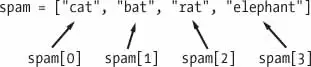
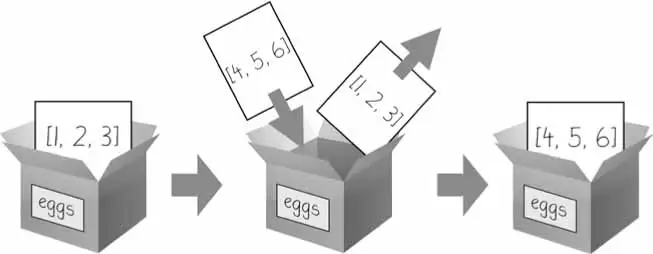
In computer science, an algorithm is a set of setups for a computer to accomplish a task.
Algorithm are reason why there is a science in a computer science.
Examples:
YouTube use compression algorithms to store and deliver videos efficiently in less cost
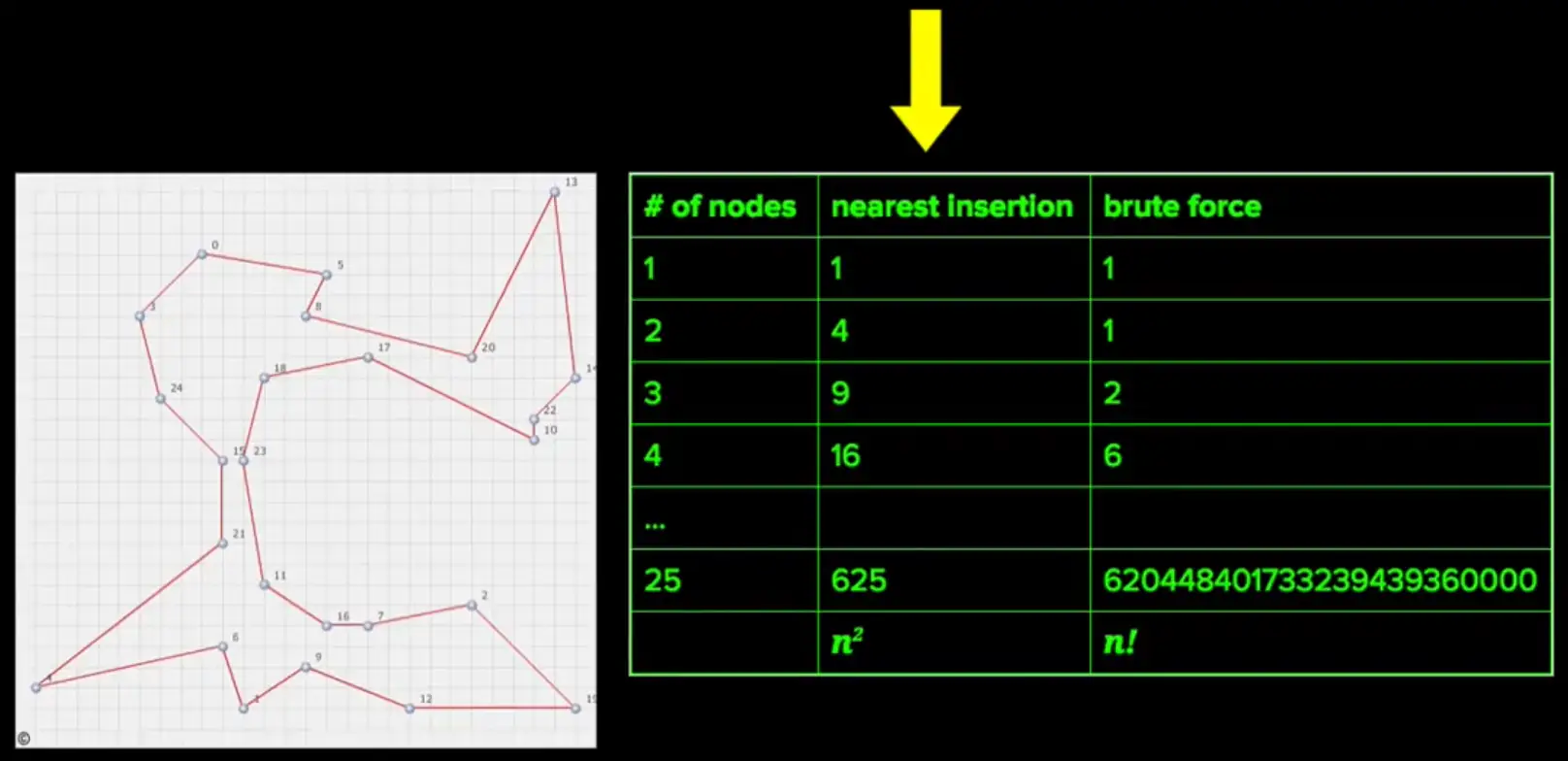
Google Maps use routing finding algorithms to find the shortest possible route between point A and point B
Why to use algorithms?
To perform the task faster
To reduce cost by eliminating the unnecessary steps
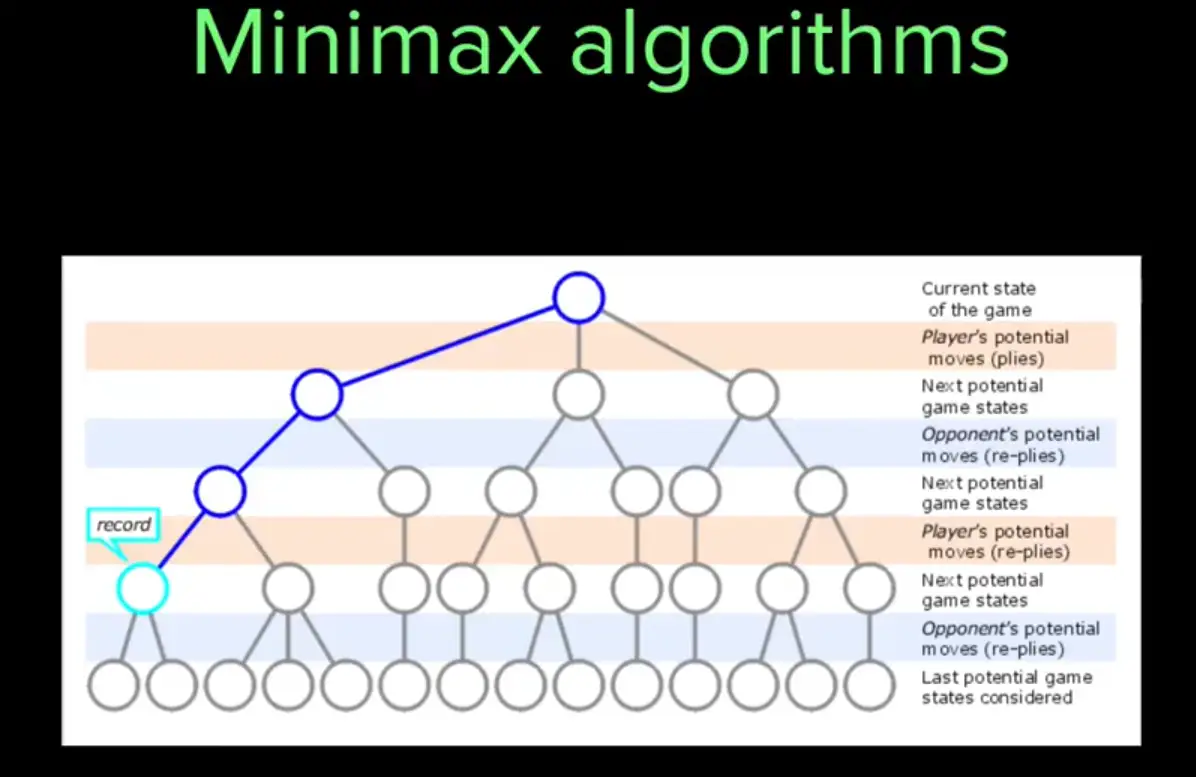
Computer scientists have written an algorithm for a checker game, where the computer never lose.
What makes a good algorithm?
Correctness
Efficiency
Sometimes we need the algorithm to give us efficient but not necessarily the 100% accurate answer. For example, a truck needs to find a route between two locations, algorithm may take a lot of time to calculate the correct and the most efficient route. We will be okay for the program to calculate the good but maybe not the best route in the matter of seconds.
How to measure the efficiency?
Computer Scientists use Asymptotic Analysis to find out the efficiency of an algorithm.
Asymptotic analysis is a method used in mathematical analysis and computer science to describe the limiting behavior of functions, particularly focusing on the performance of algorithms. It helps in understanding how an algorithm’s resource requirements, such as time and space, grow as the input size increases.
Guessing Game
If we have to guess the number between 1 and 15, how and every time we guess, we are told, if our guessed number is lower or higher the actual number.
We will start from either 1 to keep increasing one digit until we reach the correct number, or start from 15 and keep decreasing 1 until the guess is right.
The method we use here is called a linear search.
Linear search, also known as sequential search, is a simple searching algorithm used to find an element within a list. It sequentially checks each element of the list until it finds a match or reaches the end of the list.
— Wikipedia
This is the inefficient way of finding the right number. If computer has selection 15, we will need to 15 guesses to reach the correct digit. If we are lucky and computer has selected 1, we can reach it in a single guess.
Binary Search
Another approach we can use is by taking average before each. First guess will be 8, if the guess is lower, we can eliminate all the numbers before 8, if the guess is higher, we can eliminate all the numbers from 8 to 15 and so on.
This approach is called Halving method. And in computer terms, it’s called Binary Search.
Using this technique maximum number of guesses needed can be found:
$$
\text{Maximum number of guesses} = \log_{2}(n)
$$
Where n = Maximum Possible Guess
Binary search is a fast search algorithm used in computer science to find a specific element in a sorted array. It works on the principle of divide and conquer, reducing the search space by half with each step. The algorithm starts by comparing the target value with the middle element of the array. If the target value matches the middle element, the search is complete. If the target value is less or greater than the middle element, the search continues in the lower or upper half of the array, respectively. This process repeats until the target value is found, or the search space is exhausted.
— Wikipedia
Binary Search
Binary search is an algorithm for finding an item inside a sorted list. It finds it, by dividing the portion of the list in half repeatedly, which can possibly contain the item. The process goes on until the list is reduced to the last location.
Example
If we want to find a particular star in a Tycho-2 star catalog which contains information about the brightest 2,539,913 stars, in our galaxy.
Linear search would have to go through million of stars until the desired star is found. But through binary search algorithm, we can greatly reduce these guesses. For binary search to work, we need these start array to be sorted alphabetically.
Using this formula:
$$
\text{Maximum number of guesses} = \log_{2}(n)
$$
where n = 2,539,913
$$
\text{Maximum number of guessess} \approx 22
$$
So, using binary search, the number of guesses are reduced to merely 22, to reach the desired name of the star.
Describing Binary Search
When describing a computer algorithm to a fellow human, an incomplete description is often good enough. While describing a recipe, some details are intentionally left out, considering the reader/listener knows that anyway. For example, for a cake recipe, we don’t need to tell how to open a refrigerator to get ingredients out, or how to crack an egg. People might know to fill in the missing pieces, but the computer doesn’t. That’s why while giving instructions, we need to tell everything.
You need to provide answers to the following questions while writing an algorithm for a computer:
Inputs of the problem?
The outputs?
What variables to create?
Intermediary steps to reach the output?
For repeated instructions, how to make use of loops?
Here is the step-by-step guide of using binary search to play the guessing game:
Let min = 1 and max = n.
Guess the avg of max and min, rounded it, so that it’s an integer.
If your guess is right, stop.
If the guess is too low, set min to be one larger than the guess.
If the guess was too high, set max to be one smaller than the guess.
Repeat the step-2.
Implementing binary search of an array
JavaScript and many other programming languages, already provide a way to find out if a given element is in the array or not. But to understand the logic behind it, we need to implement it ourselves.
Let’s suppose we want to know if 67 is a prime number or not. If 67 is in the array, then it’s a prime.
We might also want to know how many primes are smaller than 67, we can do this by finding its index (position) in the array.
The position of an element in an array is known as its index.
Using binary search, $\text min = 2 , max = 97, guess = 41$
As $[ 41 < 67 ]$ so the elements less 41 would be discarded, and now
The next guess would be:
The binary search algorithm will stop here, as it has reached correct integer.
The binary search took only 2 guesses instead of 19 for linear search, to reach the right answer.
Pseudocode
Here’s the pseudocode for binary search, modified for searching in an array. The inputs are the array, which we call array; the number n of elements in array; and target, the number being searched for. The output is the index in array of target:
Let min = 0 and max = n-1.
Compute guess as the average of max and min, rounded down (so that it is an integer).
If array[guess] equals target, then stop. You found it! Return guess.
If the guess was too low, that is, array[guess] < target, then set min = guess + 1.
Otherwise, the guess was too high. Set max = guess - 1.
Go back to step 2.
Implementing Pseudocode
To turn pseudocode intro a program, we should create a function, as we’re writing a code that accepts an input and returns an output, and we want that code to be reusable for different inputs.
Then let’s go into the body of the function, and decide how to implement that. Step-6 says go back to step-2. That sound like a loop. Both for and while loops can be used here. But due to non-sequential guessing of the indexes, while loop will be more suitable.
Let min = 0 and max = n-1.
If max < min, then stop: target is not present in array. Return -1.
Compute guess as the average of max and min, rounded down (so that it is an integer).
If array[guess] equals target, then stop. You found it! Return guess.
If the guess was too low, that is, array[guess] < target, then set min = guess + 1.
Otherwise, the guess was too high. Set max = guess - 1.
Go back to step-2.
Challenge
Implementing binary search...
(If you don’t know JavaScript, you can skip the code challenges, or you can do the Intro to JS course and come back to them.)
Complete the doSearch function so that it implements a binary search, following the pseudo-code below (this pseudo-code was described in the previous article):
Let min = 0 and max = n-1.
If max < min, then stop: target is not present in array. Return -1.
Compute guess as the average of max and min, rounded down (so that it is an integer).
If array[guess] equals target, then stop. You found it! Return guess.
If the guess was too low, that is, array[guess] < target, then set min = guess + 1.
Otherwise, the guess was too high. Set max = guess - 1.
Go back to step 2.
Once implemented, uncomment the Program.assertEqual() statement at the bottom to verify that the test assertion passes.
TBD
Running time of binary search
Linear search on an array of n elements might have to make as many as n guesses. We know, binary search need a lot less guesses. We also learned that as the length of an array increases, the efficiency of binary search goes up.
The idea is, when binary search makes an incorrect guess, number of reasonable guess left, are at least cut half. Binary search halves the size of the reasonable portion upon every incorrect guess.
Every time we double the size of an array, we require at most one more guess.
Let’s look at the general case of an array of length n, We can express the number of guesses, in the worst case, as “the number of time we can repeatedly halve, starting at n, until we get the value 1, plus one.” But this is inconvenient to write out.
Luckily, there’s a mathematical function that means the same thing as the base-2 logarithm of n. That’s the most often written as $\log_{2}(n)$.
n
$\log_{2}(n)$
1
0
2
1
4
2
8
3
16
4
32
5
64
6
128
7
256
8
512
9
1024
10
1,048,576
20
2,097,152
21
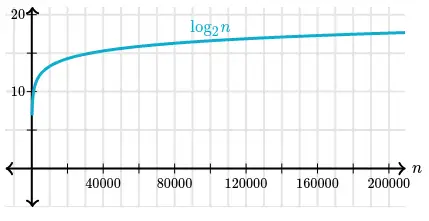
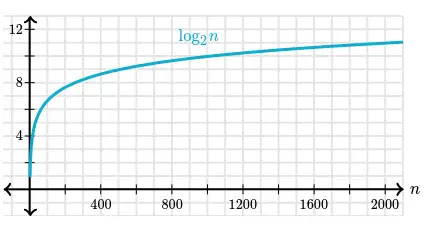
Graph of the same table:
Zooming in on smaller values of n:
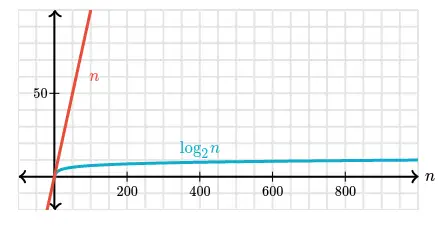
The logarithm function grows very slowly. Logarithms are the inverse of exponentials, which grow very rapidly, so that if $\log_{2}(n) = x$, then $\ n = 2^{x}$. For example, $\ log_2 128 = 7$, we know that $\ 2^7 = 128$.
That makes it easy to calculate the runtime of a binary search algorithm on an $n$ that’s exactly a power of $2$. If $n$ is $128$, binary search will require at most $8 (log_2 128 + 1)$ guesses.
What if $n$ isn’t a power of $2$? In that case, we can look at the closest lower power of $2$. For an array whose length is 1000, the closest lower power of $2$ is $512$, which equals $2^9$. We can thus estimate that $log_2 1000$ is a number greater than $9$ and less than $10$, or use a calculator to see that its about $9.97$. Adding one to that yields about $10.97$. In the case of a decimal number, we round down to find the actual number of guesses. Therefore, for a 1000-element array, binary search would require at most 10 guesses.
For the Tycho-2 star catalog with 2,539,913 stars, the closest lower power of 2 is $2^{21}$ (which is 2,097,152), so we would need at most 22 guesses. Much better than linear search!
Compare $n$ vs $log_{2} {n}$ below:
Asymptotic Notation
So far, we analyzed linear search and binary search by counting the max number of guesses we need to make. But what we really want to know is how long these algorithms take. We are interested in time not just guesses. The running time of both include the time needed to make and check guesses.
The running time an algorithm depends on:
The time it takes to run the lines of code by the computer
Speed of computer
programming language
The compiler that translates program into machine code
Let’s think more carefully about the running time. We can use a combination of two ideas.
First, we need to determine how long the algorithm takes, in terms of the size of its input. This idea makes intuitive sense, doesn’t it? We’ve already seen that the maximum number of guesses in linear search and binary search increases as the length of the array increases. Or think about a GPS. If it knew about only the interstate highway system, and not about every little road, it should be able to find routes more quickly, right? So we think about the running time of the algorithm as a function of the size of its input.
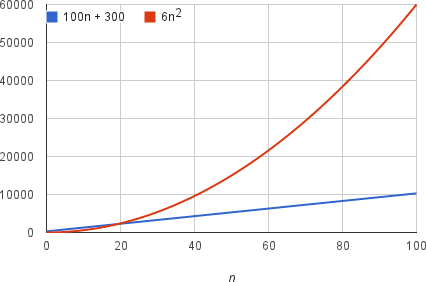
Second, we must focus on how fast a function grows with the input size. We call this the rate of growth of the running time. To keep things simple, we need to distill the most important part and cast aside the less important parts. For example, suppose that an algorithm, running on an input of size $n$, takes $6n^2+100n+300$ machine instructions. The $6n^2$ term becomes larger than the remaining terms, $100n+300$, once $n$ becomes large enough, $20$ in this case. Here’s a chart showing values of $6n^2$ and $100n+300$ for values of $n$ from $0$ to $100$:
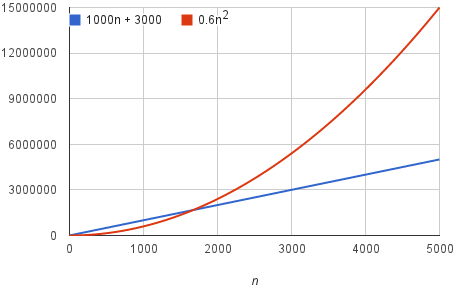
We should say that running time of this algorithm grows as $n^2$, dropping the coefficient 6 and the remaining terms $100n+300$. It doesn’t really matter what coefficients we use; as long as the running time is $an^2+bn+c$, for some numbers a > 0, b, and c, there will always be a value of $n$ for which $an^2$ is greater than $bn+c$, and this difference increases as $n$ increases. For example, here’s a chart showing values of $0.6n^2$ and $1000n+3000$ so that we’ve reduced the coefficient of $n^2$ by a factor of 10 and increased the other two constants by a factor of 10:
The value of $n$ at which $0.6n^2$ becomes greater than $1000n+3000$ has increased, but there will always be such a crossover point, no matter what the constants.
By dropping the less significant terms and the constant coefficients, we can focus on the important part of an algorithm’s running time—its rate of growth—without getting mired in details that complicate our understanding. When we drop the constant coefficients and the less significant terms, we use asymptotic notation. We’ll see three forms of it: big-$\Theta$ (theta) notation, big-O notation, and big-$\Omega$ (omega) notation.
TBD
CS50’s Introduction to Programming with Python
This course is offered by Harvard University, with David J. Malan as an instructor.
It is divided into following weekly modules:
Info
Click here for practice code arranged in according to the lectures’ weekly fashion.
A small program that allows you to perform some action in the desired Computer Programming Language.
print("Hello, World!")
When run, the following text will be printed on the screen:
Hello, World!
The text printed on the screen is termed as a Side Effect. It’s the side effect of running the function with the pre-determined input.
The built-in function print allows you to output some text to the screen in Python.
You can change the underlying implementation of function as long as name and parameters remains same, nobody running the program will notice.
Bugs
An error/mistake in the code which stops the program from running normally.
You make mistake while writing the code.
You may forgot to close parenthesis, or forgot to close a quotation marks, or use some illegal (in-terms of programming of-course) input.
Comments
A note to yourself about the function of your code, so you don’t forget in the future, what’s really happening with your code.
# This code prints "Hello, World!" on the screenprint("Hello, World!")
If it’s a complex function, a comment will immediately remind you what’s this piece of code is actually doing inside the program.
Pseudocode
A plain statement in any human language which methodically and simply outlines what you want to build in the desired programming language. A comment starts with # symbol which tells the interpreter to ignore what comes after it.
# A program that asks for user name as an input
# It takes that input, and prints Hello to that user
Above lines are simply a pseudocode which explains the outcome we need from the actual code.
No coding involved on this stage.
Only plan english is used to list down the desired outcomes.
It can act as a TODO list inside your code.
It helps break down complex programs into simple workable chunks.
Parameters
Following are the types of parameters.
Positional Parameters
A parameter passed to the function will be printed at a position it’s on i.e., first, seconds etc.
print("Hello,",name)
First positional parameter is “Hello,”, will be printed first. The name variable is a second positional parameter, printed second.
Named Parameters
A named parameter is a built-in optional argument of the given function which is usually provided after the positional parameters.
Both sep=' ' and end="\n" (with defaults) are the Named parameters provided by the print function.
Strings str
An immutable sequences of Unicode characters used to store and manipulate textual data.
In Python, anything inside '' or "" is called a string.
The function input() only accepts string arguments.
Python f-string
A special of type string that provides a concise and efficient way to embed expressions inside string literals.
print(f'Hello, {name}')
Strings Methods
Python string methods are built-in functions attached to string objects that allow for text manipulation, such as changing case, searching, replacing, splitting, and formatting.
Because strings in Python are immutable, these methods don’t modify the original string; instead, they return a new string with the requested changes applied.
str.strip() method
Remove whitespace from around the strings:
str.strip()
str.capitalize() method
Change the first letter of the string to upper case.
str.capitalize()
str.title() method
Capitalize the first letter of all the words in the given string.
str.title()
str.join() method
The join() method takes all items in an iterable and joins them into one string. – W3School
Syntax = `string.join(iterable)
myDict={"name":"John","country":"Norway"}mySeparator="TEST"x=mySeparator.join(myDict)# OR separator string can be mentioned directlyx=','.join(myDict)print(x)
Note
When using a dictionary as an iterable, the returned values are the keys, not the values.
String Slicing
You can return a range of characters by using the slice syntax
Specify the start index and the end index, separated by a colon, to return a part of the string.
Example:
greet="Hello, World!"
Slice From the Start
Get the characters from the start to position 5:
print(greet[0:5])#ORprint(greet[:5])
When starting from index 0, we don’t need to mention it. The character at index [5] will not be included.
Slice From the End
By leaving out the end index, the range will go to the end:
print(greet[2:])
If we want to slice the last 6 characters:
print(greet[-6:])
Python Interactive Mode
The live Python interpreter, where you can write code and get the execution immediately, unlike you write your code in a file and then run that file with Python interpreter.
It removes the friction for some quick Python practice.
Integers int()
Integers are whole numbers without a decimal point i.e., -3, -2, -1, 0, 1, 2, 3 etc.
In programming, ideal for counting or indexing
Floats float()
Floats (floating-point numbers) represent real numbers with decimal components.
Ideal for a wider range of values and fractional precision, making them suitable for measurements and continuous data.
Function def()
A small reusable piece of program which can be defined once and used multiple times inside the code to reduce repeatability and increase the readability.
# All the code resides in the maindefmain():return# Define as many functions as you wantdeffunc():return# Call main() to start the executionmain()
Running without calling on the main() function, no execution will happen, as our main code resides in the main function and nobody calling it, when we call on the main() function, then the execution starts, and the rest of the user functions will also be executed one by one as they appear in the main().
Variable Scope
The variable only exists in the scope where you defined it.
Variable defined inside the function, cannot be called on globally.
Variable defined in the 2nd user function cannot be called in the first one.
Ability to ask questions and answer those questions, in order to decide which line of code will be executed.
To write conditional statements in Python, we can use if statement.
The elif statement, ask a question, taking into account whether or not a previous question had a true or false answer.
The else statement, used when the all the other options has bee exhausted and only logical answer is the last one. So, we don’t need to compare anything for it, because it’s the only answer left. It’s catch all statement, if everything else isn’t proved right, let’s assume this is the answer.
Some symbols used in Python, are:
Symbol
Representation
>
Greater than
>=
Greater than or Equal to
<
Less than
<=
Less than or Equal to
==
Equal to
!=
Not equal to
Not better design (See compare.py)
A better designed program:
The final design:
In the first version, program goes through all the code despite finding the correction answer earlier.
In the second iteration, program will immediately terminate as it gets its answer.
Boolean Expression
A question that gives Yes or No answer, or simply True or False answer.
OR Returns True if at least one operand is True; it only returns False if both operands are false.
AND Returns True if both operands are true; otherwise, it returns False. It’s uses short-circuit evaluation, meaning if the first operand is false, the second is not evaluated.
Python Operators
Operator
Meaning
+
Addition
-
Substraction
*
Multiplication
**
Exponentiation
/
Division
%
Modulo operator
match…case Statement
Provides structural pattern matching as a more readable and powerful alternative to if-elif-else chains. It evaluates an expression against successive patterns and executes the corresponding code block for the first match.
Ability in Python and other programming languages, to do something again and again.
while Loops
Runs for forever unless certain conditions are met.
An infinite loop (design flaw):
i=3whilei!=0:print('meow')
This code will run for forever unless interrupted by the user (Ctrl + C).
i != 0 will always remain True, we change the value of i inside the loop on each run.
Well designed while loop:
i=3whilei!=0:print('meow')i=i-1
On each run, i = i - 1 reduces the value of i by one digit. Until i != 0 condition is no longer true, and the loop stops.
for loop
In Python, a for loop is a control flow statement used to iterate over a sequence (such as a list, tuple, string etc.) or any other iterable object.
foriin[0,2,3]:print("meow")#OR using range() functionforiinrange(3):print("meow")
We are not using the i variable in the code, though it has a use case for holding the range value.
The more Pythonic approach is to use _, when you don’t care about the variable used or not use it later in the code.
for_inrange(3):print("meow")
List []
A list in Python, is a ordered, and mutable data structure used to store a collection of items in a single variable.
Defined using square brackets []
Each list element is separated by commas
Lists are heterogeneous, meaning they can contain elements of different data types (such as integers, strings, booleans or else) within the same structure.
Each element has an index starting from [0].
len() function
It returns number of items (length or size) in an object, such as strings, lists, tuples, dictionaries, sets, etc.
A dictionary (or dict) is a built-in mutable mapping type that stores data as a collection of unique, hashable key-value pairs.
Since Python 3.7, dictionaries are ordered by insertion, meaning they preserve the sequence in which keys were added.
Key characteristics:
Keys must be immutable, while values can be any data type.
Dictionaries are created using curly braces {} with colon-separated key-value pairs.
Dictionary Methods
Python dictionary methods are built-in functions designed to manipulate, access, and manage the key-value pairs stored in Python dictionaries.
If you want to get the value of specific key and don’t know if that exists:
dict.get("name","Unknown")
If “name” is not a valid key, it will return “Unknown” instead of throwing error if we have tried to get it via dict.["name"].
To update the dictionary.
dict["name"]="David"
Another method to update a dictionary is via dict.update(). It takes another dictionary as an arguments adds to the current dictionary.
dic.update({"name":"Dawood","name":"Amin"})
To return all keys in the dict:
dict.keys()
To return all values in the dict:
dict.values()
Delete a particular key from the dictionary:
dict.pop("key")
To clear the whole dictionary key-value pairs:
dict.clear()
Return the key-value pairs as tuples in the dictionary
dict.items()
It returns the both key and value pairs as tuples, which we can access as:
forkey,valueindict.items()print(key,value)
Dictionary Comprehension
Dictionary comprehension is used to create a dictionary in a short and clear way. It allows keys and values to be generated from a loop in one line. This helps in building dictionaries directly without writing multiple statements. — GeeksforGeeks
None is special built-in constant that represents the absence of a value or a null value. It’s the sole instance of the NoneType class and acts as a singleton, meaning there is only one None object in any Python interpreter session.
None is distinct from 0, False, or an empty string "", though it evaluates to False in boolean contexts.
Functions that don’t explicitly return a value automatically return None.
Tuples
Tuples are used to store multiple items in a single variable.
A tuple is a collection which is ordered and unchangeable. —W3School
Tuples are written within parenthesis ().
A tuple can contain different data-types at once
A one item tuple can be created with ("item1", ), otherwise Python will not recognize it.
The () will create an empty tuple.
The len() can be used to find out the number of items in the tuple.
Tuples Items
Tuple items are ordered, unchangeable, and allow duplicate values.
Tuples items are indexed, the first item has index[0], the second item has index[1] etc.
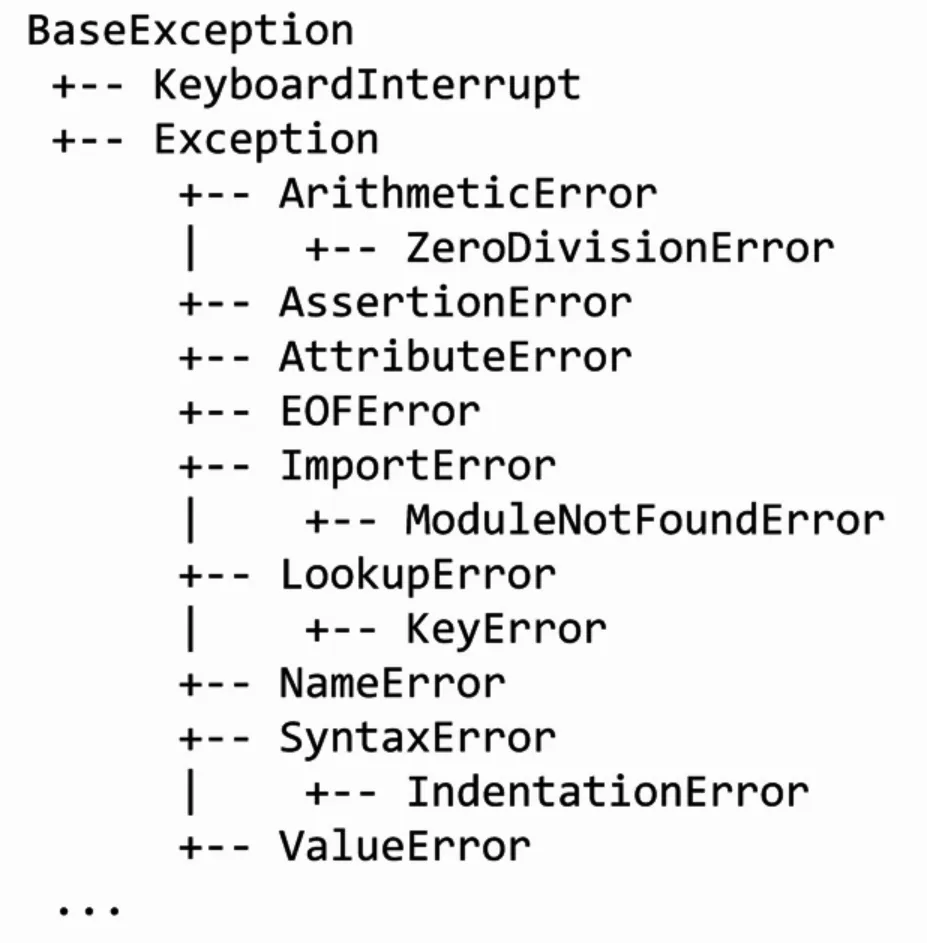
Exceptions are the problems in the Python or any other programming language code, that the programmer has to solve.
SyntaxError
A SyntaxError in Python occurs when code violates the grammatical rules of the language, making it impossible for the interpreter to parse and understand the structure. —TutorialsPoint.com
Common causes include:
Missing punctuation
Incorrect indentation
Misspelled keywords
Invalid string delimiters, such as mixing single and double quotes improperly
Value Error
A ValueError in Python is a built-in exception raised when a function or operation receives an argument of the correct data type but an inappropriate or invalid value. —RealPython.com
Unlike a TypeError, which occurs when the wrong data type is provided, a ValueError indicates that while the input is the right kind of object, its specific content is unsuitable for the operating being performed.
Common scenarios that trigger a ValueError include:
Invalid Type Conversion: Attempting to convert a string that doesn’t represent a valid number into an integer or float
Mathematical Constraints: Performing an operation that requires a specific range of values, such as taking the square root of a negative number or calculating the factorial of a negative integer
List Operations: Trying to remove a value from a list that doesn’t exist within it.
Unpacking Mismatches: Attempting to unpack a list or iterable into a different number of variables than there are items
NameError
The NameError exception occurs if you use a variable that is not defined. —W3School
You can handle the NameError in a try..except statement.
try and except
The try block lets you test a block of code for error.
The except block lets you handle the error.
The else block lets you execute code when there is no error.
The finally block lets you execute code, regardless of the result of the try and except blocks.
The raise keyword is used to raise an exception.
Let’s see a code:
try:x=int(input("What's the value of x: "))exceptValueError:print("x is not an integer.")else:print(f"The value of x is: {x}")
The else part will only be executed if there are no error.
If you don’t want to print anything in the except block write pass, it will not raise/print anything to the user.
MemoryError
In Python, a MemoryError is a built-in exception that occurs when the interpreter cannot allocate enough memory for an operation, such as creating a large list, loading a huge file, or executing a recursive function without a base case.
This error signals that the program has attempted to use more memory (RAM or virtual address space) that the system can provide.
Common causes include:
Unbounded Data Growth: Accumulating data in lists or dictionaries within infinite or large loops.
Large Object Allocation: Attempting to create data structures (like NumPy arrays or Pandas DataFrames) that exceed available system memory.
Excessive Recursion: Recursive functions that consume excessive stack space before hitting the recursion limit.
Memory Leaks: Although less common as a direct cause, failing to release references to large objects can lead to exhaustion.
KeyError
A KeyError is an exception raised when you try to access a value in a dictionary (or other mapping) using a key that doesn’t exist within that collection.
It is a subclass of LookupError and serves as Python’s signal that the requested key cannot be found among existing keys.
Raise an Exception
As a programmer, you can choose to throw an exception if a condition occurs.
To throw an exception, use the raise keyword.
x=-1ifx<0:raiseException("Sorry, no numbers below zero")
You can define what kind of error to raise, and the text to print to the user.
x="hello"ifnottype(x)isint:raiseTypeError("Only integers are allowed")
Debugging
Debugging is the process of identifying, analyzing, and resolving errors or bugs in code to ensure it runs correctly and produces expected results.
It involves detecting syntax errors (structural issues like typos) and semantic errors (logical issues where code runs but yields incorrect outputs).
The primary goal is to locate the root cause of unexpected behavior by examining the program’s state during execution. This is achieved through various techniques, including:
Using Tracebacks: Analyzing error messages to pinpoint where exceptions occur.
Print Statements: Inserting print() calls to track variable values and code flow.
BreakPoints: Pausing execution at specific lines to inspect variables and state.
Debuggers: Using tools like built-in pdb module or IDE debuggers (e.g., in Zed or VS Code) to step through code line-by-line and interactively inspect the execution environment.
In programming, libraries are like ready-made tools that save time, reduce effort, and make development much easier.
A Python library is simply a collection of pre-written code that developers can use to perform specific tasks without having to write everything from scratch. —Antara Das via Medium
Basically, you can import the library into your code, and it comes with predefined functions and methods that help you get the gob done.
Module
A module in Python is just a library that typically or more functions or other features built into it.
Purpose of a Module or Library is a re-usability of a code when you find yourself using same lines of code over and over again from across your project’s code.
import
The keyword import allows to import some functions from modules in Python.
The from keyword is primarily used to import specific functions, classes, or variables from a module into the current namespace, allowing direct access without prefixing the module name.
Command-Line arguments are parameters passed to a Python script upon execution from the terminal, allowing users to customize program behavior without modifying source code.
The one we use is using sys module feature sys.argv, where sys.argv[0] is the script name and subsequent indices are the provided arguments.
importsysprint("Hello, my name is",sys.argv[1])
Running with name as an argument:
python name.py Alex
If we replace with sys.argv[0], it will print the name of program as Hello, my name is name.py, and no CLI argument will be printed.
random Module
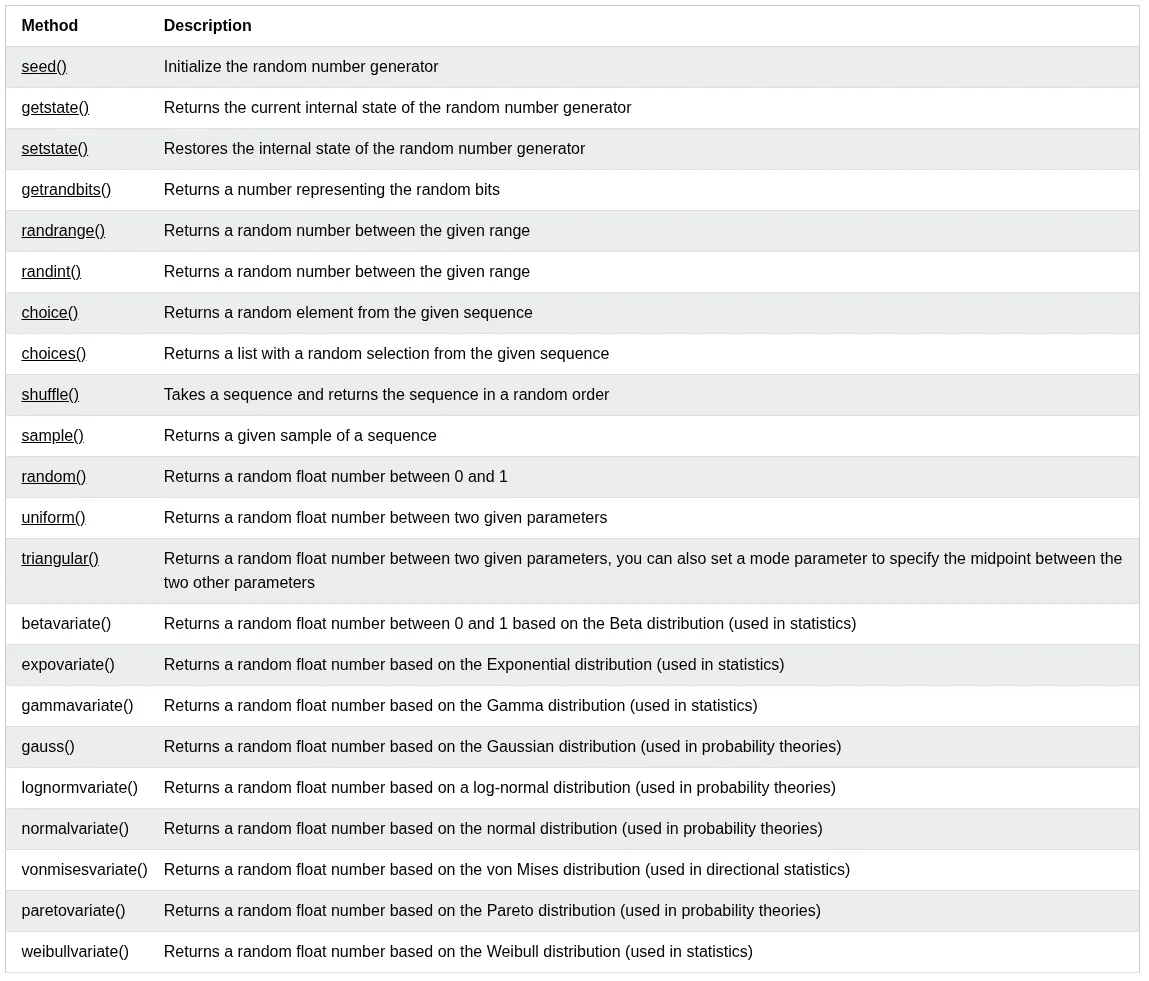
It’s a built-in Python module, that provides functions for generating pseudo-random numbers, selecting random elements, and shuffling sequences.
It’s not a separate package and doesn’t require installation; it’s used by simply adding import random to your code.
statistics Module
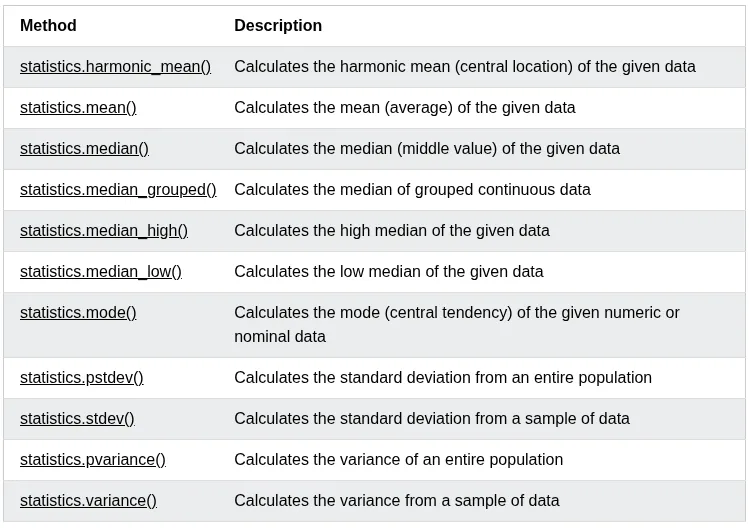
Python has a built-in module that you can use to calculate mathematical statistics of numeric data.
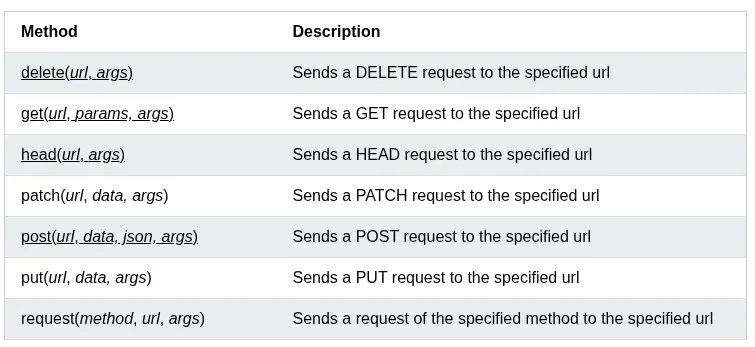
The requests module allows you to send HTTP requests using Python. —W3School
The HTTP request returns a Response Object with all the response data (content, encoding, status, etc.).
Syntax:
requests.methodname(params)
Methods
Python json
Python has a built-in package called json, which can be used to work with JSON data. —W3School
There are many different methods json has, but for now we only see the json.dumps() method.
Format the Result
The json.dumps() prints a JSON string, but it is not very easy to read, with no indentations and line breaks.
The method has parameters to make it easier to read the results.
json.dumps(x,indent=4)
You can also define the separators, default value is `(", “, “: “), which means using a comma and a space to separate each object, and a colon and a space to separate keys from values:
json.dumps(x,indent=4,separators=(". ","= "))
Order the Result
Use sort_keys parameter to specify if the result should be sorted or not:
json.dumps(x,ident=4,sort_keys=True)
PACKAGE
A package is a third-party library that we can install on our computer.
An external package maintainer is PyPI searchable via https://pypi.org or CLI.
You can install packages from PyPI via Python package manager called PIP.
Create a virtual environment inside your project:
python -m venv .myenv
Activate your virtual env:
source .myenv/bin/activate
Now install the module:
pip install cowsay
Now you can import it inside .py file.
After finishing your work, you can deactivate the env:
deactivate
Depending on your prompt, it will show you’re using a virtual environment with Python version number.
Note
Add your virtual env directory and __pycache__ dir to .gitignore, so they don’t mess your git history or project repo.
Create Your Own Package
Create a folder, put all your modules inside it. Create an empty file inside that folder:
touch __init__.py
Now you can import your package:
fromfoldername.moduleimportfunction
APIs
API stands for Application Programming Interface.
An API is a set of rules, protocols, and specifications that allows different software applications to communicate with each other.
In context Python, APIs generally refer to two distinct concepts:
Consuming External APIs: Using libraries like Requests to send HTTP requests to external services (e.g., weather data, social media) and parse the responses.
Building Web APIs: Creating server-side endpoints using frameworks like Flask, Django or FastAPI that expose functionality and data to other applications via specific URLs and HTTP methods (GET, POST, etc.).
JSON
JSON stands for JavaScript Object Notation.
JSON is a lightweight format for storing and transporting data.
JSON is often used when data is sent from a server to a web page.
JSON is “self-describing” and easy to understand
Though it’s related to JavaScript, but it’s itself typically used as a language agnostic format for exchanging data between computers.
When a Python interpreter reads a Python file, it first sets a few special variables. Then it executes the codes from the file.
One of those variables is called __name__.
So when the interpreter runs a module, the __name__ variable will be set as __main__ if the module is being run is the main program.
But if the code is importing the module from another module, then the __name__ variable will be set to that module name.
There is a really nice use case for the __name__ variable, whether you want a file that can be run as the main program or imported by other modules. We can use an if __name__ == "__main__" block to allow or prevent parts of code from being run when the modules are imported.
When the Python interpreter reads a file, the __name__ variable is set as __main__ if the module being run, or as the module’s name if it is imported. Reading the file executes all top level code, but not functions and classes (since they will only get imported).
Style
The standardized way of writing Python source code to ensure readability and maintainability.
The primary standard is PEP 8, which dictates rules for indentation (4 spaces), line length, naming conventions (snake_case for variables/functions, CamelCase for classes), and import ordering.
Adhering to these rules allows teams to collaborate efficiently and reduces bugs caused by inconsistent formatting.
Indentation: Indent code by 4 spaces and be consistent.
Tab/Spaces: Early on python, some people use 2 spaces or tabs. Those practices have died out, and now 4 spaces is the standard.
Max Lines Length: In the old days of relatively small computer displays, projects would frequently have a rules that no line in the code could be wider than 80 or 100 characters, so that the code would fit on the display. This sort of rule has becomes less common. Often in Python, the simplest thing to do is just let a long line be long.
However if a line so long that it’s hard to read or work with, break it into shorter, separate lines.
Blank Lines: PEP8 requires 2 blank lines before each def in a file. This is one of the weaker PEP8 rules.
Unit testing is a software testing technique in which individual components or units of a software application are tested independently from the rest of the application. —freeCodeCamp.org
assert
The assert keyword is used when debugging code.
The assert keyword lets you test if a condition in your code returns True, if not, the program will raise an AssertionError.
You can write a message to be written if the code returns False:
x="welcome"#if condition returns False, AssertionError is raised:assertx!="welcome","x should not be 'welcome'"
pytest module
The pytest is popular testing framework for Python that makes it easy to write and run tests. Unlike unittest, pytest’s simple syntax allows developers to write tests directly as functions or within classes. This lets you write clean, readable code without complexities. —freeCodecCamp.org
Flexibility: It provides flexibility in test structure by supporting tests for functions, classes, and modules.
Detailed test output: It provides a detailed and readable test output, making it easy to understand test failures and errors.
Automatic test discovery: It automatically discovers tests by looking for files that start with “test_” or end with “_test.py”. This eliminates the need for manually specifying test files.
Parameterization: It supports parameterized tests, which allow you to run a single test functions with multiple sets of inputs.
Fixtures: It provide setup and tearDown methods that help prevent code repetition. This enables you to set up baseline conditions for your tests and also delete them after each test.
Plugins and extension: It has a rich set of plugins and extensions to add extra functionalities.
Compatibility: It’s compatible with other testing frameworks like unittest, allowing you to migrate tests from different testing frameworks and run them seamlessly on it.
Info
Unit tests cannot run on the function which doesn’t return any value, and just prints something (side effect). So, it’s always a good idea to return values in the functions instead of the side effects(text printed on the screen).
Tests Folder
Make folder name test inside your project directory:
mkdir test
Create an empty file named __init__.py:
touch __init__.py
Create the test files like test_[PROGRAM-NAME] inside the test folder.
An empty __init__.py will tell the pytest module that test/ is a package. A package is a python module or multiple modules organized inside a folder.
Now run the pytest module on the whole folder:
pytest test/
Note
Each function name inside test_name.py must be prefixed with the word test_ for pytest to discover and run these tests automatically.
deftest_addition():assert1+1==2
Raise an Error
If your function raises an error like ZeroDivisionError when some condition is met, you want to make sure your unit test, catches that:
Here my_func() should raise a ZeroDivisionError and crash the unit test, but with pytest.raises(ZeroDivisionError) tells pytest, “I expect this block of code to through exactly this error”.
This test only passes if this error actually happens when my_func(1/0) runs, if no error occurs, the test fails.
So, it confirms, the my_func() correctly propagates the error instead of silently failing and returning something wrong.
When programming, you have likely encountered a situation where all data is lost once your script finishes running. This happens because the data is stored in the memory, and when the program ends, the memory is cleared.
To solve this issue, Python offers a feature called File I/O, which allows you to read from or write to files, ensuring that data persists even after your program has ended.
File I/O refers to the ability of a program to take a file as input or create a file as output. This is essential when you want to store data for later use, process large datasets, or manage configurations. —Dilan Nawarathne via Medium
The key function for working with files in Python is the open() function.
The open() function takes two parameters; filename, and mode.
There are four different methods (modes) for opening a file:
"r" - Read — Default Value. Opens a file for reading, error if the file doesn’t exist.
"a" - Append — Opens a file for appending, creates the file if it doesn’t exist.
"w" - Write — Opens a file for writing, creates the file if it doesn’t exist or overwrites the existing file.
"x" - Create — Creates the specified file, returns an error if the file exists.
In addition you can specify if the file should be handled as binary or text mode:
"t" - Text — Default value. Text mode
"b" - Binary — Binary mode (e.g., images)
Syntax
To open a file for reading it is enough to specify the name of the file:
file=open("demofile.txt")
The code above is the same as:
file=open("demofile.txt","rt")
As "r" for read, and "t" for text are the default values, you don’t need to specify them.
Python Read File
Using the with statement
You can also use the with statement when opening a file:
withopen("demofile.txt")asf:print(f.read())
Then you don’t have to worry about closing your files, the with statement takes care of that.
Close Files
It is a good practice to always close the file when you are done with it.
If you’re not using the with statement, you must write a close statement in order to close the file:
To write to an existing file, you must add a parameter to the open() function:
"a" - Append — will append to the end of the file
"w" - Write —- will overwrite any existing content
withopen("demofile.txt","a")asf:f.write("Now the file has more content!")# open and read the file after appendingwithopen("demofile.txt")asf:print(f.read())
Note
The “w” method will overwrite the entire file.
Create a New File
To create a new file in Python use the open() method, with one of the following parameters:
"x" - Create — will create a file, returns an error if the file exists
f=open("myfile.txt","x")
Result: A new empty file is created.
Note
If the file already exits, an error will be raised.
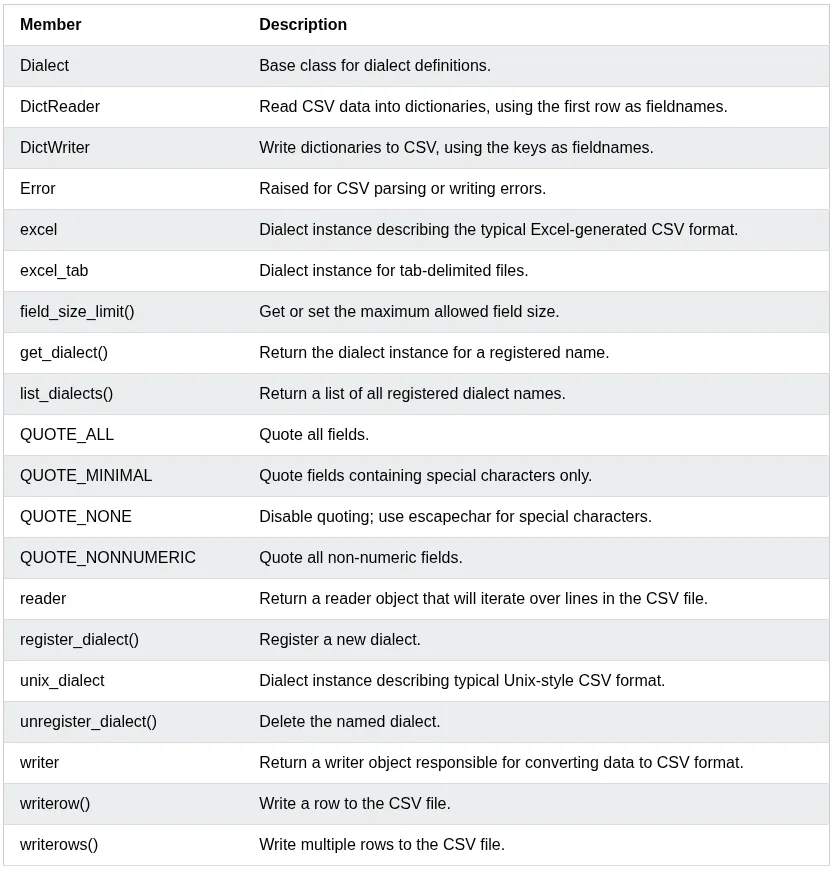
csv Module
The csv module reads and writes tabular data in CSV(Comma Separated Values) format.
Pillow is a Python library used for working with images. It is a user friendly and actively maintained fork of the original Python Imaging Library(PIL). It not only supports various image formats like JPEG, PNG, GIF, TIFF, and BMP, but also offers capabilities such as resizing, cropping, rotating, and color adjustments.
Use cases of Pillow
Pillow is used for automating and customizing image-related tasks, particularly when graphical interfaces aren’t ideal. Here are some compelling use cases:
Resize and crop images
Format conversion: Convert between file formats like JPEG, PNG, GIF, BMP.
Image Enhancement: Adjust brightness, apply filters, or add visual effects.
Batch Processing: Automate processing of large volumes of images.
Image Generation: Create custom graphics, visualization, or CAPTCHAS.
Meme or Thumbnail Creation: Combine Pillow with text or shape drawing for custom graphics.
Installing Pillow
Install the official release of Pillow:
pip install pillow
General Workflow of Pillow
Pillow operations typically follow a clear, intuitive workflow:
Import the necessary classes from the PIL module
Open an image using Image.open()
Apply transformations like resizing, rotating, or filtering
A RegEx, or Regular Expression, is a sequence of characters that forms a search pattern. — W3School
RegEx can be used to check if a string contains the specified search pattern.
Python has a built-in packaged called re, which can be used to word with Regular Expressions.
Import the re module:
importre
Metacharacters
Metacharacters are characters with a special meaning:
Character
Description
Example
[]
A set of characters
“[a-m]”
\
Signals a special sequence (can also be used to escape special characters)
“\d”
.
Any character (except newline character)
“he..o”
^
Starts with
“^hello”
$
Ends with
“planet$”
*
Zero or more occurrences
“he.*o”
+
One or more occurrences
“he.+o”
?
Zero or one occurrences
“he.?o”
{}
Exactly the specified number of occurrences
“he.{2}.o”
{m,n}
m-n range of repetitions
“he.{2,4}.o”
|
Either or
“falls|stays”
()
Capture and group
(?: )
Non-capturing version
(): It groups the pattern and stores the matched text so you can retrieve it later.
(?P<group_name>): If there many capture groups in the match pattern, you can use match.group("group_name") instead of match.group(n) where n is the group number starting from 1.
(?:): It groups the pattern but stores nothing
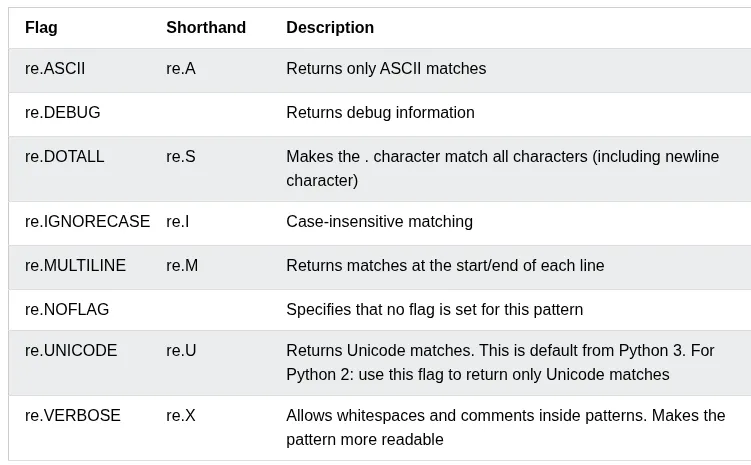
Flags
You can add flags to the pattern when using regular expressions.
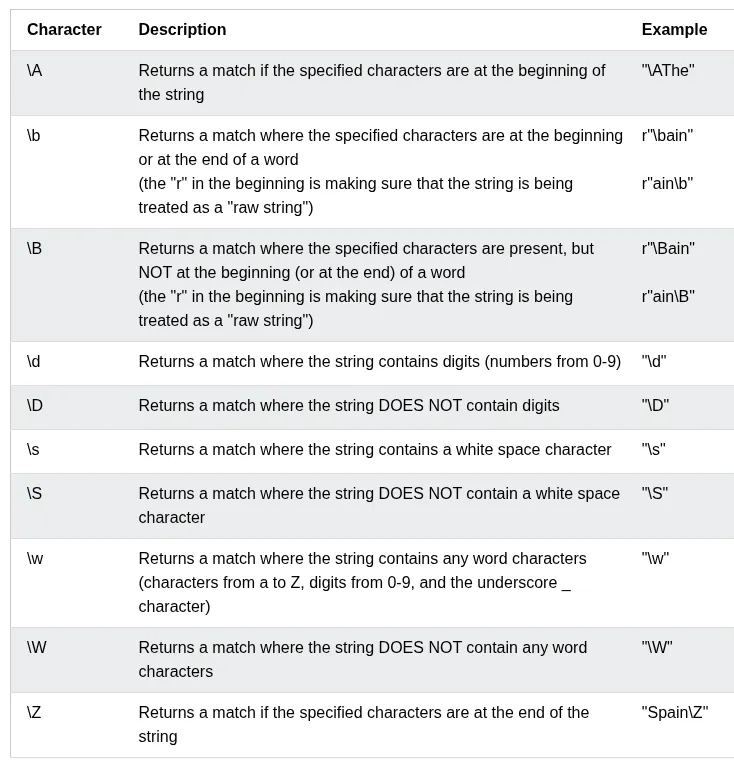
Special Sequences
A special sequence is a \ followed by one of the characters in the list below, and has a special mean:
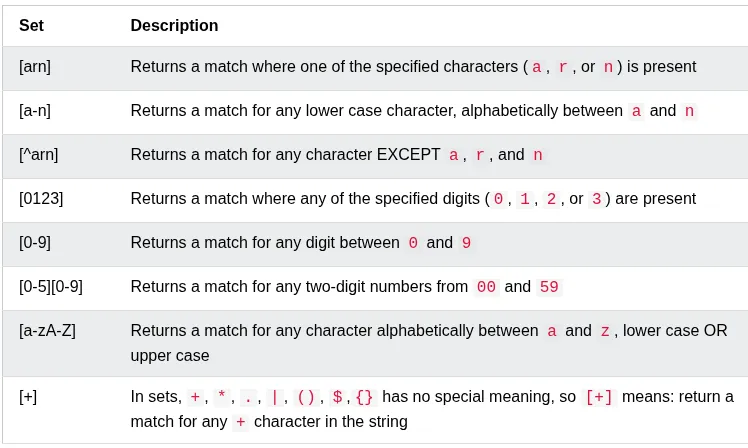
Sets
A set is a set of characters inside a pair of square brackets [] with a special meaning:
Assignment Expression/Walrus Operator :=
The := operator was introduced in Python 3.8. It allows you to assign a value to a variable as part of a larger expression, returning the assigned value unlike standard assignment(=), which doesn’t return a value.
Syntax
The operator is written as variable := expression. It evaluates the right-hand side, assigns it to the variable, and returns the value for use in the surrounding context.
Parentheses
In most contexts, such as top-level statements or certain conditionals, the assignment expression must be enclosed in parentheses to avoid syntax error (e.g., (x := 5)).
# Without walrus operatordata=get_data()ifdataisnotNone:print(data)# With walrus operatorif(data:=get_data())isnotNone:print(data)
Object-Oriented Programming (OOP) is a programming paradigm that organizes software design around object rather than functions and logic.
Let’s breakdown the OOP into its reusable building block:
Classes: These are user-defined data types that act as the blueprint for objects, attributes, methods.
Objects: These are instances of a class with specifically defined data. When a class is defined initially, the description is the only object that is defined.
Methods: These are functions that are defined inside a class that describe the behavior of an object. They are useful for re-usability or keeping functionality encapsulated inside one object at a time. Code re-usability is a great benefit when debugging.
Attributes: These are defined in the class template and represent the state of an object. Objects contain data stored in the attribute field.
OOP stands for Object-Oriented Programming.
Python is an object-oriented language, allowing you to structure your code using classes and objects for better organization and re-usability.
Principles of OOP
In order for use to write good OOP code, we need to understand the 4 pillars of OOP we should adhere to:
Encapsulation: Wrapping data and functions into a single unit(object).
Abstraction: Hiding the implementation details of a class and only showing the essential features to the user.
Inheritance
Polymorphism (Operator overloading): When the same operator is allowed to have different meaning according to the context.
Advantages of OOP
Provides a clear structure to programs
Makes code easier to maintain, reuse, and debug
Helps keep your code DRY (Don’t Repeat Yourself)
Allows you to build reusable applications with less code
Tip
The DRY principle means you should avoid writing the same code more than once, Move repeated code into functions or classes and reuse it.
What are Classes and Objects?
Classes and objects are the two core concepts in OOP.
A class defines what an object should look like, and an object si created based on that class. For example:
Class
Objects
Fruit
Apple, Banana, Mango
Car
Volvo, Audi, Toyota
When you create an object from a class, it inherits all the variables and functions defined inside that class.
Attributes
There are two types of attributes/variable in the classes.
Class Attributes: Python variables that belong to a class itself, and are shared between all class instances/objects.
Instance Attributes: Python variables that belong to one object/instance and are only accessible within the object; they are unique to each object and are not shared between class instances.
Python Classes and Objects
Python is an object-oriented programming language.
Almost everything in Python is an object, with its properties and methods.
A Class is like an object constructor, or a “blueprint” for creating objects.
Create a Class
To create a class, use the keyword class.
Create a class named MyClass, with a property named x:
classMyClass:x=5
Create Object
Now we can use the class named MyClass to create objects.
Create an object named p1, and print the value of x:
p1=MyClass()print(p1.x)
del keyword
Used to delete object properties or object itself
You can delete objects by using the del keyword.
Delete the p1 or its name property object:
delp1#ORdelp1.name
Multiple Objects
You can create multiple objects from the same class:
Each object is independent and has its own copy of the class properties.
The pass Statement
class definitions cannot be empty, but if you for some reason have a class definition with no content, put in the pass statement to avoid getting an error.
classPerson:pass
Python __init__() Method
Tip
The functions inside classes are called Methods.
The __init_() Method
All classes have a built-in method called __init__(), which is always executed when the class is being initiated.
The __init__() method is used to assign values to object properties, or to perform operations that are necessary when the object is being created.
Example
Create a class named Person, use the __init__() method to assign values for name and age:
The self parameter is a reference ot the current instance of the class.
It is used to access properties and methods that belong to the class.
Use self to access class properties:
classPerson:def__init__(self,name,age):self.name=nameself.age=agedefgreet(self):print("Hello, my name is "+self.name)p1=Person("Emil",25)p1.greet()
Note
The self parameter must be the first parameter of any method in the class.
Why Use self?
Without self, Python would not know which object’s properties you want to access.
The self parameter links the method to the specific object:
classPerson:def__init__(self,name,age):self.name=nameself.age=agedefgreet(self):print("Hello, my name is "+self.name)p1=Person("Emil",25)p1.greet()
self Does Not Have to Be Named “self”
It doesn’t have to be named self, you can call it whatever you like, but it has to be the first parameter of any method in the class.
Note
While you can use a different name, it is strongly recommended to use self as it is the convention in Python and makes your code more readable to others.
Calling Methods with self
You can also call other methods within the class using self.
Call one method from another method using self:
classPerson:def__init__(self,name):self.name=namedefgreet(self):return"Hello, "+self.namedefwelcome(self):message=self.greet()print(message+"! Welcome to our website.")p1=Person("Tobias")p1.welcome()
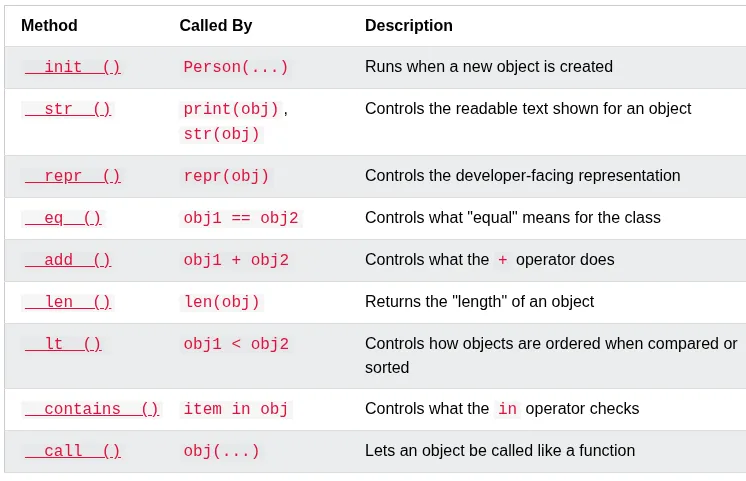
Python Magic Methods
Magic methods are special methods whose names start and end with double underscores, like __init__() and __str__(). Because of the double underscores, they are also called Dunder methods (short for “double underscore”).
You don’t call magic methods directly. Python calls them for you, automatically, in certain situations - like when an object is created, printed, or compared to another object.
Note
__init__() runs automatically when an object is created, and __str__() runs automatically when the object is printed.
List of Magic methods
The __str__() Method
The __str__() method is a special method that controls what is returned when the object is printed.
Without the __str__() method, printing an object shows its memory address:
__str__() must return a string. If it returns anything else, Python raises a TypeError.
Class method
A class method is bound to the class and receives the class as an implicit first argument.
In Python, @classmethod is a built-in decorator used to define a method that is bound to the class itself rather than a specific object instance.
Unlike regular instance methods, a class method doesn’t have access to self(the instance). Instead, it implicitly receives the class object as its first argument, which is conventionally named cls.
Static method can’t access or modify class state and generally for utility.
Property Decorator
We use @property decorator on any method in the class to use the method as a property
Inheritance
Inheritance allows us to define a class that inherits all the methods and properties from another class.
Parent class is the class being inherited from, also called base class.
Child class is the class that inherits from another class, also called derived class.
Exceptions in Python are an example of class inheritance.
Super Method
super() method is used to access methods of the parent class.
classCar:def__init__(self,type):self.type=type@staticmethoddefstart():print("Car is started..")classToyotaCar(Car):def__init__(self,name):super().__init__(type)self.name=namesuper().start()#call parent method with super()
Operator Overloading
Magic methods can control what happens when you use an operator, like +, on your own objects. This is called operator overloading.
Operator overloading refers to the ability to redefine the behavior of built-in operators for user-defined classes. In other words, you can “teach” Python how to evaluate expressions like a+b when a and b are instances of a custom class. —Leapcell.io
Python achieves this by mapping operators to special methods, also known as dunder methods (short for “double underscores). For example:
+ corresponds to __add__
- corresponds to __sub__
* corresponds to __mul__
/ corresponds to __truediv__
== corresponds to __eq__
< corresponds to __lt__
By defining these methods in your class, you can control how objects behave when used with those operators.
Best Practices
Keep operations intuitive: Only overload operators where it makes logical sense.
Return new instances: Avoid mutating existing instances unless that’s the intended behavior.
Ensure compatibility: Always handle edge cases and validate types when performing operations.
The __add__() Method
Use __add__() to add the age of two Person objects together:
Sets are used to store multiple items in a single variable.
Set is one of 4 built-in data types in Python used to store collections of data, the other 3 are list(), tuple(), and dict(), all with different qualities and usage.
A set is a collection which is unordered, unchangeable, and unindexed.
Sets are written with curly brackets.
They don’t allow duplicate values.
Set items can appear in a different order every time, and cannot be referred to by index or key.
The values True and 1 are considered the same value in sets, and are treated as duplicates.
The values False and 0 are considered the same value in sets, and are treated as duplicates.
Note
Set items are unchangeable, but you can remove items and add new items
Get the Length of a Set
To determine how many items a set has, use len() func.
If the item to remove doesn’t exist, remove() will raise an error.
Meanwhile, it the item to remove doesn’t exist, discard() will raise no error.
The global Variable
Variables that are created outside of a function are known as global variables
Global variables can be used by everyone, both inside of functions and outside.
If you create a variable with the same name inside a function, this variable will be local, and can only be used inside the func. The global variable with the same name will remain as it was, global and with original value.
balance=0#global vardefcurrent_balance():balance=1000#func local varprint("Balance:",balance)current_balance()print("Balance:",balance)
The global keyword
Normally, when you create a var inside a func, that var is local, and can only be used inside that func.
To create a global var inside a function, you can use global keyword
To change a value of a global variable inside a func, refer to the variable by using global keyword.
balance=0#global vardefcurrent_balance():globalbalancebalance=1000#changes global var value to 1000print("Balance:",balance)current_balance()print("Balance:",balance)
Constants
One have some constant value somewhere in the code, in Python and other programming languages, a convention is to bring them towards the start.
Capitalize the whole CONSTANT=<value> word, to indicate to other programmers working on the code, they shouldn’t touch it.
MEOWS=3for_inrange(3):print("meow")
But nothing is stopping other programmers to re-assign the constant’s value to something else unlike other programming languages, Python operates on “honor” system.
Python is a dynamically typed language, you don’t need to mention if your variable value is str, int, or float. Python figures this out own its own.
Unlike other languages like C, C++, Java etc., the programmers have to specify sometimes what type of variable you want something to be.
Type hints help the programmer find out bugs more easily.
Python has type hints too, but they are not strictly enforced by the language.
defmeow(n:int):# type hintfor_inrange(n):print("meow")number:int=int(input("Number: "))# type hintmeow(number)
The mypy module provides support for type hints in Python code.
pip install mypy
Run the mypy on meows.py:
mypy meows.py
To check, if function returns something:
defmeow(n:int)->str:# type hint: func should return a strreturn"meow\n"*nnumber:int=int(input("Number: "))# type hintmeows:str=meow(number)# type hintprint(meows,end="")
docstrings
Python provides docstrings to add comments to your code.
Python has documentation generation tools, which can generate a PDF/md from your docstrings inside your code.
defmeow(n:int)->str:# type hint"""
Meow n times.
:param n: Number of times to meow
:type n: int
:raise TypeError: if n is not int
:return: A string of n meows, one per line
:rtype: str
"""return"meow\n"*nnumber:int=int(input("Number: "))# type hintmeows:str=meow(number)print(meows,end="")
The argparse module
The argparse module makes it easy to build user-friendly command-line interfaces.
It parses arguments and options, generates help and usage messages automatically, and provides errors when users give the program invalid arguments.
Member
Description
Action
Base class for how an argument should be handled (store, append, count, etc.).
add_argument()
ArgumentParser method: Define a new positional or optional argument.
The overrides dictionary updates values from defaults.
The result is a merged dictionary where later entries take priority.
In assignments, the right-hand side must be an iterable, and the left-hand side is a comma-separated sequence of assignment targets, often written as a tuple of names. The number of values and targets must match. Alternatively, you can use a single starred target(*rest) to collect multiple values into a list.
In function calls, *iterable expands an iterable into positional arguments, while **dictionary expands into keyword arguments.
When to Use * and **
* —> Capture or expand multiple values (lists, args)
** —> Capture or expand keyword pairs(dicts)
Perfect for flexible functions, cleaner data handling
Why use * and **?
They make your code more flexible by allowing dynamic argument passing.
They help you avoid repetition and make code more concise and readable.
Especially useful in functional programming, API calls, and clean config handling.
By default, a function must be called with the correct number of arguments.
However, sometimes you may not know how many arguments that will be passed into your function.
*args and **kwargs allow functions to accept an unknown number of arguments.
Arbitrary Arguments — *args
If you don’t know how many arguments will be passed into your function, add a * before the parameter name. This way, the function will receive a tuple of arguments and can access the items accordingly.
Example:
Using *args to accept any number of arguments:
defmy_function(*kids):print("The youngest child is "+kids[2])my_function("Emil","Tobias","Linus")
Note
Arbitrary Arguments are often shortened to *args in Python documentation.
What is *args?
The *args parameter allows a function to accept any number of positional arguments.
Inside the function, args becomes a tuple containing all the passed arguments.
Subsections of Automate the Boring Stuff with Python
Section 1: Python Basics
Everyone in their life, spent a lot of time on repetitive tasks, which can be automated through a simple script.
Automate the boring stuff with Python uses Python 3.
How to get help?
Being stuck while coding is a normal happening, but not asking for help isn’t.
When you go online to ask for help, make sure:
Explain what you are trying to do, not just what you did.
If you get an error message, specify the point at which the error happens.
Copy and paste the entire body of the error message and your code to a Pastebin site like Pastebin.com or GitHub Gist.
Explain what you’ve already tried to do to solve your problem.
List the version of Python you’re using.
Say whether you’re able to reproduce the error every time you run the program or whether it happens only after you perform certain actions. If the latter, then explain what those actions are.
Specify what Operating System you’re on, what version of that OS you’re using.
Basic Terminology and using an IDLE
IDLE stands for Integrated Development and Learning Environment.
There are different programming text editors available:
Visual Studio Code
Sublime Text
PyCharm
Expressions = Values + Operators
In python, these expressions always evaluate to a single result. Arithmetic Operators are:
Operator
Operation
Example
Evaluates to . . .
**
Exponent
2 ** 3
8
%
Modulus/remainder
22 % 8
6
//
Integer division/floored quotient
22 // 8
2
/
Division
22 / 8
2.75
*
Multiplication
3 * 5
15
-
Subtraction
5 - 2
3
+
Addition
2 + 2
4
Data Types
Integers — “ints” (1,2,3…)
Floating point — “floats” (1.0, 1.1…)
Strings (“Hello World”)
Strings Concatenation: When two strings are joined together using a + symbol. (“Hello " + “World”)
String Replication: A string can be replicated by using * operator. (3 * “Hello World!”)
Both These operations can be combined like this "Hello World" + "!" * 5
Both concatenation and replication accepts strings values only.
Variables
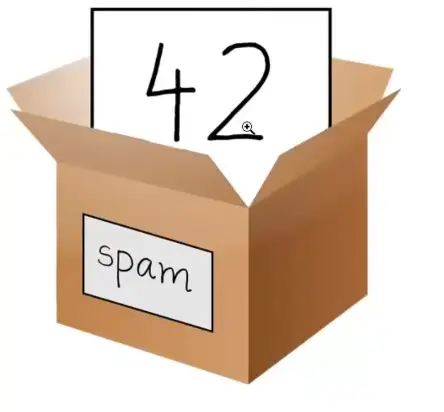
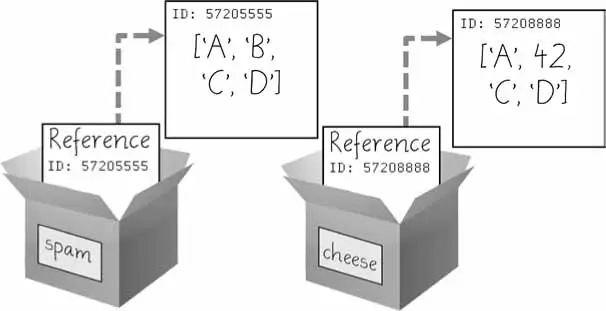
Variable can store different values, like a box:
spam = 42
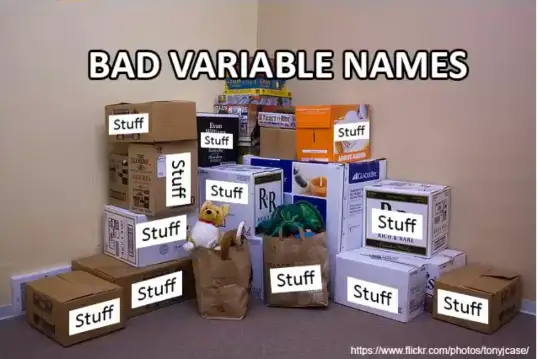
A too generic name given to a variable is a bad practice, which can create headache down the line while interacting with your code.
If a python instruction evaluates to a single value, it’s called an expression.
If it doesn’t evaluate to a single value, it’s called a statement.
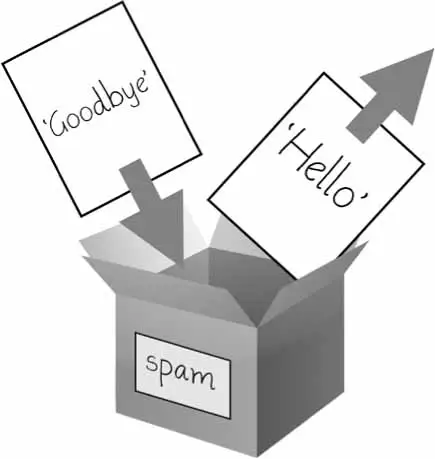
We can update the variable value by calling it down the line in the program:
Just like the box, we can remove the old item with the new one.
Variable Names
You can name your variable anything, but Python does have some restrictions too:
It can be only one word with no spaces.
It can use only letters, numbers, and the underscores (_) character.
It can’t begin with a number.
Var names are case-sensitive too.
Though Spam is a valid var, but it is a Python convention to start var name with a lowercase letter.
camelCase for variables can be used though Python PEP8 style guide instead recommends the use of underscores like this camel_case.
Though PEP8 guide itself says:
Consistency with the style guide is important. But most importantly: know when to be inconsistent—sometimes the style guide just doesn’t apply. When in doubt, use your best judgment.
Writing Our First Program
Python ignore comments starting with #.
It also skips the blank lines.
Functions — They are like mini-programs in Python.
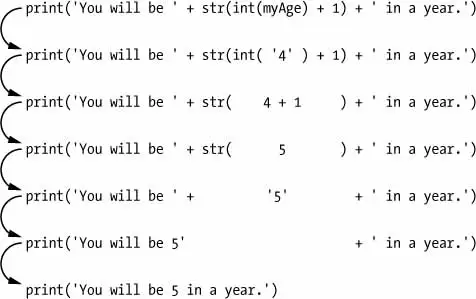
print("Hello World!")# Ask for their nameyourName=input("Type your name: ")print("It is good to meet you, "+str(yourName))print("Your name length is: "+str(len(yourName)))# Ask for their ageprint("What is your age?")yourAge=input("Type your age: ")print("You will be "+str(int(yourAge)+1)+" in a year.")
len(): It prints out the total number of characters in a string.
input() function always returns a string value, so you may have to convert it according to your need to float(), int() etc.
You can not concatenate str() and int() together, you will need to convert int() to str(int()), to concatenate them.
hello.py Evaluation steps look like this:
Extras (BOOK)
Python round(number, ndigits=None) Function
Return number rounded to ndigits precision after the decimal point. If ndigits is omitted or is None, it returns the nearest integer to its input.
The behavior of round() for floats can be surprising: for example, round(2.675, 2) gives 2.67 instead of the expected 2.68. This is not a bug: it’s a result of the fact that most decimal fractions can’t be represented exactly as a float. See Floating-Point Arithmetic: Issues and Limitations for more information.
Section 2: Flow Control
Flow Charts and Basic Flow Control Concepts
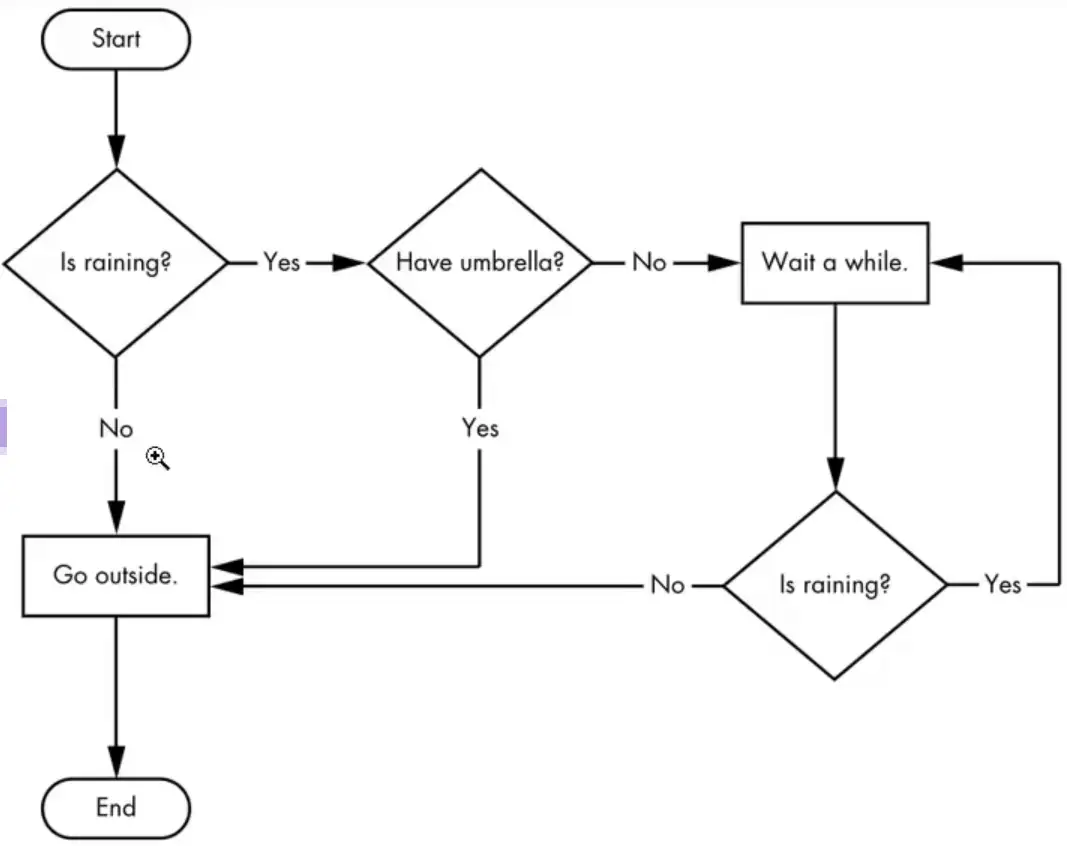
A flowchart starts at the start box, and you follow the arrow at the other boxes until you reach the end box. You take a different path depending on the conditions.
Based on how expression evaluate, a program can decide to skip instructions, repeat them, or choose one of several instructions to run. In fact, you almost never want your programs to start from the first line of ode and simply execute every line, straight to the end.
Flow control statements can decide which Python instructions to execute under which conditions.
These flow control statements directly correspond to the symbols in a flowchart.
In a flowchart, there is usually more than one way to go from the start to the end. The same is true for lines of code in a computer program. Flowcharts represent these branching points with diamonds, while the other steps are represented with rectangles. The starting and ending steps are represented with rounded rectangles.
Boolean Values
Boolean Data Type has only to values True and False.
How to represent YES and NO values:
Boolean Values
Comparison Operators
Boolean Operators
When entered as Python code, the Boolean always starts with a capital T or F, with the rest of the word in lowercase.
(Boolean is capitalized because the data type is named after mathematician George Boole)
➊>>>spam=True>>>spamTrue➋>>>trueTraceback(mostrecentcalllast):File"<pyshell#2>",line1,in<module>trueNameError:name'true'isnotdefined➌>>>True=2+2SyntaxError:can't assign to keyword
Like any other value, Boolean values are used in expressions and can be stored in variables ➊. If you don’t use the proper case ➋ or you try to use True and False for variable names ➌, Python will give you an error message.
Comparison Operators
They also called relational operators, compare two values and evaluate down to a single Boolean value.
Operator
Meaning
==
Equal to
!=
Not equal to
<
Less than
>
Greater than
<=
Less than or equal to
>=
Greater than or equal to
These operators evaluate to True or False depending on the values you give them.
The == and != operators can actually work with values of any data type.
An integer or floating point value will always be unequal to a string value. There 42 == '42'➊ evaluates to False because Python considers the integer 42 to be different from the string '42'.
The <, >, <=, and >= operators, on the other hand, work properly only with integer and floating-point values.
Boolean Operators
The three Boolean operators (and, or, and not) are used to compare Boolean values. Like comparison operators, they evaluate these expressions down to a Boolean value.
Binary Boolean Operators
The and and or operators always take two Boolean values (or expressions), so they’re considered binary operators.
and Operator: It evaluates to True only if both Boolean values are True.
Expression
Evaluates to…
True and True
True
True and False
False
False and True
False
False and False
False
or Operator: It evaluates to True if one of the Boolean values is True.
Expression
Evaluates to…
True or True
True
True or False
True
False or True
True
False or False
False
The not Operator
It has only one Boolean value (or expression)
Expression
Evaluates to…
not True
False
not False
True
Mixing Boolean and Comparison Operators
Since the comparison operators evaluate to Boolean values, you can use them in expressions with the Boolean operators.
You can also use multiple Boolean operators in an expression, along with the comparison operators:
>>>2+2==4andnot2+2==5and2*2==2+2True
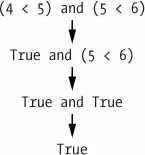
The Boolean operators have an order of operations just like the math operators do. After any math and comparison operators evaluate, Python evaluates the not operators first, then the and operators, and then the or operators.
Elements of Flow Control
Flow control statements often start with a part called the condition and are always followed by a block of code called the clause.
Conditions
The Boolean expressions you’ve seen so far could all be considered conditions, which are the same thing as expressions; condition is just a more specific name in the context of flow control statements.
Conditions always evaluate down to a Boolean value, True or False. A flow control statement decides what to do based on whether its condition is True or False, and almost every flow control statement uses a condition.
Blocks of Code
Lines of Python code can be grouped together in blocks.
There are 3 rules for block:
Blocks begin when the indentation increases.
Blocks can contain other blocks.
Blocks end when the indentation decreases to zero or to a containing block’s indentation.
You can view the execution of this program at https://autbor.com/blocks/. The first block of code ➊ starts at the line print(‘Hello, Mary’) and contains all the lines after it. Inside this block is another block ➋, which has only a single line in it: print(‘Access Granted.’). The third block ➌ is also one line long: print(‘Wrong password.’).
If, Else, and Elif Statements
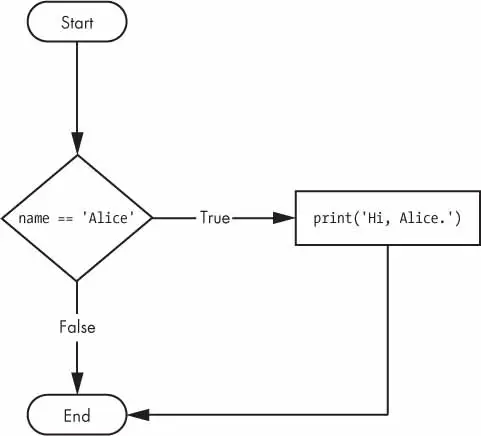
The statements represent the diamonds in the flowchart. They are the actual decisions your programs will make.
if Statements
If this condition is true, execute the code in the clause. if statement, consists of the following:
The if keyword
A condition (that is, an expression that evaluates to True or False)
A colon
Starting on the next line, an indented block of code (called the if clause)
else Statements
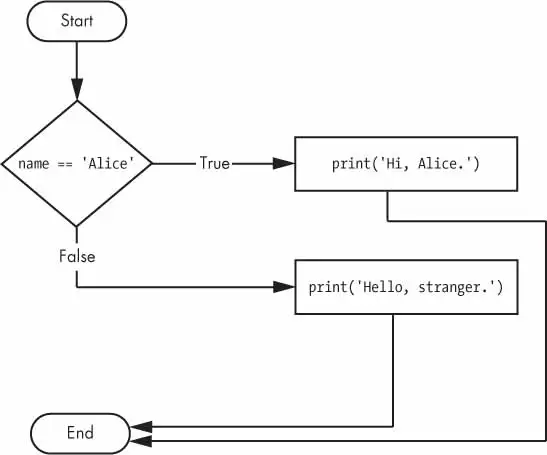
An if clause can optionally be followed by an else statement. The else clause is executed only when the if statement’s condition is False.
An else statement doesn’t have a condition. In code, an else statement always consists of the following:
The else keyword
A colon
Starting on the next line, an indented block of code (called the else clause)
elif Statements
While only one of the if or else clauses will execute, you may have a case where you want one of many possible clauses to execute.
The elif statement is an “else if” statement that always follows an if or another elif statement. It provides another condition that is checked only if all the previous conditions were False.
In code, an elif statement always consists of the following:
The elif keyword
A condition (that is, an expression that evaluates to True or False)
A colon
Starting on the next line, an indented block of code (called the elif clause)
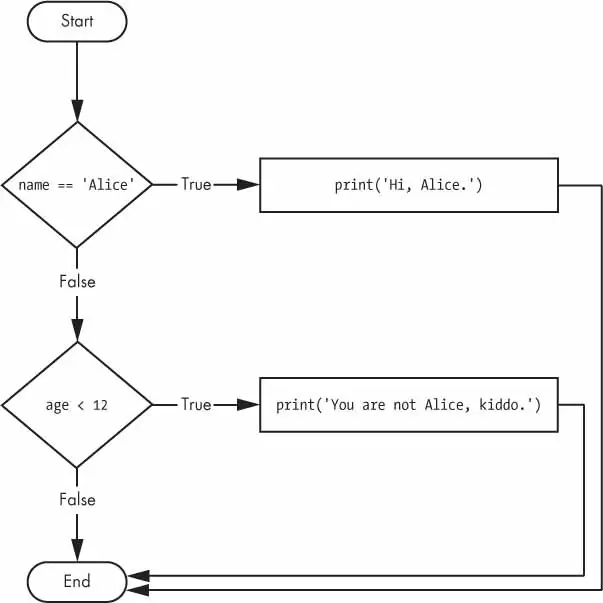
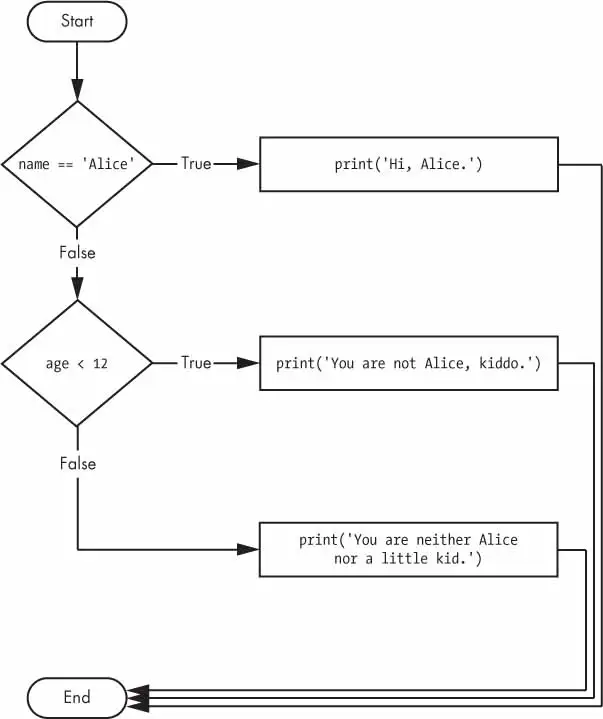
ifname=='Alice':print('Hi, Alice.')elifage<12:print('You are not Alice, kiddo.')
The elif clause executes if age < 12 is True and name == 'Alice' is False. However, if both of the conditions are False, then both of the clauses are skipped. It is not guaranteed that at least one of the clauses will be executed. When there is a chain of elif statements, only one or none of the clauses will be executed. Once one of the statements’ conditions is found to be True, the rest of the elif clauses are automatically skipped.
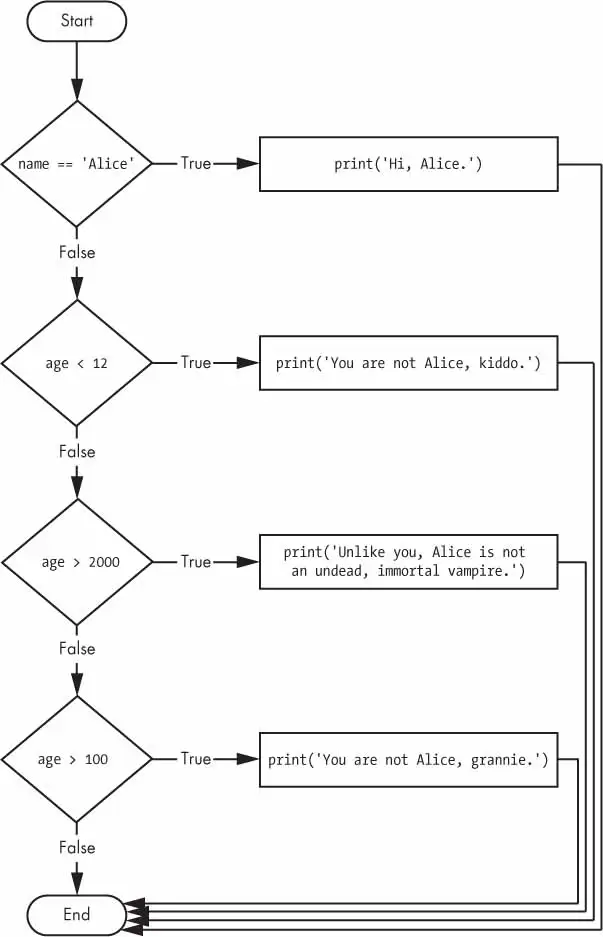
name='Carol'age=3000ifname=='Alice':print('Hi, Alice.')elifage<12:print('You are not Alice, kiddo.')elifage>2000:print('Unlike you, Alice is not an undead, immortal vampire.')elifage>100:print('You are not Alice, grannie.')
The program vampire.py has 3 elif statements. If any of the three, is found True program execution will stop.
The order of elif statements is also important.
Optionally, you can have an else statement after the last elif statement. In that case, it is guaranteed that at least one (and only one) of the clauses will be executed. If the conditions in every if and elif statement are False, then the else clause is executed.
For example, let’s re-create the Alice program to use if, elif, and else clauses.
age=3000ifname=='Alice':print('Hi, Alice.')elifage<12:print('You are not Alice, kiddo.')else:print('You are neither Alice nor a little kid.')
When you use if, elif, and else statements together, remember these rules about how to order them to avoid bugs like the one in Figure 2.7. First, there is always exactly one if statement. Any elif statements you need should follow the if statement. Second, if you want to be sure that at least one clause is executed, close the structure with an else statement.
name='Carol'age=3000ifname=='Alice':print('Hi, Alice.')elifage<12:print('You are not Alice, kiddo.')elifage>100:print('You are not Alice, grannie.')elifage>2000:print('Unlike you, Alice is not an undead, immortal vampire.')
Figure 2-7: The flowchart for the vampire2.py program. The X path will logically never happen, because if age were greater than 2000, it would have already been greater than 100.
While Loops
The while statement always consists of the following:
The while keyword
A condition (that is, an expression that evaluates to True or False)
A colon
Starting on the next line, an indented block of code (called the whileclause)
You can see that a while statement looks similar to an if statement. The difference is in how they behave. At the end of an ifclause, the program execution continues after the if statement. But at the end of a whileclause, the program execution jumps back to the start of the while statement. The while clause is often called the while loop or just the loop.
Here is the code, which will keep asking your name until you literally type your name in the prompt:
name=""whilename!='your name':print("Please type your name.")name=input()print("Thank you!")
break Statements
If the execution reaches a break statement, it immediately exits the while loop’s clause.
➊whileTrue:print('Please type your name.')➋name=input()➌ifname=='your name':➍break➎print('Thank you!')
The first line ➊ creates an infinite loop; it is a while loop whose condition is always True. (The expression True, after all, always evaluates down to the value True.) After the program execution enters this loop, it will exit the loop only when a break statement is executed. (An infinite loop that never exits is a common programming bug.)
Just like before, this program asks the user to enter your name ➋. Now, however, while the execution is still inside the while loop, an if statement checks ➌ whether name is equal to ‘your name’. If this condition is True, the break statement is run ➍, and the execution moves out of the loop to print(‘Thank you!’) ➎. Otherwise, the if statement’s clause that contains the break statement is skipped, which puts the execution at the end of the while loop. At this point, the program execution jumps back to the start of the while statement ➊ to recheck the condition.
continue Statements
continue Statements are used inside loops
When the program execution reaches a continue statement, the program execution immediately jumps back to the start of the loop and re-evaluates the loop’s condition (This is also what happens when the execution reaches the end of the loop).
whileTrue:print('Who are you?')name=input()➊ifname!='Joe':➋continueprint('Hello, Joe. What is the password? (It is a fish.)')➌password=input()ifpassword=='swordfish':➍break➎print('Access granted.')
If the user enters any name besides Joe ➊, the continue statement ➋ causes the program execution to jump back to the start of the loop. When the program reevaluates the condition, the execution will always enter the loop, since the condition is simply the value True. Once the user makes it past that if statement, they are asked for a password ➌. If the password entered is swordfish, then the break statement ➍ is run, and the execution jumps out of the while loop to print Access granted ➎. Otherwise, the execution continues to the end of the while loop, where it then jumps back to the start of the loop.
Truthy and Fasely Values
Conditions will consider some values in other data types equivalent to True and False. When used in conditions, 0, 0.0, and ’’ (the empty string) are considered False, while all other values are considered True. For example, look at the following program:
name=''# `not` is a Boolean operator which flips the `True` or `False` values➊whilenotname:print('Enter your name:')name=input()print('How many guests will you have?')numOfGuests=int(input())➋ifnumOfGuests:➌print('Be sure to have enough room for all your guests.')print('Done')
If the user enters a blank string for name, then the while statement’s condition will be True ➊, and the program continues to ask for a name. If the value for numOfGuests is not 0 ➋, then the condition is considered to be True, and the program will print a reminder for the user ➌.
You could have entered not name != ’’ instead of not name, and numOfGuests != 0 instead of numOfGuests, but using the truthy and falsey values can make your code easier to read.
For Loops
The while loop keeps looping while its condition is True (which is the reason for its name), but what if you want to execute a block of code only a certain number of times? You can do this with a for loop statement and the range() function.
In code, a for statement looks something like for i in range(5): and includes the following:
The for keyword
A variable name
The in keyword
A call to the range() method with up to three integers passed to it
A colon
Starting on the next line, an indented block of code (called the for clause)
print("My name is")foriinrange(5):print("Alex Five Times ("+str(i)+")")
The code in the for loop’s clause is run five times. The first time it is run, the variable i is set to 0. The print() call in the clause will print Jimmy Five Times (0). After Python finishes an iteration through all the code inside the for loop’s clause, the execution goes back to the top of the loop, and the for statement increments i by one. This is why range(5) results in five iterations through the clause, with i being set to 0, then 1, then 2, then 3, and then 4. The variable i will go up to, but will not include, the integer passed to range().
NOTE
You can use break and continue statements inside for loops as well. The continue statement will continue to the next value of the for loop’s counter, as if the program execution had reached the end of the loop and returned to the start. In fact, you can use continue and break statements only inside while and for loops. If you try to use these statements elsewhere, Python will give you an error.
Counting the sums of all the numbers to 100 using both for and while loops:
# For Loop to Count the sums of numbers upto 100sum=0foriinrange(101):sum=sum+i# print(sum, i)print("The sum of 100 using for loop is: ",sum)# While Loop#sum=0i=0whilei<101:sum=sum+ii=i+1print("The sum of 100 using while loop is: ",sum)
The use of for is more efficient though while can also get the job done.
The Starting, Stopping, and Stepping Arguments to range()
Some functions can be called with multiple arguments separated by a comma, and range() is one of them. This lets you change the integer passed to range() to follow any sequence of integers, including starting at a number other than zero.
foriinrange(12,16):print(i)
The first argument will be where the for loop’s variable starts, and the second argument will be up to, but not including, the number to stop at.
12
13
14
15
The range() function can also be called with three arguments. The first two arguments will be the start and stop values, and the third will be the step argument. The step is the amount that the variable is increased by after each iteration.
foriinrange(0,10,2):print(i)
So calling range(0, 10, 2) will count from zero to eight by intervals of two.
0
2
4
6
8
The range() function is flexible in the sequence of numbers it produces for for loops. You can even use a negative number for the step argument to make the for loop count down instead of up.
foriinrange(5,-1,-1):print(i)
This for loop would have the following output:
5
4
3
2
1
0
Running a for loop to print i with range(5, -1, -1) should print from five down to zero.
Importing Modules
All Python programs can call a basic set of functions called built-in functions, including the print(), input(), and len() functions you’ve seen before.
Python also comes with a set of modules called the standard library.
Each module is a Python program that contains a related group of functions that can be embedded in your programs. For example, the math module has mathematics-related functions, the random module has random number-related functions, and so on.
Before you can use the functions in a module, you must import the module with an import statement. In code, an import statement consists of the following:
The import keyword
The name of the module
Optionally, more module names, as long as they are separated by commas.
When you save your Python scripts, take care not to give them a name that is used by one of Python’s modules, such as random.py, sys.py, os.py, or math.py. If you accidentally name one of your programs, say, random.py, and use an import random statement in another program, your program would import your random.py file instead of Python’s random module. This can lead to errors such as AttributeError: module random has no attribute ‘randint’, since your random.py doesn’t have the functions that the real random module has. Don’t use the names of any built-in Python functions either, such as print() or input().
Problems like these are uncommon, but can be tricky to solve. As you gain more programming experience, you’ll become more aware of the standard names used by Python’s modules and functions, and will run into these issues less frequently.
Since randint() is in the random module, you must first type random. in front of the function name to tell Python to look for this function inside the random module.
from import Statements
An alternative form of the import statement is composed of the from keyword, followed by the module name, the import keyword, and a star; for example, from random import *.
With this form of import statement, calls to functions in random will not need the random. prefix. However, using the full name makes for more readable code, so it is better to use the import random form of the statement.
Ending a Program Early with the sys.exit() function
Programs always terminate if the program execution reaches the bottom of the instructions. However, you can cause the program to terminate, or exit, before the last instruction by calling the sys.exit() function.
Since this function is in the sys module, you have to import sys before you can use it.
importsyswhileTrue:print('Type exit to quit.')response=input()ifresponse=='exit':sys.exit()print('You typed '+"'"+response+"'"+'.')
Run this program in IDLE. This program has an infinite loop with no break statement inside. The only way this program will end is if the execution reaches the sys.exit() call. When response is equal to exit, the line containing the sys.exit() call is executed. Since the response variable is set by the input() function, the user must enter exit in order to stop the program.
A Short Program: Guess the Number
We have a pseudocode like this:
I am thinking of a number between 1 and 20.
Take a guess.
10
Your guess is too low.
Take a guess.
15
Your guess is too low.
Take a guess.
17
Your guess is too high.
Take a guess.
16
Good job! You guessed my number in 4 guesses!
I have implemented this code as:
fromrandomimportrandintsecretNumber=randint(1,20)# print(secretNumber) # Debuging purposes onlyprint("I am thinking of a number between 1 and 20.")guess=''numberOfGuesses=0whileguess!=secretNumber:guess=int(input("Take a Guess: "))numberOfGuesses=numberOfGuesses+1ifguess<secretNumber:print("Your Guess is too low.")elifguess>secretNumber:print("Your Guess is too high")print("Good job! You guessed my number in "+str(numberOfGuesses)+" guesses!")
This how Al implemented it…
# This is a guess the number game. importrandomsecretNumber=random.randint(1,20)print('I am thinking of a number between 1 and 20.')# Ask the player to guess 6 times. forguessesTakeninrange(1,7):print('Take a guess.')guess=int(input())ifguess<secretNumber:print('Your guess is too low.')elifguess>secretNumber:print('Your guess is too high.')else:break# This condition is the correct guess! ifguess==secretNumber:print('Good job! You guessed my number in '+str(guessesTaken)+' guesses!') else:print('Nope. The number I was thinking of was '+str(secretNumber))
Version 2.0 of my implementation of guessTheNumber2.py game…
fromrandomimportrandintsecretNumber=randint(1,20)# print(secretNumber) # Debuging purposes onlyprint("I am thinking of a number between 1 and 20.")# guess = ''numberOfGuesses=0whileTrue:guess=int(input("Take a Guess: "))numberOfGuesses=numberOfGuesses+1ifguess<secretNumber:print("Your Guess is too low.")elifguess>secretNumber:print("Your Guess is too high")else:breakprint("Good job! You guessed my number in "+str(numberOfGuesses)+" guesses!")
I’m still going with the unlimited number of guesses method, but improved the logic.
A Short Program: Rock, Paper, Scissors
We have the Pseudocode for the program:
ROCK, PAPER, SCISSORS
0 Wins, 0 Losses, 0 Ties
Enter your move: (r)ock (p)aper (s)cissors or (q)uit
p
PAPER versus...
PAPER
It is a tie!
0 Wins, 1 Losses, 1 Ties
Enter your move: (r)ock (p)aper (s)cissors or (q)uit
s
SCISSORS versus...
PAPER
You win!
1 Wins, 1 Losses, 1 Ties
Enter your move: (r)ock (p)aper (s)cissors or (q)uit
q
That’s how I implemented it:
################################################## RPS GAME VERSION 5.0 ####################################################importrandomimportsys# Print to the Screen Onceprint("ROCK, PAPER, SCISSORS")# Counting Streakswins=0losses=0ties=0whileTrue:# Print to the Screenprint("Enter your move: (r)ock (p)aper (s)cissors or (q)uit")# User InputuserMove=input()ifuserMove=="q":print(f"Thank you for playing our Game!\n{wins} Wins, {losses} losses, {ties} Ties")sys.exit()elifuserMove!="r"anduserMove!="p"anduserMove!="s":print("Illegal Guess, Try again.")continueelifuserMove=="r":userMove="ROCK"elifuserMove=="p":userMove="PAPER"elifuserMove=="s":userMove="SCISSORS"# System inputsystemMove=random.randint(1,3)ifsystemMove==1:systemMove="ROCK"elifsystemMove==2:systemMove="PAPER"elifsystemMove==3:systemMove="SCISSORS"# Showing the Played Movesprint(f"{systemMove} vs. {userMove}")# Game LogicifsystemMove==userMove:print("It is a tie")ties=ties+1elif((systemMove=="ROCK"anduserMove=="PAPER")or(systemMove=="SCISSORS"anduserMove=="ROCK")or(systemMove=="PAPER"anduserMove=="SCISSORS")):print("You win!")wins=wins+1elif((systemMove=="ROCK"anduserMove=="SCISSORS")or(systemMove=="PAPER"anduserMove=="ROCK")or(systemMove=="SCISSORS"anduserMove=="PAPER")):print("Loser!")losses=losses+1
Tip
Go to my GitHub to see other versions of the game, and how I went step by step, implementing the logic and cleaning the code. It still isn’t efficient or clean looking code, as we haven’t gotten to some advanced lessons, which can help us clean it up further.
This how Al implemented it…
importrandom,sysprint('ROCK, PAPER, SCISSORS')# These variables keep track of the number of wins, losses, and ties. wins=0losses=0ties=0whileTrue:# The main game loop. print('%s Wins, %s Losses, %s Ties'%(wins,losses,ties))whileTrue:# The player input loop. print('Enter your move: (r)ock (p)aper (s)cissors or (q)uit')playerMove=input()ifplayerMove=='q':sys.exit()# Quit the program. ifplayerMove=='r'orplayerMove=='p'orplayerMove=='s':break# Break out of the player input loop. print('Type one of r, p, s, or q.')# Display what the player chose: ifplayerMove=='r':print('ROCK versus...')elifplayerMove=='p':print('PAPER versus...')elifplayerMove=='s':print('SCISSORS versus...')# Display what the computer chose: randomNumber=random.randint(1,3)ifrandomNumber==1:computerMove='r'print('ROCK')elifrandomNumber==2:computerMove='p'print('PAPER')elifrandomNumber==3:computerMove='s'print('SCISSORS')# Display and record the win/loss/tie: ifplayerMove==computerMove:print('It is a tie!')ties=ties+1elifplayerMove=='r'andcomputerMove=='s':print('You win!')wins=wins+1elifplayerMove=='p'andcomputerMove=='r':print('You win!')wins=wins+1elifplayerMove=='s'andcomputerMove=='p':print('You win!')wins=wins+1elifplayerMove=='r'andcomputerMove=='p':print('You lose!')losses=losses+1elifplayerMove=='p'andcomputerMove=='s':print('You lose!')losses=losses+1elifplayerMove=='s'andcomputerMove=='r':print('You lose!')losses=losses+1
abs() Function (Extras)
The Python abs() function return the absolute value. The absolute value of any number is always positive it removes the negative sign of a number in Python.
>>>abs(-10)10>>>abs(-0.50)0.5>>>abs(-32.40)32.4
Section 3: Functions
Python provides several built-in functions like print(), input() and len(), but you can also write your own functions.
A function is like a mini-program within a program.
The first line is a def statement ➊, which defines a function named hello(). The code in the block that follows the def statement ➋ is the body of the function. This code is executed when the function is called, not when the function is first defined.
The hello() lines after the function ➌ are function calls. In code, a function call is just the function’s name followed by parentheses, possibly with some number of arguments in between the parentheses.
A major purpose of functions is to group code that gets executed multiple times. Without a function defined, you would have to copy and paste this code each time, and the program would look like this:
The definition of the hello() function in this program has a parameter called name ➊. Parameters are variables that contain arguments. When a function is called with arguments, the arguments are stored in the parameters. The first time the hello() function is called, it is passed the argument 'Alice' ➌. The program execution enters the function, and the parameter name is automatically set to 'Alice', which is what gets printed by the print() statement ➋.
The value stored in a parameter is forgotten when the function returns. For example, if you added print(name) after hello('Bob') in the previous program, the program would give a NameError because there is no variable named name.
Define, Call, Pass, Argument, Parameter
The terms define, call, pass, argument, and parameter can be confusing. Let’s look at a code example to review these terms:
To define a function is to create it, just like an assignment statement like spam = 42 creates the spam variable. The def statement defines the sayHello() function ➊.
The sayHello('Al') line ➋ calls the now-created function, sending the execution to the top of the function’s code. This function call is also known as passing the string value 'Al' to the function.
A value being passed to a function in a function call is an argument. The argument 'Al' is assigned to a local variable named name. Variables that have arguments assigned to them are parameters.
It’s easy to mix up these terms, but keeping them straight will ensure that you know precisely what the text in this chapter means.
Return Values and return Statements
Calling a len() function with an argument such as 'hello, will evaluate to the integer value 5, which is the length of the string passed.
The value that a function call evaluates to is called return value of the function.
While writing a function, return value should be used with return statement.
A return statement has:
The return keyword
The value or expression that the function should return.
When an expression is used with a return statement, the return value is what this expression evaluates to.
The None Value
In Python, there is a value called None, which represents the absence of a value(a placeholder). The None value is the only value of the NoneType data type.
Other programming languages might call this value null, nil, or undefined.
Just like the Boolean True and False values, None must be typed with a capital N.
This value-without-a-value can be helpful when you need to store something that won’t be confused for a real value in a variable.
One place where None is used is as the return value of print().
The print() function displays text on the screen, but it doesn’t need to return anything in the same way len() or input() does. But since all function calls need to evaluate to a return value, print() returns None. To see this in action, enter the following into the interactive shell:
>>>spam=print('Hello!')Hello!>>>None==spamTrue
Behind the scenes, Python adds return None to the end of any function definition with no return statement. This is similar to how a while or for loop implicitly ends with a continue statement. Also, if you use a return statement without a value (that is, just the return keyword by itself), then None is returned.
Keyword Arguments and the print() Function
Keyword arguments are often used for optional parameters. For example, the print() function has the optional parameters end and sep to specify what should be printed at the end of its arguments and between its arguments (separating them), respectively.
By default, two successive print statements would print their arguments on a separate line, but we can change this behavior with keyword arguments:
print('Hello',end=' ')print('World')
When different strings are concatenated, we can use:
print('Hello!'+'World',sep=':')
The Call Stack
Imagine that you have a meandering conversation with someone. You talk about your friend Alice, which then reminds you of a story about your coworker Bob, but first you have to explain something about your cousin Carol. You finish you story about Carol and go back to talking about Bob, and when you finish your story about Bob, you go back to talking about Alice. But then you are reminded about your brother David, so you tell a story about him, and then get back to finishing your original story about Alice. Your conversation followed a stack-like structure, like in Figure 3-1. The conversation is stack-like because the current topic is always at the top of the stack.
Similar to our meandering conversation, calling a function doesn’t send the execution on a one-way trip to the top of a function. Python will remember which line of code called the function so that the execution can return there when it encounters a return statement. If that original function called other functions, the execution would return to those function calls first, before returning from the original function call.
The call stack is how Python remembers where to return the execution after each function call.
The call stack isn’t stored in a variable in your program; rather, Python handles it behind the scenes.
When your program calls a function, Python creates a frame object on the top of the call stack. Frame objects store the line number of the original function call so that Python can remember where to return. If another function call is made, Python puts another frame object on the call stack above the other one.
When a function call returns, Python removes a frame object from the top of the stack and moves the execution to the line number stored in it. Note that frame objects are always added and removed from the top of the stack and not from any other place.
The top of the call stack is which function the execution is currently in. When the call stack is empty, the execution is on a line outside of all functions.
Local and Global Scope
Parameters and variables that are assigned in a called function are said to exit in that function’s local scope.
Variables that are assigned outside all functions are said to exist in the global scope.
A variable must be one or the other; it cannot be both local and global.
Think of a scope as a container for variables. When scope is destroyed, all variables stored inside it are forgotten.
There is only one global scope, and it is created when your program begins. When your program terminates, the global scope is destroyed, and all its variables are forgotten.
A local scope is created whenever a function is called. Any variables assigned in the function exist within the function’s local scope. When the function returns, the local scope is destroyed, and these variables are forgotten.
Scope matter because:
Code in the global scope, outside all functions, cannot use any local variables.
However, code in a local scope can access global variables.
defspam():print(eggs)eggs=42spam()print(eggs)
Code in a function’s local scope cannot use variables in any other local scope.
We can use the same name for different variables, if they are in different scopes.
It’s easy to track down a bug caused by a local variable. When there are thousands of lines of code, global variables are hard to work with.
Using global variables in small programs is fine, it’s a bad habit to rely on global variables as your programs get larger and larger.
The Global Statement
To modify a global variable from within a function, we can use a global statement.
If you have a line such as global eggs at the top of a function, it tells Python, “In this function, eggs refers to the global variable, so don’t create a local variable with this name.”
Because eggs is declared global at the top of spam() ➊, when eggs is set to 'spam' ➋, this assignment is done to the globally scoped eggs. No local eggs variable is created.
There are four rules to tell whether a variable is in a local scope or global scope:
If a variable is being used in the global scope (that is, outside all functions), then it is always a global variable.
If there is a global statement for that variable in a function, it is a global variable.
Otherwise, if the variable is used in an assignment statement in the function, it is a local variable.
But if the variable is not used in an assignment statement, it is a global variable.
Functions as Black Boxes…
Often, all you need to know about a function are its inputs (the parameters) and output value; you don’t always have to burden yourself with how the function’s code actually works. When you think about functions in this high-level way, it’s common to say that you’re treating a function as a “black box.”
This idea is fundamental to modern programming. Later chapters in this book will show you several modules with functions that were written by other people. While you can take a peek at the source code if you’re curious, you don’t need to know how these functions work in order to use them. And because writing functions without global variables is encouraged, you usually don’t have to worry about the function’s code interacting with the rest of your program.
Section 4: Handling Errors With Try/Except
Exception Handling
Getting an error or exception in Python program, without any exception handling means entire program will crash.
In real world, this is not the desired behavior, and we want our program to detect errors, handle them, and then continue to run.
When the program is run we will get ZeroDivisonError at line 6.
You can put the previous divide-by-zero code in a try clause and have an except clause contain code to handle what happens when this error occurs.
1
2
3
4
5
6
7
8
9
10
11
defspam(divideBy):try:return42/divideByexceptZeroDivisionError:return('Error: I cannot do that.')print(spam(2))print(spam(12))print(spam(0))print(spam(1))
When code in a try clause causes an error, the program execution immediately moves to the code in the except clause. After running that code, the execution continues as normal.
A Short Program: Zigzag
This program will create a back-and-forth, zigzag pattern until the user stops it by pressing the Mu editor’s Stop button or by pressing CTRL-C. When you run this program, the output will look something like this:
# An extra project from book's chapter 3importsysimporttimedefasterisks_pattern(startSpace,pattern):print(' '*startSpace+pattern)time.sleep(0.1)pattern='******'whileTrue:try:forstartSpaceinrange(10):asterisks_pattern(startSpace,pattern)forstartSpaceinrange(10,1,-1):asterisks_pattern(startSpace,pattern)exceptKeyboardInterrupt:print(' Quiting the animation pattern. Goodbye!')sys.exit()
Write a function named collatz() that has one parameter named number. If number is even, then collatz() should print number // 2 and return this value. If number is odd, then collatz() should print and return 3 * number + 1.
Then write a program that lets the user type in an integer and that keeps calling collatz() on that number until the function returns the value 1. (Amazingly enough, this sequence actually works for any integer—sooner or later, using this sequence, you’ll arrive at 1! Even mathematicians aren’t sure why. Your program is exploring what’s called the Collatz sequence, sometimes called “the simplest impossible math problem.”)
Remember to convert the return value from input() to an integer with the int() function; otherwise, it will be a string value.
Hint: An integer number is even if number % 2 == 0, and it’s odd if number % 2 == 1.
The output of this program could look something like this:
Enternumber:3105168421
 1
 2
 3
 4
 5
 6
 7
 8
 9
10
11
12
13
14
15
16
# Extra Project from book's chapter 3defcollatz(number):ifnumber%2==0:result=int(number/2)else:result=int(3*number+1)print(result)returnresulttry:number=int(input("Enter your number:\n"))whilenumber!=1:number=collatz(number)exceptValueError:print('Please enter a valid integer')
Section 5: Writing a Complete Program, Guess the Number
A Guess Game
The output we need:
Hello, What is your name?
Al
Well, Al, I am thinking of a number between 1 and 20.
Take a guess.
10
Your guess is too low.
Take a guess
5
Your guess is too high.
Take a guess.
6
Good job, Al! You guessed my number in 5 guesses!
importrandom# Ask for Player name and greet themplayerName=input('Hello, What is your name?\n')print(f"Well, {playerName}, I am thinking of a number between 1 and 20.")secretNumber=random.randint(1,20)# print(f"Debug: Secret Number is {secretNumber}")fornumberOFGuessesinrange(1,7):# Max number of Guesses allowedplayerGuess=int(input('Take a Guess\n'))ifplayerGuess<secretNumber:print('Your Guess is too low.')elifplayerGuess>secretNumber:print('Your Guess is too high')else:breakifplayerGuess==secretNumber:print(f'Good job,{playerName}! You guessed my number in {numberOFGuesses} guesses!')else:print(f"Nope. The number I was thinking of was {secretNumber}.")
F-Strings
In this course we were taught about string concatenation using + operator. But that is cumbersome, and we need to convert non-strings values to strings values for concatenation to work.
In python 3.6, F-strings were introduced, that makes the strings concatenation a lot easier.
print(f"This is an example of {strings} concatenation.")
{} We can put our variable name, which will be automatically converted into string type. As you can see, this approach is much more cleaner.
A Guess Game — Extended Version
Let’s take everything we learned so far, write a guess game which has the following qualities:
An error checking
Asking player to choose the lower and higher end of number for guessing game.
Let player exit the game using sys.exit() module or pressing q(uit) button on their keyboard.
Using built-in function title() method, convert a string into title case, where the first letter of each word is capitalized, and the rest are in lowercase.
An extra feature which I want to implement is telling the player, how many guesses they will get. As taught in Algorithm: Binary Search course, offered by Khan Academy. We can calculate max number of guesses using this formula:
$$
\text{Maximum number of guesses} = \log_{2}(n) \
$$
For guess between (1, 20), the n = 20:
$$
\text{Maximum number of guesses} = \log_{2}(20)
$$
$$
\text{Maximum number of guessess} \approx 5
$$
Here is the extended version, I might have gone a bit over the board.
importrandomimportmathimportsysimporttimedefquitGame():# Message to print when CTRL+C keys are pressedprint('\nThanks for Playing, quiting the game...')sys.exit()# Greeting the Playertry:print('Welcome to Guess the Number Game. \nYou can Quit the game any time by pressing CTRL+C keys on your keyboard')playerName=input('Hello, What is your name?\n').title()print(f"Well, {playerName}, let's choose our start and end values for the game.")exceptKeyboardInterrupt:quitGame()# Asking Player for Guessing Range and Error CheckingwhileTrue:try:lowerEndOfGuess=int(input('Choose your start number: '))higherEndOfGuess=int(input('Choose your end number: '))iflowerEndOfGuess>higherEndOfGuess:# Otherwise our random function will failprint('Starting number should be less than ending number')continuebreakexceptValueError:print('Only Intergers are allowed as a start and end values of a Guessing Game.')exceptKeyboardInterrupt:quitGame()# Haing Fun and choosing the secret numbertry:print('Wait, a moment, I m gearing up for the battle.')time.sleep(2)print("Don't be stupid.I'm not stuck., I'm still thinking of what number to choose!")time.sleep(3)print('Dont dare to Quit on me')secretNumber=random.randint(lowerEndOfGuess,higherEndOfGuess)time.sleep(2.5)print('Shshhhhhhh! I have chosen my MAGIC NUMBER!')time.sleep(1.5)print("It's your turn")time.sleep(1.5)exceptKeyboardInterrupt:quitGame()# print(f"Debug: Secret Number is {secretNumber}")# Calculating maximum number of possible guessestotalGuesses=higherEndOfGuess-lowerEndOfGuessmaxPossibleGuesses=math.ceil(math.log2(totalGuesses))print(f"You have {maxPossibleGuesses} guesses to Win the Game.")time.sleep(1.5)# Game LogicfornumberOFGuessesinrange(1,maxPossibleGuesses+1):try:playerGuess=int(input('Take a Guess!\n'))ifplayerGuess<secretNumber:print('Your Guess is too low!')elifplayerGuess>secretNumber:print('Your Guess is too high!')else:breakexceptValueError:print('Only integers are allowed as valid game guess.')exceptKeyboardInterrupt:quitGame()# Ending the Gametry:ifplayerGuess==secretNumber:print(f'Good job,{playerName}! You guessed my number in {numberOFGuesses} guesses!')else:print(f"You lose! Number of guesses are exhausted. The number I was thinking of was {secretNumber}.")exceptNameError:print('Please, try again, something went wrong!')
Section 6: Lists
A list is a value that contains multiple values.
The values in a list are also called item.
You can access items in a list with its integer index.
The indexes start at 0, not 1.
You can also use negative indexes. -1 refers to the last item, -2 refers to the second to last item, and so on.
You can get multiple items from the list using a slice.
The slice has two indexes. The new list’s items start at the first index and go up to, but doesn’t include, the second index.
The len() function, concatenation, and replication work the same way with lists that they do with strings.
You can convert a value into a list by passing it to the first() function.
The list Data Type
A list is a value that contains multiple values in an ordered sequence. The term list value refers to the list itself (which is a value that can be stored in a variable or passed to a function like any other value), not the values inside the list value.
The spam variable ➊ is still assigned only one value: the list value. But the list value itself contains other values. The value [] is an empty list that contains no values, similar to '', the empty string.
Getting Individual Values in a List with Indexes
Lists can also contain other list values. The values in these lists of lists can be accessed using multiple indexes, like so:
The first index dictates which list value to use, and the second indicates the value within the list value.
Negative Indexes
The integer value -1 refers to the last index in a list, the value -2 refers to the second-to-last index in a list, and so on.
>>>spam=['cat','bat','rat','elephant']>>>spam[-1]'elephant'>>>spam[-3]'bat'>>>'The '+spam[-1]+' is afraid of the '+spam[-3]+'.''The elephant is afraid of the bat.'
Getting a List from Another List with Slices
Just as an index can get a single value from a list, a slice can get several values from a list, in the form of a new list. A slice goes up to, but will not include, the value at the second index.
As a shortcut, you can leave out one or both of the indexes on either side of the colon in the slice. Leaving out the first index is the same as using 0, or the beginning of the list. Leaving out the second index is the same as using the length of the list, which will slice to the end of the list. Enter the following into the interactive shell:
The len() function will return the number of values that are in a list value passed to it, just like it can count the number of characters in a string value.
The del statement can also be used on a simple variable to delete it, as if it were an “un-assignment” statement. If you try to use the variable after deleting it, you will get a NameError error because the variable no longer exists. In practice, you almost never need to delete simple variables. The del statement is mostly used to delete values from lists.
Working with Lists
It’s tempting to create many individual variables to store a group of similar values.
It’s a bad way to write a program.
Down the line, when you will need to store more values, you won’t be able, if you run out of variables.
Let’s look at the example of bad code using a lot of variables to store a group of similar values:
print('Enter the name of cat 1:')catName1=input()print('Enter the name of cat 2:')catName2=input()print('Enter the name of cat 3:')catName3=input()print('Enter the name of cat 4:')catName4=input()print('Enter the name of cat 5:')catName5=input()print('Enter the name of cat 6:')catName6=input()print('The cat names are:')print(catName1+' '+catName2+' '+catName3+' '+catName4+' '+catName5+' '+catName6)
Improved version:
catName=[]whileTrue:print(f"Enter your cat name: {len(catName)+1} (Or Enter nothing to stop.)")name=input()ifname=='':breakcatName=catName+[name]print("The cat names are: ")fornameincatName:print(f" {name}")
for Loops with Lists, Multiple Assignment, and Augmented Operators
For loops technically iterate over the values in a list.
The range() function returns a list-like value, which can be passed to the list() function if you need an actual list value.
Variables can swap their values using multiple assignment.
Augmented assignment operators like += are used as shortcuts.
Using for Loops with Lists
for Loops execute a block of code a certain number of times. Technically, a for loop repeats the code block once for each item in a list value.
#inputforiinrange(4):print(i)#output0123
This is because the return value from range(4) is a sequence value that Python considers similar to [0,1,2,3] (Sequence Data Types).
The following program has same output as the previous one:
foriin[0,1,2,3]:print(i)
A common Python technique is to use range(len(someList)) with a for loop to iterate over the indexes of a list.
supplies=['pens','staplers','printers','binders']foriinrange(len(supplies)):print(f"Index of {i} in supplies is: {supplies[i]}")Index0insuppliesis:pensIndex1insuppliesis:staplersIndex2insuppliesis:printersIndex3insuppliesis:binders
The in and not in Operators
The in and not in operators are used to determine whether a value is or isn’t in a list.
Program: Write a program that lets the user type in a pet name and then checks to see whether the name is in a list of pets.
The Multiple Assignment Trick
The multiple assignment trick (technically called tuple unpacking) is a shortcut that lets you assign multiple variables with the values in a list in one line of code. So instead of doing this:
The number of variables and the length of the list must be exactly equal, or Python will give you a ValueError.
Using the enumerate() Function with Lists
Instead of using range(len(someList)) technique, enumerate() returns both list item, and its index, when called upon a list.
>>>supplies=['pens','staplers','flamethrowers','binders']>>>forindex,iteminenumerate(supplies):...print('Index '+str(index)+' in supplies is: '+item)Index0insuppliesis:pensIndex1insuppliesis:staplersIndex2insuppliesis:flamethrowersIndex3insuppliesis:binders
The enumerate() function is useful if you need both the item and the item’s index in the loop’s block.
Using the random.choice() and random.shuffle() Functions with Lists
The random module has a couple of functions that accept lists for arguments. The random.choice() function will return a randomly selected item from the list.
Methods are functions that are “called on” values.
The index() list method returns the index of an item in the list.
The append() list method adds a value to the end of the list.
The insert() list method adds a value anywhere inside a list.
The remove() list method removes an item, specified by the value, from a list.
The sort() list method sorts the items in a list.
The sort() method’s reverse=True keyword argument can sort in reverse order.
Sorting happens in “ASCII-betical” order. To sort normally, pass key=str.lower.
These list methods operate on the list “in place”, rather than returning a new list value.
Methods belong to a single data type. The append() and insert() methods are list methods and can be only called on list values, not on other values such as strings or integers.
Calling list methods on str or inte will give the error AttributeError.
Each data type has its own set of methods. This list data type, for example, has several useful methods for finding, adding, removing, and other manipulating values in a list.
Notice that the code is spam.append('moose') and spam.insert(1, 'chicken'), not spam = spam.append('moose') and spam = spam.insert(1, 'chicken'). Neither append() nor insert() gives the new value of spam as its return value. (In fact, the return value of append() and insert() is None, so you definitely wouldn’t want to store this as the new variable value.) Rather, the list is modified in place. Modifying a list in place is covered in more detail later in Mutable and Immutable Data Types.
The sort() method sorts the list in place, don’t try to capture the return value writing code like spam = spam.sort().
You cannot sort lists that have both number values and string values. Since Python doesn’t know what to do with them.
The sort() uses ASCII-betical order rather than actual alphabetical order for sorting strings. This means uppercase letters come before lowercase letters.
In most cases, the amount of indentation for a line of code tells Python what block it is in. There are some exceptions to this rule, however. For example, lists can actually span several lines in the source code file. The indentation of these lines does not matter; Python knows that the list is not finished until it sees the ending square bracket. For example, you can have code that looks like this:
Of course, practically speaking, most people use Python’s behavior to make their lists look pretty and readable.
Similarities Between Lists and Strings
Strings can do a lot of the same things lists can do, but strings are immutable.
Mutable values like lists can be modified in place.
Variables don’t contain lists, they contain references to lists.
When passing a list argument to a function, you are actually passing a list reference.
Changes made to a list in a function will affect the list outside the function.
The \ line continuation character can be used to stretch Python instructions across multiple lines.
Sequence Data Types
Lists aren’t the only data types that represent ordered sequences of values.
Strings and lists are actually similar if you consider a string to be a “list” of single text characters.
The Python sequence data types include lists, strings, range object returned by range(), and tuples.
Many things you can do with lists can also be done with strings and other values of sequence types: indexing; slicing; and using them with for loops, with len(), and with in and not in operators.
Trying to reassign a single character in a string results in a TypeError error:
>>>name='Zophie a cat'>>>name[7]='the'Traceback(mostrecentcalllast):File"<pyshell#50>",line1,in<module>name[7]='the'TypeError:'str'objectdoesnotsupportitemassignment
The proper way to “mutate” a string is to use slicing and concatenation to build a new string by copying from parts of the old string.
>>>name='Zophie a cat'>>>newName=name[0:7]+'the'+name[8:12]>>>name'Zophie a cat'>>>newName'Zophie the cat'
Although a list value is mutable:
>>>eggs=[1,2,3]>>>eggs=[4,5,6]>>>eggs[4,5,6]
The list value in eggs isn’t being changed here; rather, an entirely new and different list value [4, 5, 6] is overwriting the old list.
If you have only one value in your tuple, you cna indicate this by placing a trailing comma after the value inside the parentheses. Otherwise, Python will think you’ve just typed a value inside regular parentheses.
You can use tuples to convey to anyone reading your code that you don’t intend for that sequence of values to change. If you need an ordered sequence of values that never changes, use a tuple. A second benefit of using tuples instead of lists is that, because they are immutable, and their contents don’t change, Python can implement some optimizations.
Converting Types with the list() and tuple() Functions
Just like how str(42) will return '42', the string representation of the integer 42, the functions list() and tuple() will return list and tuple versions of the values passed to them:
Converting a tuple to a list is handy if you need a mutable version of a tuple value.
Reference Types
As you’ve seen, variables “store” strings and integer values. However, this explanation is a simplification of what Python is actually doing. Technically, variables are storing references to the computer memory locations where the values are stored.
When you assign 42 to the spam variable, you are actually creating the 42 value in the computer’s memory and storing a reference to it in the spam variable. When you copy the value in spam and assign it to the variable cheese, you are actually copying the reference. Both the spam and cheese variables refer to the 42 value in the computer’s memory. When you later change the value in spam to 100, you’re creating a new 100 value and storing a reference to it in spam. This doesn’t affect the value in cheese. Integers are immutable values that don’t change; changing the spam variable is actually making it refer to a completely different value in memory.
But lists don’t work this way, because list values can change; that is, lists are mutable. Here is some code that will make this distinction easier to understand.
➊>>>spam=[0,1,2,3,4,5]➋>>>cheese=spam# The reference is being copied, not the list. ➌>>>cheese[1]='Hello!'# This changes the list value. >>>spam[0,'Hello!',2,3,4,5]>>>cheese# The cheese variable refers to the same list. [0,'Hello!',2,3,4,5]
This might look odd to you. The code touched only the cheese list, but it seems that both the cheese and spam lists have changed.
When you create the list ➊, you assign a reference to it in the spam variable. But the next line ➋ copies only the list reference in spam to cheese, not the list value itself. This means the values stored in spam and cheese now both refer to the same list. There is only one underlying list because the list itself was never actually copied. So when you modify the first element of cheese ➌, you are modifying the same list that spam refers to.
What happens when a list is assigned to the spam variable.
Then, the reference in spam is copied to cheese. Only a new reference was created and stored in cheese, not a new list. Note how both references refer to the same list.
When you alter the list that cheese refers to, the list that spam refers to is also changed, because both cheese and spam refer to the same list.
Identity and the id() Function
Why the weird behavior with mutable lists in the previous section doesn’t happen with immutable values like integers or strings.
We can use Python’s id() function to understand this. All values in Python have a unique identity that can be obtained with the id() function.
>id('Howdy')# The returned number will be different on your machine. 139789342729024
When Python runs id('Howdy'), it creates the 'Howdy' string in the computer’s memory. The numeric memory address where the string is stored is returned by the id() function. Python picks this address based on which memory bytes happen to be free on your computer at the time, so it’ll be different each time you run this code.
Like all strings, 'Howdy' is immutable and cannot be changed. If you “change” the string in a variable, a new string object is being made at a different place in memory, and the variable refers to this new string. For example, enter the following into the interactive shell and see how the identity of the string referred to by bacon changes:
>>>bacon='Hello'>>>id(bacon)139789339474704>>>bacon+=' world!'# A new string is made from 'Hello' and ' world!'. >>>id(bacon)# bacon now refers to a completely different string. 139789337326704
However, lists can be modified because they are mutable objects. The append() method doesn’t create a new list object; it changes the existing list object. We call this modifying the object in-place.
>>>eggs=['cat','dog']# This creates a new list. >>>id(eggs)139789337916608>>>eggs.append('moose')# append() modifies the list "in place". >>>id(eggs)# eggs still refers to the same list as before. 139789337916608>>>eggs=['bat','rat','cow']# This creates a new list, which has a new identity. >>>id(eggs)# eggs now refers to a completely different list. 139789337915136
Passing References
References are particularly important for understanding how arguments get passed to functions. When a function is called, the values of the arguments are copied to the parameter variables. For lists (and dictionaries, which I’ll describe in the next chapter), this means a copy of the reference is used for the parameter.
Notice that when eggs() is called, a return value is not used to assign a new value to spam. Instead, it modifies the list in place, directly. When run, this program produces the following output:
[1, 2, 3, 'Hello']
Even though spam and someParameter contain separate references, they both refer to the same list. This is why the append('Hello') method call inside the function affects the list even after the function call has returned.
Keep this behavior in mind: forgetting that Python handles list and dictionary variables this way can lead to confusing bugs.
The copy Module’s copy() and deepcopy() Functions
Although passing around references is often the handiest way to deal with lists and dictionaries, if the function modifies the list or dictionary that is passed, you may not want these changes in the original list or dictionary value. For this, Python provides a module named copy that provides both the copy() and deepcopy() functions. The first of these, copy.copy(), can be used to make a duplicate copy of a mutable value like a list or dictionary, not just a copy of a reference.
>>>importcopy>>>spam=['A','B','C','D']>>>id(spam)139789337916608>>>cheese=copy.copy(spam)>>>id(cheese)# cheese is a different list with different identity. 139789337915776>>>cheese[1]=42>>>spam['A','B','C','D']>>>cheese['A',42,'C','D']
Now the spam and cheese variables refer to separate lists, which is why only the list in cheese is modified when you assign 42 at index 1.
If the list you need to copy contains lists, then use the copy.deepcopy() function instead of copy.copy() The deepcopy() function will these inner lists as well.
Projects
There are following project given in the book. Check their code at my GitHub.
A Short Program: Conway’s Game of Life
Conway’s Game of Life is an example of cellular automata: a set of rules governing the behavior of a field made up of discrete cells. In practice, it creates a pretty animation to look at. You can draw out each step on graph paper, using the squares as cells. A filled-in square will be “alive” and an empty square will be “dead.” If a living square has two or three living neighbors, it continues to live on the next step. If a dead square has exactly three living neighbors, it comes alive on the next step. Every other square dies or remains dead on the next step.
Four steps in a Conway’s Game of Life Simulation
Even though the rules are simple, there are many surprising behaviors that emerge. Patterns in Conway’s Game of Life can move, self-replicate, or even mimic CPUs. But at the foundation of all of this complex, advanced behavior is a rather simple program.
We can use a list of lists to represent the two-dimensional field. The inner list represents each column of squares and stores a '#' hash string for living squares and a ' ' space string for dead squares.
Comma Code
Say you have a list value like this:
spam=['apples','bananas','tofu','cats']
Write a function that takes a list value as an argument and returns a string with all the items separated by a comma and a space, with and inserted before the last item. For example, passing the previous spam list to the function would return 'apples, bananas, tofu, and cats'. But your function should be able to work with any list value passed to it. Be sure to test the case where an empty list [] is passed to your function.
Coin Flip Streaks
For this exercise, we’ll try doing an experiment. If you flip a coin 100 times and write down an “H” for each heads and “T” for each tails, you’ll create a list that looks like “T T T T H H H H T T.” If you ask a human to make up 100 random coin flips, you’ll probably end up with alternating head-tail results like “H T H T H H T H T T,” which looks random (to humans), but isn’t mathematically random. A human will almost never write down a streak of six heads or six tails in a row, even though it is highly likely to happen in truly random coin flips. Humans are predictably bad at being random.
Write a program to find out how often a streak of six heads or a streak of six tails comes up in a randomly generated list of heads and tails. Your program breaks up the experiment into two parts: the first part generates a list of randomly selected ‘heads’ and ’tails’ values, and the second part checks if there is a streak in it. Put all of this code in a loop that repeats the experiment 10,000 times so we can find out what percentage of the coin flips contains a streak of six heads or tails in a row. As a hint, the function call random.randint(0, 1) will return a 0 value 50% of the time and a 1 value the other 50% of the time.
You can start with the following template:
importrandomnumberOfStreaks=0forexperimentNumberinrange(10000):# Code that creates a list of 100 'heads' or 'tails' values. # Code that checks if there is a streak of 6 heads or tails in a row. print('Chance of streak: %s%%'%(numberOfStreaks/100))
Of course, this is only an estimate, but 10,000 is a decent sample size. Some knowledge of mathematics could give you the exact answer and save you the trouble of writing a program, but programmers are notoriously bad at math.
Character Picture Grid
Say you have a list of lists where each value in the inner lists is a one-character string, like this:
Think of grid[x][y] as being the character at the x- and y-coordinates of a “picture” drawn with text characters. The (0, 0) origin is in the upper-left corner, the x-coordinates increase going right, and the y-coordinates increase going down.
Copy the previous grid value, and write code that uses it to print the image.
Hint: You will need to use a loop in a loop in order to print grid[0][0], then grid[1][0], then grid[2][0], and so on, up to grid[8][0]. This will finish the first row, so then print a newline. Then your program should print grid[0][1], then grid[1][1], then grid[2][1], and so on. The last thing your program will print is grid[8][5].
Also, remember to pass the end keyword argument to print() if you don’t want a newline printed automatically after each print() call.