Week 7: Regualr Expressions
| Week 7: Practice Code | GitHub |
|---|
Regular Expressions
A RegEx, or Regular Expression, is a sequence of characters that forms a search pattern. — W3School
RegEx can be used to check if a string contains the specified search pattern.
Python has a built-in packaged called re, which can be used to word with Regular Expressions.
Import the re module:
Metacharacters
Metacharacters are characters with a special meaning:
| Character | Description | Example |
|---|---|---|
| [] | A set of characters | “[a-m]” |
| \ | Signals a special sequence (can also be used to escape special characters) | “\d” |
| . | Any character (except newline character) | “he..o” |
| Starts with | “^hello” | |
| $ | Ends with | “planet$” |
| * | Zero or more occurrences | “he.*o” |
| + | One or more occurrences | “he.+o” |
| ? | Zero or one occurrences | “he.?o” |
| {} | Exactly the specified number of occurrences | “he.{2}.o” |
| {m,n} | m-n range of repetitions | “he.{2,4}.o” |
| | | Either or | “falls|stays” |
| () | Capture and group | |
| (?: ) | Non-capturing version |
(): It groups the pattern and stores the matched text so you can retrieve it later.
(?P<group_name>): If there many capture groups in the match pattern, you can use match.group("group_name") instead of match.group(n) where n is the group number starting from 1.
(?:): It groups the pattern but stores nothing
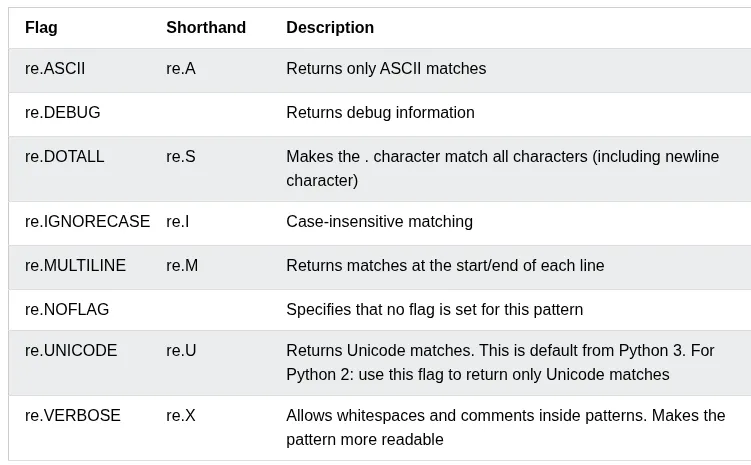
Flags
You can add flags to the pattern when using regular expressions.
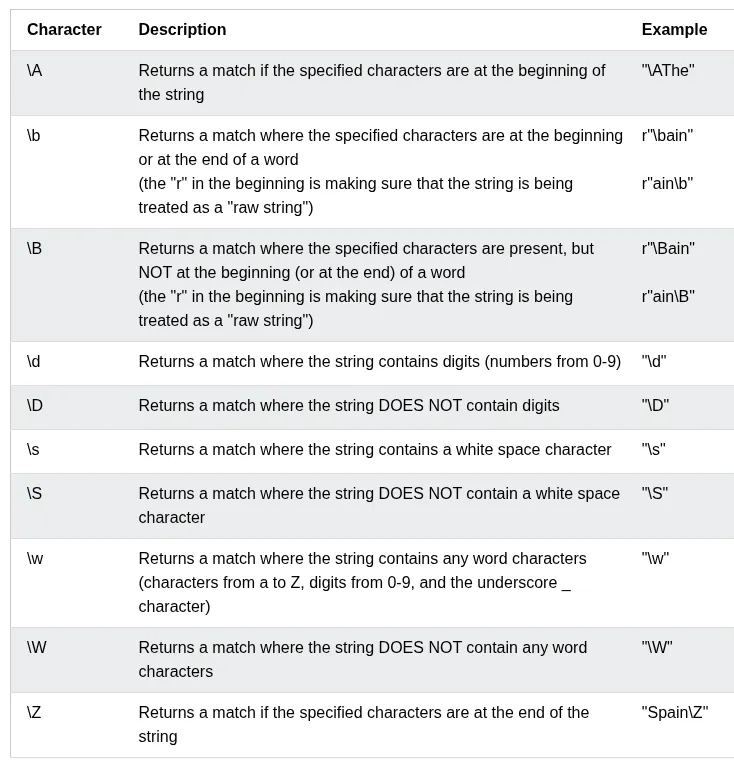
Special Sequences
A special sequence is a \ followed by one of the characters in the list below, and has a special mean:
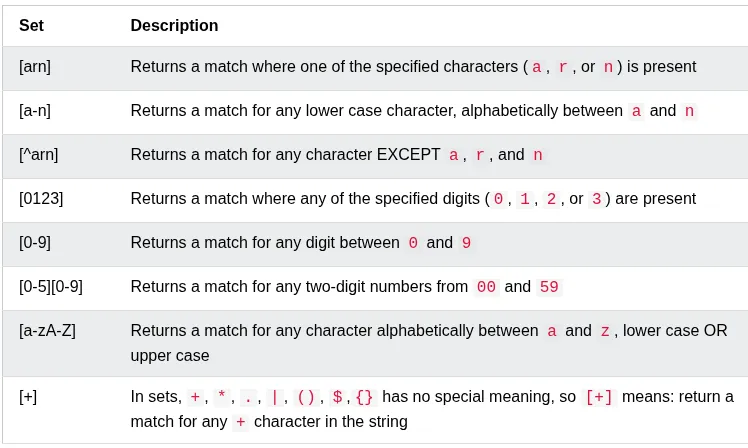
Sets
A set is a set of characters inside a pair of square brackets [] with a special meaning:
Assignment Expression/Walrus Operator :=
The := operator was introduced in Python 3.8. It allows you to assign a value to a variable as part of a larger expression, returning the assigned value unlike standard assignment(=), which doesn’t return a value.
Syntax
The operator is written as variable := expression. It evaluates the right-hand side, assigns it to the variable, and returns the value for use in the surrounding context.
Parentheses
In most contexts, such as top-level statements or certain conditionals, the assignment expression must be enclosed in parentheses to avoid syntax error (e.g., (x := 5)).
re Module Functions (via w3schools)
The findall() function
The findall() function returns a list containing all matches.
Print a list of all matches:
The list contains the matches in the order they are found.
If no matches are found, an empty list is returned.
The search() Function
It searches the string for a match, and returns a Match Object if there is a match.
If there is more than one match, only the first occurrence of the match will be returned:
Search for the first white-space character in the string:
If no matches are found, the value None is returned.
The split() Function
The split() function returns a list where the string has been split at each match.
Split at each white-space character:
You can control the number of occurrences by specifying the optional maxsplit parameter.
The sub() Function
It replaces the matches with the text of your choice.
Replace every white-space character with number 9:
You can control the number of replacements by specifying the optional count parameter.
Match Object
A Match Object is an object containing information about the search and the result.
If there is no match, the value None will be returned, instead of the Match Object.
Do a search that will return a Match Object:
The Match Object has properties and methods used to retrieve information about the search, and the result.
.span()returns a tuple containing the start, and end positions of the match..stringreturns the string passed into the function.group()returns the part of the string where there was a match.