A small program that allows you to perform some action in the desired Computer Programming Language.
print("Hello, World!")
When run, the following text will be printed on the screen:
Hello, World!
The text printed on the screen is termed as a Side Effect. It’s the side effect of running the function with the pre-determined input.
The built-in function print allows you to output some text to the screen in Python.
You can change the underlying implementation of function as long as name and parameters remains same, nobody running the program will notice.
Bugs
An error/mistake in the code which stops the program from running normally.
You make mistake while writing the code.
You may forgot to close parenthesis, or forgot to close a quotation marks, or use some illegal (in-terms of programming of-course) input.
Comments
A note to yourself about the function of your code, so you don’t forget in the future, what’s really happening with your code.
# This code prints "Hello, World!" on the screenprint("Hello, World!")
If it’s a complex function, a comment will immediately remind you what’s this piece of code is actually doing inside the program.
Pseudocode
A plain statement in any human language which methodically and simply outlines what you want to build in the desired programming language. A comment starts with # symbol which tells the interpreter to ignore what comes after it.
# A program that asks for user name as an input
# It takes that input, and prints Hello to that user
Above lines are simply a pseudocode which explains the outcome we need from the actual code.
No coding involved on this stage.
Only plan english is used to list down the desired outcomes.
It can act as a TODO list inside your code.
It helps break down complex programs into simple workable chunks.
Parameters
Following are the types of parameters.
Positional Parameters
A parameter passed to the function will be printed at a position it’s on i.e., first, seconds etc.
print("Hello,",name)
First positional parameter is “Hello,”, will be printed first. The name variable is a second positional parameter, printed second.
Named Parameters
A named parameter is a built-in optional argument of the given function which is usually provided after the positional parameters.
Both sep=' ' and end="\n" (with defaults) are the Named parameters provided by the print function.
Strings str
An immutable sequences of Unicode characters used to store and manipulate textual data.
In Python, anything inside '' or "" is called a string.
The function input() only accepts string arguments.
Python f-string
A special of type string that provides a concise and efficient way to embed expressions inside string literals.
print(f'Hello, {name}')
Strings Methods
Python string methods are built-in functions attached to string objects that allow for text manipulation, such as changing case, searching, replacing, splitting, and formatting.
Because strings in Python are immutable, these methods don’t modify the original string; instead, they return a new string with the requested changes applied.
str.strip() method
Remove whitespace from around the strings:
str.strip()
str.capitalize() method
Change the first letter of the string to upper case.
str.capitalize()
str.title() method
Capitalize the first letter of all the words in the given string.
str.title()
str.join() method
The join() method takes all items in an iterable and joins them into one string. – W3School
Syntax = `string.join(iterable)
myDict={"name":"John","country":"Norway"}mySeparator="TEST"x=mySeparator.join(myDict)# OR separator string can be mentioned directlyx=','.join(myDict)print(x)
Note
When using a dictionary as an iterable, the returned values are the keys, not the values.
String Slicing
You can return a range of characters by using the slice syntax
Specify the start index and the end index, separated by a colon, to return a part of the string.
Example:
greet="Hello, World!"
Slice From the Start
Get the characters from the start to position 5:
print(greet[0:5])#ORprint(greet[:5])
When starting from index 0, we don’t need to mention it. The character at index [5] will not be included.
Slice From the End
By leaving out the end index, the range will go to the end:
print(greet[2:])
If we want to slice the last 6 characters:
print(greet[-6:])
Python Interactive Mode
The live Python interpreter, where you can write code and get the execution immediately, unlike you write your code in a file and then run that file with Python interpreter.
It removes the friction for some quick Python practice.
Integers int()
Integers are whole numbers without a decimal point i.e., -3, -2, -1, 0, 1, 2, 3 etc.
In programming, ideal for counting or indexing
Floats float()
Floats (floating-point numbers) represent real numbers with decimal components.
Ideal for a wider range of values and fractional precision, making them suitable for measurements and continuous data.
Function def()
A small reusable piece of program which can be defined once and used multiple times inside the code to reduce repeatability and increase the readability.
# All the code resides in the maindefmain():return# Define as many functions as you wantdeffunc():return# Call main() to start the executionmain()
Running without calling on the main() function, no execution will happen, as our main code resides in the main function and nobody calling it, when we call on the main() function, then the execution starts, and the rest of the user functions will also be executed one by one as they appear in the main().
Variable Scope
The variable only exists in the scope where you defined it.
Variable defined inside the function, cannot be called on globally.
Variable defined in the 2nd user function cannot be called in the first one.
Ability to ask questions and answer those questions, in order to decide which line of code will be executed.
To write conditional statements in Python, we can use if statement.
The elif statement, ask a question, taking into account whether or not a previous question had a true or false answer.
The else statement, used when the all the other options has bee exhausted and only logical answer is the last one. So, we don’t need to compare anything for it, because it’s the only answer left. It’s catch all statement, if everything else isn’t proved right, let’s assume this is the answer.
Some symbols used in Python, are:
Symbol
Representation
>
Greater than
>=
Greater than or Equal to
<
Less than
<=
Less than or Equal to
==
Equal to
!=
Not equal to
Not better design (See compare.py)
A better designed program:
The final design:
In the first version, program goes through all the code despite finding the correction answer earlier.
In the second iteration, program will immediately terminate as it gets its answer.
Boolean Expression
A question that gives Yes or No answer, or simply True or False answer.
OR Returns True if at least one operand is True; it only returns False if both operands are false.
AND Returns True if both operands are true; otherwise, it returns False. It’s uses short-circuit evaluation, meaning if the first operand is false, the second is not evaluated.
Python Operators
Operator
Meaning
+
Addition
-
Substraction
*
Multiplication
**
Exponentiation
/
Division
%
Modulo operator
match…case Statement
Provides structural pattern matching as a more readable and powerful alternative to if-elif-else chains. It evaluates an expression against successive patterns and executes the corresponding code block for the first match.
Ability in Python and other programming languages, to do something again and again.
while Loops
Runs for forever unless certain conditions are met.
An infinite loop (design flaw):
i=3whilei!=0:print('meow')
This code will run for forever unless interrupted by the user (Ctrl + C).
i != 0 will always remain True, we change the value of i inside the loop on each run.
Well designed while loop:
i=3whilei!=0:print('meow')i=i-1
On each run, i = i - 1 reduces the value of i by one digit. Until i != 0 condition is no longer true, and the loop stops.
for loop
In Python, a for loop is a control flow statement used to iterate over a sequence (such as a list, tuple, string etc.) or any other iterable object.
foriin[0,2,3]:print("meow")#OR using range() functionforiinrange(3):print("meow")
We are not using the i variable in the code, though it has a use case for holding the range value.
The more Pythonic approach is to use _, when you don’t care about the variable used or not use it later in the code.
for_inrange(3):print("meow")
List []
A list in Python, is a ordered, and mutable data structure used to store a collection of items in a single variable.
Defined using square brackets []
Each list element is separated by commas
Lists are heterogeneous, meaning they can contain elements of different data types (such as integers, strings, booleans or else) within the same structure.
Each element has an index starting from [0].
len() function
It returns number of items (length or size) in an object, such as strings, lists, tuples, dictionaries, sets, etc.
A dictionary (or dict) is a built-in mutable mapping type that stores data as a collection of unique, hashable key-value pairs.
Since Python 3.7, dictionaries are ordered by insertion, meaning they preserve the sequence in which keys were added.
Key characteristics:
Keys must be immutable, while values can be any data type.
Dictionaries are created using curly braces {} with colon-separated key-value pairs.
Dictionary Methods
Python dictionary methods are built-in functions designed to manipulate, access, and manage the key-value pairs stored in Python dictionaries.
If you want to get the value of specific key and don’t know if that exists:
dict.get("name","Unknown")
If “name” is not a valid key, it will return “Unknown” instead of throwing error if we have tried to get it via dict.["name"].
To update the dictionary.
dict["name"]="David"
Another method to update a dictionary is via dict.update(). It takes another dictionary as an arguments adds to the current dictionary.
dic.update({"name":"Dawood","name":"Amin"})
To return all keys in the dict:
dict.keys()
To return all values in the dict:
dict.values()
Delete a particular key from the dictionary:
dict.pop("key")
To clear the whole dictionary key-value pairs:
dict.clear()
Return the key-value pairs as tuples in the dictionary
dict.items()
It returns the both key and value pairs as tuples, which we can access as:
forkey,valueindict.items()print(key,value)
Dictionary Comprehension
Dictionary comprehension is used to create a dictionary in a short and clear way. It allows keys and values to be generated from a loop in one line. This helps in building dictionaries directly without writing multiple statements. — GeeksforGeeks
None is special built-in constant that represents the absence of a value or a null value. It’s the sole instance of the NoneType class and acts as a singleton, meaning there is only one None object in any Python interpreter session.
None is distinct from 0, False, or an empty string "", though it evaluates to False in boolean contexts.
Functions that don’t explicitly return a value automatically return None.
Tuples
Tuples are used to store multiple items in a single variable.
A tuple is a collection which is ordered and unchangeable. —W3School
Tuples are written within parenthesis ().
A tuple can contain different data-types at once
A one item tuple can be created with ("item1", ), otherwise Python will not recognize it.
The () will create an empty tuple.
The len() can be used to find out the number of items in the tuple.
Tuples Items
Tuple items are ordered, unchangeable, and allow duplicate values.
Tuples items are indexed, the first item has index[0], the second item has index[1] etc.
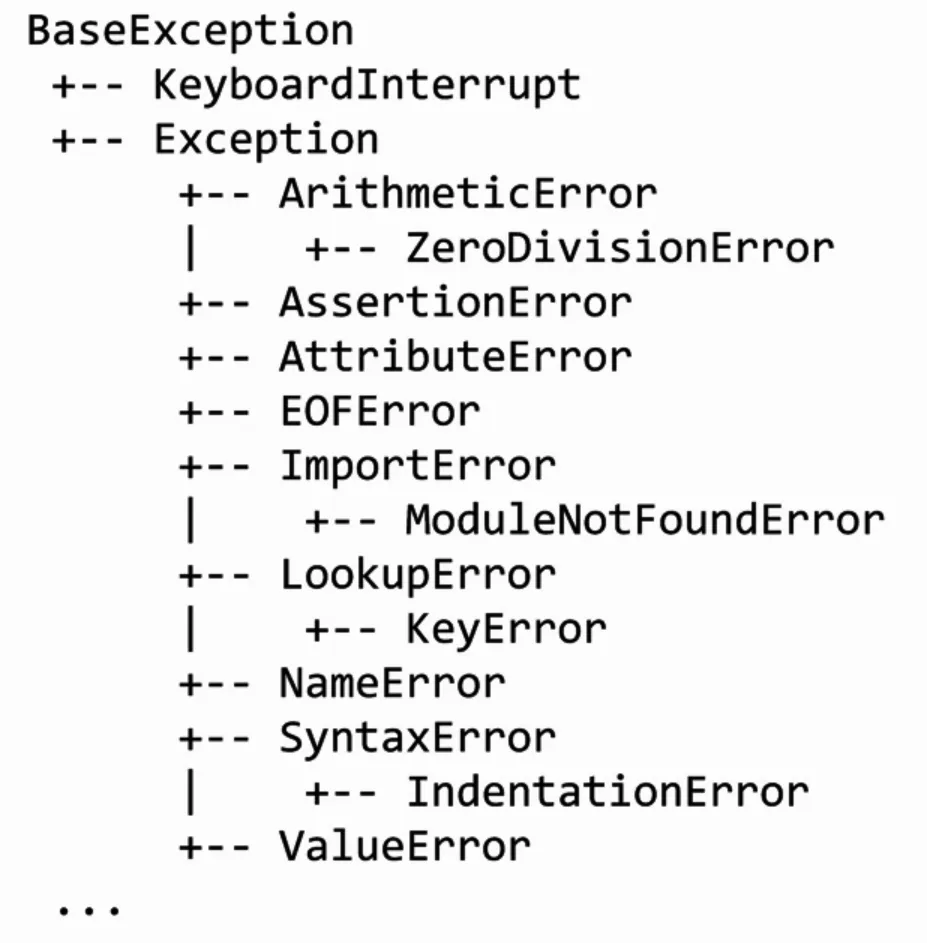
Exceptions are the problems in the Python or any other programming language code, that the programmer has to solve.
SyntaxError
A SyntaxError in Python occurs when code violates the grammatical rules of the language, making it impossible for the interpreter to parse and understand the structure. —TutorialsPoint.com
Common causes include:
Missing punctuation
Incorrect indentation
Misspelled keywords
Invalid string delimiters, such as mixing single and double quotes improperly
Value Error
A ValueError in Python is a built-in exception raised when a function or operation receives an argument of the correct data type but an inappropriate or invalid value. —RealPython.com
Unlike a TypeError, which occurs when the wrong data type is provided, a ValueError indicates that while the input is the right kind of object, its specific content is unsuitable for the operating being performed.
Common scenarios that trigger a ValueError include:
Invalid Type Conversion: Attempting to convert a string that doesn’t represent a valid number into an integer or float
Mathematical Constraints: Performing an operation that requires a specific range of values, such as taking the square root of a negative number or calculating the factorial of a negative integer
List Operations: Trying to remove a value from a list that doesn’t exist within it.
Unpacking Mismatches: Attempting to unpack a list or iterable into a different number of variables than there are items
NameError
The NameError exception occurs if you use a variable that is not defined. —W3School
You can handle the NameError in a try..except statement.
try and except
The try block lets you test a block of code for error.
The except block lets you handle the error.
The else block lets you execute code when there is no error.
The finally block lets you execute code, regardless of the result of the try and except blocks.
The raise keyword is used to raise an exception.
Let’s see a code:
try:x=int(input("What's the value of x: "))exceptValueError:print("x is not an integer.")else:print(f"The value of x is: {x}")
The else part will only be executed if there are no error.
If you don’t want to print anything in the except block write pass, it will not raise/print anything to the user.
MemoryError
In Python, a MemoryError is a built-in exception that occurs when the interpreter cannot allocate enough memory for an operation, such as creating a large list, loading a huge file, or executing a recursive function without a base case.
This error signals that the program has attempted to use more memory (RAM or virtual address space) that the system can provide.
Common causes include:
Unbounded Data Growth: Accumulating data in lists or dictionaries within infinite or large loops.
Large Object Allocation: Attempting to create data structures (like NumPy arrays or Pandas DataFrames) that exceed available system memory.
Excessive Recursion: Recursive functions that consume excessive stack space before hitting the recursion limit.
Memory Leaks: Although less common as a direct cause, failing to release references to large objects can lead to exhaustion.
KeyError
A KeyError is an exception raised when you try to access a value in a dictionary (or other mapping) using a key that doesn’t exist within that collection.
It is a subclass of LookupError and serves as Python’s signal that the requested key cannot be found among existing keys.
Raise an Exception
As a programmer, you can choose to throw an exception if a condition occurs.
To throw an exception, use the raise keyword.
x=-1ifx<0:raiseException("Sorry, no numbers below zero")
You can define what kind of error to raise, and the text to print to the user.
x="hello"ifnottype(x)isint:raiseTypeError("Only integers are allowed")
Debugging
Debugging is the process of identifying, analyzing, and resolving errors or bugs in code to ensure it runs correctly and produces expected results.
It involves detecting syntax errors (structural issues like typos) and semantic errors (logical issues where code runs but yields incorrect outputs).
The primary goal is to locate the root cause of unexpected behavior by examining the program’s state during execution. This is achieved through various techniques, including:
Using Tracebacks: Analyzing error messages to pinpoint where exceptions occur.
Print Statements: Inserting print() calls to track variable values and code flow.
BreakPoints: Pausing execution at specific lines to inspect variables and state.
Debuggers: Using tools like built-in pdb module or IDE debuggers (e.g., in Zed or VS Code) to step through code line-by-line and interactively inspect the execution environment.
In programming, libraries are like ready-made tools that save time, reduce effort, and make development much easier.
A Python library is simply a collection of pre-written code that developers can use to perform specific tasks without having to write everything from scratch. —Antara Das via Medium
Basically, you can import the library into your code, and it comes with predefined functions and methods that help you get the gob done.
Module
A module in Python is just a library that typically or more functions or other features built into it.
Purpose of a Module or Library is a re-usability of a code when you find yourself using same lines of code over and over again from across your project’s code.
import
The keyword import allows to import some functions from modules in Python.
The from keyword is primarily used to import specific functions, classes, or variables from a module into the current namespace, allowing direct access without prefixing the module name.
Command-Line arguments are parameters passed to a Python script upon execution from the terminal, allowing users to customize program behavior without modifying source code.
The one we use is using sys module feature sys.argv, where sys.argv[0] is the script name and subsequent indices are the provided arguments.
importsysprint("Hello, my name is",sys.argv[1])
Running with name as an argument:
python name.py Alex
If we replace with sys.argv[0], it will print the name of program as Hello, my name is name.py, and no CLI argument will be printed.
random Module
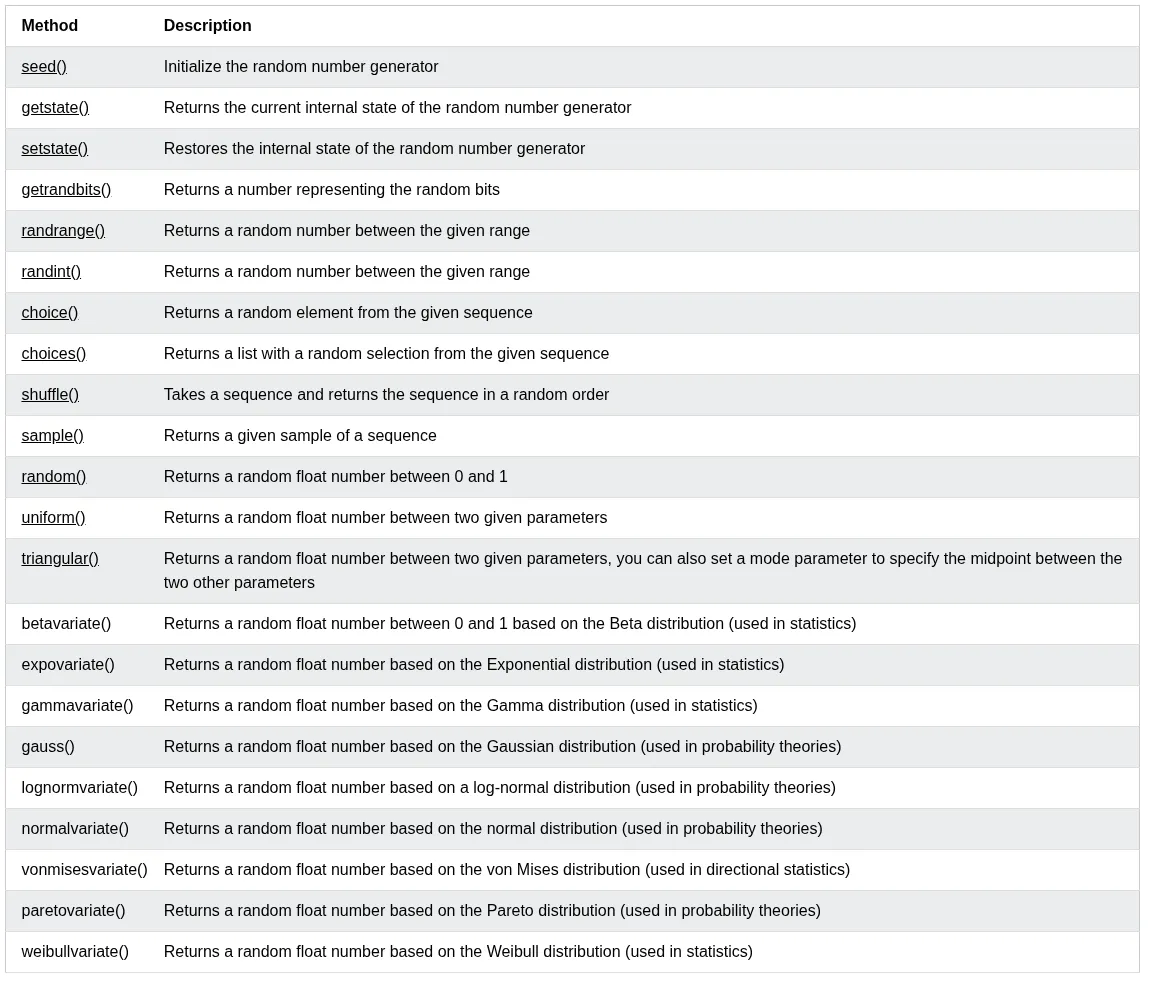
It’s a built-in Python module, that provides functions for generating pseudo-random numbers, selecting random elements, and shuffling sequences.
It’s not a separate package and doesn’t require installation; it’s used by simply adding import random to your code.
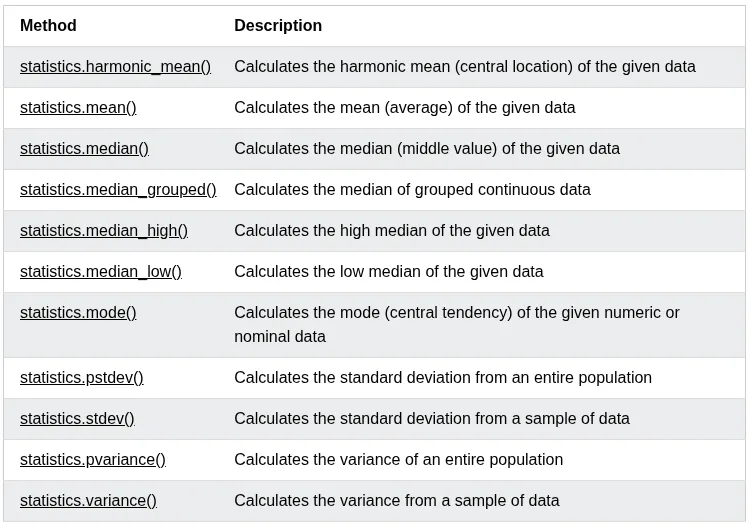
statistics Module
Python has a built-in module that you can use to calculate mathematical statistics of numeric data.
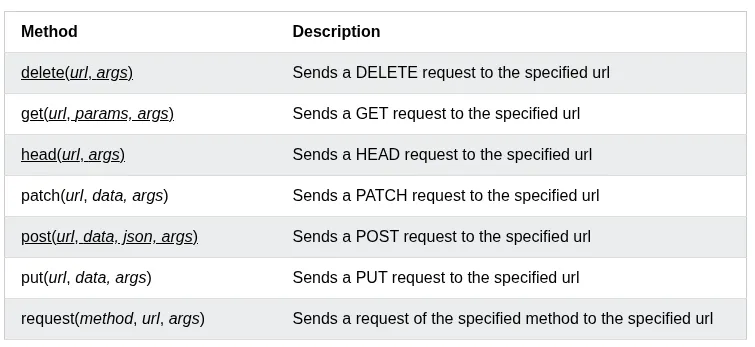
The requests module allows you to send HTTP requests using Python. —W3School
The HTTP request returns a Response Object with all the response data (content, encoding, status, etc.).
Syntax:
requests.methodname(params)
Methods
Python json
Python has a built-in package called json, which can be used to work with JSON data. —W3School
There are many different methods json has, but for now we only see the json.dumps() method.
Format the Result
The json.dumps() prints a JSON string, but it is not very easy to read, with no indentations and line breaks.
The method has parameters to make it easier to read the results.
json.dumps(x,indent=4)
You can also define the separators, default value is `(", “, “: “), which means using a comma and a space to separate each object, and a colon and a space to separate keys from values:
json.dumps(x,indent=4,separators=(". ","= "))
Order the Result
Use sort_keys parameter to specify if the result should be sorted or not:
json.dumps(x,ident=4,sort_keys=True)
PACKAGE
A package is a third-party library that we can install on our computer.
An external package maintainer is PyPI searchable via https://pypi.org or CLI.
You can install packages from PyPI via Python package manager called PIP.
Create a virtual environment inside your project:
python -m venv .myenv
Activate your virtual env:
source .myenv/bin/activate
Now install the module:
pip install cowsay
Now you can import it inside .py file.
After finishing your work, you can deactivate the env:
deactivate
Depending on your prompt, it will show you’re using a virtual environment with Python version number.
Note
Add your virtual env directory and __pycache__ dir to .gitignore, so they don’t mess your git history or project repo.
Create Your Own Package
Create a folder, put all your modules inside it. Create an empty file inside that folder:
touch __init__.py
Now you can import your package:
fromfoldername.moduleimportfunction
APIs
API stands for Application Programming Interface.
An API is a set of rules, protocols, and specifications that allows different software applications to communicate with each other.
In context Python, APIs generally refer to two distinct concepts:
Consuming External APIs: Using libraries like Requests to send HTTP requests to external services (e.g., weather data, social media) and parse the responses.
Building Web APIs: Creating server-side endpoints using frameworks like Flask, Django or FastAPI that expose functionality and data to other applications via specific URLs and HTTP methods (GET, POST, etc.).
JSON
JSON stands for JavaScript Object Notation.
JSON is a lightweight format for storing and transporting data.
JSON is often used when data is sent from a server to a web page.
JSON is “self-describing” and easy to understand
Though it’s related to JavaScript, but it’s itself typically used as a language agnostic format for exchanging data between computers.
When a Python interpreter reads a Python file, it first sets a few special variables. Then it executes the codes from the file.
One of those variables is called __name__.
So when the interpreter runs a module, the __name__ variable will be set as __main__ if the module is being run is the main program.
But if the code is importing the module from another module, then the __name__ variable will be set to that module name.
There is a really nice use case for the __name__ variable, whether you want a file that can be run as the main program or imported by other modules. We can use an if __name__ == "__main__" block to allow or prevent parts of code from being run when the modules are imported.
When the Python interpreter reads a file, the __name__ variable is set as __main__ if the module being run, or as the module’s name if it is imported. Reading the file executes all top level code, but not functions and classes (since they will only get imported).
Style
The standardized way of writing Python source code to ensure readability and maintainability.
The primary standard is PEP 8, which dictates rules for indentation (4 spaces), line length, naming conventions (snake_case for variables/functions, CamelCase for classes), and import ordering.
Adhering to these rules allows teams to collaborate efficiently and reduces bugs caused by inconsistent formatting.
Indentation: Indent code by 4 spaces and be consistent.
Tab/Spaces: Early on python, some people use 2 spaces or tabs. Those practices have died out, and now 4 spaces is the standard.
Max Lines Length: In the old days of relatively small computer displays, projects would frequently have a rules that no line in the code could be wider than 80 or 100 characters, so that the code would fit on the display. This sort of rule has becomes less common. Often in Python, the simplest thing to do is just let a long line be long.
However if a line so long that it’s hard to read or work with, break it into shorter, separate lines.
Blank Lines: PEP8 requires 2 blank lines before each def in a file. This is one of the weaker PEP8 rules.
Unit testing is a software testing technique in which individual components or units of a software application are tested independently from the rest of the application. —freeCodeCamp.org
assert
The assert keyword is used when debugging code.
The assert keyword lets you test if a condition in your code returns True, if not, the program will raise an AssertionError.
You can write a message to be written if the code returns False:
x="welcome"#if condition returns False, AssertionError is raised:assertx!="welcome","x should not be 'welcome'"
pytest module
The pytest is popular testing framework for Python that makes it easy to write and run tests. Unlike unittest, pytest’s simple syntax allows developers to write tests directly as functions or within classes. This lets you write clean, readable code without complexities. —freeCodecCamp.org
Flexibility: It provides flexibility in test structure by supporting tests for functions, classes, and modules.
Detailed test output: It provides a detailed and readable test output, making it easy to understand test failures and errors.
Automatic test discovery: It automatically discovers tests by looking for files that start with “test_” or end with “_test.py”. This eliminates the need for manually specifying test files.
Parameterization: It supports parameterized tests, which allow you to run a single test functions with multiple sets of inputs.
Fixtures: It provide setup and tearDown methods that help prevent code repetition. This enables you to set up baseline conditions for your tests and also delete them after each test.
Plugins and extension: It has a rich set of plugins and extensions to add extra functionalities.
Compatibility: It’s compatible with other testing frameworks like unittest, allowing you to migrate tests from different testing frameworks and run them seamlessly on it.
Info
Unit tests cannot run on the function which doesn’t return any value, and just prints something (side effect). So, it’s always a good idea to return values in the functions instead of the side effects(text printed on the screen).
Tests Folder
Make folder name test inside your project directory:
mkdir test
Create an empty file named __init__.py:
touch __init__.py
Create the test files like test_[PROGRAM-NAME] inside the test folder.
An empty __init__.py will tell the pytest module that test/ is a package. A package is a python module or multiple modules organized inside a folder.
Now run the pytest module on the whole folder:
pytest test/
Note
Each function name inside test_name.py must be prefixed with the word test_ for pytest to discover and run these tests automatically.
deftest_addition():assert1+1==2
Raise an Error
If your function raises an error like ZeroDivisionError when some condition is met, you want to make sure your unit test, catches that:
Here my_func() should raise a ZeroDivisionError and crash the unit test, but with pytest.raises(ZeroDivisionError) tells pytest, “I expect this block of code to through exactly this error”.
This test only passes if this error actually happens when my_func(1/0) runs, if no error occurs, the test fails.
So, it confirms, the my_func() correctly propagates the error instead of silently failing and returning something wrong.
When programming, you have likely encountered a situation where all data is lost once your script finishes running. This happens because the data is stored in the memory, and when the program ends, the memory is cleared.
To solve this issue, Python offers a feature called File I/O, which allows you to read from or write to files, ensuring that data persists even after your program has ended.
File I/O refers to the ability of a program to take a file as input or create a file as output. This is essential when you want to store data for later use, process large datasets, or manage configurations. —Dilan Nawarathne via Medium
The key function for working with files in Python is the open() function.
The open() function takes two parameters; filename, and mode.
There are four different methods (modes) for opening a file:
"r" - Read — Default Value. Opens a file for reading, error if the file doesn’t exist.
"a" - Append — Opens a file for appending, creates the file if it doesn’t exist.
"w" - Write — Opens a file for writing, creates the file if it doesn’t exist or overwrites the existing file.
"x" - Create — Creates the specified file, returns an error if the file exists.
In addition you can specify if the file should be handled as binary or text mode:
"t" - Text — Default value. Text mode
"b" - Binary — Binary mode (e.g., images)
Syntax
To open a file for reading it is enough to specify the name of the file:
file=open("demofile.txt")
The code above is the same as:
file=open("demofile.txt","rt")
As "r" for read, and "t" for text are the default values, you don’t need to specify them.
Python Read File
Using the with statement
You can also use the with statement when opening a file:
withopen("demofile.txt")asf:print(f.read())
Then you don’t have to worry about closing your files, the with statement takes care of that.
Close Files
It is a good practice to always close the file when you are done with it.
If you’re not using the with statement, you must write a close statement in order to close the file:
To write to an existing file, you must add a parameter to the open() function:
"a" - Append — will append to the end of the file
"w" - Write —- will overwrite any existing content
withopen("demofile.txt","a")asf:f.write("Now the file has more content!")# open and read the file after appendingwithopen("demofile.txt")asf:print(f.read())
Note
The “w” method will overwrite the entire file.
Create a New File
To create a new file in Python use the open() method, with one of the following parameters:
"x" - Create — will create a file, returns an error if the file exists
f=open("myfile.txt","x")
Result: A new empty file is created.
Note
If the file already exits, an error will be raised.
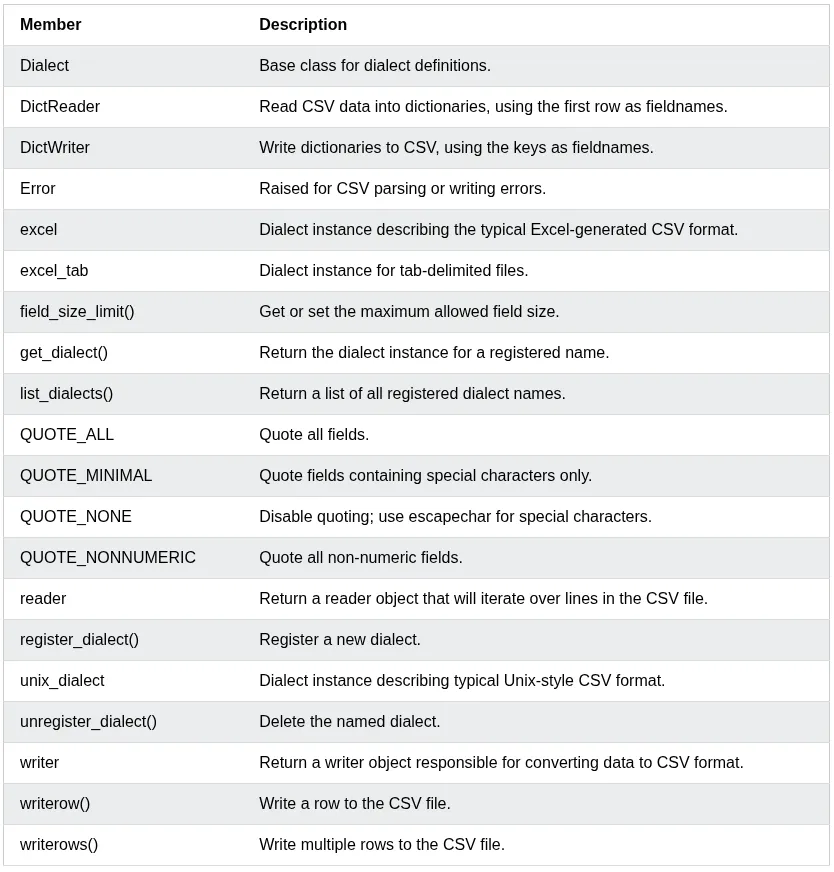
csv Module
The csv module reads and writes tabular data in CSV(Comma Separated Values) format.
Pillow is a Python library used for working with images. It is a user friendly and actively maintained fork of the original Python Imaging Library(PIL). It not only supports various image formats like JPEG, PNG, GIF, TIFF, and BMP, but also offers capabilities such as resizing, cropping, rotating, and color adjustments.
Use cases of Pillow
Pillow is used for automating and customizing image-related tasks, particularly when graphical interfaces aren’t ideal. Here are some compelling use cases:
Resize and crop images
Format conversion: Convert between file formats like JPEG, PNG, GIF, BMP.
Image Enhancement: Adjust brightness, apply filters, or add visual effects.
Batch Processing: Automate processing of large volumes of images.
Image Generation: Create custom graphics, visualization, or CAPTCHAS.
Meme or Thumbnail Creation: Combine Pillow with text or shape drawing for custom graphics.
Installing Pillow
Install the official release of Pillow:
pip install pillow
General Workflow of Pillow
Pillow operations typically follow a clear, intuitive workflow:
Import the necessary classes from the PIL module
Open an image using Image.open()
Apply transformations like resizing, rotating, or filtering
A RegEx, or Regular Expression, is a sequence of characters that forms a search pattern. — W3School
RegEx can be used to check if a string contains the specified search pattern.
Python has a built-in packaged called re, which can be used to word with Regular Expressions.
Import the re module:
importre
Metacharacters
Metacharacters are characters with a special meaning:
Character
Description
Example
[]
A set of characters
“[a-m]”
\
Signals a special sequence (can also be used to escape special characters)
“\d”
.
Any character (except newline character)
“he..o”
^
Starts with
“^hello”
$
Ends with
“planet$”
*
Zero or more occurrences
“he.*o”
+
One or more occurrences
“he.+o”
?
Zero or one occurrences
“he.?o”
{}
Exactly the specified number of occurrences
“he.{2}.o”
{m,n}
m-n range of repetitions
“he.{2,4}.o”
|
Either or
“falls|stays”
()
Capture and group
(?: )
Non-capturing version
(): It groups the pattern and stores the matched text so you can retrieve it later.
(?P<group_name>): If there many capture groups in the match pattern, you can use match.group("group_name") instead of match.group(n) where n is the group number starting from 1.
(?:): It groups the pattern but stores nothing
Flags
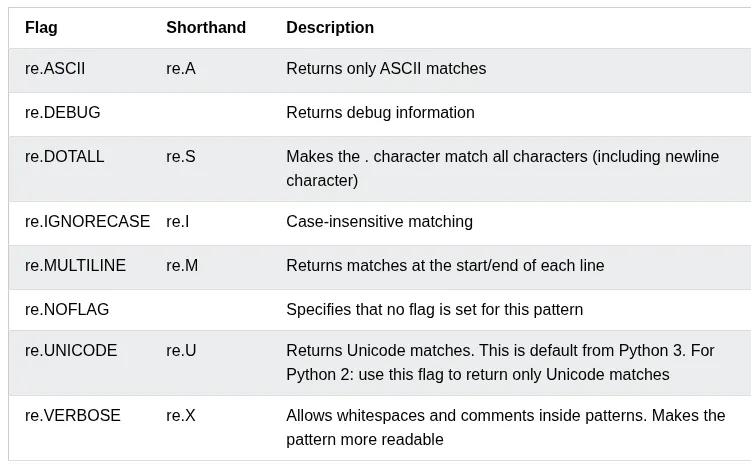
You can add flags to the pattern when using regular expressions.
Special Sequences
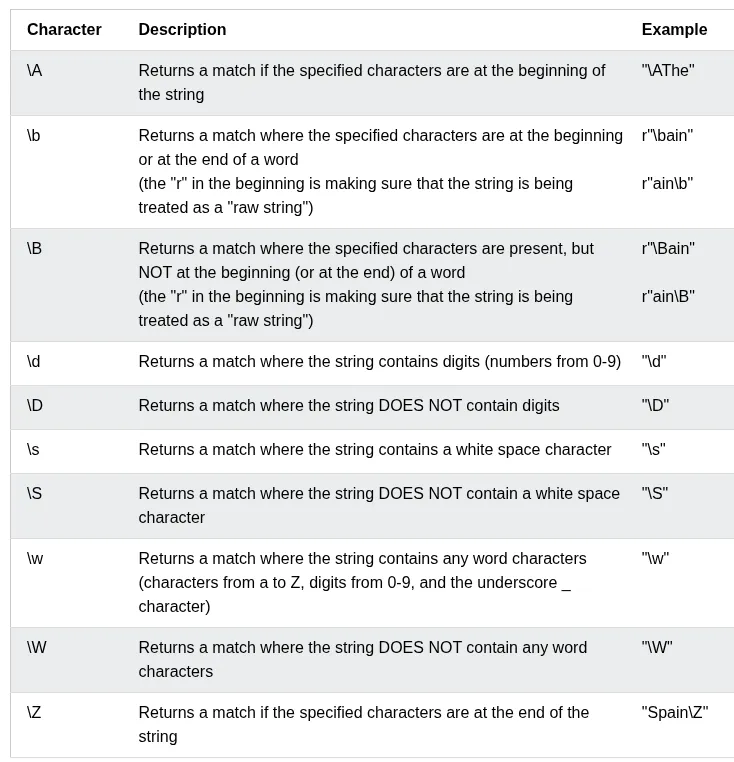
A special sequence is a \ followed by one of the characters in the list below, and has a special mean:
Sets
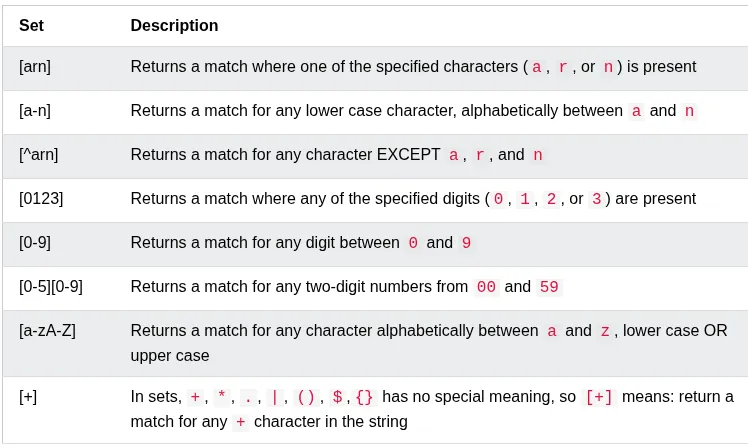
A set is a set of characters inside a pair of square brackets [] with a special meaning:
Assignment Expression/Walrus Operator :=
The := operator was introduced in Python 3.8. It allows you to assign a value to a variable as part of a larger expression, returning the assigned value unlike standard assignment(=), which doesn’t return a value.
Syntax
The operator is written as variable := expression. It evaluates the right-hand side, assigns it to the variable, and returns the value for use in the surrounding context.
Parentheses
In most contexts, such as top-level statements or certain conditionals, the assignment expression must be enclosed in parentheses to avoid syntax error (e.g., (x := 5)).
# Without walrus operatordata=get_data()ifdataisnotNone:print(data)# With walrus operatorif(data:=get_data())isnotNone:print(data)
Object-Oriented Programming (OOP) is a programming paradigm that organizes software design around object rather than functions and logic.
Let’s breakdown the OOP into its reusable building block:
Classes: These are user-defined data types that act as the blueprint for objects, attributes, methods.
Objects: These are instances of a class with specifically defined data. When a class is defined initially, the description is the only object that is defined.
Methods: These are functions that are defined inside a class that describe the behavior of an object. They are useful for re-usability or keeping functionality encapsulated inside one object at a time. Code re-usability is a great benefit when debugging.
Attributes: These are defined in the class template and represent the state of an object. Objects contain data stored in the attribute field.
OOP stands for Object-Oriented Programming.
Python is an object-oriented language, allowing you to structure your code using classes and objects for better organization and re-usability.
Principles of OOP
In order for use to write good OOP code, we need to understand the 4 pillars of OOP we should adhere to:
Encapsulation: Wrapping data and functions into a single unit(object).
Abstraction: Hiding the implementation details of a class and only showing the essential features to the user.
Inheritance
Polymorphism (Operator overloading): When the same operator is allowed to have different meaning according to the context.
Advantages of OOP
Provides a clear structure to programs
Makes code easier to maintain, reuse, and debug
Helps keep your code DRY (Don’t Repeat Yourself)
Allows you to build reusable applications with less code
Tip
The DRY principle means you should avoid writing the same code more than once, Move repeated code into functions or classes and reuse it.
What are Classes and Objects?
Classes and objects are the two core concepts in OOP.
A class defines what an object should look like, and an object si created based on that class. For example:
Class
Objects
Fruit
Apple, Banana, Mango
Car
Volvo, Audi, Toyota
When you create an object from a class, it inherits all the variables and functions defined inside that class.
Attributes
There are two types of attributes/variable in the classes.
Class Attributes: Python variables that belong to a class itself, and are shared between all class instances/objects.
Instance Attributes: Python variables that belong to one object/instance and are only accessible within the object; they are unique to each object and are not shared between class instances.
Python Classes and Objects
Python is an object-oriented programming language.
Almost everything in Python is an object, with its properties and methods.
A Class is like an object constructor, or a “blueprint” for creating objects.
Create a Class
To create a class, use the keyword class.
Create a class named MyClass, with a property named x:
classMyClass:x=5
Create Object
Now we can use the class named MyClass to create objects.
Create an object named p1, and print the value of x:
p1=MyClass()print(p1.x)
del keyword
Used to delete object properties or object itself
You can delete objects by using the del keyword.
Delete the p1 or its name property object:
delp1#ORdelp1.name
Multiple Objects
You can create multiple objects from the same class:
Each object is independent and has its own copy of the class properties.
The pass Statement
class definitions cannot be empty, but if you for some reason have a class definition with no content, put in the pass statement to avoid getting an error.
classPerson:pass
Python __init__() Method
Tip
The functions inside classes are called Methods.
The __init_() Method
All classes have a built-in method called __init__(), which is always executed when the class is being initiated.
The __init__() method is used to assign values to object properties, or to perform operations that are necessary when the object is being created.
Example
Create a class named Person, use the __init__() method to assign values for name and age:
The self parameter is a reference ot the current instance of the class.
It is used to access properties and methods that belong to the class.
Use self to access class properties:
classPerson:def__init__(self,name,age):self.name=nameself.age=agedefgreet(self):print("Hello, my name is "+self.name)p1=Person("Emil",25)p1.greet()
Note
The self parameter must be the first parameter of any method in the class.
Why Use self?
Without self, Python would not know which object’s properties you want to access.
The self parameter links the method to the specific object:
classPerson:def__init__(self,name,age):self.name=nameself.age=agedefgreet(self):print("Hello, my name is "+self.name)p1=Person("Emil",25)p1.greet()
self Does Not Have to Be Named “self”
It doesn’t have to be named self, you can call it whatever you like, but it has to be the first parameter of any method in the class.
Note
While you can use a different name, it is strongly recommended to use self as it is the convention in Python and makes your code more readable to others.
Calling Methods with self
You can also call other methods within the class using self.
Call one method from another method using self:
classPerson:def__init__(self,name):self.name=namedefgreet(self):return"Hello, "+self.namedefwelcome(self):message=self.greet()print(message+"! Welcome to our website.")p1=Person("Tobias")p1.welcome()
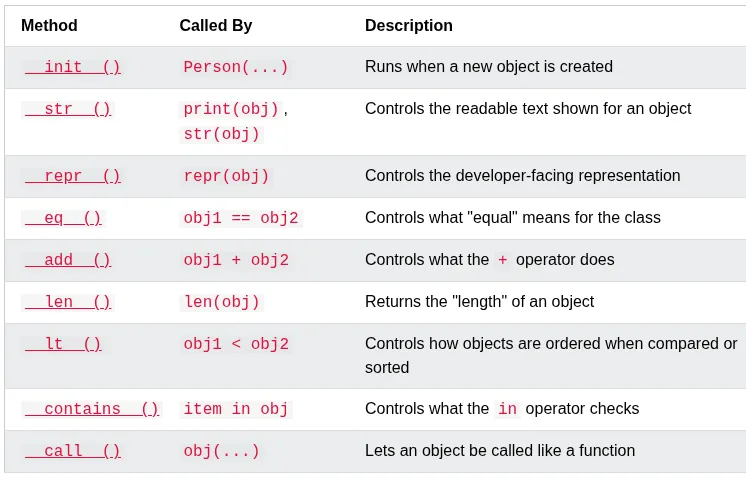
Python Magic Methods
Magic methods are special methods whose names start and end with double underscores, like __init__() and __str__(). Because of the double underscores, they are also called Dunder methods (short for “double underscore”).
You don’t call magic methods directly. Python calls them for you, automatically, in certain situations - like when an object is created, printed, or compared to another object.
Note
__init__() runs automatically when an object is created, and __str__() runs automatically when the object is printed.
List of Magic methods
The __str__() Method
The __str__() method is a special method that controls what is returned when the object is printed.
Without the __str__() method, printing an object shows its memory address:
__str__() must return a string. If it returns anything else, Python raises a TypeError.
Class method
A class method is bound to the class and receives the class as an implicit first argument.
In Python, @classmethod is a built-in decorator used to define a method that is bound to the class itself rather than a specific object instance.
Unlike regular instance methods, a class method doesn’t have access to self(the instance). Instead, it implicitly receives the class object as its first argument, which is conventionally named cls.
Static method can’t access or modify class state and generally for utility.
Property Decorator
We use @property decorator on any method in the class to use the method as a property
Inheritance
Inheritance allows us to define a class that inherits all the methods and properties from another class.
Parent class is the class being inherited from, also called base class.
Child class is the class that inherits from another class, also called derived class.
Exceptions in Python are an example of class inheritance.
Super Method
super() method is used to access methods of the parent class.
classCar:def__init__(self,type):self.type=type@staticmethoddefstart():print("Car is started..")classToyotaCar(Car):def__init__(self,name):super().__init__(type)self.name=namesuper().start()#call parent method with super()
Operator Overloading
Magic methods can control what happens when you use an operator, like +, on your own objects. This is called operator overloading.
Operator overloading refers to the ability to redefine the behavior of built-in operators for user-defined classes. In other words, you can “teach” Python how to evaluate expressions like a+b when a and b are instances of a custom class. —Leapcell.io
Python achieves this by mapping operators to special methods, also known as dunder methods (short for “double underscores). For example:
+ corresponds to __add__
- corresponds to __sub__
* corresponds to __mul__
/ corresponds to __truediv__
== corresponds to __eq__
< corresponds to __lt__
By defining these methods in your class, you can control how objects behave when used with those operators.
Best Practices
Keep operations intuitive: Only overload operators where it makes logical sense.
Return new instances: Avoid mutating existing instances unless that’s the intended behavior.
Ensure compatibility: Always handle edge cases and validate types when performing operations.
The __add__() Method
Use __add__() to add the age of two Person objects together:
Sets are used to store multiple items in a single variable.
Set is one of 4 built-in data types in Python used to store collections of data, the other 3 are list(), tuple(), and dict(), all with different qualities and usage.
A set is a collection which is unordered, unchangeable, and unindexed.
Sets are written with curly brackets.
They don’t allow duplicate values.
Set items can appear in a different order every time, and cannot be referred to by index or key.
The values True and 1 are considered the same value in sets, and are treated as duplicates.
The values False and 0 are considered the same value in sets, and are treated as duplicates.
Note
Set items are unchangeable, but you can remove items and add new items
Get the Length of a Set
To determine how many items a set has, use len() func.
If the item to remove doesn’t exist, remove() will raise an error.
Meanwhile, it the item to remove doesn’t exist, discard() will raise no error.
The global Variable
Variables that are created outside of a function are known as global variables
Global variables can be used by everyone, both inside of functions and outside.
If you create a variable with the same name inside a function, this variable will be local, and can only be used inside the func. The global variable with the same name will remain as it was, global and with original value.
balance=0#global vardefcurrent_balance():balance=1000#func local varprint("Balance:",balance)current_balance()print("Balance:",balance)
The global keyword
Normally, when you create a var inside a func, that var is local, and can only be used inside that func.
To create a global var inside a function, you can use global keyword
To change a value of a global variable inside a func, refer to the variable by using global keyword.
balance=0#global vardefcurrent_balance():globalbalancebalance=1000#changes global var value to 1000print("Balance:",balance)current_balance()print("Balance:",balance)
Constants
One have some constant value somewhere in the code, in Python and other programming languages, a convention is to bring them towards the start.
Capitalize the whole CONSTANT=<value> word, to indicate to other programmers working on the code, they shouldn’t touch it.
MEOWS=3for_inrange(3):print("meow")
But nothing is stopping other programmers to re-assign the constant’s value to something else unlike other programming languages, Python operates on “honor” system.
Python is a dynamically typed language, you don’t need to mention if your variable value is str, int, or float. Python figures this out own its own.
Unlike other languages like C, C++, Java etc., the programmers have to specify sometimes what type of variable you want something to be.
Type hints help the programmer find out bugs more easily.
Python has type hints too, but they are not strictly enforced by the language.
defmeow(n:int):# type hintfor_inrange(n):print("meow")number:int=int(input("Number: "))# type hintmeow(number)
The mypy module provides support for type hints in Python code.
pip install mypy
Run the mypy on meows.py:
mypy meows.py
To check, if function returns something:
defmeow(n:int)->str:# type hint: func should return a strreturn"meow\n"*nnumber:int=int(input("Number: "))# type hintmeows:str=meow(number)# type hintprint(meows,end="")
docstrings
Python provides docstrings to add comments to your code.
Python has documentation generation tools, which can generate a PDF/md from your docstrings inside your code.
defmeow(n:int)->str:# type hint"""
Meow n times.
:param n: Number of times to meow
:type n: int
:raise TypeError: if n is not int
:return: A string of n meows, one per line
:rtype: str
"""return"meow\n"*nnumber:int=int(input("Number: "))# type hintmeows:str=meow(number)print(meows,end="")
The argparse module
The argparse module makes it easy to build user-friendly command-line interfaces.
It parses arguments and options, generates help and usage messages automatically, and provides errors when users give the program invalid arguments.
Member
Description
Action
Base class for how an argument should be handled (store, append, count, etc.).
add_argument()
ArgumentParser method: Define a new positional or optional argument.
The overrides dictionary updates values from defaults.
The result is a merged dictionary where later entries take priority.
In assignments, the right-hand side must be an iterable, and the left-hand side is a comma-separated sequence of assignment targets, often written as a tuple of names. The number of values and targets must match. Alternatively, you can use a single starred target(*rest) to collect multiple values into a list.
In function calls, *iterable expands an iterable into positional arguments, while **dictionary expands into keyword arguments.
When to Use * and **
* —> Capture or expand multiple values (lists, args)
** —> Capture or expand keyword pairs(dicts)
Perfect for flexible functions, cleaner data handling
Why use * and **?
They make your code more flexible by allowing dynamic argument passing.
They help you avoid repetition and make code more concise and readable.
Especially useful in functional programming, API calls, and clean config handling.
By default, a function must be called with the correct number of arguments.
However, sometimes you may not know how many arguments that will be passed into your function.
*args and **kwargs allow functions to accept an unknown number of arguments.
Arbitrary Arguments — *args
If you don’t know how many arguments will be passed into your function, add a * before the parameter name. This way, the function will receive a tuple of arguments and can access the items accordingly.
Example:
Using *args to accept any number of arguments:
defmy_function(*kids):print("The youngest child is "+kids[2])my_function("Emil","Tobias","Linus")
Note
Arbitrary Arguments are often shortened to *args in Python documentation.
What is *args?
The *args parameter allows a function to accept any number of positional arguments.
Inside the function, args becomes a tuple containing all the passed arguments.