Subsections of Software, Programming, and Databases
Computing Platforms and Software Application
A computing platform is the environment where the hardware and the software work together to run applications.
Hardware is the type of computer or device, such as a desktop computer, a laptop, or a smartphone.
Software refers to the type of operating system (OS), such as Windows, macOS, iOS, Android and Linux, and the programs and applications that run on the OS.
Types of computing platforms
Desktop platform
Includes personal computers and laptops that run operating system like Windows, macOS, and Linux.
Web-based platform
Includes modern browsers like Firefox, and Chrome that function the same in various operating system, regardless of the hardware.
Mobile platform
Includes devices like Pixel and the iPhone that run operating systems like Android OS and iOS.
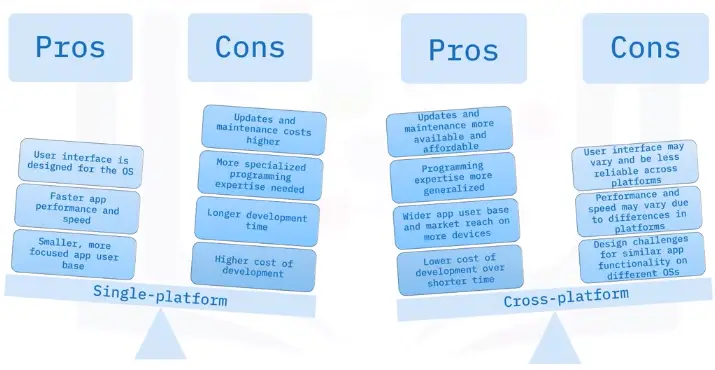
Single-platform vs. cross-platform
Compatibility concerns
Cross-platform software acts differently or may have limited usability across devices and platforms.
Software is created by different developers, and programs may interpret the code differently in each application.
Functionality and results differ across platforms, which might mean undesired results or a difference in appearance.
Commercial and Open Source Software
Commercial Software
Commercial Proprietary Closed source
Copyrighted software, which is identified in the End User License Agreement (EULA).
Private source code, which users are not allowed to copy, modify, or redistribute.
Developed for commercial profit and can include open source code bundled with private source code.
Commercial software usually requires a product key or serial number to certify that software is original.
Some commercial software is free, but upgrades and updates may cost extra, or the software contains ads.
Examples: Microsoft Office, Adobe Photoshop, and Intuit QuickBooks.
Open source software
Open source: Free and open source (FOSS)
Free software, which can be downloaded, installed, and used without limits or restrictions
Free source code, which can be freely copied, modified, and redistributed.
Open access to the software functions and software code without cost or restrictions.
Developers and users can contribute to the source code to improve the software.
Open source software requires users to agree to an End User License Agreement (EULA) to use the software.
Examples: Linux, Mozilla Firefox, and Apache OpenOffice.
Software Licenses
What is a software license?
A software license states the terms and conditions for software providers and users.
It is a contract between the developer of the source code and the user of the software.
It specifies who owns the software, outlines copyrights for the software, and specifies the terms and duration of the license.
Likewise, it states where the software can be installed, how many copies can be installed, and how it can be used.
Not only that, but it can be lengthy and full of definitions, restrictions, and penalties for misuse.
Agreeing to licensing terms
If you want to use software, you must agree to the licensing terms and requirements, called an End-User License Agreement (EULA).
Agreeing means you accept the terms of the license, such as how many computers the software can be installed on, how it can be used, and what the limitations on developer liability are.
Different software programs and applications have various ways of presenting their EULAs.
Types of software licenses
Single-use license
Allows single installation.
Allows installation on only one computer or device.
Ideal for a single user to install on computers or devices owned only by the user.
Group use, corporate, campus, or site license
Allows multiple installation for specified number of multiple users.
Allows installation on many computers or devices.
Idea for use with computers and devices that are required and owned by organizations.
Concurrent license
Allows installation on many computers, but can only use concurrently by a lower number.
Allows many users to have access, but is not used often by a lot of people at once.
Ideal for companies that do not have all workers using the software at the same time.
Software licensing cost
Costs vary, depending on the type of software, how it will be used, and how much was spent to develop the software.
The cost is for the license to use the software.
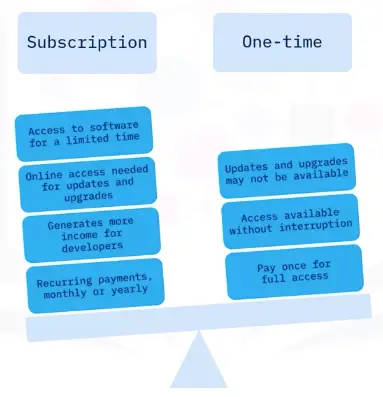
Several options are available, such trial subscription, and one-time purchase.
Trial licenses are usually free for a limited time, for a user to decide if they want to purchase the software.
Subscription or one-time licenses
Software Installation Management
Before installing software
Read application details and be selective.
Avoid ads or other unwanted software.
Avoid downloading software that contains malware.
Review permissions requests to access other apps and hardware on your device.
Be selective when allowing application privileges.
Installing software
Consider minimum system requirements, such as:
Minimum processor speed
Minimum amount of RAM
Minimum amount of hard disk space available
Compatible OS versions
Additional requirements may be:
Specific display adapter
Amount display adapter RAM
Internet connection to use the software.
Software versions
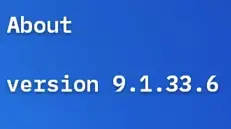
Software versions are identified by version number.
Version numbers indicate:
When the software was released.
When it was updated.
If any minor changes or fixes were made to the software.
Software developers use versioning to keep track of new software, updates, and patches.
Version numbers
Version numbers can be short or long, with 2,3, or 4 sets.
Each number set is divided by a period.
An application with a 1.0 version number indicated the first release.
Software with many releases and updates will have a larger number.
Some use dates for versioning, such as Ubuntu Linux version 18.04.2 released in 2018 April, with a change shown in the third number set.
What do version numbers mean?
Some version numbers follow the semantic numbering system and have 4 parts separated by a period.
The first number indicates major changes to the software, such as a new release.
The second number indicated that minor changes were made to a piece of software.
The third number in the version number indicates patches or minor bug fixes.
The fourth number indicates build numbers, build dates, and less significant changes.
Version compatibility
Older versions may not work as well in newer versions.
Compatibility with old and new versions of software is a common problem.
Troubleshooting compatibility issues by viewing the software version.
Update software to a newer version that is compatible.
Backwards-compatible software functions properly with older versions of files, programs, and systems.
Productivity, Business, and Collaboration Software
Types of software
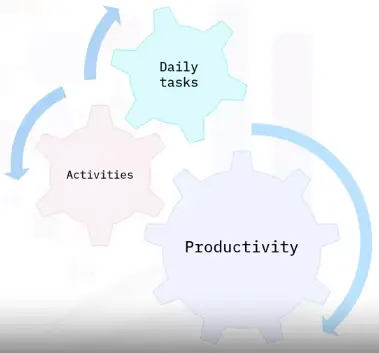
Productivity software enables users to be productive in their daily activities.
Business software is related to work tasks and business-specific processes.
Collaboration software enables people to work together and communicate with each other.
Utility software helps manage, maintain, and optimize a computer.
Note: A program or application can be categorized as multiple types of software.
What is productivity software?
“Productivity software is made up of programs and application that we use every day.”
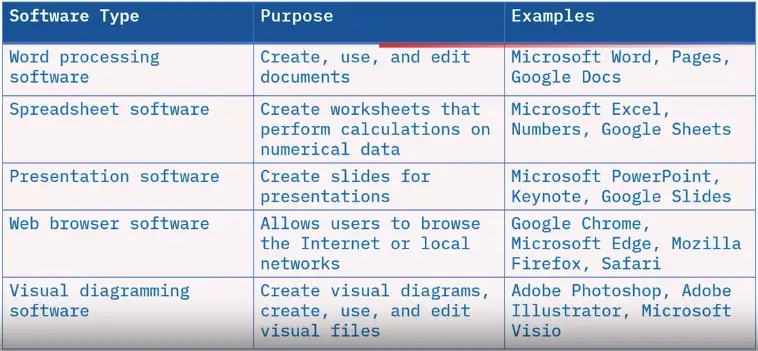
Types of productivity software
What is business software?
Programs and applications that help businesses complete tasks and function more efficiently are considered business software.
Some business software is uniquely designed to meet an industry-specific need.
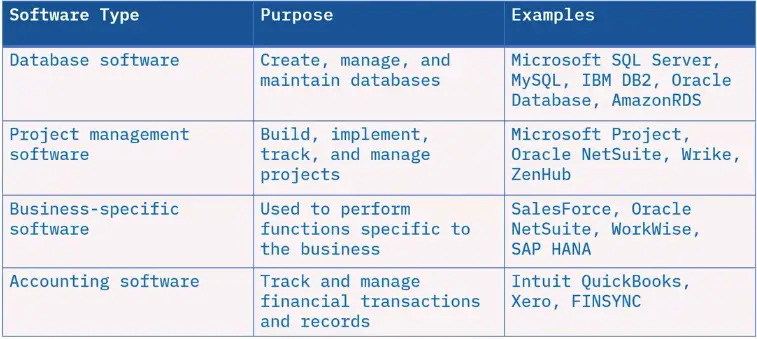
Types of business software
What is collaboration software?
Collaboration software helps people and companies communicate and work together.
Collaboration software can also be business software, but they are not interchangeable.
The primary purpose is to help users create, develop, and share information collaboratively.
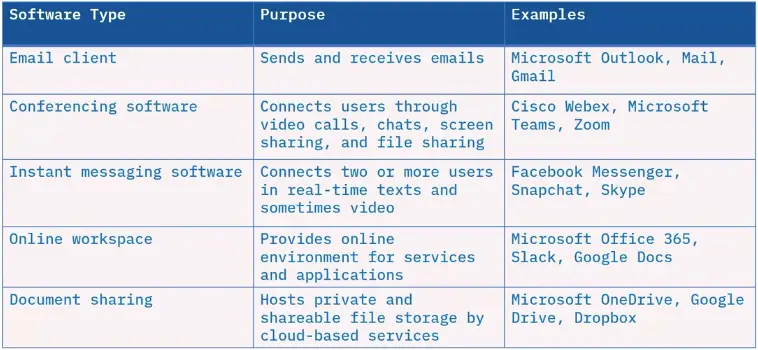
Types of collaboration software
What is utility software?
Utility software runs continuously on a computer without requiring direct interaction with the user.
These programs keep computers and networks functioning properly.
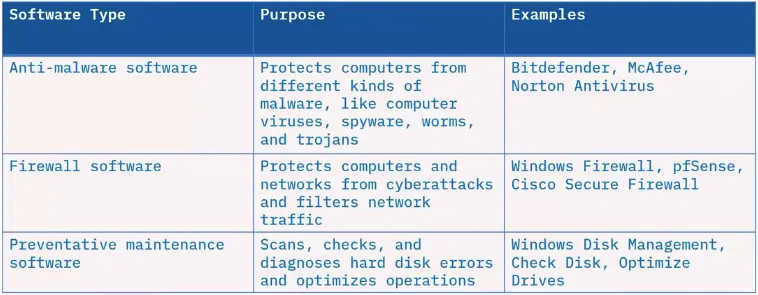
Utility software
Types of File Formats
Executable files
Executable files run programs and applications.
Some executable file format extensions are:
EXE or .exe for Windows applications
BAT or .bat for running a list of commands
SH or .sh for shell commands on Linux/Unix
CMD or .cmd for running command in order
APP or .app for Mac application bundles
MSI or .msi for installer package on Windows
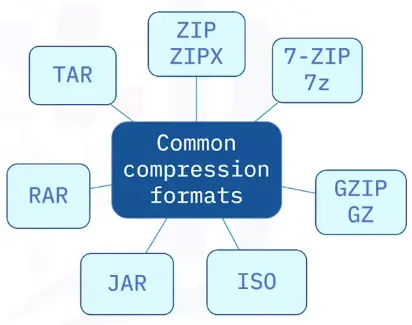
Common compression formats
Common audio and video formats
Audio and video formats often share the same extensions and the same properties.
Some audio formats:
WAV
MPEG, including MP3 and MP4
AAC
MIDI
Some video formats:
AVI
FLV
MPEG, including MP4 and MPG
WMV
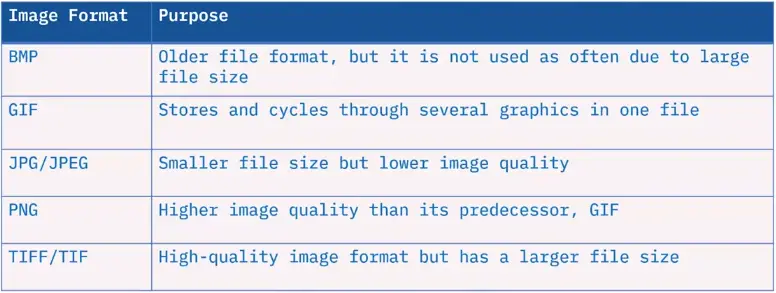
Images formats
Some common image formats are:
Document formats
Some examples of document formats and extensions:
TXT / .txt for text files
RTF / .rtf for rich text format
DOCX and DOC / .docx and .doc for Microsoft Word
XLSX and XLS / .xlsx and .xls Microsoft Excel
PDF / .pdf for Adobe Acrobat and Adobe Reader
PPTX and PPT / .pptx and .ppt for PowerPoint
Fundamentals of Web Browsers, Applications, and Cloud Computing
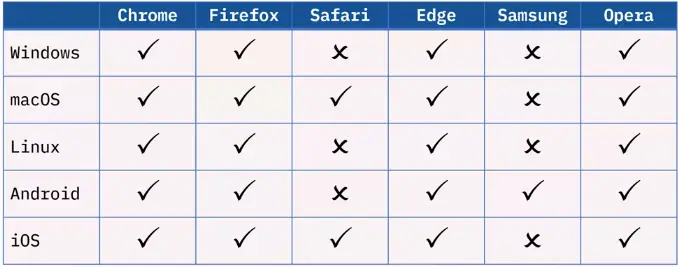
Common Web Browsers
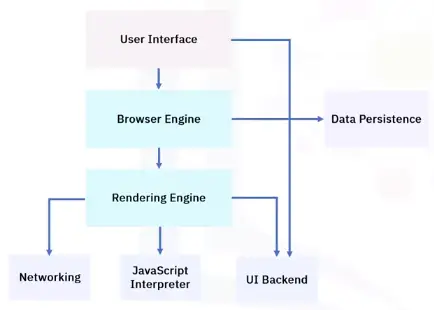
Web Browser components
Browser installs and updates
Importance of browser updates
Compatibility with websites
Security
New features
Frequency of browser updates
Most web browsers update at the same frequency:
Major updates every four weeks
Minor updates as needed within the four-week period
Security fixes, crash fixes, policy updates
Some vendors offer an extended release:
Major updates are much less frequent
Better for structured environments
Malicious plug-ins and extensions
Malicious plug-ins and extensions typically not displayed in list of installed apps and features.
Use an anti-malware program to remove them.
Use trusted sources for plug-ins and extensions to avoid malware.
Basic Browser Security Settings
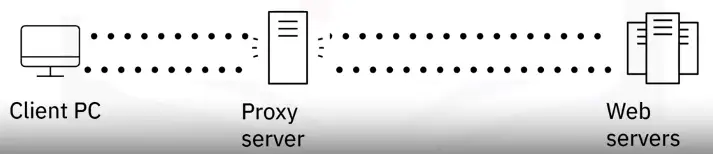
What is a proxy server?
Acts as go-between when browsing the web.
The website thinks the proxy is the site visitor.
Protects privacy or bypass content restrictions.
Allows organizations to maintain web security, web monitoring, and content filtering.
Controls what, when, and who.
Reduces bandwidth consumption and improves speed.
How does a proxy server work?
Proxy servers perform network address translation to request and retrieve web content on behalf of requesting computers on the network.
Managing cookies
Cookies:
Small text-based data stores information about your computer when browsing
Save session information
More customized browsing experience
Example: Online shopping basket
Cookies can be useful but could be malicious too:
Tracking browsing activity
Falsifying your identity
What is cache?
Cache is temporary storage area
Stores web data, so it can be quickly retrieved and reused without going to original source
Cache is stored on local disk
Improves speed, performance, and bandwidth usage
Cache can be cleared when no longer needed
Browser Security Certificates and Pop-ups Settings
Security certificates
Good security practice to check websites’ authenticity
Look for HTTPS in URL and padlock icon
‘Connection is secure’
If it says ‘not secure’ be wary
Certificate expired
Issuing CA not trusted
Script and pop-ups blockers
Pop-ups:
Typically are targeted online ads
Can be annoying and distracting
Can be malicious
Associated with ‘innocent’ actions
Take care when interacting with pop-ups
Popular third-party pop-up blockers:
Adlock
AdGuard
AdBlock
Ghostery
Adblock Plus
May provide additional features such as ad filtering.
Private Browsing and Client-side Scripting Settings
Private browsing mode that doesn’t save:
History
Passwords
Form data
Cookies
Cache
Only hidden locally
ISPs, websites, workplace can view data
Client-side scripting
Web pages were static in early days of WWW
Dynamic web pages adapt to situation/user
Server-side scripting performed by server hosting dynamic pages
Client-side scripting performed by client’s web browser
Code is embedded in web page
JavaScript
Pros
Client-side scripts are visible to user
No reliance on web server resources
Cons
Client-side scripts have security implications
Malware developers constantly trying to find security flaws
You may need to disable client-side scripts
Should you disable JavaScript?
Pros of disabling
Security
Browsing speed
Browser support
Disabled cookies
Cons of disabling
Lack of dynamic content
Less user-friendly browsing experience
Website navigation
Introduction to cloud computing and cloud deployment and service models
What is cloud computing?
Delivery of on-demand computing resources:
Networks
Servers
Storage
Applications
Services
Data centers
Over the Internet on a pay-for-use basis.
Applications and data users access over the Internet rather than locally:
Online web apps
Secure online business applications
Storing personal files
Google Drive
OneDrive
Dropbox
Cloud computing user benefits
No need to purchase applications and install them on local computer
Use online versions of applications and pay a monthly subscription
More cost-effective
Access most current software versions
Save local storage space
Work collaboratively in real time
Cloud computing
Five characteristics
Three deployment models
Three service models
Cloud computing characteristics
ON-demand self-service
Broad network access
Resource pooling
Rapid elasticity
Measured service
Cloud deployment models
Public Cloud
Private Cloud
Hybrid cloud
Cloud service models
IaaS
PaaS
SaaS
Application Architecture and Delivery Methods
Application Architecture models
How will an application be use?
How will it be accessed?
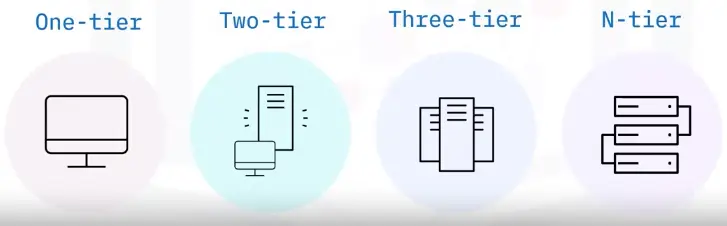
One-tier model
Single-tier model
Also called monolithic model
Applications run on a local computer
Two-tier model
Workspace-based client – Personal computer
Web server – Database server
Three-tier model
Workspace-based client
Application server or web server
Additional server (Database)
Each tier can be:
Individually developed and updated by a separate team
Modified and upgraded without affecting the other tiers
N-tier model
A number of tiers
Multi-tier model
Workspace-based client
Web server or database server
Security
Additional servers
Preferred for the microservices pattern and Agile model
Pros
Changes can be made to specific tiers
Each tier can have its own security settings
Different tiers can be load balanced
Tiers can be individually backed up by IT administrators
Cons
Changes to all tiers may take longer
Application Delivery methods
Local installation
Hosted on a local network
Cloud hosted
Software Development Life Cycle
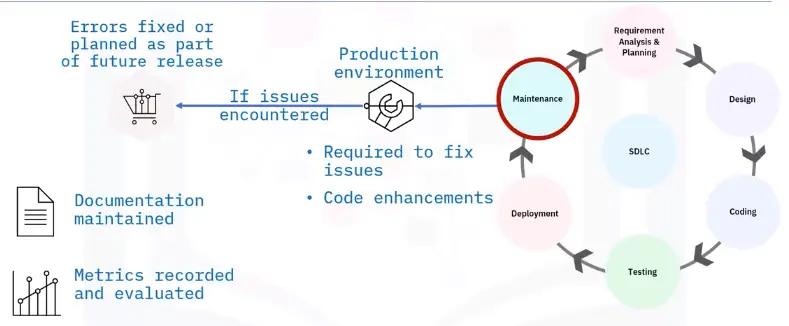
Introduction to the SDLC
Structured methodology that defines creating and developing software
Detailed plan to develop maintain, or enhance software
Methodology for consistent development that ensures quality production
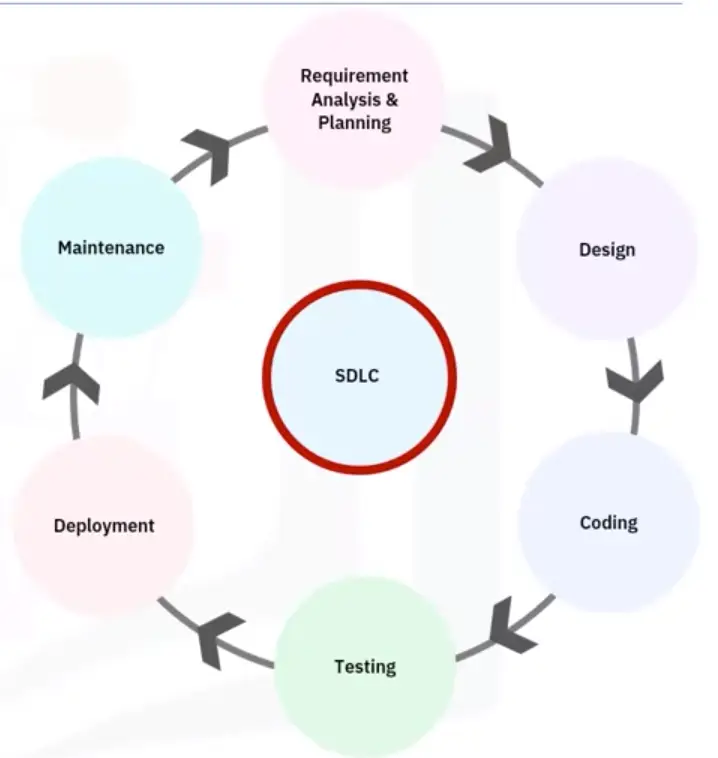
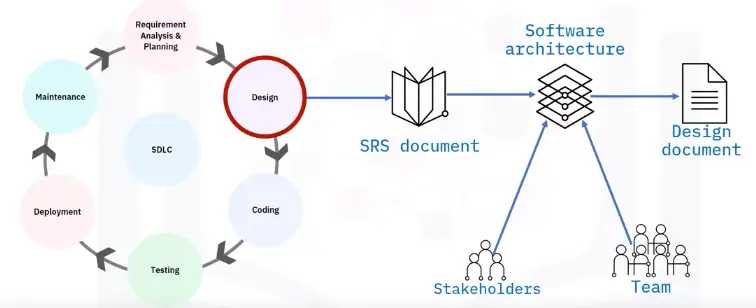
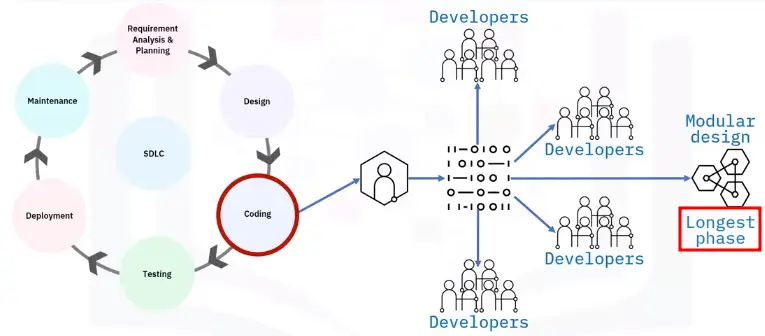
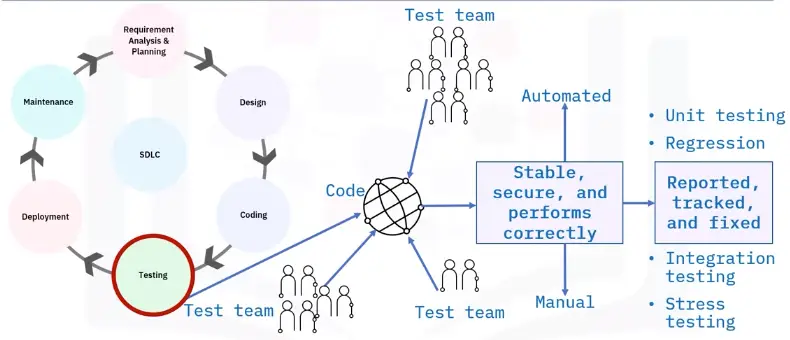
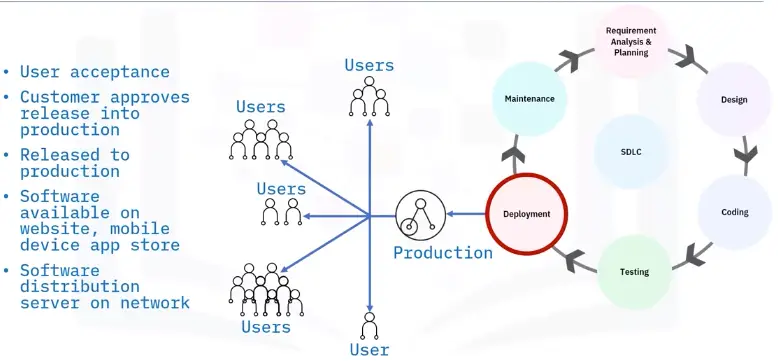
Six major steps
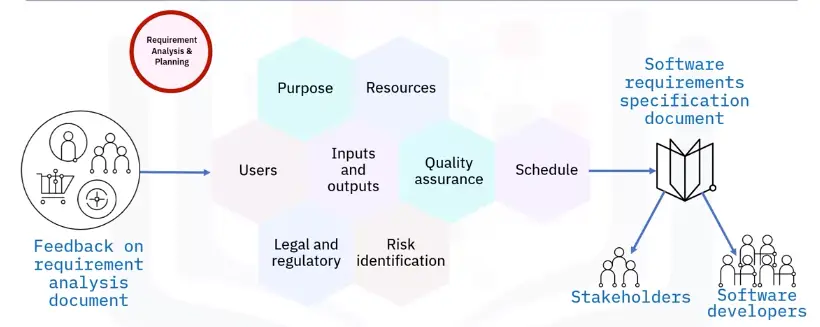
Requirement analysis and planning
Design
Coding or implementation
Testing
Deployment
Maintenance
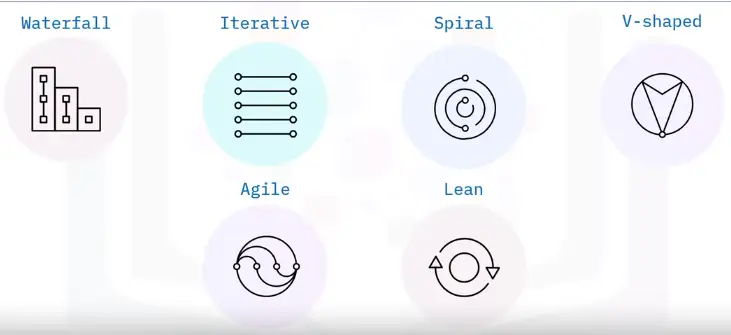
SDLC models
Waterfall
Linear sequential model
Output of one phase is input for the next phase
Next doesn’t start until work is completed on the previous phase
Iterative
Iterative incremental model
Product features developed iteratively
Once complete, final product build contains all features
Spiral
Uses waterfall and prototype models
Good for large projects
Largely reduces risk
Planning, risk analysis, engineering, and evaluation
Follows an iterative process
V-shaped
Verification and validation model
Coding and testing are concurrent, implemented at development stage
Agile
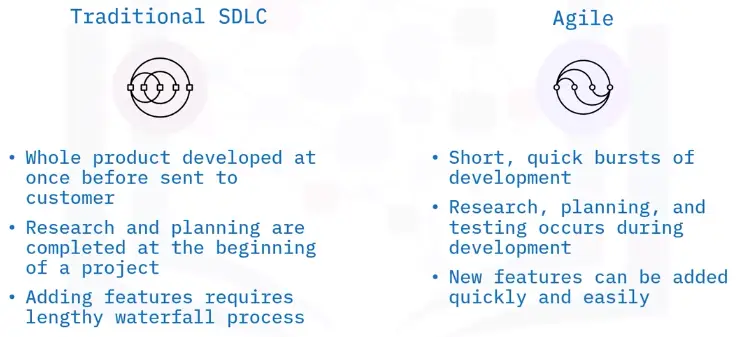
Joint development process over several short cycles
Teams work in cycles, typically two to four weeks
Testing happens in each sprint, minimizes risk
Iterative approach to development
At the end sprint, basic product developed for user feedback
Process is repeated every sprint cycle
Four core values of agile model
Individuals and interactions over process and tools
Working software over comprehensive documentation
Customer collaboration over contract negotiation
Responding to change over following plan
Lean
Application of lean principles
Focuses on delivery speed
Continuous improvement
Reducing waste each phase
Seven rules of Lean Model
Build in quality
Create knowledge
Defer commitment
Deliver fast
Respect people
Optimize the whole
DevOps evolved from Agile and Lean principles
Development and Operations teams work collaboratively
Accelerate software deployment
Traditional SDLC vs. Agile
Basics of Programming
Interpreted and Compiled Programming Languages
Programming Languages
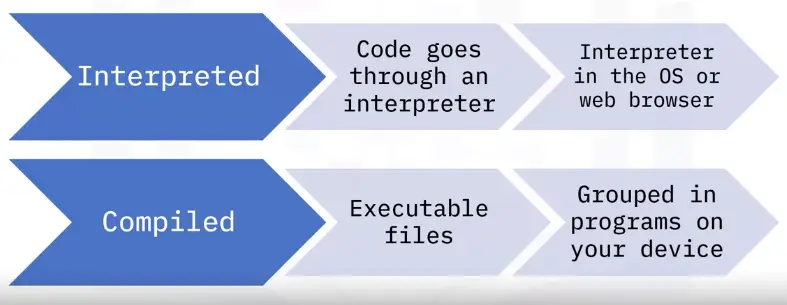
Common programming languages categories:
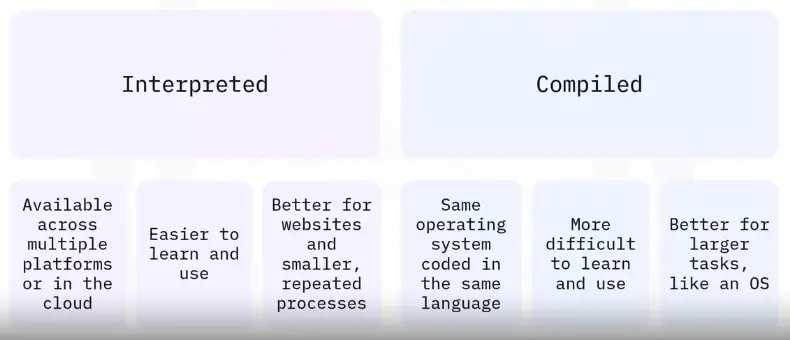
Interpreted
Compiled
Many programming languages are compiled and interpreted
The developer determines which languages is best suited for the project
Interpreted programming
Some interpreted programming languages are outdated
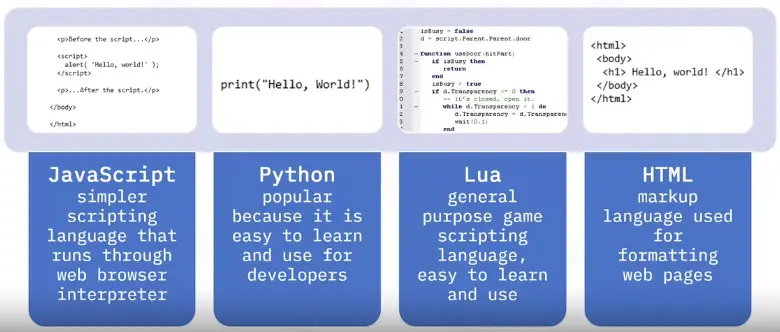
Some are more versatile and easier to learn languages
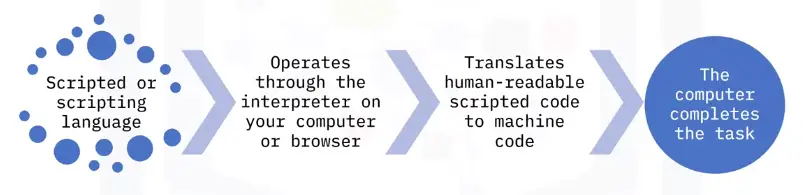
Interpreted programming languages need an interpreter to translate the source code
Translators are built into the browser or require a program on your computer to interpret the code
Interpreted programming examples
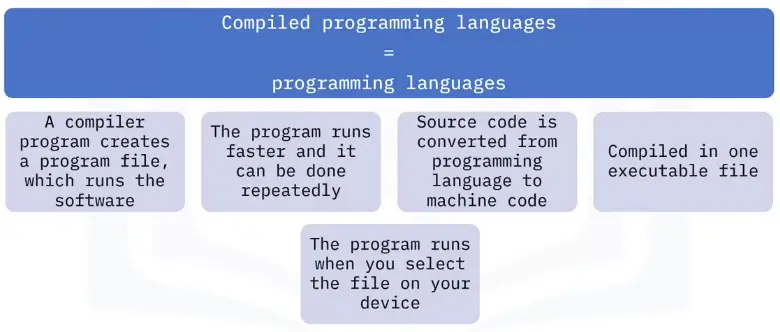
Compiled programming
Programs that you run on your computer
Packaged or compiled into one file
Usually larger programs
Used to help solve more challenging problems, like interpreting source code
Examples
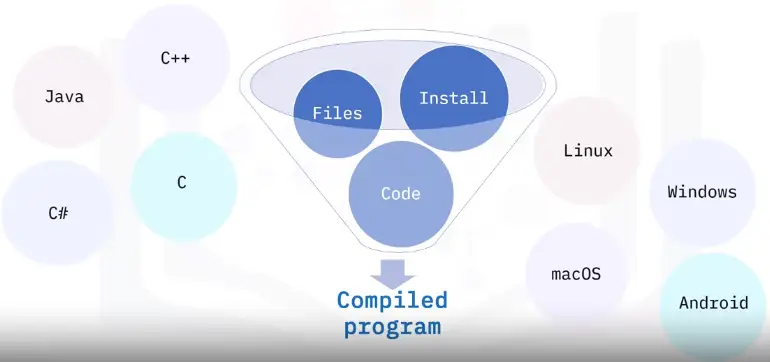
Examples of compiled programming languages are:
C, C++ and C# are used in many operating systems, like Microsoft. Windows, Apple macOS, and Linux
Java works well across platforms, like the Android OS
Compiled programming
Comparing Compiled and Interpreted Programming Languages
Choosing a programming language
Developers determine what programming language is best to use depending on:
What they are most experienced with and trust
What is best for their users
What is the most efficient to use
Programming Languages
Interpreted Programming Languages
Also called script code or scripting, used to automate tasks
Interpreter programs read and execute the source code line by line
The source code need to be executed each time
Runs on almost any OS with the right interpreter
Compiled programming languages
Also called programming languages
Used for more complex programs that complete larger tasks
Larger programs installed on the computer or device
Longer time to write the code but runs faster
Grouped into one downloadable file
Interpreted vs. compiled
Programming Language examples
C, C++, C#:
Compiled programming language
C is the original language, C++ and C# are variations
Case sensitive
Basis for Windows and many operating systems
Takes more time to learn and use for coding but requires less memory and code runs faster
Java:
Compiled programming language
Case-sensitive, object-oriented programming language
Requires Java Virtual Machine (JVM) to run the code
Programming language for Android OS
Cross-platform language that runs the same code on macOS, Windows and Linux
Python:
Interpreted programming language
Scripting language
General-use, case-sensitive
Used with Windows, macOS, and Linux OSes and with server-side web app code
Requires Python engine to interpret code
JavaScript:
Interpreted
Scripting language that runs on client side web browsers
Case insensitive
Simple scripts are run with HTML
Complex scripts are run in separate files
Not to be confused with Java, the compiled programming language
HTML:
Interpreted
HyperText Markup Language
Mostly case-insensitive
Uses tags to format web pages on client-side web browsers
Query and Assembly Programming Languages
Programming language levels
High-level programming languages
More sophisticated
Use common English
SQL, Pascal, Python
Low-level programming languages
Use simple symbols to represent machine code
ARM, MIPS, X86
Query languages
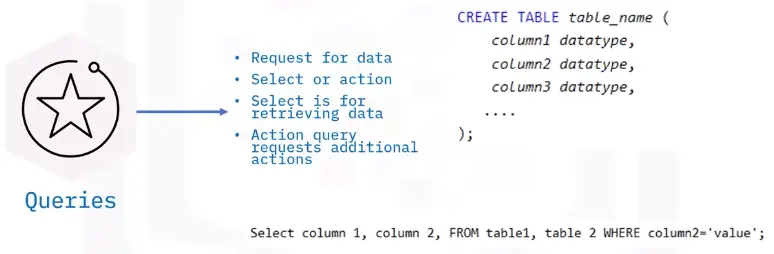
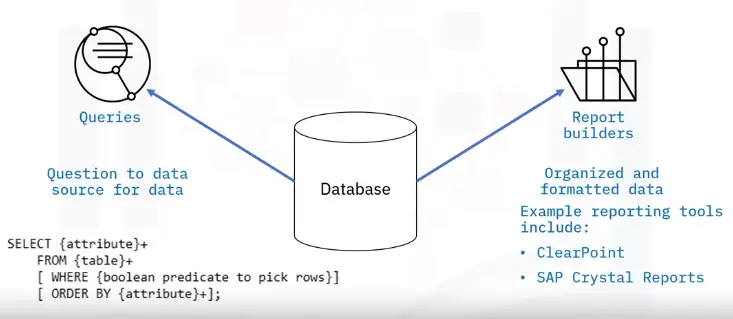
A query is a request for information from a database
The database searches its tables for information requested and returns results
Important that both the user application making the query and the database handling the query are speaking the same language
Writing a query means using predefined and understandable instructions to make the request to a database
Achieved using programmatic code (query language/database query language)
Most prevalent database query language is SQL
Other query languages available:
AQL, CQL, Datalog, and DMX
SQL vs. NoSQL
NoSQL (not only SQL)
Key difference is data structures
SQL databases:
Relational
Use structured, predefined schemas
NoSQL databases:
Non-relational
Dynamic schemas for unstructured data
How does a query language work?
Query language is predominantly used to:
Request data from a database
Create, read, update, and delete data in a database (CRUD)
Database consists of structured tables with multiple rows and columns of data
When a user performs a query, the database:
Retrieves data from the table
Arranges data into some sort of order
Returns and prevents query results
Query statements
Database queries are either:
Select commands
Action commands (CREATE, INSERT, UPDATE)
More common to use the term “statement”
Select queries request data from a database
Action queries manipulate data in a database
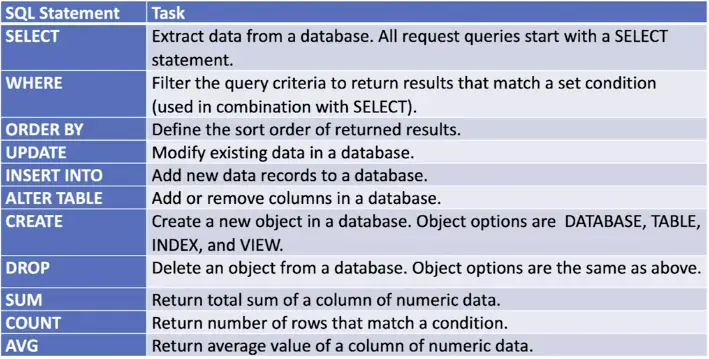
Common query statements
Query statement examples
SELECT * FROM suppliers;
SELECT name FROM suppliers, WHERE name = ‘Mike’;
CREATE DATABASE products;
DROP TABLE suppliers;
ALTER TABLE suppliers;
DROP COLUMN firstname;
SELECT AVG(purchases);
FROM suppliers;
Assembly languages
Less sophisticated than query languages, structured programming languages, and OOP languages
Uses simple symbols to represent 0s and 1s
Closely tied to CPU architecture
Each CPU type has its own assembly language
Assembly language syntax
Simple readable format
Entered one line at a time
One statement per line
{label}mnemonic{operandlist}{;comment}
mov TOTAL, 212;Transfer the value 212 in the memory variable TOTAL
Assemblers
Assembly languages are translated using an assembler instead of a compiler or interpreter
One statement translates into just one machine code instruction
Opposite to high-level languages where one statement can be translated into multiple machine code instructions
Translate using mnemonics:
Input (INP), Output (OUT), Load (LDA), Store (STA), Add (ADD)
Statements consist of:
Opcodes that tell the CPU what to do with data
Operands that tell the CPU where to find the data
Understanding Code Organization Methods
Code organization is important
Planning and organizing software design:
Enables writing cleaner, more reliable code
Helps improve code base
Reduce bugs and errors
Has a positive impact on program quality
Provides consistent and logical format while coding
Pseudocode vs. flowcharts
Pseudocode
Flowcharts
Informal, high-level algorithm description
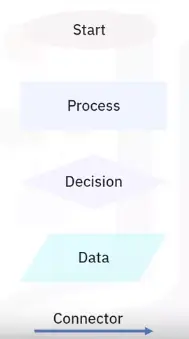
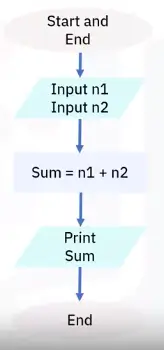
Pictorial representation of algorithm, displays steps as boxes and arrows
Step-by-step sequence of solving a problem
Used in designing or documenting a process or program
Bridge to project code; follows logic
Good for smaller concepts and problems
Helps programmers share ideas without extraneous waste of a creating code
Provide easy method of communication about logic behind concept
Provides structure that is not dependent on a programming language
Offer good starting point for project
Flowcharts
Graphical or pictorial representation of an algorithm
Symbols, shapes, and arrows in different colors to demo a process of program
Analyze different methods of solving a problem or completing a process
Standard symbols to highlight elements and relationships
Flowchart software
Provides ability to create flowcharts
Drag functionality
Easy-to-use interface
Team collaboration creating flowcharts
Examples:
Microsoft Visio
Lucidchart
Draw.io
DrawAnywhere
Pseudocode advantages
Simply explains each line of code
Focuses more on logic
Code development stage is easier
Words/phrases represent lines of computer operations
Simplifies translation
Code in different computer languages
Easier review by development groups
Translates quickly and easily to any computer language
More concise, easier to modify
Easier than developing a flowchart
Usually less than one page
Branching and Looping Programming Logic
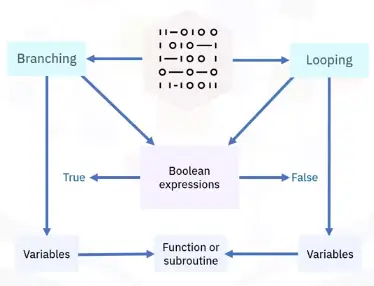
Introduction to programming logic
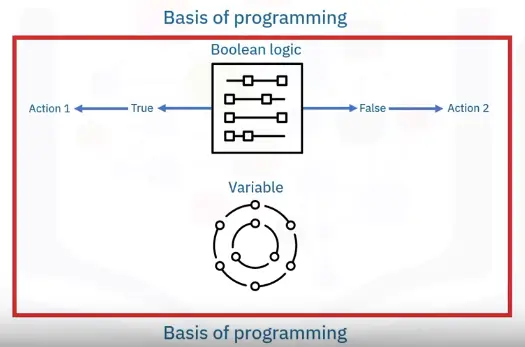
Boolean expressions and variables
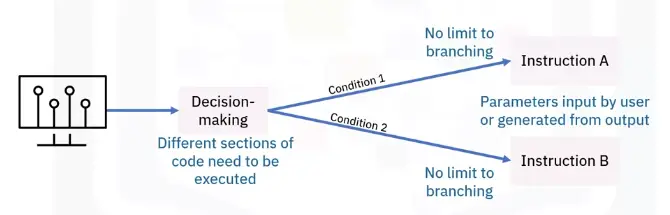
Branching programming logic
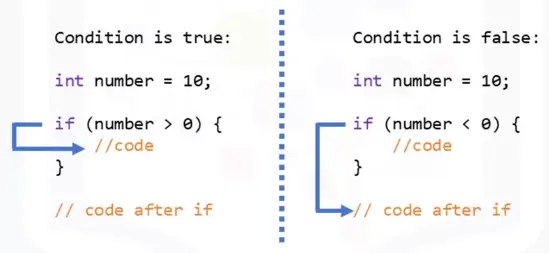
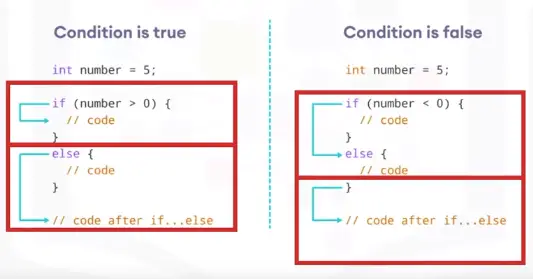
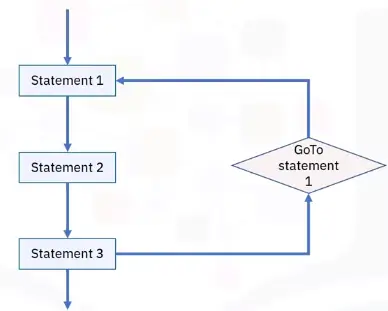
Branching statements allow program execution flow:
if
if-then-else
Switch
GoTo
Looping programming logic
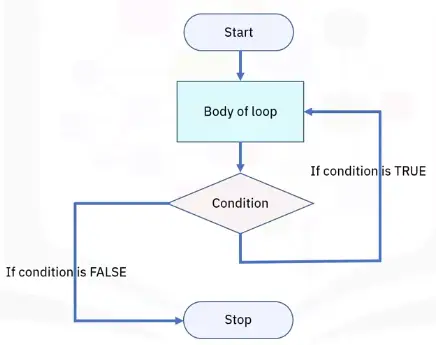
There are three basic loop statements:
While loop: Condition is evaluated before processing, if true, then loop is executed
For loop: Initial value performed once, condition tests and compares, if false is returned, loop is stopped
Do-While loop:Condition always executed after the body of a loop
Introduction to Programming Concepts, Part 1
What are identifiers?
Software developers use identifiers to reference program components
Stored values
Methods
Interfaces
Classes
Identifiers store two types of data values:
Constants
Variables
What are containers?
Special type of identifier to reference multiple program elements
No need to create a variable for every element
Faster and more efficient
Examples:
To store six numerical integers – create six variables
To store 1,000+ integers – use a container
Arrays
Simplest type of container
Fixed number of elements stored in sequential order, starting at zero
Declare an array
Specify data type (Int, bool, str)
Specify max number of elements it can contain
Syntax
Data type > array name > max array size [ ]
int my_array[50]
Vectors
Dynamic size
Automatically resize as elements are added or removed
a.k.a. ‘Dynamic arrays’
Take up more memory space
Take longer to access as not stored in sequential memory
Syntax
Container type/data type in <>/name of array
vector <int> my_vector;
Introduction to Programming Concepts, Part 2
What are functions?
Consequence of modular programming software development methodology
Multiple modular components
Structured, stand-alone, reusable code that performs a single specific action
Some languages refer to them as subroutines, procedures, methods, or modules
How functions work
Functions take in data as input
Then process the data
Then return the result as output
Types of functions
Standard library functions – built-in functions
if, else, while, print
User-defined functions – you write yourself
Once a function is written, you can use it over and over
Blocks of code in a function are identified in different ways
Use {}
Use begin-end statements
Use indentations
Using function
Define a function (create)
Function keyword, unique name, statements
Call a function (invoke)
Specified actions are performed using supplied parameters
Declare a function (some programming languages)
C, C++
What are objects?
Objects are key to understanding object-oriented programming (OOP)
OOP is a programming methodology focused on objects rather than functions
Objects contain data in the form of properties (attributes) and code in the form of procedures (methods)
OOP packages methods with data structures
Objects operate on their own data structure
Objects in programming
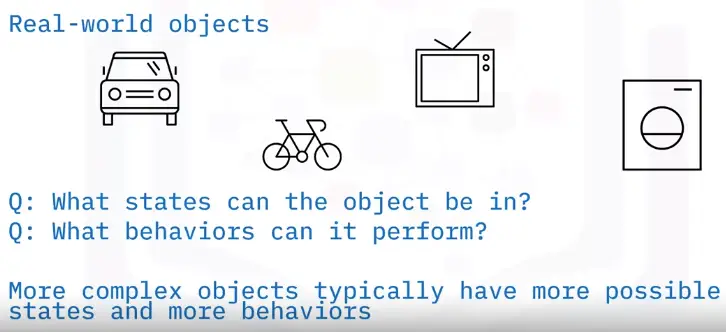
Consist of states (properties) and behaviors (methods)
Store properties in field (variables)
Expose their behaviors through methods (functions)
Database Fundamentals
Types of Data, Sources, and Uses
What is data?
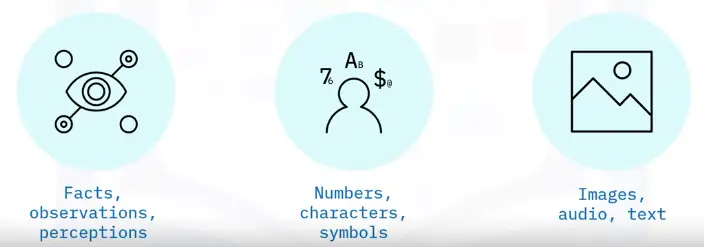
A set of characters gathered and translated for some purpose, usually analysis
Common types:
Single character
Boolean (true or false)
Text (string)
Number (integer or floating point)
Picture
Sound
Video
Forms of data
Types of data
Categorized by level and rigidity
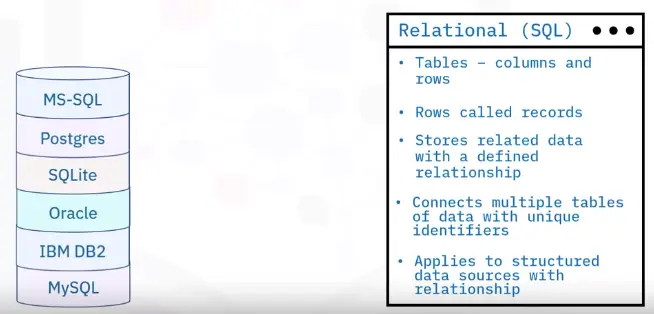
Structured data
Structured in rows and columns
Well-defined with rigid structure
Relational databases
Microsoft SQL server
IBM Db2
Oracle database
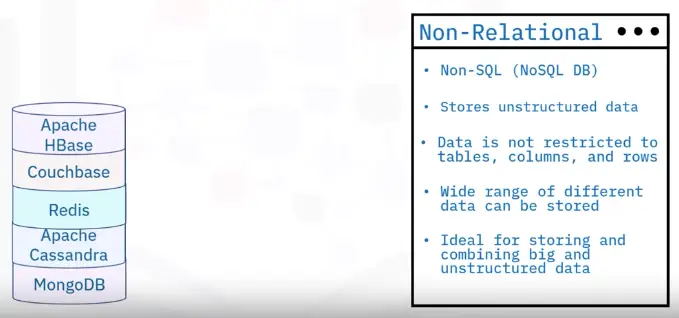
Semi-structured data
Some organizational properties
Not in rows or columns
Organized in hierarchy using tags and metadata
Non-relational database
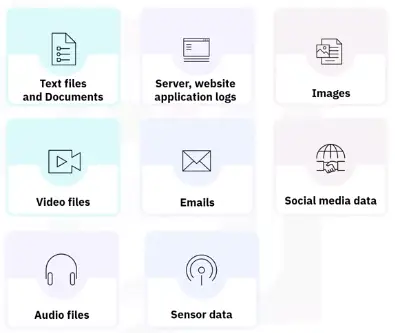
Unstructured data
No identifiable structure, specific format, sequence, or rules
Most common include text, email
Also images, audio files, and log files
Examples of Semi and Unstructured data
MonoDB
Hbase
Cassandra DB
Oracle NoSQL DB
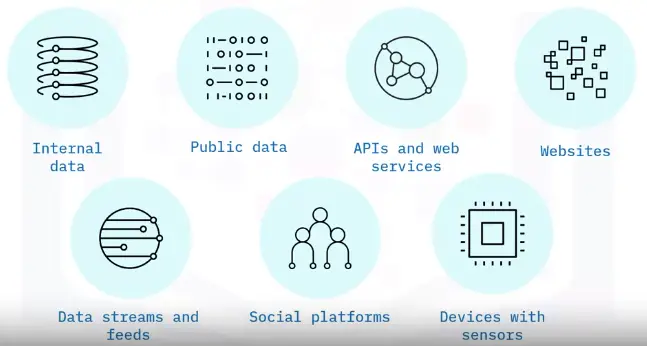
Data Sources
Using data
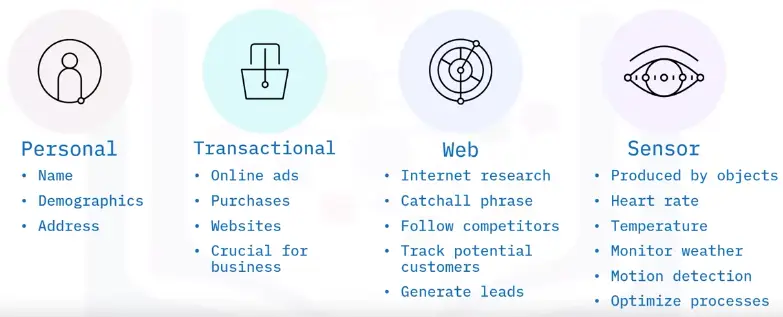
Data sources may be internal or external
Internal
Collects data from reports or records from organization
Known as internal sourcing
Accounting
Order processing
Payroll
Order shipping
External
Collects data from outside the organization
Known as external sourcing
Social media feeds
Weather reports
Government
Database and research
Database Fundamentals and Constructs
What is a database?
Components of a database
Schema
Collection of tables of data
A database can have more than one schema
Table
One or more columns of data
Two or more columns of stored data
Column
A pillar of information containing one or more data or values
Can contain dates, numeric or integer values, alphabetic values
Row
A horizontally formatted line of information like rows in Excel
100s or 1000s rows of data are typically in a table
Database constructs
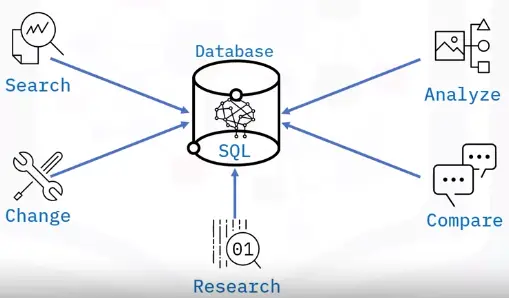
Queries
Request for data
Provide answers
Perform calculations
Combine data
Add, change, or delete data
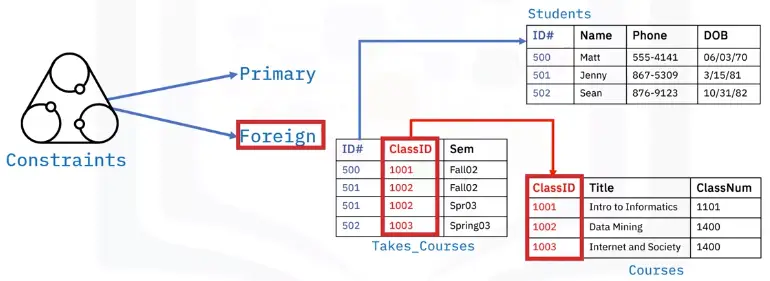
Constraints
Primary and foreign key enforce rules
Values in columns not repeated
Limit the type of data
Ensure data accuracy and reliability
Database query
Database constraints
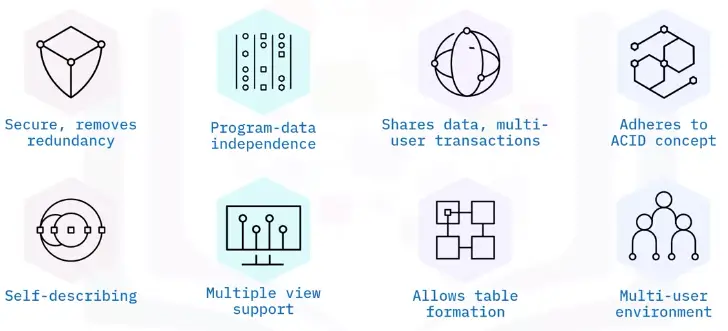
Database characteristics
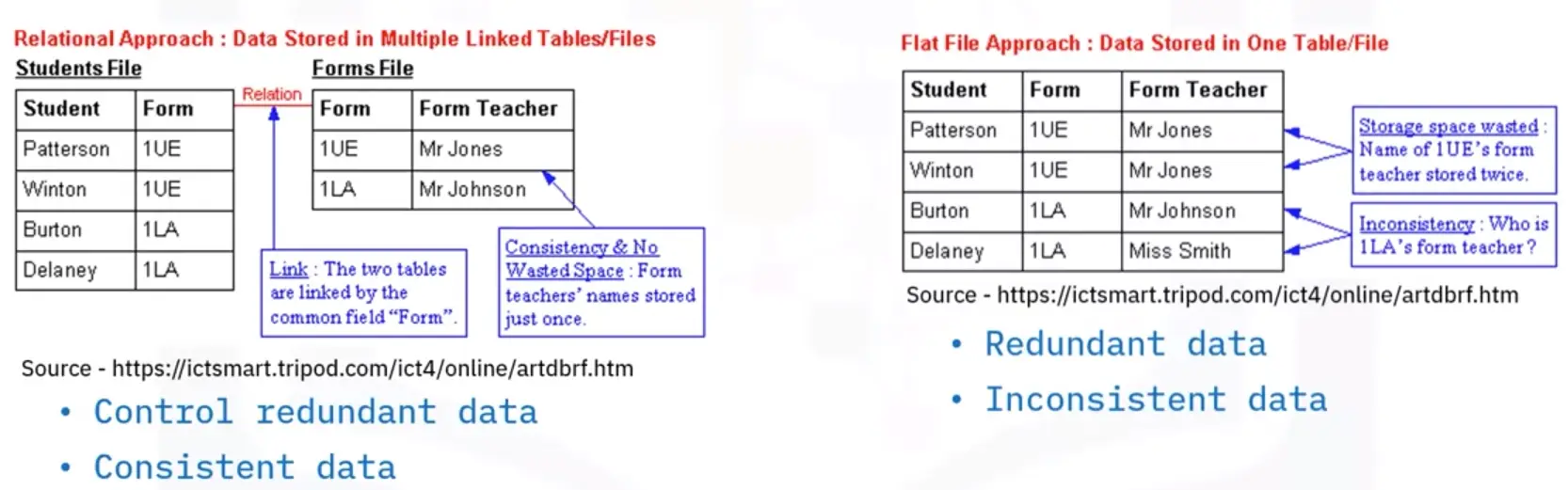
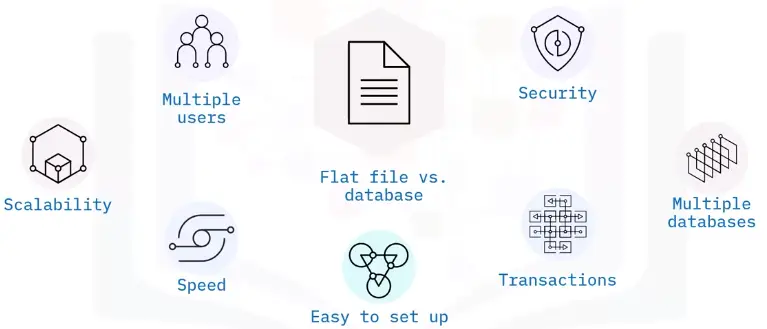
Flat file vs. database
Flat File
Database
Stores data in single table
Uses multiple table structures
Set in various application types
Tables are organized in rows and columns
Sorted based on column values
One piece of data per column
Solution for simple tasks
Faster, more efficient, more powerful
Database Roles and Permissions
Database permissions
Three types of permissions:
Database
Right to execute a specific type of SQL statement
Access second person’s object
Controls use of computing resources
Does not apply to DBA
System
Right to perform any activity
Ability to add or delete columns and rows
Object
Right to perform specific actions
Allows user to INSERT, DELETE, UPDATE, or SELECT data
Object’s owner has permissions for object
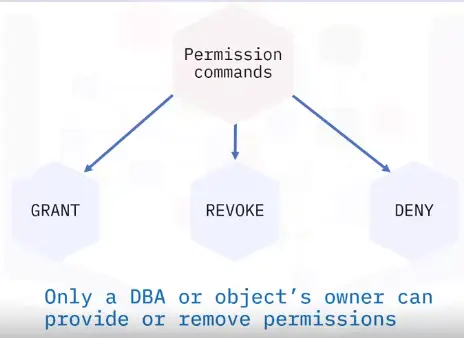
Permission commands
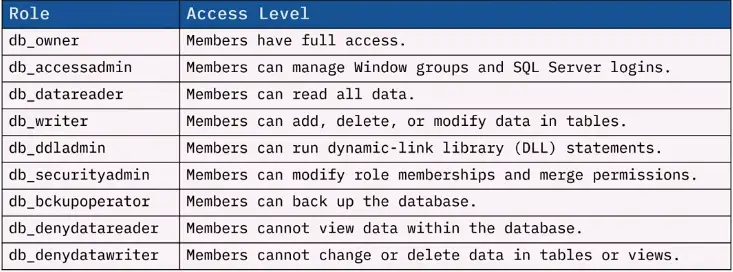
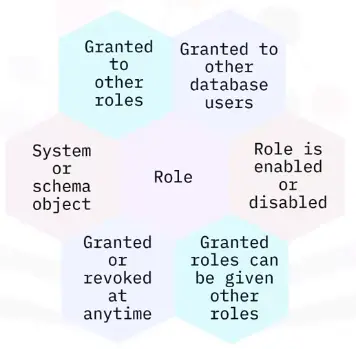
Database roles
Benefits of roles
Database types
Structured data type
Tabular data, columns, and rows
These databases are called relational databases
Formed set of data
All rows have same columns
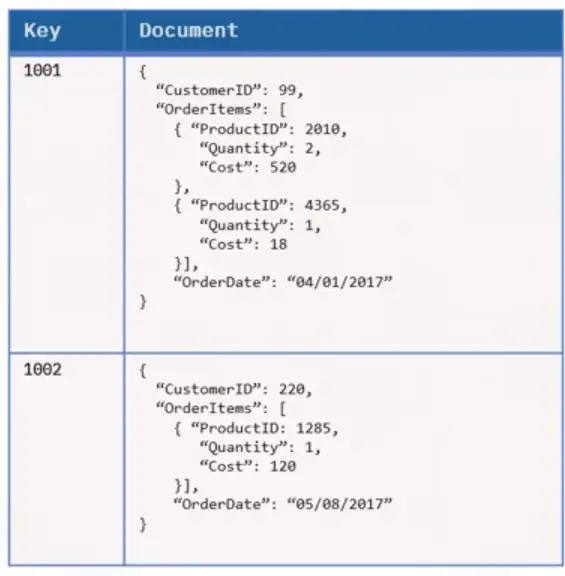
Semi-structured data type
Some structure
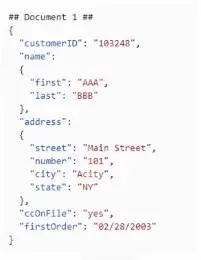
Documents in JavaScript Object Notation (JSON) format
Include key-value stores and graph database
Unstructured data type
Not in pre-defined structure or data model
Text heavy files, but may contain numbers and dates
Videos, audio, sensor data, and other types of information
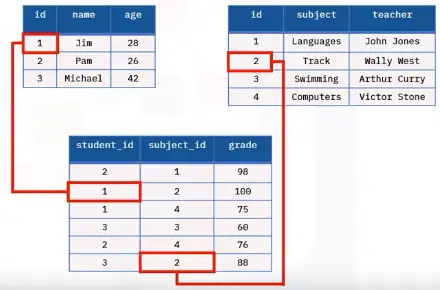
Relational database
Relational
Non-Relational
Structured to recognize relations among stored items of information
Stores data in a non-tabular form, and tends to be more flexible than the traditional, SQL-based, relational database structures
Non-relational database
Permit storing, store data in a format that closely meets the original structure.
Most common types of data stores:
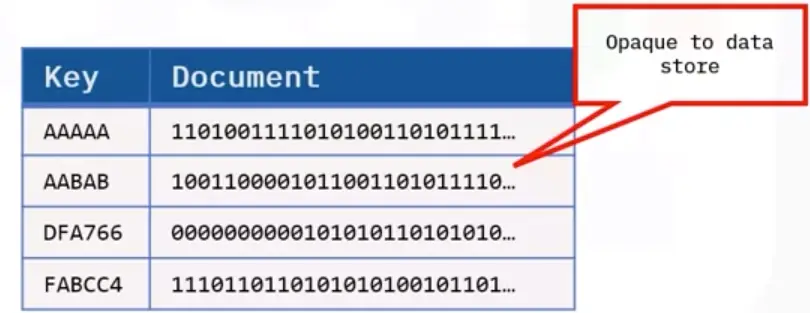
Document data stores
Handles
Objects
Data values
Named string fields in an entity referred to as a document
Generally store data in the form of JSON documents
Key-value stores
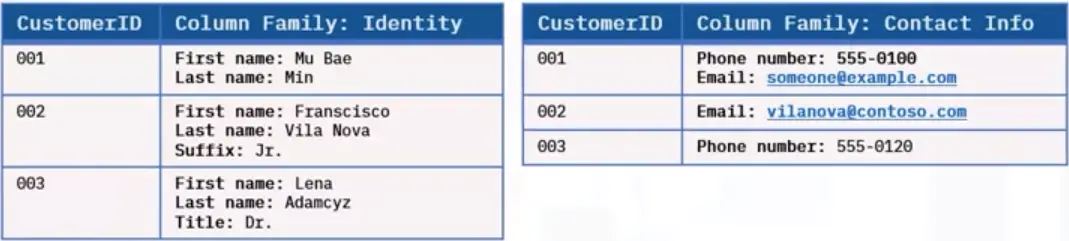
Column-oriented databases
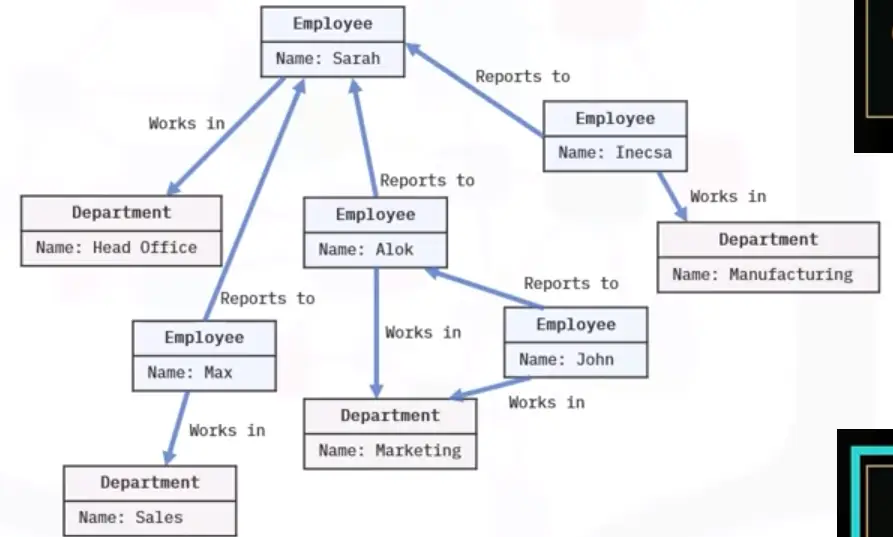
Graph databases
Interfacing with Databases
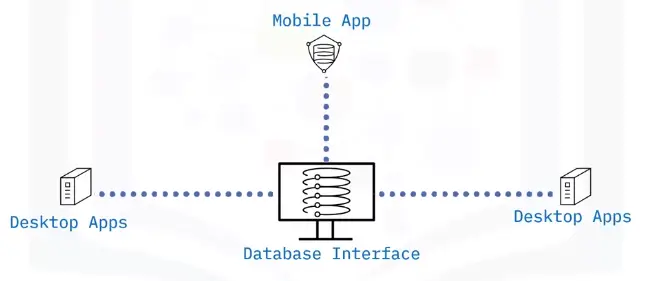
What is a database interface?
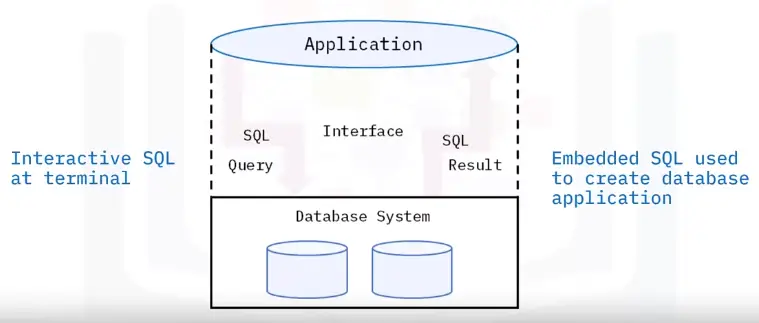
Enable users to input queries to a database
Principles of a database interface
How to access a database
Types of access:
Direct
Enters SQL commands
Selects a menu
Accesses tables directly
Works well with locally stored database or local area network
Programmatic
Accesses’ database using programming language
Enables data to be used in more ways
Safer than using direct access
Oracle databases support access from many languages
Might be necessary to perform a query with a supported language
User interface
Microsoft Access permits access to user interface
Optional user interface may be needed
Oracle offers MySQL Workbench as a graphical user interface
Allows ability to input queries without the query language
Menu-base interface
Forms-based interface
GUI displays schema in diagrammatic form
Specific query by manipulating diagram
GUIs utilize both menus and forms
GUIs using point device to pick sections of displayed schema diagram
Natural language interfaces accepts user requests and tries to interpret it
These interfaces have own schema like database conception schemas
Search engine example of entering and retrieving information using natural language
Query
Find specified data using SELECT statement
Query and reporting function included with software like Microsoft Access
Query Builder’s GUI is designed to enhance productivity and simplify query tasks
SQL or SQL displayed visually
Has pane displaying SQL text
Related tables determined by Query Builder that constructs join command
Query and update database using SELECT statement
Quickly view and edit query results
Examples:
Chartio Visual SQL
dbForge Query Builder for SQL Server
Active Query Builder
FlySpeed SQL
QueryDbVis Query Builder
Drag multiple tables, views, and columns to generate SQL statements
Database Management
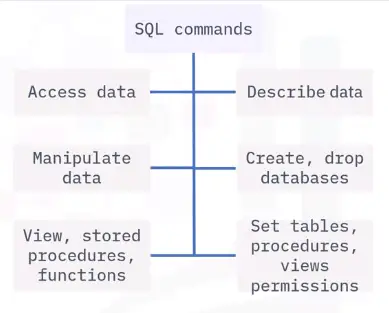
Managing databases with SQL commands
Queries refer to request information from a database
Queries generate data of different formats according to function
Query commands perform the data retrieval and management in a database
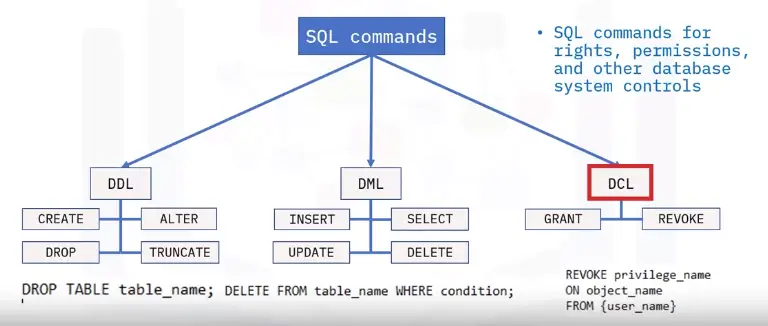
SQL command Categories
DDL
SQL commands that define database schema
Create, modify, and delete database structures
Not set by general user
DML
SQL commands that manipulate data
DCL
SQL commands for rights, permissions, and other database system controls
Inputting and importing data
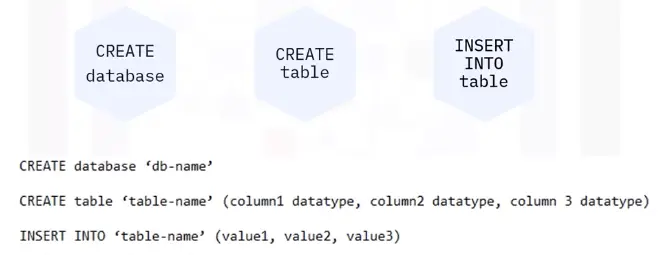
Data is input manually into a database through queries.
Another way is through importing data from different sources.
SQL Server Import Export Wizard
SQL Server Integrated Services (or SSIS)
OPENROWSET function
Extracting data from a database
Backing Up Databases
What is a database backup?
Two backup types:
Logical
Physical
Physical database backups
Needed to perform full database restoration
Minimal errors and loss
Full or incremental copies
Logical database backups
Copies of database information
Tables, schemas, procedures
Backup pros and cons
Physical backup
Logical backup
Pros:
Pros:
Simple and fast, despite format
Only selected data is backed up
Mirror copy loaded to another device
Saves time and storage
Cons:
Cons:
Used only to recreate system
No file system information
Cannot do full restore
Complications restoring process
Database backup methods
Full
Stores copies of all files
Preset schedule
Files are compressed but may need large storage capacity
Differential
Simplifies recovery
Requires last full backup
Last differential back up for full recovery
Incremental
Saves storage
Back up files generated or updated since last backup