Fundamentals of Human-Computer Interaction: users, usability, tasks, and cognitive models
What is Human Computer Interaction?
“HCI is a study of how humans interact with the computers.”
It is important to keep in mind how humans interact with the machines.
Cybersecurity experts, designers etc. should always consider HCI element as the major proponent for design and security infrastructure.
HCI involves knowing the users, tasks, context of the tasks.
Evaluation of how easy/difficult it is to use the system.
Usability
“It is a measure of how easy it is to use a system for a user.”
Measuring Usability
Speed
How quickly can the task be accomplished.
Efficiency
How many mistakes are made in accomplishing the task.
Learnability
How easy is it to learn to use the system.
Memorability
Once learned, how easy is it to remember how to use the system.
User Preference
What do users like?
How do we measure Usability?
Speed – timing
Efficiency – counting error
Learnability, Memorability and User Preference don’t have straight forward measurement tools.
Tasks and Task analysis
“Tasks are goals that users have when interacting with the system.”
Common errors in task creation
Leading or too descriptive
Click on the username box at the upper right of the screen and enter your username, then click on the password box underneath and enter your password. Click submit…
Specific questions?
What is the third headline on CNN.com?
Directing users towards things you want to tell them, not what they want to know.
What are the names of the members of the website security team?
Chunking Information
“Breaking a long list of pieces of information into smaller groups.”
“Aggregating several pieces of information into coherent groups to make them easier to remember.”
When designing systems, the most important thing to consider is human memory, as it is very volatile.
Working memory’s limitations should be kept in mind.
For design technology products, we should not expect user to remember more than 3 things at a time in his/her working memory.
Mental Models
Number of factors affecting mental models;
Affordance
Mapping
Visibility
Feedback
The user sees some visual change when they click a button.
Constraints
A user should not be allowed to perform a task until certain conditions are met.
Conventions
There are some conventions in place, for cross culture usability.
Design: design methodology, prototyping, cybersecurity case study
Intro to Design
Have the insight of the users who are they.
To include children or not.
Testing your design with users.
Involving the users from the very start of your design.
What other people are doing in your niche, and you should probably design something similar for familiarity reasons of mental models
Define your goal, is it an innovative idea, or something already existing but adding a value over it.
Don’t wait until your product is finished, take input from the users from the very first stage of design.
Design Methodologies
Design Process
The Golden rule is;
Know Your User.
Where do ideas come from?
Many processes;
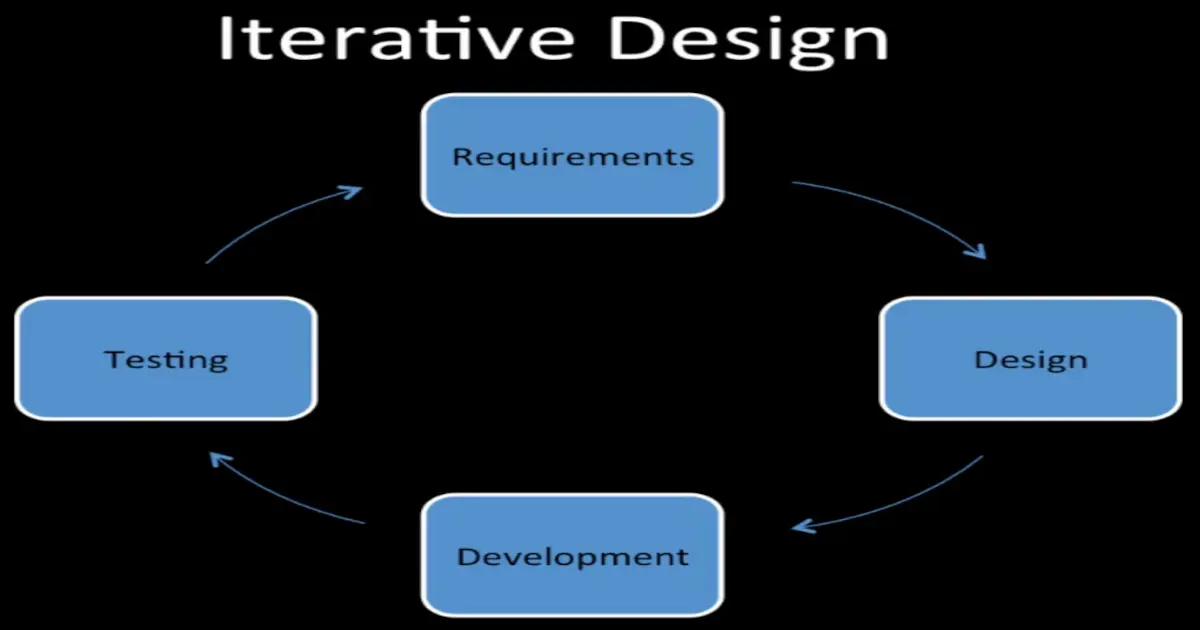
Iterative design
System centered design
What can be built easily on this platform?
What can I create from the available tools?
What do I as a programmer find interesting to work on?
User centered design
Design is based upon a user’s
Abilities and real needs
Context
Work
Tasks
Participatory design
Problem
intuitions wrong
interviews etc. not precise
designer cannot know the user sufficiently well to answer all issues that come up during the design
Solution
designers should have access to a pool of representative users. That is, END users, not their managers or union reps!
Designer centered design
“It’s not the consumers’ job to know what they want.”
— Steve Jobs
Case Study: SSL Warnings – example user
User knows something bad is happening, but not what.
User has good general strategies (worry more about sites with sensitive info)
Error message relies on a lot of information users don’t understand
Evaluation: usability studies, A/B testing, quantitative and qualitative evaluation, cybersecurity case study
Quantitative Evaluation
Cognitive Walkthrough
Requirements;
Description or prototype of interface
Task Description
List of actions to complete task
Use background
What you look for; (A mobile Gesture prototype)
Will users know to perform the action?
Will users see the control
Will users know the control does what they want?
Will users understand the feedback?
Heuristic Analysis
Follow ‘rules of thumb’ or suggestions about good design.
Can be done by experts/designers, fast and easy.
May miss problems users would catch.
Nielsen’s Heuristics
Simple and natural dialog
Speak the users’ language
Minimize user memory load
Consistency
Feedback
Clearly marked exits
Shortcuts
Prevent errors
Good error messages
Providing help and documentation
Personas
A fictitious user representing a class of users
Reference point for design and analysis
Has a goal or goals they want to accomplish (in general or in the system)
Running Controlled Experiments
State a lucid, testable hypothesis.
Identify independent and dependent variables
Design the experimental protocol
Choose the user population
Run some pilot participants
Fix the experimental protocol
Run the experiment
Perform statistical analysis
Draw conclusion
Communicate results
Analysis
Statistical comparison (e.g., t-test)
Report results
Usability Studies
Testing Usability of Security
Security is rarely the task users set out to accomplish.
Good Security is a seamless part of the task.
Usability Study Process
Define tasks (and their importance)
Develop Questionnaires
Selecting Tasks
What are the most important things a user would do with this interface?
Present it as a task not a question
Be specific
Don’t give instructions
Don’t be vague or provide tiny insignificant tasks
Choose representative tasks that reflect the most important things a user would do with the interface
Security Tasks
Security is almost never a task
Pre-Test Questionnaires
Learn any relevant background about the subject’s
Age, gender, education level, experience with the web, experience with this type of website, experience with this site in particular.
Perhaps more specific questions based on the site, e.g., color blindness, if the user has children, etc.
Post-Test Questionnaires
Have users provide feedback on the interface.
Evaluation
Users are given a list of tasks and asked to perform each task.
Interaction with the user is governed by different protocols.
Observation Methods
Silent Observer
Think Aloud
Constructive Interaction
Interview
Ask users to give you feedback
Easier for the user than writing it down
They will tell you, things, you never thought to ask
Reporting
After the evaluation, report your results
Summarize the experiences of users
Emphasize your insights with specific examples or quotes
Offer suggestions for improvement for tasks that were difficult to perform
A/B Testing
Doesn’t include any Cognitive or psychological understanding or model of user behavior.
You give two options, A or B, and measure how they perform.
How to Run A/B Test
Start with a small percentage of visitors trying the experimental conditions.
Automatically stop testing if any condition has very bad performance.
Let people consistently see the same variation so, they don’t get confused.
Strategies for Secure Interaction Design: authority, guidelines for interface design
Strategies for Secure Interaction Design: authority, guidelines for interface design
It’s the user who is making security decision, so, keep user in mind when designing security systems.
Authority Guidelines
Match the easiest way to do a task with the least granting of authority.
What are typical user tasks?
What is the easiest way for the user to accomplish each task?
What authority is granted to software and other people when the user takes the easiest route to completing the task?
How can the safest ways of accomplishing the task be made easier and vice versa?
Grant authority to others in accordance with user actions indicating consent.
When does the system give access to the user’s resources?
What user action grants that access?
Does the user understand that the action grants access?
Offer the user ways to reduce other’s authority to access the user’s resources.
What kind of access does the user grant to software and other users?
Which types of access can be revoked?
How can the interface help the user find and revoke access?
Authorization and Communication Guidelines
Users should know what authority other’s have.
What kind of authority can software and other users hold?
What kind of authority impact user decisions with security consequences?
How can the interface provide timely access to information about these authorities?
User should know what authority they themselves have.
What kind of authority does the user hold?
How does the user know they have that authority?
What might the user decide based on their expectation of authority?
Make sure the user trust the software acting on their behalf.
What agents manipulate authority on the user’s behalf?
How can users be sure they are communicating with the intended agent?
How might the agent be impersonated?
How might the user’s communication with the agent be corrupted/intercepted?
Interface Guidelines for Usable Security
Enable the user to express safe security policies that fit the user’s task.
What are some examples of security policies that users might want enforced for typical tasks?
How can the user express these policies?
How can the expression of policy be brought closer to the task?
Draw distinction among objects and actions along boundaries relevant to the task.
At what level of details does the interface allow objects and actions to be separately manipulated?
What distinction between affected objects and unaffected objects does the user care about?
Present objects and actions using distinguishable, truthful appearances.
How does the user identify and distinguish different objects and actions?
In what ways can the means of identification be controlled by other parties?
What aspects of an object’s appearances are under system control?
How can those aspects be chosen to best prevent deception?