Subsections of Network Security and Database Vulnerabilities
Introduction to the TCP/IP Protocol Framework
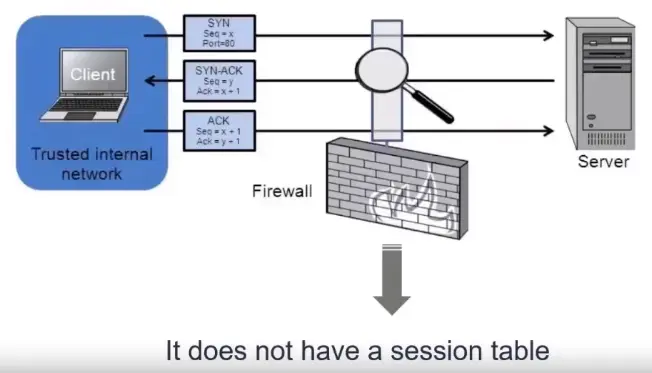
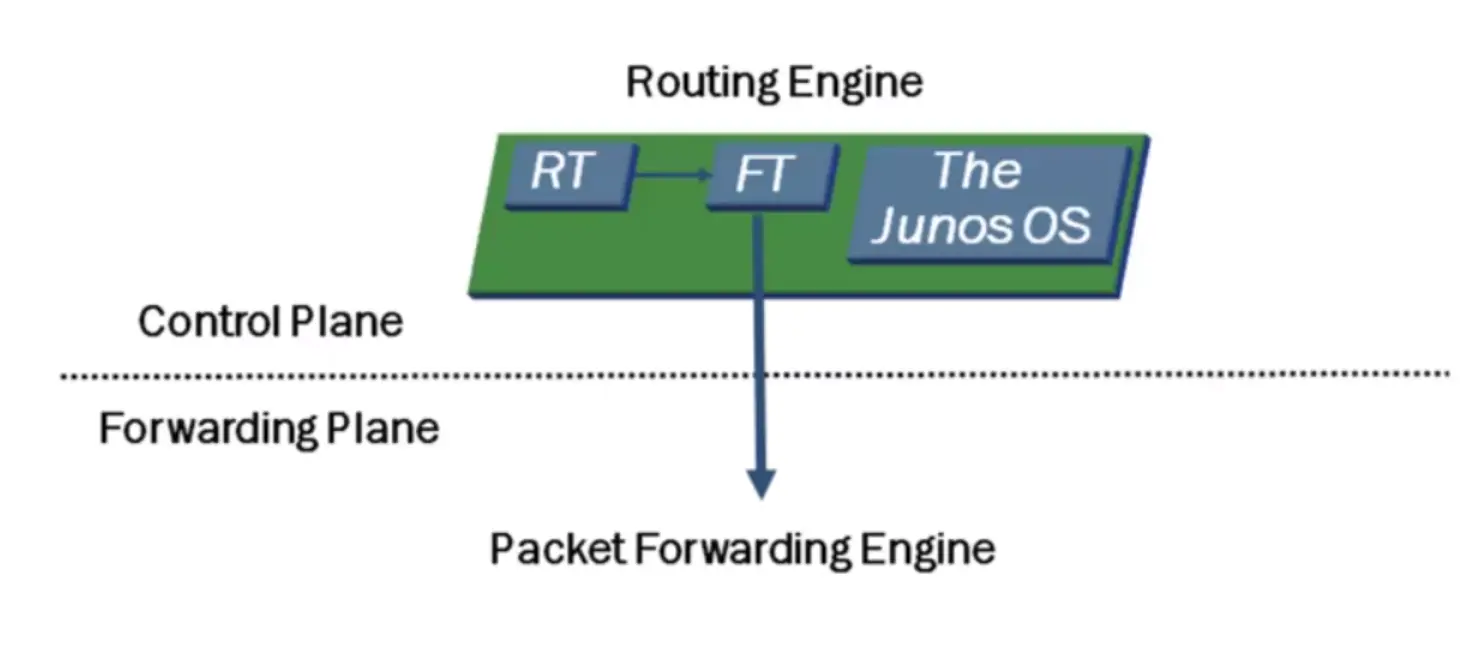
Stateless Inspection
Stateless means that each packet is inspected one at a time with no knowledge of the previous packets.
Stateless Inspection Use Cases
To protect routing engine resources.
To control traffic going in or your organization.
For troubleshooting purposes.
To control traffic routing (through the use of routing instances).
To perform QoS/CoS (marking the traffic).
Stateful Inspection
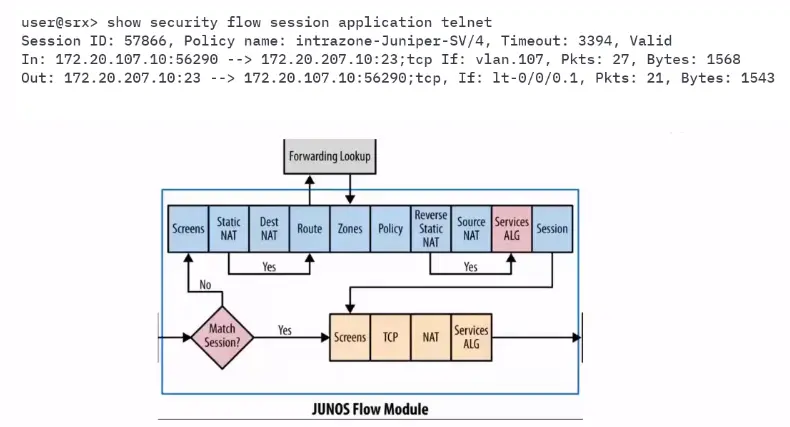
A stateful inspection means that each packet is inspected with knowledge of all the packets that have been sent or received from the same session.
A session consists of all the packets exchanged between parties during an exchange.
What if we have both types of inspection?
Firewall Filters – IDS and IPS System
Firewall Filter (ACLs) / Security Policies Demo…
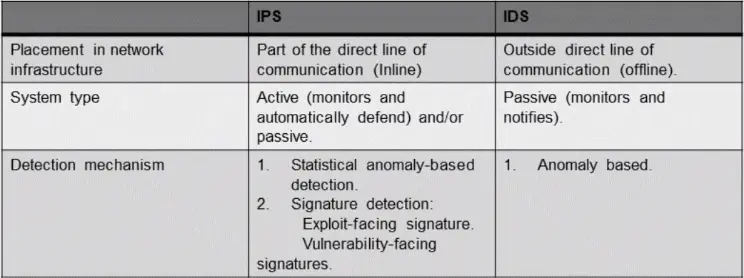
IDS
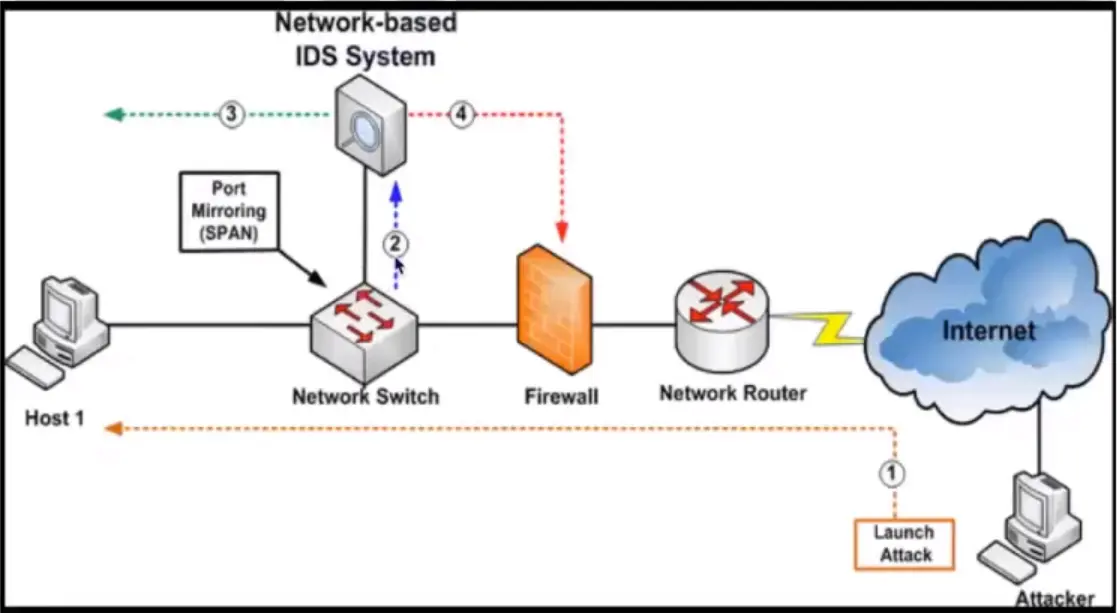
An Intrusion Detection System (IDS) is a network security technology originally built for detecting vulnerability exploits against a target application or computer.
By default, the IDS is a listen-only device.
The IDS monitor traffic and reports its results to an administrator.
Cannot automatically take action to prevent a detected exploit from taking over the system.
Basics of an Intrusion Prevention System (IPS)
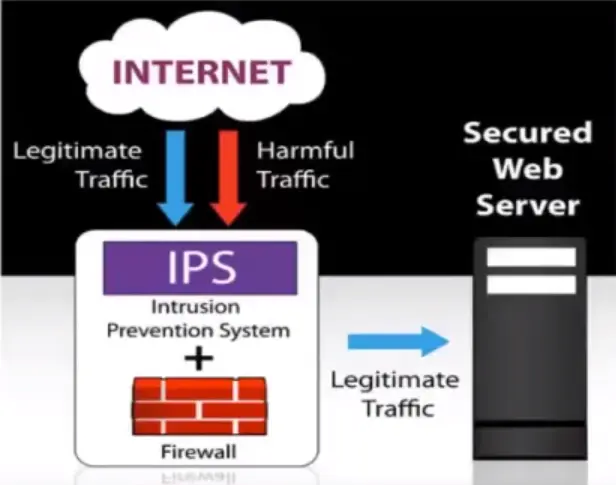
An IPS is a network security/threat prevention technology that examines network traffic flows to detect and prevent vulnerability exploits.
The IPS often sites directly behind the firewall, and it provides a complementary layer of analysis that negatively selects for dangerous content.
Unlike the IDS – which is a passive system that scans traffic and reports back on threats – the IPS is placed inline (in the direct communication path between source and destination), actively analyzing and taking automated actions on all traffic flows that enter the network.
How does it detect a threat?
The Difference between IDS and IPS Systems
Network Address Translation (NAT)
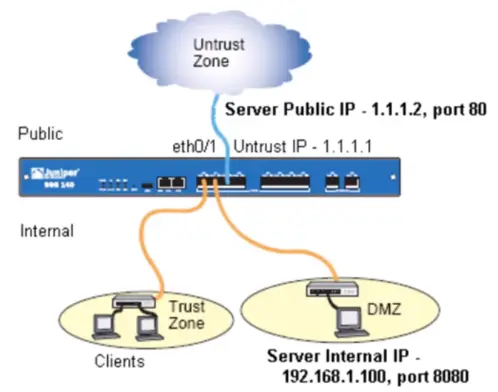
Method of remapping one IP address space into another by modifying network address information in Internet Protocol (IP) datagram packet headers, while they are in transit across a traffic routing device.
Gives you an additional layer of security.
Allows the IP network of an organization to appear from the outside to use a different IP address space than what it is actually using. Thus, NAT allows an organization with non-globally routable addresses to connect to the Internet by translating those addresses into a globally routable addresses space.
It has become a popular and essential tool in conserving global address space allocations in face of IPv4 address exhaustion by sharing one Internet-routable IP address of a NAT gateway for an entire private network.
Types of NAT
Static Address translation (static NAT): Allows one-to-one mapping between local and global addresses.
Dynamic Address Translation (dynamic NAT): Maps unregistered IP addresses to registered IP addresses from a pool of registered IP addresses.
Overloading: Maps multiple unregistered IP addresses to a single registered IP address (many to one) using different ports. This method is also known as Port Address Translation (PAT). By using overloading, thousands of users can be connected to the Internet by using only one real global IP address.
Network Protocols over Ethernet and Local Area Networks
An Introduction to Local Area Networks
Network Addressing
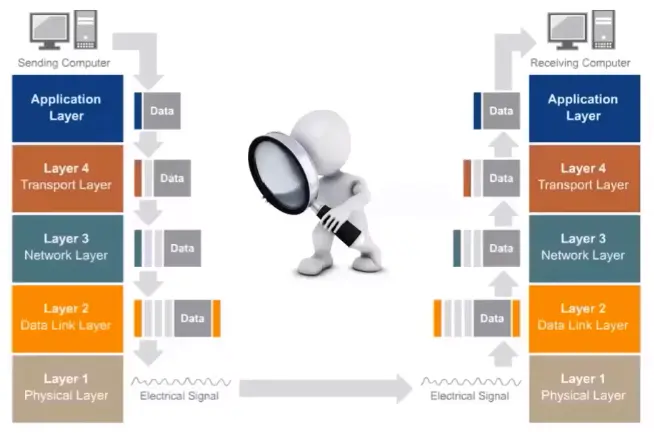
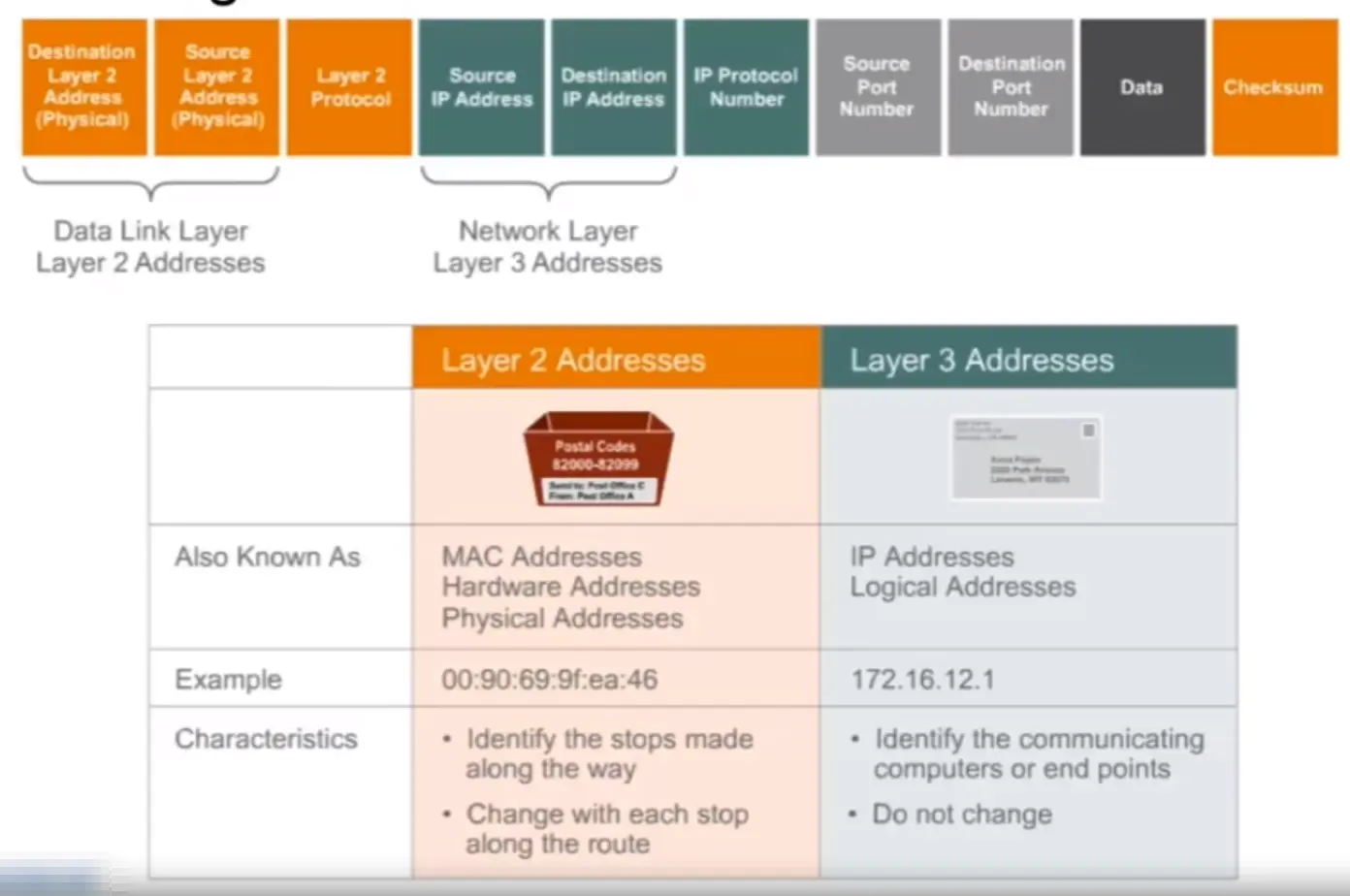
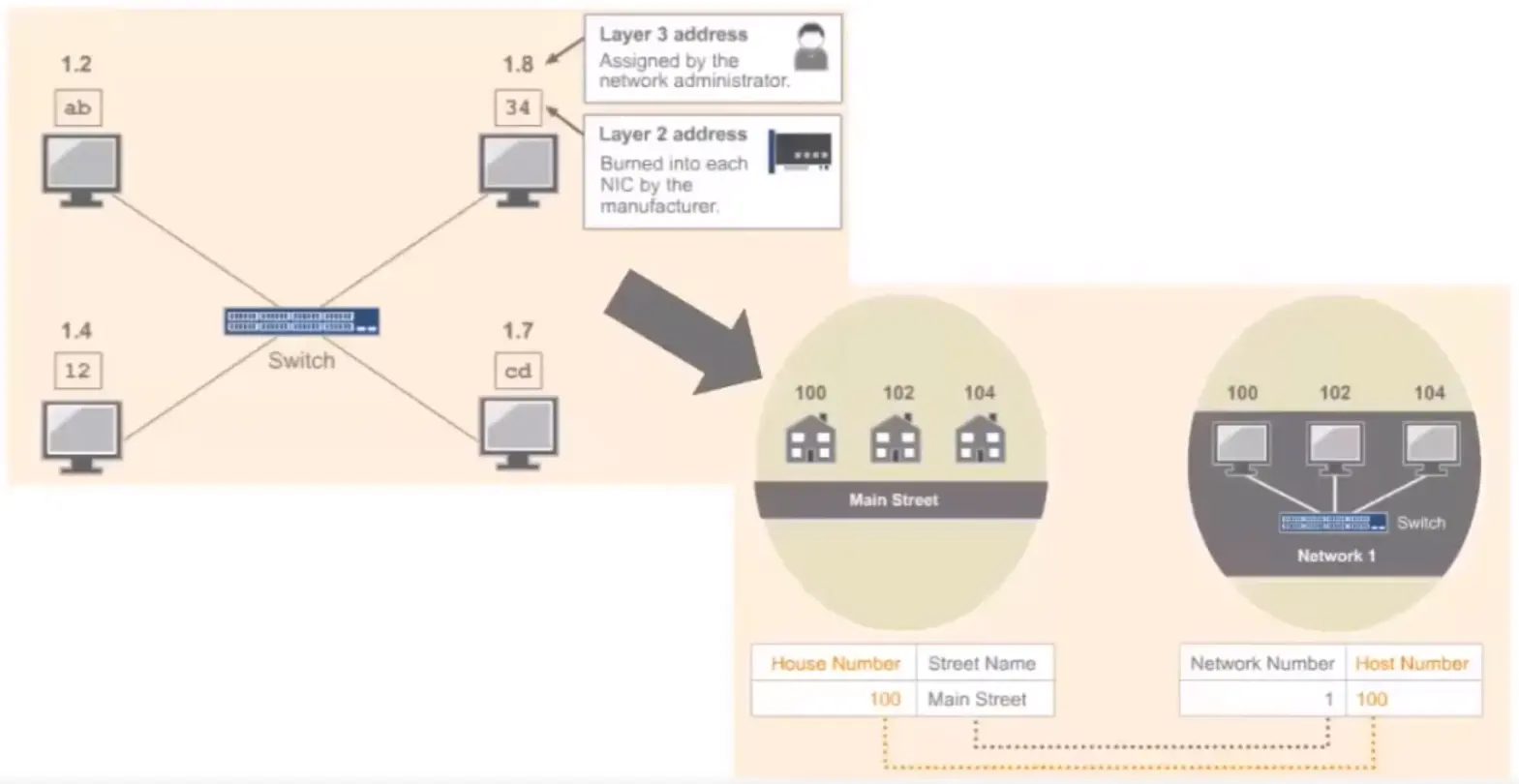
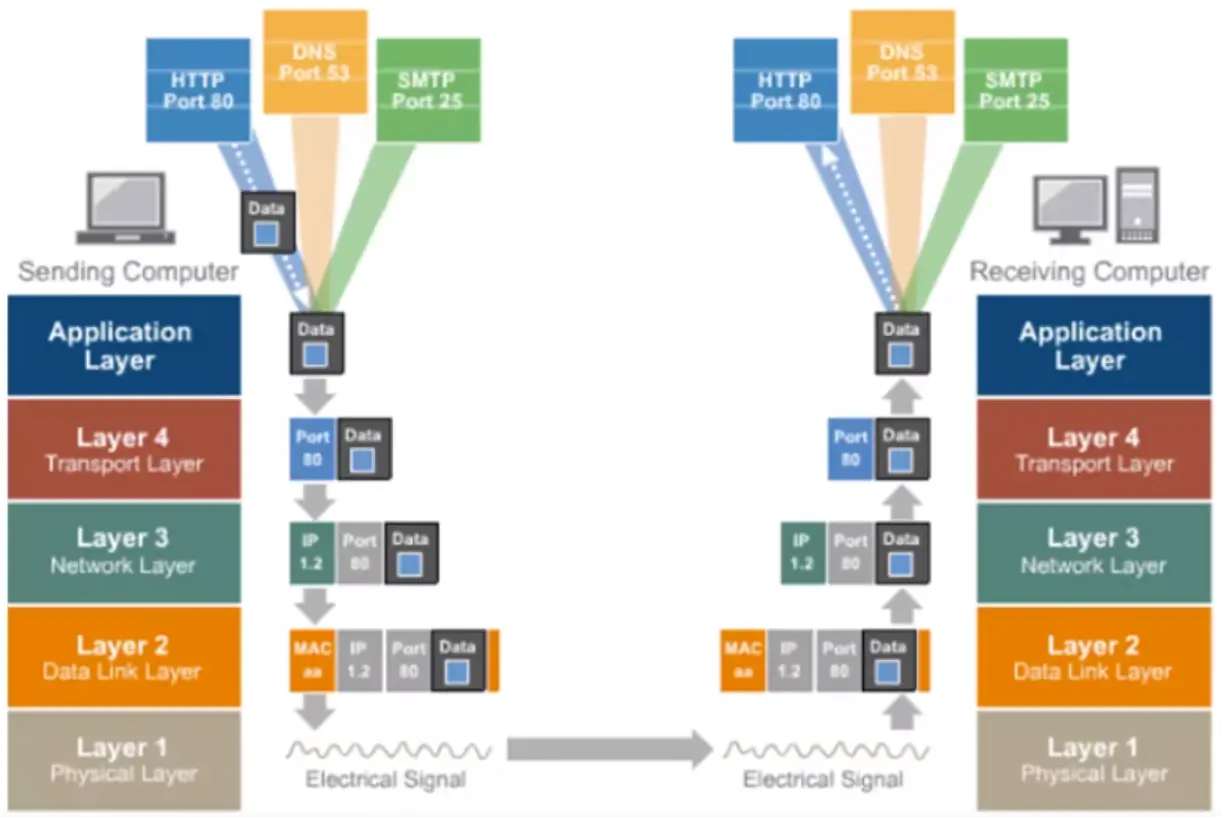
Layer 3 or network layer adds an address to the data as it flows down the stack; then layer 2 or the data link layer adds another address to the data.
Introduction to Ethernet Networks
For a LAN to function, we need:
Connectivity between devices
A set of rules controlling the communication
The most common set of rules is called Ethernet.
To send a packet from one host to another host within the same network, we need to know the MAC address, as well as the IP address of the destination device.
Ethernet and LAN – Ethernet Operations
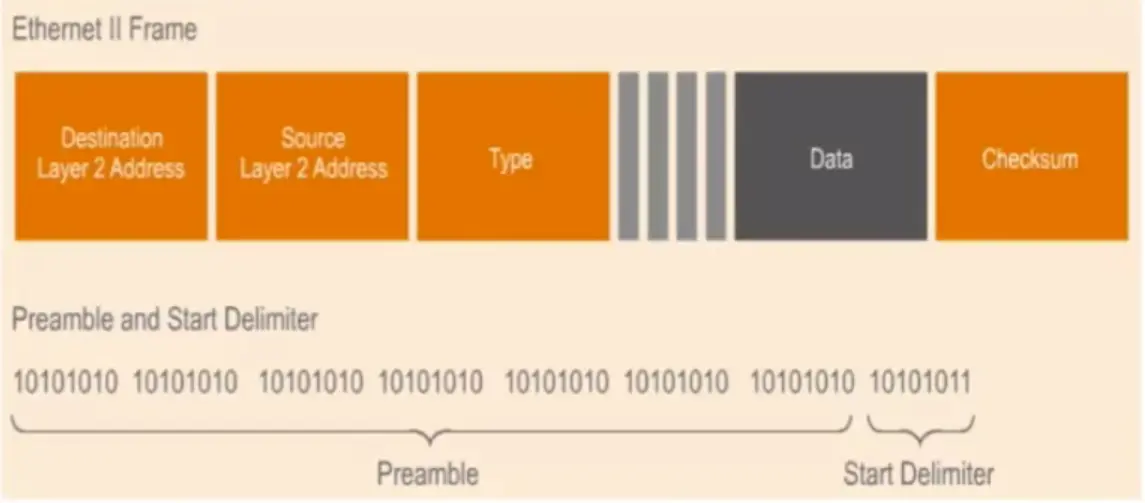
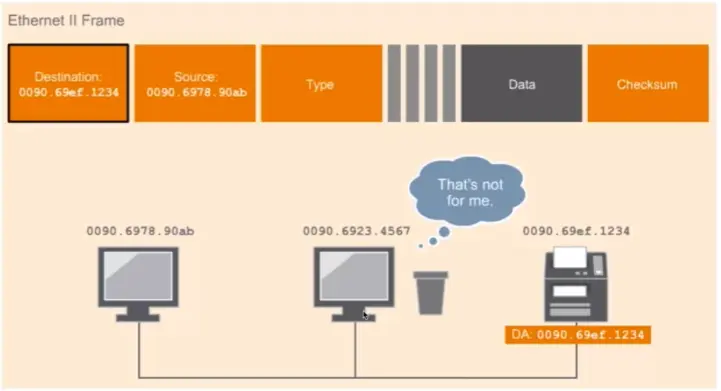
How do devices know when the data if for them?
Destination Layer 2 address: MAC address of the device that will receive the frame.
Source Layer 2 address: MAC address of the device sending the frame.
Types: Indicates the layer 3 protocol that is being transported on the frame such as IPv4, IPv6, Apple Tall, etc.
Data: Contains original data as well as the headers added during the encapsulation process.
Checksum: This contains a Cyclic Redundancy Check to check if there are errors on the data.
MAC Address
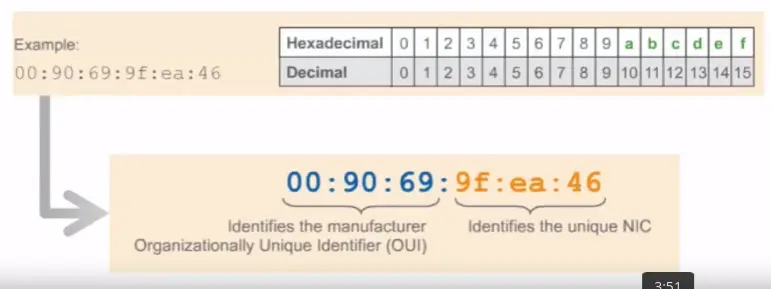
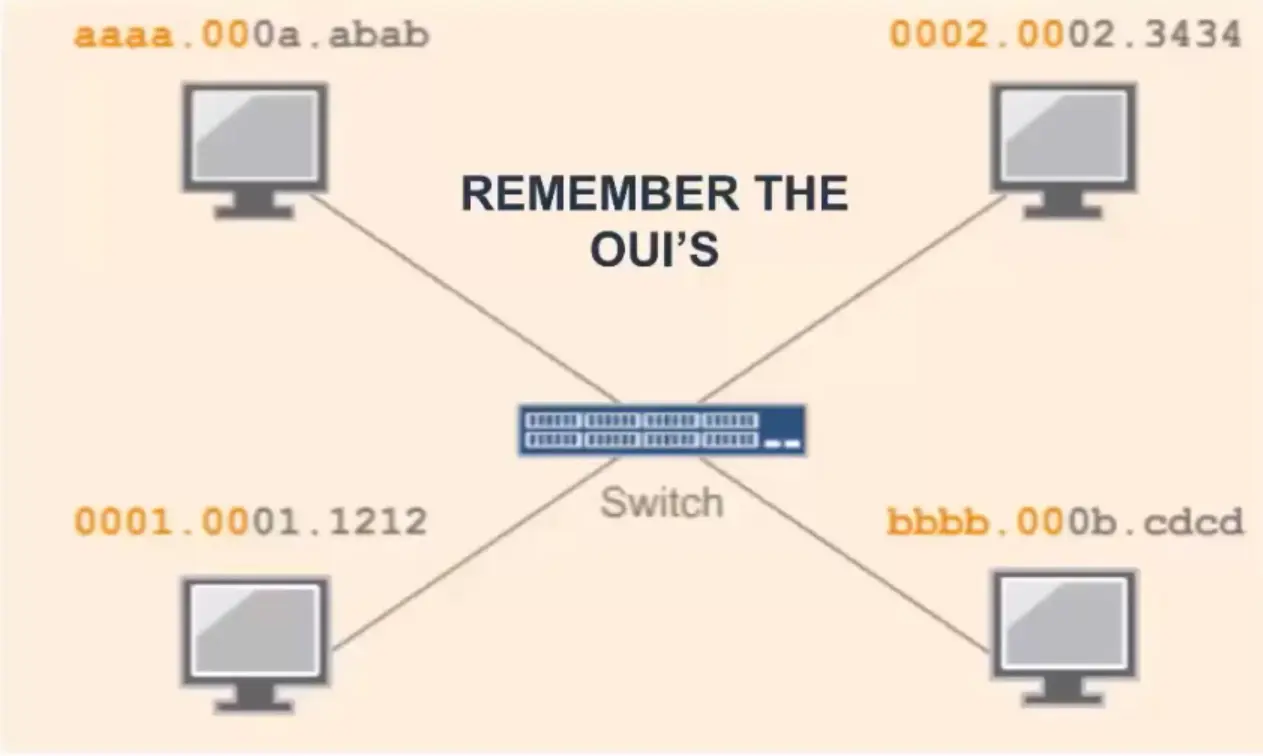
A MAC address is a 48-bits address that uniquely identifies a device’s NIC. The first 3 bytes are for the OUI and the last 3 bytes are reserved to identify each NIC.
Preamble and delimiter (SFD)
Preamble and delimiter (SFD) are 7 byte fields in an Ethernet frame. Preamble informs the receiving system that a frame is starting and enables synchronization, while SFD (Start Frame Delimiter) signifies that the Destination MAC address field begin with the next byte.
What if I need to send data to multiple devices?
Ethernet and LAN – Network Devices
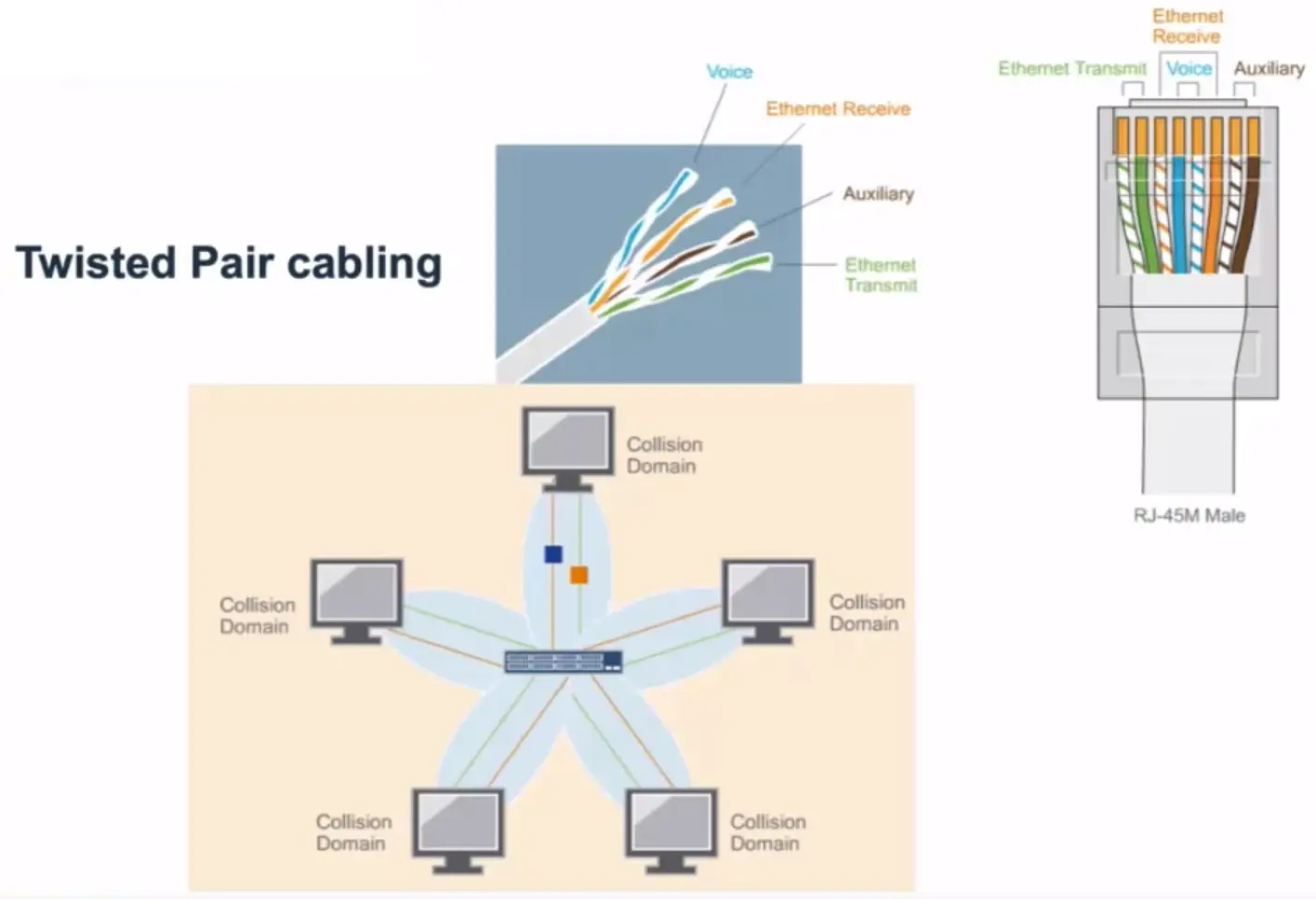
Twisted Pair Cabling
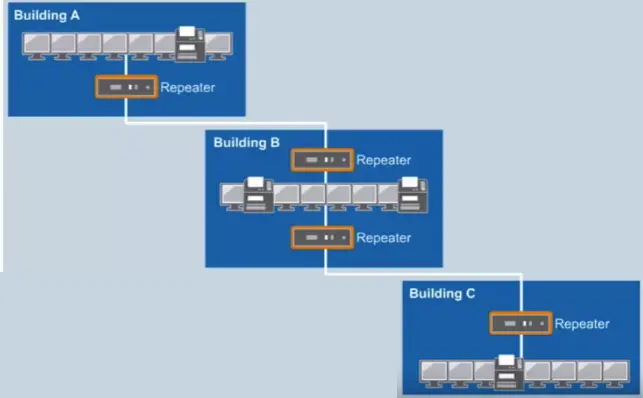
Repeater
Regenerates electrical signals.
Connects 2 or more separate physical cables.
Physical layer device.
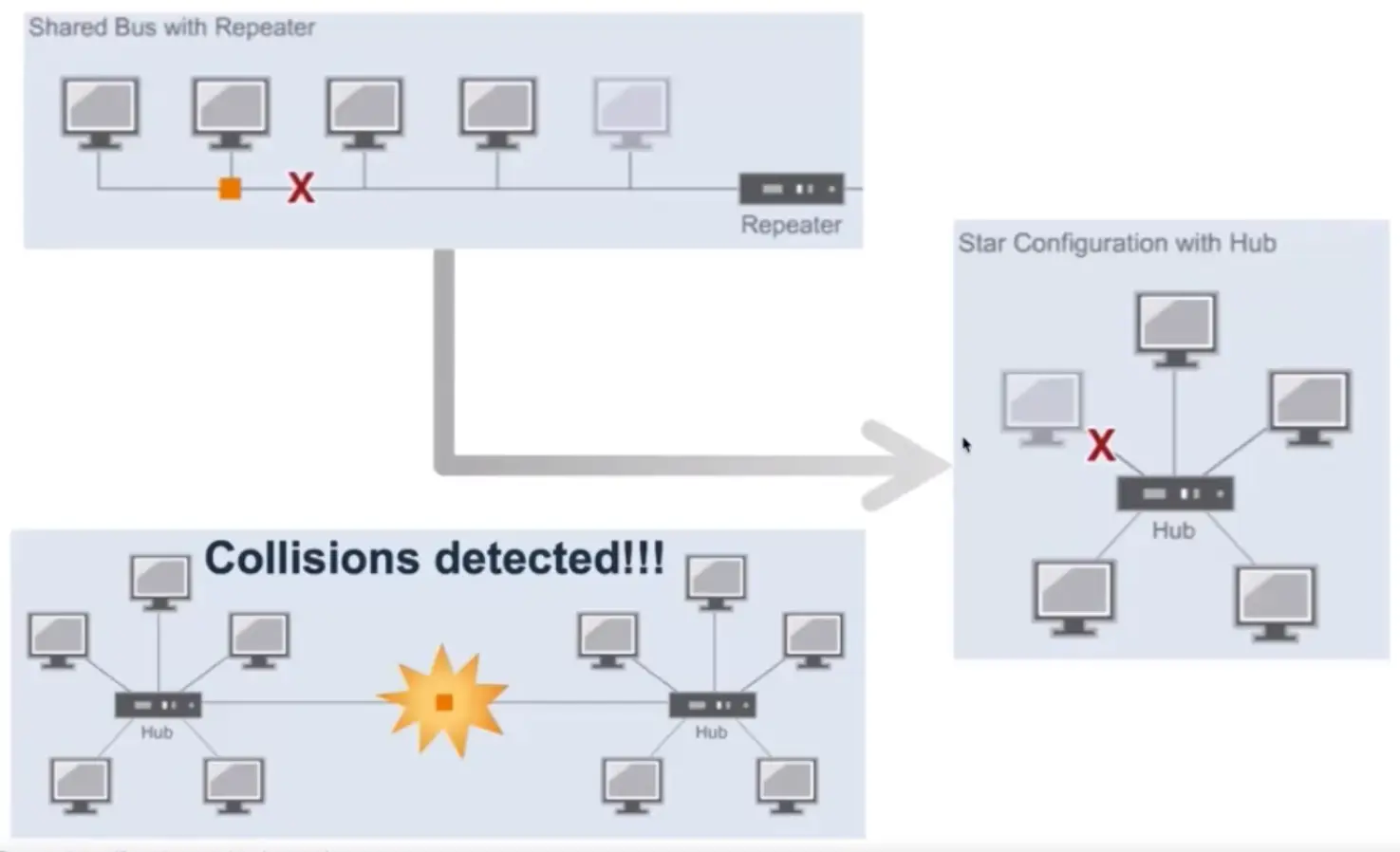
Repeater has no mechanism to check for collision.
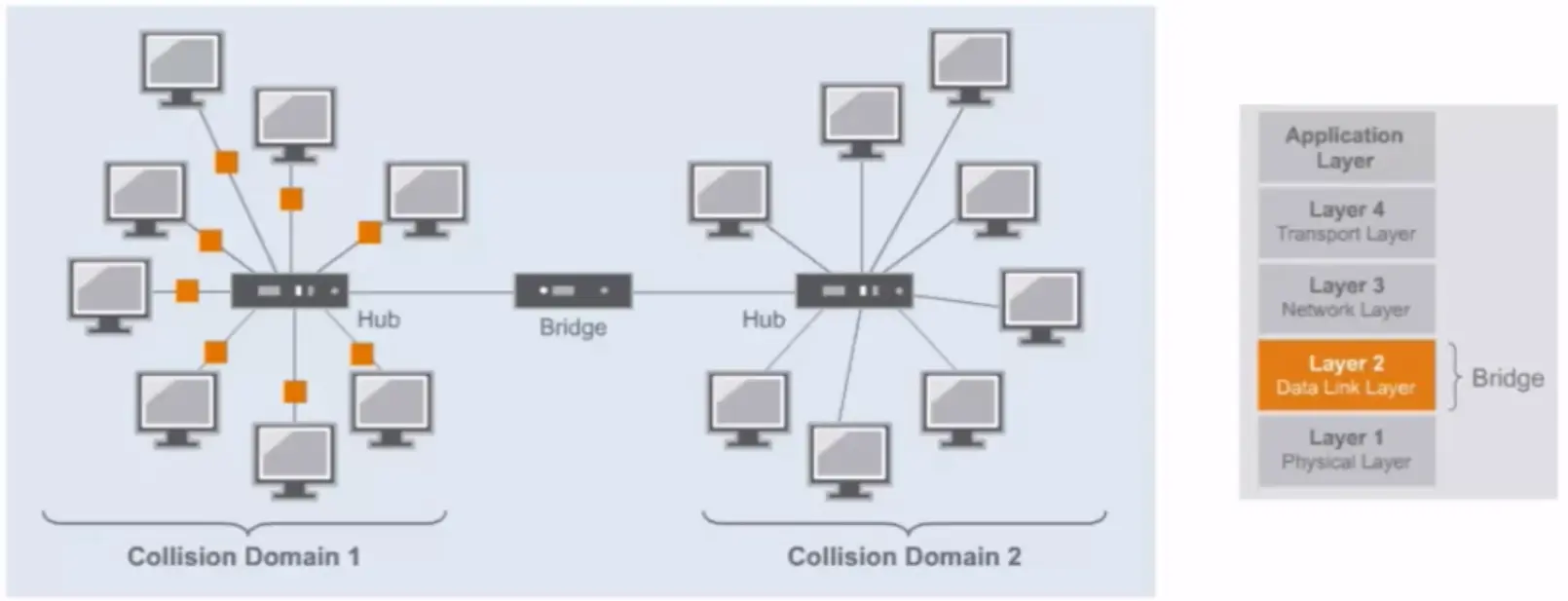
Bridge
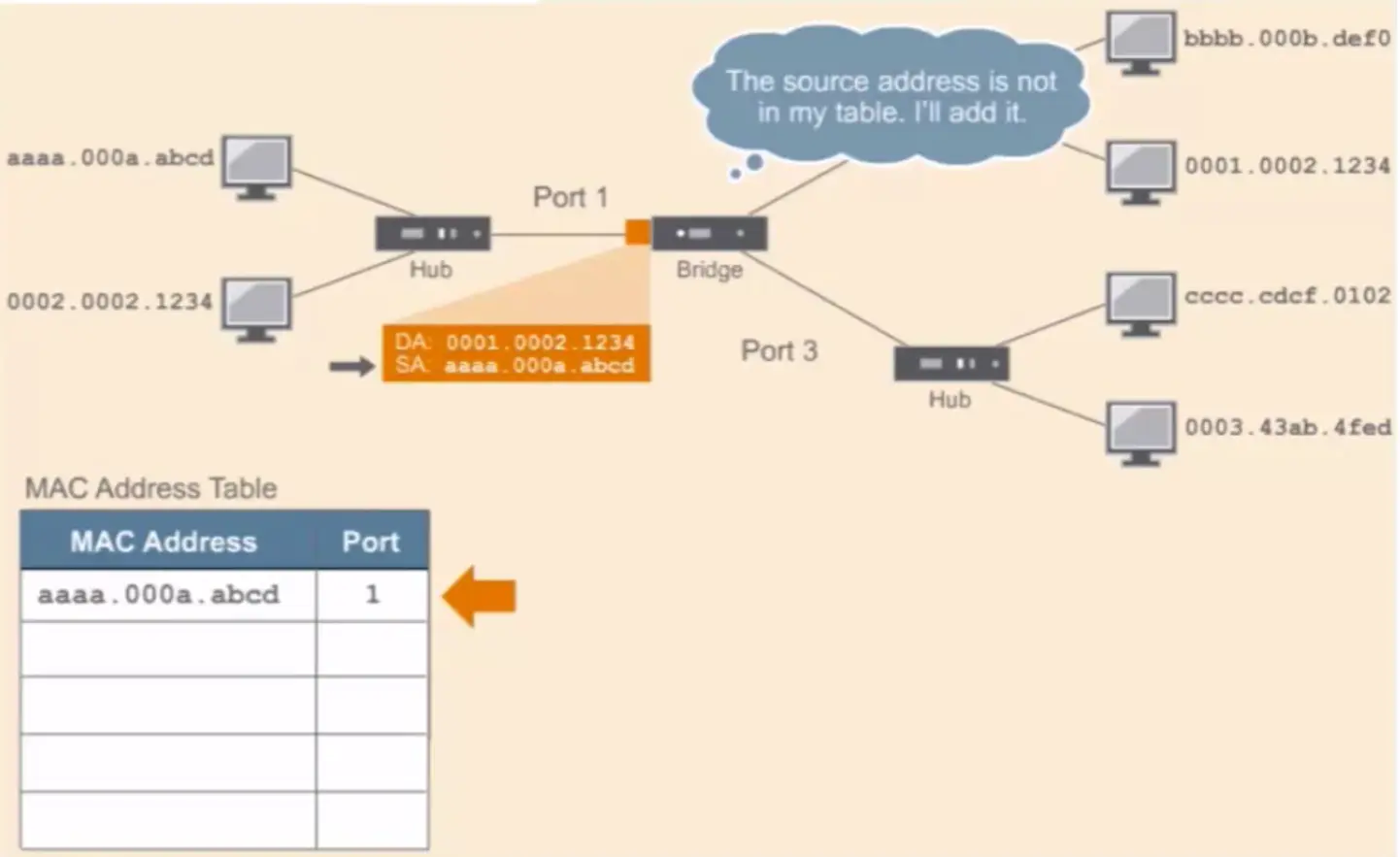
Ethernet bridges have 3 main functions:
Forwarding frames
Learning MAC addresses
Controlling traffic
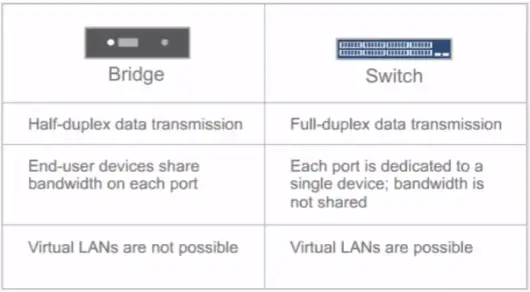
Difference between a Bridge and a Switch
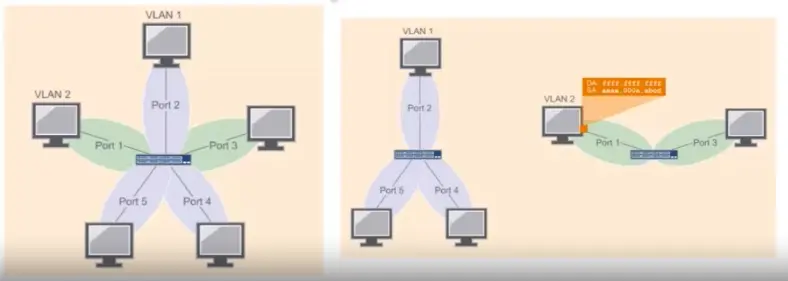
VLANs provide a way to separate LANs on the same switch.
Devices in one VLAN don’t receive broadcast from devices that are on another VLAN.
Limitations of Switches:
Network loops are still a problem.
Might not improve performance with multicast and broadcast traffic.
Can’t connect geographically dispersed networks.
Basics of Routing and Switching, Network Packets and Structures
Layer 2 and Layer 3 Network Addressing
Address Resolution Protocol (ARP)
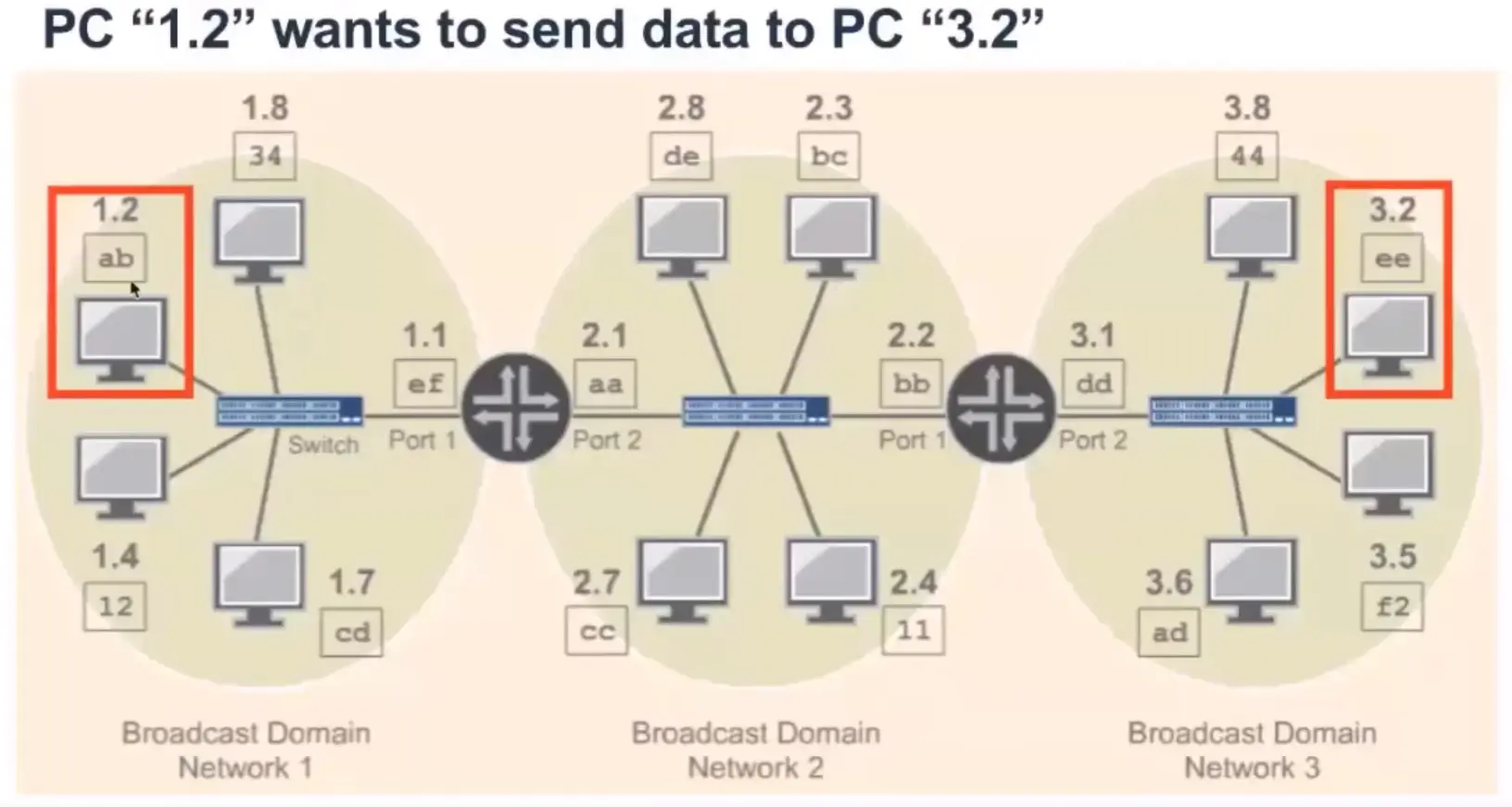
The process of using layer 3 addresses to determine layer 2 addresses is called ARP or Address Resolution Protocol.
Routers and Routing Tables
Routing Action
Basics of IP Addressing and the OSI Model
IP Addressing – The Basics of Binary
IP Address Structure and Network Classes
IP Protocol
IPv4 is a 32 bits address divided into four octets.
From 0.0.0.0 to 255.255.255.255
IPv4 has 4,294,967,296 possible addresses in its address space.
Classful Addressing
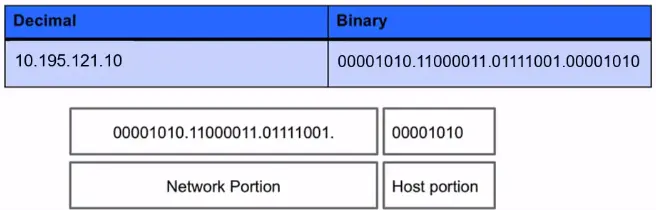
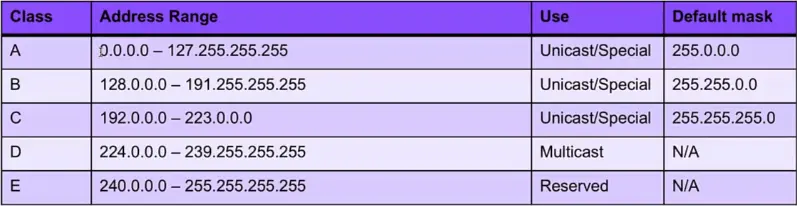
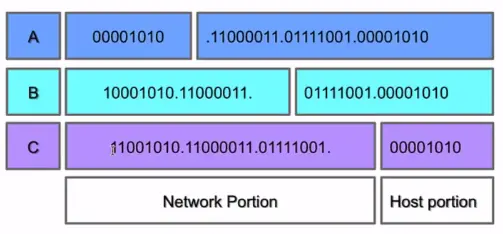
When the Internet’s address structure was originally defined, every unicast IP address had a network portion, to identify the network on which the interface using the IP address was to be found, and a host portion, used to identify the particular host on the network given in the network portion.
The partitioning of the address space involved five classes. Each class represented a different trade-off in the number of bits of a 32-bit IPv4 address devoted to the network numbers vs. the number of bits devoted to the host number.
IP Protocol and Traffic Routing
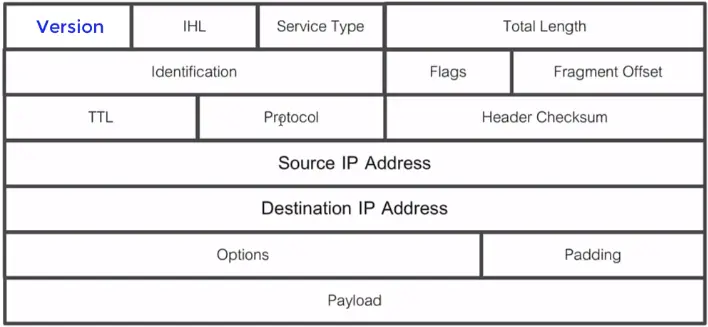
IP Protocol (Internet Protocol)
Layer 3 devices use the IP address to identify the destination of the traffic, also devices like stateful firewalls use it to identify where traffic has come from.
IP addresses are represented in quad dotted notation, for example, 10.195.121.10.
Each of the numbers is a non-negative integer from 0 to 255 and represents one-quarter of the whole IP address.
A routable protocol is a protocol whose packets may leave your network, pass through your router, and be delivered to a remote network.
IP Protocol Header
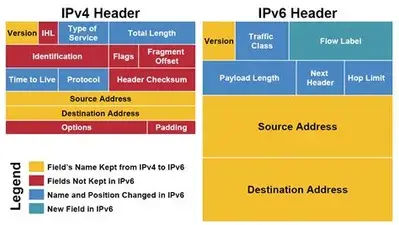
IPv4 vs. IPv6 Header
Network Mask
The subnet mask is an assignment of bits used by a host or router to determine how the network and subnetwork information is partitioned from the host information in a corresponding IP address.
It is possible to use a shorthand format for expressing masks that simply gives the number of contiguous 1 bit in the mask (starting from the left). This format is now the most common format and is sometimes called the prefix length.
The number of bits occupied by the network portion.
Masks are used by routers and hosts to determine where the network/subnetwork portion of an IP address ends and the host part starts.
Broadcast Addresses
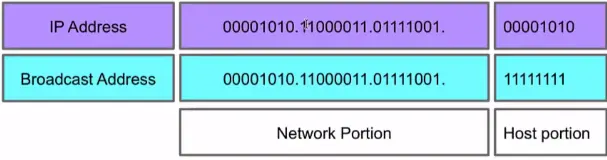
In each IPv4 subnet, a special address is reserved to be the subnet broadcast address. The subnet broadcast address is formed by setting the network/subnet portion of an IPv4 address to the appropriate value and all the bits in the Host portion to 1.
Introduction to the IPv6 Address Schema
IPv4 vs. IPv6
In IPv6, addresses are 128 bits in length, four times larger than IPv4 addresses.
An IPv6 address will no longer use four octets. The IPv6 address is divided into eight hexadecimal values (16 bits each) that are separated by a colon(:) as shown in the following examples:
65b3:b834:54a3:0000:0000:534e:0234:5332
The IPv6 address isn’t case-sensitive, and you don’t need to specify leading zeros in the address. Also, you can use a double colon(::) instead of a group of consecutive zeros when writing out the address.
0:0:0:0:0:0:0:1
::1
IPv4 Addressing Schemas
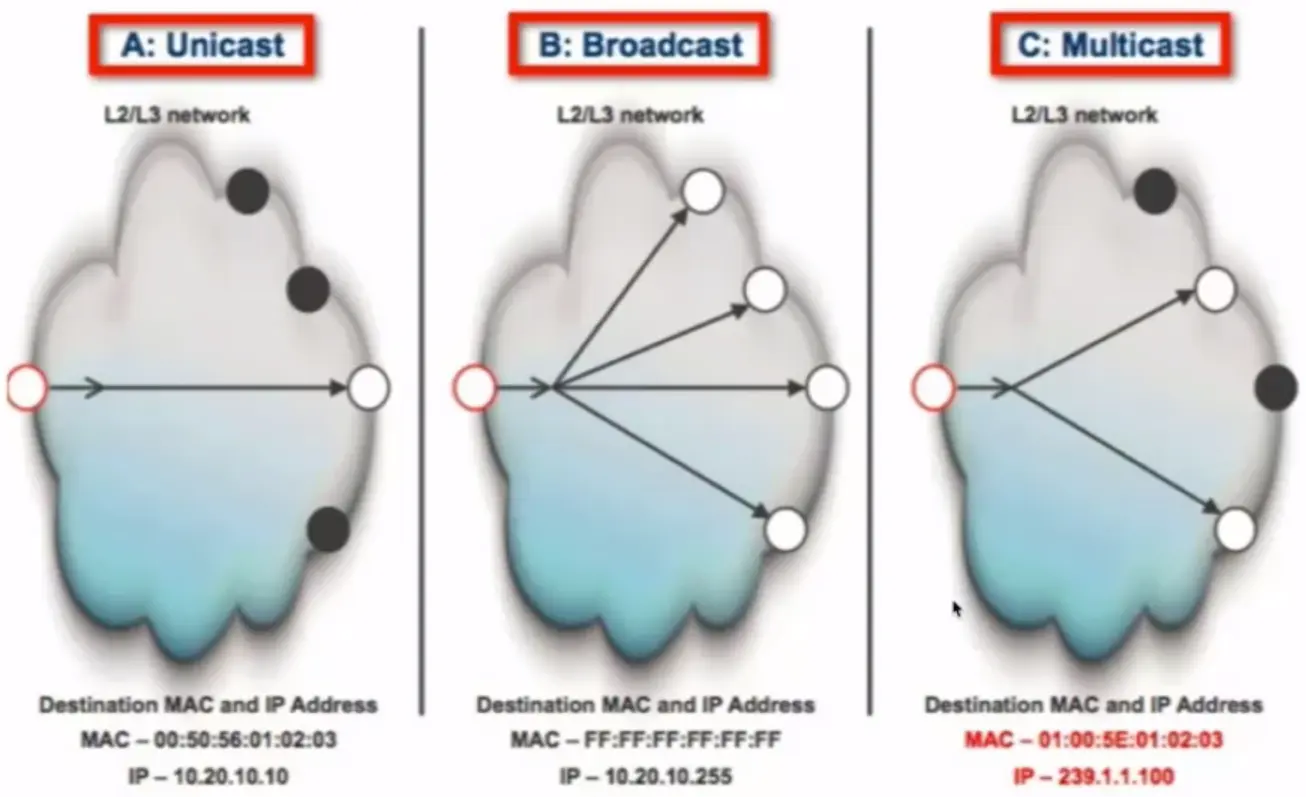
Unicast: Send information to one system. With the IP protocol, this is accomplished by sending data to the IP address of the intended destination system.
Broadcast: Sends information to all systems on the network. Data that is destined for all systems is sent by using the broadcast address for the network. An example of a broadcast address for a network is 192.168.2.2555. The broadcast address is determined by setting all hosts bits to 1 and then converting the octet to a decimal number.
Multicast: Sends information to a selected group of systems. Typically, this is accomplished by having the systems subscribe to a multicast address. Any data that is sent to the multicast address is then received by all systems subscribed to the address. Most multicast addresses start with 224.×.y.z and are considered class D addresses.
IPv6 Addressing Schemas
Unicast: A unicast address is used for one-on-one communication.
Multicast: A multicast address is used to send data to multiple systems at one time.
Anycast: Refers to a group of systems providing a service.
TCP/IP Layer 4 – Transport Layer Overview
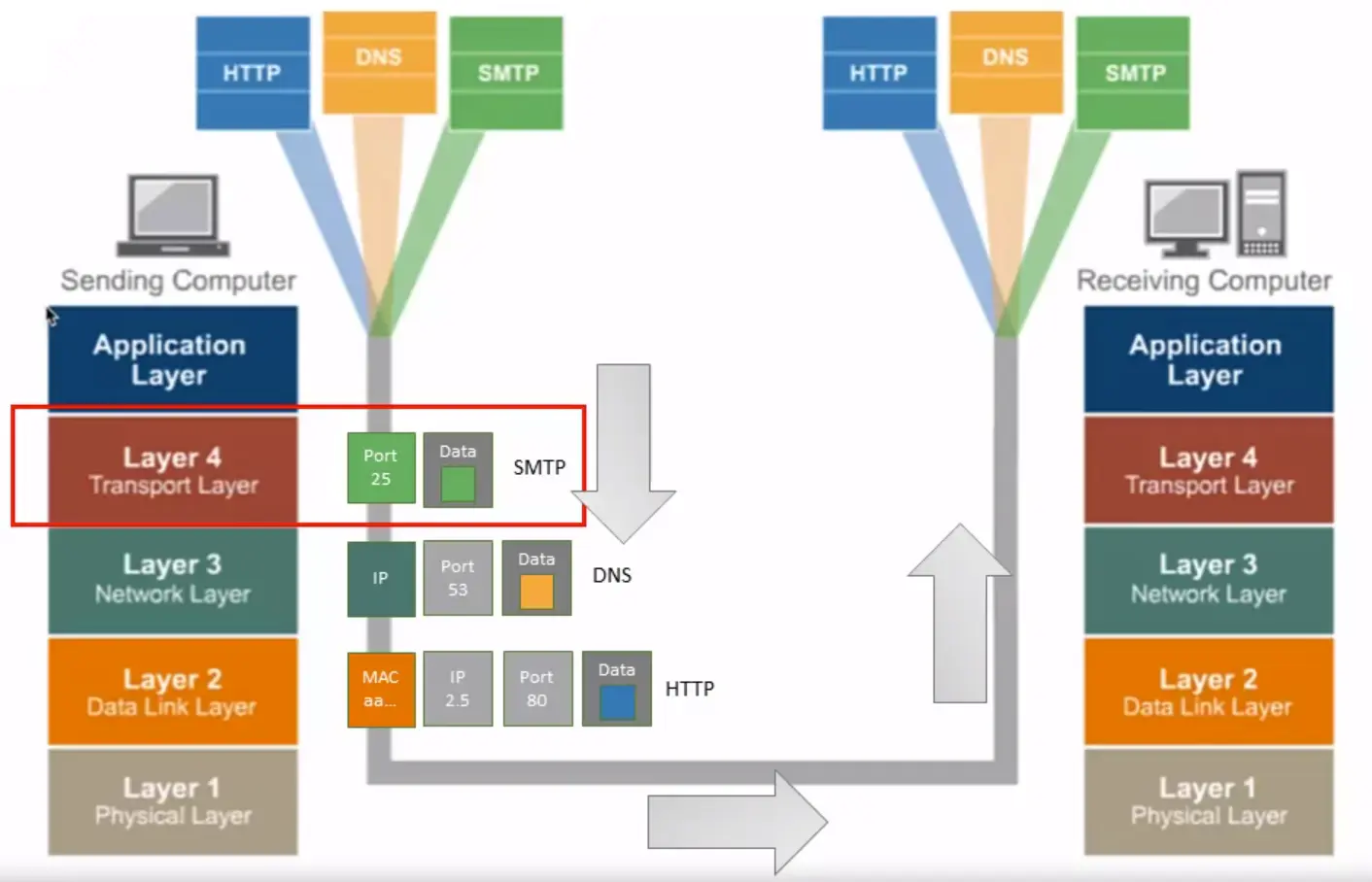
Application and Transport Protocols – UDP and TCP
Transport Layer Protocol > UDP
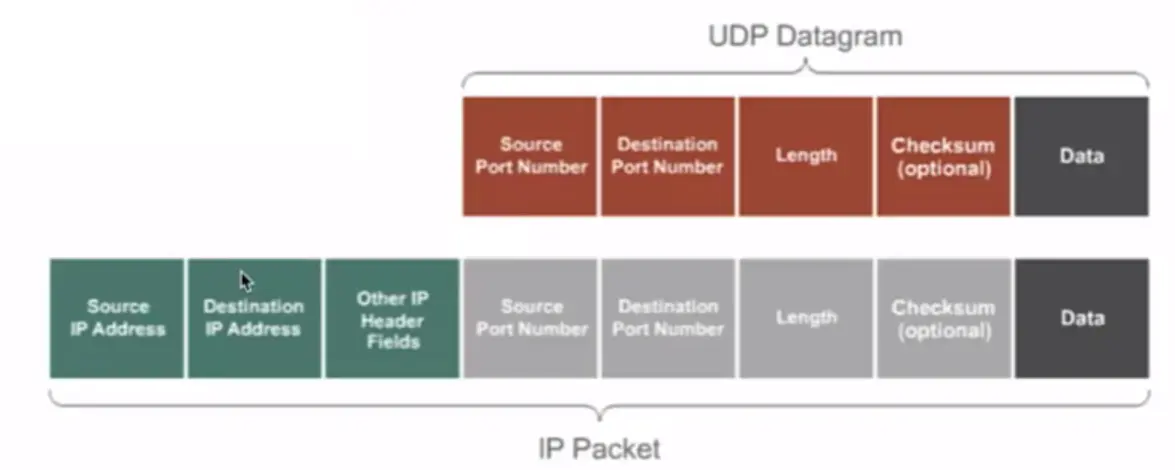
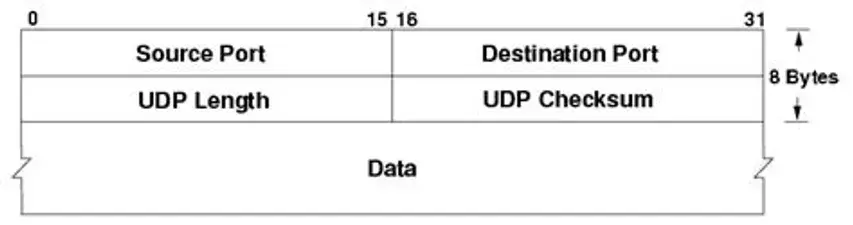
UDP Header Fields
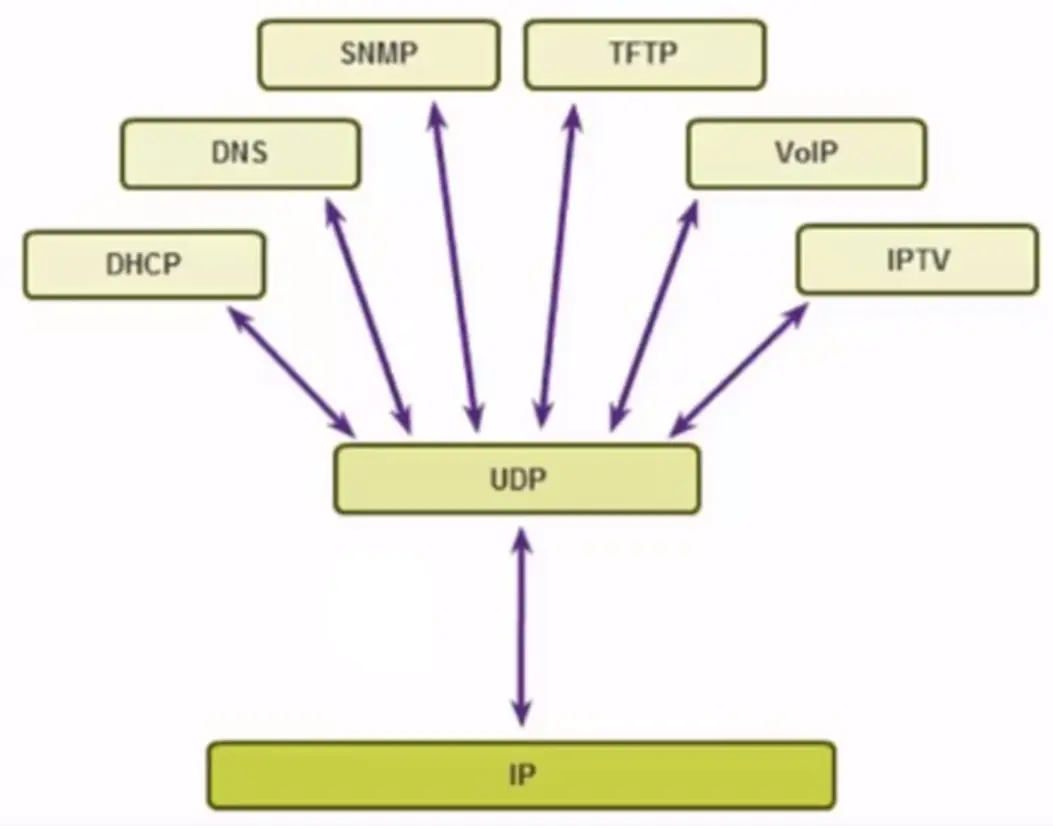
UDP Use Cases
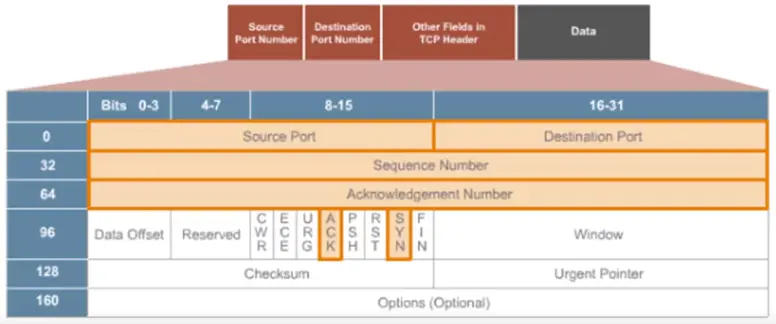
Transport Layer Protocol > TCP
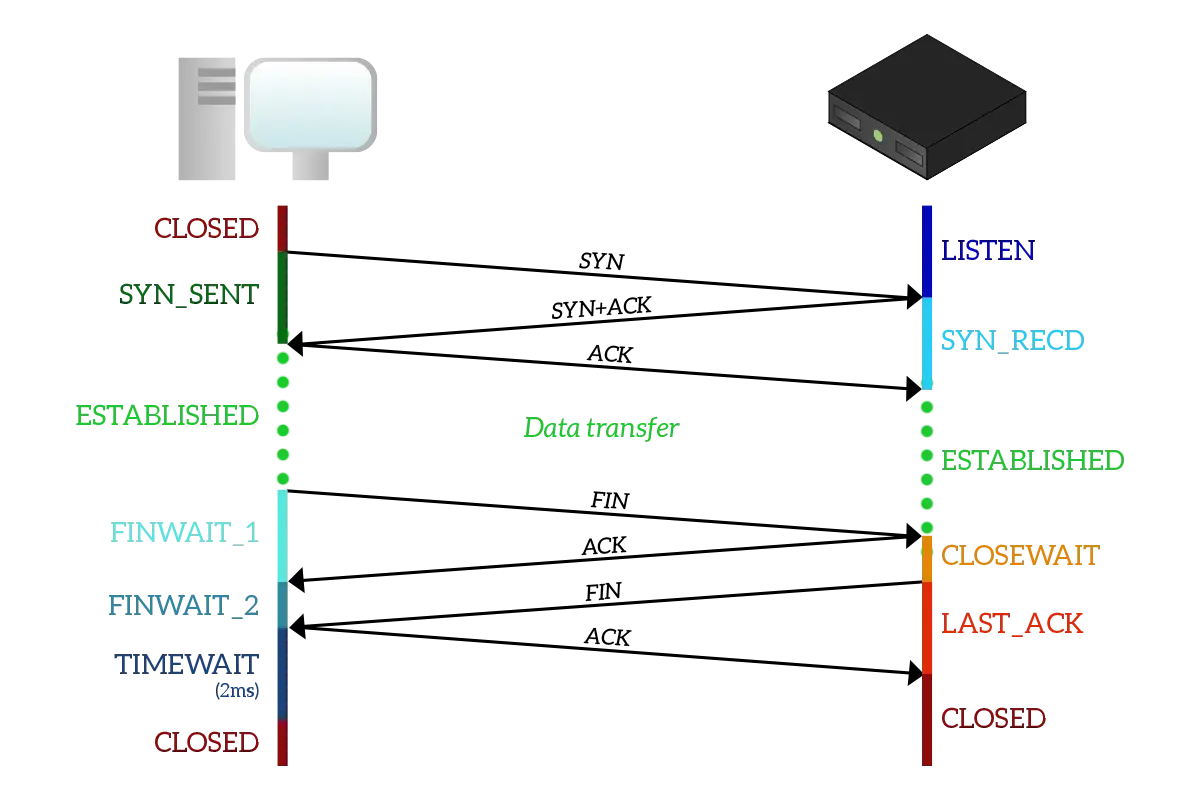
Transport Layer Protocol > TCP in Action
UDP vs TCP
Application Protocols – HTTP
Developed by Tim Berners-Lee.
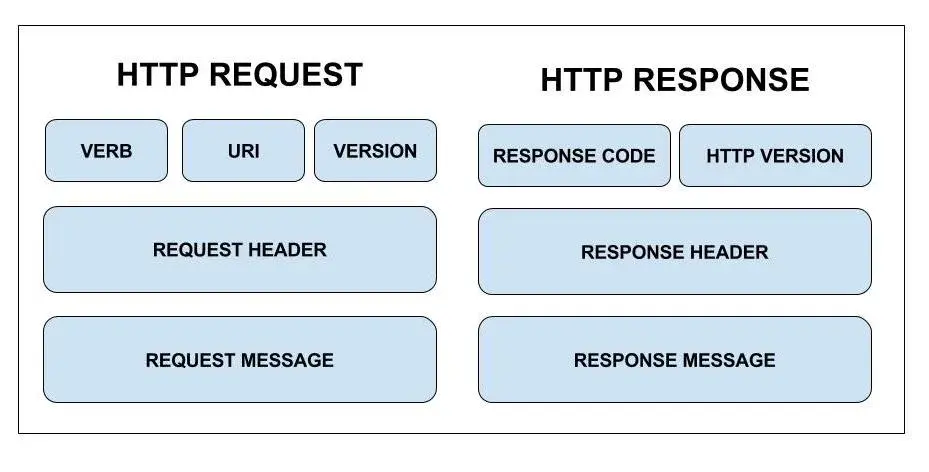
HTTP works on a request response cycle; where the client returns a response.
It is made of 3 blocks known as the start-line header and body.
Not secure.
Application Protocols – HTTPS
Designed to increase privacy on the internet.
Make use of SSL certificates.
It is secured and encrypted.
TCP/IP Layer 5 – Application Layer Overview
DNS and DHCP
DNS
Domain Name System or DNS translates domains names into IP addresses.
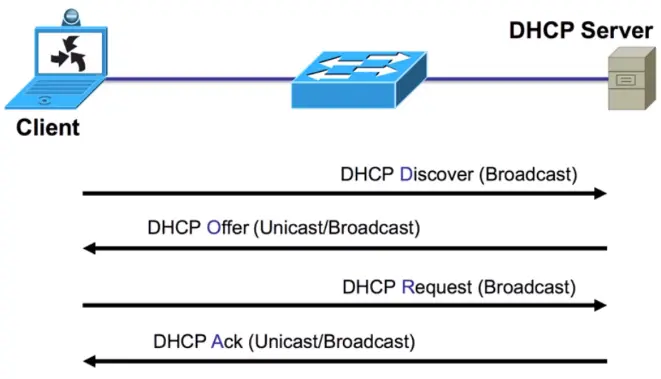
DHCP
Syslog Message Logging Protocol
Syslog is standard for message logging. It allows separation of the software that generates messages, the system that stores them, and the software that report and analyze them. Each message is labeled with a facility code, indicating the software type generating the message, and assigned a severity label.
Used for:
System management
Security auditing
General informational analysis, and debugging messages
Used to convey event notification messages.
Provides a message format that allows vendor specific extensions to be provided in a structured way.
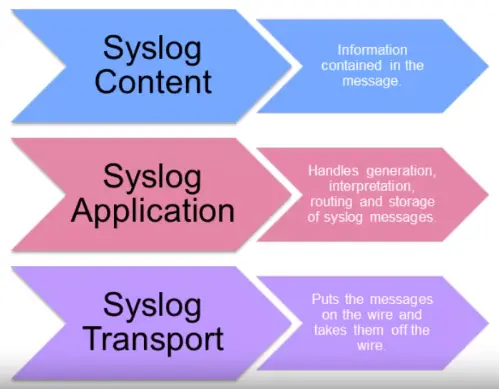
Syslog utilizes three layers
Functions are performed at each conceptual layer:
An “originator” generates syslog content to be carried in a message. (Router, server, switch, network device, etc.)
A “collector” gathers syslog content for further analysis. — Syslog Server.
A “relay” forwards messages, accepting messages from originators or other relays and sending them to collectors or other relays. — Syslog forwarder.
A “transport sender” passes syslog messages to a specific transport protocol. — the most common transport protocol is UDP, defined in RFC5426.
A “transport receiver” takes syslog messages from a specific transport protocol.
Syslog messages components
The information provided by the originator of a syslog message includes the facility code and the severity level.
The syslog software adds information to the information header before passing the entry to the syslog receiver:
Originator process ID
a timestamp
the hostname or IP address of the device.
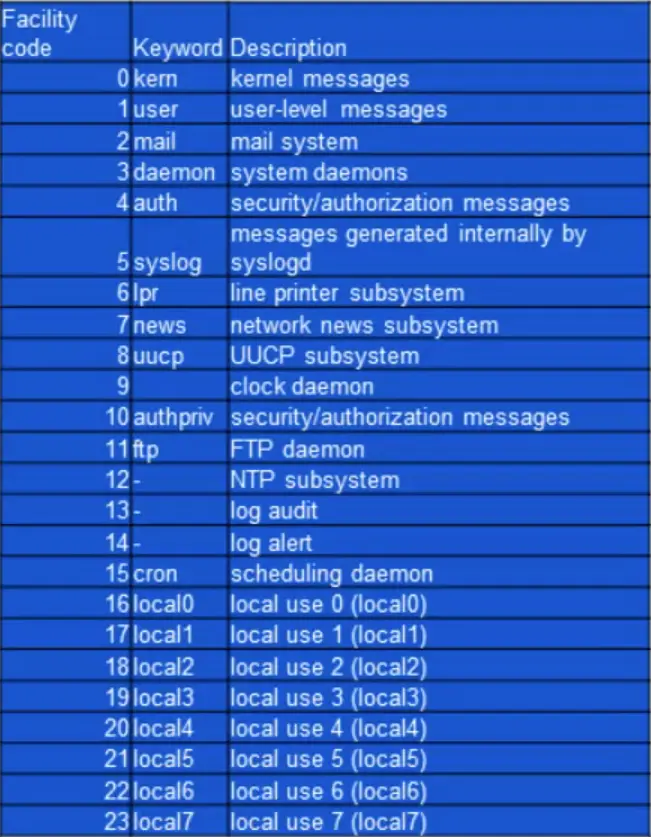
Facility codes
The facility value indicates which machine process created the message. The Syslog protocol was originally written on BSD Unix, so Facilities reflect the names of the UNIX processes and daemons.
If you’re receiving messages from a UNIX system, consider using the User Facility as your first choice. Local0 through Local7 aren’t used by UNIX and are traditionally used by networking equipment. Cisco routers, for examples, use Local6 or Local7.
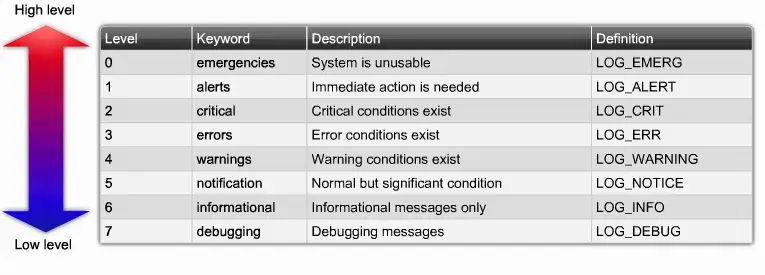
Syslog Severity Levels
Flows and Network Analysis
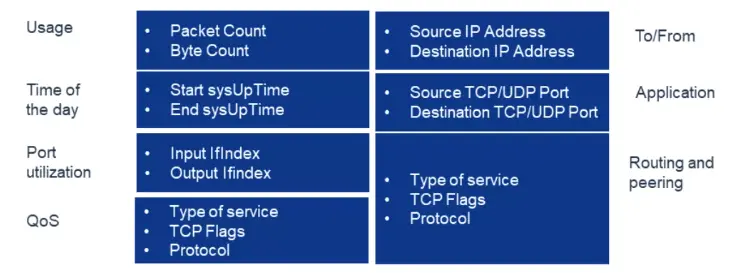
What information is gathered in flows?
Port Mirroring and Promiscuous Mode
Port mirroring
Sends a copy of network packets traversing on one switch port (or an entire VLAN) to a network monitoring connection on another switch port.
Port mirroring on a Cisco Systems switch is generally referred to as Switched Port Analyzer (SPAN) or Remote Switched Port analyzer (RSPAN).
Other vendors have different names for it, such as Roving Analysis Port (RAP) on 3COM switches.
This data is used to analyze and debug data or diagnose errors on a network.
Helps administrators keep a close eye on network performance and alerts them when problems occur.
It can be used to mirror either inbound or outbound traffic (or both) on one or various interfaces.
Promiscuous Mode Network Interface Card (NIC)
In computer networking, promiscuous mode (often shortened to “promisc mode” or “promisc. mode”) is a mode for a wired network interface controller (NIC) or wireless network interface controller (WNIC) that causes the controller o pass all traffic it receives to the Central Processing Unit (CPU) rather than passing only frames that the controller is intended to receive.
Firewalls, Intrusion Detection and Intrusion Prevention Systems
Next Generation Firewalls – Overview
What is a NGFW?
A NGFW is a part of the third generation of firewall technology. Combines traditional firewall with other network device filtering functionalities.
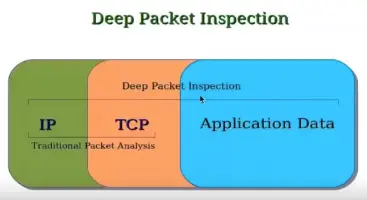
Application firewall using in-line deep packet inspection (DPI)
Intrusion prevention system (IPS).
Other techniques might also be employed, such as TLS/SSL encrypted traffic inspection, website filtering.
NGFW vs. Traditional Firewall
Inspection over the data payload of network packets.
NGFW provides the intelligence to distinguish business applications and non-business applications and attacks.
Traditional firewalls don’t have the fine-grained intelligence to distinguish one kind of Web traffic from another, and enforce business policies, so it’s either all or nothing.
NGFW and the OSI Model
The firewall itself must be able to monitor traffic from layers 2 through 7 and make a determination as to what type of traffic is being sent and received.
NGFW Packet Flow Example and NGFW Comparisons
Flow of Traffic Between Ingress and Egress Interfaces on a NGFW
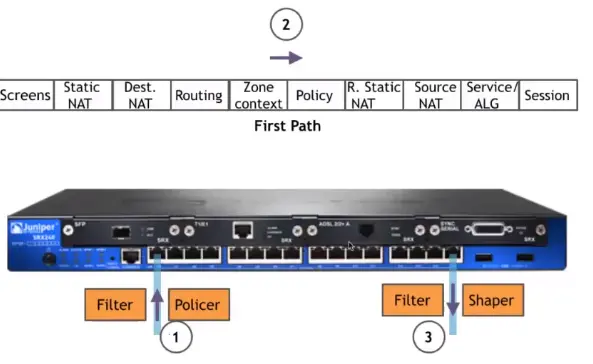
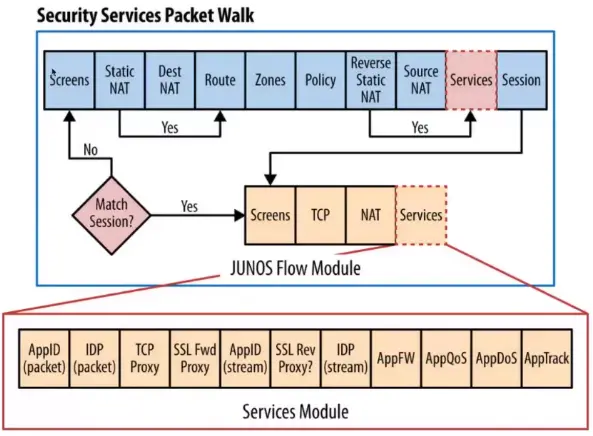
Flow of Packets Through the Firewall
NGFW Comparisons:
Many firewalls vendors offer next-generation firewalls, but they argue over whose technique is the best.
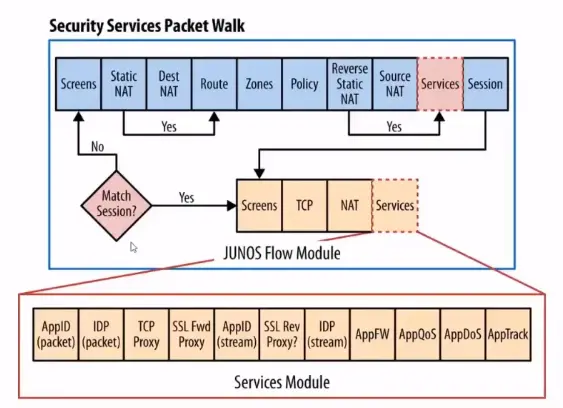
A NGFW is application-aware. Unlike traditional stateful firewalls, which deal in ports and protocols, NGFW drill into traffic to identify the application transversing the network.
With current trends pushing applications into the public cloud or to be outsourced to SaaS provides, a higher level of granularity is needed to ensure that the proper data is coming into the enterprise network.
Examples of NGFW
Cisco Systems
Cisco Systems have announced plans to add new levels of application visibility into its Adaptive Security Appliance (ASA), as part of its new SecureX security architecture.
Palo Alto Networks
Says it was the first vendor to deliver NGFW and the first to replace port-based traffic classification with application awareness. The company’s products are based on a classification engine known as App-ID. App-ID identifies applications using several techniques, including decryption, detection, decoding, signatures, and heuristics.
Juniper Networks
They use a suite of software products, known as AppSecure, to deliver NGFW capabilities to its SRX Services Gateway. The application-aware component, known as AppTrack, provides visibility into the network based on Juniper’s signature database as well as custom application signatures created by enterprise administrators.
NGFW other vendors:
McAfee
Meraki MX Firewalls
Barracuda
Sonic Wall
Fortinet Fortigate
Check Point
WatchGuard
Open Source NGFW:
pfSense
It is a free and powerful open source firewall used mainly for FreeBSD servers. It is based on stateful packet filtering. Furthermore, it has a wide range of features that are normally only found in very expensive firewalls.
ClearOS
It is a powerful firewall that provides us the tools we need to run a network, and also gives us the option to scale up as and when required. It is a modular operating system that runs in a virtual environment or on some dedicated hardware in the home, office etc.
VyOS
It is open source and completely free, and based on Debian GNU/Linux. It can run on both physical and virtual platforms. Not only that, but it provides a firewall, VPN functionality and software based network routing. Likewise, it also supports paravirtual drivers and integration packages for virtual platforms. Unlike OpenWRT or pfSense, VyOS provides support for advanced routing features such as dynamic routing protocols and command line interfaces.
IPCop
It is an open source Linux Firewall which is secure, user-friendly, stable and easily configurable. It provides an easily understandable Web Interface to manage the firewall. Likewise, it is most suitable for small businesses and local PCs.
IDS/IPS
Classification of IDS
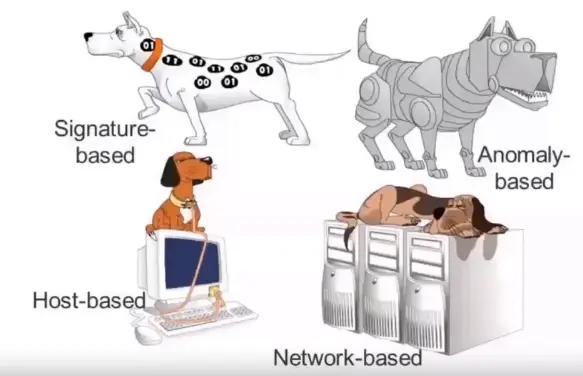
Signature based: Analyzes content of each packet at layer 7 with a set of predefined signatures.
Anomaly based: It monitors network traffic and compares it against an established baseline for normal use and classifying it as either normal or anomalous.
Types of IDS
Host based IDS (HIDS): Anti-threat applications such as firewalls, antivirus software and spyware-detection programs are installed on every network computer that has two-way access to the outside.
Network based IDS (NIDS): Anti-threat software is installed only at specific points, such as servers that interface between the outside environment and the network segment to be protected.
NIDS
Appliance: IBM RealSecure Server Sensor and Cisco IDS 4200 series
Software: Sensor software installed on server and placed in network to monitor network traffic, such as Snort.
IDS Location on Network
Hybrid IDS Implementation
Combines the features of HIDS and NIDS
Gains flexibility and increases security
Combining IDS sensors locations: put sensors on network segments and network hosts and can report attacks aimed at particular segments or the entire network.
What is an IPS?
Network security/threat prevention technology.
Examines network traffic flows to detect and prevent vulnerability exploits.
Often sits directly behind the firewall.
How does the attack affect me?
Vulnerability exploits usually come in the form of malicious inputs to a target application or service.
The attackers use those exploits to interrupt and gain control of an application or machine.
Once successful exploit, the attacker can disable the target application (DoS).
Also, can potentially access to all the rights and permissions available to the compromised application.
Prevention?
The IPS is placed inline (in the direct communication path between source and destination), actively analyzing and taking automated actions on all traffic flows that enter the network. Specifically, these actions include:
Sending an alarm to the admin (as would be seen in an IDS)
Dropping the malicious packets
Blocking traffic from the source address
Resetting the connection
Signature-based detection
It is based on a dictionary of uniquely identifiable patterns (or signatures) in the code of each exploit. As an exploit is discovered, its signature is recorded and stored in a continuously growing dictionary of signatures. Signatures detection for IPS breaks down into two types:
Exploit-facing signatures identify individual exploits by triggering on the unique patterns of a particular exploit attempt. The IPS can identify specific exploits by finding a match with an exploit-facing signatures in the traffic.
Vulnerability-facing signatures are broader signatures that target the underlying vulnerability in the system that is being targeted. These signatures allow networks to be protected from variants of an exploit that may not have been directly observed in the wild, but also raise the risk of false positive.
Statistical anomaly detection
Takes samples of network traffic at random and compares them to a pre-calculated baseline performance level. When the sample of network traffic activity is outside the parameters of baseline performance, the IPS takes action to handle the situation.
IPS was originally built and released as a standalone device in the mid-2000s. This, however, was in the advent of today’s implementations, which are now commonly integrated into Unified Threat Management (UTM) solutions (for small and medium size companies) and NGFWs (at the enterprise level).
High Availability and Clustering
What is HA?
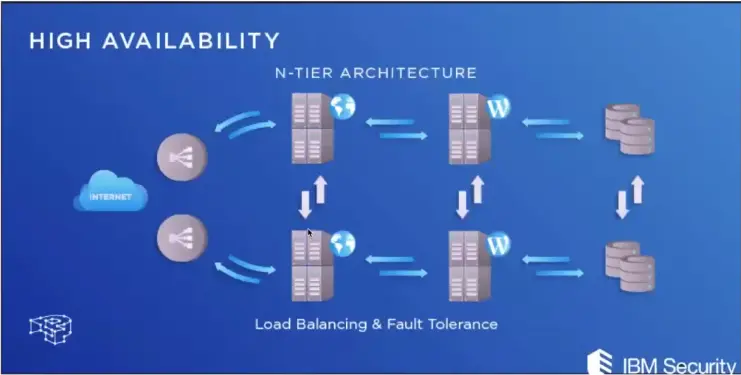
In information technology, high availability (HA) refers to a system or component that is continuously operational for a desirably long length of time. Availability can be measured relative to “100% operational” or “never failing”.
HA architecture is an approach of defining the components, modules, or implementation of services of a system which ensures optimal operational performance, even at times of high loads.
Although there are no fixed rules of implementing HA systems, there are generally a few good practices that one must follow so that you gain most out of the least resources.
Requirements for creating an HA cluster?
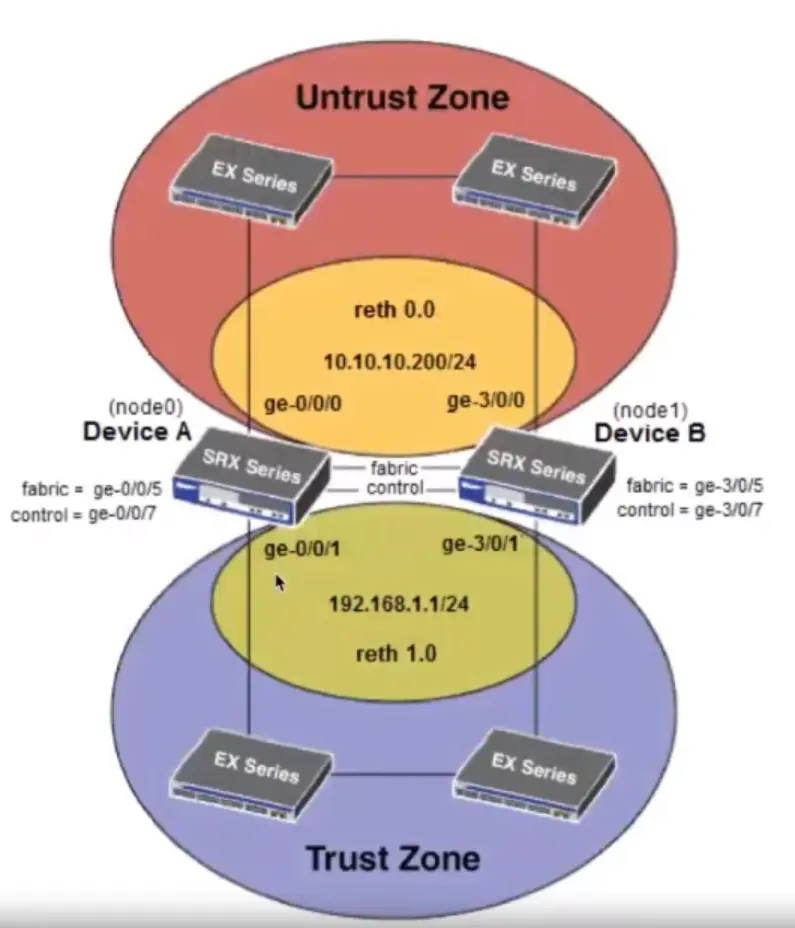
Hosts in a virtual server cluster must have access to the same shared storage, and they must have identical network configurations.
Domain name system (DNS) naming is important too: All hosts must resolve other hosts using DNS names, and if DNS isn’t set correctly, you won’t be able to configure HA settings at all.
Same OS level.
Connections between the primary and secondary nodes.
How HA works?
To create a highly available system, three characteristics should be present:
Redundancy:
Means that there are multiple components that can perform the same task. This eliminates the single point of failure problem by allowing a second server to take over a task if the first one goes down or becomes disabled.
Monitoring and Failover
In a highly available setup, the system needs to be able to monitor itself for failure. This means that there are regular checks to ensure that all components are working properly. Failover is the process by which a secondary component becomes primary when monitoring reveals that a primary component has failed.
NIC Teaming
It is a solution commonly employed to solve the network availability and performance challenges and has the ability to operate multiple NICs as a single interface from the perspective of the system.
NIC teaming provides:
Protection against NIC failures
Fault tolerance in the event of a network adapter failure.
HA on a Next-Gen FW
Introduction to Databases
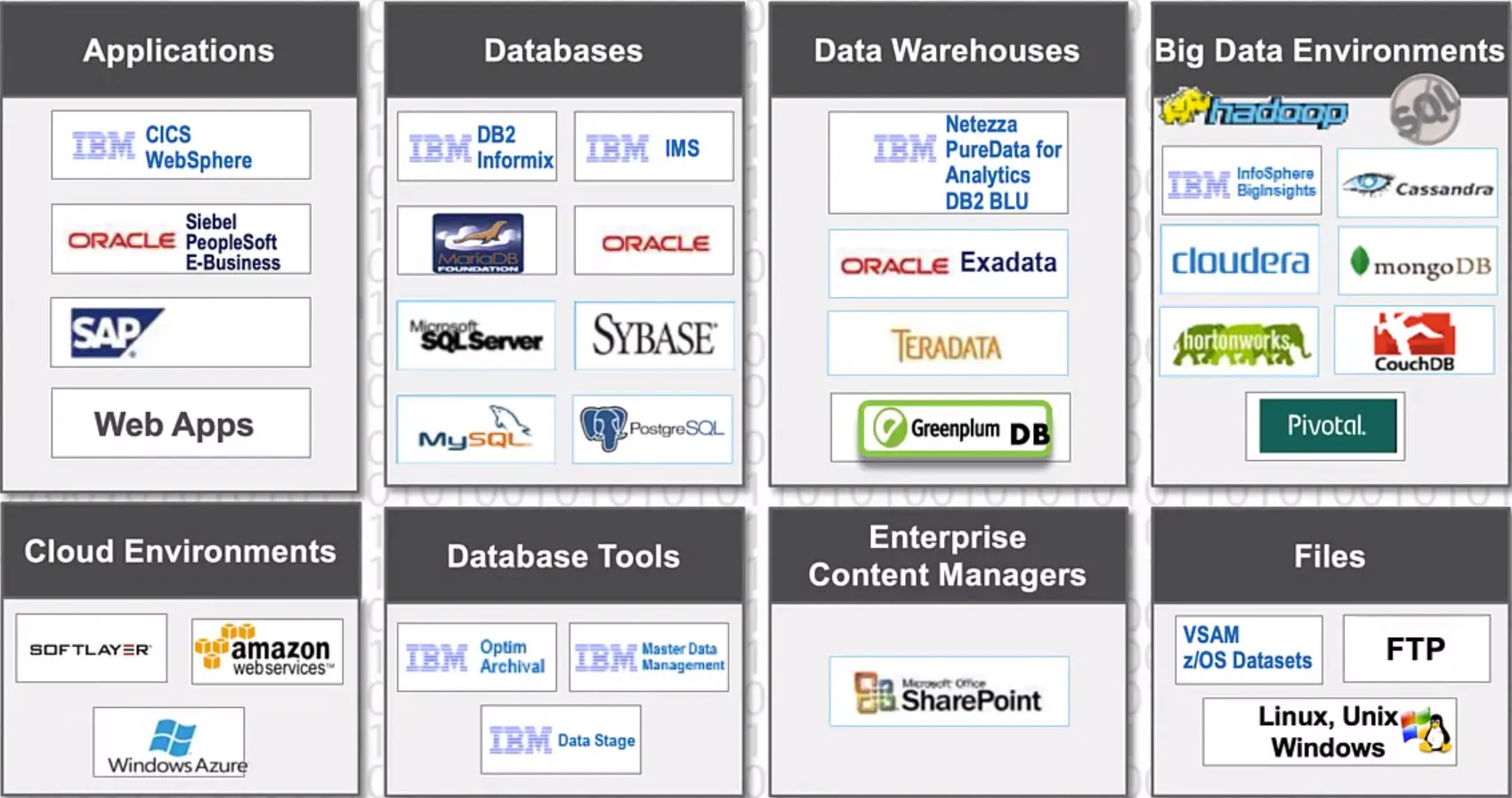
Data Source Types
Distributed Databases
Microsoft SQL Server, DB2, Oracle, MySQL, SQLite, Postgres etc.
Structured Data
Data Warehouses
Amazon’s redshift, Netezza, Exadata, Apache Hive etc.
Structured Data
Big Data
Google BigTable, Hadoop, MongoDB etc.
Semi-Structured Data
File Shares
NAS (Network Attached Storage), Network fileshares such as EMC or NetApp; and Cloud Shares such as Amazon S3, Google Drive, Dropbox, Box.com etc.
Unstructured-Data
Data Model Types
Structured Data
“Structured data is data that has been organized into a formatted repository, typically a database, so that its elements can be made addressable for more effective processing and analysis.”
Semi-Structured Data
“Semi-structured data is data that has not been organized into a specialized repository, such as a database, but that nevertheless has associated information, such as metadata, that makes it more amenable to processing than raw data.”
A Word document with tags and keywords.
Unstructured Data
“Unstructured data is information, in many forms, that doesn’t hew to conventional data models and thus typically isn’t a good fit for a mainstream relational database.”
A Word Document, transaction data etc.
Types of Unstructured Data
Text (most common type)
Images
Audio
Video
Structured Data
Flat File Databases
Flat-file databases take all the information from all the records and store everything in one table.
This works fine when you have some records related to a single topic, such as a person’s name and phone numbers.
But if you have hundreds or thousands of records, each with a number of fields, the database quickly becomes difficult to use.
Relational Databases
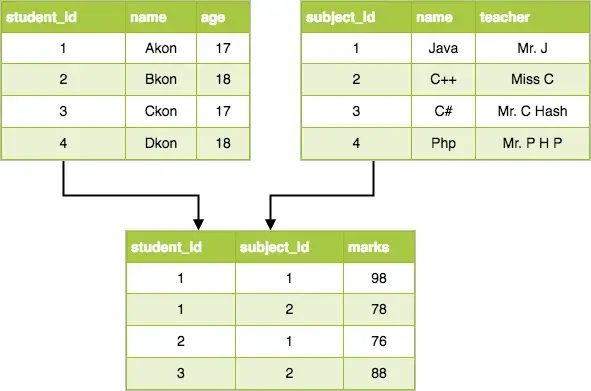
Relational databases separate a mass of information into numerous tables. All columns in each table should be about one topic, such as “student information”, “class Information”, or “trainer information”.
The tables for a relational database are linked to each other through the use of Keys. Each table may have one primary key and any number of foreign keys. A foreign key is simply a primary key from one table that has been placed in another table.
The most important rules for designing relational databases are called Normal Forms. When databases are designed properly, huge amounts of information can be kept under control. This lets you query the database (search for information section) and quickly get the answer you need.
Securing Databases
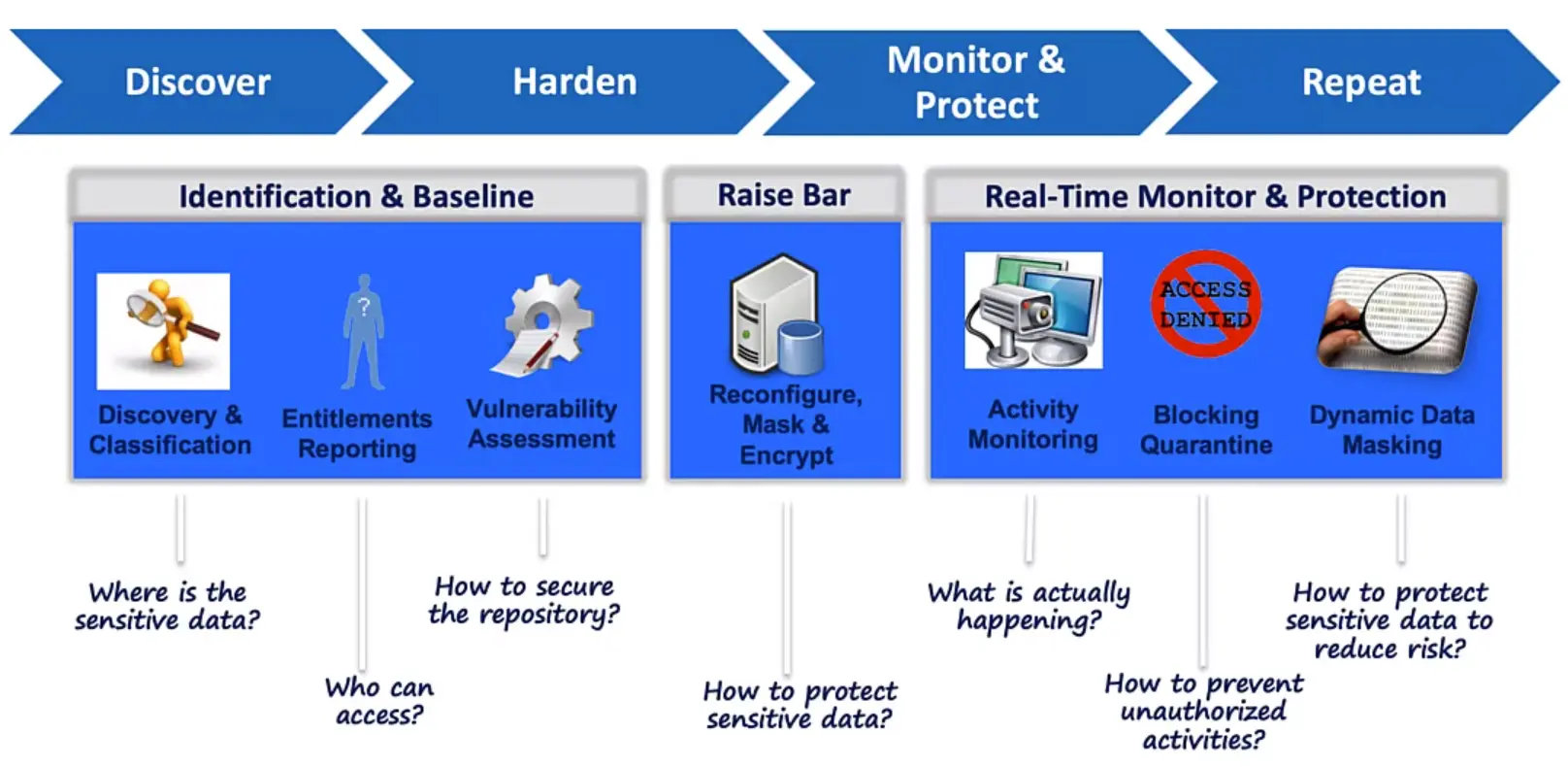
Securing your “Crown Jewels”
Leveraging Security Industry Best Practices
Enforce:
DOD STIG
CIS (Center for Internet Security)
CVE (Common Vulnerability and Exposures)
Secure:
Privileges
Configuration settings
Security patches
Password policies
OS level file permission
Established Baseline:
User defined queries for custom tests to meet baseline for;
Organization
Industry
Application
Ownership and access for your files
Forensics:
Advanced Forensics and Analytics using custom reports
Understand your sensitive data risk and exposure
Structured Data and Relational Databases
Perhaps the most common day-to-day use case for a database is using it as the backend of an application, such as your organization HR system, or even your organization’s email system!
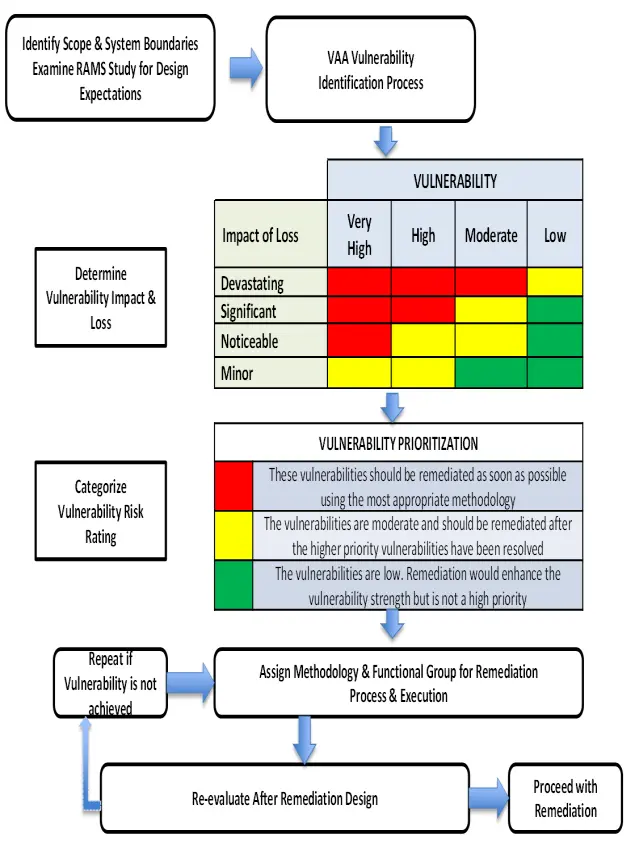
Anatomy of a Vulnerability Assessment Test Report
Securing Data Sources by Type
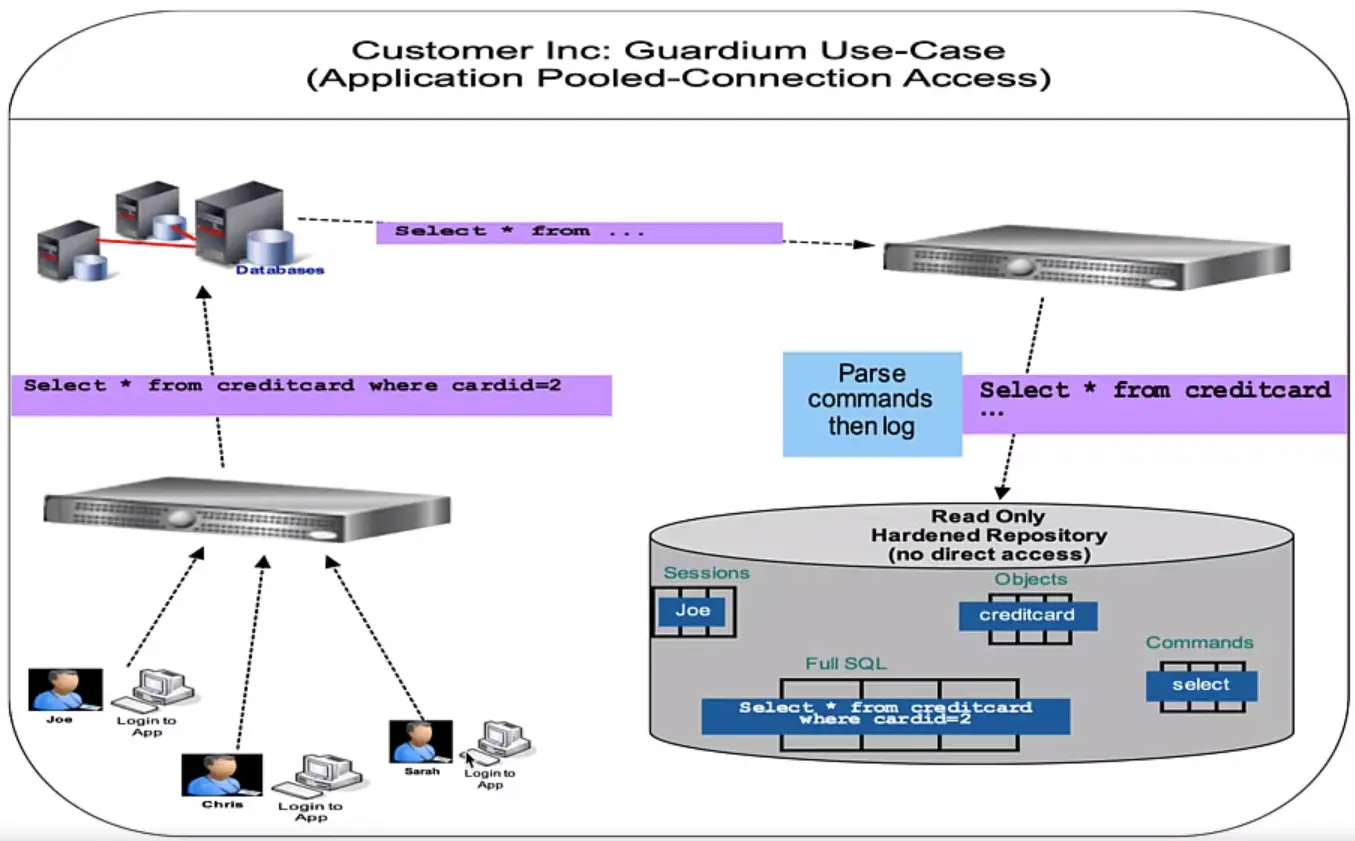
A Data Protection Solution Example, IBM Security Guadium Use Cases
Data Monitoring
Data Activity Monitoring/Auditing/Logging
Does your product log all key activity generation, retrieval/usage, etc.?
Demo data access activity monitoring and logging of the activity monitoring?
Does your product monitor for unique user identities (including highly privileged users such as admins and developers) with access to the data?
At the storage level, can it detect/identify access to highly privileged users such as database admins, system admins or developers?
Does your product generate real time alerts of policy violations while recording activities?
Does your product monitor user data access activity in real time with customizable security alerts and blocking unacceptable user behavior, access patterns or geographic access, etc.? If yes, please describe.
Does your product generate alerts?
Demo the capability for reporting and metrics using information logged.
Does your product create auditable reports of data access and security events with customizable details that can address defined regulations or standard audit process requirements? If yes, please describe.
Does your product support the ability to log security events to a centralized security incident and event management (SIEM) system?
Demo monitoring of non-Relational Database Management Systems (nRDBMS) systems, such as Cognos, Hadoop, Spark, etc.
Deep Dive Injection Vulnerability
What are injection flaws?
Injection Flaws: They allow attackers to relay malicious code through the vulnerable application to another system (OS, Database server, LDAP server, etc.)
They are extremely dangerous, and may allow full takeover of the vulnerable system.
Injection flaws appear internally and externally as a Top Issue.
OS Command Injection
What is OS Command Injection?
Abuse of vulnerable application functionality that causes execution of attacker-specified OS commands.
Applies to all OSes – Linux, Windows, macOS.
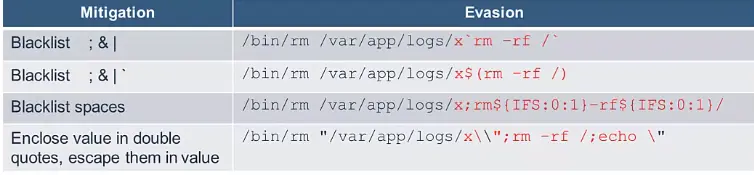
Made possible by lack of sufficient input sanitization, and by unsafe execution of OS commands.
Attacker can inject arbitrary malicious OS command – MUCH WORSE:
/bin/sh -c "/bin/rm /var/app/logs/x;rm -rf /"
OS command injection can lead to:
Full system takeover
Denial of service
Stolen sensitive information (passwords, crypto keys, sensitive personal info, business confidential data)
Lateral movement on the network, launching pad for attacks on other systems
Use of system for botnets or cryptomining
This is as bad as it gets, a “GAME OVER” event.
How to Prevent OS Command Injection?
Recommendation #1 – don’t execute OS commands
Sometimes OS command execution is introduced as a quick fix, to let the command or group of commands do the heavy lifting.
This is dangerous, because insufficient input checks may let a destructive OS command slip in.
Resist the temptation to run OS commands and use built-in or 3rd party libraries instead:
Instead of rm use java.nio.file.Files.deleteIfExists(file)
Instead of cp use java.nio.file.Files.copy(source, destination) … and so on.
Use of library functions significantly reduces the attack surface.
Recommendation #2 – Run at the least possible privilege level
It is a good idea to run under a user account with the least required rights.
The more restricted the privilege level is, the less damage can be done.
If an attacker is able to sneak in an OS command (e.g., rm -rf /) he can do much less damage when the application is running as tomcat user vs. running as root user.
This helps in case of many vulnerabilities, not just injection.
Recommendation #3 – Don’t run commands through shell interpreters
When you run shell interpreters like sh, bash, cmd.exe, powershell.exe it is much easier to inject commands.
The following command allows injection of an extra rm:
/bin/sh -c "/bin/rm /var/app/logs/x;rm -rf /"
… but in this case injection will not work, the whole command will fail:
/bin/rm /var/app/logs/x;rm -rf/
Running a single command directly executes just that command.
Note that it is still possible to influence the behavior of a single command (e.g., for nmap the part on the right, when injected, could overwrite a vital system file):
/usr/bin/nmap 1.2.3.4 -oX /lib/libc.so.6
Also note that the parameters that you pass to a script may still result in command injection:
processfile.sh "x;rm -rf /"
Recommendation #4 – Use explicit paths when running executables
Applications are found and executed based on system path settings.
If a writable folder is referenced in the path before the folder containing the valid executable, an attacker may install a malicious version of the application there.
In this case, the following command will cause execution of the malicious application:
/usr/bin/nmap 123.45.67.89
The same considerations apply to shared libraries, explicit references help avoid DLL hijacking.
Recommendation #5 – Use safer functions when running system commands
If available, use functionality that helps prevent command injection.
For example, the following function call is vulnerable to new parameter injection (one could include more parameters, separated by spaces, in ipAddress):
The query may not return the data directly, but it can be inferred by executing many queries whose behavior presents one of two outcomes.
Can be Boolean-based (one of two possible responses), and Time-based (immediate vs delayed execution).
For example, the following expression, when injected, indicates if the first letter of the password is a:
IF(passwordLIKE'a%',sleep(10),'false')
Out of Band
Data exfiltration is done through a separate channel (e.g., by sending an HTTP request).
How to Prevent SQL Injection?
Recommendation #1 – Use prepared statements
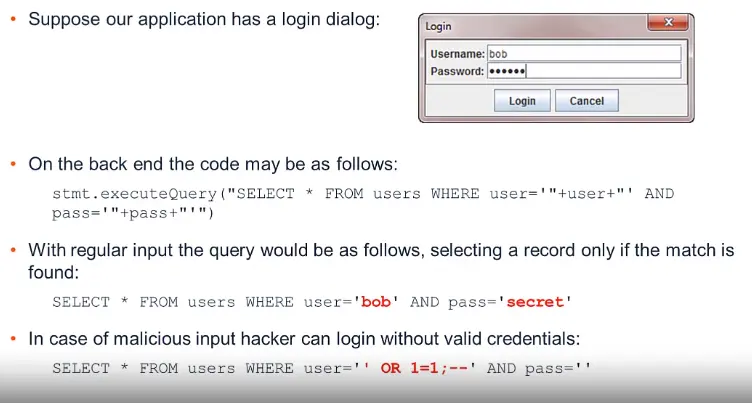
Most SQL injection happens because queries are pieced together as text.
Use of prepared statements separates the query structure from query parameters.
Instead of this pattern:
stmt.executeQuery("SELECT * FROM users WHERE user='"+user+"' AND pass='"pass+"'")
… use this:
PreparedStatementps=conn.preparedStatement("SELECT * FROM users WHERE user = ? AND pass = ?");ps.setString(1,user);ps.setString(2,pass);
SQL injection risk now mitigated.
Note that prepared statements must be used properly, we occasionally see bad examples like:
conn.preparedStatement("SELECT * FROM users WHERE user = ? AND pass = ? ORDER BY "+column);
Recommendation #2 – Sanitize user input
Just like for OS command injection, input sanitization is important.
Only restrictive whitelists should be used, not blacklists.
Where appropriate, don’t allow user input to reach the database, and instead use mapping tables to translate it.
Recommendation #3 – Don’t expose database errors to the user
Application errors should not expose internal information to the user.
Details belong in an internal log file.
Exposed details can be abused for tailoring SQL injection commands.
For examples, the following error message exposes both the internal query structure and the database type, helping attackers in their efforts:
ERROR: If you have an error in your SQL syntax, check the manual that corresponds to your MySQL server version for the right syntax to use near “x” GROUP BY username ORDER BY username ASC’ at line 1.
Recommendation #4 – Limit database user permissions
When user queries are executed under a restricted user, less damage is possible if SQL injection happens.
Consider using a user with read-only permissions when database updates are not required, or use different users for different operations.
Recommendation #5 – Use stored Procedures
Use of stored procedures mitigates the risk by moving SQL queries into the database engine.
Fewer SQL queries will be under direct control of the application, reducing likelihood of abuse.
Recommendation #6 – Use ORM libraries
Object-relational mapping (ORM) libraries help mitigate SQL injection
Examples: Java Persistence API (JPA) implementations like Hibernate.
ORM helps reduce or eliminate the need for direct SQL composition.
However, if ORM is used improperly SQL injections may still be possible:
QueryhqlQuery=session.createQuery("SELECT * FROM users WHERE user='"+user+"'AND pass='"+pass+"'")
Other Types of Injection
Injection flaws exist in many other technologies
Apart from the following, there are injection flaws also exist in Templating engines.
… and many other technologies
Recommendation for avoiding all of them are similar to what is proposed for OS and SQL injection.
NoSQL Injection
In MongoDB $where query parameter is interpreted as JavaScript.
Suppose we take an expression parameter as input:
$where:"$expression"
In simple case it is harmless:
$where:"this.userType==3"
However, an attacker can perform a DoS attack:
$where:"d = new Date; do {c = new Date;} while (c - d < 100000;"
XPath Injection
Suppose we use XPath expressions to select user on login:
In the benign case, it will select only the user whose name and password match:
//Employee[UserName/text()='bob' AND Password/text()='secret']
In the malicious case, it will select any user:
//Employee[UserName/text()='' or 1=1 or '1'='1' And Password/text()='']
LDAP Injection
LDAP is a common mechanism for managing user identity information. The following expression will find the user with the specified username and password.
find("(&(cn=" + user +")(password=" + pass +"))")
In the regular case, the LDAP expression will work only if the username and password match:
find("(&(cn=bob)(password=secret))")
Malicious users may tweak the username to force expression to find any user: