IBM Cybersecurity Analyst Professional Certificate
IBM Cybersecurity Analyst Professional Certificate is a specialization course, which is led by industry experts. The specialization focuses on intermediary skills related to cybersecurity
This specialization has 6 courses and a Capstone.
1. Introduction to Cybersecurity Tools and Cyberattacks
It teaches:
History of major cyber attacks throughout the modern history
Types of Threat actors (APT, hacktivist etc), and their motives
Subsections of Cybersecurity Tools and Cyberattacks
History of Cybersecurity
Introduction to Cybersecurity Tools & Cyberattacks
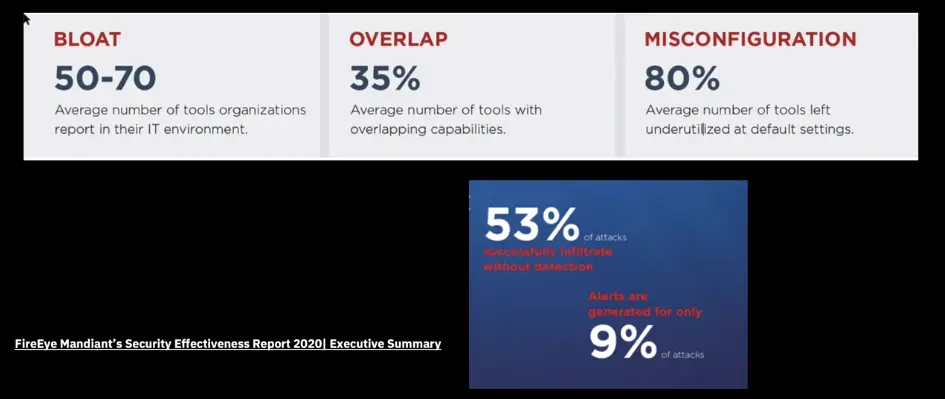
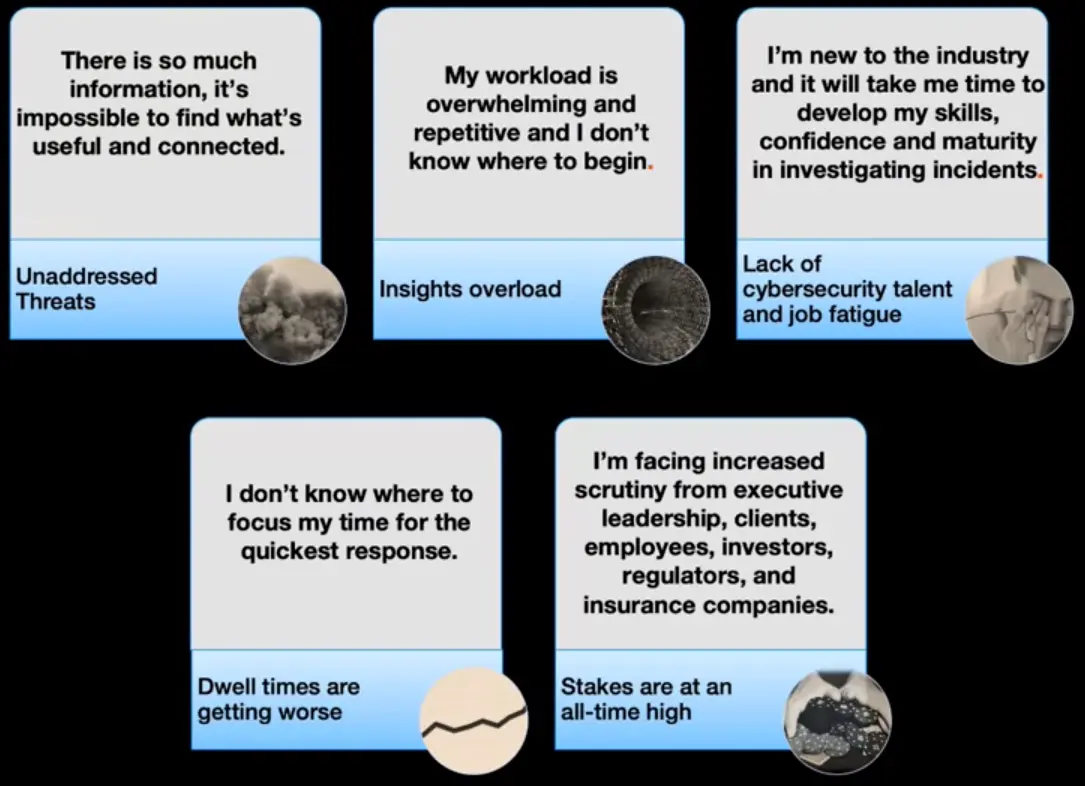
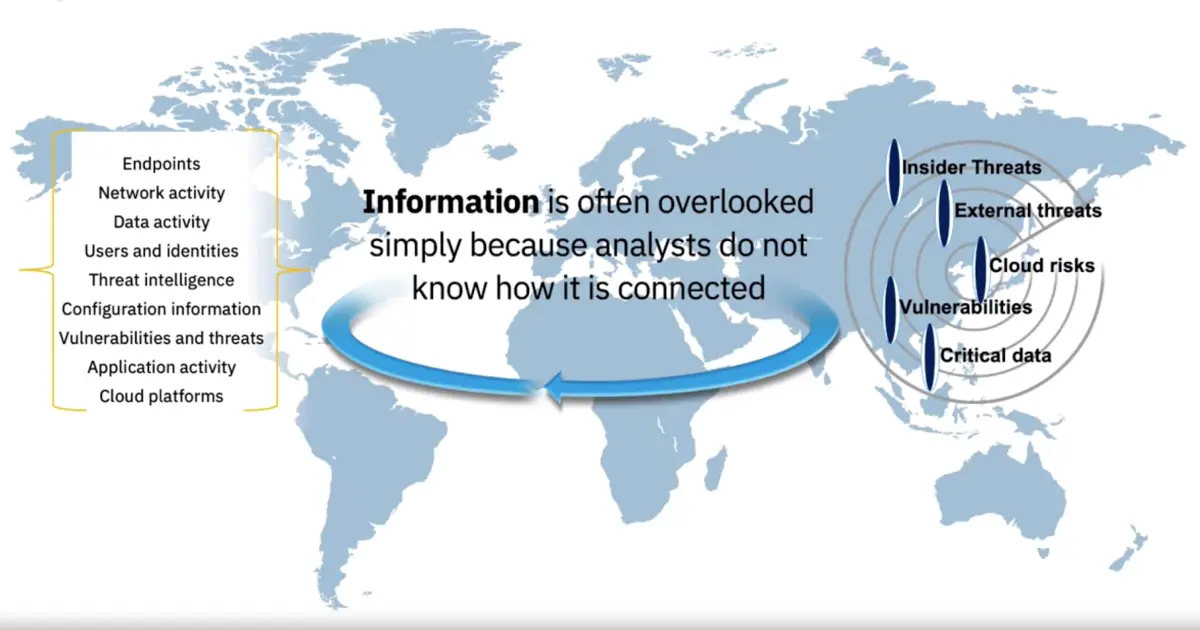
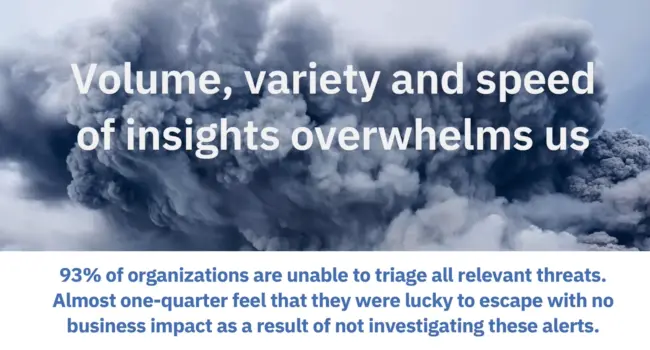
Today’s Cybersecurity Challenge
Threats > ⇾ Alerts > ⇾ Available Analyst < -⇾ Needed Knowledge > ⇾ Available Time <
By 2022, there will be 1.8 millions unfulfilled cybersecurity jobs.
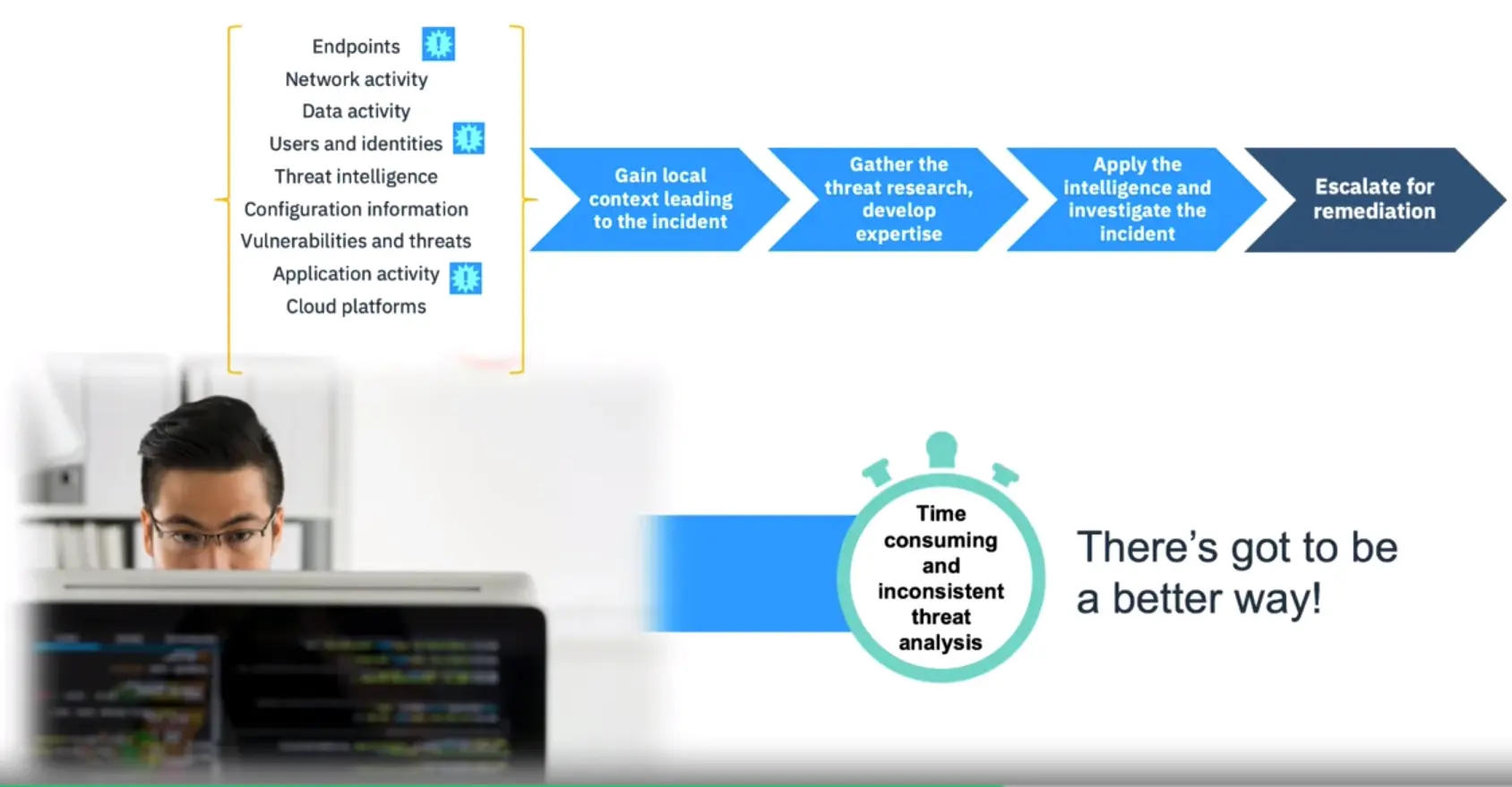
SOC(Security Operation Center) Analyst Tasks
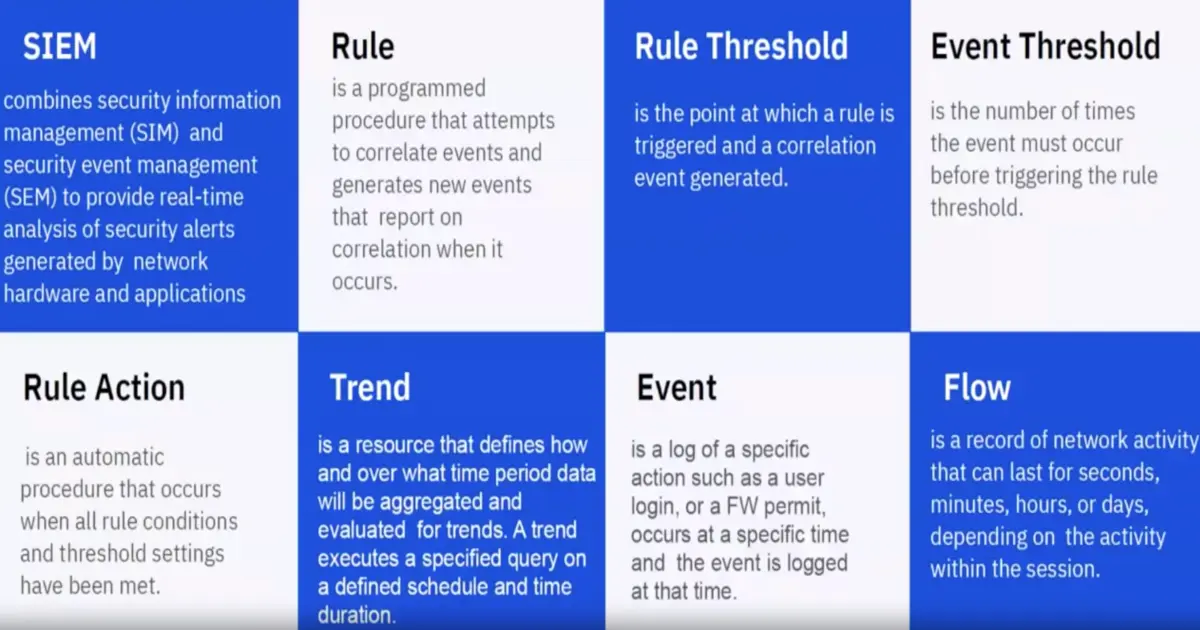
Review security incidents in SIEM (security information and even management)
Review the data that comprise the incident (events/flows)
Pivot the data multiple ways to find outliers (such as unusual domains, IPs,
file access)
Expand your search to capture more data around that incident
Decide which incident to focus on next
Identify the name of the malware
Take these newly found IOCs (indicators of compromise) from the internet and search them back in SIEM
Find other internal IPs which are potentially infected with the same malware
Search Threat Feeds, Search Engine, Virus Total and your favorite tools for these outliers/indicators; Find new malware is at play
Start another investigation around each of these IPs
Review the payload outlying events for anything interesting (domains, MD5s, etc.)
Search more websites for IOC information for that malware from the internet
From Ronald Reagan/War Games to where we are Today
He was a Hollywood actor as well as US-president
He saw a movie War Games, where a teenager hacker hacked into the Pentagon artificial intelligent computer to play a game of thermonuclear war using a dial-up connection, which was actually played using real missiles due to miss-configuration
Impact of 9/11 on Cybersecurity
What happens if 9/11 in tech-space? Like hack and destruction of SCADA system used in dams and industrial automation systems etc.
Nice early operations
Clipper Chip: (NSA operation for tapping landline phones using some kind of chip)
↔
Moonlight Maze: (in the 2000s, process to dump passwords of Unix/Linux servers investigated by NSA/DOD affected many US institutions)
↔
Solar Sunrise: (series of attack on DOD computers on FEB 1998, exploited known vulnerability of operating system, attack two teenagers in California, one of whom was an Israeli)
↔
Buckshot Yankee: (series of compromises in year 2008, everything starts with USB inserted in Middle East military base computer, remained on the network for 14 months, Trojan used was agent.BTZ)
↔
Desert Storm: (early 90s, some radars used to alert military forces about airplanes are tampered by feeding fake information of Saddam’s regime)
↔
Bosnia: (Bosnia war, fake news to military field operations etc.)
Cybersecurity Introduction
Every minute, thousands of tweets are sent, and millions of videos are watched.
Due to IOT (Internet of Things) and mobile tech, we have a lot to protect.
We have multiple vendors now, which become complicated to track for security vulnerabilities.
Things to Consider when starting a Cybersecurity Program
How and where to start?
Security Program: Evaluate, create teams, baseline, identify and model threats, use cases, risk, monitoring, and control.
Admin Controls: Policies, procedures, standards, user education, incident response, disaster recovery, compliance and physical security.
Asset Management: Classifications, implementation steps, asset control, and documents.
Cybersecurity – A Security Architect’s Perspective
What is Security?
A message is considered secure when it meets the following criteria of CIA triad.
Confidentiality ↔ Authentication ↔ Integrity
Computer Security, NIST (National Institute of Standards and Technology) defined.
“The protection afforded to an automated information system in order to attain the applicable objectives to preserving the integrity, availability, and Confidentiality of information system resources. Includes hardware, software, firmware, information/data, and telecommunications.”
Additional Security Challenges
Security not as simple as it seems
Easy requirements, tough solution
Solutions can be attacked themselves
Security Policy Enforcement structure can complicate solutions
Protection of enforcement structure can complicate solutions
Solution itself can be easy but complicated by protection
Protectors have to be right all the time, attackers just once
No one likes security until it’s needed, seat belt philosophy.
Security Architecture require constant effort
Security is viewed as in the way
What is Critical Thinking?
Beyond Technology: Critical Thinking in Cybersecurity
“The adaption of the processes and values of scientific inquiry to the special circumstances of strategic intelligence.”
Cybersecurity is a diverse, multi faced field
Constantly changing environment
Fast-paced
Multiple stakeholders
Adversary presence
Critical thinking forces you to think and act in situations where there are no clear answers nor specific procedures.
Part Art, Part Science: This is subjective and impossible to measure.
Critical Thinking: A Model
Hundreds of tools updating always with different working models, so critical thinking is more important than ever to approach problems in more pragmatic way.
Interpersonal skills for working with other people and sharing information.
Critical Thinking – 5 Key Skills
1) Challenge Assumption
question your Assumption
Explicitly list all Assumptions ↔ Examine each with key Q’s ↔ Categorize based on evidence ↔ refine and remove ↔ Identify additional data needs
2) Consider alternatives
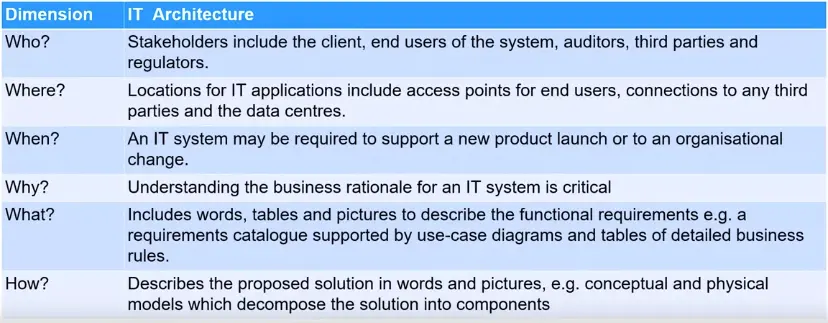
Brainstorm ↔ The 6 W’s (who/what/when/where/why/how) ↔ Null hypothesis
3) Evaluate data
Know your DATA
Establish a baseline for what’s normal
be on the lookout for inconsistent data
proactive
4) Identify key drivers
Technology
Regulatory
Society
Supply Chain
Employee
Threat Actors
5) Understand context
Operational environment you’re working in. Put yourself in other’s shoe, reframe the issue.
Key components
Factors at play
Relationships
similarities/differences
redefine
A Brief Overview of Types of Threat Actors and their Motives
Internal Users
Hackers (Paid or not)
Hacktivism
Governments
Motivation Factors
Just to play
Political action and movements
Gain money
Hire me! (To demonstrate what can I do for somebody to hire me or use my services)
Hacking organizations
Fancy Bears (US election hack)
Syrian Electronic Army
Guardians of the peace (Leaked Sony Data about film regarding Kim Jong-un to prevent its release)
Nation States
NSA
Tailored Access Operations (USA)
GCHQ (UK)
Unit 61398 (China)
Unit 8200 (Israel)
Major different types of cyberattacks
Sony Hack
Play-station Hack by a Hacktivist group called Lutz (2011).
Singapore cyberattack
Anonymous attacked multiple websites in Singapore as a protest (2013).
Target Hack
More than 100 million of credit cards were leaked (2015).
Malware and attacks
SeaDaddy and SeaDuke (CyberBears US Election)
BlackEnergy 3.0 (Russian Hackers)
Shamoon (Iran Hackers)
Duqu and Flame (Olympic Games US and Israel)
DarkSeoul (Lazarous and North Korea)
WannaCry (Lazarous and North Korea)
An Architect’s perspective on attack classifications
Security Attack Definition
Two main classifications
Passive attacks
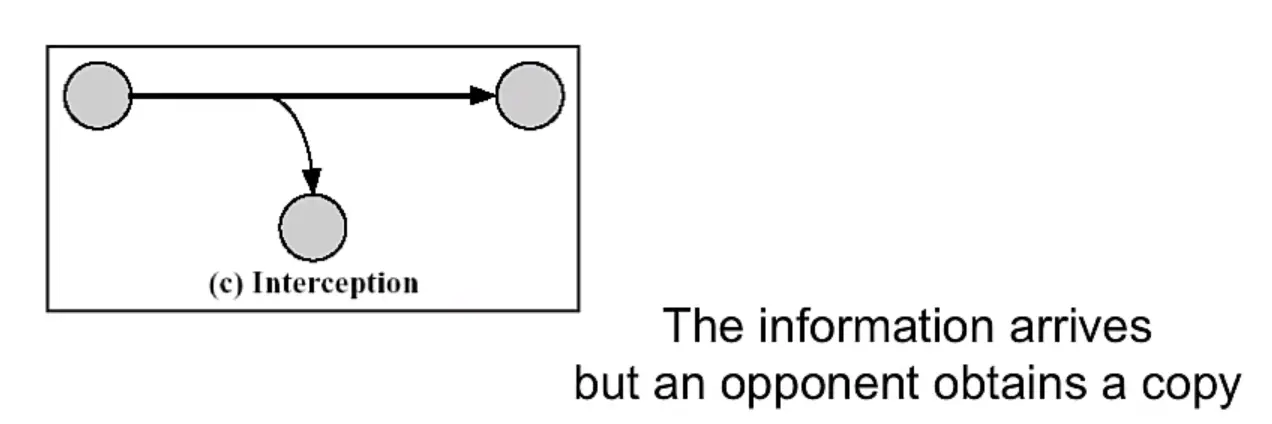
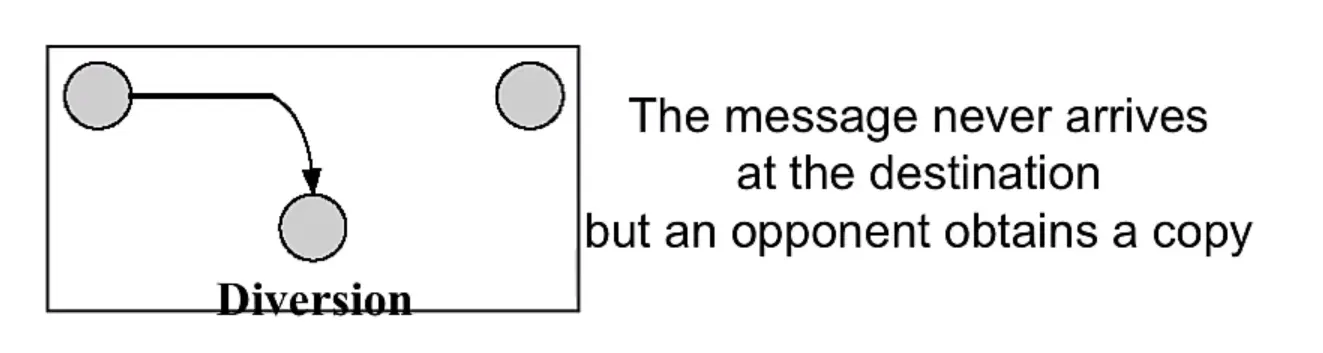
Essentially an eavesdropping styles of attacks
Second class is traffic analysis
Hard to detect the passive nature of attack as just traffic is monitored not tampered
Active Attacks
Explicit interception and modification
Several classes of these attack exist
Examples
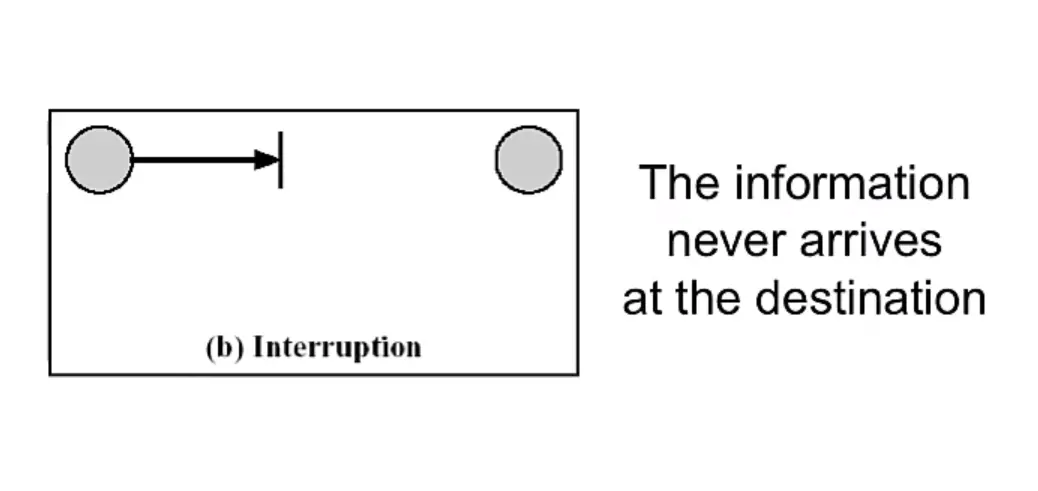
Masquerade (Intercepting packets as someone else)
Replay
Modification
DDoS
Security Services
“A process or communication service that is provided by a system, to give a specific kind of protection to a system resource.”
Security services implement security policies. And are implemented by security mechanisms
X.800 definition:
“a service provided by a protocol layer of communicating open systems, which ensures adequate security of the systems or of data transfers”
RFC 2828:
“a processing or communication service provided by a system to give a specific kind of protection to system resources”
Security Service Purpose
Enhance security of data processing systems and information transfers of an organization
Intended to counter security attacks
Using one or more security mechanisms
Often replicates functions normally associated with physical documents
which, for example, have signatures, dates; need protection from disclosure, tampering, or destruction, be notarized or witnessed; be recorded or licensed
Security Services, X.800 style
Authentication
Access control
Data confidentiality
Data integrity
Non-repudiation (protection against denial by one of the parties in a communication)
Availability
Security Mechanisms
Combination of hardware, software, and processes
That implement a specific security policy
Protocol suppression, ID and Authentication, for example
Mechanisms use security services to enforce security policy
Specific security mechanisms:
Cryptography, digital signatures, access controls, data integrity, authentication exchange, traffic padding, routing control, notarization
Security: It is used in the sense of minimizing the vulnerabilities of assets and resources.
An asset is anything of value
A vulnerability is any weakness that could be exploited to violate a system or the information it contains
A threat is a potential violation of security
Security Architecture and Motivation
The motivation for security in open systems
- a) Society’s increasing dependence on computers that are accessed by, or linked by, data communications and which require protection against various threats;
- b) The appearance in several countries of “data protection” which obliges suppliers to demonstrate system integrity and privacy;
- c) The wish of various organizations to use OSI recommendations, enhanced as needed, for existing and future secure systems
Security Architecture – Protection
What is to be protected?
- a) Information or data;
- b) communication and data processing services; and
- c) equipment and facilities
Organizational Threats
The threats to a data communication system include the following
a) destruction of information and/or other resources
b) corruption or modification of information
c) theft, removal, or loss of information and/or other resources
d) disclosure of information; and
e) interruption of services
Types of Threats
Accidental threats do not involve malicious intent
Intentional threats require a human with intent to violate security.
If an intentional threat results in action, it becomes an attack.
Passive threats do not involve any (non-trivial) change to a system.
Active threats involve some significant change to a system.
Attacks
“An attack is an action by a human with intent to violate security.”
It doesn’t matter if the attack succeeds. It is still considered an attack even if it fails.
Passive Attacks
Two more forms:
Disclosure (release of message content)
This attacks on the confidentiality of a message.
Traffic analysis (or traffic flow analysis)
also attacks the confidentiality
Active Attacks
Fours forms:
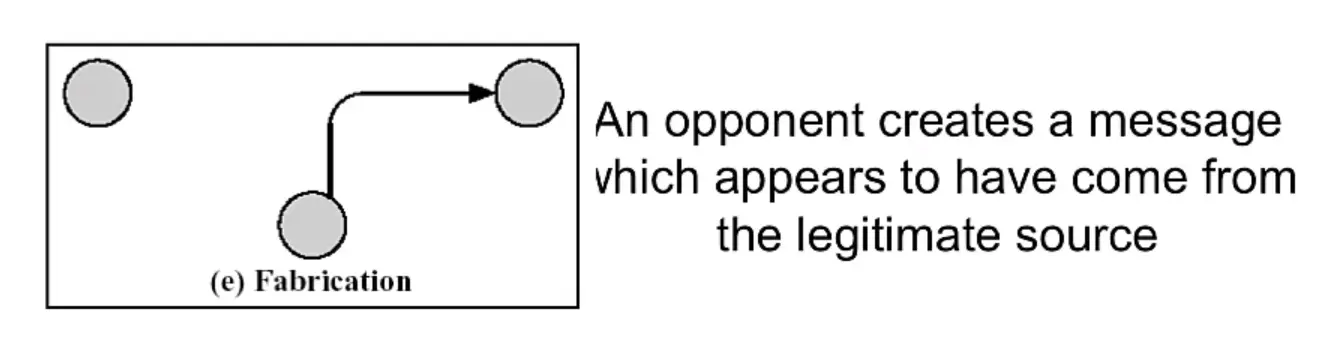
I) Masquerade: impersonification of a known or authorized system or person
II)Replay: a copy of a legitimate message is captured by an intruder and re-transmitted
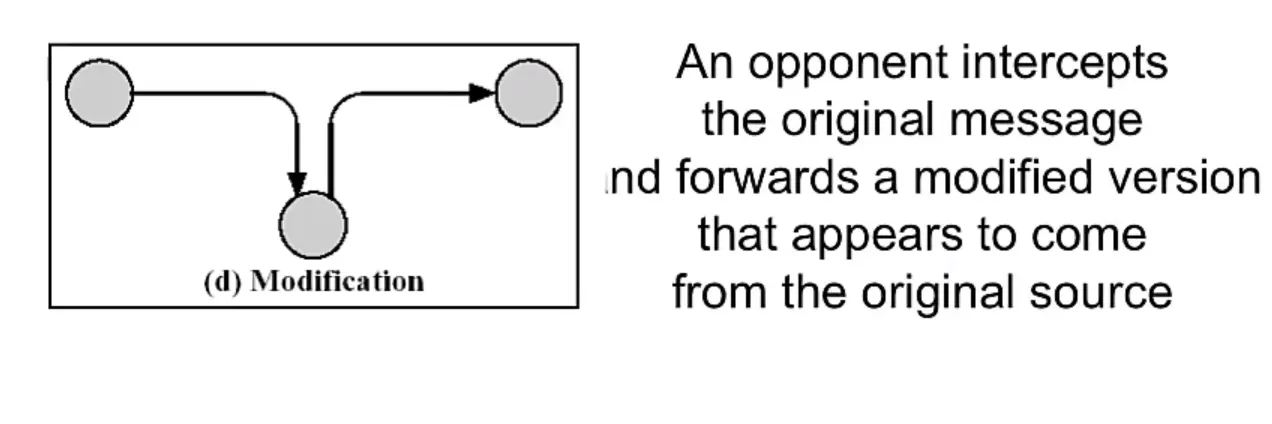
III) Modification
IV) Denial of Service: The opponent prevents authorized users from accessing a system.
Security Architecture – Attacks models
Passive Attacks
Active Attacks
Malware and an Introduction to Threat Protection
Malware and Ransomware
Malware: Short for malicious software, is any software used to disrupt computer or mobile operations, gather sensitive information, gain access to private computer systems, or display unwanted advertising. Before the term malware was coined by Yisrael Radai in 1990. Malicious software was referred to as computer viruses.
Types of Malware
Viruses
Worms
Trojans Horses
Spyware
Adware
RATs
Rootkit
Ransomware: A type of code which restricts the user’s access to the system resources and files.
Other Attack Vectors
Botnets
Keyloggers
Logic Bombs (triggered when certain condition is met, to cripple the system in different ways)
APTs (Advanced Persistent Threats: main goal is to get access and monitor the network to steal information)
Some Known Threat Actors
Fancy Bears: Russia
Lazarous Groups: North Korea
Periscope Group: China
Threat Protection
Technical Control
Antivirus (AV)
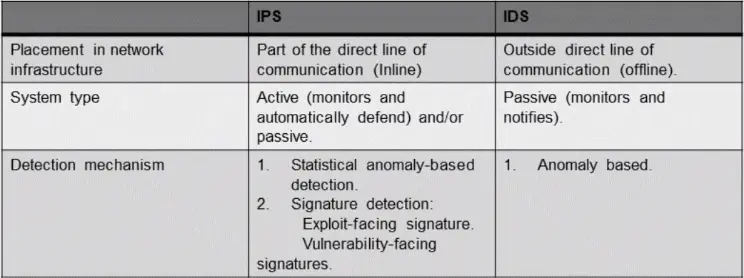
IDS (Intrusion Detection System)
IPS (Intrusion Protection System)
UTM (Unified Threat Management)
Software Updates
Administrative Control
Policies
Trainings (social engineering awareness training etc.)
Revision and tracking (The steps mentioned should remain up-to-date)
Additional Attack Vectors Today
Internet Security Threats – Mapping
Mapping
before attacking; “case the joint" – find out what services are implemented on network
Use ping to determine what hosts have addresses on network
Post scanning: try to establish TCP connection to each port in sequence (see what happens)
NMap Mapper: network exploration and security auditing
Mapping: Countermeasures
record traffic entering the network
look for suspicious activity (IP addresses, ports being scanned sequentially)
use a host scanner and keep a good inventory of hosts on the network
Red lights and sirens should go off when an unexpected ‘computer’ appears on the network
Internet Security Threats – Packet Sniffing
Packet Sniffing
broadcast media
promiscuous NIC reads all packets passing by
can read all unencrypted data
Packet Sniffing – Countermeasures
All hosts in the organization run software that checks periodically if host interface in promiscuous mode.
One host per segment of broadcast media.
Internet Security Threats – IP Spoofing
IP Spoofing
can generate ‘raw’ IP packets directly from application, putting any value into IP source address field
receiver can’t tell if source is spoofed
IP Spoofing: ingress filtering
Routers should not forward out-going packets with invalid source addresses (e.g., data-gram source address not in router’s network)
Great, but ingress can not be mandated for all networks
Internet Security Threats – Denial of Service
Denial of service
flood of maliciously generated packets ‘swamp’ receiver
filter out flooded (e.g., SYN) before reaching host: throw out good with bad
trace-back to source of floods (most likely an innocent, compromised machine)
Internet Security Threats – Host insertions
Host insertions
generally an insider threat, a computer ‘host’ with malicious intent is inserted in sleeper mode on the network
Host insertions – Countermeasures
Maintain an accurate inventory of computer hosts by MAC addresses
Use a host scanning capability to match discoverable hosts again known inventory
Missing hosts are OK
New hosts are not OK (red lights and sirens)
Attacks and Cyber Crime Resources
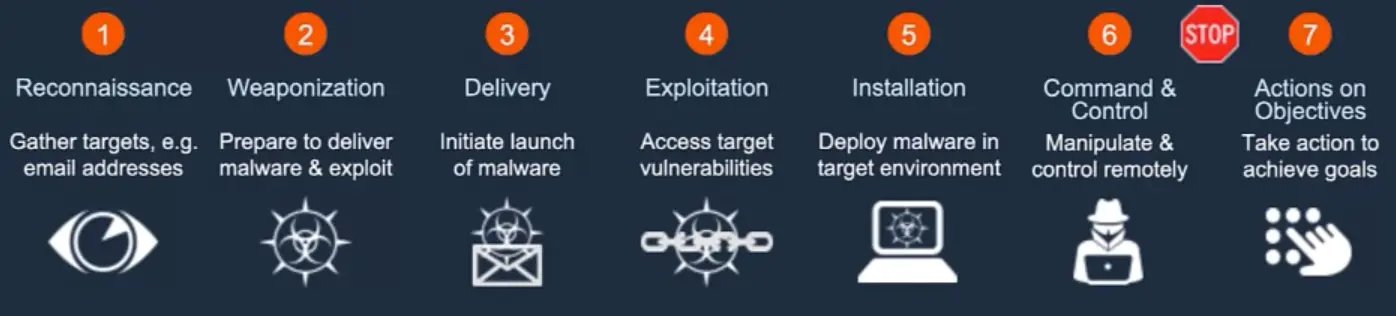
The Cyber Kill Chain
Reconnaissance: Research, identification and selection of targets
Weaponizations: Pairing remote access malware with exploit into a deliverable payload (e.g., adobe PDF and Microsoft Office files)
Delivery: Transmission of weapon to target (e.g., via email attachments, websites, or USB sticks)
Exploitation: Once delivered, the weapon’s code is triggered, exploiting vulnerable application or systems
Installation: The weapon installs a backdoor on a target’s system allowing persistent access
Command & Control: Outside server communicates with the weapons providing ‘hands on keyboard access’ inside the target’s network.
Actions on Objectives: the attacker works to achieve the objective of the intrusion, which can include ex-filtration or destruction of data, or intrusion of another target.
What is Social Engineering?
“The use of humans for cyber purposes”
Tool: The Social-Engineer Toolkit (SET)
Phishing
“To send fake emails, URLs or HTML etc.”
Tool: Gopish
Vishing
“Social Engineering via Voice and Text.”
Cyber warfare
Nation Actors
Hacktivist
Cyber Criminals
An Overview of Key Security Concepts
CIA Triad
CIA Triad – Confidentiality
“To prevent any disclosure of data without prior authorization by the owner.”
We can force Confidentiality with encryption
Elements such as authentication, access controls, physical security and permissions are normally used to enforce Confidentiality.
CIA Triad – Integrity
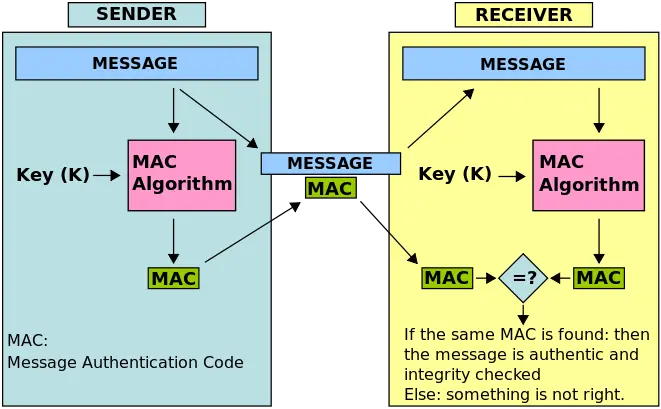
Normally implemented to verify and validate if the information that we sent or received has not been modified by an unauthorized person of the system.
We can implement technical controls such as algorithms or hashes (MD5, SHA1, etc.)
CIA Triad – Availability
The basic principle of this term is to be sure that the information and data is always available when needed.
Technical Implementations
RAIDs
Clusters (Different set of servers working as one)
ISP Redundancy
Back-Ups
Non-Repudiation – How does it apply to CIA?
“Valid proof of the identity of the data sender or receiver”
Technical Implementations:
Digital signatures
Logs
Access Management
Access criteria
Groups
Time frame and specific dates
Physical location
Transaction type
“Needed to Know” Just access information needed for the role
Single Sign-on (SSO)
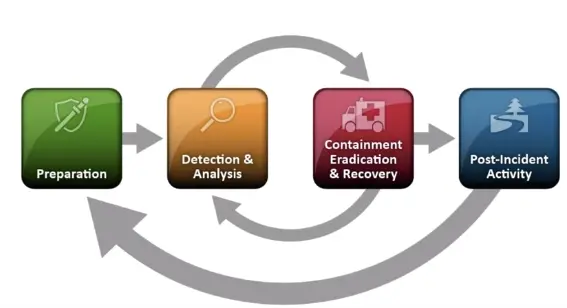
Incident Response
“Computer security incident management involves the monitoring and detection of security events on a computer or a computer network and the execution of proper resources to those events. Means the information security or the incident management team will regularly check and monitor the security events occurring on a computer or in our network.”
Incident Management
Events
Incident
Response team: Computer Security Incident Response Team (CSIRT)
Investigation
Key Concepts – Incident Response
E-Discovery
Data inventory, helps to understand the current tech status, data classification, data management, we could use automated systems. Understand how you control data retention and backup.
Automated Systems
Using SIEM, SOA, UBA, Big data analysis, honeypots/honey-tokens. Artificial Intelligence or other technologies, we could enhance the mechanism to detect and control incidents that could compromise the tech environment.
Understand the company in order to prepare the BCP. A BIA, it’s good to have a clear understanding of the critical business areas. Also indicate if a security incident will trigger the BCP or the Disaster Recovery.
Post Incident
Root-Cause analysis, understand the difference between error, problem and isolated incident. Lessons learned and reports are a key.
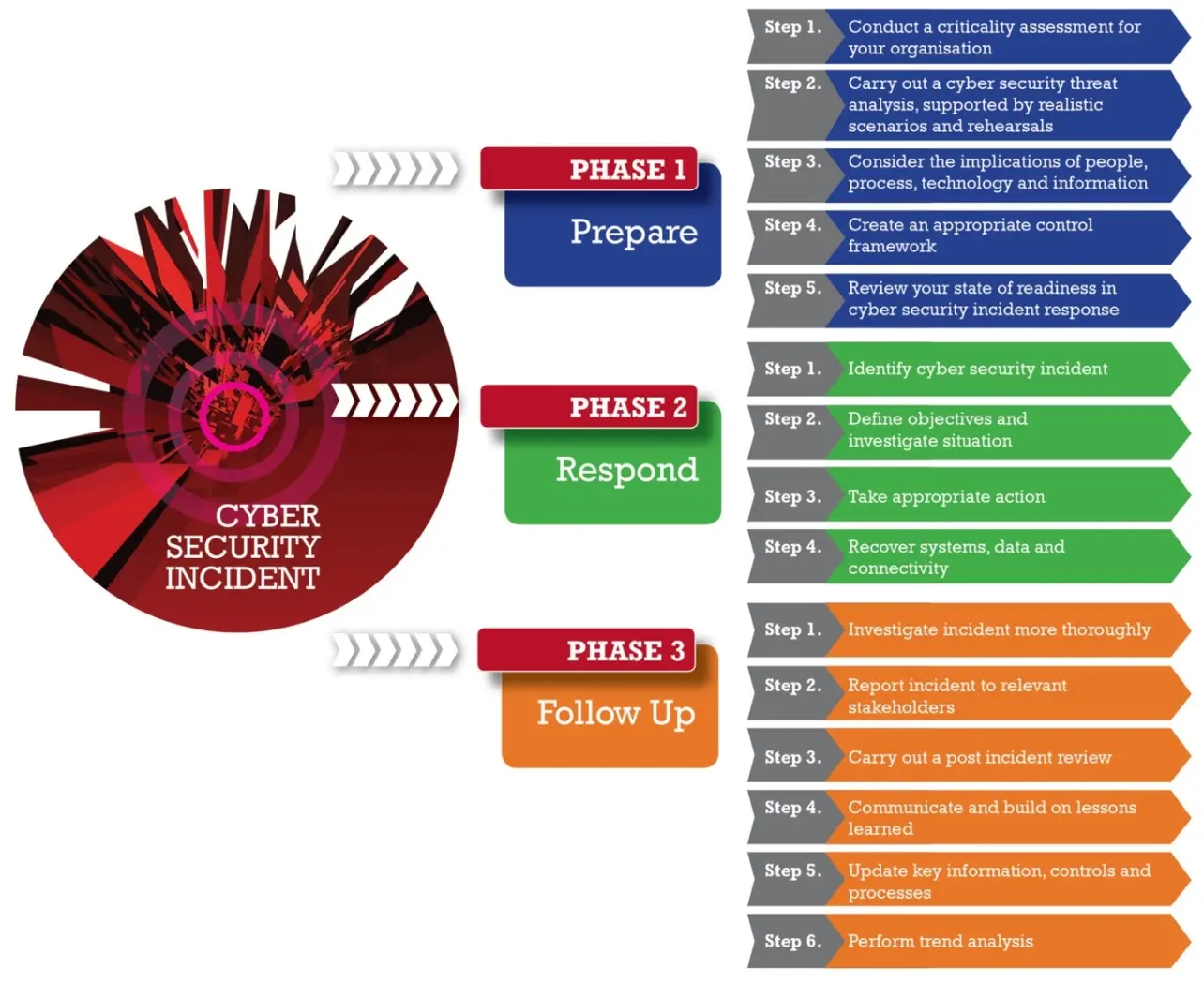
Incident Response Process
Prepare
Respond
Follow up
Introduction to Frameworks and Best Practices
Best Practices, baseline, and frameworks
Used to improve the controls, methodologies, and governance for the IT departments or the global behavior of the organization.
Seeks to improve performance, controls, and metrics.
Helps to translate the business needs into technical or operational needs.
Normative and compliance
Rules to follow for a specific industry.
Enforcement for the government, industry, or clients.
Event if the company or the organization do not want to implement those controls, for compliance.
Best practices, frameworks, and others
COBIT
ITIL
ISOs
COSO
Project manager methodologies
Industry best practices
Developer recommendations
others
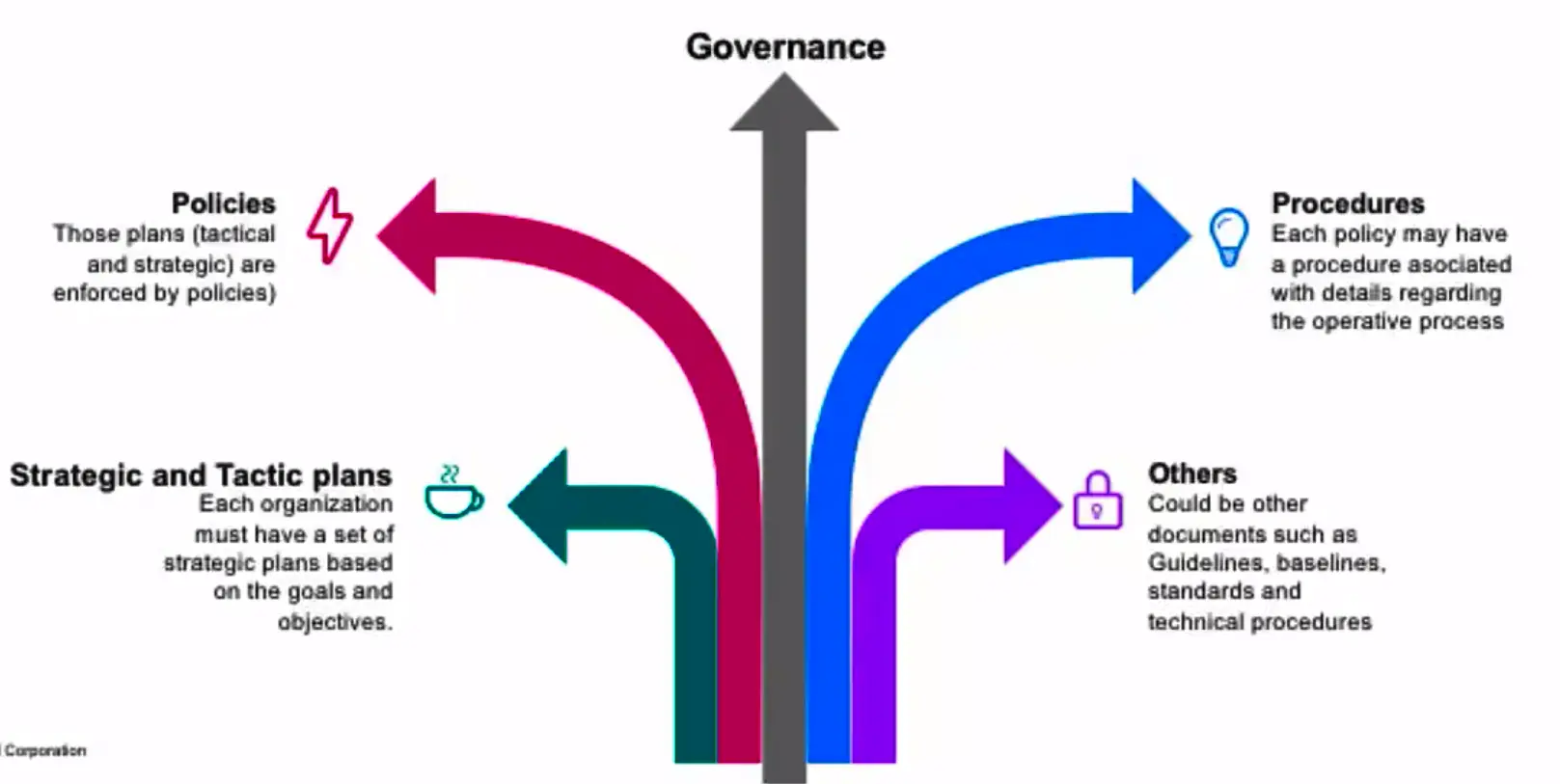
IT Governance Process
Security Policies, procedures, and other
Strategic and Tactic plans
Procedures
Policies
Governance
Others
Cybersecurity Compliance and Audit Overview
Compliance;
SOX
HIPAA
GLBA
PCI/DSS
Audit
Define audit scope and limitations
Look for information, gathering information
Do the audit (different methods)
Feedback based on the findings
Deliver a report
Discuss the results
Pentest Process and Mile 2 CPTE Training
Pentest – Ethical Hacking
A method of evaluating computer and network security by simulating an attack on a computer system or network from external and internal threats.
An Overview of Key Security Tools
Introduction to Firewalls
Firewalls
“Isolates the organization’s internal net from the larger Internet, allowing some packets to pass, while blocking the others.”
Firewalls – Why?
Prevent denial-of-service attacks;
SYN flooding: attacker establishes many bogus TCP connections, no resources left for “real” connections.
Prevent illegal modification/access of internal data.
e.g., attacker replaces CIA’s homepage with something else.
Allow only authorized access to inside network (set of authenticated users/hosts)
Two types of Firewalls
Application level
Packet filtering
Firewalls – Packet Filtering
Internal network connected to internet via router firewall
router filters packet-by-packet, decision to forward/drop packet based on;
source IP address, destination IP address
TCP/UDP source and destination port numbers
ICMP message type
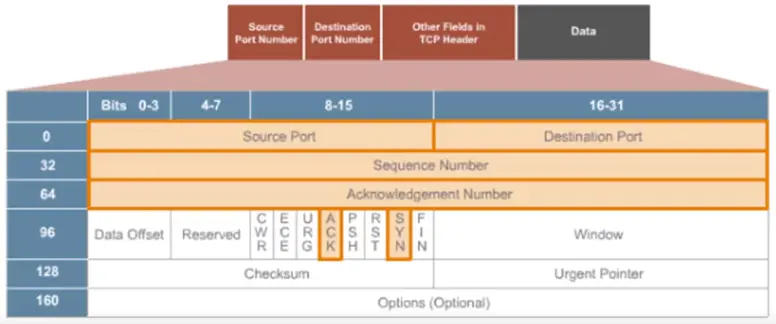
TCP SYNC and ACK bits
Firewalls – Application Gateway
Filters packets on application data as well as on IP/TCP/UDP fields.
Allow select internal users to telnet outside:
Require all telnet users to telnet through gateway.
For authorized users, the gateway sets up a telnet connection to the destination host. The gateway relays data between 2 connections.
Router filter blocks all telnet connections not originating from gateway.
Limitations of firewalls and gateways
IP spoofing: router can’t know if data “really” comes from a claimed source.
If multiple app’s need special treatment, each has the own app gateway.
Client software must know how to contact gateway.
e.g., must set IP address of proxy in Web Browser.
Filters often use all or nothing for UDP.
Trade-off: Degree of communication with outside world, level of security
Many highly protected sites still suffer from attacks.
Firewalls – XML Gateway
XML traffic passes through a conventional firewall without inspection;
All across normal ‘web’ ports
An XML gateway examines the payload of the XML message;
Well formed (meaning to specific) payload
No executable code
Target IP address makes sense
Source IP is known
Firewalls – Stateless and Stateful
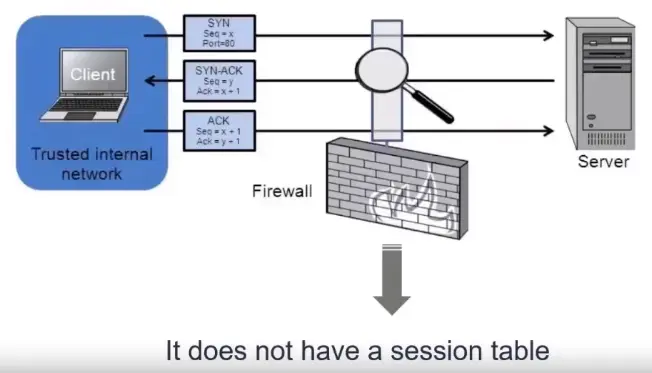
Stateless Firewalls
No concept of “state”.
Also called Packet Filter.
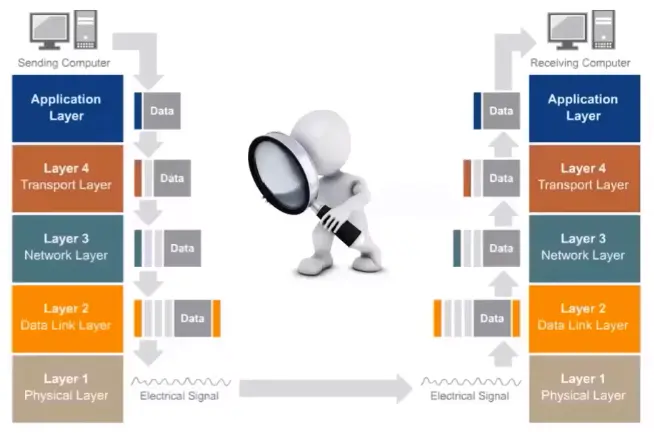
Filter packets based on layer 3 and layer 4 information (IP and port).
Lack of state makes it less secure.
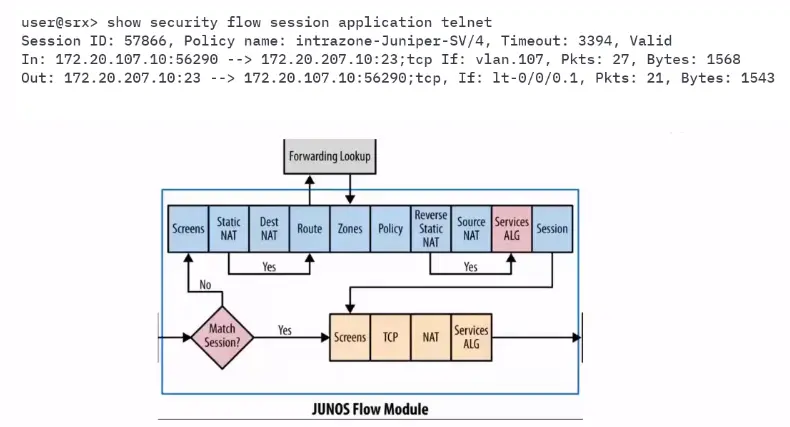
Stateful Firewalls
Have state tables that allow the firewall to compare current packets with previous packets.
Could be slower than packet filters but far more secure.
Application Firewalls can make decisions based on Layer 7 information.
Proxy Firewalls
Acts as an intermediary server.
Proxies terminate connections and initiate new ones, like a MITM.
There are two 3-way handshakes between two devices.
Antivirus/Anti-malware
Specialized software that can detect, prevent and even destroy a computer virus or malware.
Uses malware definitions.
Scans the system and search for matches against the malware definitions.
These definitions get constantly updated by vendors.
An Introduction of Cryptography
Cryptography is secret writing.
Secure communication that may be understood by the intended recipient only.
There is data in motion and data at rest. Both need to be secured.
Not new, it has been used for thousands of years.
Egyptians hieroglyphics, Spartan Scytale, Caesar Cipher, are examples of ancient Cryptography.
Cryptography – Key Concepts
Confidentiality
Integrity
Authentication
Non-repudiation
Crypto-analysis
Cipher
Plaintext
Ciphertext
Encryption
Decryption
Cryptographic Strength
Relies on math, not secrecy.
Ciphers that have stood the test of time are public algorithms.
Mono-alphabetic < Poly-alphabetic Ciphers
Modern ciphers use Modular math
Exclusive OR(XOR) is the “secret sauce” behind modern encryption.
Types of Cipher
Stream Cipher: Encrypt or decrypt, a bit per bit.
Block Cipher: Encrypt or decrypt in blocks or several sizes, depending on the algorithms.
Types of Cryptography
Three main types;
Symmetric Encryption
Asymmetric Encryption
Hash
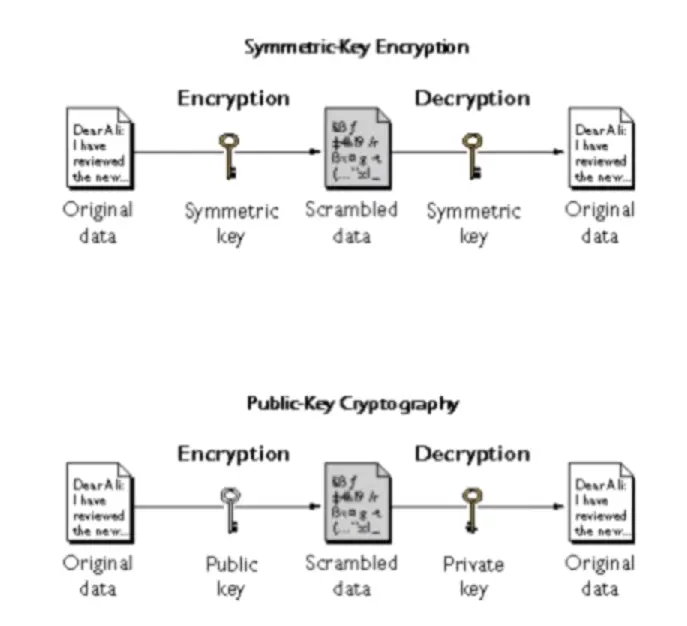
Symmetric Encryption
Use the same key to encrypt and decrypt.
Security depends on keeping the key secret at all times.
Strengths include speed and Cryptographic strength per a bit of key.
The bigger the key, the stronger the algorithm.
Key need to be shared using a secure, out-of-band method.
DES, Triples DES, AES are examples of Symmetric Encryption.
Asymmetric Encryption
Whitefield Diffie and Martin Hellman, who created the Diffie-Hellman. Pioneers of Asymmetric Encryption.
Uses two keys.
One key ban be made public, called public key. The other one needs to be kept private, called Private Key.
One for encryption and one for decryption.
Used in digital certificates.
Public Key Infrastructure – PKI
It uses “one-way” algorithms to generate the two keys. Like factoring prime numbers and discrete logarithm.
Slower than Symmetric Encryption.
Hash Functions
A hash function provides encryption using an algorithm and no key.
A variable-length plaintext is “hashed” into a fixed-length hash value, often called a “message digest” or simply a “hash”.
If the hash of a plaintext changes, the plaintext itself has changed.
This provides integrity verification.
SHA-1, MD5, older algorithms prone to collisions.
SHA-2 is the newer and recommended alternative.
Cryptographic Attacks
Brute force
Rainbow tables
Social Engineering
Known Plaintext
Known ciphertext
DES: Data Encryption Standard
US encryption Standard (NIST, 1993)
56-bit Symmetric key, 64-bit plaintext input
How secure is DES?
DES Challenge: 56-bit-key-encrypted phrase (“Strong Cryptography makes the world a safer place”) decrypted (brute-force) in 4 months
No known “back-doors” decryption approach.
Making DES more secure
Use three keys sequentially (3-DES) on each datum.
Use cipher-block chaining.
AES: Advanced Encryption Standard
New (Nov. 2001) symmetric-key NIST standard, replacing DES.
Processes data in 128-bit blocks.
128, 192, or 256-bit keys.
Brute-force decryption (try each key) taking 1 sec on DES, takes 149 trillion years for AES.
First look at Penetration Testing and Digital Forensics
Penetration Testing – Introduction
Also called Pentest, pen testing, ethical hacking.
The practice of testing a computer system, network, or application to find security vulnerabilities that an attacker could exploit.
Hackers
White Hat
Grey Hat
Black Hat
Threat Actors
“An entity that is partially or wholly responsible for an incident that affects or potentially affects an organization’s security. Also referred to as malicious actor.”
There are different types;
Script kiddies
Hacktivists
Organized Crime
Insiders
Competitors
Nation State
Fancy Bear (APT28)
Lazarous Group
Scarcruft (Group 123)
APT29
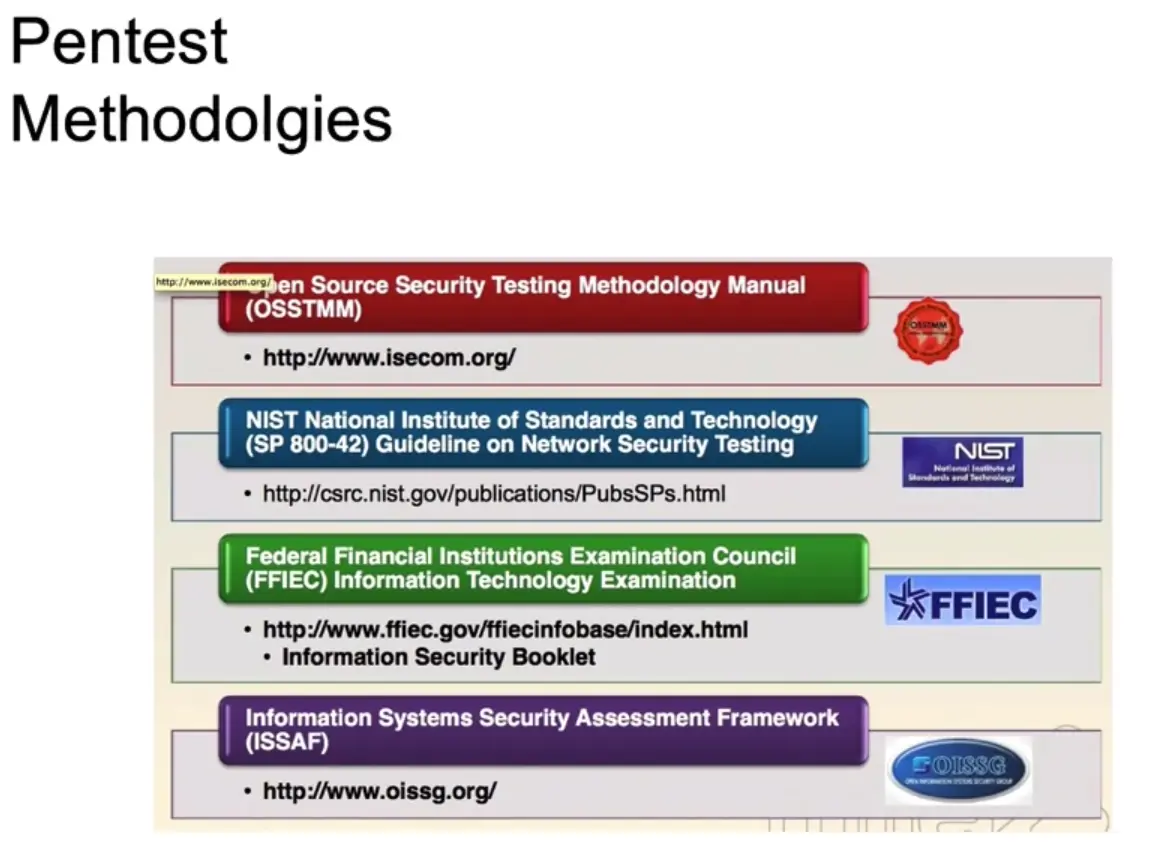
Pen-test Methodologies
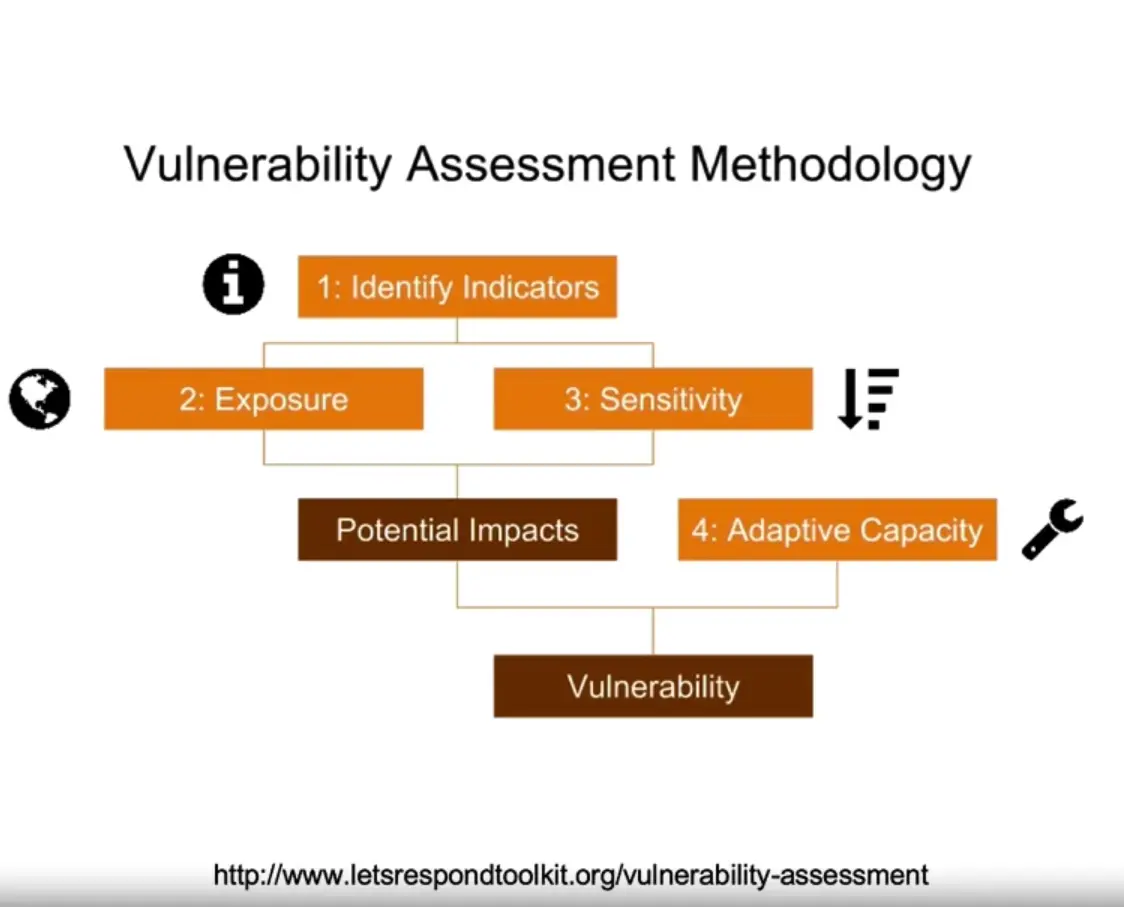
Vulnerability Tests
What is Digital Forensics?
Branch of Forensics science.
Includes the identification, recovery, investigation, validation, and presentation of facts regarding digital evidence found on the computers or similar digital storage media devices.
Locard’s Exchange Principle
DR. Edmond Locard;
“A pioneer in Forensics science who became known as the Sherlock Holmes of France.”
The perpetrator of a crime will bring something into the crime scene and leave with something from it, and that both can be used as Forensic evidence.
Chain of Custody
Refers to the chronological documentation or paper trail that records the sequence of custody, control, transfer, analysis, and disposition of physical or electronic evidence.
It is often a process that has been required for evidence to be shown legally in court.
Tools
Hardware
Faraday cage
Forensic laptops and power supplies, tool sets, digital camera, case folder, blank forms, evidence collection and packaging supplies, empty hard drives, hardware write blockers.
Software
Volatility
FTK (Paid)
EnCase (Paid)
dd
Autopsy (The Sleuth Kit)
Bulk Extractor, and many more.
Cybersecurity Roles, Processes and Operating System Security
Subsections of Cybersecurity Roles, Proces and OS Security
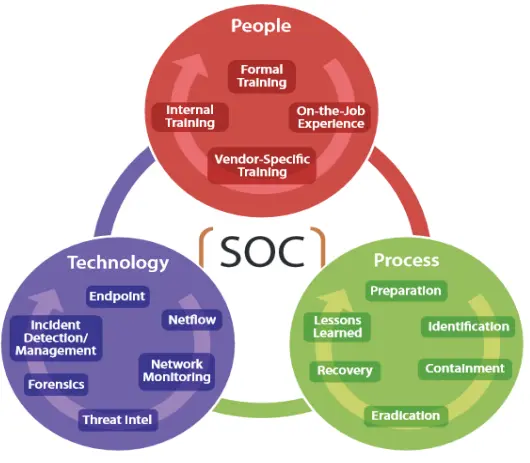
People Processes and Technology
Frameworks and their Purpose
Best practices, baseline, and frameworks
Used to improve the controls, methodologies, and governance for the IT departments or the global behavior of the organization.
Seeks to improve performance, controls, and metrics.
Helps to translate the business needs into technical or operational needs.
Normative and Compliance
Rules to follow for a specific industry.
Enforcement for the government, industry, or clients.
Event if the company or the organization do not want to implement those controls for compliance.
Best practices, frameworks & others
Frameworks
COBIT (Control Objective for Information and Related Technologies)
COBIT is a framework created by ISACA for IT management and IT governance. The framework is business focused and defines a set of generic processes for the management of IT, with each process defined together.
ITIL (The Information Technology Infrastructure Library)
ITIL is a set of detailed practices for IT activities such as IT service management (ITSM) and IT asset management (ITAM) that focus on aligning IT services with the needs of business.
ISOs (International Organization for Standardization)
COSO (Committee of Sponsoring Organization of the Tread way Commission)
COSO is a joint initiative to combat corporate fraud.
Project manager methodologies
Industry best practices
Developer recommendations
Others
Roles in Security
CISO (Chief Information Security Officer)
The CISO is a high-level management position responsible for the entire computer security department and staff.
Information Security Architect
Information Security Consultant/Specialist
Information Security Analyst
This position conducts Information security assessments for organizations and analyzes the events, alerts, alarms and any Information that could be useful to identify any threat that could compromise the organization.
Information Security Auditor
This position is in charge of testing the effectiveness of computer information systems, including the security of the systems, and reports their findings.
Security Software Developer
Penetration Tester / Ethical Hacker
Vulnerability Assessor
etc.
Business Process Management (BPM) and IT Infrastructure Library (ITIL) Basics
Introduction to Process
Processes and tools should work in harmony
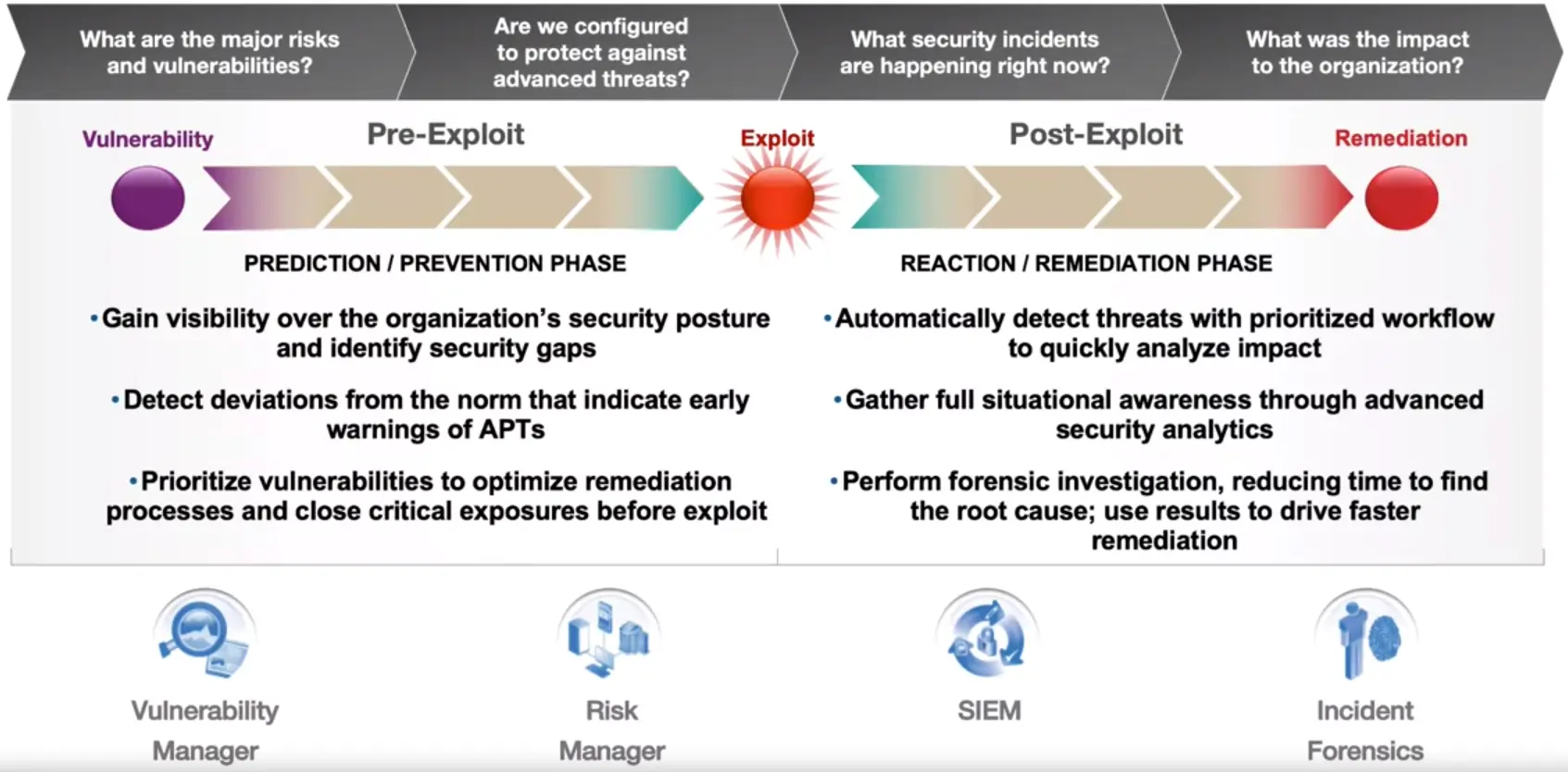
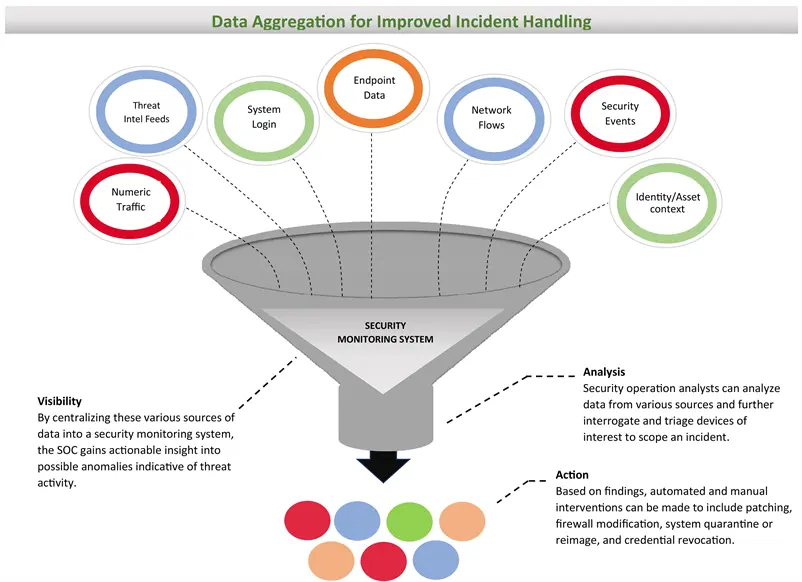
Security Operations Centers (SOC) need to have the current key skills, tools, and processes to be able to detect, investigate and stop threats before they become costly data breaches.
As volumes of security alerts and false positives grow, more burden is placed upon Security Analyst and Incident Response Teams.
Business Process Management (BPM) Overview
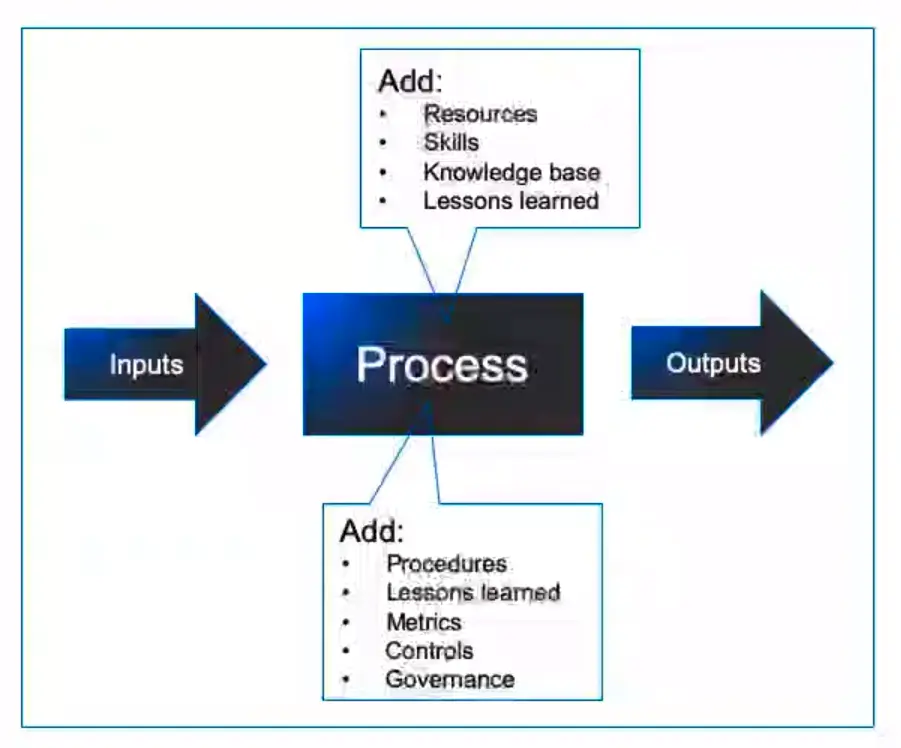
“A set of defined repeatable steps that take inputs, add value, and produce outputs that satisfy a customer’s requirements.”
Attributes of a Process
Inputs:
Information or materials that are required by the process to get started.
Outputs:
Services, or products that satisfy customer requirements.
Bounds/Scope:
The process starts when and end when.
Tasks/Steps:
Actions that are repeatable.
Documentation:
For audit, compliance, and reference purposes.
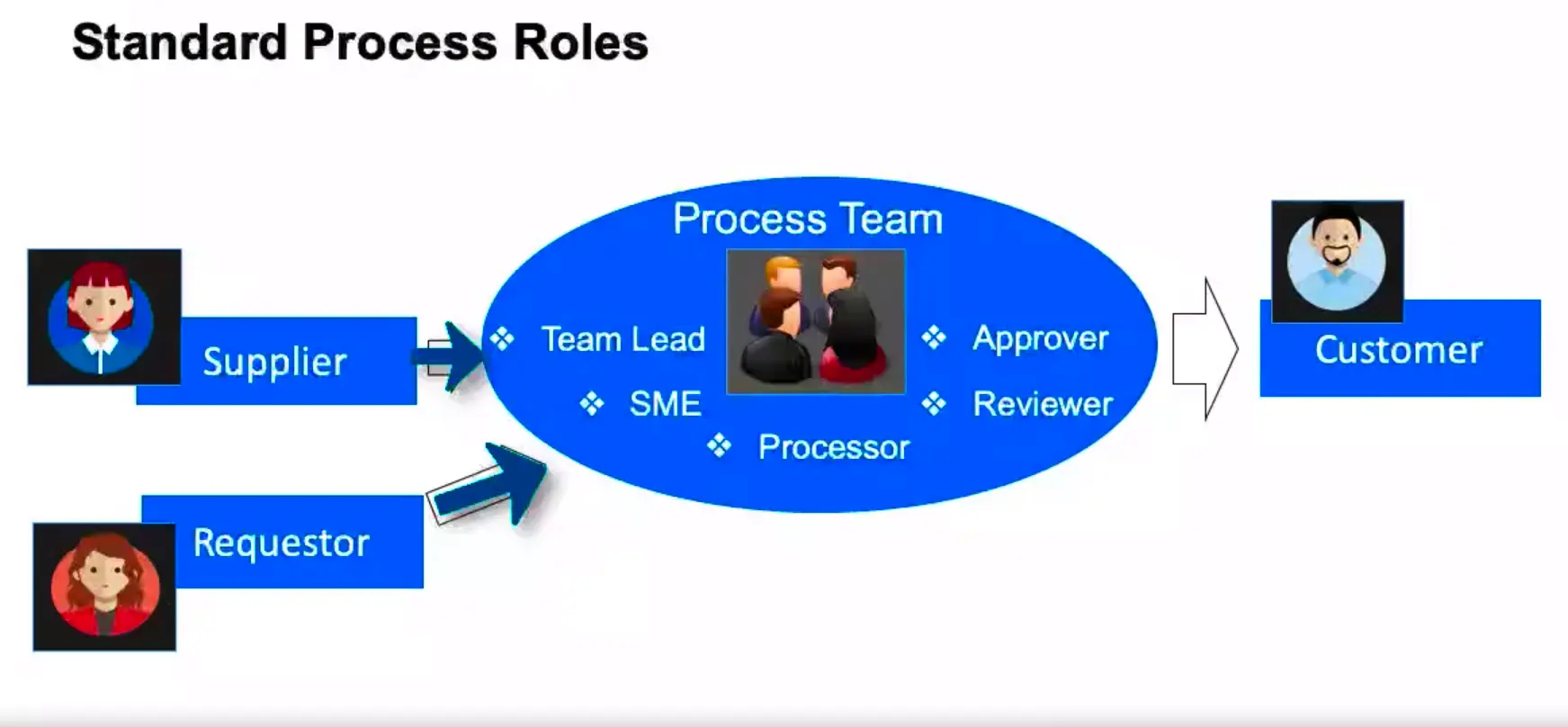
Standard Process Roles
What makes a Process Successful?
Charter
Clear Objectives
Governance/Ownership
Repeatability (reduced variation)
Automation
Established Performance indicators (metrics)
Process Performance Metrics
“It is critical that we measure our processing, so understand if they are performing to specifications and producing the desired outcome every time; and within financial expectations.”
Typical Categories
Cycle Time
Cost
Quality (Defect Rate)
Rework
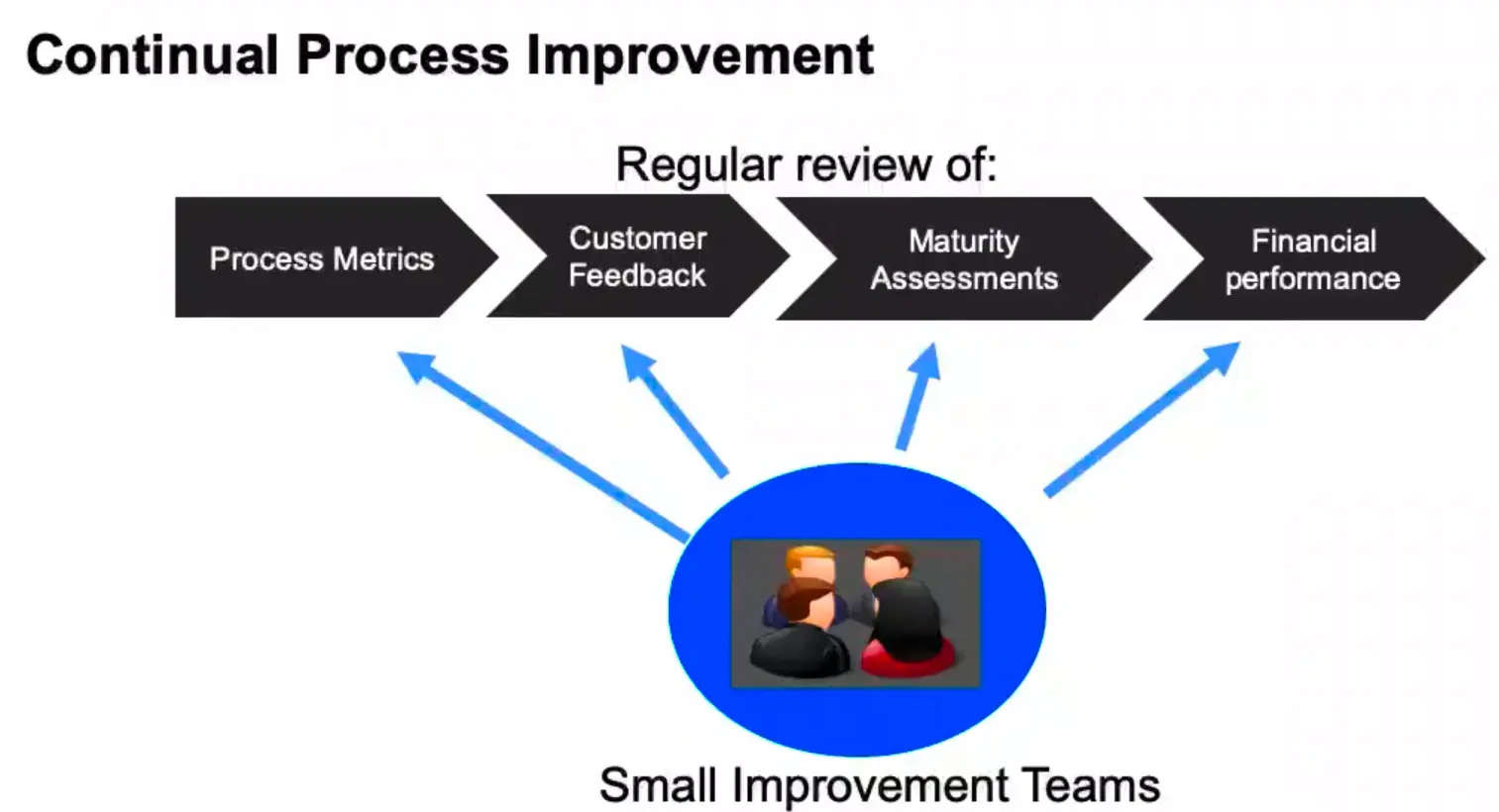
Continual Process Improvement
Information Technology Infrastructure Library (ITIL) Overview
ITIL is a best practice framework that has been drawn from both the public and private sectors internationally.
It describes how IT resources should be organized to deliver Business value.
It models how to document processes and functions, in the roles of IT Service Management (ITSM).
ITIL Life-cycle – Service Phases
Service Strategy
Service Design
Service Transition
Service Operations
Service Improvements
ITIL Life-cycle – Service Strategy
Service Portfolio Management
Financial Management
Demand Management
Business Relationship Management
ITIL Life-cycle – Service Design
Service Catalog Management
Service Level Management
Information Security Management
Supplier Management
ITIL Life-cycle – Service Transition
Change Management
Project Management
Release & Deployment Management
Service validation & Testing
Knowledge Management
ITIL Life-cycle – Service Operations
Event Management
Incident Management
Problem Management
ITIL Life-cycle – Continual Service Improvement (CSI)
Review Metrics
Identify Opportunities
Test & Prioritize
Implement Improvements
Key ITIL Processes
Problem Management
The process responsible for managing the Life-cycle of all problems.
ITIL defines a ‘problem’ as ‘an unknown cause of one or more incidents.’
Change Management
Manage changes to baseline service assets and configuration items across the ITIL Life-cycle.
Incident Management
An incident is an unplanned interruption to an IT Service, a reduction in the quality of an IT Service, and/ or a failure of a configuration item.
Events are any detectable or discernible occurrence that has significance for the management of IT Infrastructure, or the delivery of an IT service.
Service Level Management
This involves the planning coordinating, drafting, monitoring, and reporting on Service Level Agreements (SLAs). It is the ongoing review of service achievements to ensure that the required service quality is maintained and gradually improved.
Information Security Management
This deals with having and maintaining an information security policy (ISP) and specific security Policies that address each aspect of strategy, Objectives, and regulations.
Difference between ITSM and ITIL
Information Technology Service Management (ITSM)
“ITSM is a concept that enables an organization to maximize business value from the use of information Technology.”
IT Infrastructure Library (ITIL)
“ITIL is a best practice framework that gives guidance on how ITSM can be delivered.”
Further discussion of confidentiality, integrity, and availability
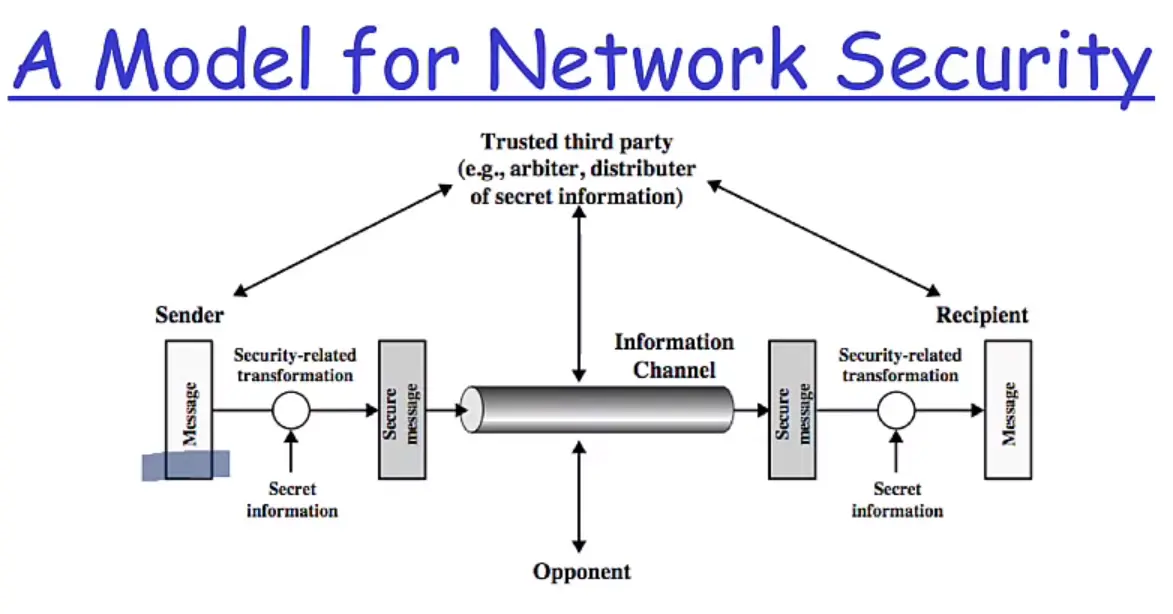
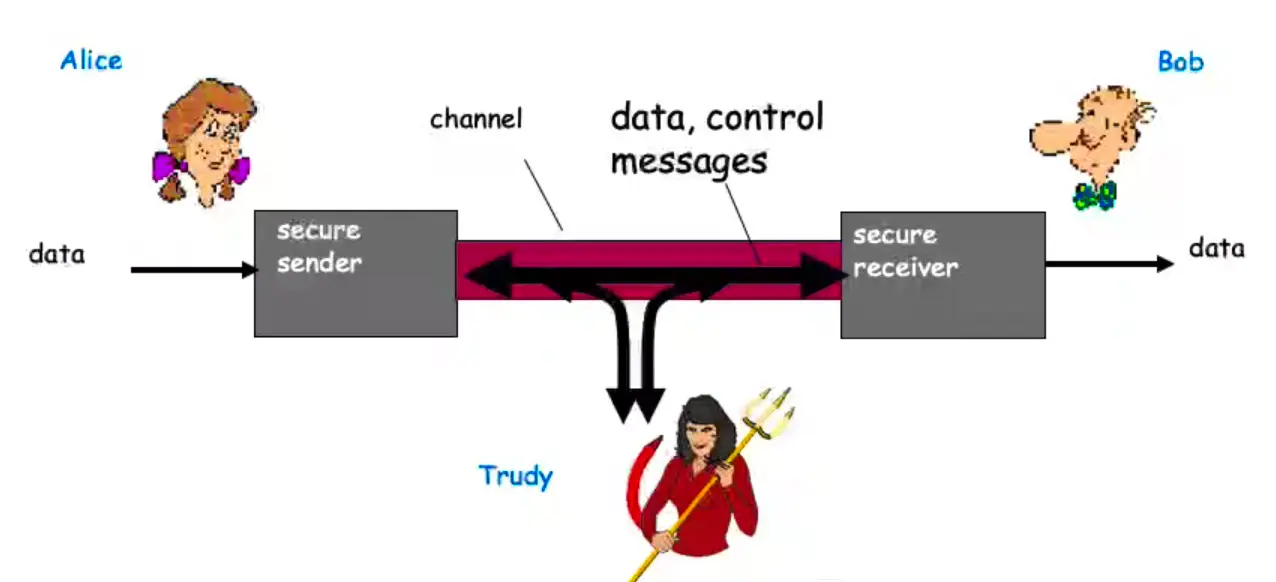
Who are Alice, Bob, and Trudy?
Well known in network security world.
Bob, Alice (friends) want to communicate “securely”.
Trudy (intruder) may intercept, delete, add messages.
Confidentiality, Integrity, and Availability
Main components of network security.
Confidentiality
Preserving authorized restrictions on information access and disclosure, including means for protecting personal privacy and proprietary information.
Loss of confidentiality is the unauthorized disclosure of information.
Integrity
Guarding against improper information modification or destruction.
Including ensuring information non-repudiation and authenticity.
Integrity loss is the unauthorized modification or destruction of information.
Availability
Timely and reliable access to information.
Loss of availability is the disruption of access to an information system.
Authenticity and Accountability
Authenticity: property of being genuine and verifiable.
“Only who has the rights to access or utilize the resources can use them.”
Access control models
MAC – Mandatory Access Control
Use labels to regulate the access
Military use
DAC – Discretionary Access Control
Each object (folder or file) has an owner and the owner defines the rights and privilege
Role Based Access Control
The rights are configured based on the user roles. For instance, sales group, management group, etc.
Other methods
Centralized
SSO (Single Sing On)
Provide the 3 As
Decentralized
Independent access control methods
Local power
Normally the military forces use these methods on the battlefields
Best practices for the access control field
These concepts are deeply integrated with the access control methodologies and must be followed by the organization in order of the policies and procedures.
Least privilege
Information access limit
Separation of duties
Verify employee activity
Rotation of duties
Tracking and control
Access Control – Physical and Logical
Physical access control methods
Perimetral
Building
Work areas
Servers and network
Technical uses of Physical security controls
ID badges
List and logs
Door access control systems
Tokens
Proximity sensors
Tramps
Physical block
Cameras
Logical access control methods
ACL (Routers)
GPO’S
Password policies
Device policies
Day and time restrictions
Accounts
Centralized
Decentralized
Expiration
BYOD, BYOC … BYO Everything…
Popular concepts for moderns times. Each collaborator has the opportunity to bring their own device to the work environment.
Some controls to follow:
Strict policy and understanding
Use of technical control MDM
Training
Strong perimetral controls
Monitoring the access control process
IDS/IPs
HOST IDS and IPS
Honeypot
Sniffers
Operating System Security Basics
User and Kernel Modes
MS Windows Components
User Mode and Kernel Mode
Drivers call routines that are exported by various kernel components.
Drivers must respond to specific calls from the OS and can respond to other system calls.
User Mode
When you start a user-mode application, Windows creates a process for the application.
Private virtual address space
Private handle table
Each application runs in isolation and if an application crashes, the crash is limited to that one application.
Kernel Mode
All code that runs in kernel mode shares a single virtual address space.
If a kernel-mode driver accidentally writes to the wrong virtual address, data that belongs to the OS or another driver could be compromised.
If a kernel-mode driver crashes, the entire OS crashes.
File System
Types of File Systems
NTS (New Technology File System)
Introduced in 1993
Most common file system for Windows end user systems
Most Windows servers use NTFS as well
FATxx (File Allocation Table)
Simple File system used since the 80s
Numbers preceding FAT refer to the number of bits used to enumerate a file system block. Ex FAT16, FAT32
Now mainly used for removable devices under 32 GB capacity.
(NOTE: FAT32 actually support upto ≤2TB storage size).
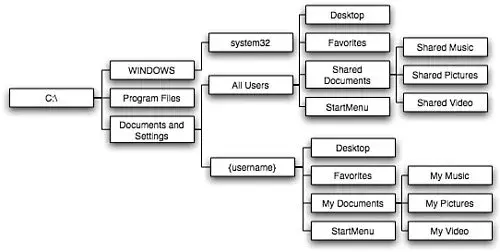
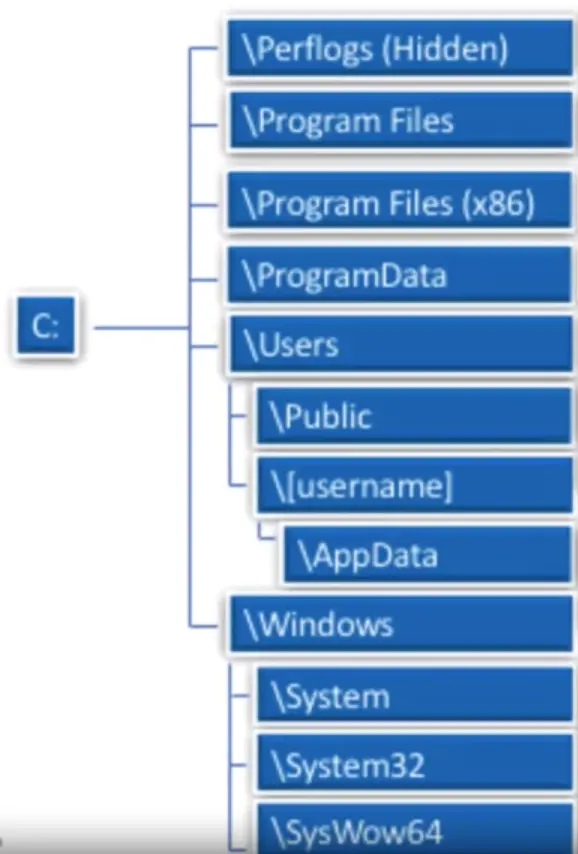
Directory Structure
Typical Windows Directory Structure
Shortcuts and Commands
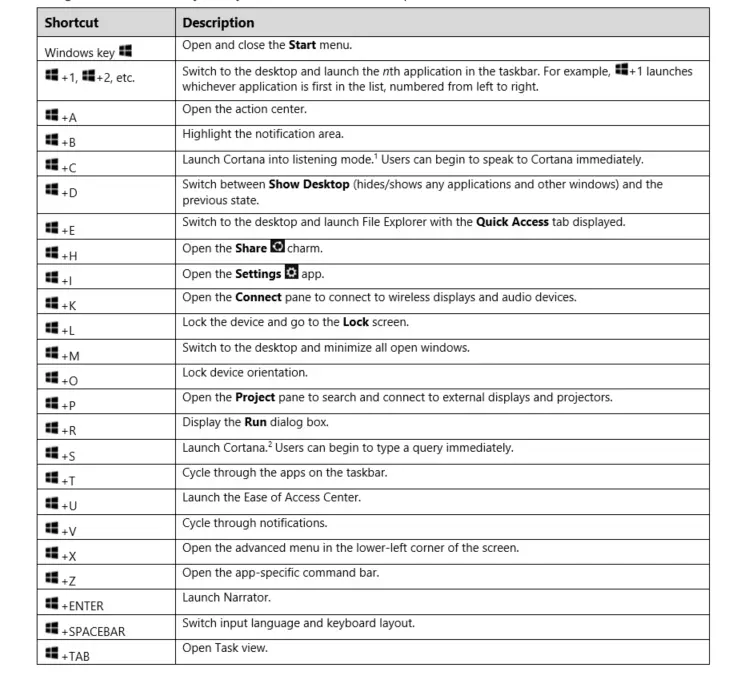
Windows Shortcuts
Common tasks that can be accessed using the Windows or Ctrl Key and another Key.
Time saving and helpful for tasks done regularly.
Additional Shortcuts
F2: Rename
F5: Refresh
Win+L: Lock your computer
Win+I: Open Settings
Win+S: Search Windows
Win+PrtScn: Save a screenshot
Ctrl+Shift+Esc: Open the Task Manager
Win+C: Start talking to Cortana
Win+Ctrl+D: Add a new virtual desktop
Win+X: Open the hidden Menu
Linux Key Components
Key Components
Linux has two major components:
The Kernel
- It is the core of the OS. It interacts directly with the hardware.
- It manages system and user input/output. Processes, files, memory, and devices.
1) The Shell
- It is used to interact with the kernel.
- Users input commands through the shell and the kernel performs the commands.
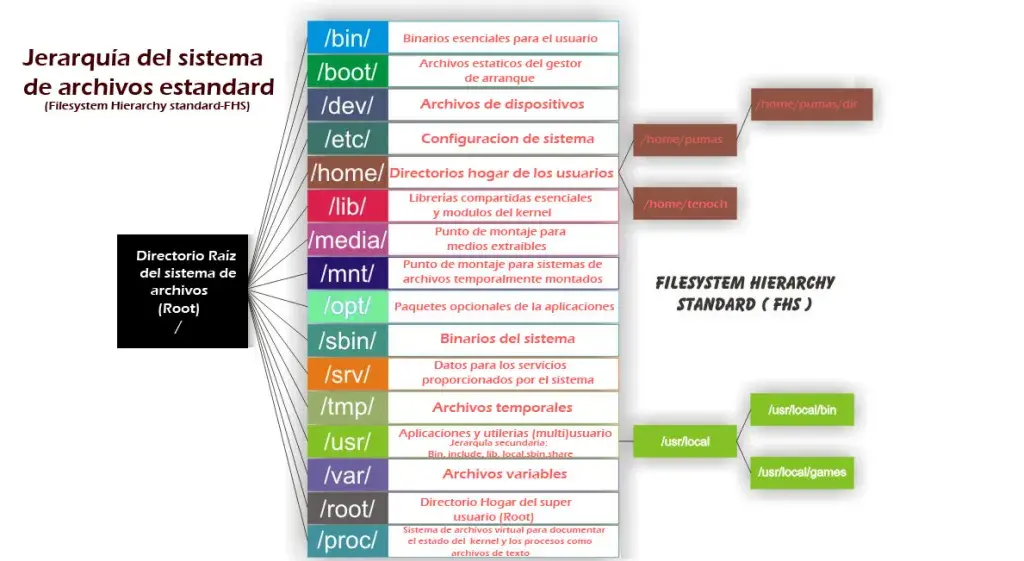
Linux File Systems
File Systems
- represents file in CLI
d represents directory in CLI
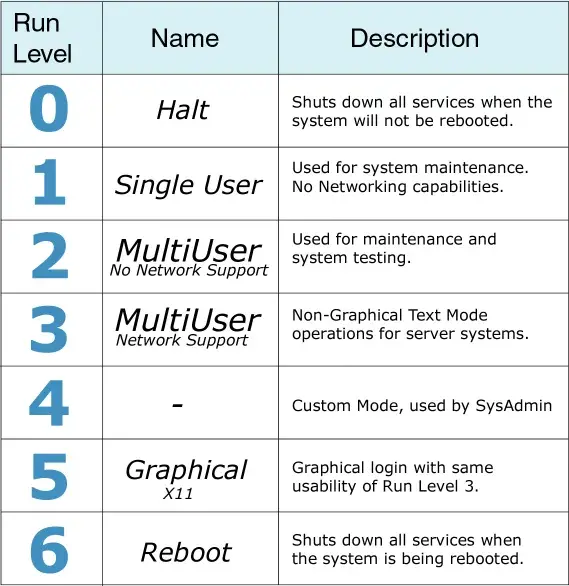
Run Levels
Linux Basic Commands
cd: change directory
cp: copy files or dirs
mv: move file or dirs
ls: lists info related to files and dirs
df: display file system disk space
kill: stop an executing process
rm: delete file and dirs
rmdir: remove en empty dir
cat: to see the file contents, or concatenate multiple files together
mkdir: creates new dir
ifconfig: view or configure network interfaces
locate: quickly searches for the location of files. It uses an internal database that is updated using updatedb command.
tail: View the end of a text file, by default the last 10 lines
less: Very efficient while viewing huge log files as it doesn’t need to load the full file while opening
more: Displays text, one screen at a time
nano: a basic text editor
chmod: changes privileges for a file or dir
Permissions and Owners
File and directory permission
There are three groups that can ‘own’ a file.
User
group
everybody
For each group there are also three types of permissions: Read, Write, and Execute.
Read: 4(100), Write: 2(010), Execute: 1(001)
Change Permissions
You can use the chmod command to change the permissions of a file or dir:
chmod <permissions><filename>
chmod 755<filename>
chmod u=rw,g=r,o=r<filename>
Change owner
You can change the owner and group owner of a file with the chown command:
chown <user>:<group><filename>
macOS Security Overview
macOS Auditing
About My mac menu, contains information about
OS
Displays
Storage
Support
Service
Logs, etc.
Activity Monitor real-time view of system resource usage and relevant actions
Console, contains
Crash reports
Spin reports
Log reports
Diagnostic reports
Mac Analysis Data
System.log
macOS Security Settings
Various Security settings for macOS can be found in System Preferences app.
Genral Tab offers GateKeeper settings for installing apps from other AppStore, and few other settings.
FileVault Tab contains information about system and file encryption.
FireWall Tab for system level software firewall settings with basic and to advanced options.
Privacy Tab contains location services and other privacy related info and settings.
macOS Recovery
macOS comes with a hidden partition installed called macOS Recovery, it essentially replaces the installation discs that comes with new computers.
Access it by restarting your Mac while holding the R key.
It offers following tools/options:
Restore from the Time Machine Backup
Reinstall macOS
Get Help Online
Disk Utility
Virtualization Basics and Cloud Computing
An Overview of Virtualization
Allows you to create multiple simulated environments or dedicated resources from a single, physical hardware system.
Hypervisor/Host
Virtual Machine/Guest
Hypervisor
Separate the physical resources from the virtual environments
Hypervisors can sit on top of an OS (end user) or be installed directly onto hardware (enterprise).
Virtual Machine
The virtual machine functions as a single data file.
The hypervisor relays requests from the VM to the actual hardware, is necessary.
VMs doesn’t interact directly with the host machine.
Physical hardware is assigned to VMs.
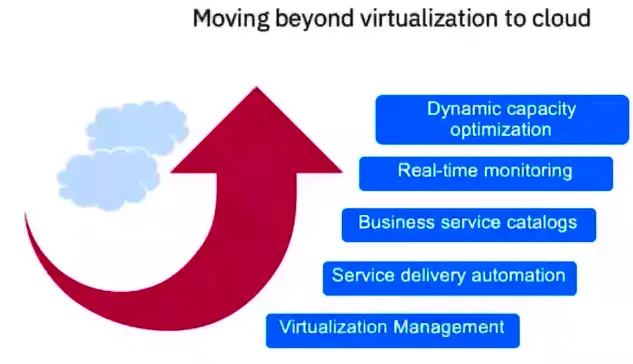
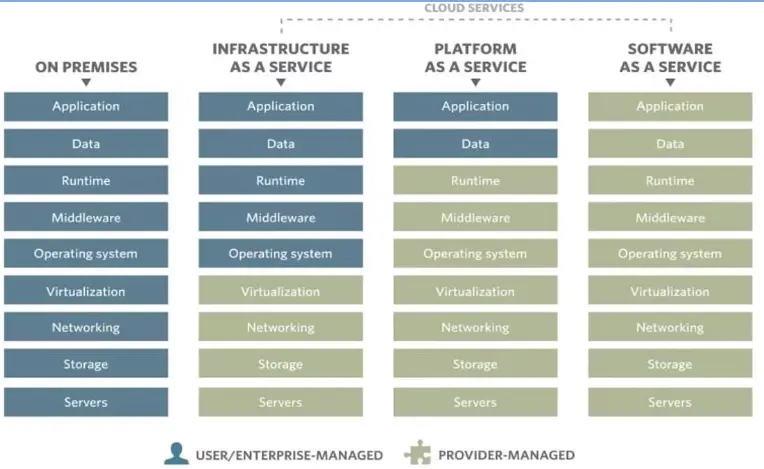
Virtualization to Cloud
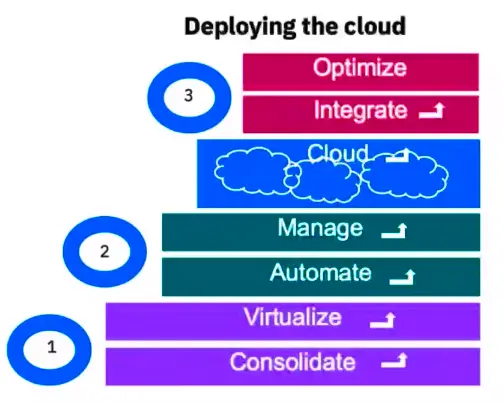
Cloud Deployments
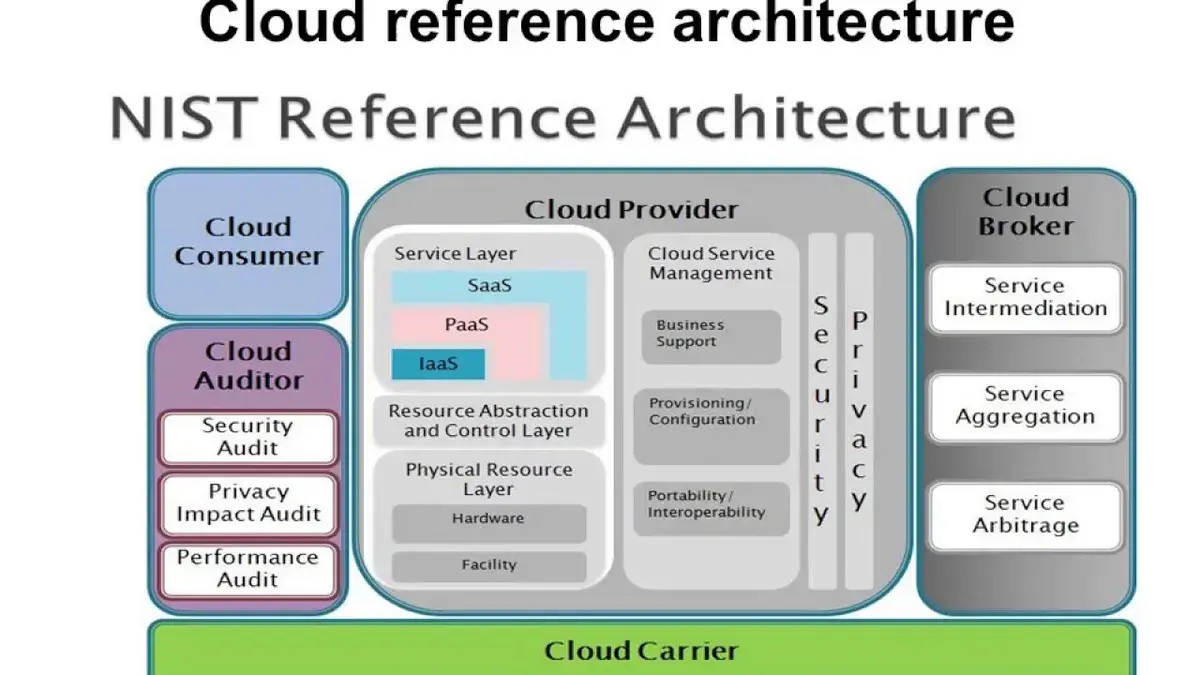
Cloud Computing Reference Model
Cybersecurity Compliance Frameworks and System Administration
What Cybersecurity Challenges do Organizations Face?
Event, attacks, and incidents defied
Security Event
An event on a system or network detected by a security device or application.
Security attack
A security event that has been identified by correlation and analytics tools as malicious activity that attempting to collect, disrupt, deny, degrade, or destroy information system resources or the information itself.
Security Incident
An attack or security event that has been reviewed by security analysts and deemed worthy of deeper investigation.
Security – How to stop “bad guys”
Outsider
They want to “get-in” – steal data, steal compute time, disrupt legitimate use
Security baseline ensures we design secure offerings but setting implementation standards
E.g. Logging, encryption, development, practices, etc.
Validated through baseline reviews, threat models, penetration testing, etc.
Inadvertent Actor
They are “in” – but are human and make mistakes
Automate procedures to reduce error-technical controls
Operational/procedural manual process safeguards
Review logs/reports to find/fix errors. Test automation regularly for accuracy.
Malicious Insiders
They are “in” – but are deliberately behaving badly
Separation of duties – no shared IDs, limit privileged IDs
Designed protection from theft or damage, disruption or misdirection
Physical controls – for the servers in the data centers
Technical controls
Features and functions of the service (e.g., encryption)
What log data is collected?
Operational controls
How a server is configured, updated, monitored, and patched?
How staff are trained and what activities they perform?
Privacy
How information is used, who that information is shared with, or if the information is used to track users?
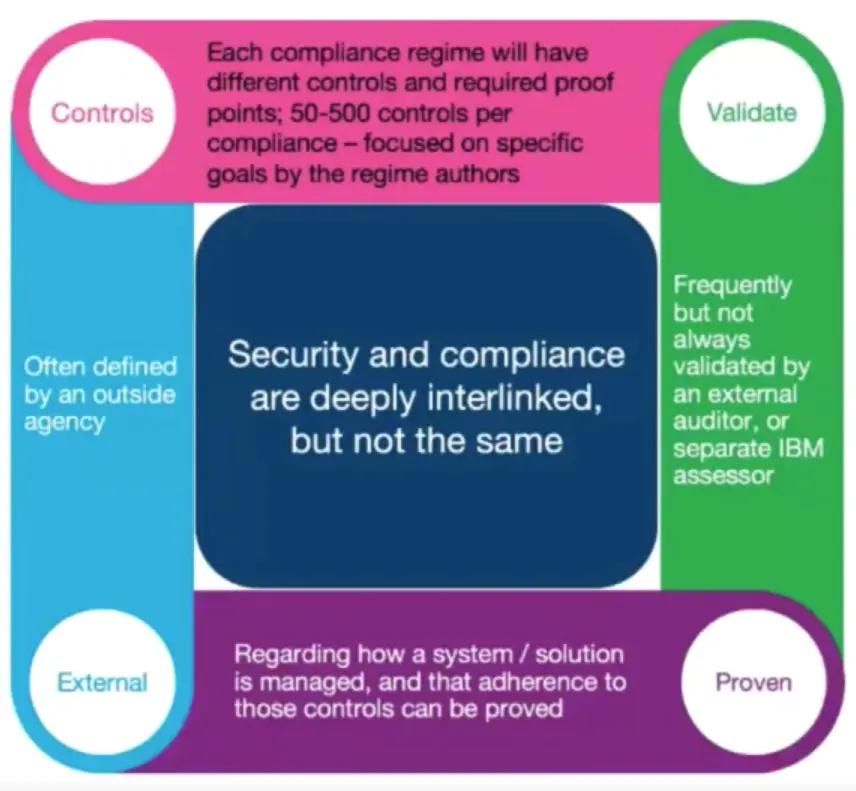
Compliance
Tests that security measures are in place.
Which and how many depend on the specific compliance.
It Will Often cover additional non-security requirements such as business practices, vendor agreements, organized controls etc.
Compliance: Specific Checklist of Security Controls, Validated
Compliance Basics
Foundational
General specifications, (not specific to any industry) important, but generally not legally required.
Ex: SOC, ISO.
Industry
Specific to an industry, or dealing with a specific type of data. Often legal requirements.
Ex: HIPAA, PCI DSS
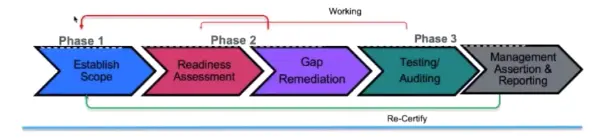
Any typical compliance process
General process for any compliance/audit process
Scoping
“Controls” are based on the goal/compliance – 50–500.
Ensure all components in scope are compliant to technical controls.
Ensure all processes are compliant to operation controls.
Testing and auditing may be:
Internal/Self assessments
External Audit
Audit recertification schedules can be quarterly, bi-quarterly, annually, etc.
Overview of US Cybersecurity Federal Law
Computer Fraud and Abuse Act (CFAA)
Enacted in 1984
US Federal Laws
Federal Information Security Management Act of 2002 (FISMA)
Federal Information Security Modernization Act of 2014 (FISMA 2014)
FISMA assigns specific responsibilities to federal agencies, the National Institute of Standards and Technology (NIST) and the Office of Management and Budget (OMB) in order to strengthen information security systems.
National Institute of Standards and Technology (NIST) Overview
Cybersecurity and Privacy
NIST’s cybersecurity and privacy activities strengthen the security digital environment. NIST’s sustained outreach efforts support the effective application of standards and best practices, enabling the adoption of practical cybersecurity and privacy.
General Data Protection Regulation (GDPR) Overview
This is simply a standard for EU residence:
Compliance
Data Protection
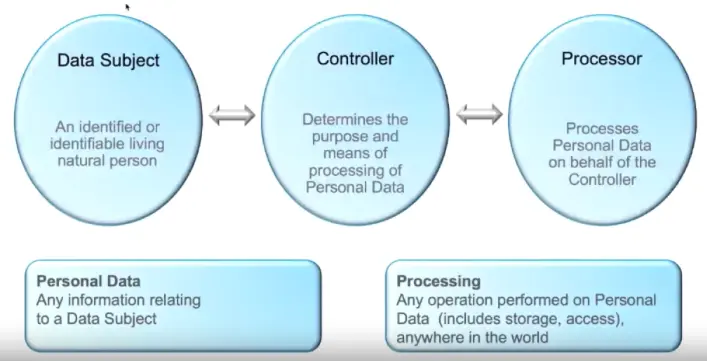
Personal Data:
The GDPR cam into effect on 25 May 2018 and represents the biggest change in data privacy in two decades. The legislation aims to give control back to individuals located in EU over their Personal Data and simplify the regulatory environment for internation businesses.
5 Key GDPR Obligations:
Rights of EU Data subjects
Security of Personal Data
Consent
Accountability of Compliance
Data Protection by Design and by Default
Key terms for understanding
Internation Organization for Standardization (ISO) 2700x
The ISO 2700 family of standards help organization keep information assets secure.
ISO/IEC 27001 is the best-known standard in the family providing requirements for an information security management systems (ISMS).
The standard provides requirements for establishing, implementing, maintaining and continually improving an information security management system.
Also becoming more common,
ISO 270018 – Privacy
Other based on industry/application, e.g.,
ISO 270017 – Cloud Security
ISO 27001 Certification can provide credibility to a client of an organization.
For some industries, certification is a legal or contractual requirement.
ISO develops the standards but does not issue certifications.
Organizations that meet the requirements may be certified by an accredited certification body following successful completion of an audit.
System and Organization Controls Report (SOC) Overview
SOC Reports
Why SOC reports?
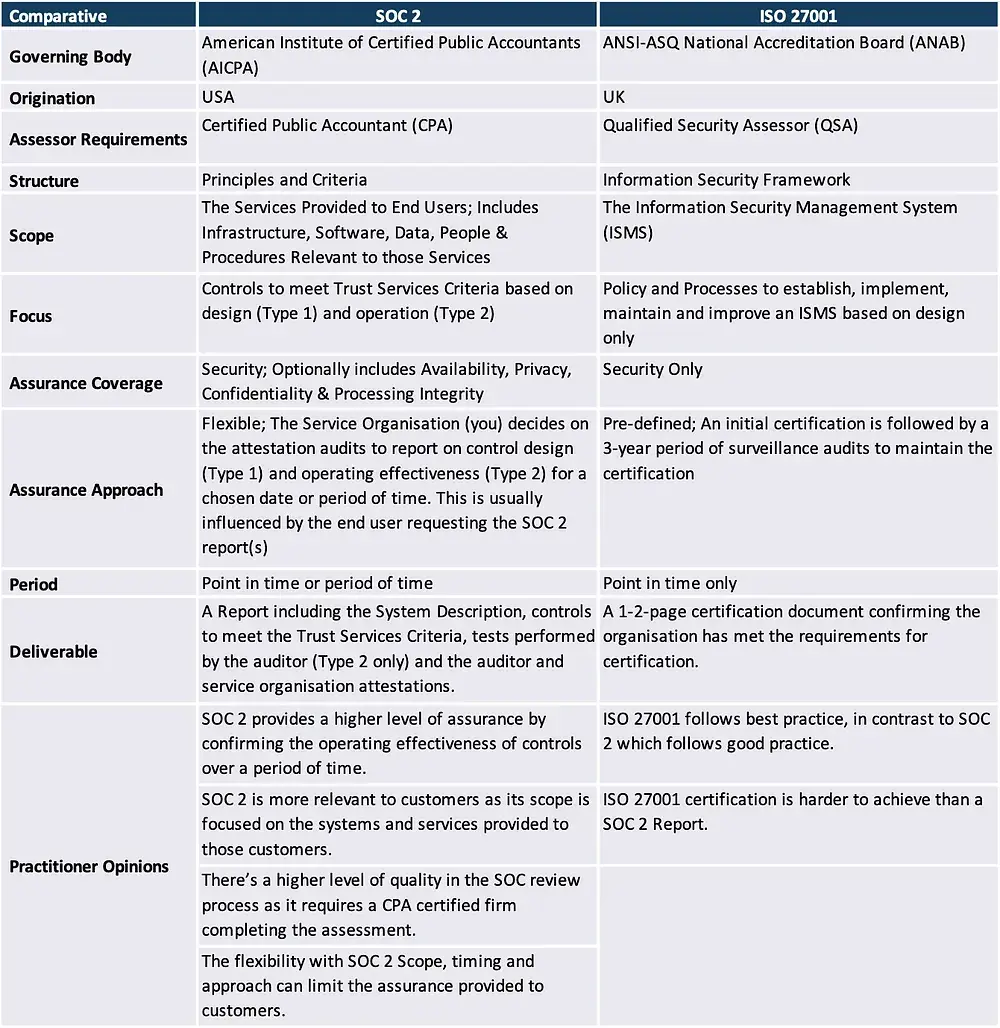
Some industry/jurisdictions require SOC2 or local compliance audit.
Many organizations who know compliance, know SOC Type 2 consider it a stronger statement of operational effectiveness than ISO 27001 (continuous testing).
Many organization’s clients will accept SOC2 in lieu of the right-to-audit.
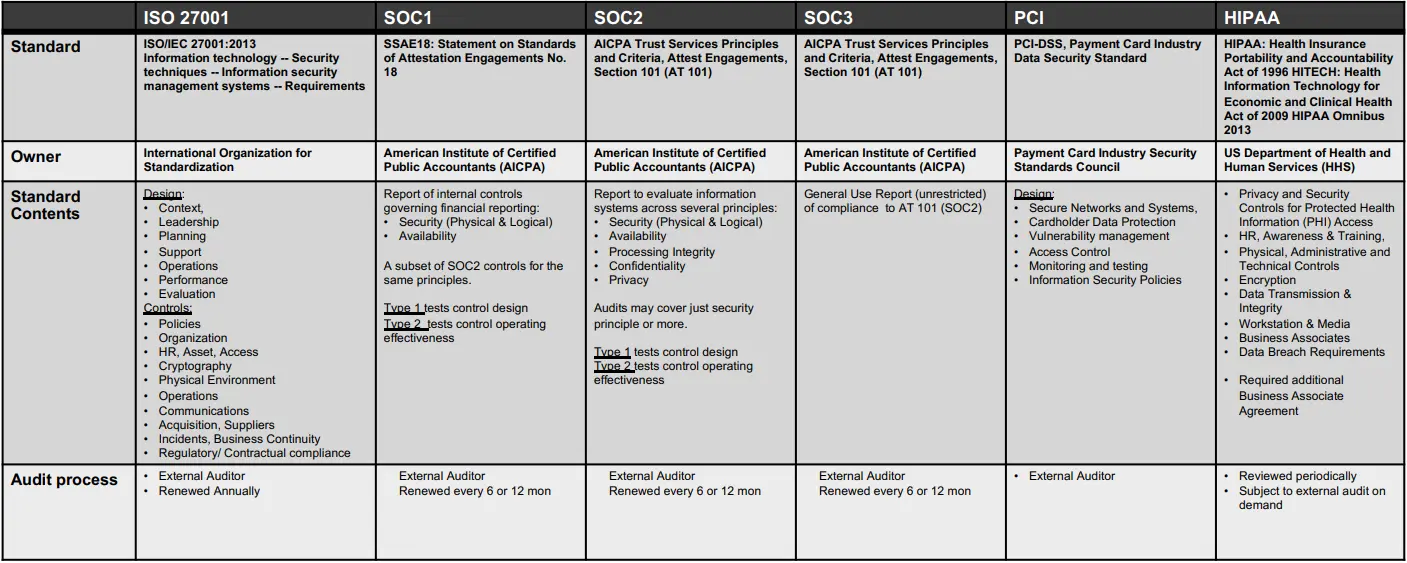
Compared with ISO 27001
SOC1 vs SOC2 vs SOC3
SOC1
Used for situations where the systems are being used for financial reporting.
Also referenced as Statement on Standards for Attestation Engagements (SSAE)18 AT-C 320 (formerly SSAE 16 or AT 801).
SOC2
Addresses a service organization’s controls that are relevant to their operations and compliance, more generally than SOC1.
Restricted use report contains substantial detail on the system, security practices, testing methodology and results.
Also, SSAE 18 standards, sections AT-C 105 and AT-C 205.
SOC3
General use report to provide interested parties with a CPA’s opinion about same controls in SOC2.
Type 1 vs Type 2
Type 1 Report
Consider this the starting line.
The service auditor expresses an opinion on whether the description of the service organization’s systems is fairly presented and whether the controls included in the description are suitably designed to meet the applicable Trust Service criteria as of a point in time.
Type 2 Report
Proof you’re maintaining the effectiveness over time
Typically 6 month, renewed either every 6 months or yearly.
The service auditor’s report contains the same opinions expressed in a Type 1 report, but also includes an opinion on the operating effectiveness of the service organization’s controls for a period of time. Includes description of the service auditor’s tests of operation effectiveness and test results.
Selecting the appropriate report type
A type 1 is generally only issued if the service organization’s system has not been in operation for a significant period of time, has recently made significant system or control changes. Or if it is the first year of issuing the report.
SOC1 and SOC2, each available as Type 1 or Type 2.
Scoping Considerations – SOC 2 Principles
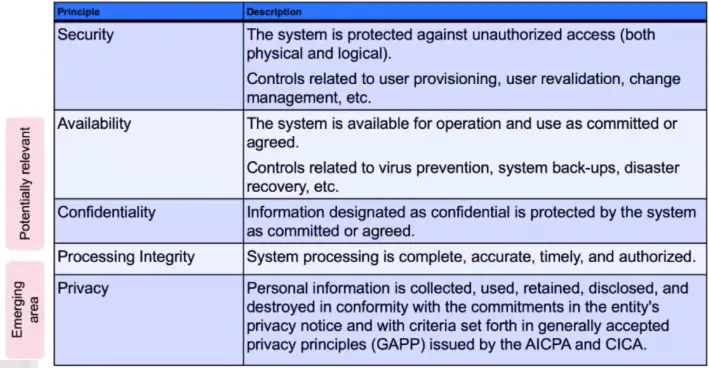
Report scope is defined based on the Trust Service Principles and can be expanded to additional subject.
SOC Reports – Auditor Process Overview
What are auditors looking for:
1)Accuracy → are controls results being assessed for pass/fail.
2)Completeness → do controls implementation cover the entire offering: e.g., no gaps in inventory, personnel, etc.
3)Timeliness → are controls performed on time (or early) with no gaps in coverage.
- If a control cannot be performed on time, are there appropriate assessment (risk) approvals BEFORE the control is considered ‘late’.
4)With Resilience notice → are there checks/balances in place such that if a control does fail, would you be able to correct at all? Within a reasonable timeframe?
5)Consistency → Shifting control implementation raises concerns about above, plus increases testing.
What does SOC1/SOC2 Test
General Controls:
Inventory listing
HR Employee Listing
Access group listing
Access transaction log
A: Organization and Management
Organizational Chart
Vendor Assessments
B: Communications
Customer Contracts
System Description
Policies and Technical Specifications
C: Risk Management and Design/Implementation of Controls
IT Risk Assessment
D: Monitoring of Controls
Compliance Testing
Firewall Monitoring
Intrusion Detection
Vulnerability Management
Access Monitoring
E: Logical and Physical Access Controls
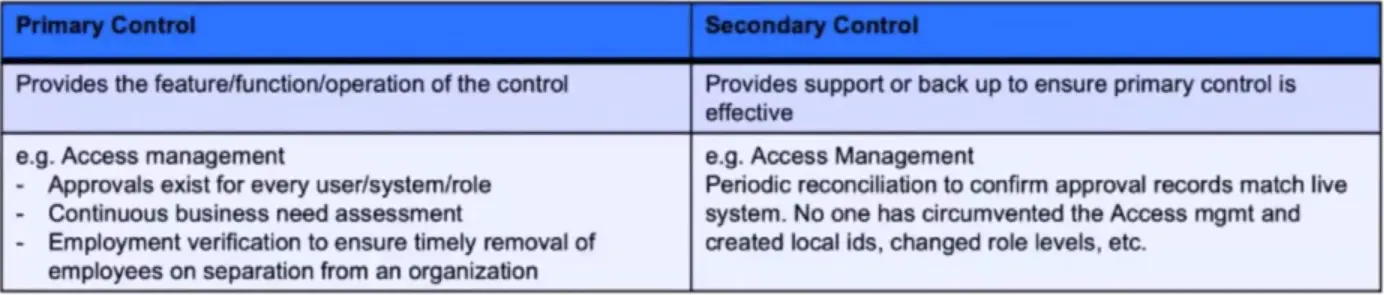
Employment Verification
Continuous Business Need
F: System Operations
Incident Management
Security Incident Management
Customer Security Incident Management
Customer Security Incident Reporting
G: Change Management
Change Management
Communication of Changes
H: Availability
Capacity Management
Business Continuity
Backup or equivalent
Continuous Monitoring – Between audits
Purpose:
Ensure controls are operating as designed.
Identify control weaknesses and failure outside an audit setting.
Communicate results to appropriate stakeholders.
Scope:
All production devices
Controls will be tested for operating effectiveness over time, focusing on:
Execution against the defined security policies.
Execution evidence maintenance/availability
Timely deviation from policy documentation.
Timely temporary failures of a control or loss of evidence documentation and communication.
Industry Standards
Health Insurance Portability and Accountability Act (HIPAA)
Healthcare organizations use cloud services to achieve more than saving and scalability:
Foster virtual collaboration across care environments
Leverage full potential of existing patient data
Address challenges in analyzing patient needs
Provide platforms for care innovation
Expand delivery network
Reduce response time in the case of emergencies
Integrate data silos and optimizes information flow
Increase resource utilization
Simplify processes, reducing administration cost
What is HIPAA-HITECH
The US Federal laws and regulations that define the control of most personal healthcare information (PHI) for companies responsible for managing such data are:
Health insurance Portability and Accountability Act (HIPAA)
Health Information Technology for Economic Clinical Health Act (HITECH)
The HIPAA Privacy Rule establishes standards to protect individuals’ medical records and other personal health information and applies to health plans, health care clearinghouses, and those health care providers who conduct certain health care transactions electronically.
The HIPAA Security Rule establishes a set of security standards for protecting certain health information that is held or transferred in electronic form. The Security Rule operationalizes the protections contained in the Privacy Rule by addressing the technical and non-technical safeguards that must be put in place to secure individuals’ “electronic protected health information” (e-PHI)
HIPAA Definitions
U.S. Department of Health and Human Services (HHS) Office of Civil Rights (OCR):
Governing entity for HIPAA.
Covered Entity:
HHS-OCR define companies that manage healthcare data for their customers as a Covered Entity.
Business Associate:
Any vendor company that supports the Covered Entity.
Protected Health Information (PHI):
Any information about health status, provision of health care, or payment for health care that is maintained by a Covered Entity (or a Business Associate of a Covered Entity), and can be linked to a specific individual.
HHS-OCR “Wall of Shame”:
Breach Portal: Notice to the Secretary of HHS Breach of Unsecured Protected Health Information.
Why is Compliance Essential?
U.S. Law states that all individuals have the right to expect that their private health information be kept private and only be used to help assure their health.
There are significant enforcement penalties if a Covered Entity / Business Associate is found in violation.
HHS-OCR can do unannounced audits on the (CE+BA) or just the BA.
HIPAA is a U.S. Regulation, so be aware…
Other countries have similar regulations / laws:
Canada – Personal Information Protection and Electronic Documents Act
European Union (EU) Data Protection Directive (GDPR)
Many US states address patient privacy issues and are stricter than those set forth in HIPAA and therefore supersedes the US regulations.
Some international companies will require HIPAA compliance for an either a measure of confidence, or because they intend to do business with US data.
HIPAA Security Rule
The Security Rule requires, covered entities to maintain reasonable and appropriate administrative, technical, and physical safeguards for protecting “electronic protected health information” (e-PHI).
Specifically, covered entities must:
Ensure the confidentiality, integrity, and availability of all e-PHI they create, receive, maintain or transmit.
Identify and protect against reasonably anticipated threats to the security or integrity of the information.
Protect against reasonably anticipated, impermissible uses or disclosures; and
ensure compliance by their workforce.
Administrative Safeguards
The Administrative Safeguards provision in the Security Rule require covered entities to perform risk analysis as part of their security management processes.
Administrative Safeguards include:
Security Management Process
Security Personnel
Information Access Management
Workforce Training and Management
Evaluation
Technical Safeguards
Technical Safeguards include:
Access Control
Audit Controls
Integrity Controls
Transmission Security
Physical Safeguards
Physical Safeguards include:
Facility Access and Control
Workstation and Device Security
Payment Card Industry Data Security Standard (PCI DSS)
The PCI Data Security Standard
The PCI DSS was introduced in 2004, by American Express, Discover, MasterCard and Visa in response to security breaches and financial losses within the credit card industry.
Since 2006 the standard has been evolved and maintained by the PCI Security Standards Council, a “global organization, (it) maintains, evolves and promotes Payment Card Industry Standards for the safety of cardholder data across the globe.”
The PCI Security Standards Council is now comprised of American Express, Discover, JCB International MasterCard and Visa Inc.
Applies to all entities that store, process, and/or transmit cardholder data.
Covers technical and operational practices for system components included in or connected to environments with cardholder data.
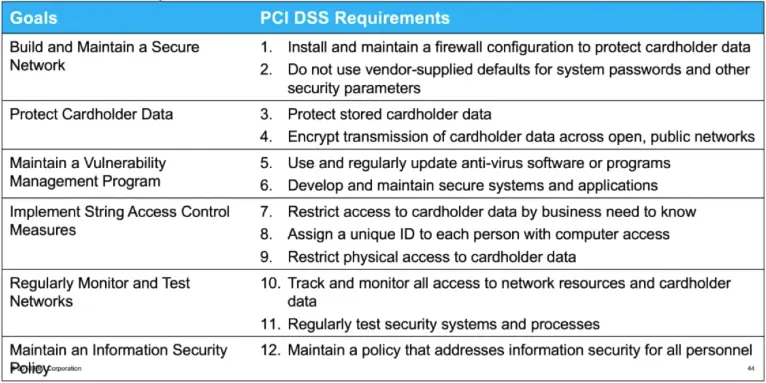
PCI DSS 3.2 includes a total of 264 requirements grouped under 12 main requirements.
Goals and Requirements
PCI DSS 3.2 includes a total of 264 requirements grouped under 12 main requirements:
Scope
The Cardholder Data Environment (CDE): People, processes and technology that store, process or transmit cardholder data or sensitive authentication data.
Cardholder Data:
Primary Account Number (PAN)
PAN plus any of the following:
Cardholder name
expiration date and/or service mode.
Sensitive Authentication Data:
Security-related information (including but not limited to card validation codes/values, full track data (from the magnetic stripe or equivalent on a chip), PINs, and PIN blocks) used to authenticate cardholder and/or authorize payment card transactions.
Sensitive Areas:
Anything that accepts, processes, transmits or stores cardholder data.
Anything that houses systems that contain cardholder data.
Determining Scope
People
Processes
Technologies
Compliance Personnel
IT Governance
Internal Network Segmentation
Human Resources
Audit Logging
Cloud Application platform containers
IT Personnel
File Integrity Monitoring
Developers
Access Management
Virtual LAN
System Admins and Architecture
Patching
Network Admins
Network Device Management
Security Personnel
Security Assessments
Anti-Virus
PCI Requirements
Highlight New and Key requirements:
Approved Scanning Vendor (ASV) scans (quarterly, external, third party).
Use PCI scan policy in Nessus for internal vulnerability scans.
File Integrity Monitoring (FIM)
Firewall review frequency every 6 months
Automated logoff of idle session after 15 minutes
Responsibility Matrix
Critical Security Controls
Center for Internet Security (CIS) Critical Security Controls
CIS Critical Security Controls
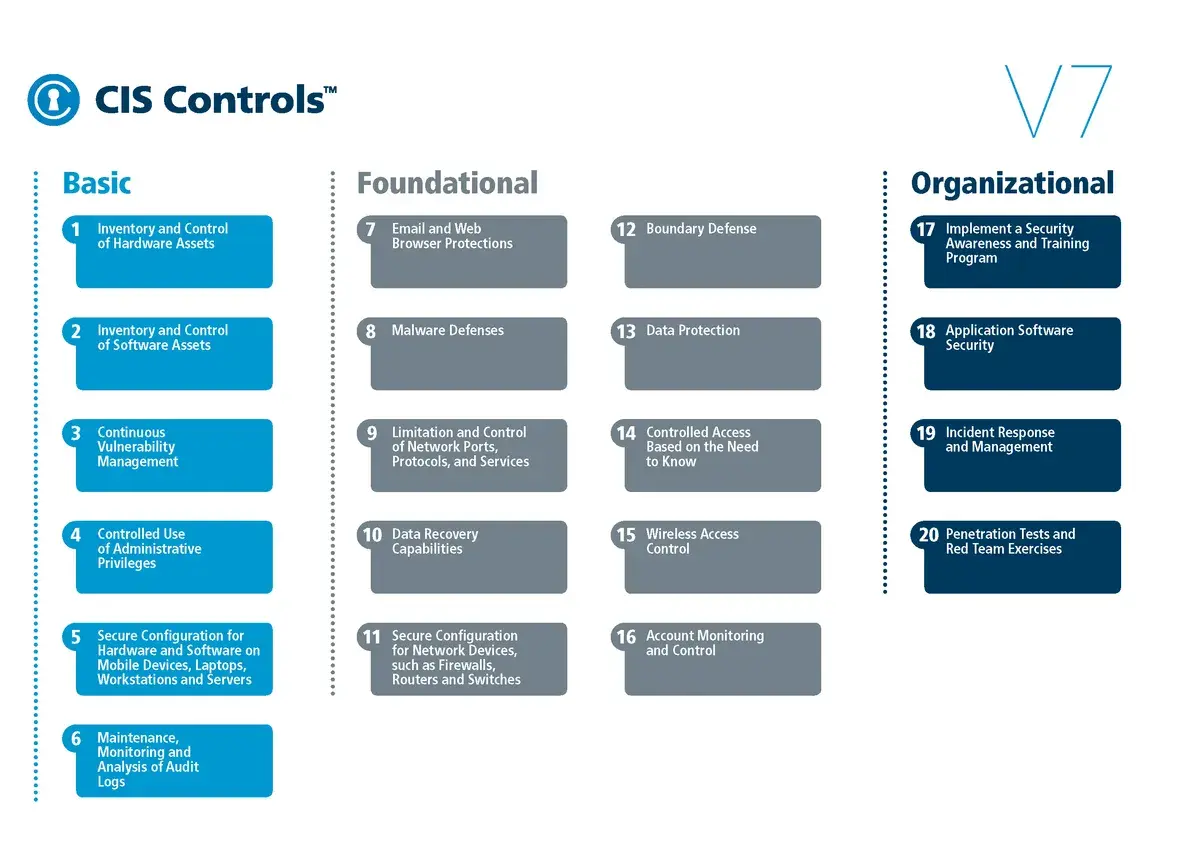
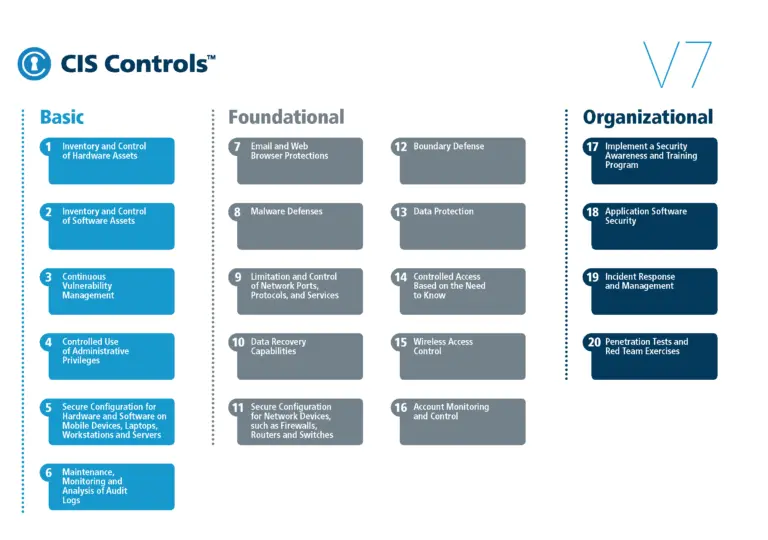
The CIS ControlsTM are a prioritized set of actions that collectively form a defense-in-depth set of best practices that mitigate the most common attacks against systems and networks.
The CIS ControlsTM are developed by a community of IT experts who apply their first-hand experience as cyber defenders to create these globally accepted security best practices.
The experts who develop the CIS Controls come from a wide range of sectors including retail, manufacturing, healthcare, education, government, defense, and others.
CIS ControlTM 7
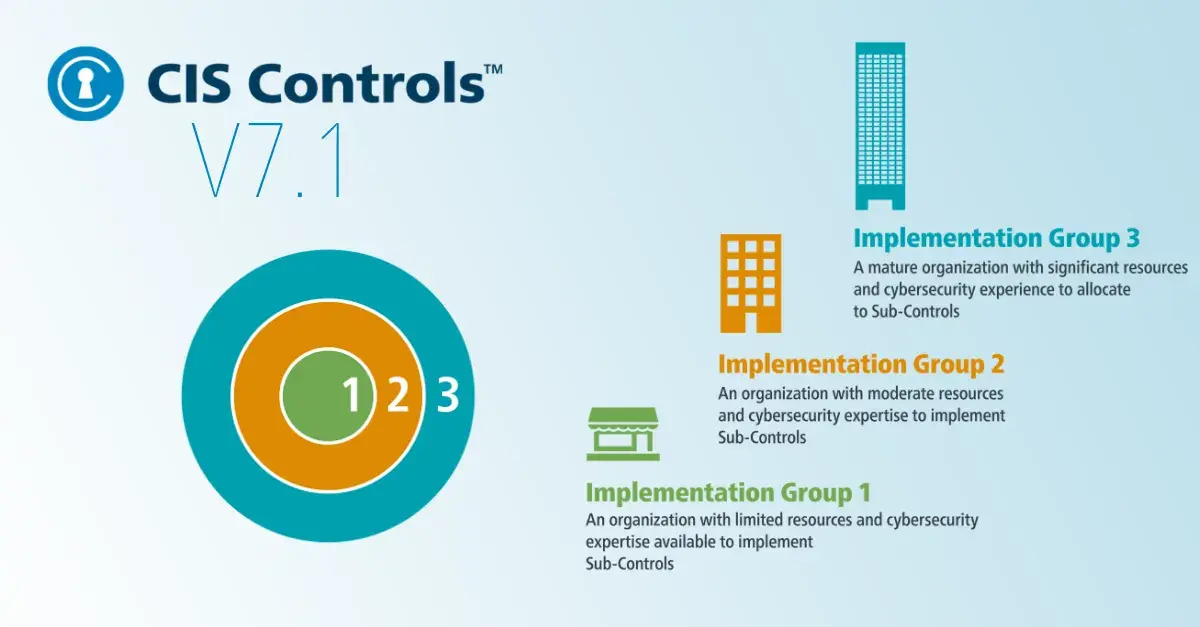
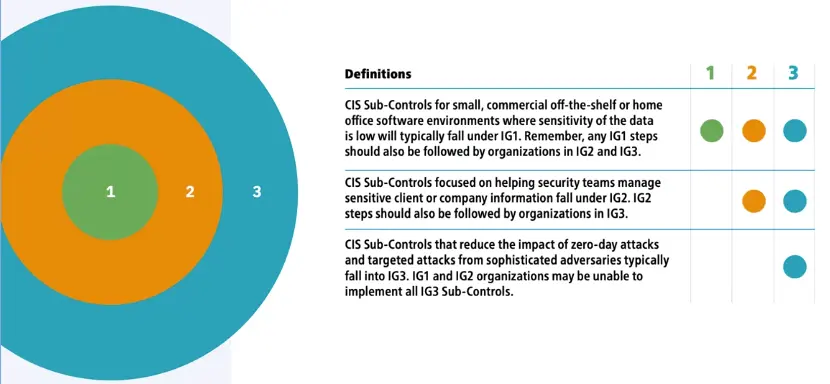
CIS ControlTM 7.1 Implementation Groups
Structure of the CIS ControlTM 7.1
The presentation of each Control in this document includes the following elements:
A description of the importance of the CIS Control (Why is this control critical?) in blocking or identifying the presence of attacks, and an explanation of how attackers actively exploit the absence of this Control.
A table of the specific actions (“Sub-Controls”) that organizations should take to implement the Control.
Procedures and Tools that enable implementation and automation.
Sample Entity Relationship Diagrams that show components of implementation.
Compliance Summary
Client System Administration Endpoint Protection and Patching
Client System Administration
“The client-server model describes how a server provides resources and services to one or more clients. Examples of servers include web servers, mail servers, and file servers. Each of these servers provide resources to client devices, such as desktop computers, laptops, tablets, and smartphones. Most servers have a one-to-many relationship with clients, meaning a single server can provide resources to multiple clients at one time.”
Client System Administration
Cloud and Mobile computing
New Devices, new applications and new services.
Endpoint devices are the front line of attack.
Common type of Endpoint Attacks
Spear Phishing/Whale Hunting – An email imitating a trusted source designed to target a specific person or department.
Watering Hole – Malware placed on a site frequently visited by an employee or group of employees.
**Ad Network Attacks – Using ad networks to place malware on a machine through ad software.
Island Hopping – Supply chain infiltration.
Endpoint Protection
Basics of Endpoint Protection
Endpoint protection management is a policy-based approach to network security that requires endpoint devices to comply with specific criteria before they are granted access to network resources.
Endpoint security management systems, which can be purchased as software or as a dedicated appliance, discover, manage and control computing devices that request access to the corporate network.
Endpoint security systems work on a client/server model in which a centrally managed server or gateway hosts the security program and an accompanying client program is installed on each network devices.
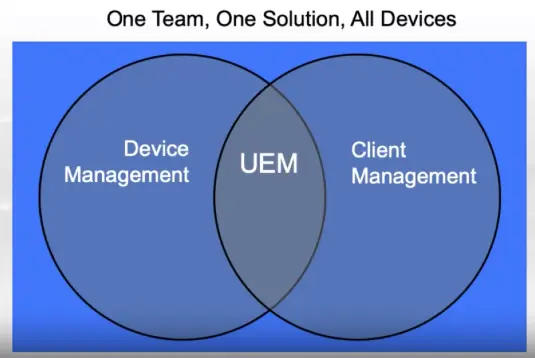
Unified Endpoint Management
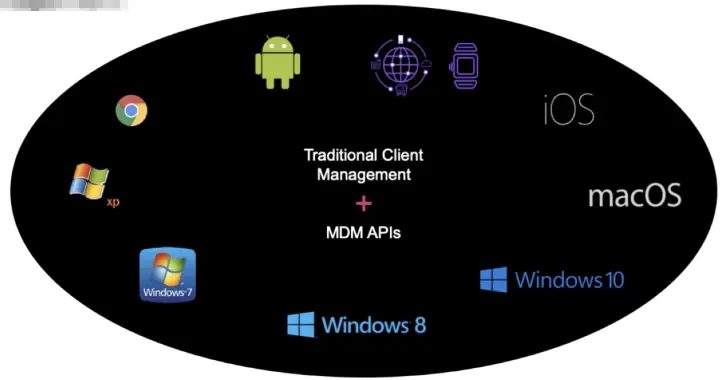
A UEM platform is one that converges client-based management techniques with Mobile device management (MDM) application programming interfaces (APIs).
Endpoint Detection and Response
Key mitigation capabilities for endpoints
Deployment of devices with network configurations
Automatic quarantine/blocking of non-compliant endpoints
Ability to patch thousands of endpoints at once
Endpoint Detection and Response
Automatic policy creation for endpoints
Zero-day OS updates
Continuous monitoring, patching, and enforcement of security policies across endpoints.
Examining an Endpoint Security Solution
Three key factors to consider:
Threat hunting
Detection response
User education
An Example of Endpoint Protection
Unified Endpoint Management
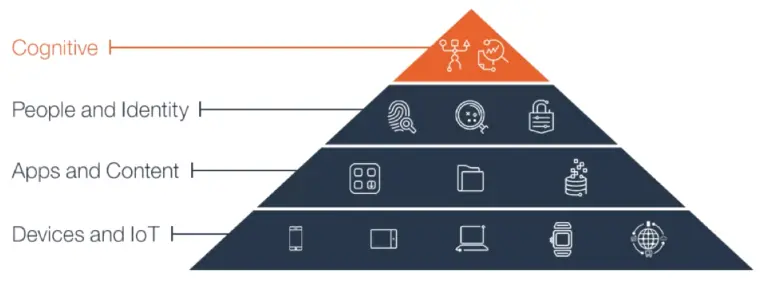
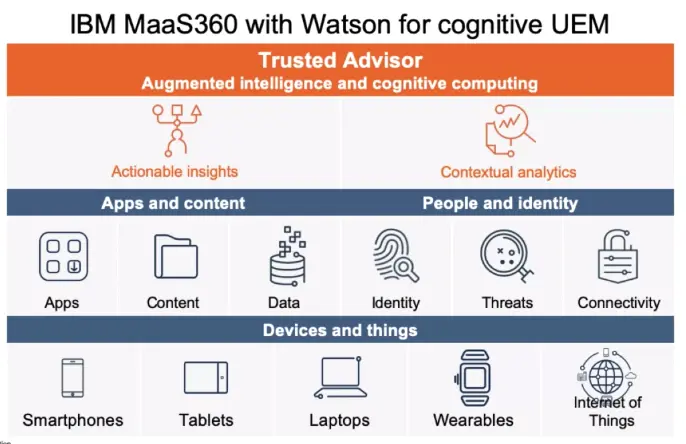
UEM is the first step to enable today’s enterprise ecosystem:
Devices and things
Apps and content
People and identity
What is management without insight?
IT and security needs to understand:
What happened
What can happen
What should be done
… in the context of their environment
Take a new approach to UEM
UEM with AI
Traditional Client Management Systems
Involves an agent-based approach
Great for maintenance and support
Standardized rinse and repeat process
Applicable for some OS & servers
Mobile Device Management
API-based management techniques
Security and management of corporate mobile assets
Specialized for over-the-air configuration
Purpose-built for smartphones and tablets
Modern Unified Endpoint Management
IT Teams are also converging:
Overview of Patching
All OS require some type of patching.
Patching is the fundamental and most important thing an organization can do to prevent malicious attacks.
What is a patch?
A patch is a set of changes to a computer program or its supporting data designed to update, fix, or improve it. This includes fixing security vulnerabilities and other bugs, with such patches usually being called bugfixes, or bug fixes, and improving the functionality, usability or performance.
Windows Patching
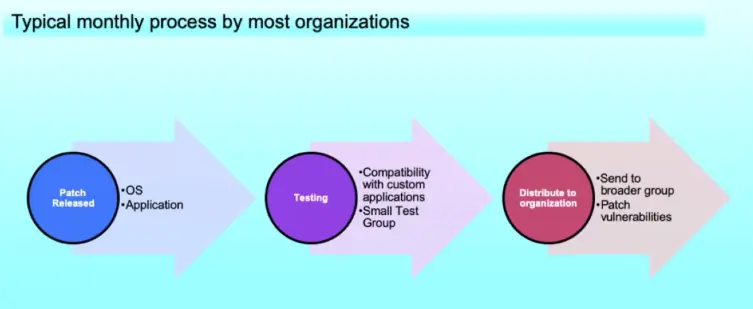
Windows Updates allow for fixes to known flaws in Microsoft products and OS. The fixes, known as patches, are modification to software and hardware to help improve performance, reliability, and security.
Microsoft releases patches in a monthly cycle, commonly referred to as “Patch Tuesday”, the second Tuesday of every month.
Four types of Updates for Windows OSes
Security Updates: Security updates for Windows work to protect against new and ongoing threats. They are classified as Critical, Important, Moderate, Low, or non-rated.
590344 These are high priority updates. When these are released, they need to updated asap. It is recommended to have these set as automatic.
Software Updates: Software updates are not critical. They often expand features and improve the reliability of the software.
Service Packs: These are roll-ups, or a compilation, of all previous updates to ensure that you are up-to-date on all the patches since the release of the product up to a particular data. If your system is behind on updates, then service packs bring your system up-to-update.
Windows Application Patching
Why patch 3rd party applications in addition to Windows OS?
Unpatched software, especially if a widely used app like Adobe Flash or Browser, can be a magnet for malware and viruses.
87% of the vulnerabilities found in the top 50 programs affected third-party programs such as Adobe Flash and Reader, Java, Skype, Various Media Players, and others outside the Microsoft Ecosystem. That means the remaining 13 percent “stem from OSes and Microsoft Programs,” according to Secunia’s Vulnerability Review report.
Patching Process
Server and User Administration
Introduction to Windows Administration
User and Kernel Modes
MS Windows Components:
User Mode
Private Virtual address space
Private handle table
Application isolation
Kernel Mode
Single Virtual Address, shared by other kernel processes
File Systems
Types of file systems in Windows
NTFS (New Technology File system)
FATxx (File Allocation Table)
FAT16, FAT32
Typical Windows Directory Structure
Role-Based Access Control and Permissions
Access Control Lists (ACLs)
Principle of the least privileges
Privileged Accounts
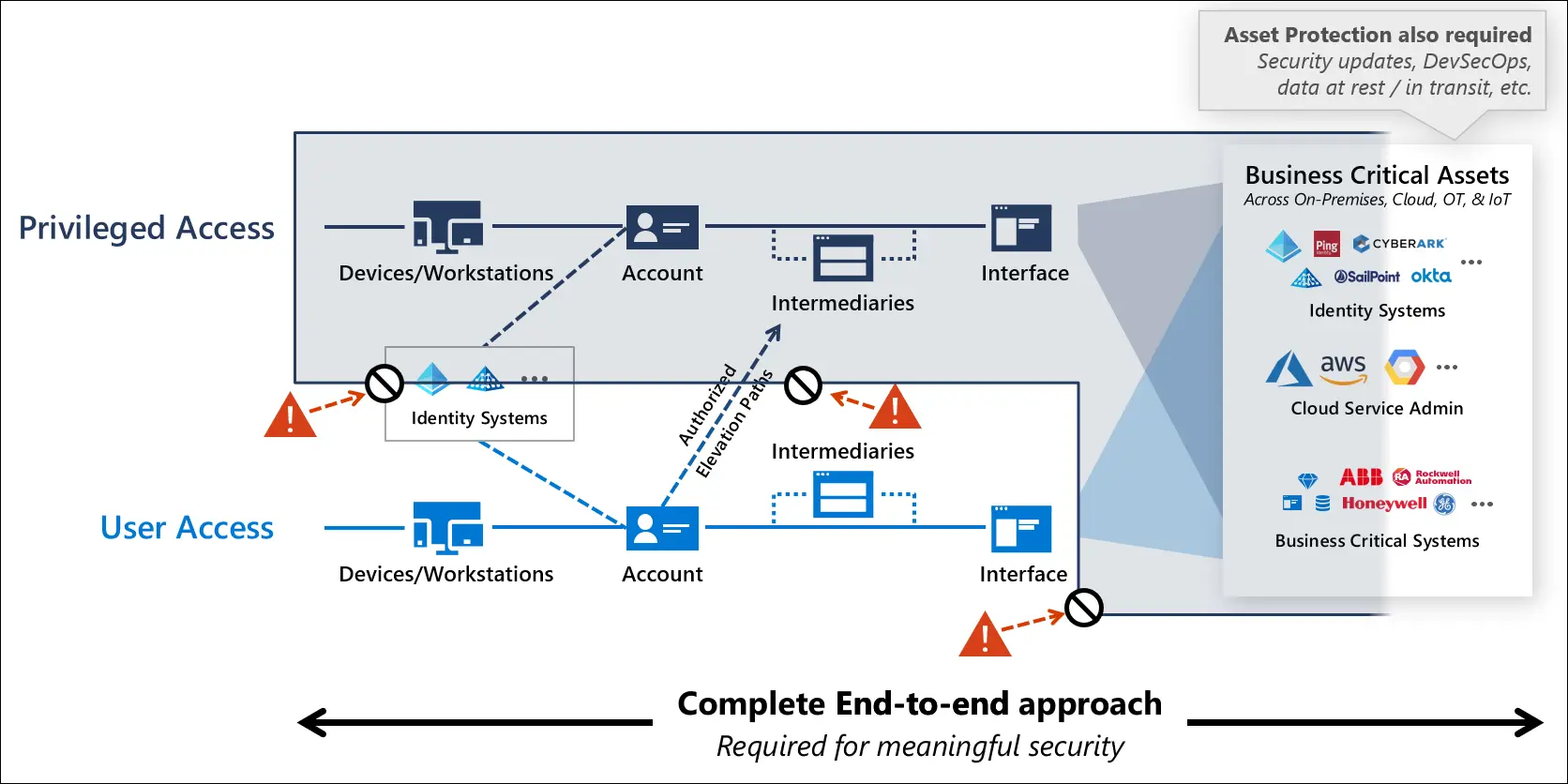
Privileged accounts like admins of Windows services have direct or indirect access to most or all assets in an IT organization.
Admins will configure Windows to manage access control to provide security for multiple roles and uses.
Access Control
Key concepts that make up access control are:
Permissions
Ownership of objects
Inheritance of permissions
User rights
Object auditing
Local User Accounts
Default local user accounts:
Administrator account
Guest account
HelpAssistant account
DefaultAccount
Default local system accounts:
SYSTEM
Network Service
Local Service
Management of Local Users accounts and Security Considerations
Restrict and protect local accounts with administrative rights
Enforce local account restrictions for remote access
Deny network logon to all local Administrator accounts
Create unique passwords for local accounts with administrative rights
What is AD?
Active Directory Domain Services (AD DS) stores information about objects on the network and makes this information easy for administrators and users to find and use.
Servers
Volumes
Printers
Network user and computer accounts
Security is integrated with AD through authentication and access control to objects in the directory via policy-based administration.
Features of AD DS
A set of rules, the schema
A global catalog
A query and index mechanism
A replication service
Active Directory Accounts and Security Considerations
AD Accounts
Default local accounts in AD:
Administrator account
Guest Account
HelpAssistant Account
KRBTGT account (system account)
Settings for default local accounts in AD
Manage default local accounts in AD
Secure and Manage domain controllers
Restrict and Protect sensitive domain accounts
Separate admin accounts from user accounts
Privileged accounts: Allocate admin accounts to perform the following
Minimum: Create separate accounts for domain admins, enterprise admins, or the equivalent with appropriate admin.
Better: Create separate accounts for admins that have reduced admin rights, such as accounts for workstation admins, account with user rights over designated AD organizational units (OUs)
Ideal: Create multiples, separate accounts for an administrator who has a variety of job responsibilities that require different trust levels
Standard User account: Grant standard user rights for standard user tasks, such as email, web browsing, and using line-of-business (LOB) applications.
Create dedicated workstation hosts without Internet and email access
Admins need to manage job responsibilities that require sensitive admin rights from a dedicated workstation because they don’t have easy physical access to the servers.
Minimum: Build dedicated admin workstations and block Internet Access on those workstations, including web browsing and email.
Better: Don’t grant admins membership in the local admin group on the computer in order to restrict the admin from bypassing these protections.
Ideal: Restrict workstations from having any network connectivity, except for the domain controllers and servers that the administrator accounts are used to manage.
Restrict administrator logon access to servers and workstations
It is a best practice to restrict admins from using sensitive admin accounts to sign-in to lower-trust servers and workstations.
Restrict logon access to lower-trust servers and workstations by using the following guidelines:
Minimum: Restrict domain admins from having logon access to servers and workstations. Before starting this procedure, identify all OUs in the domain that contain workstations and servers. Any computers in OUs that are not identified will not restrict admins with sensitive accounts from signing in to them.
Better: Restrict domain admins from non-domain controller servers and workstations.
Ideal: Restrict server admins from signing in to workstations, in addition to domain admins.
Disable the account delegation right for administrator accounts
Although user accounts are not marked for delegation by default, accounts in an AD domain can be trusted for delegation. This means that a service or a computer that is trusted for delegation can impersonate an account that authenticates to the to access other resources across the network.
It is a best practice to configure the user objects for all sensitive accounts in AD by selecting the Account is sensitive and cannot be delegated check box under Account options to prevent accounts from being delegated.
Overview of Server Management with Windows Admin Center
Active Directory Groups
Security groups are used to collect user accounts, computer accounts, and other groups into manageable units.
For AD, there are two types of admin responsibilities:
Server Admins
Data Admins
There are two types of groups in AD:
Distribution groups: Used to create email distribution lists.
Security groups: Used to assign permissions to shared resources.
Groups scope
Groups are characterized by a scope that identifies the extent to which the group is applied in the domain tree or forest.
The following three group scopes are defined by AD:
Universal
Global
Domain Local
Default groups, such as the Domain Admins group, are security groups that are created automatically when you create an AD domain. You can use these predefined groups to help control access to shared resources and to delegate specific domain-wide admin roles.
What is Windows Admin Center?
Windows Admin Center is a new, locally-deployed, browser-based management tool set that lets you manage your Windows Servers with no cloud dependency.
Windows Admin Center gives you full control over all aspects of your server infrastructure and is useful for managing servers on private networks that not connected to the Internet.
Kerberos Authentication and Logs
Kerberos Authentication
Kerberos is an authentication protocol that is used to verify the identity of a user or host.
The Kerberos Key Distribution Center (KDC) is integrated with other Windows Server security services and uses the domain’s AD DS database.
The key Benefits of using Kerberos include:
Delegated authentication
Single sign on
Interoperability
More efficient authentication to servers
Mutual authentication
Windows Server Logs
Windows Event Log, the most common location for logs on Windows.
Windows displays its event logs in the Windows Event Viewer. This application lets you view and navigate the Windows Event Log, search, and filter on particular types of logs, export them for analysis, and more.
Windows Auditing Overview
Audit Policy
Establishing audit policy is an important facet of security. Monitoring the creation o modification of objects gives you a way to track potential security problems, helps to ensure user accountability, and provides evidence in the event of a security breach.
There are nine different kinds of events you can audit. If you audit any of those kinds of events, Windows records the events in the Security log, which you can find in the Event Viewer.
Account logon Events
Account Management
Directory service Access
Logon Events
Object access
Policy change
Privilege use
Process tracking
System events
Linux Components: Common Shells
Bash:
The GNU Bourne Again Shell (BASH) is based on the earlier Bourne Again shell for UNIX. On Linux, bash is the most common default shell for user accounts.
Sh:
The Bourne Shell upon which bash is based goes by the name sh. It’s not often used on Linux, often a pointer to the bash shell or other shells.
Tcsh:
This shell is based on the earlier C shell (CSH). Fairly popular, but no major Linux distributions make it the default shell. You don’t assign environment variables the same way in TCSH as in bash.
CSH:
The original C shell isn’t used much on Linux, but if a user is familiar with CSH, TCSh makes a good substitute.
Ksh:
The Korn shell (ksh) was designed to take the best features of the Bourne shell and the C shell and extend them. It has a small but dedicated following among Linux users.
ZSH:
The Z shell (zsh) takes shell evolution further than the Korn shell, incorporating features from earlier shells and adding still more.
Linux Internal and External Commands
Internal Commands:
Built into the shell program and are shell dependent. Also called built-in commands.
Determine if a command is a built-in command by using the type command.
External commands:
Commands that the system offers, are totally shell-independent and usually can be found in any Linux distribution
They mostly reside in /bin and /usr/bin.
Shell command Tricks:
Command completion: Type part of a command or a filename (as an option to the command), and then press TAB key.
Use Ctrl+A or Ctrl+E: To move the cursor to the start or end of the line, respectively.
Samba
Samba is an Open Source/Free software suite that provides seamless file and print services. It uses the TCP/IP protocol that is installed on the host server.
When correctly configured, it allows that host to interact with an MS Windows client or server as if it is a Windows file and print server, so it allows for interoperability between Linux/Unix servers and Windows-based clients.
Cryptography and Compliance Pitfalls
Cryptography Terminology
Encryption only provides confidentiality, but no integrity.
Data can be encrypted
At rest
In use
In transit
Common types of encryption algorithms
Symmetric Key (AES, DES, IDEA, …)
Public key (RSA, Elliptic Curve, DH, …)
Hash Function
Maps data of arbitrary size to data of a fixed size.
Provides integrity, but not confidentiality
MD5, SHA-1, SHA-2, SHA-3, and others
Original data deliberately hard to reconstruct
Used for integrity checking and sensitive data storage (e.g., passwords)
Digital Signature
“A mathematical scheme for verifying the authenticity of digital messages and documents.”
Uses hashing and public key encryption
ensures authentication, non-repudiation, and integrity.
Common Cryptography Pitfalls
Pitfall: Missing Encryption of Data and Communication
Products handle sensitive business and personal data.
Data is often the most valuable asset that the business has.
When you store or transmit it in clear text, it can be easily leaked or stolen.
In this day and age, there is no excuse for not encrypting data that’s stored or transmitted.
We have the cryptographic technology that is mature, tested, and is available for all environments and programming languages.
Encrypt all sensitive data you are handling (and also ensure its integrity).
Pitfall: Missing Encryption of Data and Communication
Some products owners that we talk to don’t encrypt stored data because “users don’t have access to the file system.”
There are plenty of vulnerabilities out there that may allow exposure of files stored on the file system.
The physical machine running the application maybe stolen, the hard disk can be then accessed directly.
You have to assume that the files containing sensitive information may be exposed and analyzed.
Pitfall: Implementing Your Own Crypto
Often developers use Base64 encoding, simple xor encoding, and similar obfuscation schemes.
Also, occasionally we see products implement their own cryptographic algorithms.
Please don’t do that!
Schneier’s Law:
Anyone, from the most clueless amateur to the best cryptographer, can create an algorithm that he himself can’t break. It’s not even hard. What is hard is creating an algorithm that no one else can break, even after years of analysis.
Rely on proven cryptography, that was scrutinized by thousands of mathematicians and cryptographers.
Follow recommendations of NIST.
Pitfall: Relying on Algorithms Being Secret
We sometimes hear dev teams tell us that “the attacker will never know our internal algorithms.”
Bad news – they can and will be discovered; it’s only a question of motivation.
A whole branch of hacking – Reverse Engineering – is devoted to discovering hidden algorithms and data.
Even if your application is shipped only in compiled form, it can be “decompiled”.
Attackers may analyze trial/free versions of the product, or get copies on the Dark Web.
“Security by obscurity” is not a good defense mechanism.
The contrary is proven true all the time.
All algorithms that keep us safe today are open source and very well-studied: AES, RSA, SHA*, ….
Always assume that your algorithms will be known to the adversary.
A great guiding rule is Kerckhoffs’s Principle:
A cryptosystem should be secure even if everything about the system, except the key, is public knowledge.
Pitfall: Using Hard-coded/Predictable/Weak Keys
Not safeguarding your keys renders crypto mechanisms useless.
When the passwords and keys are hard-coded in the product or stored in plaintext in the config file, they can easily be discovered by an attacker.
An easily guessed key can be found by trying commonly used passwords.
When keys are generated randomly, they have to be generated from a cryptographically-secure source of randomness, not the regular RNG.
Rely on hard to guess, randomly generated keys and passwords that are stored securely.
Calls encryption algorithms in another library or component.
Directs encryption functionality in another product.
… must be classified for export before being released.
Data Encryption
Encryption Data at rest
The rule of thumb is to encrypt all sensitive data at rest: in files, config files, databases, backups.
Symmetric key encryption is most commonly used.
Follow NIST Guidelines for selecting an appropriate algorithm – currently it’s AES (with CBC mode) and Triple DES.
Pitfalls and Recommendations
Some algorithms are outdated and no longer considered secure – phase them out
examples include DES, RC4, and others.
Using hard-coded/easily guessed/insufficiently random keys – Select cryptographically-random keys, don’t reuse keys for different installations.
Storing keys in clear text in proximity to data they protect (“key under the doormat”)
stores keys in secure key stores.
Using initialization vectors (IVs) incorrectly.
Use a new random IV every time.
Preferable to select the biggest key size you can handle (but watch out for export restrictions).
Encryption Data in Use
Unfortunately, a rarely-followed practice.
Important, nonetheless, memory could be leaked by an attacker.
A famous 2014 Heartbleed defect leaked memory of processes that used OpenSSL.
The idea is to keep data encrypted up until it must be used.
Decrypt data as needed, and then promptly erase it in memory after use.
Keep all sensitive data (data, keys, passwords) encrypted except a brief moment of use.
Consider Homomorphic encryption if it can be applied to your application.
Encryption Data in Transit
In this day and age, there is no excuse for communicating in cleartext.
There is an industry consensus about it; Firefox and Chrome now mark HTTP sites as insecure.
Attackers can easily snoop on unprotected communication.
All communications (not just HTTP) should be encrypted, including: RPCs, database connections, and others.
TLS/SSL is the most commonly used protocol.
Public key crypto (e.g., RSA, DH) for authentication and key exchange; Symmetric Key crypto to encrypt the data.
Server Digital Certificate references certificate authority (CA) and the public key.
Sometimes just symmetric key encryption is employed (but requires pre-sharing of keys).
Pitfalls
Using self-signed certificates
Less problematic for internal communications, but still dangerous.
Use properly generated certificates verified by established CA.
Accepting arbitrary certificates
Attacker can issue their own certificate and snoop on communications (MitM attacks).
Don’t accept arbitrary certificates without verification.
Not using certificate pinning
Attacker may present a properly generated certificate and still snoop on communications.
Certificate pinning can help – a presented certificate is checked against a set of expected certificates.
Using outdated versions of the protocol or insecure cipher suites
Old versions of SSL/TLS are vulnerable. (DROWN, POODLE, BEAST, CRIME, BREACH, and other attacks)
TLS v1.1-v1.3 are safe to use (v1.2 is recommended, with v1.3 coming)
Review your TLS support; there are tools that can help you:
Nessus, Qualys SSL Server Test (external only), sslscan, sslyze.
Allowing TLS downgrade to insecure versions, or even to HTTP
Lock down the versions of TLS that you support and don’t allow downgrade; disable HTTP support altogether.
Not safeguarding private keys
Don’t share private keys between different customers, store them in secure key stores.
Consider implementing Forward Secrecy
Some cipher suites protect past sessions against future compromises of secret keys or passwords.
Don’t use compression under TLS
CRIME/BREACH attacks showed that using compression with TLS for changing resources may lead to sensitive data exposure.
Implement HTTP Strict Transport Security (HSTS)
Implement Strict-Transport-Security header on all communications.
Stay informed of latest security news
A protocol or cipher suite that is secure today may be broken in the future.
Hashing Considerations
Hashing
Hashing is used for a variety of purposes:
Validating passwords (salted hashes)
Verifying data/code integrity (messages authentication codes and keyed hashes)
Verifying data/code integrity and authenticity (digital signatures)
Use secure hash functions (follow NIST recommendations):
SHA-2 (SHA-256, SHA-384, SHA-512, etc.) and SHA-3
Pitfalls: Using Weak or Obsolete Functions
There are obsolete and broken functions that we still frequently see in the code – phase them out.
Hash functions for which it is practical to generate collisions (two or more different inputs that correspond to the same hash value) are not considered robust.
MD5 has been known to be broken for more than 10 years, collisions are fairly easily generated.
SHA-1 was recently proven to be unreliable.
Using predictable plaintext
Not quite a cryptography problem, but when the plaintext is predictable it can be discovered through brute forcing.
Using unsalted hashes when validating passwords
Even for large issue spaces, rainbow tables can be used to crack hashes.
When salt is added to the plaintext, the resulting hash is completely different, and rainbow tables will no longer help.
Additional Considerations
Use key stretching functions (e.g., PBKDF2) with numerous iterations.
Key stretching functions are deliberately slow (controlled by number of iterations) in order to make brute forcing attacks impractical, both online and offline (aim 750ms to complete the operation).
Future-proof your hashes – include an algorithm identifier, so you can seamlessly upgrade in the future if the current algorithm becomes obsolete.
Message Authentication Codes (MACs)
MACs confirm that the data block came from the stated sender and hasn’t been changed.
Hash-based MACs (HMACs) are based on crypto hash functions (e.g., HMAC-SHA256 or HMAC-SHA3).
They generate a hash of the message with the help of the secret key.
If the key isn’t known, the attacker can’t alter the message and be able to generate another valid HMAC.
HMACs help when data may be maliciously altered while under temporary attacker’s control (e.g., cookies, or transmitted messages).
Even encrypted data should be protected by HMACs (to avoid bit-flipping attacks).
Digital Signatures
Digital signatures ensure that messages and documents come from an authentic source and were not maliciously modified in transit.
Some recommended uses of digital signatures include verifying integrity of:
Data exchanged between nodes in the product.
Code transmitted over network for execution at client side (e.g., JavaScript).
Service and fix packs installed by customer.
Data temporarily saved to customer machine (e.g., backups).
Digital signatures must be verified to be useful.
Safeguarding Encryption Keys
Encryption is futile if the encryption keys aren’t safeguarded.
Don’t store them in your code, in plaintext config files, in databases.
Proper way to store keys and certificates is in secure cryptographic storage, e.g, keystores
For examples, in Java you can use Java Key Store (JKS).
There is a tricky problem of securing key encrypting key (KEK).
This is a key that is used to encrypt the keystore. But how do we secure it?
Securing KEK
Use hardware secure modules (HSM).
Use Virtual HSM (Unbound vHSM).
Derive KEK for user-entered password.
An example of this can be seen in Symantec Encryption Desktop Software, securing our laptops.
Derive KEK from data unique to the machine the product is running on.
This could be file system metadata (random file names, file timestamps).
An attacker that downloads the database or the keystore will not be able to as easily obtain this information.
Impact of Quantum Computing
Quantum computing is computing using quantum-mechanical phenomena. Quantum computing may negatively affect cryptographic algorithms we employ today.
We are still 10–15 years away from quantum computing having an effect on cryptography.
Risks to existing cryptography:
Symmetric encryption (e.g., AES) will be weakened.
To maintain current levels of security, double the encryption key size (e.g., got from 128-bit to 256-bit keys).
Public key encryption that relies on prime number factorization (e.g., RSA used in SSL/TLS, blockchain, digital signatures) will be broken.
Plan on switching to quantum-resistant algorithms – e.g., Lattice-based Cryptography, Homomorphic Encryption.
Attacker can capture conversations now and decrypt them when quantum computing becomes available.
General Good practice – make your encryption, hash, signing algorithms “replaceable”, so that you could exchange them for something more robust if a weakness is discovered.
Subsections of Network Security and Database Vulnerabilities
Introduction to the TCP/IP Protocol Framework
Stateless Inspection
Stateless means that each packet is inspected one at a time with no knowledge of the previous packets.
Stateless Inspection Use Cases
To protect routing engine resources.
To control traffic going in or your organization.
For troubleshooting purposes.
To control traffic routing (through the use of routing instances).
To perform QoS/CoS (marking the traffic).
Stateful Inspection
A stateful inspection means that each packet is inspected with knowledge of all the packets that have been sent or received from the same session.
A session consists of all the packets exchanged between parties during an exchange.
What if we have both types of inspection?
Firewall Filters – IDS and IPS System
Firewall Filter (ACLs) / Security Policies Demo…
IDS
An Intrusion Detection System (IDS) is a network security technology originally built for detecting vulnerability exploits against a target application or computer.
By default, the IDS is a listen-only device.
The IDS monitor traffic and reports its results to an administrator.
Cannot automatically take action to prevent a detected exploit from taking over the system.
Basics of an Intrusion Prevention System (IPS)
An IPS is a network security/threat prevention technology that examines network traffic flows to detect and prevent vulnerability exploits.
The IPS often sites directly behind the firewall, and it provides a complementary layer of analysis that negatively selects for dangerous content.
Unlike the IDS – which is a passive system that scans traffic and reports back on threats – the IPS is placed inline (in the direct communication path between source and destination), actively analyzing and taking automated actions on all traffic flows that enter the network.
How does it detect a threat?
The Difference between IDS and IPS Systems
Network Address Translation (NAT)
Method of remapping one IP address space into another by modifying network address information in Internet Protocol (IP) datagram packet headers, while they are in transit across a traffic routing device.
Gives you an additional layer of security.
Allows the IP network of an organization to appear from the outside to use a different IP address space than what it is actually using. Thus, NAT allows an organization with non-globally routable addresses to connect to the Internet by translating those addresses into a globally routable addresses space.
It has become a popular and essential tool in conserving global address space allocations in face of IPv4 address exhaustion by sharing one Internet-routable IP address of a NAT gateway for an entire private network.
Types of NAT
Static Address translation (static NAT): Allows one-to-one mapping between local and global addresses.
Dynamic Address Translation (dynamic NAT): Maps unregistered IP addresses to registered IP addresses from a pool of registered IP addresses.
Overloading: Maps multiple unregistered IP addresses to a single registered IP address (many to one) using different ports. This method is also known as Port Address Translation (PAT). By using overloading, thousands of users can be connected to the Internet by using only one real global IP address.
Network Protocols over Ethernet and Local Area Networks
An Introduction to Local Area Networks
Network Addressing
Layer 3 or network layer adds an address to the data as it flows down the stack; then layer 2 or the data link layer adds another address to the data.
Introduction to Ethernet Networks
For a LAN to function, we need:
Connectivity between devices
A set of rules controlling the communication
The most common set of rules is called Ethernet.
To send a packet from one host to another host within the same network, we need to know the MAC address, as well as the IP address of the destination device.
Ethernet and LAN – Ethernet Operations
How do devices know when the data if for them?
Destination Layer 2 address: MAC address of the device that will receive the frame.
Source Layer 2 address: MAC address of the device sending the frame.
Types: Indicates the layer 3 protocol that is being transported on the frame such as IPv4, IPv6, Apple Tall, etc.
Data: Contains original data as well as the headers added during the encapsulation process.
Checksum: This contains a Cyclic Redundancy Check to check if there are errors on the data.
MAC Address
A MAC address is a 48-bits address that uniquely identifies a device’s NIC. The first 3 bytes are for the OUI and the last 3 bytes are reserved to identify each NIC.
Preamble and delimiter (SFD)
Preamble and delimiter (SFD) are 7 byte fields in an Ethernet frame. Preamble informs the receiving system that a frame is starting and enables synchronization, while SFD (Start Frame Delimiter) signifies that the Destination MAC address field begin with the next byte.
What if I need to send data to multiple devices?
Ethernet and LAN – Network Devices
Twisted Pair Cabling
Repeater
Regenerates electrical signals.
Connects 2 or more separate physical cables.
Physical layer device.
Repeater has no mechanism to check for collision.
Bridge
Ethernet bridges have 3 main functions:
Forwarding frames
Learning MAC addresses
Controlling traffic
Difference between a Bridge and a Switch
VLANs provide a way to separate LANs on the same switch.
Devices in one VLAN don’t receive broadcast from devices that are on another VLAN.
Limitations of Switches:
Network loops are still a problem.
Might not improve performance with multicast and broadcast traffic.
Can’t connect geographically dispersed networks.
Basics of Routing and Switching, Network Packets and Structures
Layer 2 and Layer 3 Network Addressing
Address Resolution Protocol (ARP)
The process of using layer 3 addresses to determine layer 2 addresses is called ARP or Address Resolution Protocol.
Routers and Routing Tables
Routing Action
Basics of IP Addressing and the OSI Model
IP Addressing – The Basics of Binary
IP Address Structure and Network Classes
IP Protocol
IPv4 is a 32 bits address divided into four octets.
From 0.0.0.0 to 255.255.255.255
IPv4 has 4,294,967,296 possible addresses in its address space.
Classful Addressing
When the Internet’s address structure was originally defined, every unicast IP address had a network portion, to identify the network on which the interface using the IP address was to be found, and a host portion, used to identify the particular host on the network given in the network portion.
The partitioning of the address space involved five classes. Each class represented a different trade-off in the number of bits of a 32-bit IPv4 address devoted to the network numbers vs. the number of bits devoted to the host number.
IP Protocol and Traffic Routing
IP Protocol (Internet Protocol)
Layer 3 devices use the IP address to identify the destination of the traffic, also devices like stateful firewalls use it to identify where traffic has come from.
IP addresses are represented in quad dotted notation, for example, 10.195.121.10.
Each of the numbers is a non-negative integer from 0 to 255 and represents one-quarter of the whole IP address.
A routable protocol is a protocol whose packets may leave your network, pass through your router, and be delivered to a remote network.
IP Protocol Header
IPv4 vs. IPv6 Header
Network Mask
The subnet mask is an assignment of bits used by a host or router to determine how the network and subnetwork information is partitioned from the host information in a corresponding IP address.
It is possible to use a shorthand format for expressing masks that simply gives the number of contiguous 1 bit in the mask (starting from the left). This format is now the most common format and is sometimes called the prefix length.
The number of bits occupied by the network portion.
Masks are used by routers and hosts to determine where the network/subnetwork portion of an IP address ends and the host part starts.
Broadcast Addresses
In each IPv4 subnet, a special address is reserved to be the subnet broadcast address. The subnet broadcast address is formed by setting the network/subnet portion of an IPv4 address to the appropriate value and all the bits in the Host portion to 1.
Introduction to the IPv6 Address Schema
IPv4 vs. IPv6
In IPv6, addresses are 128 bits in length, four times larger than IPv4 addresses.
An IPv6 address will no longer use four octets. The IPv6 address is divided into eight hexadecimal values (16 bits each) that are separated by a colon(:) as shown in the following examples:
65b3:b834:54a3:0000:0000:534e:0234:5332
The IPv6 address isn’t case-sensitive, and you don’t need to specify leading zeros in the address. Also, you can use a double colon(::) instead of a group of consecutive zeros when writing out the address.
0:0:0:0:0:0:0:1
::1
IPv4 Addressing Schemas
Unicast: Send information to one system. With the IP protocol, this is accomplished by sending data to the IP address of the intended destination system.
Broadcast: Sends information to all systems on the network. Data that is destined for all systems is sent by using the broadcast address for the network. An example of a broadcast address for a network is 192.168.2.2555. The broadcast address is determined by setting all hosts bits to 1 and then converting the octet to a decimal number.
Multicast: Sends information to a selected group of systems. Typically, this is accomplished by having the systems subscribe to a multicast address. Any data that is sent to the multicast address is then received by all systems subscribed to the address. Most multicast addresses start with 224.×.y.z and are considered class D addresses.
IPv6 Addressing Schemas
Unicast: A unicast address is used for one-on-one communication.
Multicast: A multicast address is used to send data to multiple systems at one time.
Anycast: Refers to a group of systems providing a service.
TCP/IP Layer 4 – Transport Layer Overview
Application and Transport Protocols – UDP and TCP
Transport Layer Protocol > UDP
UDP Header Fields
UDP Use Cases
Transport Layer Protocol > TCP
Transport Layer Protocol > TCP in Action
UDP vs TCP
Application Protocols – HTTP
Developed by Tim Berners-Lee.
HTTP works on a request response cycle; where the client returns a response.
It is made of 3 blocks known as the start-line header and body.
Not secure.
Application Protocols – HTTPS
Designed to increase privacy on the internet.
Make use of SSL certificates.
It is secured and encrypted.
TCP/IP Layer 5 – Application Layer Overview
DNS and DHCP
DNS
Domain Name System or DNS translates domains names into IP addresses.
DHCP
Syslog Message Logging Protocol
Syslog is standard for message logging. It allows separation of the software that generates messages, the system that stores them, and the software that report and analyze them. Each message is labeled with a facility code, indicating the software type generating the message, and assigned a severity label.
Used for:
System management
Security auditing
General informational analysis, and debugging messages
Used to convey event notification messages.
Provides a message format that allows vendor specific extensions to be provided in a structured way.
Syslog utilizes three layers
Functions are performed at each conceptual layer:
An “originator” generates syslog content to be carried in a message. (Router, server, switch, network device, etc.)
A “collector” gathers syslog content for further analysis. — Syslog Server.
A “relay” forwards messages, accepting messages from originators or other relays and sending them to collectors or other relays. — Syslog forwarder.
A “transport sender” passes syslog messages to a specific transport protocol. — the most common transport protocol is UDP, defined in RFC5426.
A “transport receiver” takes syslog messages from a specific transport protocol.
Syslog messages components
The information provided by the originator of a syslog message includes the facility code and the severity level.
The syslog software adds information to the information header before passing the entry to the syslog receiver:
Originator process ID
a timestamp
the hostname or IP address of the device.
Facility codes
The facility value indicates which machine process created the message. The Syslog protocol was originally written on BSD Unix, so Facilities reflect the names of the UNIX processes and daemons.
If you’re receiving messages from a UNIX system, consider using the User Facility as your first choice. Local0 through Local7 aren’t used by UNIX and are traditionally used by networking equipment. Cisco routers, for examples, use Local6 or Local7.
Syslog Severity Levels
Flows and Network Analysis
What information is gathered in flows?
Port Mirroring and Promiscuous Mode
Port mirroring
Sends a copy of network packets traversing on one switch port (or an entire VLAN) to a network monitoring connection on another switch port.
Port mirroring on a Cisco Systems switch is generally referred to as Switched Port Analyzer (SPAN) or Remote Switched Port analyzer (RSPAN).
Other vendors have different names for it, such as Roving Analysis Port (RAP) on 3COM switches.
This data is used to analyze and debug data or diagnose errors on a network.
Helps administrators keep a close eye on network performance and alerts them when problems occur.
It can be used to mirror either inbound or outbound traffic (or both) on one or various interfaces.
Promiscuous Mode Network Interface Card (NIC)
In computer networking, promiscuous mode (often shortened to “promisc mode” or “promisc. mode”) is a mode for a wired network interface controller (NIC) or wireless network interface controller (WNIC) that causes the controller o pass all traffic it receives to the Central Processing Unit (CPU) rather than passing only frames that the controller is intended to receive.
Firewalls, Intrusion Detection and Intrusion Prevention Systems
Next Generation Firewalls – Overview
What is a NGFW?
A NGFW is a part of the third generation of firewall technology. Combines traditional firewall with other network device filtering functionalities.
Application firewall using in-line deep packet inspection (DPI)
Intrusion prevention system (IPS).
Other techniques might also be employed, such as TLS/SSL encrypted traffic inspection, website filtering.
NGFW vs. Traditional Firewall
Inspection over the data payload of network packets.
NGFW provides the intelligence to distinguish business applications and non-business applications and attacks.
Traditional firewalls don’t have the fine-grained intelligence to distinguish one kind of Web traffic from another, and enforce business policies, so it’s either all or nothing.
NGFW and the OSI Model
The firewall itself must be able to monitor traffic from layers 2 through 7 and make a determination as to what type of traffic is being sent and received.
NGFW Packet Flow Example and NGFW Comparisons
Flow of Traffic Between Ingress and Egress Interfaces on a NGFW
Flow of Packets Through the Firewall
NGFW Comparisons:
Many firewalls vendors offer next-generation firewalls, but they argue over whose technique is the best.
A NGFW is application-aware. Unlike traditional stateful firewalls, which deal in ports and protocols, NGFW drill into traffic to identify the application transversing the network.
With current trends pushing applications into the public cloud or to be outsourced to SaaS provides, a higher level of granularity is needed to ensure that the proper data is coming into the enterprise network.
Examples of NGFW
Cisco Systems
Cisco Systems have announced plans to add new levels of application visibility into its Adaptive Security Appliance (ASA), as part of its new SecureX security architecture.
Palo Alto Networks
Says it was the first vendor to deliver NGFW and the first to replace port-based traffic classification with application awareness. The company’s products are based on a classification engine known as App-ID. App-ID identifies applications using several techniques, including decryption, detection, decoding, signatures, and heuristics.
Juniper Networks
They use a suite of software products, known as AppSecure, to deliver NGFW capabilities to its SRX Services Gateway. The application-aware component, known as AppTrack, provides visibility into the network based on Juniper’s signature database as well as custom application signatures created by enterprise administrators.
NGFW other vendors:
McAfee
Meraki MX Firewalls
Barracuda
Sonic Wall
Fortinet Fortigate
Check Point
WatchGuard
Open Source NGFW:
pfSense
It is a free and powerful open source firewall used mainly for FreeBSD servers. It is based on stateful packet filtering. Furthermore, it has a wide range of features that are normally only found in very expensive firewalls.
ClearOS
It is a powerful firewall that provides us the tools we need to run a network, and also gives us the option to scale up as and when required. It is a modular operating system that runs in a virtual environment or on some dedicated hardware in the home, office etc.
VyOS
It is open source and completely free, and based on Debian GNU/Linux. It can run on both physical and virtual platforms. Not only that, but it provides a firewall, VPN functionality and software based network routing. Likewise, it also supports paravirtual drivers and integration packages for virtual platforms. Unlike OpenWRT or pfSense, VyOS provides support for advanced routing features such as dynamic routing protocols and command line interfaces.
IPCop
It is an open source Linux Firewall which is secure, user-friendly, stable and easily configurable. It provides an easily understandable Web Interface to manage the firewall. Likewise, it is most suitable for small businesses and local PCs.
IDS/IPS
Classification of IDS
Signature based: Analyzes content of each packet at layer 7 with a set of predefined signatures.
Anomaly based: It monitors network traffic and compares it against an established baseline for normal use and classifying it as either normal or anomalous.
Types of IDS
Host based IDS (HIDS): Anti-threat applications such as firewalls, antivirus software and spyware-detection programs are installed on every network computer that has two-way access to the outside.
Network based IDS (NIDS): Anti-threat software is installed only at specific points, such as servers that interface between the outside environment and the network segment to be protected.
NIDS
Appliance: IBM RealSecure Server Sensor and Cisco IDS 4200 series
Software: Sensor software installed on server and placed in network to monitor network traffic, such as Snort.
IDS Location on Network
Hybrid IDS Implementation
Combines the features of HIDS and NIDS
Gains flexibility and increases security
Combining IDS sensors locations: put sensors on network segments and network hosts and can report attacks aimed at particular segments or the entire network.
What is an IPS?
Network security/threat prevention technology.
Examines network traffic flows to detect and prevent vulnerability exploits.
Often sits directly behind the firewall.
How does the attack affect me?
Vulnerability exploits usually come in the form of malicious inputs to a target application or service.
The attackers use those exploits to interrupt and gain control of an application or machine.
Once successful exploit, the attacker can disable the target application (DoS).
Also, can potentially access to all the rights and permissions available to the compromised application.
Prevention?
The IPS is placed inline (in the direct communication path between source and destination), actively analyzing and taking automated actions on all traffic flows that enter the network. Specifically, these actions include:
Sending an alarm to the admin (as would be seen in an IDS)
Dropping the malicious packets
Blocking traffic from the source address
Resetting the connection
Signature-based detection
It is based on a dictionary of uniquely identifiable patterns (or signatures) in the code of each exploit. As an exploit is discovered, its signature is recorded and stored in a continuously growing dictionary of signatures. Signatures detection for IPS breaks down into two types:
Exploit-facing signatures identify individual exploits by triggering on the unique patterns of a particular exploit attempt. The IPS can identify specific exploits by finding a match with an exploit-facing signatures in the traffic.
Vulnerability-facing signatures are broader signatures that target the underlying vulnerability in the system that is being targeted. These signatures allow networks to be protected from variants of an exploit that may not have been directly observed in the wild, but also raise the risk of false positive.
Statistical anomaly detection
Takes samples of network traffic at random and compares them to a pre-calculated baseline performance level. When the sample of network traffic activity is outside the parameters of baseline performance, the IPS takes action to handle the situation.
IPS was originally built and released as a standalone device in the mid-2000s. This, however, was in the advent of today’s implementations, which are now commonly integrated into Unified Threat Management (UTM) solutions (for small and medium size companies) and NGFWs (at the enterprise level).
High Availability and Clustering
What is HA?
In information technology, high availability (HA) refers to a system or component that is continuously operational for a desirably long length of time. Availability can be measured relative to “100% operational” or “never failing”.
HA architecture is an approach of defining the components, modules, or implementation of services of a system which ensures optimal operational performance, even at times of high loads.
Although there are no fixed rules of implementing HA systems, there are generally a few good practices that one must follow so that you gain most out of the least resources.
Requirements for creating an HA cluster?
Hosts in a virtual server cluster must have access to the same shared storage, and they must have identical network configurations.
Domain name system (DNS) naming is important too: All hosts must resolve other hosts using DNS names, and if DNS isn’t set correctly, you won’t be able to configure HA settings at all.
Same OS level.
Connections between the primary and secondary nodes.
How HA works?
To create a highly available system, three characteristics should be present:
Redundancy:
Means that there are multiple components that can perform the same task. This eliminates the single point of failure problem by allowing a second server to take over a task if the first one goes down or becomes disabled.
Monitoring and Failover
In a highly available setup, the system needs to be able to monitor itself for failure. This means that there are regular checks to ensure that all components are working properly. Failover is the process by which a secondary component becomes primary when monitoring reveals that a primary component has failed.
NIC Teaming
It is a solution commonly employed to solve the network availability and performance challenges and has the ability to operate multiple NICs as a single interface from the perspective of the system.
NIC teaming provides:
Protection against NIC failures
Fault tolerance in the event of a network adapter failure.
HA on a Next-Gen FW
Introduction to Databases
Data Source Types
Distributed Databases
Microsoft SQL Server, DB2, Oracle, MySQL, SQLite, Postgres etc.
Structured Data
Data Warehouses
Amazon’s redshift, Netezza, Exadata, Apache Hive etc.
Structured Data
Big Data
Google BigTable, Hadoop, MongoDB etc.
Semi-Structured Data
File Shares
NAS (Network Attached Storage), Network fileshares such as EMC or NetApp; and Cloud Shares such as Amazon S3, Google Drive, Dropbox, Box.com etc.
Unstructured-Data
Data Model Types
Structured Data
“Structured data is data that has been organized into a formatted repository, typically a database, so that its elements can be made addressable for more effective processing and analysis.”
Semi-Structured Data
“Semi-structured data is data that has not been organized into a specialized repository, such as a database, but that nevertheless has associated information, such as metadata, that makes it more amenable to processing than raw data.”
A Word document with tags and keywords.
Unstructured Data
“Unstructured data is information, in many forms, that doesn’t hew to conventional data models and thus typically isn’t a good fit for a mainstream relational database.”
A Word Document, transaction data etc.
Types of Unstructured Data
Text (most common type)
Images
Audio
Video
Structured Data
Flat File Databases
Flat-file databases take all the information from all the records and store everything in one table.
This works fine when you have some records related to a single topic, such as a person’s name and phone numbers.
But if you have hundreds or thousands of records, each with a number of fields, the database quickly becomes difficult to use.
Relational Databases
Relational databases separate a mass of information into numerous tables. All columns in each table should be about one topic, such as “student information”, “class Information”, or “trainer information”.
The tables for a relational database are linked to each other through the use of Keys. Each table may have one primary key and any number of foreign keys. A foreign key is simply a primary key from one table that has been placed in another table.
The most important rules for designing relational databases are called Normal Forms. When databases are designed properly, huge amounts of information can be kept under control. This lets you query the database (search for information section) and quickly get the answer you need.
Securing Databases
Securing your “Crown Jewels”
Leveraging Security Industry Best Practices
Enforce:
DOD STIG
CIS (Center for Internet Security)
CVE (Common Vulnerability and Exposures)
Secure:
Privileges
Configuration settings
Security patches
Password policies
OS level file permission
Established Baseline:
User defined queries for custom tests to meet baseline for;
Organization
Industry
Application
Ownership and access for your files
Forensics:
Advanced Forensics and Analytics using custom reports
Understand your sensitive data risk and exposure
Structured Data and Relational Databases
Perhaps the most common day-to-day use case for a database is using it as the backend of an application, such as your organization HR system, or even your organization’s email system!
Anatomy of a Vulnerability Assessment Test Report
Securing Data Sources by Type
A Data Protection Solution Example, IBM Security Guadium Use Cases
Data Monitoring
Data Activity Monitoring/Auditing/Logging
Does your product log all key activity generation, retrieval/usage, etc.?
Demo data access activity monitoring and logging of the activity monitoring?
Does your product monitor for unique user identities (including highly privileged users such as admins and developers) with access to the data?
At the storage level, can it detect/identify access to highly privileged users such as database admins, system admins or developers?
Does your product generate real time alerts of policy violations while recording activities?
Does your product monitor user data access activity in real time with customizable security alerts and blocking unacceptable user behavior, access patterns or geographic access, etc.? If yes, please describe.
Does your product generate alerts?
Demo the capability for reporting and metrics using information logged.
Does your product create auditable reports of data access and security events with customizable details that can address defined regulations or standard audit process requirements? If yes, please describe.
Does your product support the ability to log security events to a centralized security incident and event management (SIEM) system?
Demo monitoring of non-Relational Database Management Systems (nRDBMS) systems, such as Cognos, Hadoop, Spark, etc.
Deep Dive Injection Vulnerability
What are injection flaws?
Injection Flaws: They allow attackers to relay malicious code through the vulnerable application to another system (OS, Database server, LDAP server, etc.)
They are extremely dangerous, and may allow full takeover of the vulnerable system.
Injection flaws appear internally and externally as a Top Issue.
OS Command Injection
What is OS Command Injection?
Abuse of vulnerable application functionality that causes execution of attacker-specified OS commands.
Applies to all OSes – Linux, Windows, macOS.
Made possible by lack of sufficient input sanitization, and by unsafe execution of OS commands.
Attacker can inject arbitrary malicious OS command – MUCH WORSE:
/bin/sh -c "/bin/rm /var/app/logs/x;rm -rf /"
OS command injection can lead to:
Full system takeover
Denial of service
Stolen sensitive information (passwords, crypto keys, sensitive personal info, business confidential data)
Lateral movement on the network, launching pad for attacks on other systems
Use of system for botnets or cryptomining
This is as bad as it gets, a “GAME OVER” event.
How to Prevent OS Command Injection?
Recommendation #1 – don’t execute OS commands
Sometimes OS command execution is introduced as a quick fix, to let the command or group of commands do the heavy lifting.
This is dangerous, because insufficient input checks may let a destructive OS command slip in.
Resist the temptation to run OS commands and use built-in or 3rd party libraries instead:
Instead of rm use java.nio.file.Files.deleteIfExists(file)
Instead of cp use java.nio.file.Files.copy(source, destination) … and so on.
Use of library functions significantly reduces the attack surface.
Recommendation #2 – Run at the least possible privilege level
It is a good idea to run under a user account with the least required rights.
The more restricted the privilege level is, the less damage can be done.
If an attacker is able to sneak in an OS command (e.g., rm -rf /) he can do much less damage when the application is running as tomcat user vs. running as root user.
This helps in case of many vulnerabilities, not just injection.
Recommendation #3 – Don’t run commands through shell interpreters
When you run shell interpreters like sh, bash, cmd.exe, powershell.exe it is much easier to inject commands.
The following command allows injection of an extra rm:
/bin/sh -c "/bin/rm /var/app/logs/x;rm -rf /"
… but in this case injection will not work, the whole command will fail:
/bin/rm /var/app/logs/x;rm -rf/
Running a single command directly executes just that command.
Note that it is still possible to influence the behavior of a single command (e.g., for nmap the part on the right, when injected, could overwrite a vital system file):
/usr/bin/nmap 1.2.3.4 -oX /lib/libc.so.6
Also note that the parameters that you pass to a script may still result in command injection:
processfile.sh "x;rm -rf /"
Recommendation #4 – Use explicit paths when running executables
Applications are found and executed based on system path settings.
If a writable folder is referenced in the path before the folder containing the valid executable, an attacker may install a malicious version of the application there.
In this case, the following command will cause execution of the malicious application:
/usr/bin/nmap 123.45.67.89
The same considerations apply to shared libraries, explicit references help avoid DLL hijacking.
Recommendation #5 – Use safer functions when running system commands
If available, use functionality that helps prevent command injection.
For example, the following function call is vulnerable to new parameter injection (one could include more parameters, separated by spaces, in ipAddress):
The query may not return the data directly, but it can be inferred by executing many queries whose behavior presents one of two outcomes.
Can be Boolean-based (one of two possible responses), and Time-based (immediate vs delayed execution).
For example, the following expression, when injected, indicates if the first letter of the password is a:
IF(passwordLIKE'a%',sleep(10),'false')
Out of Band
Data exfiltration is done through a separate channel (e.g., by sending an HTTP request).
How to Prevent SQL Injection?
Recommendation #1 – Use prepared statements
Most SQL injection happens because queries are pieced together as text.
Use of prepared statements separates the query structure from query parameters.
Instead of this pattern:
stmt.executeQuery("SELECT * FROM users WHERE user='"+user+"' AND pass='"pass+"'")
… use this:
PreparedStatementps=conn.preparedStatement("SELECT * FROM users WHERE user = ? AND pass = ?");ps.setString(1,user);ps.setString(2,pass);
SQL injection risk now mitigated.
Note that prepared statements must be used properly, we occasionally see bad examples like:
conn.preparedStatement("SELECT * FROM users WHERE user = ? AND pass = ? ORDER BY "+column);
Recommendation #2 – Sanitize user input
Just like for OS command injection, input sanitization is important.
Only restrictive whitelists should be used, not blacklists.
Where appropriate, don’t allow user input to reach the database, and instead use mapping tables to translate it.
Recommendation #3 – Don’t expose database errors to the user
Application errors should not expose internal information to the user.
Details belong in an internal log file.
Exposed details can be abused for tailoring SQL injection commands.
For examples, the following error message exposes both the internal query structure and the database type, helping attackers in their efforts:
ERROR: If you have an error in your SQL syntax, check the manual that corresponds to your MySQL server version for the right syntax to use near “x” GROUP BY username ORDER BY username ASC’ at line 1.
Recommendation #4 – Limit database user permissions
When user queries are executed under a restricted user, less damage is possible if SQL injection happens.
Consider using a user with read-only permissions when database updates are not required, or use different users for different operations.
Recommendation #5 – Use stored Procedures
Use of stored procedures mitigates the risk by moving SQL queries into the database engine.
Fewer SQL queries will be under direct control of the application, reducing likelihood of abuse.
Recommendation #6 – Use ORM libraries
Object-relational mapping (ORM) libraries help mitigate SQL injection
Examples: Java Persistence API (JPA) implementations like Hibernate.
ORM helps reduce or eliminate the need for direct SQL composition.
However, if ORM is used improperly SQL injections may still be possible:
QueryhqlQuery=session.createQuery("SELECT * FROM users WHERE user='"+user+"'AND pass='"+pass+"'")
Other Types of Injection
Injection flaws exist in many other technologies
Apart from the following, there are injection flaws also exist in Templating engines.
… and many other technologies
Recommendation for avoiding all of them are similar to what is proposed for OS and SQL injection.
NoSQL Injection
In MongoDB $where query parameter is interpreted as JavaScript.
Suppose we take an expression parameter as input:
$where:"$expression"
In simple case it is harmless:
$where:"this.userType==3"
However, an attacker can perform a DoS attack:
$where:"d = new Date; do {c = new Date;} while (c - d < 100000;"
XPath Injection
Suppose we use XPath expressions to select user on login:
In the benign case, it will select only the user whose name and password match:
//Employee[UserName/text()='bob' AND Password/text()='secret']
In the malicious case, it will select any user:
//Employee[UserName/text()='' or 1=1 or '1'='1' And Password/text()='']
LDAP Injection
LDAP is a common mechanism for managing user identity information. The following expression will find the user with the specified username and password.
find("(&(cn=" + user +")(password=" + pass +"))")
In the regular case, the LDAP expression will work only if the username and password match:
find("(&(cn=bob)(password=secret))")
Malicious users may tweak the username to force expression to find any user:
find("(&(cn=*)(cn=*))(|cn=*)(password=any)")
Penetration Testing, Incident Response and Forensics
“Penetration testing is security testing in which assessors mimic real-world attacks to identify methods for circumventing the security features of an application, system, or network. It often involves launching real attacks on real systems and data that use tools and techniques commonly used by attackers.”
Operating Systems
Desktop
Mobile
Windows
iOS
Unix
Android
Linux
Blackberry OS
macOS
Windows Mobile
ChromeOS
WebOS
Ubuntu
Symbian OS
Approaches
Internal vs. external
Web and mobile application assessments
Social Engineering
Wireless Network, Embedded Device & IoT
ICS (Industry Control Systems) penetration
General Methodology
Planning
Discovery
Attack
Report
Penetration Testing Phases
Penetration Testing – Planning
Setting Objectives
Establishing Boundaries
Informing Need-to-know employees
Penetration Testing – Discovery
Vulnerability analysis
Vulnerability scanning can help identify outdated software versions, missing patches, and misconfigurations, and validate compliance with or deviations from an organization’s security policy. This is done by identifying the OSes and major software applications running on the hosts and matching them with information on known vulnerabilities stored in the scanners’ vulnerability databases.
Dorks
A Google Dork query, sometimes just referred to as a dork, is a search string that uses advanced search operators to find information that is not readily available on a website.
What Data Can We Find Using Google Dorks?
Admin login pages
Username and passwords
Vulnerable entities
Sensitive documents
Govt/military data
Email lists
Bank Account details and lots more…
Passive vs. Active Record
Passive
Active
Monitoring employees
Network Mapping
Listening to network traffic
Port Scanning
Password cracking
Social Engineering
“Social Engineering is an attempt to trick someone into revealing information (e.g., a password) that can be used to attack systems or networks. It is used to test the human element and user awareness of security, and can reveal weaknesses in user behavior.”
Scanning Tools
Network Mapper → NMAP
Network Analyzer and Profiler → WIRESHARK
Password Crackers → JOHNTHERIPPER
Hacking Tools → METASPLOIT
Passive Online
Wire sniffing
Man in the Middle
Replay Attack
Active Online
Password Guessing
Trojan/spyware/keyloggers
Hah injection
Phishing
Offline Attacks
Pre-computed Hashes
Data structures that use a hash function to store, order, and/or access data in an array.
Distributed Network Attack (DNA)
DNA is a password cracking system sold by AccessData.
DNA can perform brute-force cracking of 40-bit RC2/RC4 keys. For longer keys, DNA can attempt password cracking. (It’s computationally infeasible to attempt a brute-force attack on a 128-bit key.)
DNA can mine suspect’s hard drive for potential passwords.
Rainbow Tables
A rainbow table is a pre-computed table for reversing cryptographic hash functions, usually for cracking password hashes.
Tech-less Discovery
Social Engineering
Shoulder surfing
Dumpster Diving
Penetration Testing – Attack
“While vulnerability scanners check only for the possible existence of a vulnerability, the attack phase of a penetration test exploits the vulnerability to confirm its existence.”
Types of Attack Scenarios
White Box Testing:
In this type of testing, the penetration tester has full access to the target system and all relevant information, including source code, network diagrams, and system configurations. This type of testing is also known as “full disclosure” testing and is typically performed during the planning phase of penetration testing.
Grey Box Testing:
In this type of testing, the penetration tester has partial access to the target system and some knowledge of its internal workings, but not full access or complete knowledge. This type of testing is typically performed during the Discovery phase of penetration testing.
Black Box Testing:
In this type of testing, the penetration tester has no prior knowledge or access to the target system and must rely solely on external observations and testing to gather information and identify vulnerabilities. This type of testing is also known as “blind” testing and is typically performed during the Attack phase of penetration testing.
Exploited Vulnerabilities
Penetration Testing – Reporting
Executive Summary
“This section will communicate to the reader the specific goals of the Penetration Test and the high level findings of the testing exercise.”
Background
Overall Posture
Risk Ranking
General Findings
Recommendations
Roadmap
Technical Review
Introduction
Personnel involved
Contact information
Assets involved in testing
Objectives of Test
Scope of test
Strength of test
Approach
Threat/Grading Structure
Scope
Information gathering
Passive intelligence
Active intelligence
Corporate intelligence
Personnel intelligence
Vulnerability Assessment
In this section, a definition of the methods used to identify the vulnerability as well as the evidence/classification of the vulnerability should be present.
Vulnerability Confirmation
This section should review, in detail, all the steps taken to confirm the defined vulnerability as well as the following:
Exploitation Timeline
Targets selected for Exploitation
Exploitation Activities
Post Exploitation
Escalation path
Acquisition of Critical Information
Value of information Access to core business systems
Access to compliance protected data sets
Additional information/systems accessed
Ability of persistence
Ability for exfiltration
Countermeasure
Effectiveness
Risk/Exposure
This section will cover the business risk in the following subsection:
Evaluate incident frequency
Estimate loss magnitude per incident
Derive Risk
Penetration Testing Tools
Kali Linux
NMAP (Network Scanner)
JohnTheRipper (Password cracking tool)
MetaSploit
Wireshark (Packet Analyzer)
HackTheBox (Testing playground)
LameWalkThrough (Testing playground)
Incident Response
What is Incident Response?
“Preventive activities based on the results of risk assessments can lower the number of incidents, but not all incidents can be prevented. An incident response is therefore necessary for rapidly detecting incidents, minimizing loss and destruction, mitigating the weaknesses that were exploited, and restoring IT services.”
Events
“An event can be something as benign and unremarkable as typing on a keyboard or receiving an email.”
In some cases, if there is an Intrusion Detection System(IDS), the alert can be considered an event until validated as a threat.
Incident
“An incident is an event that negatively affects IT systems and impacts on the business. It’s an unplanned interruption or reduction in quality of an IT service.”
An event can lead to an incident, but not the other way around.
Why Incident Response is Important
One of the benefit of having an incident response is that it supports responding to incidents systematically so that the appropriate actions are taken, it helps personnel to minimize loss or theft of information and disruption of services caused by incidents, and to use information gained during incident handling to better prepare for handling future incidents.
IR Team Models
Central teams
Distributed teams
Coordinating teams
Coordinating Teams
Incident don’t occur in a vacuum and can have an impact on multiple parts of a business. Establish relationships with the following teams:
Common Attack Vectors
Organization should be generally prepared to handle any incident, but should focus on being prepared to handle incident that use common attack vectors:
External/Removable Media
Attrition
Web
Email
Impersonation
Loss or theft of equipment
Baseline Questions
Knowing the answers to these will help your coordination with other teams and the media.
Who attacked you? Why?
When did it happen? How did it happen?
Did this happen because you have poor security processes?
How widespread is the incident?
What steps are you taking to determine what happened and to prevent future occurrences?
What is the impact of the incident?
Was any PII exposed?
What is the estimated cost of this incident?
Incident Response Phases
Incident Response Process
Incident Response Preparation
Incident Response Policy
IR Policy needs to cover the following:
IR Team
The composition of the incident response team within the organization.
Roles
The role of each of the team members.
Means, Tools, Resources
The technological means, tools, and resources that will be used to identify and recover compromised data.
Policy Testing
The persons responsible for testing the policy.
Action Plan
How to put the policy into the action?
Resources
Incident Handler Communications and Facilities:
Contact information
On-call information
Incident reporting mechanisms
Issue tracking system
Smartphones
Encryption software
War room
Secure storage facility
Incident Analysis Hardware and Software:
Digital forensic workstations and/or backup devices
Laptops
Spare workstations, servers, and networking equipment
Blank removable media
Portable printer
Packet sniffers and protocol analyzers
Digital forensic software
Removable media
Evidence gathering accessories
Incident Analysis Resources:
Port lists
Documentation
Network diagrams and lists of critical assets
Current baselines
Cryptographic hashes
The Best Defense
“Keeping the number of incidents reasonably low is very important to protect the business processes of the organization. It security controls are insufficient, higher volumes of incidents may occur, overwhelming the incident response team.”
So the best defense is:
Periodic Risk Assessment
Hardened Host Security
Whitelist based Network Security
Malware prevention systems
User awareness and training programs
Checklist
Are all members aware of the security policies of the organization?
Do all members of the Computer Incident Response Team know whom to contact?
Do all incident responders have access to journals and access to incident response toolkits to perform the actual incident response process?
Have all members participated in incident response drills to practice the incident response process and to improve overall proficiency on a regularly established basis?
Incident Response Detection and Analysis
Precursors and Indicators
Precursors
A precursor is a sign that an incident may occur in the future.
Web server log entries that show the usage of a vulnerability scanner.
An announcement of a new exploit that targets a vulnerability of the organization’s mail server.
A threat from a group stating that the group will attack the organization.
Indicators
An indicator is a sing that an incident may have occurred or may be occurring now.
Antivirus software alerts when it detects that a host is infected with malware.
A system admin sees a filename with unusual characters.
A host records an auditing configuration change in its log.
An application logs multiple failed login attempts from an unfamiliar remote system.
An email admin sees many bounced emails with suspicious content.
A network admin notices an unusual deviation from typical network traffic flows.
Monitoring Systems
Monitoring systems are crucial for early detection of threats.
These systems are not mutually exclusive and still require an IR team to document and analyze the data.
IDS vs. IPS
Both are parts of the network infrastructure. The main difference between them is that IDS is a monitoring system, while IPS is a control system.
DLP
Data Loss Prevention (DLP) is a set of tools and processes used to ensure that sensitive data is not lost, misused, or accessed by unauthorized users.
SIEM
Security Information and Event Management solutions combine Security Event Management (SEM) – which carries out analysis of event and log data in real-time, with Security Information Management (SIM).
Documentation
Regardless of the monitoring system, highly detailed, thorough documentation is needed for the current and future incidents.
The current status of the incident
A summary of the incident
Indicators related to the incident
Other incident related to this incident
Actions taken by all incident handlers on this incident.
Chain of custody, if applicable
Impact assessments related to the incident
Contact information for other involved parties
A list of evidence gathered during the incident investigation
Comments from incident handlers
Next steps to be taken (e.g., rebuild the host, upgrade an application)
Functional Impact Categories
Information Impact Categories
Recoverability Effort Categories
Notifications
CIO
Local and Head of information security
Other incident response teams within the organization
External incident response teams (if appropriate)
System owner
Human resources
Public affairs
Legal department
Law enforcement (if appropriate)
Containment, Eradication & Recovery
Containment
“Containment is important before an incident overwhelms resources or increases damage. Containment strategies vary based on the type of incident. For example, the strategy for containing an email-borne malware infection is quite different from that of a network-based DDoS attack.”
An essential part of containment is decision-making. Such decisions are much easier to make if there are predetermined strategies and procedures for containing the incident.
Potential damage to and theft of resources
Need for an evidence preservation
Service availability
Time and resources needed to implement the strategy
Effectiveness of the strategy
Duration of the solution
Forensics in IR
“Evidence should be collected to procedures that meet all applicable laws and regulations that have been developed from previous discussions with legal staff and appropriate law enforcement agencies so that any evidence can be admissible in court.” — NIST 800-61
Capture a backup image of the system as-is
Gather evidence
Follow the Chain of custody protocols
Eradication and Recovery
After an incident has been contained, eradication may be necessary to eliminate components of the incident, such as deleting malware and disabling breached user accounts, as well as identifying and mitigating all vulnerabilities that were exploited.
Recovery may involve such actions as restoring systems from clean backups, rebuilding systems from scratch, replacing compromised files with clean versions, installing patches, changing passwords, and tightening network perimeter security.
A high level of testing and monitoring are often deployed to ensure restored systems are no longer impacted by the incident. This could take weeks or months, depending on how long it takes to bring back compromised systems into production.
Checklist
Can the problem be isolated? Are all affected systems isolated from non-affected systems? Have forensic copies of affected systems been created for further analysis?
If possible, can the system be reimaged and then hardened with patches and/or other countermeasures to prevent or reduce the risk of attacks? Have all malware and other artifacts left behind by the attackers been removed, and the affected systems hardened against further attacks?
What tools are you going to use to test, monitor, and verify that the systems being restored to productions are not compromised by the same methods that cause the original incident?
Post Incident Activities
Holding a “lessons learned” meeting with all involved parties after a major incident, and optionally periodically after lesser incidents as resources permit, can be extremely helpful in improving security measures and the incident handling process itself.
Lessons Learned
Exactly what happened, and at what times?
How well did staff and management perform in dealing with the incident? Were the documented procedures followed? Were they adequate?
What information was needed sooner?
Were any steps or actions taken that might have inhibited the recovery?
What would the staff and management do differently the next time a similar incident occurs?
How could information sharing with other organizations have been improved?
What corrective actions can prevent similar incidents in the future?
What precursors or indicators should be watched in the future to detect the similar incidents?
Other Activities
Utilizing data collected
Evidence Retention
Documentation
Digital Forensics
Forensics Overview
What are Forensics?
“Digital forensics, also known as computer and network forensics, has many definitions. Generally, it is considered the application of science to the identification, collection, examination, and analysis of data while preserving the integrity of the information and maintaining a strict chain of custody for the data.”
Types of Data
The first step in the forensic process is to identify potential sources of data and acquire data from them. The most obvious and common sources of data are desktop computers, servers, network storage devices, and laptops.
CDs/DVDs
Internal & External Drives
Volatile data
Network Activity
Application Usage
Portable Digital Devices
Externally Owned Property
Computer at Home Office
Alternate Sources of Data
Logs
Keystroke Monitoring
The Need for Forensics
Criminal Investigation
Incident Handling
Operational Troubleshooting
Log Monitoring
Data Recovery
Data Acquisition
Due Diligence/Regulatory Compliance
Objectives of Digital Forensics
It helps to recover, analyze, and preserve computer and related materials in such a manner that it helps the investigation agency to present them as evidence in a court of law. It helps to postulate the motive behind the crime and identity of the main culprit.
Designing procedures at a suspected crime scene, which helps you to ensure that the digital evidence obtained is not corrupted.
Data acquisition and duplication: Recovering deleted files and deleted partitions from digital media to extract the evidence and validate them.
Help you to identify the evidence quickly, and also allows you to estimate the potential impact of the malicious activity on the victim.
Producing a computer forensic report, which offers a complete report on the investigation process.
Preserving the evidence by following the chain of custody.
Forensic Process – NIST
Collection
Identify, label, record, and acquire data from the possible sources, while preserving the integrity of the data.
Examination
Processing large amounts of collected data to assess and extract of particular interest.
Analysis
Analyze the results of the examination, using legally justifiable methods and techniques.
Reporting
Reporting the results of the analysis.
The Forensic Process
Data Collection and Examination
Examination
Steps to Collect Data
Develop a plan to acquire the data
Create a plan that prioritizes the sources, establishing the order in which the data should be acquired.
Acquire the Data
Use forensic tools to collect the volatile data, duplicate non-volatile data sources, and securing the original data sources.
Verify the integrity of the data
Forensic tools can create hash values for the original source, so the duplicate can be verified as being complete and untampered with.
Overview of Chain of Custody
A clearly defined chain of custody should be followed to avoid allegations of mishandling or tampering of evidence. This involves keeping a log of every person who had physical custody of the evidence, documenting the actions that they performed on the evidence and at what time, storing the evidence in a secure location when it is not being used, making a copy of the evidence and performing examination and analysis using only the copied evidence, and verifying the integrity of the original and copied evidence.
Examination
Bypassing Controls
OSs and applications may have data compression, encryption, or ACLs.
A Sea of Data
Hard drives may have hundreds of thousands of files, not all of which are relevant.
Tools
There are various tools and techniques that exist to help filter and exclude data from searches to expedite the process.
Analysis & Reporting
Analysis
“The analysis should include identifying people, places, items, and events, and determining how these elements are related so that a conclusion can be reached.”
Putting the pieces together
Coordination between multiple sources of data is crucial in making a complete picture of what happened in the incident. NIST provides the example of an IDS log linking an event to a host. The host audit logs linking the event to a specific user account, and the host IDS log indicating what actions that user performed.
Writing your forensic report
A case summary is meant to form the basis of opinions. While there are a variety of laws that relate to expert reports, the general rules are:
If it is not in your report, you cannot testify about it.
Your report needs to detail the basis for your conclusions.
Detail every test conducted, the methods and tools used, and the results.
Report Composition
Overview/Case Summary
Forensic Acquisition & Examination Preparation
Finding & report (analysis)
Conclusion
SANS Institute Best Practices
Take Screenshots
Bookmark evidence via forensic application of choice
Use built-in logging/reporting options within your forensic tool
Highlight and exporting data items into .csv or .txt files
Use a digital audio recorder vs. handwritten notes when necessary
Forensic Data
Data Files
What’s not there
Deleted files
When a file is deleted, it is typically not erased from the media; instead, the information in the directory’s data structure that points to the location of the file is marked as deleted.
Slack Space
If a file requires less space than the file allocation unit size, an entire file allocation unit is still reserved for the file.
Free Space
Free space is the area on media that is not allocated to any partition, the free space may still contain pieces of data.
MAC data
It’s important to know as much information about relevant files as possible. Recording the modification, access, and creation times of files allows analysts to help establish a timeline of the incident.
Modification Time
Access Time
Creation Time
Logical Backup
Imaging
A logical data backup copies the directories and files of a logical volume. It does not capture other data that may be present on the media, such as deleted files or residual data stored in slack space.
Generates a bit-for-bit copy of the original media, including free space and slack space. Bit stream images require more storage space and take longer to perform than logical backups.
Can be used on live systems if using a standard backup software
If evidence is needed for legal or HR reasons, a full bit stream image should be taken, and all analysis done on the duplicate
May be resource intensive
Disk-to-disk vs Disk-to-File
Should not be use on a live system since data is always chaning
Tools for Techniques
Many forensic products allow the analyst to perform a wide range of processes to analyze files and applications, as well as collecting files, reading disk images, and extracting data from files.
File Viewers
Uncompressing Files
GUI for Data Structure
Identifying Known Files
String Searches & Pattern Matches
Metadata
Operating System Data
“OS data exists in both non-volatile and volatile states. Non-volatile data refers to data that persists even after a computer is powered down, such as a filesystem stored on a hard drive. Volatile data refers to data on a live system that is lost after a computer is powered down, such as the current network connections to and from the system.”
Volatile
Non-Volatile
Slack Space
Configuration Files
Free Space
Logs
Network configuration/connections
Application files
Running processes
Data Files
Open Files
Swap Files
Login Sessions
Dump Files
Operating System Time
Hibernation Files
Temporary Files
Collection & Prioritization of Volatile Data
Network Connections
Login Sessions
Contents of Memory
Running Processes
Open Files
Network Configuration
Operating System Time
Collecting Non-Volatile Data
Consider Power-Down Options
File System Data Collected
Users and Groups
Passwords
Network Shares
Logs
Logs
Other logs can be collected depending on the incident under analysis:
In case of a network hack:
Collect logs of all the network devices lying in the route of the hacked devices and the perimeter router (ISP router). Firewall rule base may also be required in this case.
In case it is unauthorized access:
Save the web server logs, application server logs, application logs, router or switch logs, firewall logs, database logs, IDS logs etc.
In case of a Trojan/Virus/Worm attack:
Save the antivirus logs apart from the event logs (pertaining to the antivirus).
Windows
The file systems used by Windows include FAT, exFAT, NTFS, and ReFS.
Investigators can search out evidence by analyzing the following important locations of the Windows:
Recycle Bin
Registry
Thumbs.db
Files
Browser History
Print Spooling
macOS
Mac OS X is the UNIX bases OS that contains a Mach 3 microkernel and a FreeBSD based subsystem. Its user interface is Apple like, whereas the underlying architecture is UNIX like.
Mac OS X offers novel techniques to create a forensic duplicate. To do so, the perpetrator’s computer should be placed into a “Target Disk Mode”. Using this mode, the forensic examiner creates a forensic duplicate of the perpetrator’s hard disk with the help of a FireWire cable connection between the two PCs.
Linux
Linux can provide an empirical evidence of if the Linux embedded machine is recovered from a crime scene. In this case, forensic investigators should analyze the following folders and directories.
/etc[%SystemRoot%/System32/config]
/var/log
/home/$USER
/etc/passwd
Application Data
OSs, files, and networks are all needed to support applications: OSs to run the applications, networks to send application data between systems, and files to store application data, configuration settings, and the logs. From a forensic perspective, applications bring together files, OSs, and networks. — NIST 800-86
Application Components
Config Settings
Configuration file
Runtime Options
Added to Source Code
Authentication
External Authentication
Proprietary Authentication
Pass-through authentication
Host/User Environment
Logs
Event
Audit
Error
Installation
Debugging
Data
Can live temporary in memory and/or permanently in files
File format may be generic or proprietary
Data may be stored in databases
Some applications create temp files during session or improper shutdown
Supporting Files
Documentation
Links
Graphics
App Architecture
Local
Client/Server
Peer-to-Peer
Types of Applications
Certain of application are more likely to be the focus of forensic analysis, including email, Web usage, interactive messaging, file-sharing, document usage, security applications, and data concealment tools.
Email
“From end to end, information regarding a single email message may be recorded in several places – the sender’s system, each email server that handles the message, and the recipient’s system, as well as the antivirus, spam, and content filtering server.” — NIST 800-45
Web Usage
Web Data from Host
Web Data from Server
Typically, the richest sources of information regarding web usage are the hosts running the web browsers.
Another good source of web usage information is web servers, which typically keep logs of the requests they receive.
Favorite websites
Timestamps
History w/timestamps of websites visited
IP Addresses
Cached web data files
Web browesr version
Cookies
Type of request
Resource requested
Collecting the Application Data
Overview
Network Data
“Analysts can use data from network traffic to reconstruct and analyze network-based attacks and inappropriate network usage, as well as to troubleshoot various types of operational problems. The term network traffic refers to computer network communications that are carried over wired or wireless networks between hosts.” — NIST 800-86
TCP/IP
Sources of Network Data
These sources collectively capture important data from all four TCP/IP layers.
Data Value
IDS Software
SEM Software
NFAT Software (Network Forensic Analysis Tool)
Firewall, Routers, Proxy Servers, & RAS
DHCP Server
Packet Sniffers
Network Monitoring
ISP Records
Attacker Identification
“When analyzing most attacks, identifying the attacker is not an immediate, primary concern: ensuring that the attack is stopped and recovering systems and data are the main interests.” — NIST 800-86
Contact IP Address Owner:
Can help identify who is responsible for an IP address, Usually an escalation.
Send Network Traffic:
Not recommended for organizations
Application Content:
Data packets could contain information about the attacker’s identity.
Seek ISP Assistance:
Requires court order and is only done to assist in the most serious of attacks.
History of IP address:
Can look for trends of suspicious activity.
Introduction to Scripting
Scripting Overview
History of Scripting
IBM’s Job Control Language (JCL) was the first scripting language.
Many batch jobs require setup, with specific requirements for main storage, and dedicated devices such as magnetic tapes, private disk volumes, and printers set up with special forms.
JCL was developed as a means of ensuring that all required resources are available before a job is scheduled to run.
The first interactive shell was developed in the 1960s.
Calvin Mooers in his TRAC language is generally credited with inventing command substitution, the ability to embed commands in scripts that when interpreted insert a character string into the script.
One innovation in the UNIX shells was the ability to send the output of one program into the input of another, making it possible to do complex tasks in one line of shell code.
Script Usage
Scripts have multiple uses, but automation is the name of the game.
Image rollovers
Validation
Backup
Testing
Scripting Concepts
Scripts
Small interpreted programs
Script can use functions, procedures, external calls, variables, etc.
Variables
Arguments/Parameters
Parameters are pre-established variables which will be used to perform the related process of our function.
If Statement
Loops
For Loop
While Loop
Until Loop
Scripting Languages
JavaScript
Object-oriented, developed in 1995 by Netscape communications.
Server or client side use, most popular use is client side.
Supports event-driven functional, and imperative programming styles. It has APIs for working with text, arrays, dates, regular expression, and the DOM, but the language itself doesn’t include any I/O, such as networking, storage, or graphics facilities. It relies upon the host environment in which it is embedded to provide these features.
Bash
UNIX shell and command language, written by Brian Fox for the GNU project as a free software replacement for the Bourne shell.
Released in 1989.
Default login shell for most Linux distros.
A command processor typically runs in a text window, but can also read and execute commands from a file.
POSIX compliant
Perl
Larry Wall began work on Perl in 1987.
Version 1.0 released on Dec 18, 1987.
Perl2 – 1988
Perl3 – 1989
Originally, the only documentation for Perl was a single lengthy man page.
Perl4 – 1991
PowerShell
Task automation and configuration management framework
Open-sourced and cross-platformed on 18 August 2016 with the introduction of PowerShell Core. The former is built on .NET Framework, while the latter on .NET Core.
Binary
Binary code represents text, computer processor instructions, or any other data using a two-symbol system. The two-symbol used is often “0” and “1” from the binary number system.
Adding a binary payload to a shell script could, for instance, be used to create a single file shell script that installs your entire software package, which could be composed of hundreds of files.
Hex
Advanced hex editors have scripting systems that let the user create macro like functionality as a sequence of user interface commands for automating common tasks. This can be used for providing scripts that automatically patch files (e.g., game cheating, modding, or product fixes provided by the community) or to write more complex/intelligent templates.
“Cyber threat intelligence is information about threats and threat actors that helps mitigate harmful events in cyberspace.”
Cyber threat intelligence provides a number of benefits, including:
Empowers organizations to develop a proactive cybersecurity posture and to bolster overall risk management policies.
Drives momentum toward a cybersecurity posture that is predictive, not just reactive.
Enables improved detection of threats.
Informs better decision-making during and following the detection of a cyber intrusion.
Today’s security drivers
Breached records
Human Error
IOT innovation
Breach cost amplifiers
Skills gap
Attackers break through conventional safeguards every day.
Threat Intelligence Strategy and External Sources
Threat Intelligence Strategy Map:
Sharing Threat Intelligence
“In practice, successful Threat Intelligence initiatives generate insights and actions that can help to inform the decisions – both tactical, and strategic – of multiple people and teams, throughout your organization.”
Threat Intelligence Strategy Map: From technical activities to business value:
Level 1 Analyst
Level 2/3 Analyst
Operational Leaders
Strategic Leaders
Intelligence Areas (CrowdStrike model)
Tactical:
Focused on performing malware analysis and enrichment, as well as ingesting atomic, static, and behavioral threat indicators into defensive cybersecurity systems.
Stakeholders:
SOC Analyst
SIEM
Firewall
Endpoints
IDS/IPS
Operation:
Focused on understanding adversarial capabilities, infrastructure, and TTPs, and then leveraging that understanding to conduct more targeted and prioritized cybersecurity operations.
Stakeholders:
Threat Hunter
SOC Analyst
Vulnerability Mgmt.
IR
Insider Threat
Strategic:
Focused on understanding high level trends and adversarial motives, and then leveraging that understanding to engage in strategic security and business decision-making.
Stakeholders:
CISO
CIO
CTO
Executive Board
Strategic Intel
Trends and Predictions
Threat Intelligence Platforms
“Threat Intelligence Platforms is an emerging technology discipline that helps organizations aggregate, correlate, and analyze threat data from multiple sources in real time to support defensive actions.”
These are made up of several primary feature areas that allow organizations to implement an intelligence-driven security approach.
Collect
Correlate
Enrichment and Contextualization
Analyze
Integrate
Act
Platforms
Recorded Future
On top of Recorded Future’s already extensive threat intelligence to provide a complete solution. Use fusion to centralize data, to get the most holistic and relevant picture of your threat landscape.
Features include:
Centralize and Contextualize all sources of threat data.
Collaborate on analysis from a single source of truth.
Customize intelligence to increase relevance.
FireEye
Threat Intelligence Subscriptions Choose the level and depth of intelligence, integration and enablement your security program needs.
Subscriptions include:
Fusion Intelligence
Strategic Intelligence
Operation Intelligence
Vulnerability Intelligence
Cyber Physical Intelligence
Cyber Crime Intelligence
Cyber Espionage Intelligence
IBM X-Force Exchange
IBM X-Force Exchange is a cloud-based threat intelligence sharing platform enabling users to rapidly research the latest security threats, aggregate actionable intelligence and collaborate with peers. IBM X-Force Exchange is supported by human and machine-generated intelligence leveraging the scale of IBM X-Force.
Access and share threat data
Integrate with other solutions
Boost security operations
TruSTAR
It is an intelligence management platform that helps you operationalize data across tools and teams, helping you prioritize investigations and accelerate incident response.
Streamlined Workflow Integrations
Secure Access Control
Advanced Search
Automated Data ingest and Normalization
Threat Intelligence Frameworks
Getting Started with ATT&CK
Adversarial Tactics, Techniques, and Common Knowledge (ATT&CK) can be useful for any organization that wants to move toward a threat-informed defense.
Level 2:
Understand ATT&CK
Find the behavior
Research the behavior into a tactic
Figure out what technique applies to the behavior
Compare your results to other analyst
Cyber Threat Framework
An integrated and intelligent security immune system
Best practices: Intelligent detection
Predict and prioritize security weaknesses
Gather threat intelligence information
Manage vulnerabilities and risks
Augment vulnerability scan data with context for optimized prioritization
Correlate logs, events, network flows, identities, assets, vulnerabilities, and configurations, and add context
Use automated and cognitive solutions to make data actionable by existing staff
Security Intelligence
“The real-time collection, normalization, and analytics of the data generated by users, applications, and infrastructure that impacts the IT security and risk posture of an enterprise.”
Security Intelligence provides actionable and comprehensive insights for managing risks and threats from protection and detection through remediation.
Ask the right questions – The exploit timeline
3 Pillars of Effective Threat Detection
See Everything
Automate Intelligence
Become Proactive
Security Effectiveness Reality
Key Takeaways
Data Loss Prevention and Mobile Endpoint Protection
What is Data Security and Protection?
Protecting the:
Confidentiality
Integrity
Availability
Of Data:
In transit
At rest
Databases
Unstructured Data (files)
On endpoints
What are we protecting against?
Deliberate attack:
Hackers
Denial of Service
Inadvertent attacks:
Operator error
Natural disaster
Component failure
Data Security Top Challenges
Explosive data growth
New privacy regulations (GDPR, Brazil’s LGPD etc.)
Operational complexity
Cybersecurity skills shortage
Data Security Common Pitfalls
Five epic fails in Data Security:
Failure to move beyond compliance
Failure to recognize the need for centralized data security
Failure to define who owns the responsibility for the data itself
Failure to address known vulnerabilities
Failure to prioritize and leverage data activity monitoring
Industry Specific Data Security Challenges
Healthcare
Process and store combination of personal health information and payment card data.
Subject to strict data privacy regulations such as HIPAA.
May also be subject to financial standards and regulations.
Highest cost per breach record.
Data security critical for both business and regulatory compliance.
Transportation
Critical part of national infrastructure
Combines financially sensitive information and personal identification
Relies on distributed IT infrastructure and third party vendors
Financial industries and insurance
Most targeted industry: 19% of cyberattacks in 2018
Strong financial motivation for both external and internal attacks
Among the most highly targeted groups for data breaches
Large number of access points in retail data lifecycle
Customers and associates access and share sensitive data in physical outlets, online, mobile applications
Capabilities of Data Protection
The Top 12 critical data protection capabilities:
Data Discovery
Where sensitive data resides
Cross-silo, centralized efforts
Data Classification
Parse discovered data sources to determine the kind of data
Vulnerability Assessment
Determine areas of weakness
Iterative process
Data Risk analysis
Identify data sources with the greatest risk exposure or audit failure and help prioritize where to focus first
Build on classification and vulnerability assessment
Data and file activity monitoring
Capture and record real-time data access activity
Centralized policies
Resource intensive
Real-time Alerting
Blocking Masking, and Quarantining
Obscure data and/or blocking further action by risky users when activities deviate from regular baseline or pre-defined policies
Provide only level of access to data necessary
Active Analytics
Capture insight into key threats such as, SQL injections, malicious stored procedures, DoS, Data leakage, Account takeover, data tampering, schema tampering etc
Develop recommendations for actions to reduce risk
Encryption
Tokenization
A special type of format-preserving encryption that substitutes sensitive data with a token, which can be mapped to the original value
Key Management
Securely distribute keys across complex encryption landscape
Centralize key management
Enable organized, secure key management that keeps data private and compliant
Automated Compliance Report
Pre-built capabilities mapped to specific regulations such as GDPR, HIPAA, PCI-DSS, CCPA and so on
Includes:
Audit workflows to streamline approval processes
Out-of-the-box reports
Pre-built classification patterns for regulated data
Tamper-proof audit repository
Data Protection – Industry Example
Guardium support the data protection journey
Guardium – Data Security and Privacy
Protect all data against unauthorized access
Enable organizations to comply with government regulations and industry standards
Mobile Endpoint Protection
iOS
Developed by Apple
Launched in 2007
~13% of devices (based on usage)
~60% of tablets worldwide run iOS/iPadOS
MDM capabilities available since iOS 6
Android
Android Inc. was a small team working on an alternative to Symbian and Windows Mobile OS.
Purchased by Google in 2005 – the Linux kernel became the base of the Android OS. Now developed primarily by Google and a consortium known as Open Handset Alliance.
First public release in 2008
~86% of smartphones and ~39% of tablets run some form of Android.
MDM capabilities since Android 2.2.
How do mobile endpoints differ from traditional endpoints?
Users don’t interface directly with the OS.
A series of applications act as a broker between the user and the OS.
OS stability can be easily monitored, and any anomalies reported that present risk.
Antivirus software can “see” the apps that are installed on a device, and reach certain signatures, but can not peek inside at their contents.
Primary Threats To Mobile Endpoints
System based:
Jailbreaking and Rooting exploit vulnerabilities to provide root access to the system.
Systems that were previously read-only can be altered in malicious ways.
One primary function is to gain access to apps that are not approved or booting.
Vulnerabilities and exploits in the core code can open devices to remote attacks that provide root access.
App based threats:
Phishing scams – via SMS or email
Malicious code
Apps may request access to hardware features irrelevant to their functionality
Web content in mobile browsers, especially those that prompt for app installations, can be the root cause of many attacks
External:
Network based attacks
Tethering devices to external media can be exploited for vulnerabilities
Social engineering to unauthorized access to the device
Protection mobile assets
MDM: Control the content allowed on the devices, restrict access to potentially dangerous features.
App security: Report on the health and reliability of applications, oftentimes before they even make it on the devices.
User Training
Day-to-day operations
While it may seem like a lot to monitor hundreds, thousands, or hundreds of thousands of devices daily, much of the information can be digested by automated systems and action taken without much admin interactions.
Scanning
Vulnerability Assessment Tools
“Vulnerability scanning identifies hosts and host attributes (e.g., OSs, applications, open ports), but it also attempts to identify vulnerabilities rather than relying on human interpretation of the scanning results. Vulnerability scanning can help identify outdated software versions, missing patches, and misconfigurations, and validate compliance with or deviation from an organization’s security policy.” — NIST SP 800-115
What is a Vulnerability Scanner?
Capabilities:
Keeping an up-to-date database of vulnerabilities.
Detection of genuine vulnerabilities without an excessive number of false positives.
Ability to conduct multiple scans at the same time.
Ability to perform trend analyses and create clear reports of the results.
Provide recommendations for effective countermeasures to eliminate discovered vulnerabilities.
Components of Vulnerability Scanners
There are 4 main components of most scanners:
Engine Scanner
Performs security checks according to its installed plug-ins, identifying system information, and vulnerabilities.
Report Module
Provides scan result reporting such as technical reports for system administrators, summary reports for security managers, and high-level graph and trend reports for corporate executives’ leadership.
Database
Stores vulnerability information, scan results, and other data used by the scanner.
User interface
Allows the admin to operate the scanner. It may be either a GUI, or just a CLI.
Host & Network
Internal Threats:
It can be through Malware or virus that is downloaded onto a network through internet or USB.
It can be a disgruntled employee who has the internal network access.
It can be through the outside attacker who has gained access to the internal network.
The internal scan is done by running the vulnerability scanner on the critical components of the network from a machine which is a part of the network. This important component may include core router, switches, workstations, web server, database, etc.
External Threats:
The external scan is critical as it is required to detect the vulnerabilities to those internet facing assets through which an attacker can gain internal access.
Common Vulnerability Scoring Systems (CVSS)
The CVSS is a way of assigning severity rankings to computer system vulnerabilities, ranging from zero (least severe) to 10 (most severe).
It provides a standardized vulnerability score across the industry, helping critical information flow more effectively between sections within an organization and between organizations.
The formula for determining the score is public and freely distributed, providing transparency.
It helps prioritize risk — CVSS rankings provide both a general score and more specific metrics.
Score Breakdown:
The CVSS score has three values for ranking a vulnerability:
A base score, which gives an idea of how easy it is to exploit targeting that vulnerability could inflict.
A temporal score, which ranks how aware people are of the vulnerability, what remedial steps are being taken, and whether threat actors are targeting it.
An environmental score, which provides a more customized metric specific to an organization or work environment.
STIGS – Security Technical Implementation Guides
The Defense Information Systems Agency (DISA) is the entity responsible for maintaining the security posture of the DoD IT infrastructure.
Default configurations for many applications are inadequate in terms of security, and therefore DISA felt that developing a security standard for these applications would allow various DoD agencies to utilize the same standard – or STIG – across all application instances that exist.
STIGs exist for a variety of software packages including OSs, DBAs, OSS, Network devices, Wireless devices, Virtual software, and, as the list continues to grow, now even include Mobile Operating Systems.
Center for Internet Security (CIS)
Benchmarks:
CIS benchmarks are the only consensus-based, best-practice security configuration guides both developed and accepted by government, business, industry, and academia.
The initial benchmark development process defines the scope of the benchmark and begins the discussion, creation, and testing process of working drafts. Using the CIS WorkBench community website, discussion threads are established to continue dialogue until a consensus has been reached on proposed recommendations and the working drafts. Once consensus has been reached in the CIS Benchmark community, the final benchmark is published and released online.
Controls:
The CIS ControlsTM are a prioritized set of actions that collectively form a defense-in-depth set of best practices that mitigate the most common attacks against systems and networks. The CIS Controls are developed by a community of IT experts who apply their first-hand experience as cyber defenders to create these globally accepted security best practices.
The five critical tenets of an effective cyber defense systems as reflected in the CIS Controls are:
Offense informs defense
Prioritization
Measurements and metrics
Continuous diagnostics and mitigation
Automation
Implementation Groups
20 CIS Controls
Port Scanning
“Network port and service identification involves using a port scanner to identify network ports and services operating on active hosts–such as FTP and HTTP–and the application that is running each identified service, such as Microsoft Internet Information Server (IIS) or Apache for the HTTP service. All basic scanners can identify active hosts and open ports, but some scanners are also able to provide additional information on the scanned hosts.” —NIST SP 800-115
Ports
Managed by IANA.
Responses
A port scanner is a simple computer program that checks all of those doors – which we will start calling ports – and responds with one of three possible responses:
Open — Accepted
Close — Not Listening
Filtered — Dropped, Blocked
Types of Scans
Port scanning is a method of determining which ports on a network are open and could be receiving or sending data. It is also a process for sending packets to specific ports on a host and analyzing responses to identify vulnerabilities.
Ping:
Simplest port scan sending ICMP echo request to see who is responding
TCP/Half Open:
A popular, deceptive scan also known as SYN scan. It notes the connection and leaves the target hanging.
TCP Connect:
Takes a step further than half open by completing the TCP connection. This makes it slower and noisier than half open.
UDP:
When you run a UDP port scan, you send either an empty packet or a packet that has a different payload per port, and will only get a response if the port is closed. It’s faster than TCP, but doesn’t contain as much data.
Stealth:
These TCP scans are quieter than the other options and can get past firewalls. They will still get picked by the most recent IDS.
Tools – NMAP
NMAP (Network Mapper) is an open source tool for network exploration and security auditing.
Design to rapidly scan large networks, though work fine against single hosts.
Uses raw IP packets.
Used to know, service type, OS type and version, type of packet filter/firewall in use, and many other things.
Also, useful for network inventory, managing service upgrade schedules, and monitoring host or service uptime.
ZenMap is a GUI version of NMAP.
Network Protocol Analyzers
“A protocol analyzer (also known as a sniffer, packet analyzer, network analyzer, or traffic analyzer) can capture data in transit for the purpose of analysis and review. Sniffers allow an attacker to inject themselves in a conversation between a digital source and destination in hopes of capturing useful data.”
Sniffers
Sniffers operate at the data link layer of the OSI model, which means they don’t have to play by the same rules as the applications and services that reside further up the stack. Sniffers can capture everything on the wire and record it for later review. They allow user’s to see all the data contained in the packet.
Wireshark
WireShark
Wireshark intercepts traffics and converts that binary traffic into human-readable format. This makes it easy to identify what traffic is crossing your network, how much of it, how frequently, how much latency there is between certain hops, and so on.
Network Admins use it to troubleshoot network problems.
Network Security Engineers use it to examine security issues.
QA engineers use it to verify network applications.
Developers use it to debug protocol implementations.
People use it to learn network protocol internals.
WireShark Features
Deep inspection of hundred of protocols, with more being added all the time
Live capture and offline analysis
Standard three pane packet browser
Cross-platform
GUI or TTY-mode – TShark utility
Powerful display filters
Rich VoIP analysis
Read/write to different formats
Capture compressed file with gzip
Live data from any source
Decryption support for many protocols
Coloring rules
Output can be exported to different formats
Packet Capture (PCAP)
PCAP is a valuable resource for file analysis and to monitor network traffic.
Monitoring bandwidth usage
Identify rogue DHCP servers
Detecting Malware
DNS resolution
Incident Response
Wireshark is the most popular traffic analyzer in the world. Wireshark uses .pcap files to record packet data that has been pulled from a network scan. Packet data is recorded in files with the .pcap file extension and can be used to find performance issues and cyberattacks on the network.
Security Architecture considerations
Characteristics of a Security Architecture
The foundation of robust security is a clearly communicated structure with a systematic analysis of the threats and controls.
Build with a clearly communicated structure
Use systematic analysis of threats and controls
As IT systems increase in complexity, they require a standard set of techniques, tools, and communications.
Architectural thinking is about creating and communicating good structure and behavior with the intent of avoiding chaos.
Architecture need to be:
Described before it can be created
With different level of elaboration for communication
Include a solution for implementation and operations
That is affordable
And is secure
Architecture: “The architecture of a system describes its overall static structure and dynamic behavior. It models the system’s elements (which for IT systems are software, hardware and its human users), the externally manifested properties of those elements, and the static and dynamic relationships among them.”
ISO/IEC 422010:20071 defines Architecture as “the fundamental organization of a system, embodied in its components, their relationships to each other and the environment, and the principles governing its design and evolution.”
High-level Architectural Models
Enterprise and Solution Architecture break down the problem, providing different levels of abstraction.
High-level architectures are described through Architectural Building Blocks (ABBs) and Solution Building Blocks (SBBs).
Here are some example Security ABBs and SBBs providing different levels of abstraction aimed at a different audience.
Here is a high level example of an Enterprise Security Architecture for hybrid multicloud showing security domains.
The Enterprise Security Architecture domains could be decomposed to show security capabilities… without a context.
Adding context gives us a next level Enterprise Architecture for hybrid multi-cloud, but without specific implementation.
Solution Architecture
Additional levels of abstraction are used to describe architectures down to the physical operational aspects.
Start with a solution architecture with an Architecture Overview giving an overview of the system being developed.
Continue by clearly defining the external context describing the boundary, actors and use that process data.
Examine the system internally looking at the functional components and examine the threats to the data flows.
Finally, look at where the function is hosted, the security zones and the specific protection required to protect data.
As the architecture is elaborated, define what is required and how it will be delivered?
Security Patterns
The use of security architecture patterns accelerate the creation of a solution architecture.
A security Architecture pattern is
a reusable solution to a commonly occurring problem
it is a description or template for how to solve a problem that can be used in many different situations
is not a finished design as it needs conext
it can be represented in many different formats
Vendor specific or agnostic
Available at all levels of abstraction
There are many security architecture patterns available to provide a good starting point to accelerate development.
Application Security Techniques and Risks
Application Security Overview
Software Development Lifecycle
Penetration Testing Tools
Source Code Analysis Tools
Application Security Threats and Attacks
Third Party Software
Standards
Patching
Testing
Supplier Risk Assessment
Identify how any risks would impact your organization’s business. It could be a financial, operational or strategic risk.
Next step would be to determine the likelihood the risk would interrupt the business
And finally there is a need to identify how the risk would impact the business.
Web Application Firewall (WAF)
Application Threats/Attacks
Input Validation:
Buffer overflow
Cross-site scripting
SQL injection
Canonicalization
Authentication:
Network eavesdropping
Brute force attack
Dictionary attacks
Cookie replay
Credential theft
Authorization:
Elevation of privilege
Disclosure of confidential data
Data tampering
Luring Attacks
Configuration Management:
Unauthorized access to admin interface
Unauthorized access to configuration stores
Retrieval of clear text configuration data
Lack of individual accountability; over-privileged process and service accounts
Exception Management:
Information disclosure
DoS
Auditing and logging:
User denies performing an operation
Attacker exploits an application without trace
Attacker covers his tracks
Application Security Standards and Regulations
Threat Modeling
“Threat modeling is a process by which potential threats, such as structural vulnerabilities or the absence of appropriate safeguards, can be identified, enumerated, and mitigations can be prioritized.”
Conceptually, a threat modeling practice flows from a methodology.
STRIDE methodology: STRIDE is a methodology developed by Microsoft for threat modeling. It provides a mnemonic for security threats in six categories: Spoofing, Tampering, Repudiation, Information disclosure, Denial of service and Elevation of privilege.
Microsoft developed it
P.A.S.T.A: P.A.S.T.A. stands for Process for Attack Simulation and Threat Analysis. It is an attacker-focused methodology that uses a seven-step process to identify and analyze potential threats.
Seven-step process
VAST: VAST is an acronym for Visual, Agile, and Simple Threat modeling. The methodology provides actionable outputs for the unique needs of various stakeholders like application architects and developers.
Trike: Trike threat modeling is an open-source threat modeling methodology focused on satisfying the security auditing process from a cyber risk management perspective. It provides a risk-based approach with unique implementation and risk modeling process.
Standards vs Regulations
Standards
Regulations
Cert Secure Coding
Common Weakness Enumeration (CWE)
Gramm-Leach-Bliley Act
DISA-STIG
HIPAA
ISO 27034/24772
Sarbanes-Oxley Act (SOX)
PCI-DSS
NIST 800-53
DevSecOps Overview
Why this matter?
Emerging DevOps teams lead to conflicting objectives.
DevSecOps is an integrated, automated, continuous security; always.
Integrating Security with DevOps to create DevSecOps.
What does DevSecOps look like?
Define your operating and governance model early.
A successful program starts with the people & culture.
Training and Awareness
Explain and embrace new ways of working
Equip teams & individuals with the right level of ownership & tools
Continuous improvement and feedback.
Develop Securely: Plan A security-first approach
Use tools and techniques to ensure security is integral to the design, development, and operation of all systems.
Enable empowerment and ownership by the Accreditor/Risk owner participating in Plan & Design activities.
Security Coach role to drive security integration.
Develop Security: Code & Build Security & Development combined
Apply the model to Everything-as-Code:
Containers
Apps
Platforms
Machines
Shift security to the left and embrace security-as-code.
Security Engineer to drive technical integration and uplift team security knowledge.
Develop Securely: Code & Build
Detect issues and fix them, earlier in the lifecycle
Develop Securely: Test
Security and development Combined
Validate apps are secure before release & development.
DevSecOps Deployment
Secure Operations: Release, Deploy & Decom
Orchestrate everything and include security.
Manage secure creation and destruction of your workloads.
Automate sign-off to certified levels of data destruction.
Controlled creation & destruction
Create securely, destroy securely, every time.
Secure Operations: Operate & Monitor
If you don’t detect it, you can’t fix it.
Integrated operational security helps ensure the security health of the system is as good as it can be with the latest information.
Playbooks-as-code run automatically, as issues are detected they are remediated and reported on.
Security & Operations combined
It’s not a question of if you get hacked, but when.
“At its core, System Information Event Management (SIEM) is a data aggregator, search and reporting system. SIEM gathers immense amounts of data from your entire networked environment, consolidates and makes that data human accessible. With the data categorized and laid out at your fingertips, you can research data security breaches with as much detail as needed.”
Key Terms:
Log collection
Normalization
Correlation
Aggregation
Reporting
SIEM
A SIEM system collects logs and other security-related documentation for analysis.
The core function to manage network security by monitoring flows and events.
It consolidates log events and network flow data from thousands of devices, endpoints, and applications distributed throughout a network. It then uses an advanced Sense Analytics engine to normalize and correlate this data and identifies security offenses requiring investigation.
A SIEM system can be rules-based or employ a statistical correlation between event log entries.
Capture log event and network flow data in near real time and apply advanced analytics to reveal security offenses.
It can be available on premises and in a cloud environment.
Events & Flows
Events
Flows
Typically is a log of a specific action such as a user login, or a FW permit, occurs at a specific time and the event is logged at that time
A flow is a record of network activity between two hosts that can last for seconds to days depending on the activity within the session.
For example, a web request might download multiple files such as images, ads, video, and last for 5 to 10 seconds, or a user who watches a NetFlix movie might be in a network session that lasts up to a few hours.
Data Collection
It is the process of collecting flows and logs from different sources into a common repository.
It can be performed by sending data directly into the SIEM or an external device can collect log data from the source and move it into the SIEM system on demand or scheduled.
To consider:
Capture
Memory
Storage capacity
License
Number of sources
Normalization
The normalization process involves turning raw data into a format that has fields such as IP address that SIEM can use.
Normalization involves parsing raw event data and preparing the data to display readable information.
Normalization allows for predictable and consistent storage for all records, and indexes these records for fast searching and sorting.
License Throttling
Monitors the number of incoming events to the system to manage input queues and EPS licensing.
Coalescing
Events are parsed and then coalesced based on common attributes across events. In QRadar, Event coalescing starts after three events have been found with matching properties within a 10-second period.
Event data received by QRadar is processed into normalized fields, along with the original payload. When coalescing is enabled, the following five properties are evaluated.
QID
Source IP
Destination IP
Destination port
Username
SIEM Deployment
SIEM Deployment Considerations
Compliance
Cost-benefit
Cybersecurity
QRadar Deployment Examples
Events
Event Collector:
The event collector collects events from local and remote log sources, and normalize raw log source events to format them for use by QRadar. The Event Collector bundles or coalesces identical events to conserve system usage and send the data to the Event Processor.
The Event Collector can use bandwidth limiters and schedules to send events to the Event Processor to overcome WAN limitations such as intermittent connectivity.
Event Processor:
The Event Processor processes events that are collected from one or more Event Collector components.
Processes events by using the Custom Rules Engine (CRE).
Flows
Flow Collector:
The flow collector generates flow data from raw packets that are collected from monitor ports such as SPANS, TAPS, and monitor sessions, or from external flow sources such as netflow, sflow, jflow.
This data is then converted to QRadar flow format and sent down the pipeline for processing.
Flow Processor:
Flow deduplication: is a process that removes duplicate flows when multiple Flow Collectors provide data to Flow Processors appliances.
Asymmetric recombination: Responsible for combining two sides of each flow when data is provided asymmetrically. This process can recognize flows from each side and combine them in to one record. However, sometimes only one side of the flow exists.
License throttling: Monitors the number of incoming flows to the system to manage input queues and licensing.
Forwarding: Applies routing rules for the system, such as sending flow data to offsite targets, external Syslog systems, JSON systems, other SIEMs.
Reasons to add event or flow collectors to an All-in-One deployment
Your data collection requirements exceed the collection capability of your processor.
You must collect events and flows at a different location than where your processor is installed.
You are monitoring packet-based flow sources.
As your deployment grows, the workload exceeds the processing capacity of the All-in-One appliance.
Your security operations center employs more analytics who do more concurrent searches.
The types of monitored data, and the retention period for that data, increases, which increases processing and storage requirements.
As your security analyst team grows, you require better search performance.
Security Operations Center (SOC)
Triad of Security Operations: People, Process and Technology.
SOC Data Collection
SIEM Solutions – Vendors
“The security information and event management (SIEM) market is defined by customers’ need to analyze security event data in real-time, which supports the early detection of attacks and breaches. SIEM systems collect, store, investigate, support mitigation and report on security data for incident response, forensics and regulatory compliance. The vendors included in this Magic Quadrant have products designed for this purpose, which they actively market and sell to the security buying center.”
Deployments
Small:
Gartner defines a small deployment as one with around 300 log sources and 1500 EPS.
Medium:
A midsize deployment is considered to have up to 1000 log sources and 7000 EPS.
Large:
A large deployment generally covers more than 1000 log sources with approximately 15000 EPS.
Important Concepts
IBM QRadar
IBM QRadar Components
ArcSight ESM
Splunk
Friendly Representation
LogRythm’s Security Intelligence Platform
User Behavior Analytics
Security Ecosystem
Detecting insider threats requires a 360 degree view of both logs and flows.
Advantages of an integrated UBA Solution
Complete visibility across end point, network and cloud infrastructure with both log and flow data.
Avoids reloading and curating data faster time to insights, lowers opex, frees valuable resources.
Out-of-the-box analytics models that leverage and extend the security operations platform.
Single Security operation processes with integration of workflow system and other security solutions.
Easily extend to third-party analytic models, including existing insider threats use cases already implemented.
Leverage UBA insights in other integrated security analytics solutions.
Get more from your QRadar ecosystem.
IBM QRadar UBA
160+ rules and ML driven use cases addressing 3 major insider threat vectors:
Compromised or Stolen Credentials
Careless or Malicious Insiders
Malware takeover of user accounts
Detecting Compromised Credentials
70% of phishing attacks are to steal credentials.
81% of breaches are with stolen credentials.
$4M average cost of a data breach.
Malicious behavior comes in many forms
Maturing into User Behavioral Analytics
QRadar UBA delivers value to the SOC
AI and SIEM
Your goals as a security operations team are fundamental to your business.
Pressures today make it difficult to achieve your business goals.
Challenge #1: Unaddressed threats
Challenge #2: Insights Overload
Challenge #3: Dwell times are getting worse
Lack of consistent, high-quality and context-rich investigations lead to a breakdown of existing processes and high probability of missing crucial insights – exposing your organization to risk.
Challenge #4: Lack of cybersecurity talent and job fatigue
Overworked
Understaffed
Overwhelmed
Investigating an Incident without AI:
Unlock a new partnership between analysts and their technology:
AI and SIEM – An industry Example
QRadar Advisor with Watson:
Built with AI for the front-line Security Analyst.
QRadar Advisor empowers security analysts to drive consistent investigations and make quicker and more decisive incident escalations, resulting in reduced dwell times, and increased analyst efficiency.
Benefits of adopting QRadar Advisor:
How it works – An app that takes QRadar to the next level:
How it works – Building the knowledge (internal and external)
How it works – Aligning incidents to the ATT&CK chain:
How it works – Cross-investigation analytics
How it works – Using analyst feedback to drive better decisions
How it works – QRadar Assistant
Threat Hunting Overview
Fight and Mitigate Upcoming Future Attacks with Cyber Threat Hunting
Global Cyber Trends and Challenges
Cybercrime will/has transform/ed the role of Citizens, Business, Government, law enforcement ad the nature of our 21st Century way of life.
We depend more than ever on cyberspace.
A massive interference with global trade, travel, communications, and access to databases caused by a worldwide internet crash would create an unprecedented challenge.
The Challenges:
The Rise of Advanced Threats
Highly resourced bad guys
High sophisticated
Can evade detection from rule and policy based defenses
Dwell in the network
Can cause the most damage
The threat surface includes:
Targeted ‘act of war’ & terrorism
Indirect criminal activities designed for mass disruption
Targeted data theft
Espionage
Hacktivists
Countermeasures challenges include:
Outdated security platforms
Increasing levels of cybercrime
Limited marketplace skills
Increased Citizen expectations
Continuous and ever-increasing attack sophistication
The act of proactively and aggressively identifying, intercepting, tracking, investigating, and eliminating cyber adversaries as early as possible in the Cyber Kill Chain.
The earlier you locate and track your adversaries Tactics, Techniques, and Procedures (TTPs) the less impact these adversaries will have on your business.
Multidimensional Trade craft: What is the primary objective of cyber threat hunting?
Know Your Enemy: Cyber Kill Chain
The art and Science of threat hunting.
Advance Your SOC:
Cyber Threat Hunting – An Industry Example
Cyber threat hunting team center:
Build a Cyber Threat Hunting Team:
Six Key Use Cases and Examples of Enterprise Intelligence:
i2 Threat Hunting Use Cases:
Detect, Disrupt and Defeat Advanced Threats
Know Your Enemy with i2 cyber threat analysis:
Intelligence Concepts are a Spectrum of Value:
i2 Cyber Users:
Cybersecurity Capstone: Breach Response Case Studies
Disclaimer: Expand me…
Dear Stranger;
I would like to thank you for taking an interest in my project, which I have shared on GitHub as a part of my specialization course. While I am happy to share my work with others, I would like to emphasize that this project is the result of my own hard work and effort, and I would like it to be used solely for the purpose of reference and inspiration.
Therefore, I strongly advise against any unethical use of my project, such as submitting it as your own work or copying parts of it to gain easy grades. Plagiarism is a serious offense that can result in severe consequences, including academic penalties and legal action.
I would like to remind you that the purpose of sharing my project is to showcase my skills and knowledge in a specific subject area. I encourage you to use it as a reference to understand the concepts and techniques used, but not to copy it verbatim or use it in any unethical manner.
In conclusion, I ask you to respect my work and use it ethically. Please do not plagiarize or copy my project, but rather use it as a source of inspiration to create your own unique and original work.