Subsections of Cybersecurity Roles, Proces and OS Security
People Processes and Technology
Frameworks and their Purpose
Best practices, baseline, and frameworks
Used to improve the controls, methodologies, and governance for the IT departments or the global behavior of the organization.
Seeks to improve performance, controls, and metrics.
Helps to translate the business needs into technical or operational needs.
Normative and Compliance
Rules to follow for a specific industry.
Enforcement for the government, industry, or clients.
Event if the company or the organization do not want to implement those controls for compliance.
Best practices, frameworks & others
Frameworks
COBIT (Control Objective for Information and Related Technologies)
COBIT is a framework created by ISACA for IT management and IT governance. The framework is business focused and defines a set of generic processes for the management of IT, with each process defined together.
ITIL (The Information Technology Infrastructure Library)
ITIL is a set of detailed practices for IT activities such as IT service management (ITSM) and IT asset management (ITAM) that focus on aligning IT services with the needs of business.
ISOs (International Organization for Standardization)
COSO (Committee of Sponsoring Organization of the Tread way Commission)
COSO is a joint initiative to combat corporate fraud.
Project manager methodologies
Industry best practices
Developer recommendations
Others
Roles in Security
CISO (Chief Information Security Officer)
The CISO is a high-level management position responsible for the entire computer security department and staff.
Information Security Architect
Information Security Consultant/Specialist
Information Security Analyst
This position conducts Information security assessments for organizations and analyzes the events, alerts, alarms and any Information that could be useful to identify any threat that could compromise the organization.
Information Security Auditor
This position is in charge of testing the effectiveness of computer information systems, including the security of the systems, and reports their findings.
Security Software Developer
Penetration Tester / Ethical Hacker
Vulnerability Assessor
etc.
Business Process Management (BPM) and IT Infrastructure Library (ITIL) Basics
Introduction to Process
Processes and tools should work in harmony
Security Operations Centers (SOC) need to have the current key skills, tools, and processes to be able to detect, investigate and stop threats before they become costly data breaches.
As volumes of security alerts and false positives grow, more burden is placed upon Security Analyst and Incident Response Teams.
Business Process Management (BPM) Overview
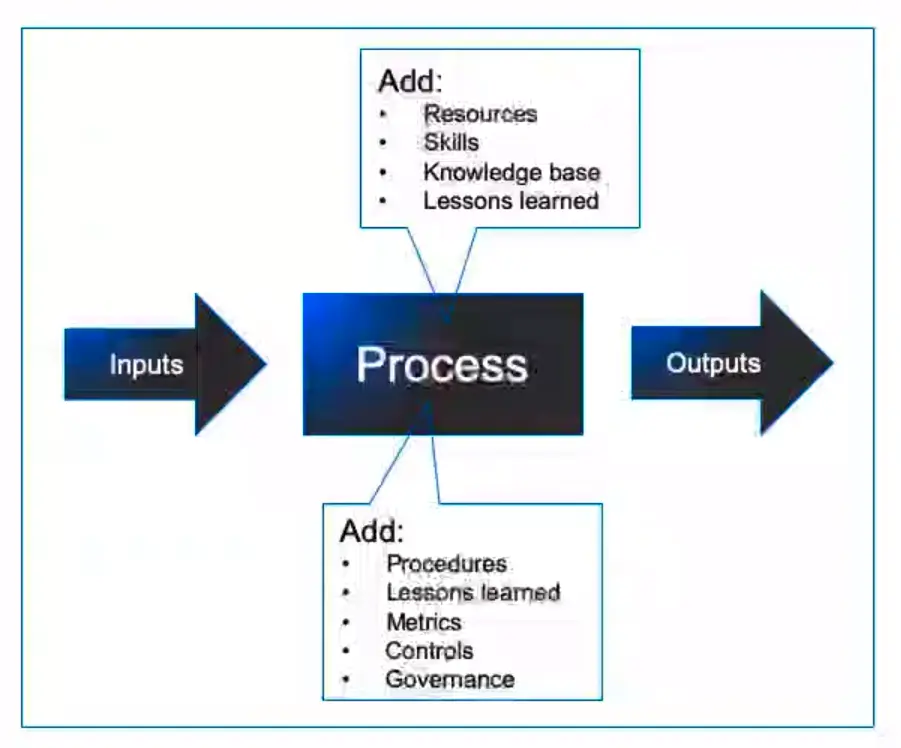
“A set of defined repeatable steps that take inputs, add value, and produce outputs that satisfy a customer’s requirements.”
Attributes of a Process
Inputs:
Information or materials that are required by the process to get started.
Outputs:
Services, or products that satisfy customer requirements.
Bounds/Scope:
The process starts when and end when.
Tasks/Steps:
Actions that are repeatable.
Documentation:
For audit, compliance, and reference purposes.
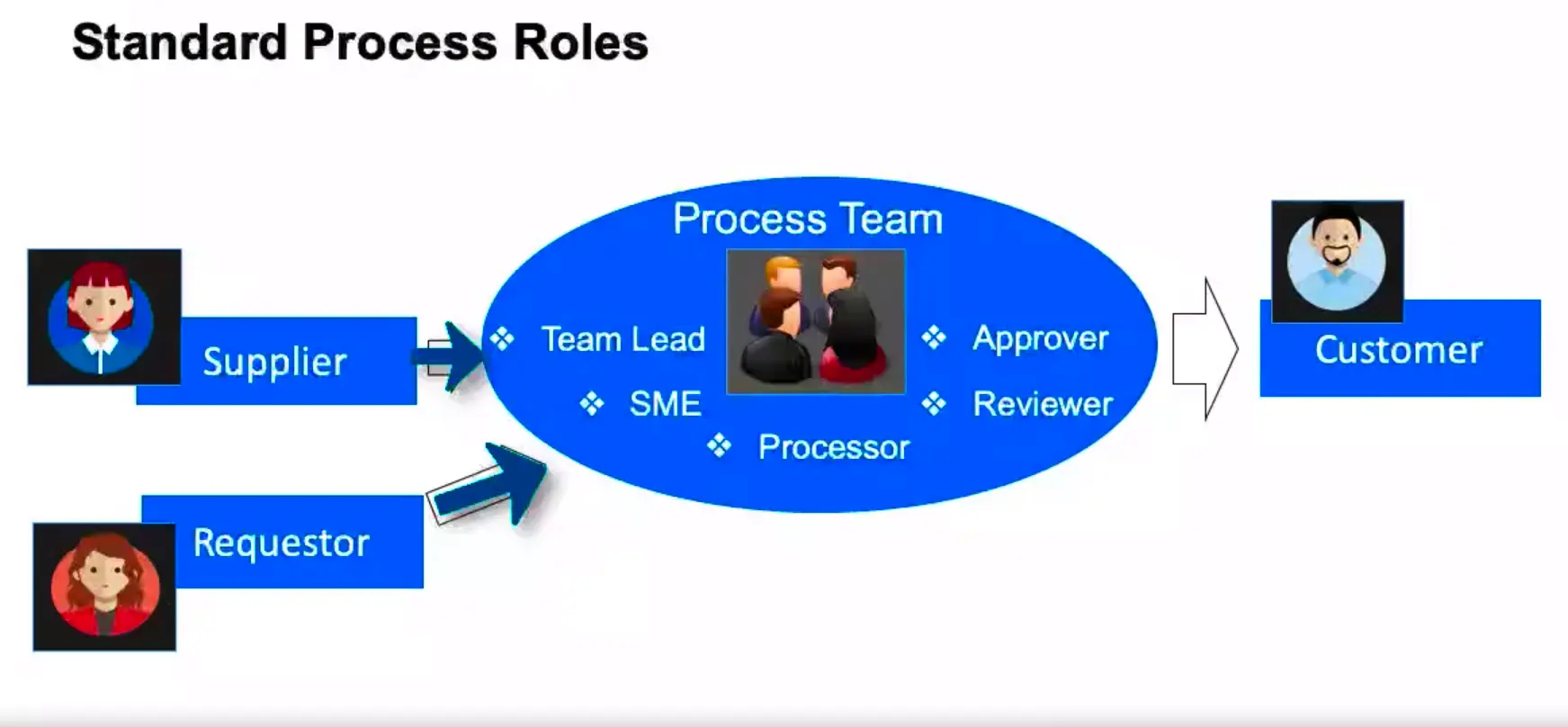
Standard Process Roles
What makes a Process Successful?
Charter
Clear Objectives
Governance/Ownership
Repeatability (reduced variation)
Automation
Established Performance indicators (metrics)
Process Performance Metrics
“It is critical that we measure our processing, so understand if they are performing to specifications and producing the desired outcome every time; and within financial expectations.”
Typical Categories
Cycle Time
Cost
Quality (Defect Rate)
Rework
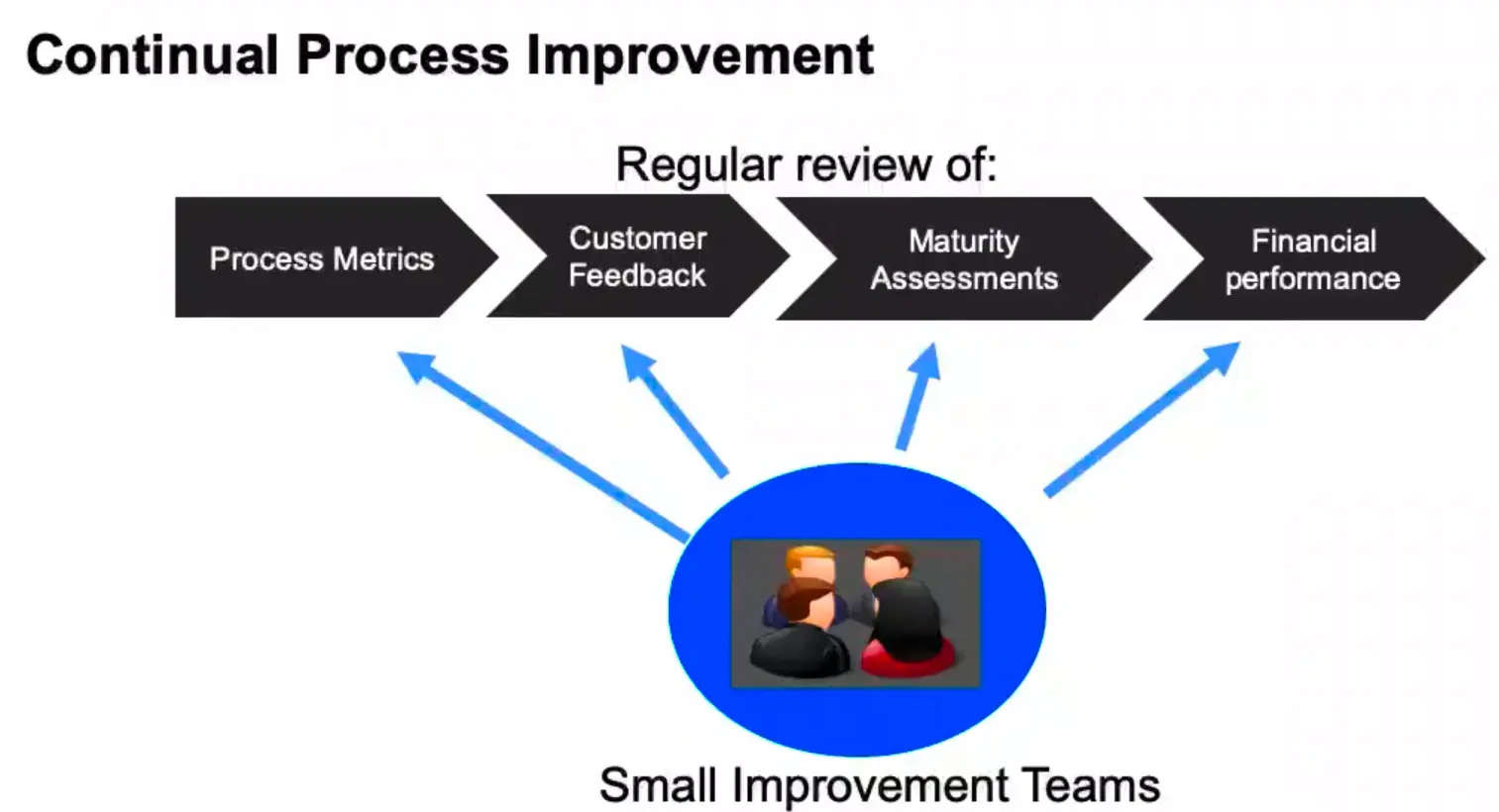
Continual Process Improvement
Information Technology Infrastructure Library (ITIL) Overview
ITIL is a best practice framework that has been drawn from both the public and private sectors internationally.
It describes how IT resources should be organized to deliver Business value.
It models how to document processes and functions, in the roles of IT Service Management (ITSM).
ITIL Life-cycle – Service Phases
Service Strategy
Service Design
Service Transition
Service Operations
Service Improvements
ITIL Life-cycle – Service Strategy
Service Portfolio Management
Financial Management
Demand Management
Business Relationship Management
ITIL Life-cycle – Service Design
Service Catalog Management
Service Level Management
Information Security Management
Supplier Management
ITIL Life-cycle – Service Transition
Change Management
Project Management
Release & Deployment Management
Service validation & Testing
Knowledge Management
ITIL Life-cycle – Service Operations
Event Management
Incident Management
Problem Management
ITIL Life-cycle – Continual Service Improvement (CSI)
Review Metrics
Identify Opportunities
Test & Prioritize
Implement Improvements
Key ITIL Processes
Problem Management
The process responsible for managing the Life-cycle of all problems.
ITIL defines a ‘problem’ as ‘an unknown cause of one or more incidents.’
Change Management
Manage changes to baseline service assets and configuration items across the ITIL Life-cycle.
Incident Management
An incident is an unplanned interruption to an IT Service, a reduction in the quality of an IT Service, and/ or a failure of a configuration item.
Events are any detectable or discernible occurrence that has significance for the management of IT Infrastructure, or the delivery of an IT service.
Service Level Management
This involves the planning coordinating, drafting, monitoring, and reporting on Service Level Agreements (SLAs). It is the ongoing review of service achievements to ensure that the required service quality is maintained and gradually improved.
Information Security Management
This deals with having and maintaining an information security policy (ISP) and specific security Policies that address each aspect of strategy, Objectives, and regulations.
Difference between ITSM and ITIL
Information Technology Service Management (ITSM)
“ITSM is a concept that enables an organization to maximize business value from the use of information Technology.”
IT Infrastructure Library (ITIL)
“ITIL is a best practice framework that gives guidance on how ITSM can be delivered.”
Further discussion of confidentiality, integrity, and availability
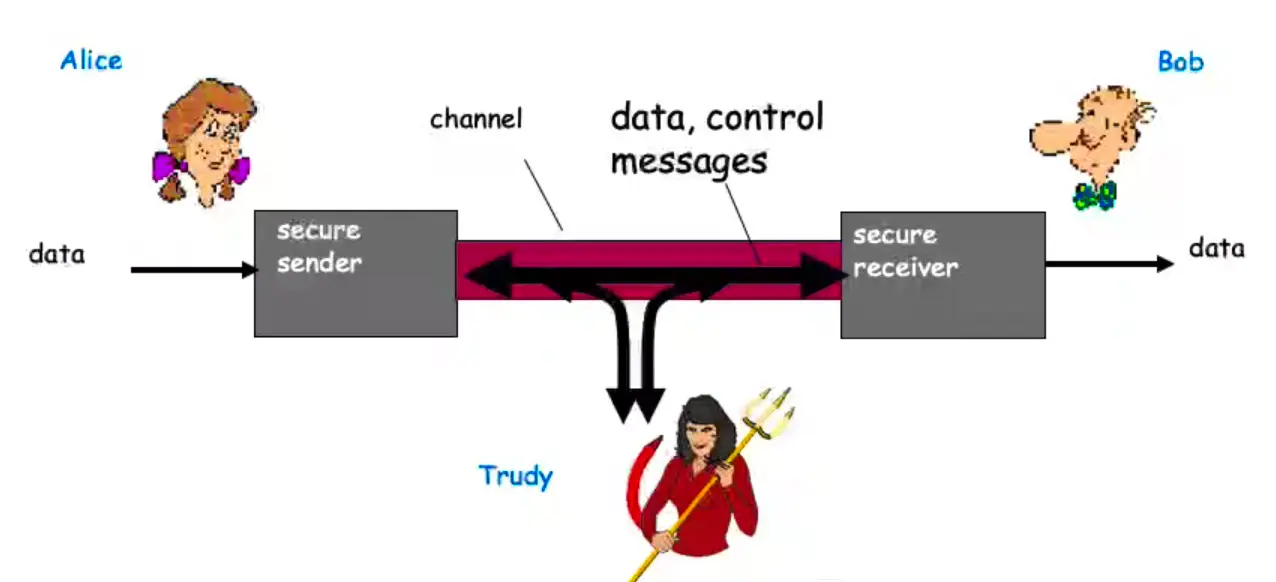
Who are Alice, Bob, and Trudy?
Well known in network security world.
Bob, Alice (friends) want to communicate “securely”.
Trudy (intruder) may intercept, delete, add messages.
Confidentiality, Integrity, and Availability
Main components of network security.
Confidentiality
Preserving authorized restrictions on information access and disclosure, including means for protecting personal privacy and proprietary information.
Loss of confidentiality is the unauthorized disclosure of information.
Integrity
Guarding against improper information modification or destruction.
Including ensuring information non-repudiation and authenticity.
Integrity loss is the unauthorized modification or destruction of information.
Availability
Timely and reliable access to information.
Loss of availability is the disruption of access to an information system.
Authenticity and Accountability
Authenticity: property of being genuine and verifiable.
“Only who has the rights to access or utilize the resources can use them.”
Access control models
MAC – Mandatory Access Control
Use labels to regulate the access
Military use
DAC – Discretionary Access Control
Each object (folder or file) has an owner and the owner defines the rights and privilege
Role Based Access Control
The rights are configured based on the user roles. For instance, sales group, management group, etc.
Other methods
Centralized
SSO (Single Sing On)
Provide the 3 As
Decentralized
Independent access control methods
Local power
Normally the military forces use these methods on the battlefields
Best practices for the access control field
These concepts are deeply integrated with the access control methodologies and must be followed by the organization in order of the policies and procedures.
Least privilege
Information access limit
Separation of duties
Verify employee activity
Rotation of duties
Tracking and control
Access Control – Physical and Logical
Physical access control methods
Perimetral
Building
Work areas
Servers and network
Technical uses of Physical security controls
ID badges
List and logs
Door access control systems
Tokens
Proximity sensors
Tramps
Physical block
Cameras
Logical access control methods
ACL (Routers)
GPO’S
Password policies
Device policies
Day and time restrictions
Accounts
Centralized
Decentralized
Expiration
BYOD, BYOC … BYO Everything…
Popular concepts for moderns times. Each collaborator has the opportunity to bring their own device to the work environment.
Some controls to follow:
Strict policy and understanding
Use of technical control MDM
Training
Strong perimetral controls
Monitoring the access control process
IDS/IPs
HOST IDS and IPS
Honeypot
Sniffers
Operating System Security Basics
User and Kernel Modes
MS Windows Components
User Mode and Kernel Mode
Drivers call routines that are exported by various kernel components.
Drivers must respond to specific calls from the OS and can respond to other system calls.
User Mode
When you start a user-mode application, Windows creates a process for the application.
Private virtual address space
Private handle table
Each application runs in isolation and if an application crashes, the crash is limited to that one application.
Kernel Mode
All code that runs in kernel mode shares a single virtual address space.
If a kernel-mode driver accidentally writes to the wrong virtual address, data that belongs to the OS or another driver could be compromised.
If a kernel-mode driver crashes, the entire OS crashes.
File System
Types of File Systems
NTS (New Technology File System)
Introduced in 1993
Most common file system for Windows end user systems
Most Windows servers use NTFS as well
FATxx (File Allocation Table)
Simple File system used since the 80s
Numbers preceding FAT refer to the number of bits used to enumerate a file system block. Ex FAT16, FAT32
Now mainly used for removable devices under 32 GB capacity.
(NOTE: FAT32 actually support upto ≤2TB storage size).
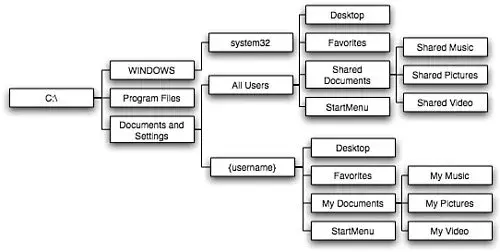
Directory Structure
Typical Windows Directory Structure
Shortcuts and Commands
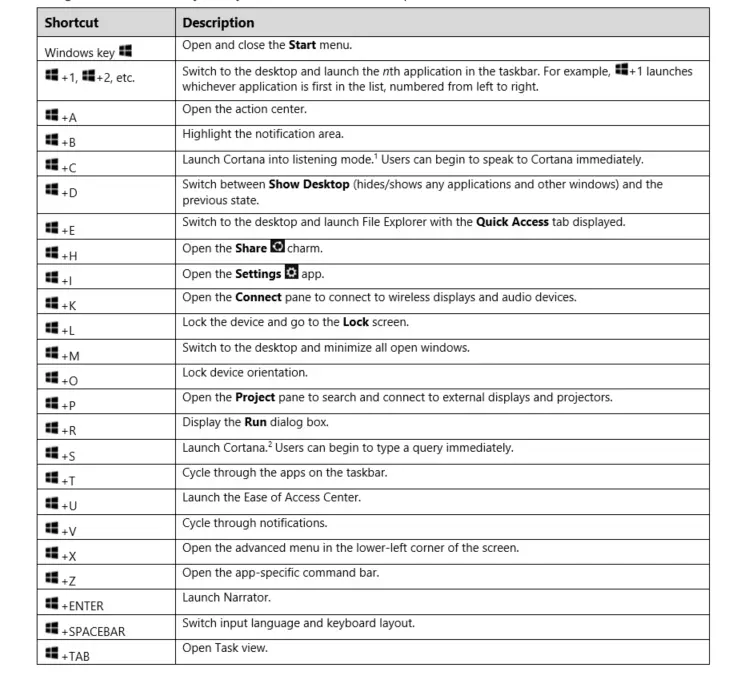
Windows Shortcuts
Common tasks that can be accessed using the Windows or Ctrl Key and another Key.
Time saving and helpful for tasks done regularly.
Additional Shortcuts
F2: Rename
F5: Refresh
Win+L: Lock your computer
Win+I: Open Settings
Win+S: Search Windows
Win+PrtScn: Save a screenshot
Ctrl+Shift+Esc: Open the Task Manager
Win+C: Start talking to Cortana
Win+Ctrl+D: Add a new virtual desktop
Win+X: Open the hidden Menu
Linux Key Components
Key Components
Linux has two major components:
The Kernel
- It is the core of the OS. It interacts directly with the hardware.
- It manages system and user input/output. Processes, files, memory, and devices.
1) The Shell
- It is used to interact with the kernel.
- Users input commands through the shell and the kernel performs the commands.
Linux File Systems
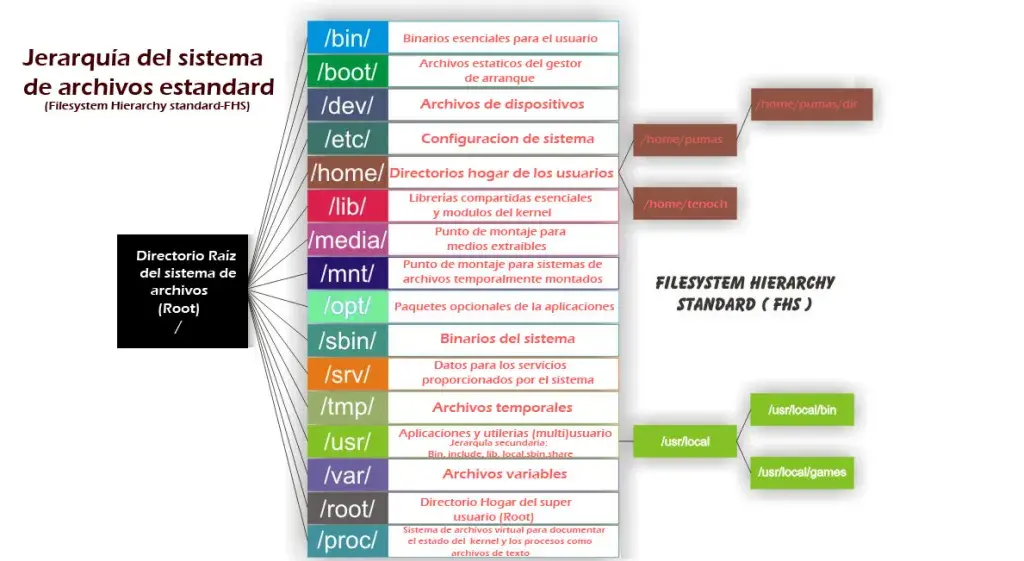
File Systems
- represents file in CLI
d represents directory in CLI
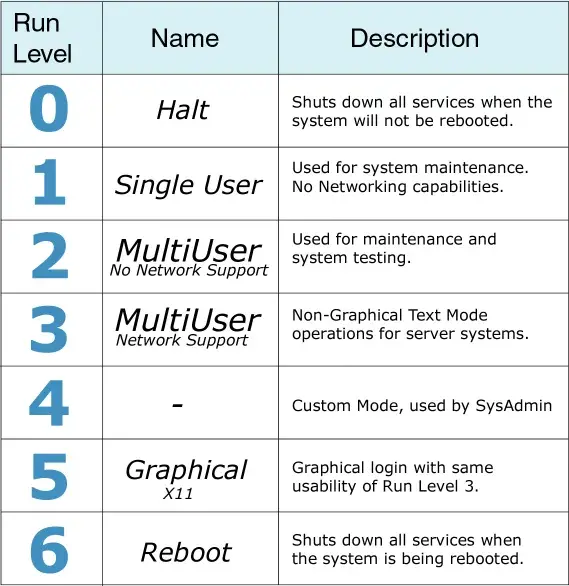
Run Levels
Linux Basic Commands
cd: change directory
cp: copy files or dirs
mv: move file or dirs
ls: lists info related to files and dirs
df: display file system disk space
kill: stop an executing process
rm: delete file and dirs
rmdir: remove en empty dir
cat: to see the file contents, or concatenate multiple files together
mkdir: creates new dir
ifconfig: view or configure network interfaces
locate: quickly searches for the location of files. It uses an internal database that is updated using updatedb command.
tail: View the end of a text file, by default the last 10 lines
less: Very efficient while viewing huge log files as it doesn’t need to load the full file while opening
more: Displays text, one screen at a time
nano: a basic text editor
chmod: changes privileges for a file or dir
Permissions and Owners
File and directory permission
There are three groups that can ‘own’ a file.
User
group
everybody
For each group there are also three types of permissions: Read, Write, and Execute.
Read: 4(100), Write: 2(010), Execute: 1(001)
Change Permissions
You can use the chmod command to change the permissions of a file or dir:
chmod <permissions><filename>
chmod 755<filename>
chmod u=rw,g=r,o=r<filename>
Change owner
You can change the owner and group owner of a file with the chown command:
chown <user>:<group><filename>
macOS Security Overview
macOS Auditing
About My mac menu, contains information about
OS
Displays
Storage
Support
Service
Logs, etc.
Activity Monitor real-time view of system resource usage and relevant actions
Console, contains
Crash reports
Spin reports
Log reports
Diagnostic reports
Mac Analysis Data
System.log
macOS Security Settings
Various Security settings for macOS can be found in System Preferences app.
Genral Tab offers GateKeeper settings for installing apps from other AppStore, and few other settings.
FileVault Tab contains information about system and file encryption.
FireWall Tab for system level software firewall settings with basic and to advanced options.
Privacy Tab contains location services and other privacy related info and settings.
macOS Recovery
macOS comes with a hidden partition installed called macOS Recovery, it essentially replaces the installation discs that comes with new computers.
Access it by restarting your Mac while holding the R key.
It offers following tools/options:
Restore from the Time Machine Backup
Reinstall macOS
Get Help Online
Disk Utility
Virtualization Basics and Cloud Computing
An Overview of Virtualization
Allows you to create multiple simulated environments or dedicated resources from a single, physical hardware system.
Hypervisor/Host
Virtual Machine/Guest
Hypervisor
Separate the physical resources from the virtual environments
Hypervisors can sit on top of an OS (end user) or be installed directly onto hardware (enterprise).
Virtual Machine
The virtual machine functions as a single data file.
The hypervisor relays requests from the VM to the actual hardware, is necessary.
VMs doesn’t interact directly with the host machine.