Network Environments
Software Defined Networking (SDN)
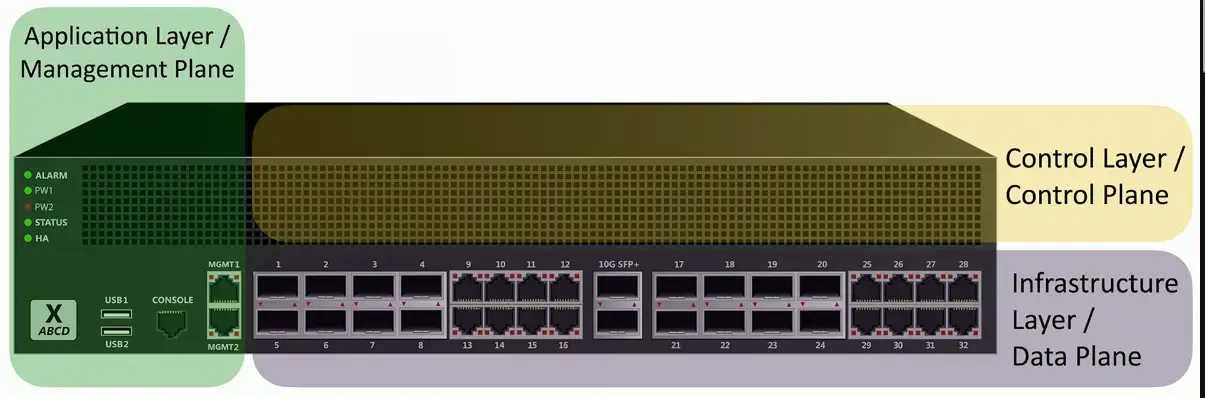
Networking devices have different functional planes of operation
- Data, control, and management planes
Split the functions into separate logical units
- Extend the functionality and management of a single device
- Perfectly built for the cloud
Infrastructure layer/Data plane
- Process the network frames and packets
- Forwarding, trunking, encrypting, NAT
Control layer/Control plane
- Manages the actions of the data plane
- Routing tables, session tables, NAT tables
- Dynamic routing protocol updates
Application layer/Management plane
- Configure and manage the device
- SSH, browser, API
Extend the Physical Architecture
SD-WAN
Software Defined Networking in a Wide Area Network
- A WAN built for the cloud
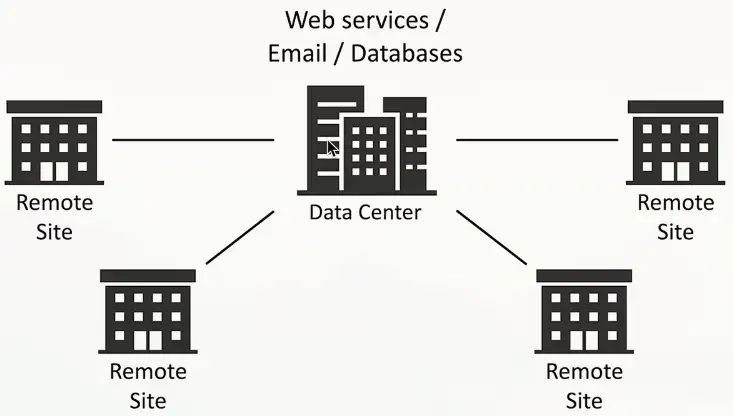
The data center used to be in one place
- The cloud has changed everything
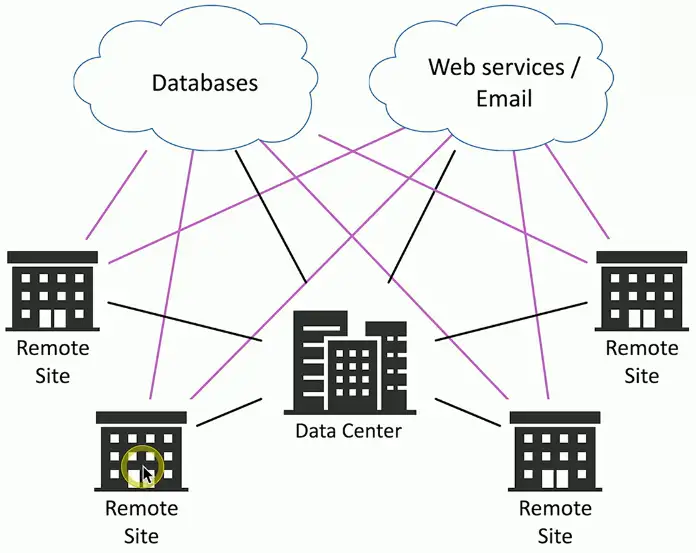
Cloud-based applications communicate directly to the cloud
- No need to hop through a central point
Before cloud:
After cloud:

SD-WAN Characteristics
Application aware
- The WAN knows which app in use
- Makes routing decisions based on the application data
Zero-touch provisioning
- Remote equipment is automatically configured
- Application traffic uses the most optimal path
- Can change based on traffic patterns and network health
Transport agnostic
- The underlying network can be any type
- Cable modem, DSL, fiber-based, 5G, etc.
- Pick the best choice for the location
Central policy management
- Management and configuration on a single console
- One device to configure
- Changes are pushed to the SD-WAN routers
SD-WAN:
Virtual Extensible LAN
Data Center Interconnect (DCI)
Connect multiple data centers together
- Seamlessly span across these geographic distances
Connect and segment different customer networks
- Across multiple data centers
- All customers share the same core network
Distribute applications everywhere
- Increase uptime and availability
- Workload can be moved to the last location
Scaling across Data Centers
IP addressing is different across data centers
- Challenging to manage dynamically created virtual systems
Data centers can be connected in different ways
- MPLS, high speed optical, Metro Ethernet, etc.
Applications shouldn’t have to worry about IP addressing, routing, or connectivity
- Applications should work regardless of physical location
Extend networks across physical locations
- Encapsulate, send the data, decapsulate
- Tunnel the data
Virtual Extensible LAN (VXLAN)
Designed for large service providers
- Hundreds or thousands of tenants
VLANs
- Maximum of about 4,000 possible virtual networks
- Fixed layer 2 domain
- Not designed for large scale and dynamic movement of VMs
VXLAN support
- Over 16 million possible virtual networks
- Tunnel frames across a layer 3 network
- Built to accommodate large virtual environments
VXLAN Encapsulation

Zero Trust
Many networks are relatively open on the inside
- Once you’re through the firewall, there are few security controls
Zero trust is a holistic approach to network security
- Covers every device, every process, every person
Everything must be verified
- Nothing is inherently trusted
- Multi-factor authentication, encryption, system permissions, additional firewalls, monitoring and analytics, etc.
Policy-based authentication
Adaptive identity
- Consider the source and the requested resources
- Multiple risk indicators — relationship to the organization, physical location, type of connection, IP address, etc.
- Make the authentication stronger, if needed
Policy-derived access control
- Combine the adaptive identity with a predefined set of rules
- Evaluates each access decision based on policy and other information
- Grant, deny, or revoke
Authorization
Authentication is complete
- We can trust your identity
Authorization process is also required
- Determine which applications and data are accessible
Different rights depending on the user
- Help desk technicians can view the hardware database
- Help desk managers can modify the database
- Other users have no access
Can include other criteria
- Location, device certificate validation, time of day, etc.
Least privilege access
Rights and permissions should be set to the bare minimum
- You only get exactly what’s needed to complete your objective
All user accounts must be limited
- Applications should run with minimal privileges
Don’t allow users to run with administrative privileges
- Limits the scope of malicious behavior
Secure Access Service Edge (SASE)
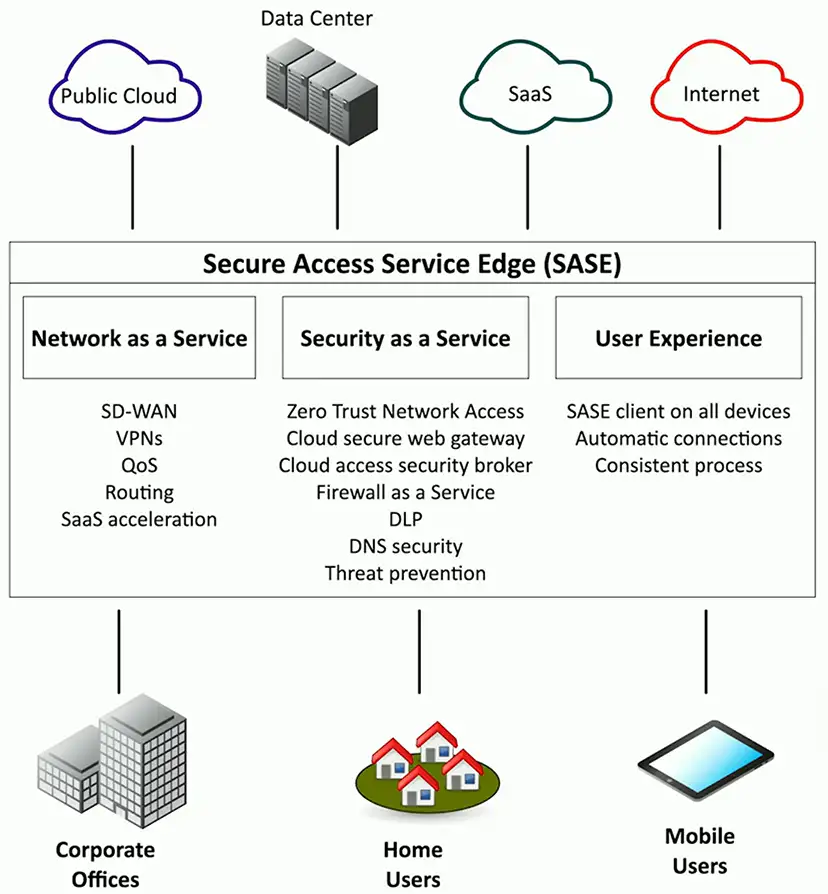
Update secure access for cloud services
- Securely connect from different locations
Secure Access Service Edge (SASE)
- A “next generation” VPN
Security technologies are in the cloud
- Located close to existing cloud services
SASE clients on all devices
- Streamlined and automatic
Infrastructure as Code (IaC)
Describe an infrastructure
- Define servers, network, and applications as definition files
Modify the infrastructure and create versions
- The same way you version application code
Use the description (code) to build other application instances
- Build it the same way every time based on the code
An important concept for cloud computing
- Build a perfect version every time
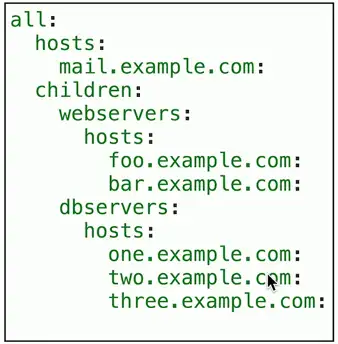
Playbooks
Conditional steps to follow; a broad process
- Investigate a data breach, recover from ransomware
Step-by-step set of processes and procedures
- A reusable template
- Can be used to create automated activities
Often integrated with a SOAR platform
- Security Orchestration, Automation, and Response
- Integrate third-party tools and data sources
Automation use cases
Configuration drift/compliance
- Ensure the same configurations for all systems
- The configuration used in testing should be the same in production
- IaC provides an identical deployment
Upgrades
- Change a configuration with a single line of code
- Modify configuration and software
Dynamic inventories
- Query devices in real-time
- Manage and make changes based on the results
Source Control
Managing change
- Developers create the infrastructure requirements
- Build and publish the definition files
Manage ongoing changes to the code
- Version control system
- Git is a popular example
Track changes across multiple updates
- A central repository
- All changes are tracked and merged together
- Everyone can participate without causing issues with the code
Controlling the source code
Conflict identification
- Some code can’t be merged
- Multiple versions could be modifying the same line of code
Which one wins?
- Might be determined automatically
- May require manual intervention
Branching
- Move away from the main line of development
- Work without making changes to the main code base
- Branch and merge, branch and merge
IPv6 Addressing
IPv4 address exhaustion
There are an estimated 20 billion devices connected to the Internet (and growing)
- IPv4 supports around 4.29 billion address
The address space for IPv4 is exhausted
- There are no available addresses to assign
IPv4 and NAT is a workaround
- Can be a challenge with certain protocols
IPv6 provides a larger address space
- With room for growth
IPv6 addresses
Internet Protocol v6 — 128-bit address
- 340,282,366,920,938,463,463,374,607,431,768,211,456 addresses (340 undecillion)
- Each grain of sand on Earth could have 45 quintillion unique IPv6 addresses

IPv6 address compression
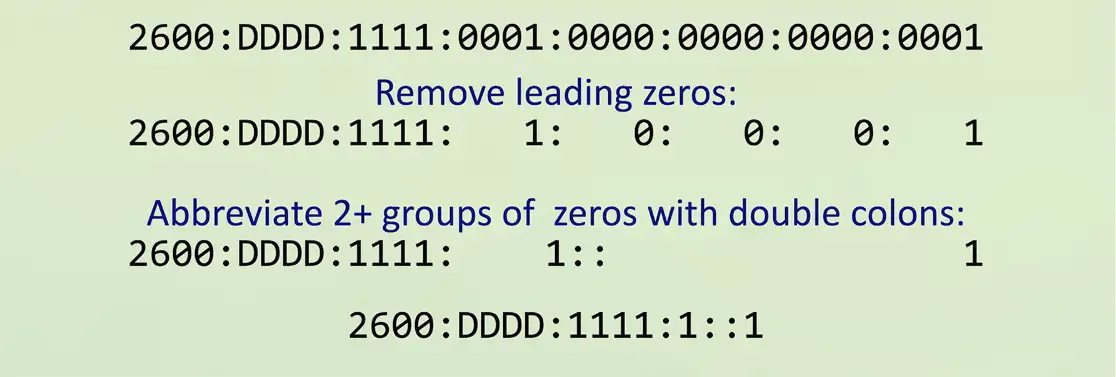
Groups of zeros can be abbreviated with a double colon ::
- Only one of these abbreviations allowed per address
Leading zeros are options:

Communicating between IPv4 and IPv6
Not all devices can talk IPv6
- Legacy devices, embedded systems, etc.
- How can an IPv4 device talk to an IPv6 server?
- Can an IPv6 device communicate with a legacy IPv4 server?
Requires an alternate form of communication
- Tunnel — Encapsulate one protocol within another
- Dual-stack — Have the option to use both IPv4 and IPv6
- Translate — Convert between IPv4 and IPv6
These are short-term strategies
- Long-term goal should be a complete migration to IPv6
Tunneling IPv6
A migration option
- Designed for temporary use
6to4 addressing
- Send IPv6 over an existing IPv4 network
- Creates an IPv6 address based on the IPv4 address
- Requires relay routers
- No support for NAT
- No longer available as an option on Windows
4in6 tunneling
- Tunnel IPv4 traffic on the IPv6 network
Dual-stack routing
Dual-stack IPv4 and IPv6
- Run both at the same time
- Interfaces will be assigned multiple address type
IPv4
- Configured with IPv4 addresses
- Maintains an IPv4 routing table
- Uses IPv4 dynamic routing protocols
IPv6
- Configured with IPv6 addresses
- Maintains a separate IPv6 routing table
- Uses IPv6 dynamic routing protocols
Translating between IPv4 and IPv6
Network address translation using NAT64
- Translate between IPv4 and IPv6
- Seamless to the end user
Requires something in the middle to translate
- IPv6 is not backwards compatible with IPv4
- Use a NAT64-capable router
Works with a DNS64 server
- Translate the DNS requests
