
Week 4: Libraries
| Week 4: Practice Code | GitHub |
|---|
Libraries
In programming, libraries are like ready-made tools that save time, reduce effort, and make development much easier.
A Python library is simply a collection of pre-written code that developers can use to perform specific tasks without having to write everything from scratch. —Antara Das via Medium
Basically, you can import the library into your code, and it comes with predefined functions and methods that help you get the gob done.
Module
A module in Python is just a library that typically or more functions or other features built into it.
Purpose of a Module or Library is a re-usability of a code when you find yourself using same lines of code over and over again from across your project’s code.
import
The keyword import allows to import some functions from modules in Python.
To import random library with all its functions:
from
The from keyword is primarily used to import specific functions, classes, or variables from a module into the current namespace, allowing direct access without prefixing the module name.
To import choice() function from random module:
Command-Line Arguments
Command-Line arguments are parameters passed to a Python script upon execution from the terminal, allowing users to customize program behavior without modifying source code.
The one we use is using sys module feature sys.argv, where sys.argv[0] is the script name and subsequent indices are the provided arguments.
Running with name as an argument:
python name.py AlexIf we replace with sys.argv[0], it will print the name of program as Hello, my name is name.py, and no CLI argument will be printed.
random Module
It’s a built-in Python module, that provides functions for generating pseudo-random numbers, selecting random elements, and shuffling sequences.
It’s not a separate package and doesn’t require installation; it’s used by simply adding import random to your code.
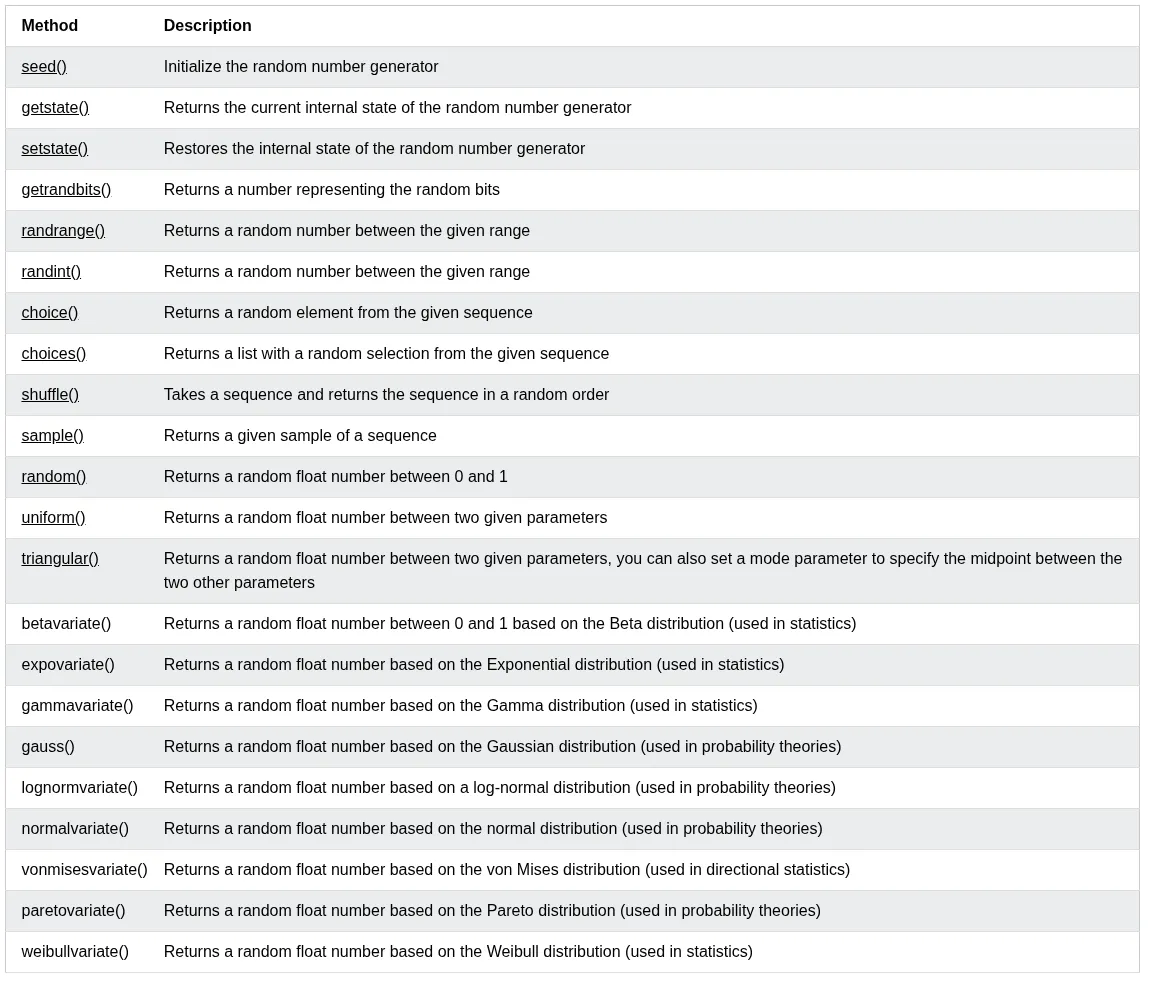
statistics Module
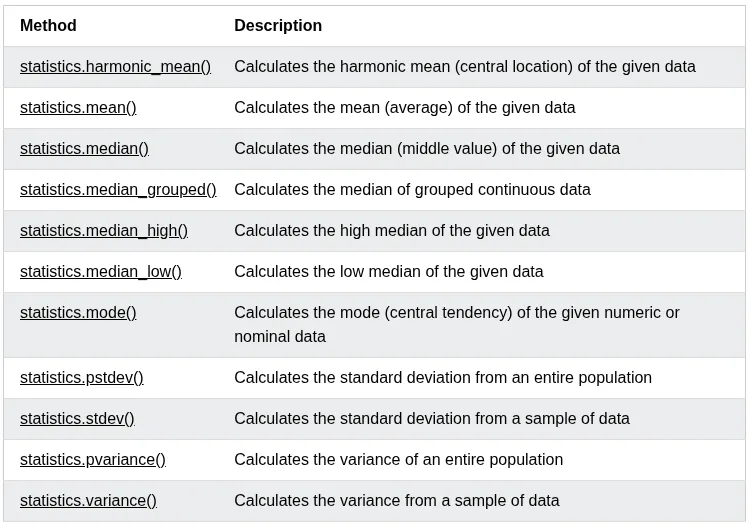
Python has a built-in module that you can use to calculate mathematical statistics of numeric data.
Statistics Methods
(REF: W3School)
requests Module
The
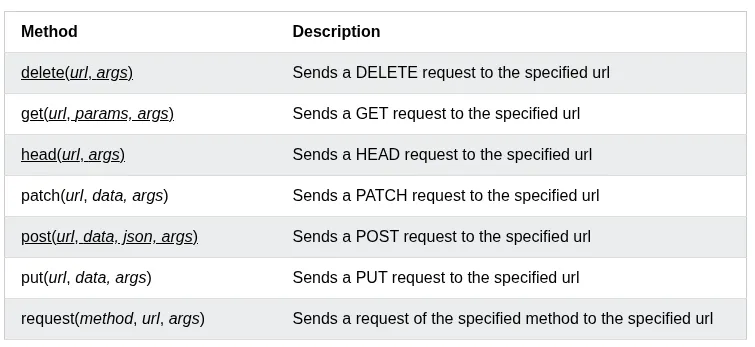
requestsmodule allows you to send HTTP requests using Python. —W3School
The HTTP request returns a Response Object with all the response data (content, encoding, status, etc.).
Syntax:
Methods
Python json
Python has a built-in package called
json, which can be used to work with JSON data. —W3School
There are many different methods json has, but for now we only see the json.dumps() method.
Format the Result
The json.dumps() prints a JSON string, but it is not very easy to read, with no indentations and line breaks.
The method has parameters to make it easier to read the results.
You can also define the separators, default value is `(", “, “: “), which means using a comma and a space to separate each object, and a colon and a space to separate keys from values:
Order the Result
Use sort_keys parameter to specify if the result should be sorted or not:
PACKAGE
A package is a third-party library that we can install on our computer.
An external package maintainer is PyPI searchable via https://pypi.org or CLI.
You can install packages from PyPI via Python package manager called PIP.
Create a virtual environment inside your project:
Activate your virtual env:
Now install the module:
Now you can import it inside .py file.
After finishing your work, you can deactivate the env:
Depending on your prompt, it will show you’re using a virtual environment with Python version number.

Add your virtual env directory and __pycache__ dir to .gitignore, so they don’t mess your git history or project repo.
Create Your Own Package
Create a folder, put all your modules inside it. Create an empty file inside that folder:
Now you can import your package:
APIs
API stands for Application Programming Interface.
An API is a set of rules, protocols, and specifications that allows different software applications to communicate with each other.
In context Python, APIs generally refer to two distinct concepts:
- Consuming External APIs: Using libraries like
Requeststo send HTTP requests to external services (e.g., weather data, social media) and parse the responses. - Building Web APIs: Creating server-side endpoints using frameworks like
Flask,DjangoorFastAPIthat expose functionality and data to other applications via specific URLs and HTTP methods (GET, POST, etc.).
JSON
JSON stands for JavaScript Object Notation.
- JSON is a lightweight format for storing and transporting data.
- JSON is often used when data is sent from a server to a web page.
- JSON is “self-describing” and easy to understand
Though it’s related to JavaScript, but it’s itself typically used as a language agnostic format for exchanging data between computers.
__name__ REF: freeCodeCamp
When a Python interpreter reads a Python file, it first sets a few special variables. Then it executes the codes from the file.
One of those variables is called __name__.
So when the interpreter runs a module, the __name__ variable will be set as __main__ if the module is being run is the main program.
But if the code is importing the module from another module, then the __name__ variable will be set to that module name.
There is a really nice use case for the __name__ variable, whether you want a file that can be run as the main program or imported by other modules. We can use an if __name__ == "__main__" block to allow or prevent parts of code from being run when the modules are imported.
When the Python interpreter reads a file, the __name__ variable is set as __main__ if the module being run, or as the module’s name if it is imported. Reading the file executes all top level code, but not functions and classes (since they will only get imported).
Style
The standardized way of writing Python source code to ensure readability and maintainability.
The primary standard is PEP 8, which dictates rules for indentation (4 spaces), line length, naming conventions (snake_case for variables/functions, CamelCase for classes), and import ordering.
Adhering to these rules allows teams to collaborate efficiently and reduces bugs caused by inconsistent formatting.
REF: Python Style Basics - PEP8
- Indentation: Indent code by 4 spaces and be consistent.
- Tab/Spaces: Early on python, some people use 2 spaces or tabs. Those practices have died out, and now 4 spaces is the standard.
- Max Lines Length: In the old days of relatively small computer displays, projects would frequently have a rules that no line in the code could be wider than 80 or 100 characters, so that the code would fit on the display. This sort of rule has becomes less common. Often in Python, the simplest thing to do is just let a long line be long.
- However if a line so long that it’s hard to read or work with, break it into shorter, separate lines.
- Blank Lines: PEP8 requires 2 blank lines before each def in a file. This is one of the weaker PEP8 rules.