IPv4 Addressing
Binary Math
A bit — a zero or a one
- One digit. Off or on. Cold or hot. 0 or 1.
A byte — Eight bits
- Often called an “octet” to avoid ambiguity
A binary-to-decimal conversion chart
| 1024 | 512 | 256 | 128 | 64 | 32 | 16 | 8 | 4 | 2 | 1 |
|---|---|---|---|---|---|---|---|---|---|---|
| 0 | 0 | 0 | 0 | 0 | 0 | 0 | 0 | 0 | 0 | 0 |
Binary to Decimal
What is binary 00000010 in decimal?

What is binary 10000010 in decimal?

What is binary 11111111 in decimal?

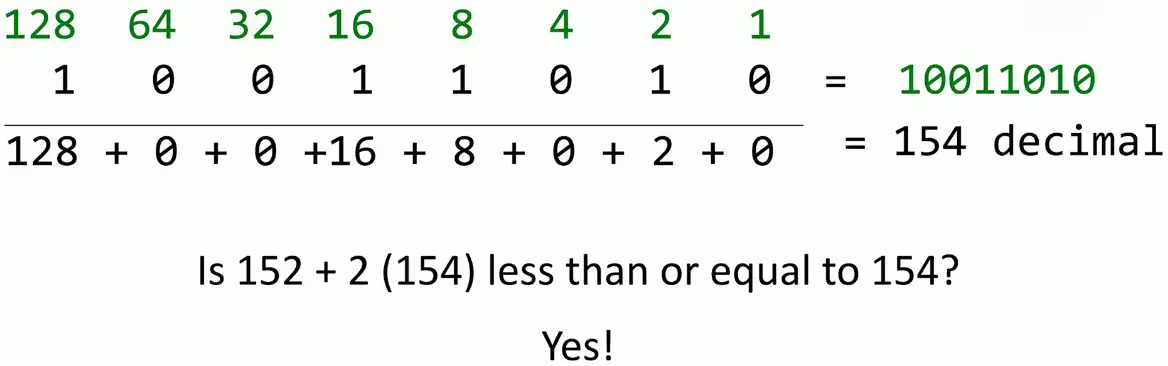
Decimal to Binary Conversion
What is decimal 154 in binary?
More bits, more addresses
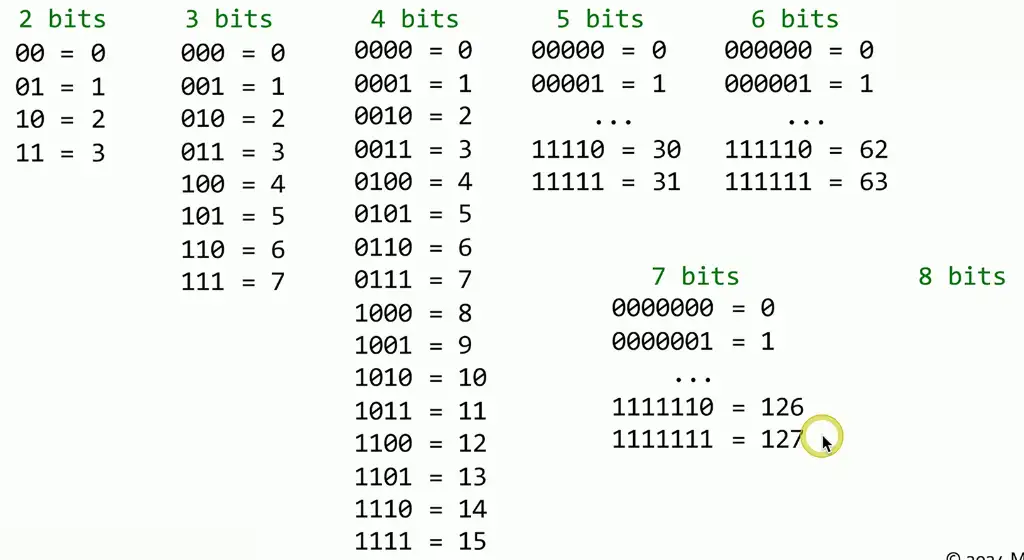
More bits, more addresses:
Power of two
- Useful for binary calculations and subnetting
| 212 | 211 | 210 | 29 | 28 | 27 | 26 | 25 | 24 | 23 | 22 | 21 | 20 |
|---|---|---|---|---|---|---|---|---|---|---|---|---|
| 4,096 | 2,048 | 1,024 | 512 | 256 | 128 | 64 | 32 | 16 | 8 | 4 | 2 | 1 |
IPv4 Addressing
Networking with IPv4
IP Address, e.g., 192.168.1.165
- Every device needs a unique IP address
Subnet mask, e.g., 255.255.255.0
- Used by the local device to determine what subnet it’s on
- The subnet mask isn’t (usually) transmitted across the network
- You will ask for the subnet mask all the time
Default gateway, e.g., 192.168.1.1
- The router that allows you to communicate outside your local subnet
- The default gateway must be an IP address on the local subnet
Special IPv4 Addresses
Loopback address
- An address to yourself
- Ranges from
127.0.0.1through127.255.255.254 - An easy way to self-reference (ping
127.0.0.1)
Reserved addresses
- Set aside for future use or testing
240.0.0.1through254.255.255.254- All “Class E” addresses
Virtual IP addresses (VIP)
- Not associated with a physical network adapter
- Virtual machine, internal router address
IPv4 addresses
Internet Protocol version 4
- OSI Layer 3 address
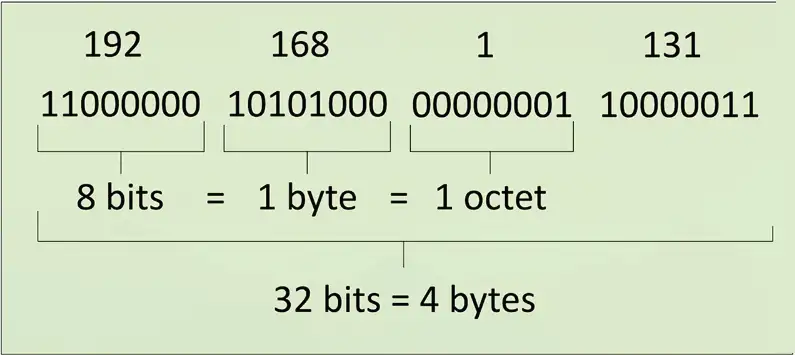
Since one byte is 8 bits, the maximum decimal value for each byte is 255
DHCP
IPv4 address configuration used to be a manual process
- IP address, subnet mask, gateway, DNS servers, NTP servers, etc.
Dynamic Host Configuration Protocol
- Provides automatic address and IP configuration for almost all devices
Automatic Private IP Addressing (APIPA)
A link-local address
- Can only communicate to other local devices
- No forwarding by routers
IETF has reserved 169.254.0.1 through 169.254.255.254
- First and last 256 addresses are reserved
- Functional block of
169.254.1.0through169.254.1.0
Automatically assigned
- Uses ARP to confirm the address isn’t currently in use
The IPv4 address problem
There are far more devices than IPv4 addresses
- This Internet thing could be big
The use and registration of IP address ranges is problematic
- Unused and non-continuous address blocks
- Complete depletion of available addresses
Private IP address ranges
More public IP addresses
- More Internet connectivity
Huge private IP address ranges
- Properly design and scale large networks
Private IP addresses are not Internet-routable
- But can be routed internally
- Use NAT for everything else
Defined in RFC 1918
- Request for Comment
Public addresses vs. Private addresses
RFC 1918 private IPv4 addresses
| IP address | Number of addresses | Classful description | Largest CIDR block (subnet mask) | Host ID size |
|---|---|---|---|---|
| 10.0.0.0–10.255.255.255 | 16,777,216 | single class A | 10.0.0.0/8 (255.0.0.0) | 24 bits |
| 172.16.0.0–172.31.255.255 | 1,048,576 | 16 contiguous class Bs | 172.16.0.0/12 (255.240.0.0) | 20 bits |
| 192.168.0.0–192.168.255.255 | 65,536 | 256 contiguous class Cs | 192.168.0.0/16 (255.255.0.0) | 16 bits |
Classful Subnetting
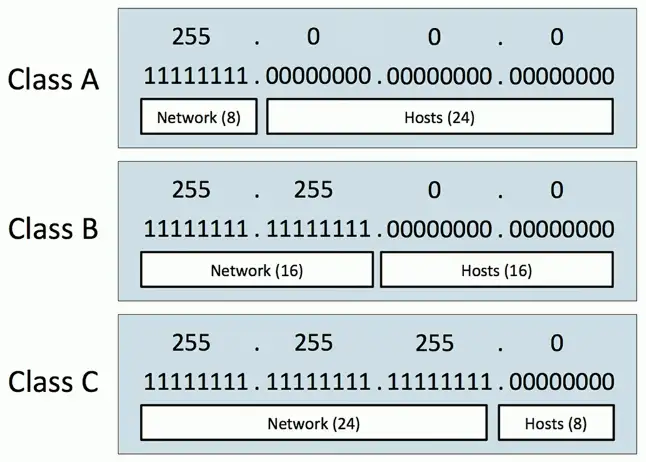
Very specific subnetting architecture
- Not used since 1993
- But still referenced in casual conversation
Used as a starting point when subnetting
- Standard values
Subnet Classes
| Class | Leading Bits | Network Bits | Remaining Bits | Number of Networks | Hosts per Network | Default Subnet Mask |
|---|---|---|---|---|---|---|
| Class A | 0xxx (0-127) | 8 | 24 | 128 | 16,777,214 | 255.0.0.0 |
| Class B | 10xx (128-191) | 16 | 16 | 16,384 | 65,534 | 255.255.0.0 |
| Class C | 110x (192-223) | 24 | 8 | 2,097,152 | 254 | 255.255.255.0 |
| Class D (multicast) | 1110 (224-239) | Not defined | Not defined | Not defined | Not defined | Not defined |
| Class E (reserved) | 1111 (240-255) | Not defined | Not defined | Not defined | Not defined | Not defined |
The 127.0.0.0/8 network is reserved as a loopback address.
What IP class?
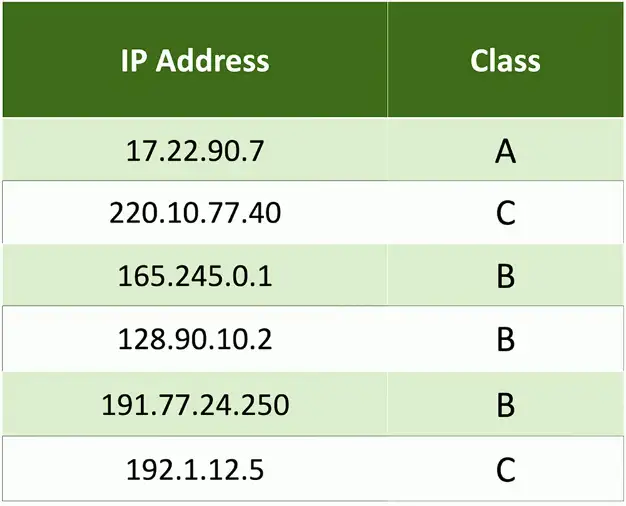
The Construction of a Subnet
Network address
- The first IP address of a subnet
- Set all host bits to 0 (0 decimal)
First usable host address
- One number higher than the network address
Network broadcast address
- The last IP address of a subnet
- Set all hosts bits to 1 (255 decimal)
Last usable host address
- One number lower than the broadcast address
Subnet calculations
IP address: 10.74.222.11
- Class A
- Subnet mask 255.0.0.0
| Network | Host | |
|---|---|---|
| 10. | 74.222.11 | |
| Network Address (Set all host bits to 0) | 10. | 0.0.0 |
| First host address (add one) | 10. | 0.0.1 |
| Broadcast address (Set all host bits to 1) | 10. | 255.255.255 |
| Last host address (subtract one) | 10. | 255.255.254 |
IP address: 172.16.88.200
- Class B
- Subnet mask 255.255.0.0
| Network | Host | |
|---|---|---|
| 172.16. | 88.200 | |
| Network Address (Set all host bits to 0) | 172.16. | 0.0 |
| First host address (add one) | 172.16. | 0.1 |
| Broadcast address (Set all host bits to 1) | 172.16. | 255.255 |
| Last host address (subtract one from broadcast addr) | 172.16. | 255.254 |
IP address: 192.168.4.77
- Class C
- Subnet mask 255.255.255.0
| Network | Host | |
|---|---|---|
| 192.168.4. | 77 | |
| Network address (Set all host bits to 0) | 192.168.4. | 0 |
| First host address (add one) | 192.168.4. | 1 |
| Broadcast address (Set all host bit to 1) | 192.168.4. | 255 |
| Last host address (subtract one from broadcast addr) | 192.168.4. | 254 |
IPv4 Subnet Masks
Classless Subnetting
CIDR (Classless Inter-Domain Routing)
- Created around 1993
- Removed the restrictions created by classful subnet masks
- “Cider” block notation
Subnet masks can be expressed as decimal or in CIDR notation
- IP address, slash, number of subnet bits; 192.168.1.44/24
You will usually be provided an IP address, subnet mask, default gateway, and DNS servers
- Some OSes are expecting decimal masks
- Some OSes are expecting CIDR notation masks
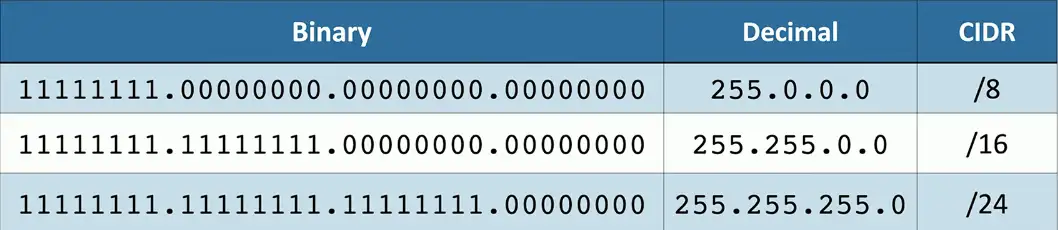
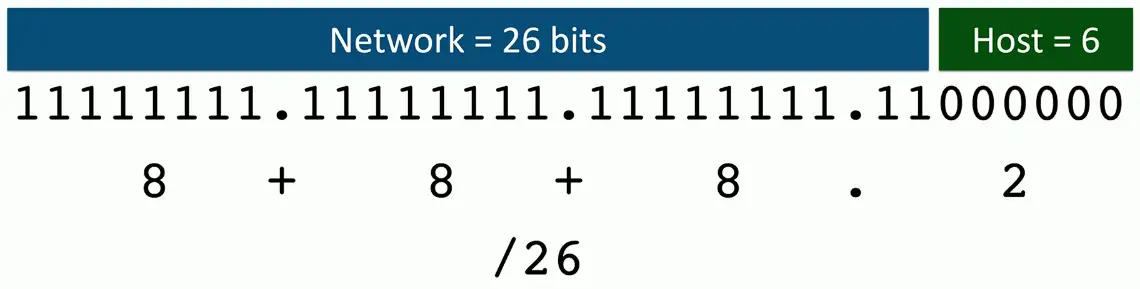
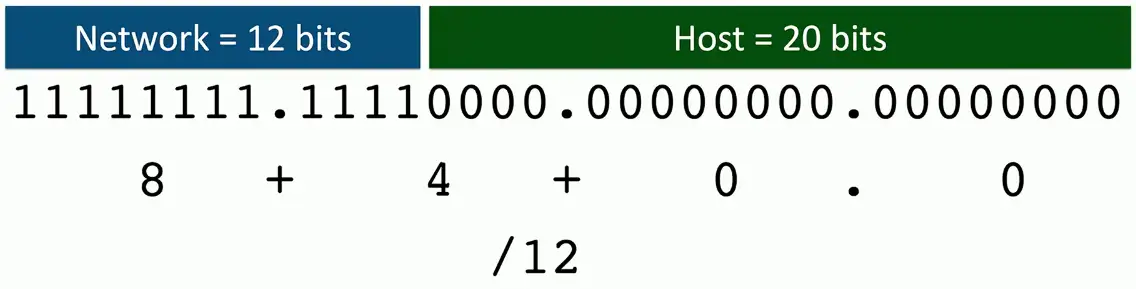
The subnet mask
Contiguous series of ones
- Ones on the left
- Zeros on the right
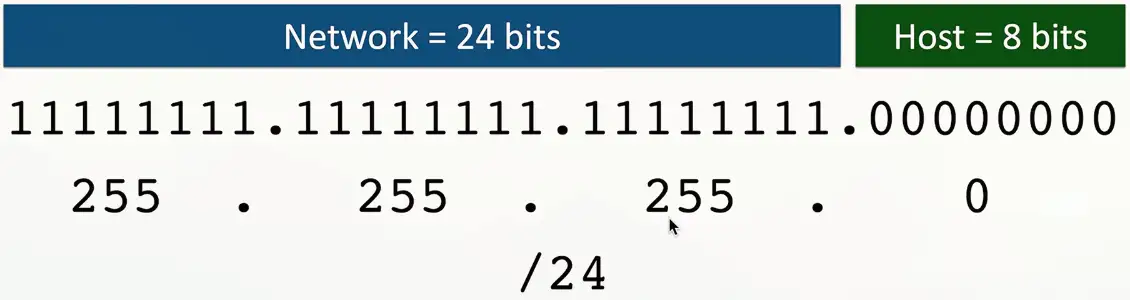
Binary to CIDR-block notation
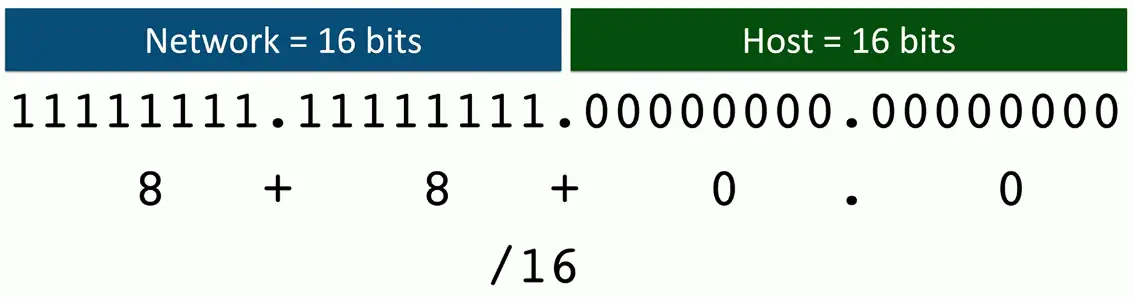
Subnet Masks — Binary to Decimal
| Binary | Decimal |
|---|---|
| 00000000 | 0 |
| 10000000 | 128 |
| 11000000 | 192 |
| 11100000 | 224 |
| 11110000 | 240 |
| 11111000 | 248 |
| 11111100 | 252 |
| 11111110 | 254 |
| 11111111 | 255 |
Now we can calculate binary to CIDR-block notation:
It can be done in the reverse too. From CIDR-block notion to decimal.
Calculating IPv4 Subnets and Hosts
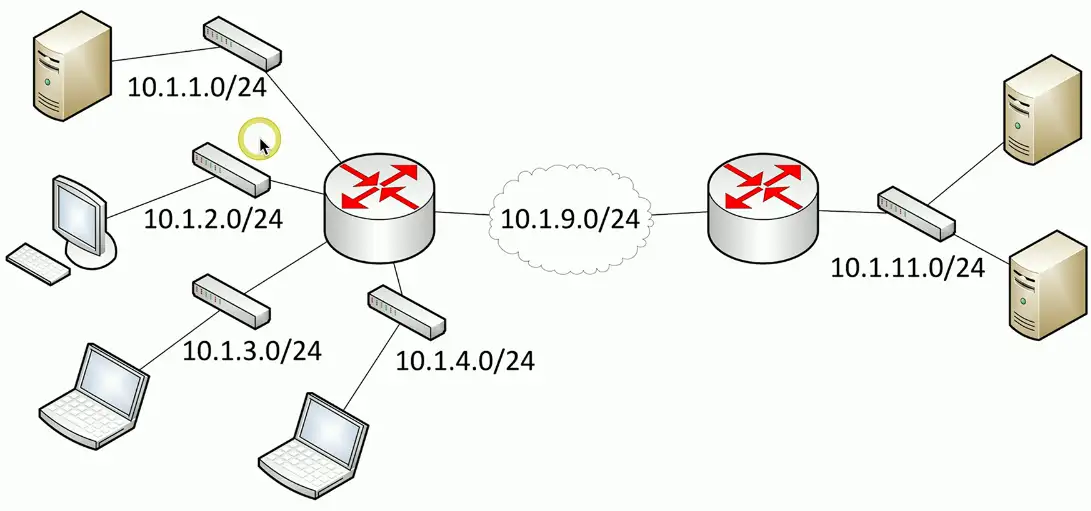
Why subnet the network?
- For single device, it’s functionally impossible to know about all devices on the big network
- That’s why we create smaller networks using subnets
VLSM (Variable Length Subnet Masks)
Class-based networks are inefficient
- The subnet mask is based on the network class
Allow network administrators to define their own masks
- Customize the subnet mask to specific network requirements
Use different subnet masks in the same classful network
- 10.0.0.0/8 is the class A network
- 10.0.0.1/24 and 10.0.8.0/26 would be VLSM
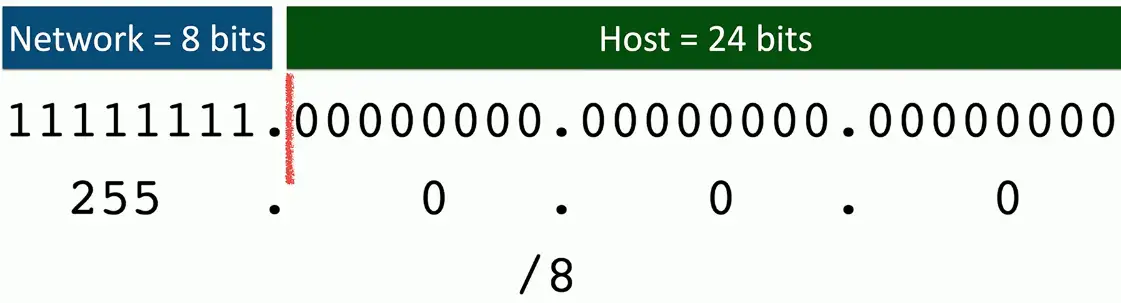
Defining subnets
IP address: 10.0.0.0
- Class A, subnet mask: 255.0.0.0
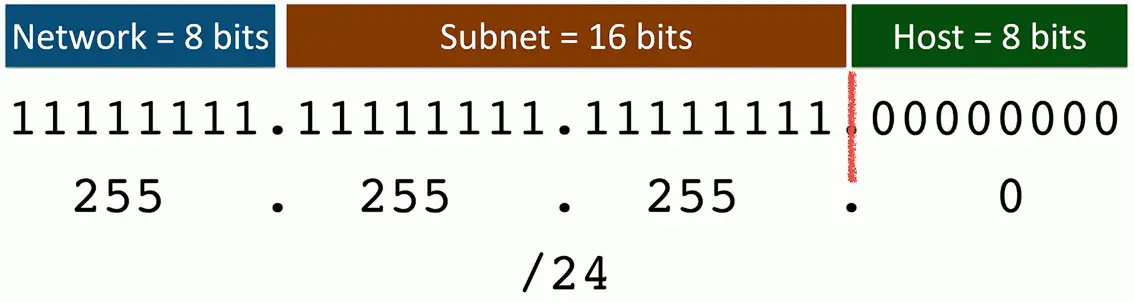
Calculating subnets and hosts
Powers of two
| 28 | 27 | 26 | 25 | 24 | 23 | 22 | 21 |
|---|---|---|---|---|---|---|---|
| 256 | 128 | 64 | 32 | 16 | 8 | 4 | 2 |
| 216 | 215 | 214 | 213 | 212 | 211 | 210 | 29 |
|---|---|---|---|---|---|---|---|
| 65,536 | 32,768 | 16,384 | 8,192 | 4,096 | 2,048 | 1,024 | 512 |
Number of Subnets = 2subnet bits
Hosts per subnet = 2host bits — 2
Let’s put the table to use:
IP address: 10.1.1.0/24
- Class A
- Subnet mask 255.0.0.0
- /24 in binary = 11111111.11111111.11111111.00000000
| Network = B bits | Subnet = 16 bits | Host = 8 bits |
|---|---|---|
| 11111111. | 11111111.11111111 | 00000000 |
Total Subnets = 16 bits = 216 = 65,536
Hosts per Subnet = 8 Bits = 28 = 256-2 = 254
IP address: 192.168.11.0/26
- Class C
- Subnet mask 255.255.255.0
- /26 in binary = 11111111.11111111.11111111.11000000
| Network = 24 bits | Subnet = 2 bits | Host = 6 bits |
|---|---|---|
| 11111111.11111111.11111111. | 11 | 000000 |
Total Subnets = 2 bits = 22 = 4
Hosts per subnet = 6 bits = 26 2 = 64–2 = 62
IP address: 172.16.55.0/21
- Class B
- Subnet mask 255.255.0.0
- /21 in binary = 11111111.11111111.11111000.00000000
| Network = 16 bits | Subnet = 5 bits | Host = 11 bits |
|---|---|---|
| 11111111.11111111. | 11111 | 000.00000000 |
Total subnets = 5 bits = 25 = 32
Total hosts per subnet = 11 bits = 211–2 = 2048-2 = 2046
Magic Number Subnetting
Subnetting the network
Here’s your IP address assignment: Network: 192.168.1.0/24

We need an IP addressing scheme with more than one network address that can support 40 devices per subnet.
Calculating subnet masks:
- We have four networks with about 40 devices per subnet
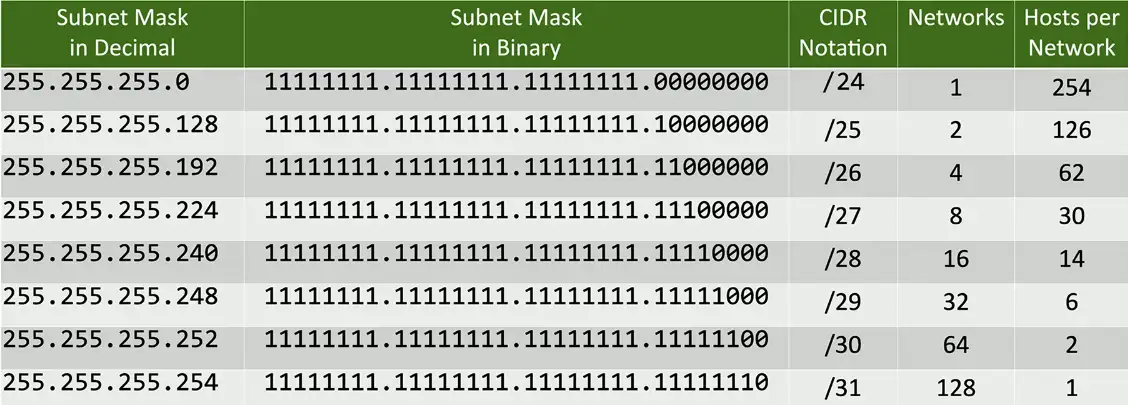
Subnetting the network:
IP address 192.168.1.0, subnet mask 255.255.255.192
192.168.1.0 = 11000000.10101000.00000001.00000000
255.255.255.192 = 11111111.11111111.11111111.11000000
Network = 24 bits, Subnet = 2, Host = 6
Total Subnets = 2 bits = 22 = 4
Hosts per Subnet = 6 bits = 26 = 64-2 = 62
Four important addresses
Network address/subnet ID
- The first address in the subnet
Broadcast address
- The last address in the subnet
First available host address
- One more than the network address
Last available host address
- One less than the broadcast address
Subnetting the network
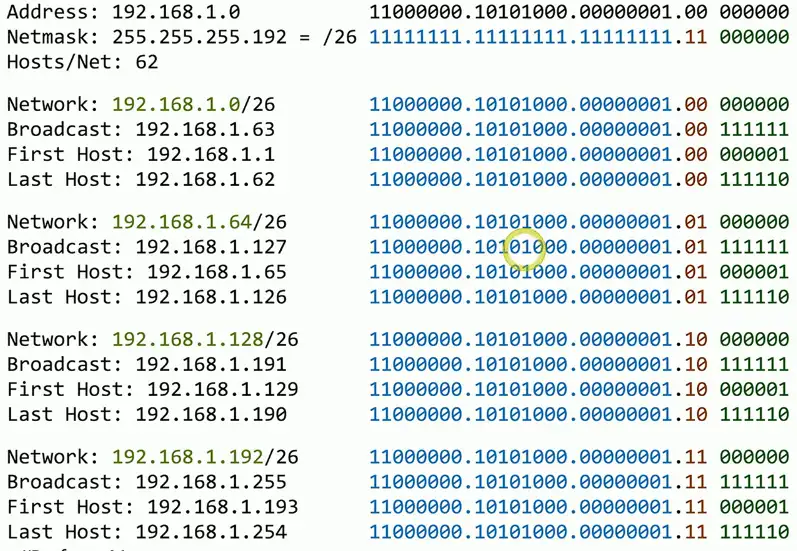
Magic Number subnetting
Very straightforward method
- Can often perform the math in your head
Subnet with minimal math
- Still some counting involved
Some charts might help
- But may not be required
- CIDR to Decimal
- Host ranges
Some helpful charts
CIDR to decimal charts
- Memorization will increase the speed
| CIDR | Decimal |
|---|---|
| /9 | 255.128.0.0 |
| /10 | 255.192.0.0 |
| /11 | 255.224.0.0 |
| /12 | 255.240.0.0 |
| /13 | 255.248.0.0 |
| /14 | 255.252.0.0 |
| /15 | 255.254.0.0 |
| /16 | 255.255.0.0 |
| /17 | 255.128.0.0 |
| … | … |
More simple chart:
| CIDR | Decimal |
|---|---|
| /9 /17 /25 | 128 |
| /10 /18 /26 | 192 |
| /12 /20 /28 | 240 |
| /13 /21 /29 | 248 |
| /14 /22 /30 | 252 |
| /15 /23 /31 | 254 |
| /16 /24 /32 | 255 |
Magic number chart:
| CIDR for interesting octet 2 | /9 | /10 | /11 | /12 | /13 | /14 | /15 | /16 |
|---|---|---|---|---|---|---|---|---|
| CIDR for interesting octet 3 | /17 | /18 | /19 | /20 | /21 | /22 | /23 | /24 |
| CIDR for interesting octet 4 | /25 | /26 | /27 | /28 | /29 | /30 | ||
| Magic number | 128 | 64 | 32 | 16 | 8 | 4 | 2 | 1 |
| Subnet mask for interesting octet | 128 | 192 | 224 | 240 | 248 | 252 | 254 | 255 |
Host ranges
- Larger blocks are easier to remember
- Multiply quickly for the smaller blocks
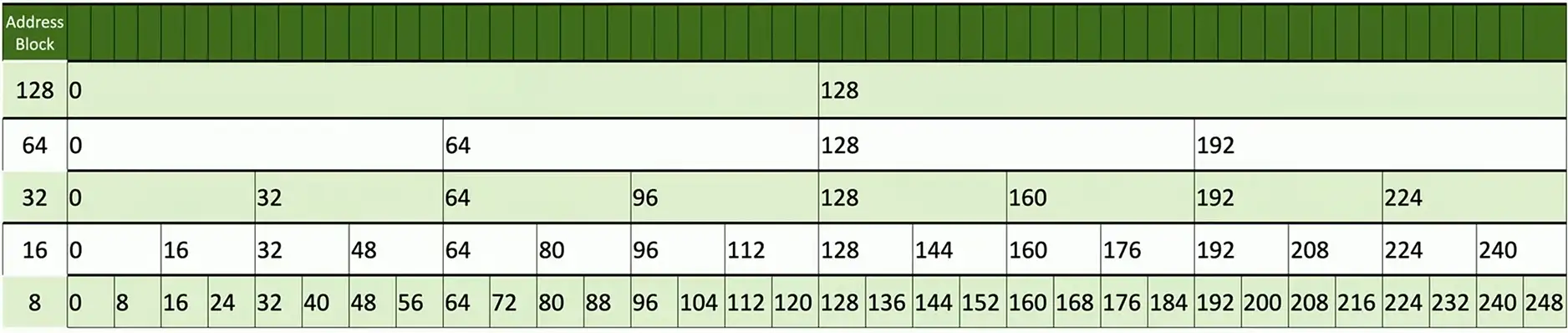
The magic number process
- Convert the subnet mask to decimal (if necessary)
- Identify the “interesting octet”
- Calculate the “magic number”
- 256 minus the interesting octet
- Calculate the host range
- Identify the network address
- First address in the range
- Identify the broadcast address
- Last address in the range
Find the subnet ID
IP address: 165.245.77.14 Subnet mask: 255.255.240.0
- If the mask is 255, Copy the IP address
- If the mask is zero, copy the zero
- Anything not 255 or zero is the interesting octet
Subtract the interesting octet mask from 256
- 256-240 = 16
- The magic number is 16
To find out Subnet ID, see the table.
| Mask | 255. | 255. | 240. | 0 |
|---|---|---|---|---|
| Action | Copy | Copy | (256-240)=16 | Zero |
| IP | 165. | 245. | 77. | 14 |
| Subnet ID | 165. | 245. | 64. | 0 |
Find the broadcast address
- If the mask is 255, copy the subnet ID
- If the mask is zero, write 255
- Anything not 255 or zero is the interesting octet
Subtract the interesting octet mask from 256
- 256-240 = 16
- The magic number is 16
Broadcast ID = (Calculate Subnet ID + Magic Number) — 1
= (64+16)-1 = 79 (Broadcast ID)
| Mask | 255. | 255. | 240. | 0 |
|---|---|---|---|---|
| Action | Copy | Copy | (256-240)=16 | Zero |
| Subnet ID | 165. | 245. | 64. | 0 |
| Broadcast Address | 165. | 245. | 79. | 255 |
Find the host range
IP address: 165.245.77.14
Subnet mask: 255.255.240.0
Subnet ID: 165.245.64.0
Broadcast: 165.245.79.255
Firt host is subnet ID + 1
- 165.245.64.1
Last host is broadcast - 1
- 165.245.79.254
Finding the Subnet ID/Broadcast and First and Last host addresses
IP address: 10.180.122.244 Subnet mask: 255.248.0.0
Find the Subnet ID:
Using the Subnet ID rules
Find the Broadcast ID:
Using the Broadcast ID rules
Broadcast ID = (Subnet ID + Magic Number) — 1 = (176+8)-1 = 183
So,
IP address: 10.180.122.244
Subnet mask: 255.248.0.0
Subnet ID: 10.176.0.0
Broadcast address: 10.183.255.255
First host address: 10.176.0.1
Last host address: 10.183.255.254
Speeding up the magic
IP address: 172.16.242.133/27
Using the table, /27 has subnet mask
Subnet mask: 255.255.255.224
Magic number is 256–224 = 32
From the host ranges, the Subnet ID would be
Subnet ID: 172.16.242.128
Using the magic number calculation: (subnet ID + magic number) — 1
Broadcast: 172.16.242.159
First host: 172.16.242.129
Last host: 172.16.242.158
Seven Second Subnetting
Designed for exam situations
- Very fast subnetting
- No second guessing
No Very little math involved
- Some simple addition to create the tables
- Add and subtract one
Combination of many techniques
- Find one that works for you
Use the in-person or digital whiteboard
- Quickly create the charts — bring your own erasable marker
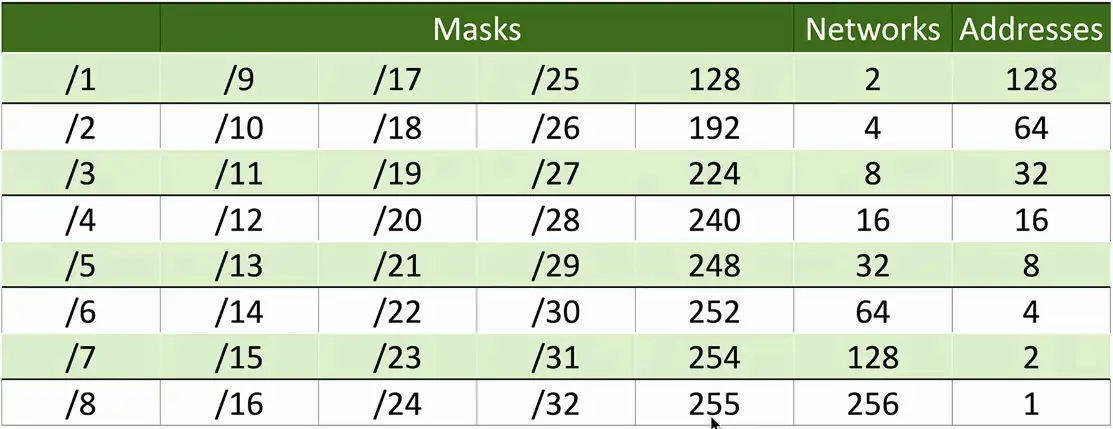
The Networks
The Hosts
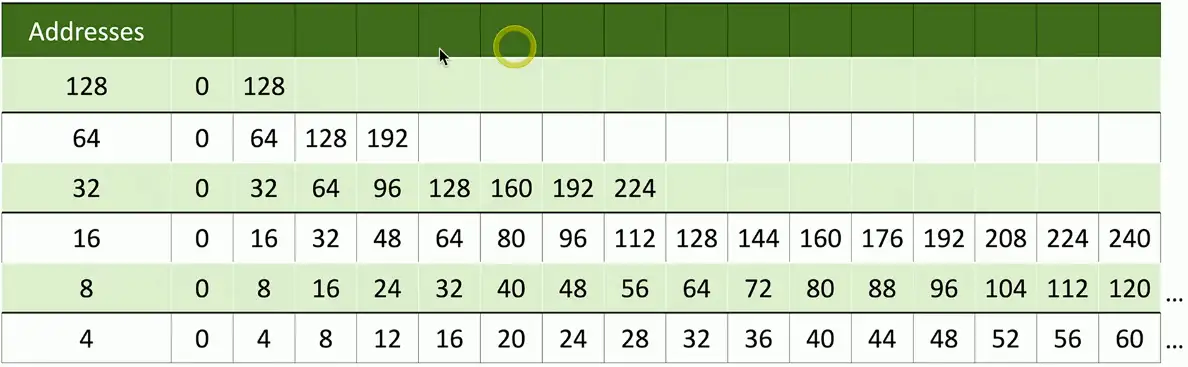
Network Address Subnet Boundaries:
The Seven Second Subnetting Process
Convert IP address and subnet mask to decimal
- Use chart to convert between CIDR-block notation and decimal
- Same chart also shows the number of devices per subnet
Determine network/subnet address
- Second chart shows the starting subnet boundary
Determine broadcast address
- Second chart shows the ending subnet boundary
Calculate first and last usable IP address
- Add one from network address, subtract one from broadcast address
Seven second subnetting — Practice
Address: 165.245.12.88/24
Convert address and mask to decimal
Calculate the network address:
- If mask is 255, bring down the address
- If mask is 0, use the 0
Calculate the broadcast address:
- If the mask is 255, bring down the address
- If mask is 0, use 255
First IP is network address + 1
Last IP is broadcast address - 1
| Address | 165 | 245 | 12 | 88 |
|---|---|---|---|---|
| Mask | 255 | 255 | 255 | 0 |
| ↓ | ↓ | ↓ | ↓ | |
| Network | 165 | 245 | 12 | 0 |
| Broadcast | 165 | 245 | 12 | 255 |
| First IP | 165 | 245 | 12 | 1 |
| Last IP | 165 | 245 | 12 | 254 |
Address: 165.245.12.88/26
(For any other number, refer to your charts)
| Address | 165 | 245 | 12 | 88 |
|---|---|---|---|---|
| Mask | 255 | 255 | 255 | 192 |
| ↓ | ↓ | ↓ | ↓ | |
| Net | 165 | 245 | 12 | 64 |
| Broadcast | 165 | 245 | 12 | 127 |
| First IP | 165 | 245 | 12 | 65 |
| Last IP | 165 | 245 | 12 | 126 |
Address: 165.245.12.88/20
| Address | 165 | 245 | 12 | 88 |
|---|---|---|---|---|
| Mask | 255 | 255 | 240 | 0 |
| ↓ | ↓ | ↓ | ↓ | |
| Net | 165 | 245 | 0 | 0 |
| Broadcast | 165 | 245 | 15 | 255 |
| First IP | 165 | 245 | 0 | 1 |
| Last IP | 165 | 245 | 15 | 254 |
Address: 18.172.200.77/11
| Address | 18 | 172 | 200 | 77 |
|---|---|---|---|---|
| Mask | 255 | 224 | 0 | 0 |
| ↓ | ↓ | ↓ | ↓ | |
| Net | 18 | 160 | 0 | 0 |
| Broadcast | 18 | 191 | 255 | 255 |
| First IP | 18 | 160 | 0 | 1 |
| Last IP | 18 | 191 | 255 | 254 |
Address: 18.172.200.77/17
| Address | 18 | 172 | 200 | 77 |
|---|---|---|---|---|
| Mask | 255 | 255 | 128 | 0 |
| ↓ | ↓ | ↓ | ↓ | |
| Net | 18 | 172 | 128 | 0 |
| Broadcast | 18 | 172 | 255 | 255 |
| First IP | 18 | 172 | 128 | 1 |
| Last IP | 18 | 172 | 255 | 254 |
Subnetting and exams
Practice creating the charts
- Writing or typing
- Less than a minute
Consider using your own dry-erase pen
- Fine tip
- Get permission from the testing center
Find the system that works for you
- Magic number, seven second subnetting, or your own shortcuts